ios-mcp
mcp
Warn
Health Warn
- No license — Repository has no license file
- Description — Repository has a description
- Active repo — Last push 0 days ago
- Community trust — 216 GitHub stars
Code Pass
- Code scan — Scanned 6 files during light audit, no dangerous patterns found
Permissions Pass
- Permissions — No dangerous permissions requested
Purpose
This tool is an MCP server designed for jailbroken iPhones. It enables AI agents and developers to remotely inspect and control iOS devices by simulating touch gestures, managing applications, and extracting device information.
Security Assessment
The overall risk is High. While the automated code scan found no dangerous patterns or hardcoded secrets, the inherent functionality of this tool is extremely permissive. The server runs entirely without authentication over a local network, meaning anyone on the same network could potentially connect to it. It explicitly provides an unchecked `run_command` tool capable of executing arbitrary shell commands, which is further exacerbated by the tool's root-level access on a jailbroken device. Additionally, it can read and write clipboard contents, simulate hardware input, and extract UI element trees, making it a potential goldmine for malicious actors if exposed to untrusted networks.
Quality Assessment
The project is in active development, with its most recent push occurring today. It has a solid community backing with 216 GitHub stars, and the repository explicitly states it uses the MIT License (despite an automated check failing to detect the file). The provided documentation is thorough and details the exact jailbreak environments and dependencies required for installation.
Verdict
Use with caution: The code is actively maintained and of good quality, but the inherent risks of granting an unauthenticated, root-level AI control over a physical device make it strictly unsuitable for untrusted or public networks.
This tool is an MCP server designed for jailbroken iPhones. It enables AI agents and developers to remotely inspect and control iOS devices by simulating touch gestures, managing applications, and extracting device information.
Security Assessment
The overall risk is High. While the automated code scan found no dangerous patterns or hardcoded secrets, the inherent functionality of this tool is extremely permissive. The server runs entirely without authentication over a local network, meaning anyone on the same network could potentially connect to it. It explicitly provides an unchecked `run_command` tool capable of executing arbitrary shell commands, which is further exacerbated by the tool's root-level access on a jailbroken device. Additionally, it can read and write clipboard contents, simulate hardware input, and extract UI element trees, making it a potential goldmine for malicious actors if exposed to untrusted networks.
Quality Assessment
The project is in active development, with its most recent push occurring today. It has a solid community backing with 216 GitHub stars, and the repository explicitly states it uses the MIT License (despite an automated check failing to detect the file). The provided documentation is thorough and details the exact jailbreak environments and dependencies required for installation.
Verdict
Use with caution: The code is actively maintained and of good quality, but the inherent risks of granting an unauthenticated, root-level AI control over a physical device make it strictly unsuitable for untrusted or public networks.
iOS MCP: MCP management tool for jailbroken iPhones, enabling developers and AI agents to inspect and control devices.
README.md
iOS MCP
中文 | English
iOS MCP 是一个运行在越狱 iPhone 上的 MCP (Model Context Protocol) 服务器,让 AI 代理(Claude、Codex、Cursor 等)能够直接操控 iOS 设备。
功能概览
| 类别 | 工具 | 说明 |
|---|---|---|
| 触控手势 | tap_screen swipe_screen long_press double_tap drag_and_drop |
精确屏幕坐标操作 |
| 硬件按键 | press_home press_power press_volume_up press_volume_down toggle_mute |
HID 模拟物理按键 |
| 文字输入 | input_text type_text press_key |
剪贴板快速输入 / HID 逐字模拟 / 特殊键 |
| 截图 | screenshot get_screen_info |
Base64 JPEG 截图、屏幕尺寸与方向 |
| App 管理 | launch_app kill_app list_apps list_running_apps get_frontmost_app install_app uninstall_app |
启动/关闭/安装/卸载 App |
| 无障碍 | get_ui_elements get_element_at_point |
获取 UI 节点树、坐标元素查询 |
| 剪贴板 | get_clipboard set_clipboard |
读写剪贴板内容 |
| 设备控制 | get_brightness set_brightness get_volume set_volume |
亮度、音量 |
| 设备信息 | get_device_info |
型号、iOS 版本、电池、存储、内存 |
| URL | open_url |
打开链接或 URL Scheme |
| Shell | run_command |
执行 Shell 命令 |
共 33 个 MCP 工具,覆盖 iOS 设备自动化的主要场景。
运行要求
- 越狱 iOS 设备
安装说明
支持环境
| 越狱类型 | 支持系统版本 | 包架构 |
|---|---|---|
rootful |
iOS 13 - iOS 18 | iphoneos-arm |
rootless |
iOS 15 - iOS 18 | iphoneos-arm64 |
roothide |
iOS 15 - iOS 18 | iphoneos-arm64e |
安装方式
方式一:从 Release 页面下载安装包
请根据越狱类型选择上表对应架构的 deb 包。
手动安装时请注意以下依赖:
mobilesubstrate/ElleKitpreferenceloader
方式二:通过 Cydia / Sileo 直接安装
可在以下包管理器中直接搜索并安装:
CydiaSileo
搜索名称:
iOS MCP
安装完成后建议执行以下检查
- 重启一次
SpringBoard - 浏览器访问:
http://设备IP:8090/health
- 返回以下内容表示服务启动正常:
{"status":"ok","server":"ios-mcp","version":"1.0.1"}
使用
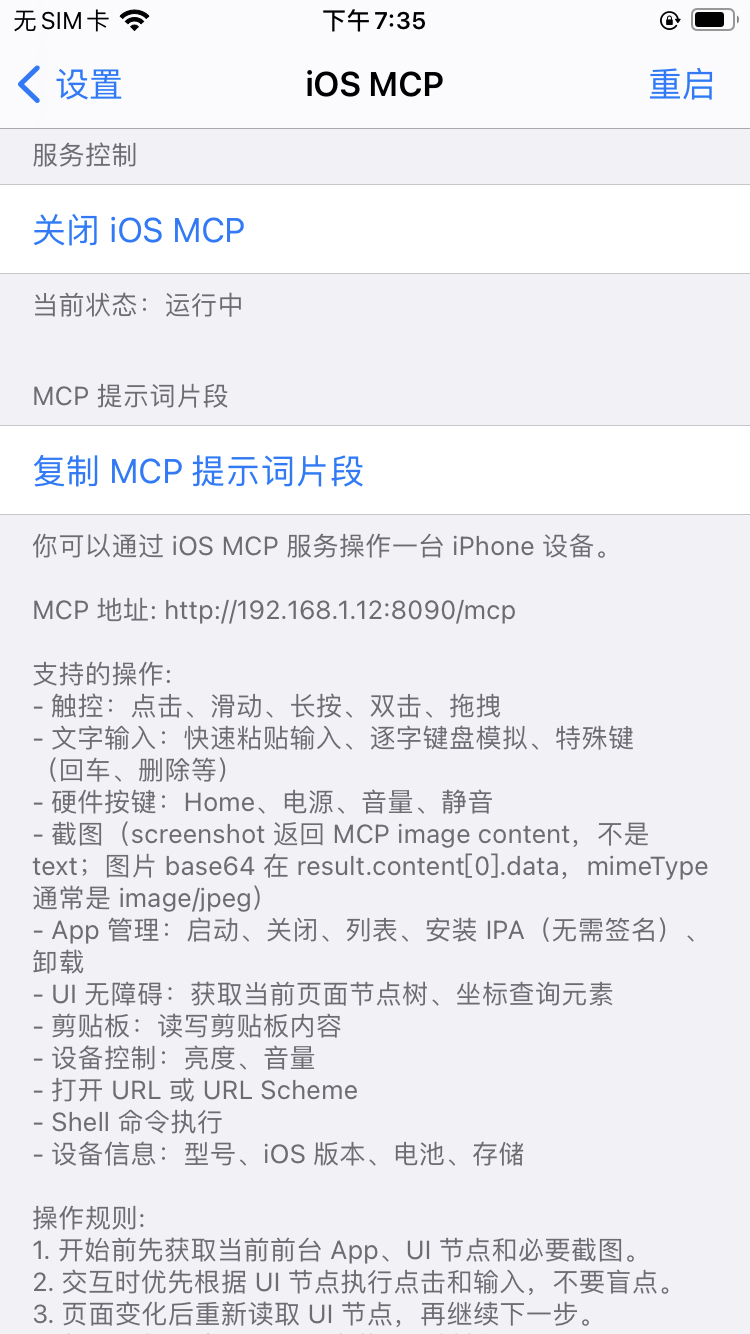
安装后打开设备「设置」→「iOS MCP」,启动服务后点击「复制 MCP 提示词片段」,将其粘贴到你的 AI 提示词中即可。
安全说明
- MCP 服务无内置认证,建议仅在局域网环境下使用
run_command工具可执行任意 Shell 命令,请谨慎使用mcp-root提供 root 提权能力,仅限包内工具使用
社区交流
iOS MCP 已经聚集了不少开发者和用户持续交流,目前已建立多个微信交流群。
| 微信交流群(6群开放中) | 公众号 |
|---|---|
| 1群:已满 2群:已满 3群:已满 4群:已满 5群:已满 6群:开放中 |
移动端Android和iOS开发技术分享 |
 |
 |
6群二维码如已过期,请添加微信
witchan028或关注公众号移动端Android和iOS开发技术分享获取最新入群方式。
欢迎添加微信或关注公众号,获取最新动态与入群方式。
- 微信:
witchan028 - 邮箱:
[email protected]
作者
witchan
许可
MIT License
Reviews (0)
Sign in to leave a review.
Leave a reviewNo results found