x-code-cli
Health Pass
- License — License: MIT
- Description — Repository has a description
- Active repo — Last push 0 days ago
- Community trust — 42 GitHub stars
Code Fail
- rm -rf — Recursive force deletion command in .github/workflows/release.yml
- process.env — Environment variable access in packages/cli/esbuild.config.js
Permissions Pass
- Permissions — No dangerous permissions requested
No AI report is available for this listing yet.
Open-source, model-agnostic coding agent CLI with subagents, skills, MCP, and plugins.
X-Code CLI
A model-agnostic coding agent CLI with Claude Code-compatible extensions.
Use Claude, GPT, Gemini, DeepSeek, Qwen, Kimi, or any OpenAI-compatible model in one open-source agent workflow.


English · 简体中文
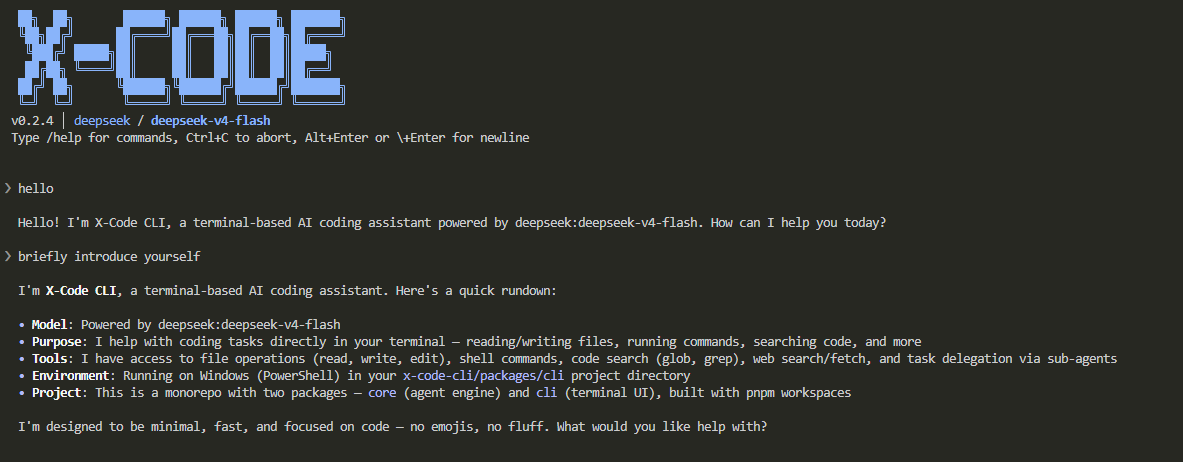
Why X-Code CLI?
Model agnostic — Switch providers at any time with /model, or connect any OpenAI-compatible endpoint. One workflow, any model.
Claude Code-compatible extensions — Reuse plugins, skills, sub-agents, MCP servers, and hooks built for Claude Code. The plugin loader recognizes both .x-code-plugin/ and .claude-plugin/ formats.
Open and controllable — Open source, BYOK, local execution, configurable 3-level permission model. You decide what the agent can do.
Complete agent runtime — More than a chat wrapper: it covers planning, execution, memory, context management, and task verification.
X-Code CLI is an independent open-source project and is not affiliated with Anthropic.
Install
Requires Node.js >= 22 (Node 20 is not supported).
npm install -g @x-code-cli/cli

# Or
pnpm add -g @x-code-cli/cli
After installation, launch with the xc or x-code command.
Configure API Keys
X-Code CLI does not bundle a free model. At least one provider API key must be configured.
Recommended: DeepSeek — affordable, free credits on signup, sufficient coding capability for everyday use.
| Variable | Provider | Sign up |
|---|---|---|
ANTHROPIC_API_KEY |
Anthropic (Claude) | console.anthropic.com |
OPENAI_API_KEY |
OpenAI (GPT) | platform.openai.com/api-keys |
DEEPSEEK_API_KEY |
DeepSeek | platform.deepseek.com/api_keys |
GOOGLE_GENERATIVE_AI_API_KEY |
Google (Gemini) | aistudio.google.com/apikey |
ALIBABA_API_KEY |
Alibaba (Qwen) | dashscope.console.aliyun.com |
XAI_API_KEY |
xAI (Grok) | console.x.ai |
ZHIPU_API_KEY |
Zhipu (GLM) | open.bigmodel.cn |
MOONSHOT_API_KEY |
Moonshot (Kimi) | Choose a service |
OpenAI-compatible escape hatch (vLLM / OpenRouter / internal gateways): set both OPENAI_COMPATIBLE_API_KEY and OPENAI_COMPATIBLE_BASE_URL, then address models as custom:<your-model-id>.
The examples below use ANTHROPIC_API_KEY; substitute your provider's variable name.
bash (Linux / Git Bash / WSL)
echo 'export ANTHROPIC_API_KEY=sk-ant-...' >> ~/.bashrc
source ~/.bashrc
zsh (macOS default)
echo 'export ANTHROPIC_API_KEY=sk-ant-...' >> ~/.zshrc
source ~/.zshrc
fish
set -Ux ANTHROPIC_API_KEY sk-ant-...
Windows PowerShell (user-level, persistent)
[Environment]::SetEnvironmentVariable('ANTHROPIC_API_KEY', 'sk-ant-...', 'User')
# Restart PowerShell to take effect
Windows CMD (user-level, persistent)
setx ANTHROPIC_API_KEY "sk-ant-..."
:: Restart CMD to take effect
Web search keys (optional)For temporary use:
export X=...(bash) or$env:X = '...'(PowerShell); discarded when the terminal closes.Per-project: place a
.envfile in the project root.xcwalks up from the current directory.
To enable the web_search tool, configure either of the following. Both offer a free tier:
| Variable | Provider | Free quota | Signup |
|---|---|---|---|
TAVILY_API_KEY |
Tavily | ~1,000 requests/mo | Email, no card |
BRAVE_API_KEY |
Brave Search | ~1,000 requests/mo | Card required |
Moonshot (Kimi) endpoint noteTavily is recommended for first-time setup: simpler signup, LLM-optimized responses. When both are set, Tavily is preferred and Brave serves as fallback.
Moonshot/Kimi credentials come from three separate services. A key only works with the endpoint of the service that issued it:
- Kimi Code plan: Kimi Code console →
https://api.kimi.com/coding/v1 - China Open Platform: platform.kimi.com →
https://api.moonshot.cn/v1 - International Open Platform: platform.kimi.ai →
https://api.moonshot.ai/v1
After selecting a Kimi model via /model, an endpoint picker appears automatically.
Quick Start
cd your-project

xc                                              # Interactive session
xc "Explain the overall architecture"           # Run with a prompt
xc -m sonnet "Refactor the formatDate function" # Specify a model
Key Features
Intelligent Development
- Built-in tools — file I/O, shell execution, code search (Grep / Glob), web fetch, sub-agent delegation, todo tracking, and more
- Sub-agents — ships with 5 (explore / general-purpose / plan / code-reviewer / goal-verifier), supports custom agents
- Plan mode —
--planor/planenters read-only exploration; the agent designs a plan, then executes after approval - Durable goal loops —
/goalruns execute → verify → repair cycles until passing or hitting a stop condition - File attachments —
@pathor bare absolute paths auto-ingest text / code / PDF / Office docs (docx / xlsx / pptx / odt / ods / odp) / images / audio - Local audio transcription — attach MP3 / WAV / M4A / OGG / FLAC / AAC / AIFF / WMA / WebM / Opus files; when the active model can't take audio input, X-Code CLI transcribes them locally via Whisper (whisper.cpp) and feeds the model timestamped text — the audio never leaves your machine. The Whisper model auto-downloads on first use and is cached under
~/.x-code/whisper-models/(defaulttiny; setX_CODE_WHISPER_MODELto pick another, e.g.base) - Vision sub-agent — text-only providers (e.g. DeepSeek) can borrow a configured vision model for image understanding
Context Management
- Knowledge system — layered
AGENTS.mdloading (compatible withCLAUDE.md), subpackages override root - Auto-memory — durable facts (preferences, corrections, project state) saved after each turn, loaded next session
- Session resumption —
--continueresumes the last session,--resumeopens a picker or jumps by ID - Context compression — long conversations auto-compress; loop-guard detects cycles; prompt cache reuses prefixes
- 3-level permission model — safe by default, prompts before writes;
--trustbypasses
Extension Ecosystem
- MCP integration — stdio + HTTP (with OAuth),
/mcpmanagement, server tools merge into agent toolset - Plugin system — bundle skills / sub-agents / MCP / hooks; byte-compatible with Claude Code plugin format
- Skills — reusable workflow templates as
SKILL.md, triggered via/<skill-name> - Custom slash commands — drop markdown into
~/.x-code/commands/or project scope, invoke with/<name> - Hooks — 10 lifecycle event callbacks to intercept or rewrite agent behavior via shell commands
- Browser automation —
/browser onenables a real-browser sub-agent (Playwright-powered), off by default
Terminal Experience
- Streaming output — results render as they are generated
- Theme switching —
/themecontrols diff colors and syntax-highlight palette - Unified thinking mode —
/thinking on|offconsolidates provider-specific reasoning parameters - Multiline input —
Alt+Enteror trailing\inserts a newline - Input history —
↑/↓on empty prompt recalls previous messages - Mid-turn steering — keep typing while the agent is working: your message is queued above the spinner and injected at the next tool boundary
- Live footer — the active model and current context usage (e.g.
Kimi K3 · 6.6k / 200k · 3%) are always visible under the input - Cross-platform — Windows, macOS, Linux
CLI Options
xc [options] [prompt]

--model, -m <id>      Model to use (e.g. sonnet, deepseek, openai:gpt-5.6-sol)
--trust, -t           Trust mode: skip write-operation confirmations
--print, -p           Non-interactive mode: print result and exit
--plan                Start in plan mode (read-only; user approves before edits)
--continue, -c        Resume the most recent session (no picker)
--resume, -r [id]     Resume a session: no argument opens the picker
--max-turns <n>       Agent loop turn cap per submit (default: unlimited)
--no-plugins          Disable the plugin system (built-in only; for triage)
--no-hooks            Skip all hook execution
--plugin-debug        Mirror plugin/hook debug logs to stderr
--version, -v         Show version
--help, -h            Show help
Non-interactive subcommands
xc plugin <subcommand>            Manage plugins (list / install / uninstall / enable / disable / search / update / info / doctor / marketplace)
xc plugin install [--yes] <src>   Install a plugin; --yes skips confirmation
xc plugin marketplace <sub>       Manage marketplace subscriptions (list / add / remove / refresh / info)
Slash Commands
| Command | Description |
|---|---|
/help |
Show available commands |
/model [alias] |
Switch model or list available models |
/thinking [on|off] |
Enable / disable thinking mode |
/theme [name] |
Switch UI theme |
/plan [on|off] |
Enable / disable plan mode |
/goal [objective] |
Start a durable goal loop (see docs/goal.en.md) |
/usage |
Token usage: context split, per-step detail, attribution, cache hits |
/usage-history |
List past session usage |
/clear |
Clear the current conversation |
/compact |
Manually compress context |
/resume |
Pick a past session to resume |
/rewind |
Roll back to a previous message (restores files + truncates history) |
/init |
Create or update AGENTS.md at project root |
/review [PR#] |
Review a GitHub PR (requires gh) |
/memory [subcommand] |
Inspect, search, explain, or reload global long-term memory |
/skill <sub> |
Manage Skills |
/mcp <sub> |
Manage MCP servers |
/plugin <sub> |
Manage plugins and marketplaces |
/browser [on|off] |
Toggle the browser sub-agent (off by default) |
/doctor |
Diagnose the runtime environment |
/exit |
Save session and exit |
Detailed Docs
This README is the entry view. Each feature has a focused doc under docs/ (Chinese *.md, English *.en.md):
| Doc | What it covers |
|---|---|
docs/skills.en.md |
Reusable workflow templates |
docs/goal.en.md |
Durable goal loops (/goal) |
docs/sub-agents.en.md |
Built-in / custom sub-agents |
docs/mcp.en.md |
MCP server configuration |
docs/knowledge.en.md |
Knowledge base & auto-memory |
docs/plugins.en.md |
Plugin management |
docs/marketplace.en.md |
Plugin marketplace |
docs/hooks.en.md |
Agent lifecycle hooks |
docs/plugin-authoring.en.md |
Plugin authoring guide |
Troubleshooting
Set DEBUG_STDOUT=1 to capture a debug log:
# bash / zsh
DEBUG_STDOUT=1 xc

# fish
env DEBUG_STDOUT=1 xc

# PowerShell
$env:DEBUG_STDOUT=1; xc

# CMD
set DEBUG_STDOUT=1 && xc
Log path: ~/.x-code/logs/debug.log (Windows: %USERPROFILE%\.x-code\logs\debug.log), 10 MB per file, ~20 MB total with rotation.
Build From Source
git clone https://github.com/woai3c/x-code-cli.git
cd x-code-cli
pnpm install
pnpm dev
Source changes require
pnpm buildorpnpm dev. For auto-watch, runpnpm devinsidepackages/core(tsc -b --watch).
Companion Book (Chinese)
For a deep dive into the implementation, check out the companion Juejin booklet: 《从零打造一个 AI Agent CLI》 — walks through the agent loop, multi-provider adapter, terminal rendering, permission model, and more using this codebase as reference.
QQ Group: 455053594
Feedback & Contributing
Issues and pull requests are welcome: https://github.com/woai3c/x-code-cli
License
Reviews (0)
Sign in to leave a review.
Leave a reviewNo results found