logseq-cli
Health Warn
- License — License: MIT
- Description — Repository has a description
- Active repo — Last push 0 days ago
- Low visibility — Only 6 GitHub stars
Code Pass
- Code scan — Scanned 12 files during light audit, no dangerous patterns found
Permissions Pass
- Permissions — No dangerous permissions requested
No AI report is available for this listing yet.
A Unix-composable CLI for the Logseq local HTTP API — built for humans and AI agents alike
██╗      ██████╗  ██████╗ ███████╗███████╗ ██████╗       ██████╗██╗     ██╗
██║     ██╔═══██╗██╔════╝ ██╔════╝██╔════╝██╔═══██╗     ██╔════╝██║     ██║
██║     ██║   ██║██║  ███╗███████╗█████╗  ██║   ██║     ██║     ██║     ██║
██║     ██║   ██║██║   ██║╚════██║██╔══╝  ██║▄▄ ██║     ██║     ██║     ██║
███████╗╚██████╔╝╚██████╔╝███████║███████╗╚██████╔╝     ╚██████╗███████╗██║
╚══════╝ ╚═════╝  ╚═════╝ ╚══════╝╚══════╝ ╚══▀▀═╝      -╚═════╝╚══════╝╚═╝
Logseq CLI




Your Logseq graph, from the command line.
Pipe pages. Filter blocks. Query the graph. Work with Logseq the Unix way.
A Unix-composable CLI for the Logseq local HTTP API — built for humans and AI agents alike. NDJSON output, clean stderr, and auto-stdin composition let you wire Logseq into any shell pipeline or agentic workflow without glue code.
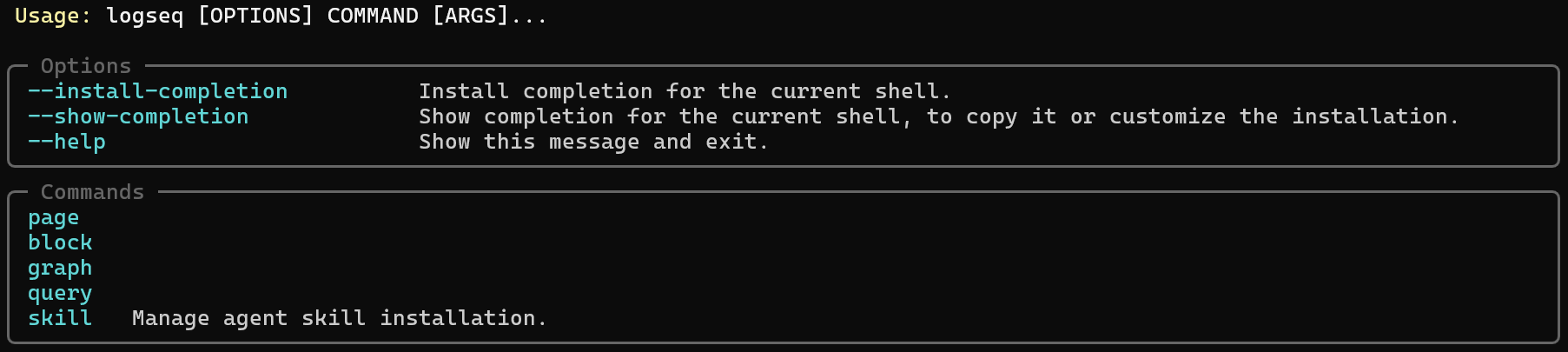
Why This CLI
Most Logseq automation requires either the plugin API (which lives inside Logseq) or direct file manipulation (which bypasses the graph index). This CLI takes a third path: the official local HTTP API, exposed as composable shell commands.
Designed for humans and AI agents. Every command emits structured NDJSON that is trivially parseable by jq, shell scripts, or an LLM driving an agentic workflow. Errors are always on stderr so stdout stays clean for piping.
| Property | What You Get |
|---|---|
| NDJSON by default | Pipe directly into jq, fzf, or the next command — no parsing glue |
| Auto-stdin | Commands read identifiers from upstream NDJSON when no argument is given |
--fields filtering |
Trim output to specific keys — token-efficient for LLM agents |
--plain mode |
Human-readable key: value pairs for interactive use |
| Errors on stderr | stdout is always clean — safe to pipe at every step |
| Consistent structure | Every command follows noun verb — no surprises |
Requirements
- Python 3.10+
- Logseq Desktop with the HTTP API server enabled
- Windows, macOS, or Linux
Installation
logseq-cli is a standard Python package. The examples below are grouped by platform because the Python launcher and virtual environment activation steps differ slightly.
Recommended: pipx (globally available, no manual activation)
Windows (PowerShell)
py -m pip install --user pipx
py -m pipx ensurepath
pipx install .
macOS / Linux
python3 -m pip install --user pipx
python3 -m pipx ensurepath
pipx install .
Open a new shell and verify:
logseq --help
Virtual environment (for development or isolation)
Windows (PowerShell)
py -3.10 -m venv .venv
.\.venv\Scripts\Activate.ps1
pip install -e ".[dev]"
macOS / Linux
python3 -m venv .venv
source .venv/bin/activate
pip install -e ".[dev]"
User install (no virtual environment)
Windows (PowerShell)
py -m pip install --user .
The script lands in your user Python Scripts directory, such as %APPDATA%\Python\Python310\Scripts — add that to PATH if logseq is not found after install.
macOS / Linux
python3 -m pip install --user .
If logseq is not found after install, add ~/.local/bin to your PATH.
Install the agent skill
If you want AI agents to install the bundled logseq-cli skill into their local skill directories, use:
logseq skill install
That writes SKILL.md into the supported user-level targets:
~/.agents/skills/logseq-cli/SKILL.md~/.claude/skills/logseq-cli/SKILL.md
You can also install into the current project instead:
logseq skill install --scope project
Related commands:
logseq skill statuslogseq skill showlogseq skill uninstall
Configuration
1. Enable the Logseq HTTP API
- Open Logseq Desktop and load your graph.
- Go to Settings → Features.
- Enable HTTP APIs server.
- Copy the API token shown in that panel.
The server listens at http://127.0.0.1:12315/api by default.
2. Set the API token
Copy .env.example to .env in the project root and fill in your token:
LOGSEQ_TOKEN=your-token-here
The CLI loads .env automatically on startup. You can also export LOGSEQ_TOKEN as a regular shell environment variable instead.
Quick Start
Make sure Logseq is running with the HTTP API enabled, then:
# Verify the connection
logseq graph info

# List all pages
logseq page list

# Get a specific page
logseq page get "My Page"

# Append a block to a page
logseq block append "My Page" "- New thought"
Command Reference
page
| Command | Arguments | What It Does |
|---|---|---|
page list |
--fields, --plain, --page, --page-size |
List all pages; auto-paginated |
page get [name] |
--fields, --plain |
Get a page by name; auto-stdin reads .name |
page create <name> |
--fields, --plain |
Create a new page |
page delete [name] |
Delete a page; auto-stdin reads .name |
|
page rename <src> <dest> |
Rename a page | |
page refs <name> |
--fields, --plain |
Linked references to this page |
page properties <name> |
--plain |
Derived from the first block in the page tree |
page journal <date> |
--plain |
Create/get a journal page (YYYY-MM-DD) |
page ns-list <namespace> |
--fields, --plain |
Pages under a namespace |
page ns-tree <namespace> |
--plain |
Namespace as a nested tree |
block
| Command | Arguments | What It Does |
|---|---|---|
block get [uuid] |
--fields, --include-children, --plain |
Get a block; auto-stdin reads .uuid |
block insert <content> |
--uuid, --sibling, --plain |
Insert as child by default; auto-stdin reads .uuid |
block update <uuid> <content> |
--plain |
Replace a block's content |
block remove [uuid] |
Delete a block; auto-stdin reads .uuid |
|
block prepend <page> <content> |
--plain |
Insert at the top of a page |
block append <page> <content> |
--plain |
Insert at the bottom of a page |
block move <src_uuid> <target_uuid> |
--sibling, --plain |
Move as child by default |
block collapse <uuid> |
--expand, --toggle |
Collapse, expand, or toggle |
block properties <uuid> |
--plain |
Get all block properties |
block prop-set <uuid> <key> <value> |
Upsert a block property | |
block prop-remove <uuid> <key> |
Remove a block property | |
block insert-batch <uuid> <json> |
--sibling, --plain |
JSON array with content and optional children |
graph
| Command | What It Does |
|---|---|
graph info |
Returns the current graph name and path |
query
| Command | Arguments | What It Does |
|---|---|---|
query run <datalog> |
--plain, --page, --page-size, --input |
Run a Datalog query; --input is repeatable for parameterized queries |
Piping & Composition
Commands that accept a positional name or uuid argument will read it from upstream NDJSON when the argument is omitted:
# List non-journal pages, then fetch each full page object
logseq page list |
  jq -c "select(.isJournal == false)" |
  logseq page get

# Fetch a block and remove it by piping its UUID forward
logseq block get abc-123 | logseq block remove

# Trim output to specific fields for downstream processing
logseq page list --fields name,uuid

# Run a Datalog query and pipe results into jq
logseq query run "[:find ?name :where [?p :block/name ?name]]" | jq .
Auto-stdin commands:
| Command | Field read |
|---|---|
page get |
.name |
page delete |
.name |
block get |
.uuid |
block insert |
.uuid (when --uuid omitted) |
block remove |
.uuid |
Output Format
| Mode | What You Get |
|---|---|
| Default (NDJSON) | One JSON object per line — pipe-safe, jq-compatible |
--plain |
key: value pairs — human-readable for interactive use |
--fields name,uuid |
Output filtered to the specified keys only |
Errors always go to stderr. stdout is reserved for data only.
logseq page list --fields name,uuid
{"name": "My Page", "uuid": "abc-123"}
{"name": "Another Page", "uuid": "def-456"}
API Compatibility Notes
Some Logseq HTTP API methods are absent or non-functional in current builds. This project documents all confirmed-unsupported methods in UNSUPPORTED-LOGSEQ-HTTP-METHODS.md, including reproduction steps and the exact server error returned.
Active fallbacks:
| Command | Fallback Strategy |
|---|---|
block append |
Reads the page tree and inserts after the last block |
page properties |
Reads the first block in the page tree |
page journal |
Creates a YYYY_MM_DD page, then resolves the journal entry |
Development
# Install with dev dependencies
pip install -e ".[dev]"

# Run all tests
pytest --tb=short

# Run a specific test module
pytest tests/test_page.py --tb=short
Project Layout
src/
  logseq_client.py      # HTTP client — thin wrapper around httpx.AsyncClient
  logseq_service.py     # Service layer — async methods over logseq_client
  cli/
    main.py             # Typer app entry point, get_service(), handle_errors()
    output.py           # format_output(data, fields, plain)
    stdin.py            # read_stdin_field(field) — reads NDJSON lines from stdin
    page.py             # page subcommand group
    block.py            # block subcommand group
    graph.py            # graph subcommand group
    query.py            # query subcommand group
tests/
  conftest.py
  test_page.py
  test_block.py
  test_graph.py
  test_query.py
  test_output.py
  test_stdin.py
  test_errors.py
  test_entrypoint.py
License
MIT
Reviews (0)
Sign in to leave a review.
Leave a reviewNo results found