demi
Health Warn
- License — License: Apache-2.0
- Description — Repository has a description
- Active repo — Last push 0 days ago
- Low visibility — Only 6 GitHub stars
Code Pass
- Code scan — Scanned 12 files during light audit, no dangerous patterns found
Permissions Pass
- Permissions — No dangerous permissions requested
No AI report is available for this listing yet.
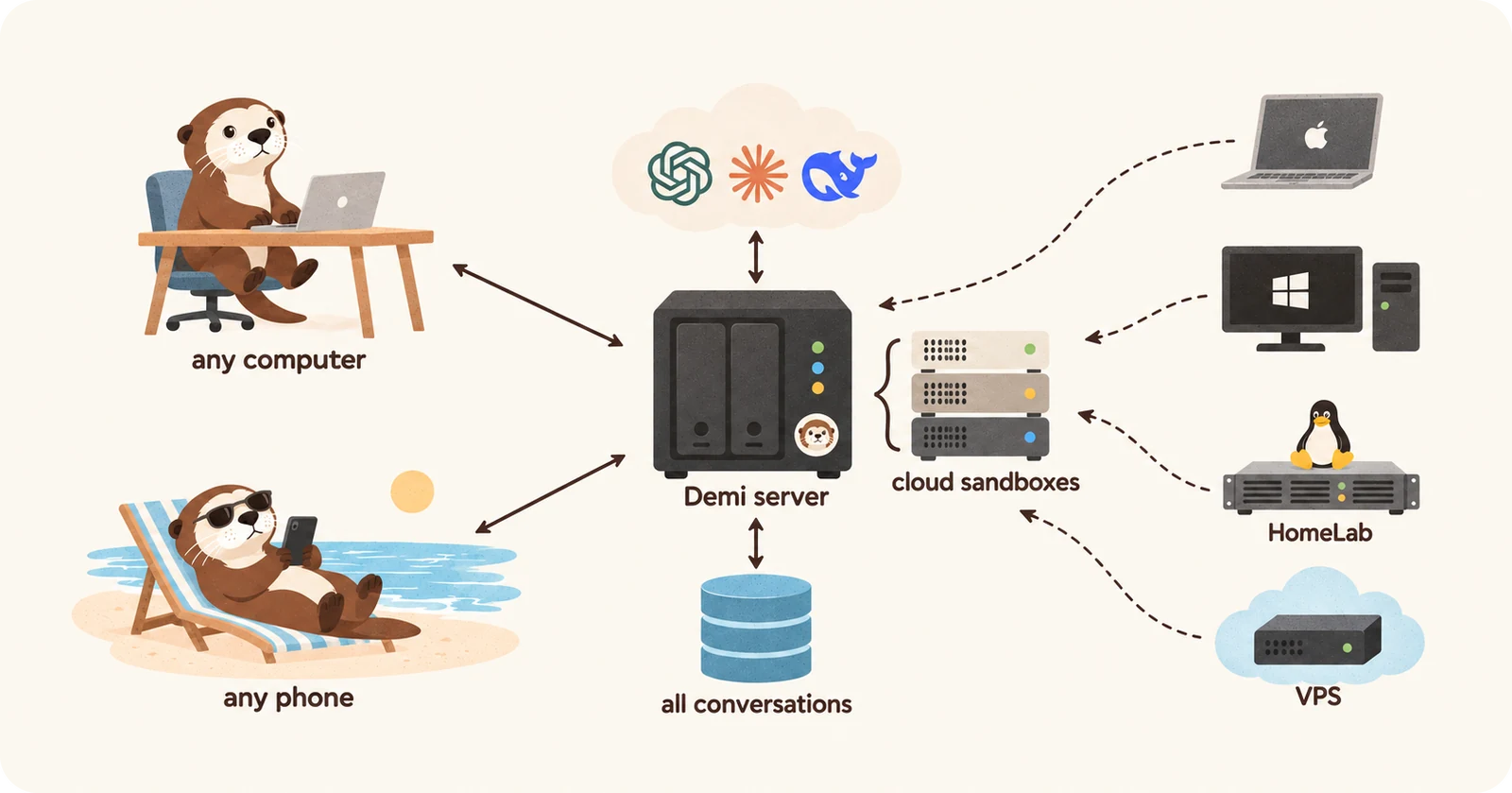
Your agent, across all your machines. A self-hosted, web-based AI agent: one server holds every conversation and works in a cloud sandbox or on your Macs, PCs and servers.

Your agent, across all your machines.
A web-based AI agent you host on your own server.



English · 简体中文 · 繁體中文 · 日本語 · 한국어
Demi is a web-based AI agent you host on your own server. Open it in any
browser. Ask it a question or hand it a job: research, operating websites,
working with files, writing code, all in the same conversation.
Every conversation lives on your server, in one place for all your devices.
Your computers only run the work: the agent works in a cloud sandbox or
across your own machines, and tasks keep running when you close the tab.
[!NOTE]
Demi is in early development. Expect breaking changes between releases.
Quick start
You need the following:
- A Linux server you have root on, running one of these
(supported distributions):- Ubuntu 22.04 or later, Debian 12 or later
- Fedora, RHEL 10, Rocky Linux, AlmaLinux
- Arch Linux
- A domain name, served over HTTPS in front of the server
(HTTPS setup).
Run the command on the server. It installs Beta, the releases Demi
publishes; --canary installs Canary, which gets every build first:
# Beta
curl -fsSL https://demi.sh/install.sh | sudo bash
# Canary
curl -fsSL https://demi.sh/install.sh | sudo bash -s -- --canary
Or give a coding agent such as Claude Code or Codex this prompt:
Install Demi on my server by following https://raw.githubusercontent.com/wspl/demi/main/docs/delivery/install-with-an-agent.md
The installer asks a few questions and sets Demi up. After it finishes:
- Open your domain right away and create the admin account.
- Go to Settings › Providers and sign in with a subscription or add an
API key. - Start a conversation. It runs in your cloud sandbox.
- To work on your own computer, choose Add Device from the conversation's
host menu and run the command it shows on that computer.
See the installation guide for every option,
including installing without questions, and upgrades
for moving to a new release.
Key features
Demi's features fall into four groups.
Chat, work and code
- One conversation for everything: Ask a quick question or hand off a
multi-step job in the same place. No modes to switch. - Coding: Edit repositories, run builds and tests, and review every change
as a diff. - Research: Search the web and read pages, PDFs and documents.
- Real browser: Demi drives Chrome to sign in, fill in forms and download
files. Watch it in the side panel and take over at any time. - Phone apps: Demi drives iOS Simulators and Android Emulators to install,
run and test an app, and records the screen. Watch them in the side panel and
take over at any time. - Files and data: Work with documents, spreadsheets and images, and get the
results back as attachments. - Images, video and audio: Make and edit images, and make videos, speech,
music and sound effects through the model providers you add. - Share: Share a conversation, or a single answer, as a read-only link.
- Comments and questions: Select words in a reply to comment on them or ask
about them, without interrupting the task. - Search: Find any message in every conversation, or in the one you are
reading.
Anywhere, on any machine
- Works in any browser: Desktop, tablet or phone, with nothing to install.
Add it to your Home Screen, and it adapts to phones, tablets and foldables. - Five languages: English, Simplified Chinese, Traditional Chinese, Japanese
and Korean. - Always on: Tasks keep running on the server after you close the tab.
- Notifications: Get notified on your phone and computers when a task
finishes or needs you, even with Demi closed. - One place for every conversation: The server stores conversations
instead of scattering them across the machines the agent worked on. Start on
your laptop and continue on your phone, live. Change AI providers and keep
your history. - QR code and passkey sign-in: Scan a code to sign in on your phone, or use
Touch ID, Face ID or Windows Hello. - Private cloud sandbox: Every user gets their own Linux sandbox on your
server. It runs under gVisor, can't reach your server's services or your
private network, and can't see other users' sandboxes. - Bring your own computers: Connect macOS, Windows and Linux machines with
a single command. No open ports needed. - Multi-machine tasks: Use several machines in one conversation, for
example to build on a Mac and test on Windows. - Switch machines mid-task: Move a conversation between the cloud and your
computers without starting over. - Files on every machine: Browse the files of the sandbox and each of your
computers, preview images, videos, audio, PDFs and Markdown, upload and
download, and search file names and text. - Port forwarding: Reach a port of one machine from another.
Agent
- Multi-agent: Demi splits a large task across a team of agents that work
in parallel, then combines their results. - Agent profiles: Define specialist agents, such as a researcher or a
reviewer, each with its own model, reasoning effort, instructions and
commands. - Workflows: Bundle a set of agent profiles with instructions for one kind
of work. Keep workflows in a project's.demi/workflows/, pick one in the
message box, and share them with your team through the repository. - Schedules: Wake a conversation once, on a repeating cycle, at intervals,
by cron, when a command's output changes or when a URL is called. - Conversations work together: A conversation sends messages to another and
reads other conversations' transcripts. - Skills: Install skills to teach Demi new tasks.
- Secure credentials: Demi requests API keys and passwords through a
secure form, and they never appear in the conversation.
Models and teams
- Use your subscriptions: Sign in with Claude, ChatGPT or Grok Build
accounts. Add several accounts per subscription, and Demi rotates between
them as their usage limits run out. - Coding plans: Use a coding plan's key, such as Kimi, GLM or MiniMax.
- API keys: Anthropic, OpenAI, Gemini, or any compatible endpoint.
- Local models: Let your server use a model that runs on your own
computer, such as Ollama, through port forwarding. - Switch models any time: Change the model or reasoning effort, even in the
middle of a task. - Usage and cost: See how much of each subscription's limits is used and
when they reset, and what the work cost over the last hour, day or all time. - Multi-user: Each user has their own sandbox, devices and
conversations, on the admin's subscriptions or their own. - Admin tools: Add users, manage roles, reset passwords and send phone
sign-in codes. - One-line install and upgrades: Set up a server with one command and
upgrade it with another.
An agent built on a shell
Demi is both the app and the agent.
It doesn't wrap Claude Code or Codex. Its own runtime drives every model, and a
Claude or ChatGPT subscription serves only the model.
Most agents give the model a long list of tools. Demi gives it one: a
shell. Everything else, from the browser to other machines to subagents, is ademi command inside it:
T=$(demi browser tab new) && demi browser open $T http://localhost:5173 && demi browser screenshot $T | demi file view
demi host shell --host windows 'cargo test'
demi agent spawn --profile research --description "Compare pricing pages" < brief.md
The design has these benefits:
- Composable: Commands chain with pipes and
&&, so the agent does in one
step what usually takes several tool calls. - Lean prompts: The model sees one line per command group and reads
--helpwhen it needs more. New capabilities don't bloat every request. - Same shell everywhere: Every machine runs the same bash-compatible
shell, written in Rust (brush), so a
script that works in the cloud works on macOS and Windows too. The tools
that change files are GNU's on every machine
(uutils), so the changes they make
are recorded; every other program, such astarorpython, is the
system's own and its changes are not recorded, and on Windows the other
utilities are Git for Windows', which Demi's setup installs when it is
missing. - Same for every model: Every provider sees the same single tool, so
switching models doesn't change what the agent can do. - Built for long jobs: Commands keep running in the background and report
back when they finish, so dev servers and test suites never block the
conversation.
[!NOTE]
Planned: an OpenAPI for the Demi server, so your own programs can use
its conversations, agents and cloud sandboxes for the agents you need.
Architecture
The following diagram shows how the parts connect:
  Browsers (computer, phone, tablet)
        │  HTTPS + WebSocket
        ▼
  ┌──────────────────────────┐   HTTPS   ┌────────────────────┐
  │ Demi server              │──────────▶│ Model providers    │
  │ users, conversations,    │           └────────────────────┘
  │ agents                   │
  └──────────────────────────┘
        ▲                ▲
        │ WebSocket      │ WebSocket
  ┌─────┴──────────┐  ┌──┴───────────────────────────┐
  │ Runner in your │  │ Runners on your computers    │
  │ cloud sandbox  │  │ and servers (macOS, Windows, │
  │ (gVisor)       │  │ Linux)                       │
  └────────────────┘  └──────────────────────────────┘
The design has these properties:
- The server runs the agent, runners do the work: Conversations, agents
and settings live on the server. A small runner on each machine only handles
files, commands and the browser. It connects out to the server, so it works
behind NAT and firewalls. - One runner everywhere: The cloud sandbox and your computers run the same
runner, so every feature works on every machine. - Light on bandwidth: Large outputs and files stay on the machine that made
them. The browser loads them only when you open them. - Native: The server, the runner and the agent's tools are written in Rust.
The web app is built with Vue and TypeScript.
Read the design docs, starting with the
overview.
Comparison
How Demi differs from OpenHands, Orca, T3 Code, DeepSeek Harness, opencode,
Pi and herdr, feature by feature: Demi compared.
Documentation
- Design docs: how every part of Demi works
- Contributing: development setup, checks, and adding a
provider - Security: reporting vulnerabilities and where data is stored
License
Most of Demi is released under the Apache License 2.0. Use these
parts for anything:
- The agent runtime.
- The model providers, and the library that sets them up from your
configuration. - The runner you install on your machines, and the library that drives it.
- The commands.
- The plugins, their SDK, and the host that runs them.
- The UI component library and its gallery.
- The protocols.
- The docs.
The server and the web app (crates/backend*, crates/server,crates/machine-manager and packages/web) are released under the
Demi License, which is the Apache License 2.0 with additional
conditions:
- Free to use: Use, modify and run them, including at your company for
your own team. - Free to support: Charge for deploying, integrating or supporting Demi
that others run themselves. - Not for resale as a service: Don't offer them to others for a fee as a
hosted or multi-tenant service, or as a product that is substantially Demi. - Keep the branding: Don't remove or change the Demi name, logo or
copyright notices in the web app.
For other uses, contact [email protected].
Reviews (0)
Sign in to leave a review.
Leave a reviewNo results found