MemWhale
Health Pass
- License — License: MIT
- Description — Repository has a description
- Active repo — Last push 0 days ago
- Community trust — 43 GitHub stars
Code Fail
- rm -rf — Recursive force deletion command in install.sh
Permissions Pass
- Permissions — No dangerous permissions requested
No AI report is available for this listing yet.
MemoryWhale is a Rust/Tauri local-first terminal memory system that records commands, arguments, logs, sessions, errors, bookmarks, and debug history into SQLite so work survives across machines, SSH sessions, containers, and crashes.

MemoryWhale




🐬 Sibling project: Delphin — the duplex communication layer (talk to your agent while it thinks). MemoryWhale is the memory layer — see ECOSYSTEM.md.
Shell history remembers commands loosely. It does not preserve the debugging
situation: the machine, the working directory, the exact flags, the error
output, and the note about what the attempt meant. When the terminal crashes,
the SSH session drops, or the scrollback scrolls away, that context is gone —
and you (or your AI agent) re-debug what was already solved.
MemoryWhale records commands, arguments, output, errors, and whole sessions
into local SQLite, so what already failed stays searchable — across crashes,
SSH drops, and machine switches. Everything stays on your machine; nothing is
uploaded.

Install
Prebuilt binaries for Linux x86_64/aarch64 (incl. Jetson) and macOS — no Rust
toolchain needed:
curl -fsSL https://raw.githubusercontent.com/wuisabel-gif/MemWhale/main/install.sh | sh
Installs into ~/.local/bin (override with PREFIX=/usr/local). Other routes:
# cargo (builds the CLI only — no Tauri/GTK)
cargo install --git https://github.com/wuisabel-gif/MemWhale mw-cli

# Homebrew (macOS/Linux)
brew tap wuisabel-gif/memorywhale https://github.com/wuisabel-gif/MemWhale
brew install memorywhale
Debian/Ubuntu/Jetson: grab the .deb from the
releases page andsudo apt install ./memorywhale_*.deb.
First run: type mw — it explains itself and offers to auto-record every new
terminal. That's the whole setup.
Sixty-second tour
mw --notes "Jetson build debugging"   # record a whole shell session (exit to stop)
mw --live                             # same, but autosaved — survives SSH drops
mw-run -- cargo check                 # run one command, capture its output + exit code
mw list && mw show 1                  # inspect recorded sessions
mw search "linker error"              # find it across commands, output, and transcripts
mw context --last-error               # the most recent failure, with its exact error
mw-serve                              # web dashboard (works headless, e.g. on a Jetson)
Every command run stores the command, each argument as a searchable row, the
cwd, exit code, stdout, stderr, and your notes. Captured output is scrubbed for
common secret shapes (tokens, keys, password=) before it reaches SQLite. Full
flags and helpers: docs/CLI.md.
AI agents
Coding agents forget everything between sessions. mw-mcp is a Model Context
Protocol server over your local memory — register it once and Claude Code /
Codex / Cursor can query past failures directly instead of re-deriving them:
claude mcp add memorywhale -- mw-mcp
Or, with no setup at all, paste a compact digest into any agent or chat:
mw context --last-error
See integrations/ for the MCP tools and a Claude Code
skill that knows when to reach for the memory.
Web dashboard (solo or team)
mw-serve serves your memory as a local web page — useful on headless machines
where the desktop app cannot open, and for teams: run it on the machine that has
the data, and everyone on the network sees the same errors instead of asking for
copy-pastes.
mw-serve                       # binds 0.0.0.0:7071
#   this machine:  http://localhost:7071/
#   over the LAN:   http://<machine-ip>:7071/   (find the IP with: hostname -I)
On a shared or untrusted network, require a token — the first ?token= visit
sets a cookie so links keep working:
MEMORYWHALE_TOKEN=some-shared-secret mw-serve
#   open once:  http://<machine-ip>:7071/?token=some-shared-secret
The dashboard lists command runs and sessions, opens a readable detail page for
each (with suggested next steps mined from your history), auto-recovers
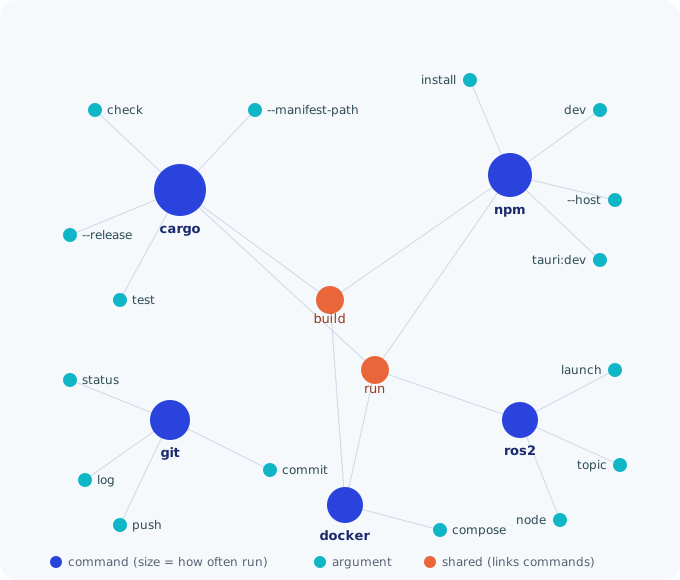
interrupted recordings on startup, and includes a /graph view: each command is
a node sized by how often you ran it, and arguments shared by two or more
commands become bridges (orange) that reveal which tools share a workflow.
Projects across terminals
Each mw records one terminal. Tag related sessions with the sameproject:<name> in the notes and the dashboard merges them into one
time-ordered timeline:
mw --notes "project:pop_playlist git history"     # terminal 1
mw --notes "project:pop_playlist server testing"  # terminal 2
To auto-record every new terminal without typing mw, use mw global on
(mw global off to stop). Full operating procedure: SOP.md.
Sharing memory across machines
Memory is local per machine, but you can move it:
mw export project:demo   # bundle: Markdown + JSON + a SQLite copy
mw import path/to/bundle # merge into this machine (skips duplicates)
mw push jetson           # snapshot → scp → remote mw import, any ssh host
Nothing goes through a third party; it's your own scp/ssh.
Why I built it
I was running the same robotics repo on two machines — a Jetson and my laptop —
for USC Autonomous Underwater Vehicle work. The codebase was shared, but the
terminal history was not. Commands, errors, build logs, and debugging attempts
lived on whichever machine happened to run them.
That became a real problem for AI-assisted debugging and team collaboration. If
a teammate asked why something failed, I could not always retrieve the terminal
scrollback that explained it. If the terminal shut down or the machine changed,
the exact context disappeared: what command ran, what flags, what error came
back, what had already been tried.
The goal is simple: make the terminal feel like it has long-term memory, so I
can search old attempts, recover exact errors after shutdowns, and give an AI
agent enough history to continue debugging instead of starting over.
Developing
The repo is a Cargo workspace: crates/mw-cli (the CLI, no GUI dependencies),crates/mw-memory (retrieval), and src-tauri (the desktop app).
cargo build -p mw-cli            # CLI only — fast, no GTK/WebKit needed
npm install && npm run tauri:dev # full desktop app (needs Tauri system deps)
- Linux/Jetson system deps, shell hook, systemd dashboard service, completions,
man pages: linux/README.md (linux/install.sh --all) - Real problems hit while setting up on a Jetson, and the fixes:
DEBUG.md
Attribution and learning sources
MemoryWhale was built after studying two original projects:
- CodeWhale by Hmbown: https://github.com/Hmbown/CodeWhale
- MemPalace by the MemPalace project: https://github.com/MemPalace/mempalace
CodeWhale taught me how a Rust-first developer tool can organize terminal
workflows, command execution, safety boundaries, and agent-facing runtime
ideas. MemPalace taught me local-first memory: keeping technical context on
your own machine, where you can still search it months later. MemoryWhale is my
own project built from those lessons; it does not vendor those repositories.
Project governance
- Philosophy — the communication and memory ideas behind the project.
- Contributing — how to make useful changes.
- Code of Conduct — the standard for collaboration.
- Constitution — governs users, contributors, maintainers,
and AI agents alike, under the same principles, duties, and protections.
Reviews (0)
Sign in to leave a review.
Leave a reviewNo results found