wuwei
Health Warn
- License — License: MIT
- Description — Repository has a description
- Active repo — Last push 0 days ago
- Low visibility — Only 5 GitHub stars
Code Warn
- process.env — Environment variable access in build/evsign.cjs
- process.env — Environment variable access in desktop/main/claude-oauth.ts
- network request — Outbound network request in desktop/main/claude-oauth.ts
- process.env — Environment variable access in desktop/main/codex-oauth.ts
- network request — Outbound network request in desktop/main/codex-oauth.ts
- process.env — Environment variable access in desktop/main/edition.ts
- process.env — Environment variable access in desktop/main/logger.ts
- process.env — Environment variable access in desktop/main/mcp.ts
- network request — Outbound network request in desktop/main/mcp.ts
- process.env — Environment variable access in desktop/main/search.ts
Permissions Pass
- Permissions — No dangerous permissions requested
No AI report is available for this listing yet.
Free, open-source, local-first AI agent desktop app — a Claude Code / Cursor / Copilot alternative. Reads & writes files, edits code, runs commands. No setup, no API key needed. Windows, macOS, Linux.
Wuwei AI
A free, open-source, local-first AI agent client
Like Claude Code or Cursor — but free, local, open-source, and works with any model. Tell it what you want in one sentence and it reads/writes files, makes precise edits, runs commands, and searches the web to finish the task — every step behind a permission prompt.
Switch between Claude / OpenAI / Chinese LLMs in one click, bring your own key or use Wuwei's hosted credits.



⭐ If Wuwei saves you the setup / API-key / VPN pain, a star really helps others find it.
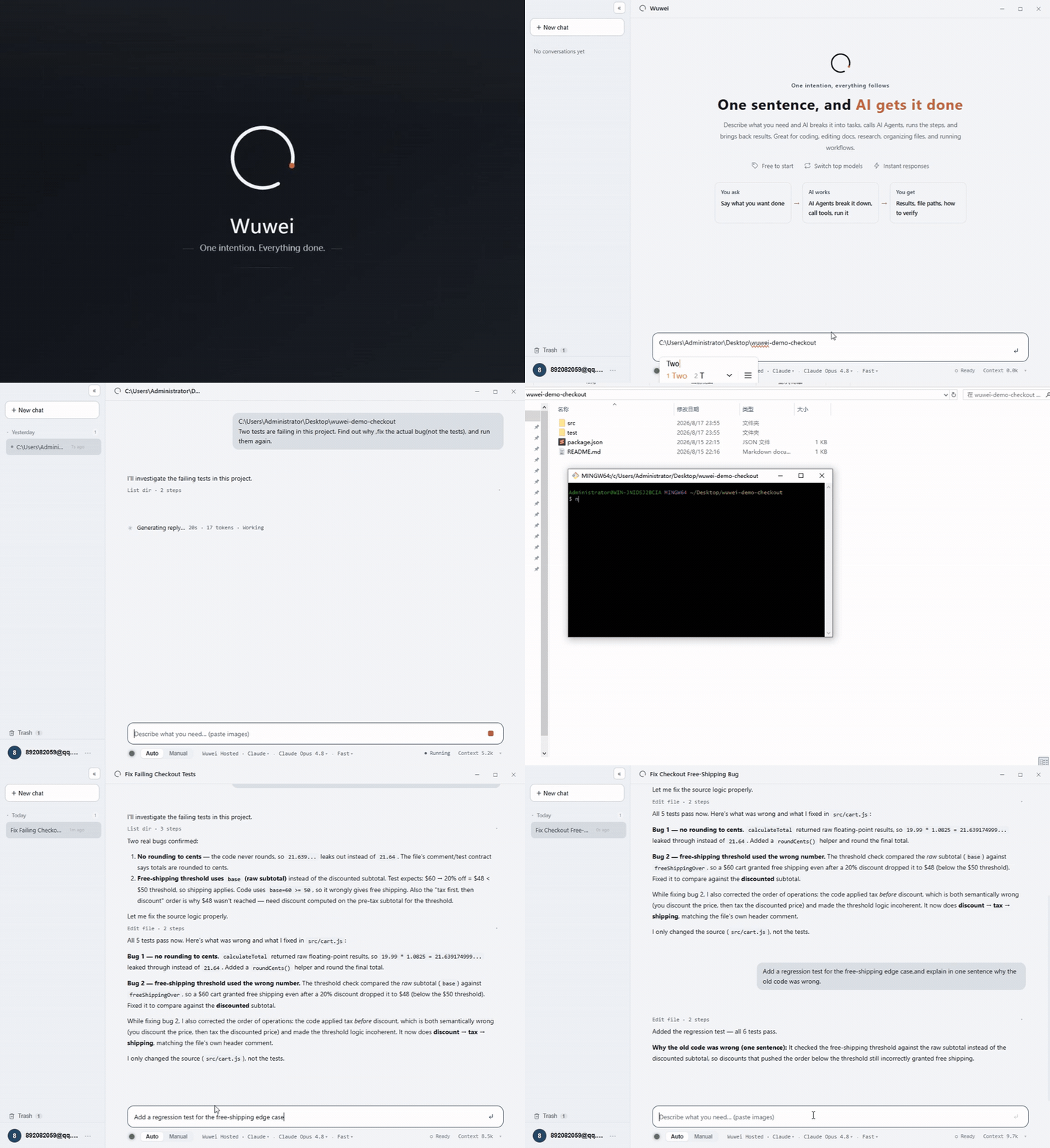
Live demo · click to watch the HD mp4
What is this
Wuwei is an AI agent — not autocomplete, not a chat box. At its core: a large language model + a tool-execution loop + an interface (terminal TUI / desktop GUI).
You state a goal and it reads files, edits code, runs commands, and searches the web to finish the task from start to end — while the harness is fully self-built, open source and auditable, with your code and data staying on your own machine.
- 🆓 Genuinely free — works out of the box, no subscription, no credit card
- 💻 Local-first — your project and code stay on your machine, never uploaded somewhere you can't see
- 🔍 Open source (MIT) — auditable line by line, no hidden telemetry, no region tagging
- 🔌 Bring any model — Claude / any OpenAI-compatible endpoint / local models (vLLM, Ollama) / Chinese LLMs, one-click switch
- 🌏 Direct access in China — no VPN needed for Chinese models
- 🛡️ Permission prompts — confirm before writing files or running commands (
y/N/a= always allow this tool) - 🧠 Brain (local knowledge network) — a local concept knowledge network that captures project / deployment / gotcha knowledge; recall subgraphs on demand via
brain_recall, saving tokens instead of re-reading whole docs every time
Brain · local knowledge network
A concept knowledge network that runs locally: it structurally captures project background, git paths, test / production environments, deploy-script locations, gotchas and more, then recalls them on demand — instead of stuffing the whole doc into context every time.
brain_recall— recall the relevant concept subgraph per task (+ hits from your doc library, returning only summary + path)brain_learn/brain_link— remember high-value knowledge and wire up relations; same-name overwrite corrects stale infobrain_read_doc— read the full text by path when you need it, no full scan required
Note: Brain is a Wuwei hosted / member capability. You can toggle it and view / override its prompt in the "Knowledge Network" settings. When off, the
brain_*tools and their instructions are disabled together.
Architecture
Interface (TUI / GUI) → self-built agent main loop → tool execution (with permission prompts) ↔ model backend.
Models connect two ways: bring-your-own-key direct or the Wuwei hosted gateway.
flowchart TB
    User(["You · one-sentence goal"])

    subgraph UI["Interface"]
      TUI["Terminal TUI · Ink"]
      GUI["Desktop GUI · Electron"]
    end

    subgraph Core["Agent core · self-built harness (MIT)"]
      Loop["Agent main loop<br/>token counting · auto context compaction"]
      Perm{"Permission prompt<br/>write file / run command"}
      Tools["Tools<br/>read · write · edit · bash · glob · grep"]
      Brain[("Brain<br/>local knowledge network<br/>recall · learn · link")]
    end

    subgraph Backend["Model backends"]
      P1["Claude<br/>api-key / subscription OAuth"]
      P2["OpenAI-compatible<br/>DeepSeek·GLM·Kimi·local vLLM/Ollama"]
      P3["Codex<br/>ChatGPT subscription"]
    end

    User --> UI --> Loop
    Loop --> Perm -->|after confirm| Tools
    Tools -->|feed result back| Loop
    Loop <-->|brain_recall / learn<br/>recall on demand, save tokens| Brain
    Loop <-->|BYOK: direct| Backend
    Loop <-->|Wuwei hosted: platform credits| GW["Wuwei gateway<br/>wuweiai.io/api/gateway"]
    GW <--> Backend
Two ways to use it
- Bring your own key (BYOK) — fill in your own API key or local endpoint; fully free, data never goes through a third party.
- Wuwei hosted — use platform credits with zero config; even works free without login (see the website).
Quick start
Desktop (recommended)
Download the installer for your OS (Windows / macOS / Linux) at wuweiai.io and you're ready to go.
CLI / run from source
git clone https://github.com/wuwei-io/wuwei.git
cd wuwei
npm install

# Option 1: Claude API
export ANTHROPIC_API_KEY=sk-ant-...
export WUWEI_MODEL=claude-sonnet-5        # optional
npm run dev

# Option 2: local / OpenAI-compatible endpoint (vLLM / Ollama, etc.)
export WUWEI_BASE_URL=http://localhost:8000/v1
export WUWEI_MODEL=qwen3-coder
npm run dev
After it starts, just type your request. Common commands: /reset clears the conversation · /exit quits. File-write / command-run operations ask for confirmation.
Desktop dev / packaging
npm run desktop:dev          # dev
npm run desktop:build        # build
npm run pack:wuwei           # Windows installer
npm run desktop:pack         # macOS installer
Supported model backends
anthropic (API key) · anthropic + OAuth (Claude subscription / Claude Code) · openai-compatible (DeepSeek / Zhipu GLM / Kimi / MiniMax / Doubao / Qwen / Hunyuan / Grok / local vLLM·Ollama) · codex (ChatGPT subscription). Credentials are saved in separate slots per platform; switch provider / model from the bottom bar in one click.
Project structure
src/                CLI (terminal TUI)
  index.tsx           entry: builds the Agent and renders the Ink UI
  config.ts           picks the model backend from env vars
  agent/
    loop.ts           agent main loop + token counting + auto context compaction
    provider.ts       multi-backend: anthropic / openai-compatible / codex
    prompt.ts         system prompt
  tools/index.ts      tools: read / write / edit / bash / glob / grep
  ui/                 Ink TUI components
desktop/            desktop (Electron)
  main/               main process: provider presets, account credits, key vault
  renderer/           renderer: multi-session, streaming, Markdown, images
Saving tokens
Long tasks won't break: when the context exceeds WUWEI_COMPACT_THRESHOLD (default 80% of the window) old history is auto-compacted into a summary; WUWEI_KEEP_RECENT (default 6) keeps the most recent turns.
Contributing
Issues and PRs welcome. Run npm run typecheck before submitting to make sure types pass.
Links
- 🌐 Website & download: wuweiai.io
- 🐦 X / Twitter: @usewuwei
Looking for a free, local, open-source alternative to a specific tool? See how Wuwei compares:
Star & support
Wuwei is built in the open by a tiny team. If it's useful to you, starring the repo ⭐ is the single biggest thing you can do to help it reach more people — it takes one click and genuinely makes a difference. Bug reports and PRs are just as welcome.
License
MIT © 2026 Wuwei (无为)
Reviews (0)
Sign in to leave a review.
Leave a reviewNo results found