mcp-engram-memory
Health Warn
- License — License: MIT
- Description — Repository has a description
- Active repo — Last push 0 days ago
- Low visibility — Only 5 GitHub stars
Code Pass
- Code scan — Scanned 12 files during light audit, no dangerous patterns found
Permissions Pass
- Permissions — No dangerous permissions requested
This tool provides a persistent, local cognitive memory engine for AI agents. It uses hybrid search and knowledge graphs to store decisions and recall context across sessions without requiring a cloud connection.
Security Assessment
Overall risk: Medium. The code scan found no dangerous patterns, hardcoded secrets, or requests for elevated system permissions, and the tool is designed to run entirely locally. However, the provided quickstart instructions encourage users to pipe remote scripts directly into PowerShell or Bash (`irm ... | iex` and `curl ... | bash`). This installation method executes remote, unaudited code directly on your machine, which is an inherently risky practice that bypasses standard code review.
Quality Assessment
The project is actively maintained with very recent updates and is distributed under the permissive MIT license. It appears to be a well-structured project featuring an extensive test suite (over 900 tests) and multiple installation options. However, it currently has very low community visibility with only 5 GitHub stars, meaning the codebase has not been broadly peer-reviewed or battle-tested by a wide user base.
Verdict
Use with caution. While the engine itself is local and passed basic code scans, developers should avoid the one-click setup scripts and instead clone, inspect, and run the tool manually to ensure safe usage.
Persistent cognitive memory for AI agents. Hybrid search (BM25 + vector), knowledge graph, expert routing, and lifecycle management — all local, no cloud required. 52 MCP tools.





Give your AI agent persistent memory that survives across sessions. Store decisions, recall context, and build expertise — all locally, no cloud required.
A cognitive memory engine exposed as an MCP server with hybrid search (BM25 + vector), knowledge graph, lifecycle management, hierarchical expert routing, and a graph-aware memory-diffusion subsystem (v0.9.0) that drives spreading-activation decay, sleep-style consolidation, and spectral retrieval re-ranking — all from a single per-namespace eigenbasis of the graph Laplacian.

Quickstart
Option 1 — One-click setup script (clones, restores, and wires up Claude Code automatically)
# Windows PowerShell
irm https://raw.githubusercontent.com/wyckit/mcp-engram-memory/main/setup.ps1 | iex
# macOS / Linux
curl -fsSL https://raw.githubusercontent.com/wyckit/mcp-engram-memory/main/setup.sh | bash
Both scripts clone the repo, download the ONNX model, and patch ~/.claude.json with the MCP server entry. Optional flags: --profile minimal|standard|full, --storage json|sqlite, --agent-id <id>. Already cloned? Run pwsh setup.ps1 or bash setup.sh from the repo root.
Option 2 — Clone and configure manually
git clone https://github.com/wyckit/mcp-engram-memory.git
cd mcp-engram-memory
dotnet restore
Add to your MCP client config (Claude Code, Copilot, Gemini, Codex):
{
  "mcpServers": {
    "engram-memory": {
      "command": "dotnet",
      "args": ["run", "--project", "/path/to/mcp-engram-memory/src/McpEngramMemory"],
      "env": { "MEMORY_TOOL_PROFILE": "minimal" }
    }
  }
}
Option 3 — Docker
docker build -t mcp-engram-memory .
docker run -i -v memory-data:/app/data mcp-engram-memory
Option 4 — NuGet library (embed the engine in your own app)
dotnet add package McpEngramMemory.Core --version 0.9.0
First run downloads a ~5.7 MB embedding model (bge-micro-v2) — subsequent starts are instant.
See examples/ for ready-to-use config files and AI assistant harness templates.
Memory Graph Visualizer
The built-in D3.js graph viewer lets you explore your memory graph interactively.
Generate a snapshot (call this MCP tool from any AI assistant):
get_graph_snapshot → save the JSON → open visualization/memory-graph.html
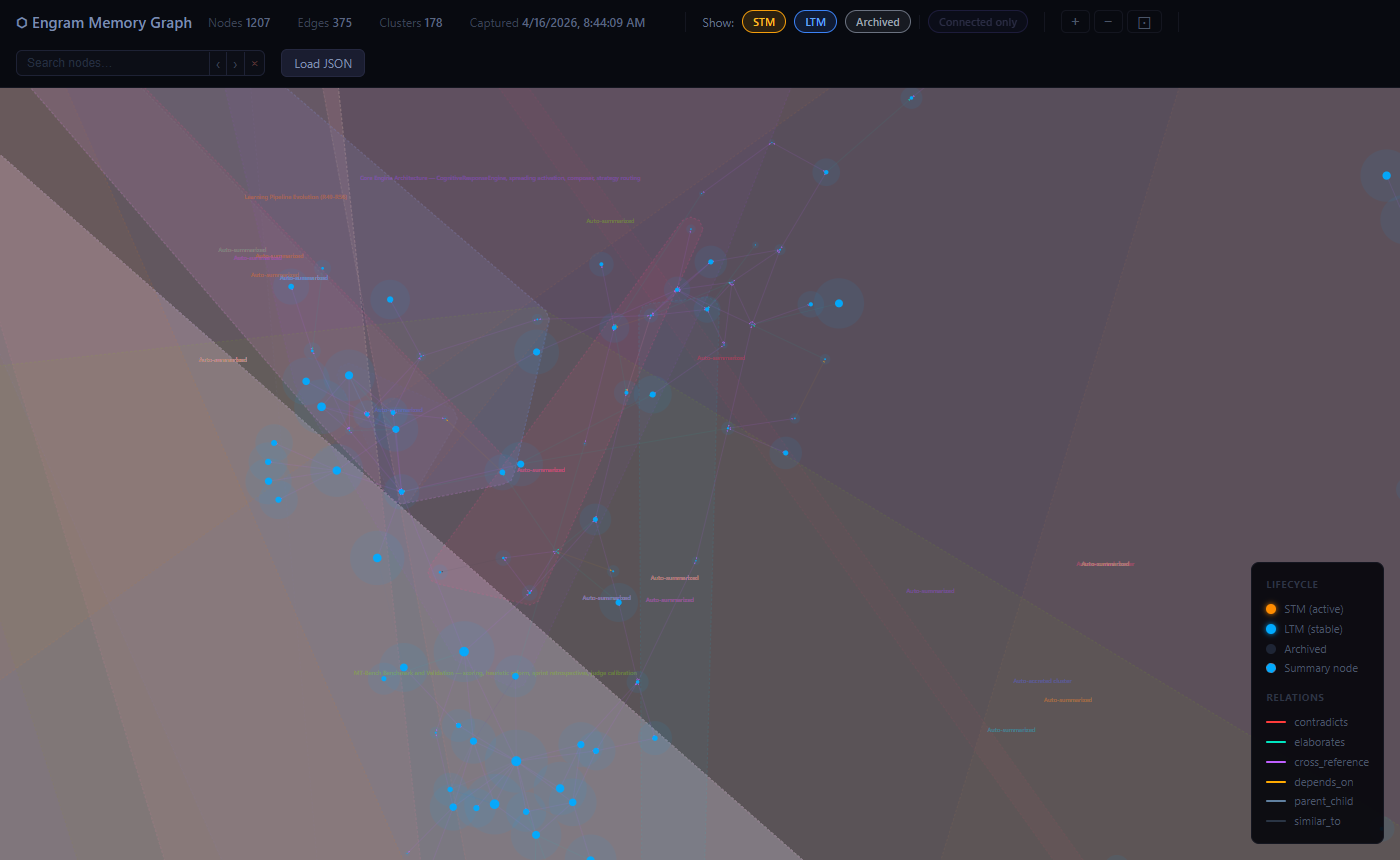
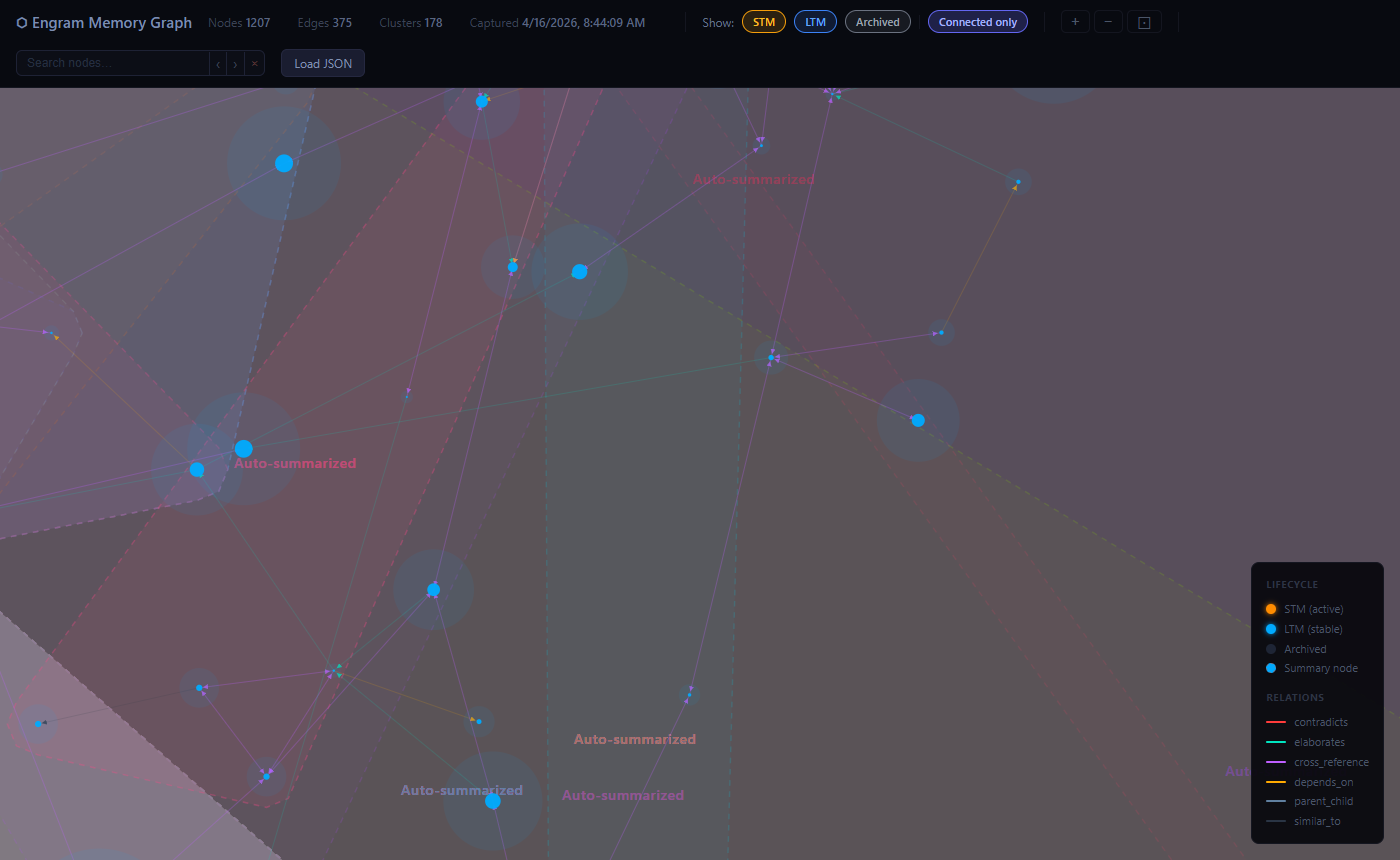
Features:
- Force-directed layout — related memories cluster together, typed edges (elaborates, contradicts, depends_on, …) shown in distinct neon colors
- Lifecycle colors — STM nodes amber, LTM nodes blue; cluster summaries marked with a dashed ring
- Convex-hull cluster overlays — cluster membership visible at a glance
- Search & highlight — type in the search bar to instantly dim non-matching nodes and pulse-highlight matches in gold;
‹ ›buttons orEnter / Shift+Enterto cycle through results - Zoom / pan / rotate —
+/−/⊡buttons; scroll to zoom; right-click drag to rotate the whole graph - Fractal density overlay — zooms out reveal a quadtree density map color-coded by lifecycle state
- Connected-only filter — hide isolated nodes to focus on the linked knowledge graph
- Drag-and-drop JSON loading — drop a snapshot file directly onto the viewer
The snapshot file is not committed (it's personal memory data). Generate a fresh one any time with get_graph_snapshot.
Tool Profiles
Control how many tools are exposed with MEMORY_TOOL_PROFILE:
| Profile | Tools | What's included |
|---|---|---|
minimal |
16 | Core CRUD + composite + admin + multi-agent — recommended starting point |
standard |
41 | Adds graph (+auto-link), lifecycle (+consolidation), clustering, intelligence, memory-diffusion kernel, spectral retrieval |
full |
65 | Everything including expert routing, debate, synthesis, benchmarks (default) |
At a Glance
| Metric | Value |
|---|---|
| MCP tools | 65 (profiles: 16 / 41 / 65) |
| Retrieval | Hybrid BM25 + vector with synonym expansion, cascade retrieval, MMR diversity, auto-PRF |
| Embedding | bge-micro-v2 (384-dim, ONNX, MIT license, runs locally, concurrent inference) |
| Best recall | 0.792 realworld dataset, 0.771 scale dataset (hybrid mode) |
| Search latency | ~2.7 ms production, ~0.04 ms benchmark |
| Storage | JSON (default) or SQLite (WAL mode) |
| Frameworks | net8.0, net9.0, net10.0 |
| Tests | 865 non-MSA net8 tests across 49 files |
| CI/CD | GitHub Actions: build + test on push, nightly MSA benchmarks |
System Layers
| Layer | Stability | Components |
|---|---|---|
| Core | Stable | Storage, Embeddings, Retrieval, Lifecycle, Graph |
| Advanced | Stable | Clustering, Multi-Agent Sharing, Intelligence |
| Orchestration | Maturing | Expert Routing (HMoE), Debate, Benchmarks |


AI Assistant Setup
Copy the reference harness for your tool — each includes recall/store/routing patterns:
| Tool | Harness File | MCP Config |
|---|---|---|
| Claude Code | examples/CLAUDE.md → ~/.claude/CLAUDE.md |
examples/claude-code.json |
| GitHub Copilot | examples/copilot-instructions.md → .github/ |
examples/vscode-copilot.json |
| Google Gemini | GEMINI.md → workspace root |
Gemini CLI config |
| OpenAI Codex | examples/AGENTS.md → project root |
Codex config |
Claude Code users: Route memory sub-agents to Sonnet (
model: "sonnet") and utility sub-agents to Haiku (model: "haiku") to maximize your subscription. See the harness for details.
For step-by-step setup prompts, see AI Assistant Setup.
Cost-Optimized Usage (Claude Code)
| Tier | Model | What runs here |
|---|---|---|
| Main thread | Opus | Coding, architecture, reasoning, decisions |
| Memory sub-agents | Sonnet (model: "sonnet") |
All engram MCP tool calls: search, store, dispatch, link, merge |
| Utility sub-agents | Haiku (model: "haiku") |
Codebase exploration, file searches, grep research, simple lookups |
Opus thinks, Sonnet remembers, Haiku explores.
MCP Tools (65)
| Group | Tools | Description |
|---|---|---|
| Core Memory | store_memory, store_batch, search_memory, delete_memory |
Vector CRUD with namespace isolation, batch import, and lifecycle-aware search |
| Composite | remember, recall (with spectralMode), reflect, get_context_block |
High-level wrappers with auto-dedup, auto-linking, expert routing, context assembly, and graph-aware spectral re-ranking on recall (default auto) |
| Knowledge Graph | link_memories, unlink_memories, get_neighbors, traverse_graph, auto_link_namespace |
Directed graph with 7 relation types, multi-hop BFS, and similarity-based auto-link densification |
| Clustering | create_cluster, update_cluster, store_cluster_summary, get_cluster, list_clusters |
Semantic grouping with auto-computed centroids |
| Lifecycle | promote_memory, memory_feedback, deep_recall, decay_cycle, run_consolidation, configure_decay |
State transitions (STM/LTM/archived), spectral decay diffusion, and topology-driven sleep consolidation |
| Memory Diffusion | compute_diffusion_basis, diffusion_stats, invalidate_diffusion, spectral_recall |
Graph-Laplacian eigenbasis primitive shared by decay, consolidation, and retrieval; standalone graph-aware retrieval |
| Intelligence | detect_duplicates, find_contradictions, merge_memories, uncollapse_cluster, list_collapse_history |
Dedup, contradiction detection, merge, collapse reversal |
| Expert Routing | dispatch_task, create_expert, get_domain_tree, link_to_parent |
HMoE semantic routing with 3-level domain tree |
| Multi-Agent | cross_search, share_namespace, unshare_namespace, list_shared, whoami |
Namespace sharing, permissions, cross-namespace RRF search |
| Debate | consult_expert_panel, map_debate_graph, resolve_debate, purge_debates |
Multi-perspective analysis with debate tracking |
| Synthesis | synthesize_memories |
Map-reduce synthesis via local SLM (Ollama) |
| Accretion | get_pending_collapses, collapse_cluster, dismiss_collapse, trigger_accretion_scan |
DBSCAN cluster detection and two-phase summarization |
| Admin | get_memory, cognitive_stats, get_metrics, reset_metrics |
Inspection, system-wide statistics, and latency metrics |
| Maintenance | rebuild_embeddings, compression_stats |
Re-embed entries and storage diagnostics |
| Benchmarks | run_benchmark, run_agent_outcome_benchmark, run_live_agent_outcome_benchmark, compare_live_agent_outcome_artifacts |
IR quality validation, proxy memory-condition comparison, live-model memory A/B benchmarking, and artifact-to-artifact diff reporting |
Full tool documentation: MCP Tools Reference
Environment Variables
| Variable | Default | Description |
|---|---|---|
MEMORY_TOOL_PROFILE |
full |
Tool profile: minimal (16), standard (41), full (65) |
AGENT_ID |
default |
Agent identity for multi-agent namespace sharing |
MEMORY_STORAGE |
json |
Storage backend: json or sqlite |
MEMORY_SQLITE_PATH |
data/memory.db |
SQLite database path (when MEMORY_STORAGE=sqlite) |
MEMORY_MAX_NAMESPACE_SIZE |
unlimited | Max entries per namespace |
MEMORY_MAX_TOTAL_COUNT |
unlimited | Max total entries across all namespaces |
NuGet / GitHub Packages
The core engine is available as a NuGet package for embedding in your own .NET applications:
# nuget.org
dotnet add package McpEngramMemory.Core --version 0.9.0

# GitHub Packages
dotnet add package McpEngramMemory.Core --version 0.9.0 \
  --source https://nuget.pkg.github.com/wyckit/index.json
using McpEngramMemory.Core.Services;
using McpEngramMemory.Core.Services.Storage;

var persistence = new PersistenceManager();
var embedding = new OnnxEmbeddingService();
var index = new CognitiveIndex(persistence);

// Store
var vector = embedding.Embed("The capital of France is Paris");
var entry = new CognitiveEntry("fact-1", vector, "default", "The capital of France is Paris", "facts");
index.Upsert(entry);

// Search
var results = index.Search(embedding.Embed("French capital"), "default", k: 5);
Documentation
| Doc | Description |
|---|---|
| First 5 Minutes | Store, close, recall — the whole loop |
| Cheat Sheet | One-page quick reference |
| MCP Tools Reference | Full documentation for all 65 tools |
| Architecture | System design, retrieval pipeline, data flow |
| Services | All services with descriptions |
| Internals | Retrieval, quantization, persistence deep dive |
| Project Structure | File tree and module organization |
| AI Assistant Setup | Step-by-step setup prompts for each tool |
| Sample Prompts | Power prompts and usage patterns |
| Benchmarks | IR quality results and mode selection guide |
| MRCR v2 Benchmark | Long-context A/B (full context vs. hybrid retrieval) via Claude CLI subscription |
| Testing | Test coverage breakdown and current CI coverage |
Build & Test
cd mcp-engram-memory
dotnet build
dotnet test    # full suite, including slower MSA benchmark cases
Tech Stack
- .NET 8/9/10, C#
- ModelContextProtocol 1.0.0
- FastBertTokenizer 0.4.67
- Microsoft.ML.OnnxRuntime 1.17.0
- bge-micro-v2 ONNX (384-dim, MIT license)
- Microsoft.Data.Sqlite 8.0.11
- xUnit (tests)
License
MIT
Reviews (0)
Sign in to leave a review.
Leave a reviewNo results found