kiki
Health Pass
- License — License: MIT
- Description — Repository has a description
- Active repo — Last push 0 days ago
- Community trust — 30 GitHub stars
Code Fail
- rm -rf — Recursive force deletion command in .github/workflows/_native-build.yml
- process.env — Environment variable access in .github/workflows/_native-build.yml
- fs module — File system access in .github/workflows/_native-build.yml
Permissions Pass
- Permissions — No dangerous permissions requested
No AI report is available for this listing yet.
Open-source multi-model AI agent workbench (Desktop GUI, TUI & Web) — dispatch subagents across Claude, GPT, Gemini & Kimi, bridge WeChat/QQ, and run locally.
Kiki
Your agents, your call.


Documentation · All features · Screenshot tour · Issues · Acknowledgements · 中文
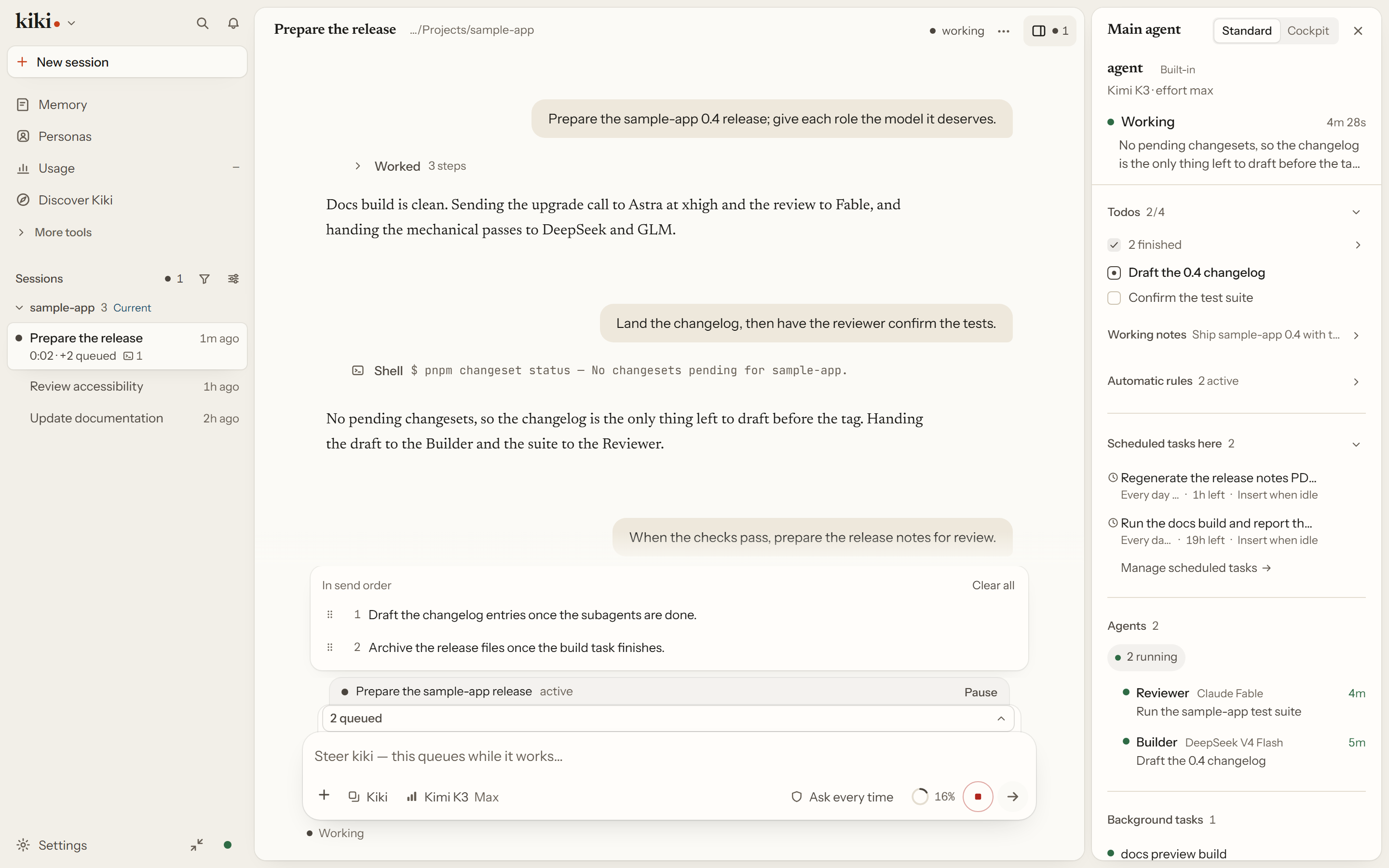
Hand Kiki a folder and a task: map an unfamiliar codebase, work through a stack of PDFs and spreadsheets, finish a draft, or ship a change. It reads what is there, plans, and works in place. When a job divides, it hands parts to subagents you can put on different models, and goals, a queue, and memory keep the work moving across turns.
Work files stay in the folder you choose, sessions, history, and configuration stay in your local Kiki home, and model requests go only to the providers or local servers you connect. It is open source (MIT).
Coming from Claude Code, OpenAI Codex CLI, or Cursor? Four things work differently here:
- Several models in one dispatch tree: a strong model plans, cheaper models run routine work, and a review on another vendor does not share the implementation's blind spots. Kimi, Anthropic, OpenAI and Codex, Gemini, and Vertex AI all fit in one session, and you can sign in with GitHub Copilot or ChatGPT.
- One live session, three surfaces: the desktop app, the terminal UI (
kiki), and the browser UI (kiki web) attach to the same local daemon, so the session you start in one is the one you open in another. - Reachable away from the desk: pair WeChat or QQ to a persona or session to reply, steer the current turn, and answer approvals from your phone. Remote connections and SSH hosts extend the same work to other machines; Spaces keep work and personal setups apart.
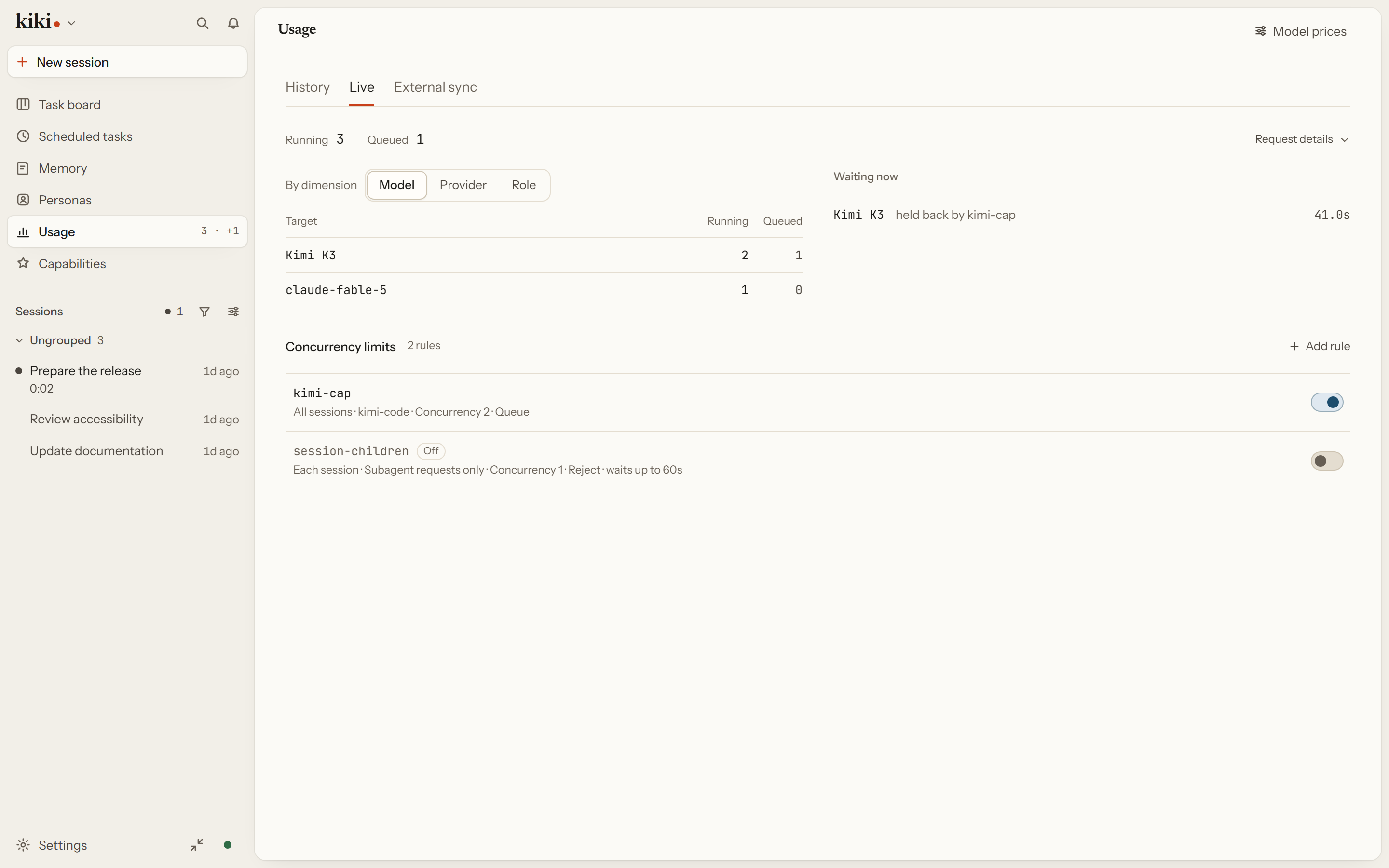
- Limits and prompts in plain view: the Usage page names the concurrency rule holding each queued request,
kiki prompt-fieldsoverrides prompt text down to a single tool description, and ordinary memory edits and deletes keep their revision history so you can undo them (while explicitforgetclears historical payloads permanently).
Start here
On the desktop
- Download a build for your platform (see Desktop builds below) and open Kiki.
- The welcome shows what Kiki can help you do, asks how much it may do on its own, and offers a few places to look around. Each one is the same short guided tour, and Discover Kiki in the sidebar brings it back any time.
- On a new conversation, pick a folder and describe a task, or click a starter — starters only fill the draft and never send on their own. If no model is connected yet, Kiki asks when you send: sign in with an account, or use an API key or a local server.
In the terminal
npm install -g kiki-agent   # needs Node.js 24.22.1+ or 26.12.1+; a desktop build is linked below
cd your-project
kiki                        # terminal UI; `kiki web` for the browser, `kiki desktop` for the app
Run /login and pick Kimi Code OAuth or a Kimi Platform API key — other providers are in Providers and models. Then ask for something:
Take a look at this project and explain its main directories.
The same shape works when the folder is not code. PDF, Office, and HTML extraction is a plugin, not part of the base install: add Kiki Extract from the catalog (it needs Python with MarkItDown for PDF and Office formats), then ask:
Read the PDFs in ./sources, check their figures against budget.xlsx, and write summary.md with the file each number came from.
New sessions start in Auto: routine work runs on its own, and you are still asked before it touches sensitive files or runs dangerous commands. /permission switches among Ask every time (manual), Auto (auto), Approve for me (review), and Full access (yolo).
Desktop builds
Pick a build from GitHub Releases under kiki-v<version>.
| Platform | Desktop app | Standalone CLI/TUI |
|---|---|---|
| Windows x64 | Kiki_*_x64-setup.exe (also installs kiki on your user PATH) |
Included in the installer; no separate Windows CLI asset |
| Linux x64 | Kiki_*_amd64.deb (adds kiki to PATH) or Kiki_*_amd64.AppImage |
kiki-linux-x64 |
| Linux ARM64 | — | kiki-linux-arm64 |
| macOS Apple Silicon | Kiki_*_aarch64.dmg |
kiki-darwin-arm64 |
| macOS Intel | Kiki_*_x64.dmg |
kiki-darwin-x64 |
Each standalone CLI file comes with a matching .sha256 checksum. On macOS the dmg is unsigned and not notarized: verify the download, drag Kiki to Applications, and use Control-click → Open on first launch; the dmg does not change your PATH, so add the CLI separately.
With npm, kiki-agent installs the CLI/TUI and downloads and checksum-verifies the matching desktop release (network required), while kiki-agent-lite installs only the CLI/TUI. kiki desktop opens the installed app.
On Windows, install Git for Windows before first launch — the Kiki CLI uses the bundled Git Bash as its shell environment. If Git Bash is installed elsewhere, set
KIKI_SHELL_PATHto the absolute path ofbash.exe.
Verify with kiki --version. See Installation for checksum commands and update channels.
Do one thing first
Choose the folder Kiki works in and what it should read, then hand it the task. Normal, Plan, and Goal shape how the task is done, and the result keeps its sources and the steps behind it. When you start a session you can also pick a git worktree, so that session's work lands on its own branch instead of your checkout. Temporary conversations stay out of history, search, and memory, and are deleted when they end.
See First launch and Interaction and approvals.
Understand and direct work
Give every agent its own model
The lead agent splits your task and dispatches subagents, and each one can run a different model — or a different vendor — in the same session. A strong reasoning model can plan while cheaper models do the routine work, and a review by a different vendor is not anchored to the same blind spots as the implementation. Kimi works out of the box; Anthropic, OpenAI-compatible services, the OpenAI Responses API, Gemini, and Vertex AI can be added, and you can sign in with a GitHub Copilot or ChatGPT account.
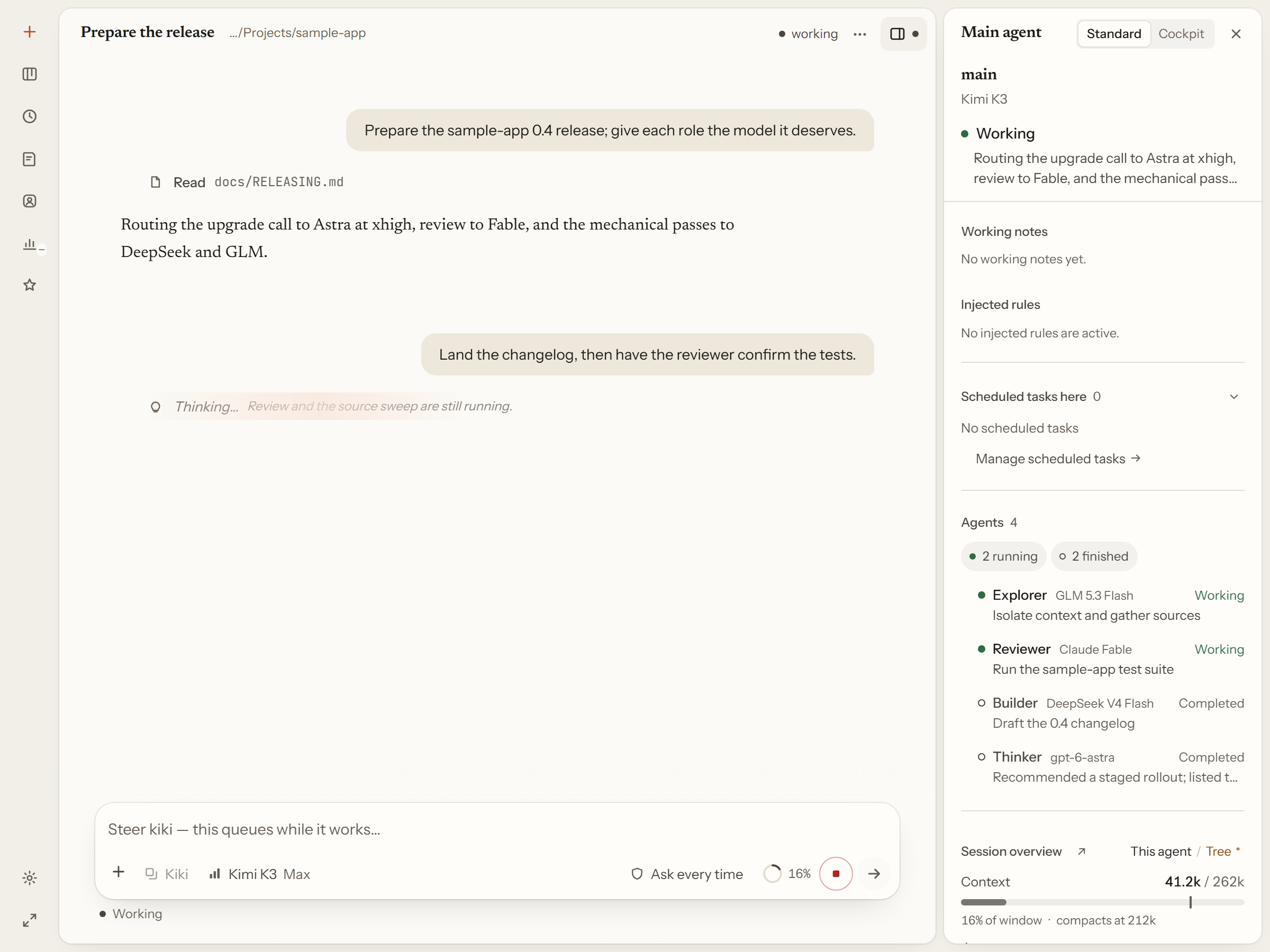
Agents themselves are Markdown files you own: the frontmatter sets tools, model, effort, and which agents it may dispatch, and the body is the system prompt. Save the file and the next dispatch uses it, while a session already running keeps the snapshot it started with until you rebuild its context. You can create a profile by copying an existing one, starting from a shipped template, or starting blank.
Open any dispatched subagent to read its own transcript, and message it from its own composer. While the agent works, what you type joins a queue rather than cutting in, and each queued message can go out when the agent is idle, after its subagents finish, or after its background tasks finish. Long commands move to the background and notify the agent when they finish, so it never has to poll. See One workbench, many lines and Agents and Sub-Agents.
Work in the window you have open
Finished stretches of tool calls, thinking, and shell output fold into one line such as "Worked · 8 steps", and every fold opens back up in order. The right rail shows pending approvals and questions, what the agent is doing now, context and cost, its working notes, the agent team, and background tasks — and it follows you into a subagent. Annotations let you leave a note on a message and send it with your next one instead of interrupting with a separate turn.
The agent can search its own earlier messages and tool output — including text from before a compaction — with HistorySearch and HistoryRead, and you can search sessions by title in the sidebar. Web search and fetch run on named lanes you can inspect; GitHub repository search works without a key. Appearance is six built-in skins, picture and video backgrounds, and appearance packs that bundle colors with media. See The daily driver and Look and feel.
Know what it costs, and where the numbers go
The Usage page breaks a date range into tokens, cost, and cache hit rate — a provider that never returned usage reads as unknown rather than as a real zero — and names the concurrency rule holding each waiting request. External sync sends only content-free numbers, never a prompt, answer, title, or path, to a webhook, a VibeCafe account, or a script you approve, and nothing is sent until you add a destination, preview the exact payload, agree once, and enable it.
See The daily driver and kiki usage-export.
Keep work going
A goal keeps the target in view across turns instead of restating the task each time.
Memory is what outlives the session: preferences, feedback, verified project facts, and references, kept as global, per workspace, or per persona. You can read every entry, and undo any change one operation at a time — including a delete. Set approval to review and proposed writes wait in an inbox instead of applying themselves. See the memory guide.
Each workspace can also add a board (via the optional kiki-task-board plugin) where requirements are cards that link to the sessions working on them, and the agent reads and updates it. Scheduled prompts cover the recurring case: a prompt fires on a cron schedule while a Kiki process holds that session open. See Work that runs long.
Extend Kiki when needed
Personas you can talk to
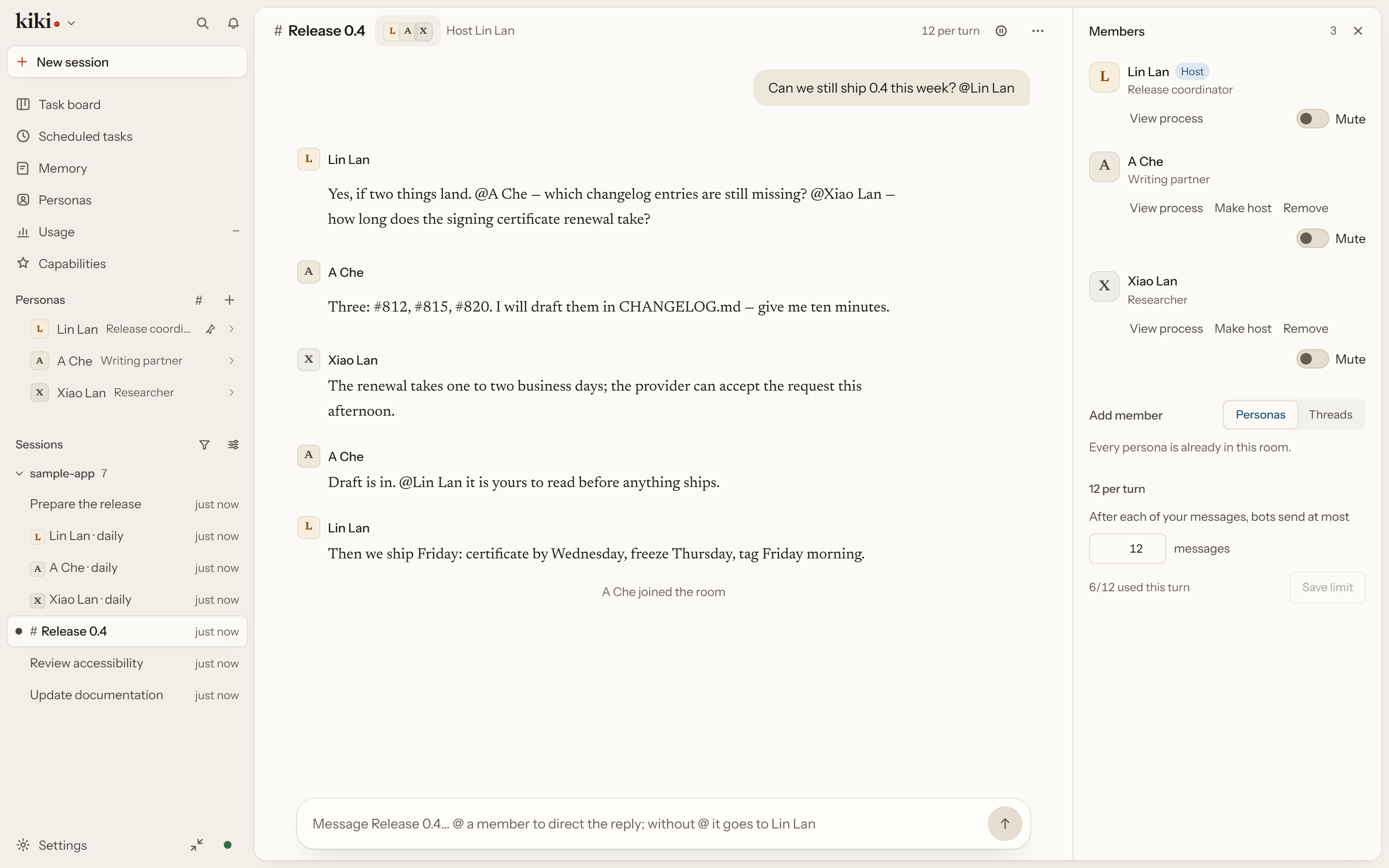
A persona is a long-term identity — a name, an avatar, what it is for, the standing rules for how it works, and its own memory — stored as a Markdown file you can read and edit. Clicking its name lands you in the same conversation every time, so "ask Lin Lan" means one thing; the same persona can hold several conversations at once for different projects.
A room puts two to six of them on one topic, speaking in order, with a host, a budget, and pause and continue.
A persona is not an agent profile. A profile is execution configuration — tools, permissions, model, effort; a persona is identity — who it is and what it remembers. Rebinding one does not touch the other. See Roles you can talk to.
Skills, plugins, and tool connections
A plugin can add skills, agents, MCP servers, hooks, commands, and tools; browse and install them on the Capabilities page. The catalog carries, among others, Kiki Extract for local PDF and Office files, Kiki Office Suite, Kiki Work for local CSV checks, Kiki Writing, Kiki Notion, Kiki Media, and Kimi Datasource — each one installed, configured, and enabled on its own — while browser control connects to Ego Lite, a browser extension (Codex / ChatGPT or Kimi Browser Extension), an independent profile, or CDP. Sessions stay on your machine; there is no cloud relay. See Make it yours to extend and Plugins.
Your data, your machines
A space is a Kiki you open, with its own shortcuts, window behavior, and credential scope — shared with the main space or isolated — so a work Kiki and a personal Kiki can sit side by side without sharing what they sign in to.
Remote connections point one Kiki home at another with an approval on each side, and every connection is one row with its own state. A thread bridge is narrower: a one-way channel for messages between two homes that never grants browsing access. Web access opens this Kiki in a browser on another device through a single-use link, and turning it off revokes every link without stopping work already running. SSH hosts joined to a session belong to that session, so the timeline stays clean. Pair a WeChat or QQ chat to a persona or session to reply and approve steps when you are away from the desk. See Your data, your machines and Phone session.
Bring in history, plug in other tools
Any built-in prompt field can be replaced, down to a single tool description, globally or per model or agent, and kiki prompt-fields shows what the model will receive. Import another tool's conversations as Kiki sessions you can keep working in, or as read-only archives; the preview tells you what is kept and what is not, and nothing is installed or trusted to reach it. kiki acp puts Kiki inside Zed, JetBrains, and other ACP clients, and kiki seat lets Cursor, Claude Code, or Codex call it as a service with the workspace, permission mode, and model fixed before they connect. An agent profile can also run on another harness entirely as its engine. See Bring your history, meet other tools and Every layer is yours.
Docs
All features · First launch · Desktop app · Agent profiles · Plugins · Interaction and approvals · Configuration · Command reference · Tool reference
Develop
Requirements: Node.js 24.22.1+ or 26.12.1+, pnpm 10.33.0.
git clone https://github.com/X-T-E-R/kiki.git && cd kiki && pnpm install
pnpm dev:cli    # run the CLI in dev mode
pnpm test       # tests  ·  pnpm typecheck  ·  pnpm lint  ·  pnpm build
See CONTRIBUTING.md for the full guide. Report bugs in Issues; for security vulnerabilities, see SECURITY.md.
Acknowledgements
Kiki began as a fork of Kimi Code and is now developed independently. Its TUI is built on pi-tui. The desktop app adapts code and interaction patterns from several other open-source projects. ACKNOWLEDGEMENTS.md lists each project, what Kiki took from it, and its license.
License
Released under the MIT License.
Friends
Reviews (0)
Sign in to leave a review.
Leave a reviewNo results found