applyer
Health Warn
- License — License: MIT
- Description — Repository has a description
- Active repo — Last push 0 days ago
- Low visibility — Only 5 GitHub stars
Code Warn
- process.env — Environment variable access in scripts/smoke-mcp.ts
- process.env — Environment variable access in src/main/browser/browserController.ts
Permissions Pass
- Permissions — No dangerous permissions requested
No AI report is available for this listing yet.
Local Electron app that turns a coding agent (Claude Code, Codex CLI) into a job-search assistant — it searches, matches, and drafts applications; you review and submit.

Applyer
Turn a coding agent into your job-search assistant.
A local Electron app that puts Claude Code, Codex CLI, or any other MCP-capable
agent to work searching, matching, and drafting job applications, while you stay
in full control of what actually gets submitted.





Applyer runs an embedded terminal alongside a live job board. You describe what you're
looking for, the agent in the terminal searches the web, scores matches against your
profile, queues them, and can even draft a filled-out application. What it never does is
click submit. Every application gets a human review before it goes out.
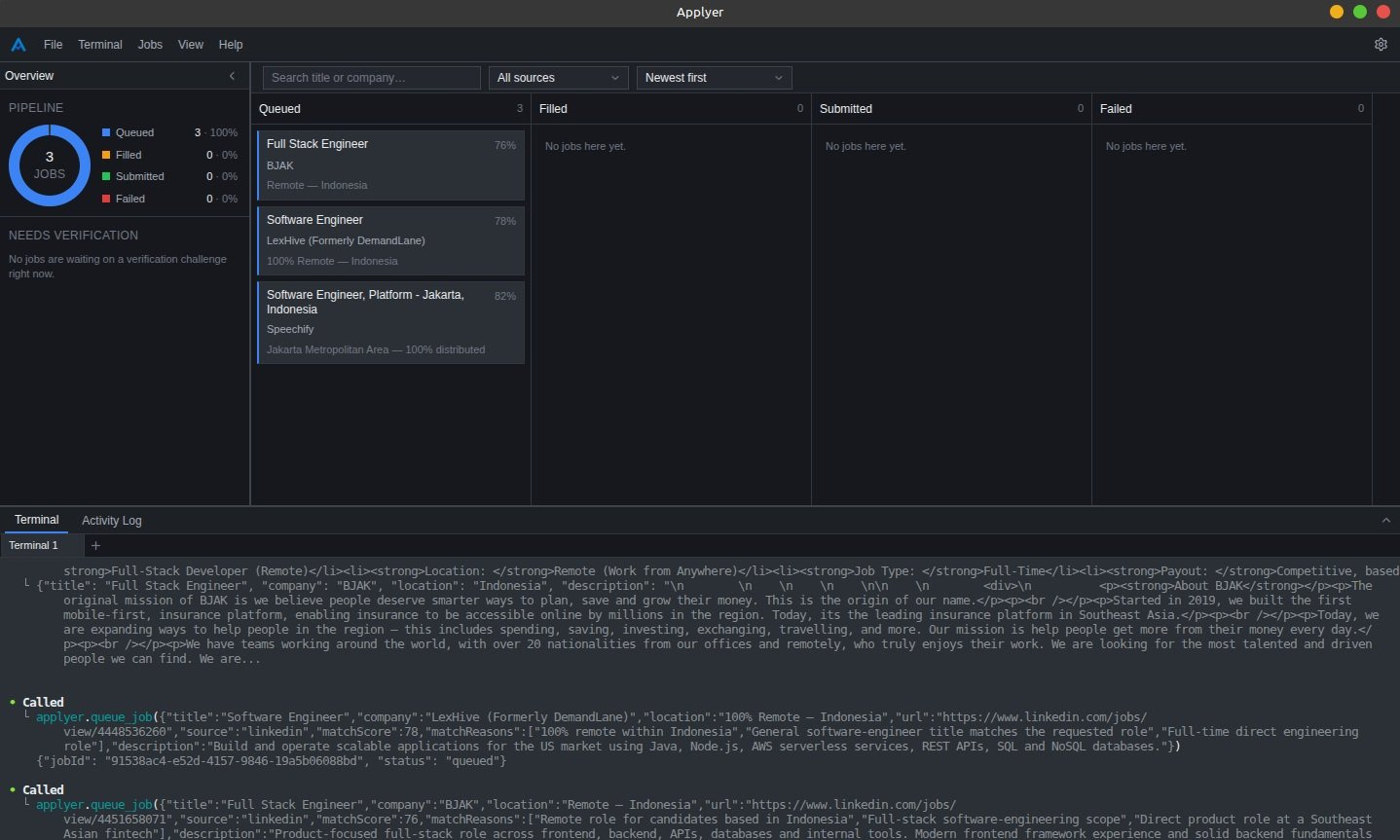
Table of contents
- Why
- How it works
- Inside the app
- What the agent can do
- Where your data lives
- Prerequisites
- Setup
- Using it day to day
- Scripts
- Project layout
- Project status
- Contributing
- License
Why
Job hunting is mostly repetitive research: reading postings, checking if they're a real
fit, and filling in the same contact and experience fields over and over. Applyer hands
that repetitive part to a coding agent you already trust to work autonomously in a
terminal, and keeps the parts that actually matter, deciding what to apply to and hitting
submit, in your hands.
- You own your data. Profile, documents, and job history live on your machine,
encrypted with your OS keychain or stored as plain files, your choice. Nothing is sent
anywhere except to the agent you connect. - The agent is sandboxed to a small toolset. It gets exactly the MCP tools listed
below. It cannot browse your filesystem, run
arbitrary commands outside its own terminal, or touch anything else on your machine. - Nothing gets submitted without you.
fill_applicationopens a real, visible
browser window and fills the form. You review it and click submit yourself.
How it works
- Tell it about yourself. Onboarding walks you through a profile (contact info,
desired roles, skills, salary expectations) and your resume or cover letter documents.
You choose whether this is stored encrypted (OS keychain-backed) or as plain files. - Connect an agent. Onboarding detects installed MCP-capable CLIs (currently Claude
Code and Codex CLI) and can auto-configure the connection for you, or hand you a config
snippet to add manually. A connection can be scoped to the CLI's global config or just
to Applyer's own workspace directory, so it does not leak into your other projects. - Ask the agent to job hunt from the terminal built into the app. It calls back into
Applyer over MCP to search, inspect postings, and manage your board. - Review on the board. Matches land in a Kanban board (Queued, Filled, Submitted,
plus Failed) that updates live as the agent works.
Inside the app
The main screen is one workspace, not a set of pages you navigate between. Three resizable
regions stay live at the same time:
- Pipeline overview (left): a donut breakdown of jobs per status, plus a "needs
verification" list of anything the agent is currently blocked on. - The board (center): four columns with search, source, and sort filters, multi-select
with a bulk action bar, right-click actions per card, and a detail view for each job
showing its description, match reasons, and a screenshot of any drafted application. - The dock (bottom): the terminal and the activity log as two tabs of one region. The
terminal runs several concurrent sessions as renameable, reorderable sub-tabs, and can
auto-run a command (your agent CLI, for instance) in every new session.
A second screen, Indexed Jobs, is the audit trail behind the board. Its "Indexed" tab
lists every posting a search has surfaced, matched or not, with filters, pagination, a
compact row mode, and a retention window. Its "Excluded" tab is the blacklist of URLs that
will never be surfaced or queued again, by you or by the agent.
Other things worth knowing:
- Verification challenges pause a fill instead of failing it. A banner appears in the
app with Resume and Cancel per blocked job, and Resume re-checks that the challenge is
actually cleared before continuing. - Keyboard shortcuts and a menu bar cover terminal, board, and panel actions. Every
shortcut is rebindable in Settings, and all of them require a modifier key, so plain
typing in the terminal is never intercepted. - Appearance offers light, dark, or system themes, a custom accent color, and an
optional custom CSS editor with a panic shortcut (Ctrl/Cmd + Shift + Backspace) that
clears it instantly. - Languages: English and Indonesian, or match your system. Translations are catalog
files undersrc/renderer/src/i18n/locales/, so adding a language is a pull request, not
a code change.
What the agent can do (MCP tools)
| Tool | Purpose |
|---|---|
get_profile |
Reads your profile and document list, to judge fit and fill forms. |
search_jobs |
Keyword search across LinkedIn and Indeed, the two sources with cross-company search. Everything it surfaces is recorded on the Indexed Jobs page, matched or not. |
get_job_details |
Full posting details for a specific URL. Greenhouse, Lever, and Ashby go through their public APIs; LinkedIn, Indeed, Workday, and generic sites are read with a headless browser. |
queue_job |
Adds a posting to your board, deduplicated by URL. |
list_jobs |
Lists what's already on the board, optionally by status, to avoid re-queuing. |
flag_failure |
Marks a job Failed with a reason tag (login required, expired listing, and so on; unrecognized tags register themselves). |
fill_application |
Opens a visible browser, fills the standard fields from your profile, and never submits. Custom essay questions are left for you. If the site throws up a verification challenge it returns right away and resumes once you clear it. |
exclude_job |
Blacklists a posting URL permanently, at your explicit request only. The tool description tells the agent not to use it as its own quality filter. |
That is the entire surface area the agent has. Nothing else in the app or on your machine
is exposed to it.
Where your data lives
Everything stays on your computer. Settings gives you control over the details:
- Storage mode: encrypted through your OS keychain, or plain readable files. You can
switch either way after onboarding, and your existing profile and documents are
rewritten in the new format. - Storage location: keep the default app-data directory, move everything (database,
documents, screenshots, logs) to a folder of your choosing while the app keeps running,
or connect to an existing Applyer dataset somewhere else. If a custom location is missing
at startup, say an external drive that is not plugged in, the app opens a recovery screen
instead of failing: reconnect and retry, or fall back to the default location and switch
back later. - Export and import: write a JSON bundle (jobs, exclusions, profile, settings, picked
per domain) or a CSV table for spreadsheets. Importing adds jobs and exclusions alongside
what you already have, and only overwrites profile and settings if you ask it to. - Browser: by default Applyer looks for your installed Chrome, then Edge, and only
downloads its own Chromium if neither is there. You can pin a specific choice instead. In
a packaged build, a first-time download is confirmed by you and shows live progress.
Prerequisites
- Node.js 20.19+ or 22.12+ (CI runs on 24) and npm
- Linux, macOS, or Windows (Linux is what this has actually been built and tested on so
far) - At least one MCP-capable CLI installed and authenticated, for example
Claude Code (npm install -g @anthropic-ai/claude-code)
or Codex CLI - On Linux, a display server (X11 or Wayland). This is a normal Electron GUI app, not a
headless one.
Setup
git clone https://github.com/xCirno1/applyer.git
cd applyer
npm install   # also rebuilds native modules (better-sqlite3, node-pty) for Electron
              # and downloads a bundled Chromium for the agent's browser automation
npm run dev   # launches the app in development mode
First launch takes you through onboarding: profile, documents, storage mode, then
connecting a CLI. This only happens once. Later launches go straight to the workspace.
A development run keeps its data in its own directory (applyer-dev next to the
installed build's applyer — e.g. ~/.config/applyer-dev on Linux), so npm run dev
never touches the database, settings, or documents of an installed copy. Dev windows are
marked Development Build in the top bar; hover the marker (or open Help > About) for
the exact directory.
Using it day to day
- Open the app.
- In the dock's Terminal tab, start your agent, for example type
claudeand hit
enter. Set an auto-start command in Settings > Agent and that happens for you. - Ask it something like: "Search for remote backend engineer roles and queue anything
that's a good match for my profile." - Watch matches show up on the board, open a job for full details, and once the agent has
drafted a fill, review and submit the application yourself in the browser window it
opened. - Check Indexed Jobs to see everything the search actually saw, and exclude anything
you never want shown again.
Scripts
npm run dev          # development mode
npm run build        # production build (out/)
npm run start        # preview a production build
npm run package      # build and package a distributable (release/) via electron-builder
npm run typecheck    # tsc, no emit (main and renderer projects)
npm run lint         # eslint
npm run test         # unit test suite (Vitest)
npm run test:watch   # unit test suite in watch mode
npm run smoke:mcp    # exercises the MCP server end to end against a running dev instance
npm run db:generate  # generate a Drizzle migration from schema changes
npm run db:migrate   # apply migrations to the local database
Project layout
src/main/          Electron main process
  browser/           Playwright automation: search, detail scraping, form filling, captcha detection
  config/            MCP CLI adapters (Claude Code, Codex), config writing, paths, storage location
  db/                SQLite via Drizzle: schema, migrations, repositories, encryption
  dataTransfer/      Export bundles, CSV, import validation and application
  ipc/               One module per IPC surface (jobs, profile, settings, terminal, and so on)
  mcp-server/        The MCP server the agent talks to: schemas, tools, transport
  storageLocation/   Moving, connecting, and recovering the storage root
  terminal/          node-pty session management
src/preload/       Context-isolated bridge exposed to the renderer as window.api
src/renderer/      React 19 and Tailwind UI: components, pages, state, i18n, theme, shortcuts
src/shared/        Types and constants shared across processes
scripts/           Migration runner and the MCP smoke test
test/              Shared test mocks
CLAUDE.md at the root and src/renderer/src/components/CLAUDE.md document the code and
design conventions this project follows, including where new components belong.
Is it ready to use?
Yes, for personal, single-user use on Linux. Concretely, what has been verified:
- Onboarding through profile, documents, storage mode (encrypted or plaintext, switchable
later from Settings), and MCP connection, working end to end. - The read, search, queue, and failure tools pass a scripted protocol smoke test
(npm run smoke:mcp), including validation and error paths, against both dev mode and a
packaged build.fill_applicationandexclude_jobare covered by unit tests and manual
runs rather than by that script, since one drives a real browser and the other is
permanent by design. - A Vitest suite of roughly 570 unit tests (
npm run test) covers
the pure and business logic across the app: job-source parsing, MCP schema validation and
tool handlers, database repositories (against a real SQLite instance with real
migrations, not a mock), encryption, storage-location migration and recovery, export and
import, MCP CLI adapters, i18n catalogs, and the renderer's localStorage-backed
preference logic (theme, shortcuts, workspace layout) plus its state stores. Rendered
React components are not covered yet, so UI changes still need a manual pass. - The packaged app (
npm run package) was built, launched standalone, and driven
through the real MCP bridge exactly as an installed CLI would, including a livesearch_jobscall that launched a browser and returned real Indeed results. Two
packaging-specific bugs (a display-server crash in the MCP bridge process, and an asar
and Playwright incompatibility) were found and fixed this way rather than inferred from
config. - Lint, typecheck, and the test suite run on every push and pull request in CI.
For getting a coding agent to help you look for jobs on your own machine, it is in good
enough shape to start using today. Treat a packaged build on macOS or Windows as unverified
until someone actually builds and runs one there.
Contributing
Bug reports, feature ideas, translations, and pull requests are all welcome. See
CONTRIBUTING.md for how to get set up and what to check before opening a
PR, and please read the Code of Conduct.
License
Applyer is released under the MIT License, copyright (c) 2026 xCirno1. You are
free to use, copy, modify, and distribute it, including commercially, as long as the
copyright notice and the license text travel with any substantial portion of the code. The
software comes with no warranty of any kind.
Reviews (0)
Sign in to leave a review.
Leave a reviewNo results found