StanzaWeaver
Health Warn
- License — License: MIT
- Description — Repository has a description
- Active repo — Last push 0 days ago
- Low visibility — Only 6 GitHub stars
Code Pass
- Code scan — Scanned 12 files during light audit, no dangerous patterns found
Permissions Pass
- Permissions — No dangerous permissions requested
No AI report is available for this listing yet.
Weaving Stanzas with Wisdom 以智识 巧织诗
StanzaWeaver
Weaving Stanzas with Wisdom — A Neuro-Symbolic Intelligent Poetry Generation Desktop Application











StanzaWeaver weaves together the "imagination of AI" and the "hard rules of meter": a modern large language model handles wording, phrasing, and artistic conception, while a zero‑AI‑overhead symbolic engine pins every line to the grid of tone, rhyme, and syllable count. The two are decoupled via structured tool calls—neither letting the model break the rules, nor freezing creativity into a fill‑in‑the‑blanks exercise.
Table of Contents
- Project Introduction
- System Architecture
- Core Features
- Demo
- Four‑Step Generation Pipeline
- Docker Deployment
- Project Structure
- Meter Templates
- LLM Configuration
- License
Project Introduction
Design Philosophy: Neuro‑Symbolic
Poetry is the art of "dancing in chains". Pure neural network generation often produces beautiful words but loses tone and rhyme; pure rule‑based systems can be perfectly correct but utterly lifeless. StanzaWeaver adopts a Neuro‑Symbolic architecture, giving each layer its own role:
| Layer | Role | Implementation | Characteristics |
|---|---|---|---|
| Symbolic (Hard Rules) | Meter Judge | Pure Python validation code | Zero AI cost, deterministic, explainable |
| Neural (AI Semantics) | Poetic Creator | LLM + Tool Calling | Handles description, artistic conception, refinement, and final review |
The symbolic layer handles: syllable counting, tone/stress/length constraints, rhyme checking, “three‑level‑tail”, “solitary level”, and “alternating tones at even positions” — all done in pure Python with zero LLM calls. The neural layer takes a modern‑language description, generates a poetic theme, conceives meaning, repeatedly refines under constraints, and finally reviews the finished piece for semantic coherence — all via a large language model (compatible with any OpenAI‑style endpoint) and tool calls.
Why Tool‑Call Decoupling?
The two layers communicate only through structured tools. The AI can never output a block of free‑form text to "pretend" it has finished; it can only call these three tools with structured data:
search_words– retrieve candidate words/phrases from the local lexicon by meaning, tone, or rhyme categorymodify– modify the poem by type:line(replace one line, then immediately run full meter validation),title(rename the title), orpunctuation(set the punctuation list)submit– submit the final draft; may replace the whole poem (poem) and set punctuation (punctuation), and is accepted only after full‑poem meter validation passes
This "tools‑as‑interface" design keeps the AI’s creativity firmly within the boundaries of meter, and every modification is instantly verified by the symbolic layer — neither generating illegal lines, nor allowing the AI to bluff its way through with prose.
Three‑Element Feedback Loop
The Writer AI, Checker AI, and the user form a triangular feedback loop: if any link fails, the process is sent back to Step 3 for further refinement — until the Checker AI passes it or the user is satisfied. There is no upper limit on refinement rounds; the model can keep polishing until it passes.
System Architecture
flowchart TD
    User([User]) -->|theme description / feedback| UI[Frontend UI<br/>templates/index.html · static/style.css]
    UI -->|HTTP + SocketIO| App[app.py<br/>Flask + SocketIO + pywebview]

    App --> Pipe[PoetryPipeline · 4‑step pipeline]

    subgraph S1 [Step 1 · Description Generation]
        W1[Writer AI]
    end
    subgraph S2 [Step 2 · First Draft]
        W2[Writer AI produces initial draft<br/>only validates line count / syllable count]
    end
    subgraph S3 [Step 3 · Refinement Loop ReAct]
        W3[Writer AI tool calls]
        T[Tool execution tools/<br/>search_words · modify · submit]
        Sym[Symbolic layer prosody/<br/>syllable count · tone · rhyme · solitary level]
        W3 -->|search_words / modify| T
        T --> Sym
        Sym -->|per‑syllable meter validation| W3
    end
    subgraph S4 [Step 4 · Semantic Final Review]
        C[Checker AI]
    end

    Pipe --> S1 --> S2 --> S3
    S3 -->|submit final draft| S4
    S4 -->|fail · send back| S3
    S4 -->|pass| Out([Final Poem])

    W1 & W2 & W3 & C --> LLM{{LLM Endpoint<br/>writer / checker independently configurable}}
    T --> KB[(Local SQLite Lexicon<br/>vocabulary · embeddings · importer)]
    KB -->|CC‑CEDICT / CMUdict / Lexique / GLAW‑IT / Lewis & Short| Imp[importer.py]
Core Features
- Neuro‑Symbolic Dual Engine – Hard meter rules are enforced by deterministic pure‑Python validation; the AI is responsible only for poetic meaning, decoupled via structured tools.
- Four‑Step Generation Pipeline – Description generation → First draft (syllable count only) → ReAct refinement loop (search + modify line/title/punctuation, or whole‑poem replacement via
submit, with immediate full‑poem validation after each change) → Checker AI semantic final review. - Poem Sequence (组诗) – The user picks the poem count and meter(s) (one meter for all, or a meter per poem); an Architect AI then writes the sequence title and a self‑contained prompt per poem, each poem is generated in its own session (with earlier poems injected for coherence) and reviewed per poem before assembly.
- Three‑Element Feedback Loop – Writer AI → Checker AI → User; any failure sends the work back to Step 3 for further refinement, with no upper limit on refinement rounds.
- Multi‑language Meter – Chinese (5‑character quatrain, 7‑character quatrain, 5‑character regulated verse, 7‑character regulated verse, Xiangjianhuan, Rumengling, Langtaosha, Qingpingyue), English (Shakespearean sonnet, villanelle, heroic couplet), Italian, French, Classical Latin; templates are defined as Python classes and can be extended indefinitely.
- Multi‑Layer Meter Validation – Per‑syllable tone/stress constraints + three‑level‑tail + solitary level + alternating tone rule + rhyme checking (Chinese grouped by Thirteen Rhymes, Western languages by real‑time phoneme‑based rhyme).
- Real‑time Streaming Output – LLM generation tokens are pushed to the frontend token by token, with the Step detail area continuously updating.
- Separable Dual AI Agents – Writer AI (3 tools) and Checker AI (1 tool) can use different LLM endpoints and models independently.
- Local Lexicon + Vector Reranking – SQLite lexicon (CC‑CEDICT / CMUdict / Lexique / GLAW‑IT / Lewis & Short), with
sentence‑transformersfor semantic reranking. - Desktop Packaging – pywebview + Flask + SocketIO, packaged as a single executable using PyInstaller.
Demo
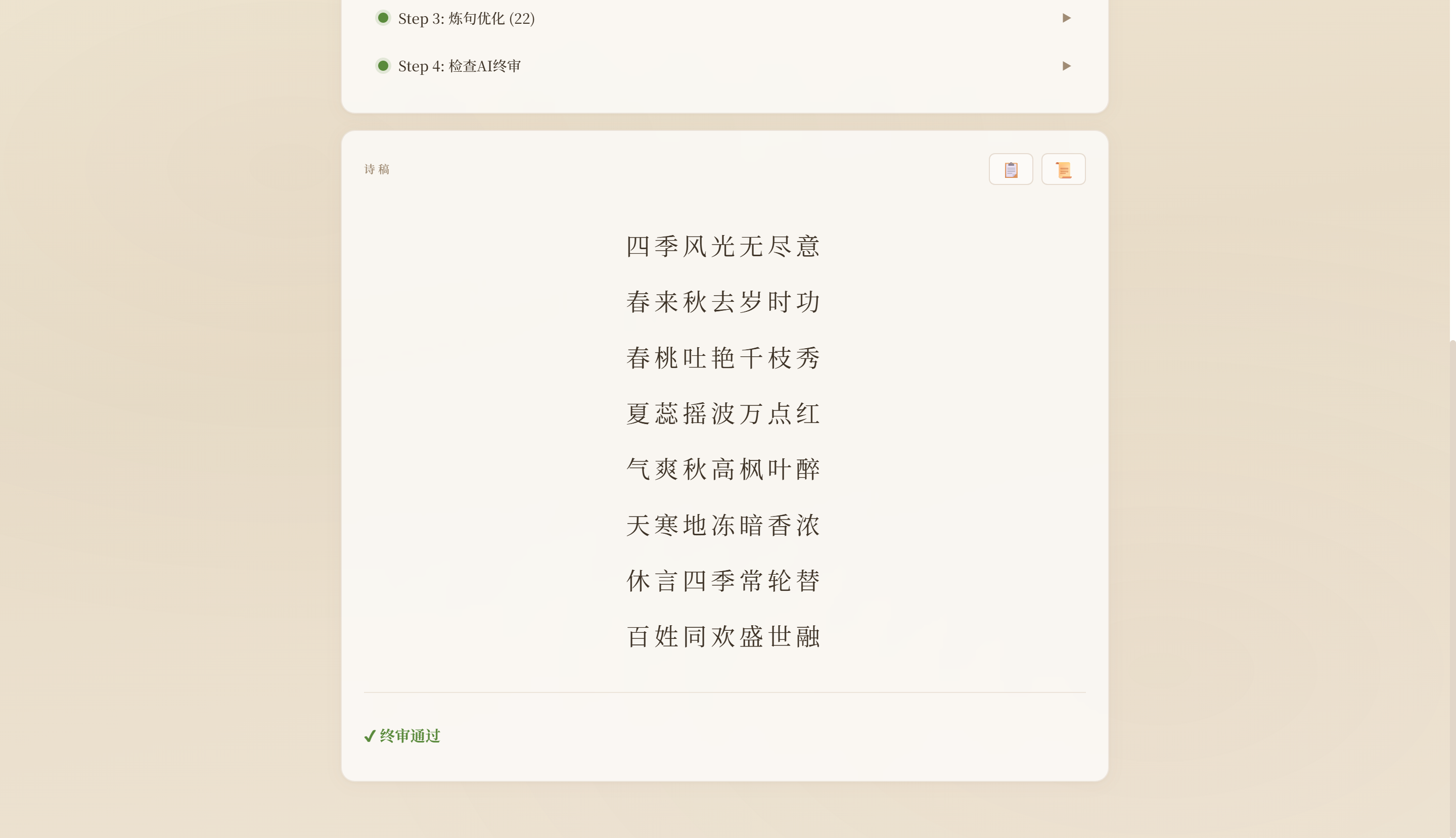
The following image shows the generation interface and refinement process:
Four‑Step Generation Pipeline
- Step 1 · Description Generation – The Writer AI takes the user’s modern‑language theme and produces a poetic description (a “creative outline” reused in later steps).
- Step 2 · First Draft – The Writer AI produces an initial draft respecting the template’s meter requirements (line count, syllable count). Only line and syllable counts are validated at this stage.
- Step 3 · Refinement Loop (ReAct) – The AI repeatedly calls
search_wordsto find compliant words/phrases andmodifyto change a line, the title, or the punctuation; it may also callsubmitwith a whole new poem (poem) or a punctuation list. Every modification immediately triggers symbolic‑layer full‑poem validation. The AI may callsubmitat any time, but the submission is accepted only after the full‑poem meter validation passes — otherwise it is rejected with the concrete errors and the loop continues. There is no upper limit on this loop; it continues until the draft is submitted with a valid meter. - Step 4 · Semantic Final Review – The Checker AI reviews the final draft from aspects such as coherence, thematic fit, and higher‑level dimensions beyond meter, then calls
submitto give a pass/fail decision. If it fails, suggestions are sent back to Step 3 for further refinement; if it passes, the poem is finalised.
Poem Sequence (组诗)
A poem sequence is generated in three phases, mirroring the multi‑movement architecture:
- Sequence Planning – The user fixes the poem count and meter(s) (one meter for all, or a meter per poem). The Architect AI then only uses
set_sequence_titleandset_poem_prompt(noadd_poem): the poems are pre‑seeded from the chosen meters, and the planner writes a self‑contained prompt for each. Missing prompts are fed back and planning continues (bounded bymax_rounds). Prompts must not use cross‑poem references such as “see poem N”. - Per‑Poem Composition – Poems are composed in order, each in an independent session that reuses the single‑poem pipeline (description → draft → refine → checker review). The sequence goal and the titles/first lines of earlier poems are injected; symbolic meter validation and the Checker AI run per poem.
- Assembly – Finished poems are assembled under the sequence title. Cross‑poem coherence relies on planning + injection rather than a whole‑sequence symbolic check.
Docker Deployment
Run as a web service (no local Python environment required):
Use the one‑click scripts in scripts/ (Windows and Linux/macOS, all support -h for help):
| Platform | Build | Run |
|---|---|---|
| PowerShell | .\scripts\build.ps1 [-t tag] [-b base-image] [-n] |
.\scripts\run.ps1 [-p port] [-d] [-l] [--no-volume] |
| cmd | scripts\build.bat [-t tag] [-b base-image] [-n] |
scripts\run.bat [-p port] [-d] [-l] [--no-volume] |
| bash | ./scripts/build.sh [-t tag] [-b base-image] [-n] |
./scripts/run.sh [-p port] [-d] [-l] [--no-volume] |
Example: .\scripts\build.ps1 -b docker.m.daocloud.io/library/python:3.14-slim to build, and .\scripts\run.ps1 -d -l to run in background and follow logs.
Notes:
- Dependencies – Uses the full project dependencies declared in
pyproject.tomland locked byuv.lock(managed with uv; includes desktop GUI and embedded reranking components, same functionality as local). The Linux image includes all these dependencies, so the image is large and initial build is slow, but can be reused after the first build. - Data Persistence – Configuration, lexicon, history, and logs are persisted via the
stanzaweaver-datavolume, mounted to~/.stanza_weaverinside the container. - Security – The application only accepts
localhost/127.0.0.1Host headers (viaapp.py’s_guard_local_access). Docker deployment must access viahttp://localhost:5000; on Linux you can also usenetwork_mode: host(see comments indocker-compose.yml). - Custom Templates – Templates created via the UI are written to
/app/src/templates/inside the container; they will be lost when the container is rebuilt (source is not mounted). To persist them, you would need to mount the directory. - Logs – Container log files are located at
~/.stanza_weaver/logs/stanza.log(persisted via the volume); you can override withSTANZAWEAVER_LOG_DIR.docker compose logsshows standard output.
Project Structure
StanzaWeaver/
├── .dockerignore
├── .gitignore
├── .python-version         # Python version (uv)
├── Dockerfile              # Image build (Python 3.14-slim + desktop/reranking dependencies)
├── LICENSE                 # MIT License
├── README.md               # Project documentation
├── Franx.ico               # Application icon
├── StanzaWeaver.spec       # PyInstaller build spec
├── app.py                  # pywebview + Flask + SocketIO entry point
├── docker-compose.yml      # Compose deployment
├── pyproject.toml          # Project dependencies (uv) + tool config
├── uv.lock                 # Locked dependency versions (uv)
├── assets/
│   └── 1.png               # Demo screenshot
├── scripts/                # Cross‑platform one‑click build/run scripts
│   ├── build.bat
│   ├── build.ps1
│   ├── build.sh
│   ├── run.bat
│   ├── run.ps1
│   └── run.sh
├── static/
│   └── style.css           # Frontend styles
├── templates/
│   └── index.html          # Frontend UI
└── src/
    ├── __init__.py
    ├── config.py            # LLM multi‑endpoint configuration
    ├── logging_setup.py     # Logging initialisation (RotatingFileHandler rotation)
    ├── models/              # Data models
    │   ├── __init__.py
    │   ├── syllable.py      # Syllable
    │   └── word.py          # Word entry
    ├── prosody/             # Symbolic layer: meter utilities
    │   ├── __init__.py
    │   ├── base.py          # SyllableAnalyzer abstract base class
    │   ├── chinese.py       # Chinese analyser (pypinyin)
    │   ├── english.py       # English analyser (CMUdict)
    │   ├── french.py        # French analyser
    │   ├── italian.py       # Italian analyser
    │   ├── latin.py         # Latin analyser
    │   ├── meter_validator.py   # Master meter validator
    │   └── syllable_counter.py  # Unified multi‑language syllable counting
    ├── knowledge/           # Local lexicon
    │   ├── __init__.py
    │   ├── embeddings.py    # sentence‑transformers vector reranking
    │   ├── importer.py      # Dataset import (CC‑CEDICT / CMUdict / Lexique / GLAW‑IT / Lewis & Short)
    │   ├── schema.sql       # SQLite schema
    │   └── vocabulary.py    # Query interface
    ├── agents/              # Neural layer: AI Agents
    │   ├── __init__.py
    │   ├── base.py          # LLM call wrapper
    │   ├── checker_ai.py    # Checker AI (1 tool)
    │   └── writer_ai.py     # Writer AI (3 tools)
    ├── tools/               # Agent tool definitions
    │   ├── __init__.py      # OpenAI Tool JSON Schemas
    │   ├── modify.py        # Modify execution (line/title/punctuation)
    │   └── search_words.py  # Word search execution
    ├── templates/           # Meter templates (Python classes)
    │   ├── __init__.py      # PoetryTemplate base class + registry
    │   ├── en.py            # English templates (sonnet, villanelle, heroic couplet)
    │   ├── fr.py            # French templates (rondeau, triolet, ballade)
    │   ├── it.py            # Italian templates (terza rima, ottava rima, canzone)
    │   ├── la.py            # Latin templates (hexameter, elegiac couplet, hendecasyllabic)
    │   └── zh.py            # Chinese templates (5‑char quatrain, 7‑char quatrain, etc.)
    └── pipeline/
        ├── __init__.py
        └── pipeline.py      # 4‑step pipeline + feedback loop
Meter Templates
Templates are defined as Python classes inheriting from PoetryTemplate, and must implement:
| Method | Description |
|---|---|
get_syllable_constraints() |
Per‑position syllable constraints (used by modify for single‑line validation) |
validate_full() |
Full‑poem rule checking (three‑level‑tail, solitary level, rhyme, etc.) |
describe() |
Human‑readable meter description (used in the AI prompt) |
Built‑in templates: 5‑character quatrain, 7‑character quatrain, 5‑character regulated verse, 7‑character regulated verse, Xiangjianhuan, Rumengling, Langtaosha, Qingpingyue, Shakespearean sonnet, villanelle, heroic couplet, Italian terza rima / ottava rima / canzone, French rondeau / triolet / ballade, Latin hexameter / elegiac couplet / hendecasyllabic.
To extend: add a new Python file under src/templates/, define the class, and register it in app.py; or use the UI’s “+ Custom” button to generate a template (automatically saved to src/templates/custom_*.py and restored on restart).
LLM Configuration
Supports any OpenAI‑compatible endpoint (OpenAI / Ollama / vLLM / DeepSeek / Groq, etc.):
{
  "writer": {
    "base_url": "https://api.openai.com/v1",
    "api_key": "sk-xxx",
    "model": "gpt-4o"
  },
  "checker": {
    "base_url": "http://localhost:11434/v1",
    "api_key": "ollama",
    "model": "qwen2.5:7b"
  }
}
Edit directly in the UI via the gear icon, or manually edit ~/.stanza_weaver/config.json.
Ollama Local Deployment
{
  "writer": {
    "base_url": "http://127.0.0.1:11434/v1",
    "api_key": "ollama",
    "model": "your_local_model_name"
  },
  "checker": {
    "base_url": "http://127.0.0.1:11434/v1",
    "api_key": "ollama",
    "model": "your_local_model_name"
  }
}
Notes:
- Base URL must end with
/v1(Ollama’s OpenAI‑compatible endpoint), otherwise returns 404. - The model name must be one installed (visible via
ollama list);:cloudcloud models require an Ollama subscription, otherwise returns 403. - 502 Bad Gateway – Usually caused by
HTTP_PROXY/HTTPS_PROXYenvironment variables set in the shell (e.g., Clash). StanzaWeaver automatically bypasses the proxy for127.0.0.1/localhost; if you still see 502, check your terminal environment variables.
License
All code is open‑source under the MIT License, Copyright (c) 2026 xhdlphzr.
All files under assets/ are under the CC BY-NC-ND 4.0 License, Copyright (c) 2026 xhdlphzr.
Reviews (0)
Sign in to leave a review.
Leave a reviewNo results found