mcp-manager
Health Warn
- License — License: MIT
- Description — Repository has a description
- Active repo — Last push 0 days ago
- Low visibility — Only 7 GitHub stars
Code Fail
- process.env — Environment variable access in scripts/github-release.mjs
- network request — Outbound network request in scripts/github-release.mjs
- exec() — Shell command execution in scripts/homebrew-cask.mjs
- process.env — Environment variable access in scripts/homebrew-cask.mjs
- network request — Outbound network request in scripts/homebrew-cask.mjs
Permissions Pass
- Permissions — No dangerous permissions requested
No AI report is available for this listing yet.
A cross-platform desktop app for managing MCP server configs across Claude Code, Codex, Cursor, VS Code, OpenCode, Gemini CLI, and more.

MCP Manager
A cross-platform desktop app for managing MCP server configs across Claude Code, Codex, Cursor, VS Code, OpenCode, Gemini CLI, and more.



English | 简体中文 | Latest Release | Release Guide
Why MCP Manager
MCP Manager is a cross-platform desktop app for people who do not want to hand-edit multiple MCP client configs.
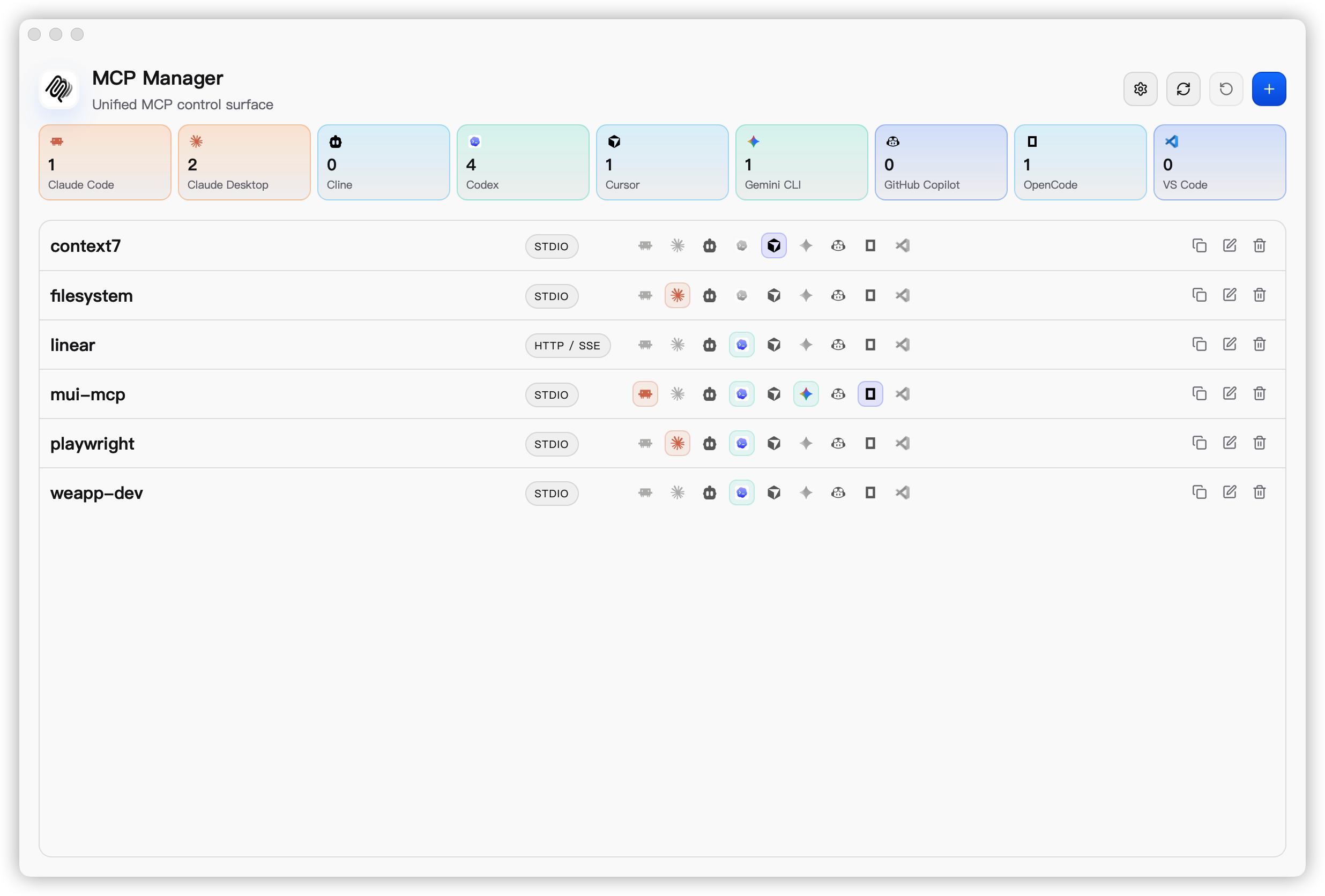
- Keep a unified MCP workspace for all configured servers
- Import existing entries from local client configuration
- Edit servers in form mode or raw JSON mode
- Apply generated configuration to multiple supported clients
- Review risky writes before files change
- Keep backups and rollback support during apply
- Use light mode, dark mode, or system theme
- Work in English or Simplified Chinese
Screenshots
Download & Installation
System Requirements
- Desktop packages are published for macOS, Windows, and Linux
- Building from source requires Node.js 20+, npm 10+, Rust stable, and Tauri system dependencies for your platform
macOS
Homebrew
brew tap xjeway/mcp-manager
brew install --cask mcp-manager
brew update
brew upgrade --cask mcp-manager
Manual Download
Download from:
Example macOS asset names:
MCP-Manager-<version>-<arch>.dmg
Arch guide:
- Apple Silicon Macs: choose
arm64oraarch64assets - Intel Macs: choose
x64orx86_64assets
After downloading the correct macOS asset, open it locally:
open ~/Downloads/MCP-Manager*.dmg
Current public macOS releases may still be unsigned while Apple signing and notarization are being prepared. If Gatekeeper blocks MCP Manager.app, use this fallback flow:
- Drag
MCP Manager.appinto/Applications. - In Finder, right-click the app once and choose
Open. - If macOS still says the app cannot be opened or is damaged, remove the quarantine flag and try again:
xattr -dr com.apple.quarantine "/Applications/MCP Manager.app"
open "/Applications/MCP Manager.app"
Windows
Manual Download
Download from:
Example Windows asset names:
MCP-Manager-<version>-<arch>-setup.exeMCP-Manager-<version>-x64.msi
Arch guide:
- Windows on ARM devices: choose the
arm64installer asset - Intel / AMD PCs: choose the
x64orx86_64installer asset
Package guide:
setup.exe: available for both Windows x64 and Windows arm64.msi: published for stable Windows x64 releases
Choose the asset that matches your arch, then run it locally:
Start-Process "C:\Path\To\MCP-Manager-Setup.exe"
# or
msiexec /i "C:\Path\To\MCP-Manager.msi"
Linux Users
Download the latest Linux build from the Releases page:
Example Linux asset names:
mcp-manager_<version>_<arch>.deb(Debian/Ubuntu)mcp-manager-<version>.<arch>.rpm(Fedora/RHEL/openSUSE)MCP-Manager-<version>-<arch>.AppImage(Universal)
Expanded distro guide:
.deb: Debian, Ubuntu, Linux Mint, Pop!_OS, elementary OS, and other Debian-based distributions.rpm: Fedora, RHEL, Rocky Linux, AlmaLinux, openSUSE, and other RPM-based distributions.AppImage: portable option for desktop Linux when you do not want a system package
Arch guide:
x86_64oramd64for most Intel and AMD 64-bit PCsarm64oraarch64for ARM64 Linux devices, when that asset is published in the release
Install with the matching command:
# Debian / Ubuntu
sudo dpkg -i ./mcp-manager_<version>_amd64.deb

# Fedora / RHEL / openSUSE
sudo rpm -i ./mcp-manager-<version>.x86_64.rpm

# AppImage
chmod +x ./MCP-Manager-<version>-<arch>.AppImage
./MCP-Manager-<version>-<arch>.AppImage
Build From Source
Install dependencies:
make install
Run the desktop app:
make tauri-dev
Run the web UI only:
make dev
Quick Start
- Launch
MCP Manager. - Import existing entries from local client configuration files.
- Edit servers in form mode or JSON mode.
- Apply the generated config to one or more supported clients.
- Review warnings, then write with backup and rollback protection.
Supported Clients
Available Now
| Client | Import | Apply |
|---|---|---|
| Claude Code | ✅ | ✅ |
| Claude Desktop | ✅ | ✅ |
| Codex | ✅ | ✅ |
| Cursor | ✅ | ✅ |
| OpenCode | ✅ | ✅ |
| GitHub Copilot | ✅ | ✅ |
| Gemini CLI | ✅ | ✅ |
| Antigravity | ✅ | ✅ |
| iFlow | ✅ | ✅ |
| Qwen Code | ✅ | ✅ |
| Cline | ✅ | ✅ |
| Windsurf | ✅ | ✅ |
| Kiro | ✅ | ✅ |
| VS Code | ✅ | ✅ |
How It Works
- The app reads local client configuration and converts it into the internal model
- Apply writes client-specific output with atomic updates, backup, and rollback support
Scope
Current scope is focused on configuration management. Runtime lifecycle management such as process start, stop, logs, and health checks is intentionally out of scope for v1.
Project Structure
mcp-manager/
  src/                frontend application
  src-tauri/          tauri app + rust backend
  public/             static assets and branding
  docs/               release notes and design references
  openspec/           change and spec tracking
Backend Modules
platform: OS-aware path resolution and environment contextadapters: per-client import and apply logiccore: canonical config model and merge behaviorparser: YAML / JSON / TOML parsing and extractionstorage: atomic write, backup, and rollbackcommands: Tauri commands exposed to the frontend
Development
make install
make dev
make tauri-dev
make build
make test
make check
make tauri-build
Release Automation
This repository includes GitHub Actions workflows for CI and desktop release packaging with the official Tauri release action.
See docs/releasing.md for:
- tag-driven GitHub Release publishing
- macOS, Windows, and Linux package generation
- updater signing setup
- optional platform code signing
- version sync and git tag helper commands
Contributing
Issues and pull requests are welcome.
If you plan to contribute a non-trivial change, open an issue or discussion first so the scope and direction are clear before implementation.
Local Development
make install
make tauri-dev
Before Opening a PR
make test
make check
Keep README.md and README.zh-CN.md in sync when changing user-facing project documentation.
License
MIT @ xJeway
Reviews (0)
Sign in to leave a review.
Leave a reviewNo results found