voiceclaw
Health Warn
- License — License: MIT
- Description — Repository has a description
- Active repo — Last push 0 days ago
- Low visibility — Only 6 GitHub stars
Code Pass
- Code scan — Scanned 12 files during light audit, no dangerous patterns found
Permissions Pass
- Permissions — No dangerous permissions requested
No AI report is available for this listing yet.
Voice to brain interface 🦞🎤🧠 for OpenClaw, Hermes, PI, etc
VoiceClaw








Open-source voice AI assistant. Talk to any AI model in real time from your phone or desktop.
VoiceClaw is a thin voice layer on top of your existing AI agent. Already have an agent that can search the web, manage your calendar, or access your tools? VoiceClaw gives it a voice -- connect any OpenAI-compatible agent and talk to it naturally through your phone or desktop.
Demo
Watch VoiceClaw in action as a thinking partner for real-time problem solving:
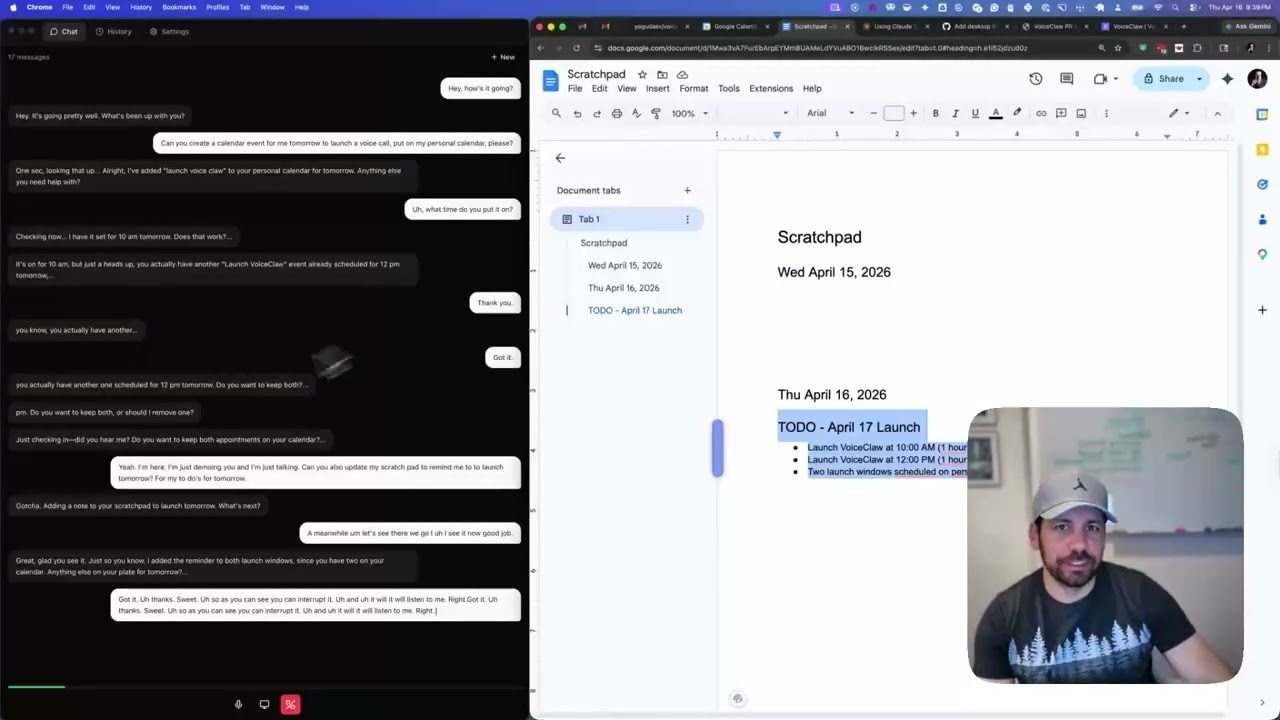
The magic of voice agents: Talk through ideas with your AI agent while you work. Real collaboration, real thinking.
Quick Start
Prerequisites
- Node.js 20+
- yarn
1. Clone the repo
git clone https://github.com/yagudaev/voiceclaw.git
cd voiceclaw
yarn install
2. Start the relay server
cd relay-server
cp .env.example .env
# Edit .env and add your API keys (see Configuration below)
yarn dev
The server starts on http://localhost:8080 with a test page at /test.
3. Start the desktop app
cd desktop
yarn dev
4. Start the mobile app
cd mobile
yarn dev
Or use the root workspace scripts:
yarn dev:server     # relay server only
yarn dev:desktop    # desktop app only
yarn dev:mobile     # mobile app only
yarn dev            # mobile + web + server together
How it works: the ask_brain pattern
Realtime voice models (Gemini Live, Grok Voice, OpenAI Realtime) are great at natural conversation but can't use tools, access memory, or call external APIs on their own. VoiceClaw bridges this gap with a simple escalation pattern:
- You speak to a realtime voice model that handles conversation naturally
- When the model needs capabilities it doesn't have, it calls the
ask_braintool - The relay server routes
ask_brainto your existing agent -- any OpenAI-compatible chat completions endpoint - Your agent does the heavy lifting (web search, memory lookup, tool execution) and streams results back
- The voice model incorporates the answer and keeps talking
Bring your own agent. VoiceClaw doesn't ship a brain -- it connects to yours. Point it at OpenClaw, Hermes, any MCP-based agent, or your own custom endpoint. If it speaks the OpenAI chat completions protocol, it works.
Architecture
---
config:
  layout: dagre
---
flowchart LR
 subgraph Clients["📲 Clients"]
    direction TB
        Mobile["📱 Mobile App<br>Native audio I/O"]
        Desktop["🖥️ Desktop App<br>Web Audio + screen share"]
  end
    Mobile -- WebSocket<br>audio+video --> Relay["🔗 Relay Server<br>(TypeScript / Node.js)<br><br>- Session mgmt<br>- Provider adapter<br>- Brain agent gateway<br>- Tracing (Langfuse / OTEL)"]
    Desktop -- WebSocket<br>audio + video --> Relay
    Relay <-- Provider WebSocket<br>audio + video --> Provider["📢 Realtime AI Provider<br>(Gemini Live / Grok Voice / OpenAI Realtime)<br><br>- Speech to Speech"]
    Provider -- tool call: ask_brain --> Relay
    Relay <-- POST /v1/chat/completions<br>(SSE stream) --> Brain["🧠 Brain AI<br>(OpenAI-compatible agent)<br><br>- Web search<br>- Calendar / tasks<br>- Long-term memory"]

     Mobile:::clientStyle
     Desktop:::clientStyle
     Relay:::relayStyle
     Provider:::providerStyle
     Brain:::brainStyle
    classDef clientStyle fill:#1c1636,stroke:#6c63ff,color:#f5f3ff
    classDef relayStyle fill:#4a3fd9,stroke:#c4c1ff,color:#f5f3ff
    classDef providerStyle fill:#14102a,stroke:#8b84ff,color:#c4c1ff
    classDef brainStyle fill:#2a1f5c,stroke:#c4c1ff,color:#f5f3ff
+------------------+        WebSocket         +----------------+        Streaming API       +------------------+
|                  | -----------------------> |                | -----------------------> |                  |
|   Mobile App     |    audio + events        |  Relay Server  |    audio + events        |  Realtime Voice  |
|   (Expo / iOS)   | <----------------------- |  (Node.js)     | <----------------------- |  (Gemini Live    |
|                  |                          |                |                          |   or OpenAI)     |
+------------------+                          |                |                          +------------------+
                                              |                |
+------------------+                          |  ask_brain     |        HTTP / SSE         +------------------+
|                  | -----------------------> |  --------------|-------------------------> |                  |
|   Desktop App    |    audio + events        |                |    OpenAI-compatible      |   Brain Agent    |
|   (Electron)     | <----------------------- |                |    chat completions       |   (any agent)    |
|                  |                          +----------------+                           +------------------+
+------------------+                                                                       OpenClaw, Hermes,
                                                                                           or your own agent
Mobile app -- React Native / Expo iOS app with voice capture and playback.
Desktop app -- Electron + React + Tailwind macOS app with screen sharing support.
Relay server -- TypeScript / Node.js WebSocket server that brokers sessions between clients and AI providers.
Brain agent -- Any OpenAI-compatible agent endpoint. The relay calls it via ask_brain when the voice model needs tools, memory, or external data. Swap in any agent you want.
Configuration
The relay server reads these environment variables from relay-server/.env:
| Variable | Required | Description |
|---|---|---|
GEMINI_API_KEY |
Yes (for Gemini provider) | Google Gemini API key for Live API |
XAI_API_KEY |
Yes (for xAI provider) | xAI API key for Grok Voice API |
OPENAI_API_KEY |
Yes (for OpenAI provider) | OpenAI API key for Realtime API |
RELAY_API_KEY |
Recommended | API key clients must send to connect. Generate with openssl rand -hex 24 |
BRAIN_GATEWAY_AUTH_TOKEN |
Optional | Auth token for your brain agent endpoint |
BRAIN_GATEWAY_URL |
Optional | Brain agent URL -- any OpenAI-compatible endpoint (default: http://localhost:18789) |
PORT |
Optional | Server port (default: 8080) |
LANGFUSE_PUBLIC_KEY |
Optional | Langfuse tracing public key |
LANGFUSE_SECRET_KEY |
Optional | Langfuse tracing secret key |
LANGFUSE_BASE_URL |
Optional | Langfuse endpoint (default: https://cloud.langfuse.com) |
You need at least one provider key (GEMINI_API_KEY, XAI_API_KEY, or OPENAI_API_KEY) for the relay to be useful.
Project Structure
voiceclaw/
  mobile/           React Native (Expo) iOS app
  desktop/          Electron + React + Tailwind macOS app
  relay-server/     TypeScript WebSocket relay server
  website/          Next.js marketing site
  agent/            Agent plugins and configuration
  package.json      Yarn workspaces root
Contributing
- Fork the repo and create a feature branch
- Make your changes
- Open a pull request against
main
Please keep PRs focused -- one feature or fix per PR.
License
Reviews (0)
Sign in to leave a review.
Leave a reviewNo results found