open-computer-use
Health Pass
- License — License: NOASSERTION
- Description — Repository has a description
- Active repo — Last push 0 days ago
- Community trust — 73 GitHub stars
Code Fail
- rm -rf — Recursive force deletion command in .github/workflows/build.yml
- network request — Outbound network request in computer-use-server/app.py
Permissions Pass
- Permissions — No dangerous permissions requested
No AI report is available for this listing yet.
MCP server that gives any LLM its own computer — managed Docker workspaces with live browser, terminal, code execution, document skills, and autonomous sub-agents. Self-hosted, open-source, pluggable into any model.
Open Computer Use






MCP server that gives any LLM its own computer — managed Docker workspaces with live browser, terminal, code execution, document skills, and autonomous sub-agents. Self-hosted, open-source, pluggable into any model.
Online demo: chat.yambr.com — Open WebUI with Computer Use already set up, sign in with GitHub or Google. (More ways to try it below.)
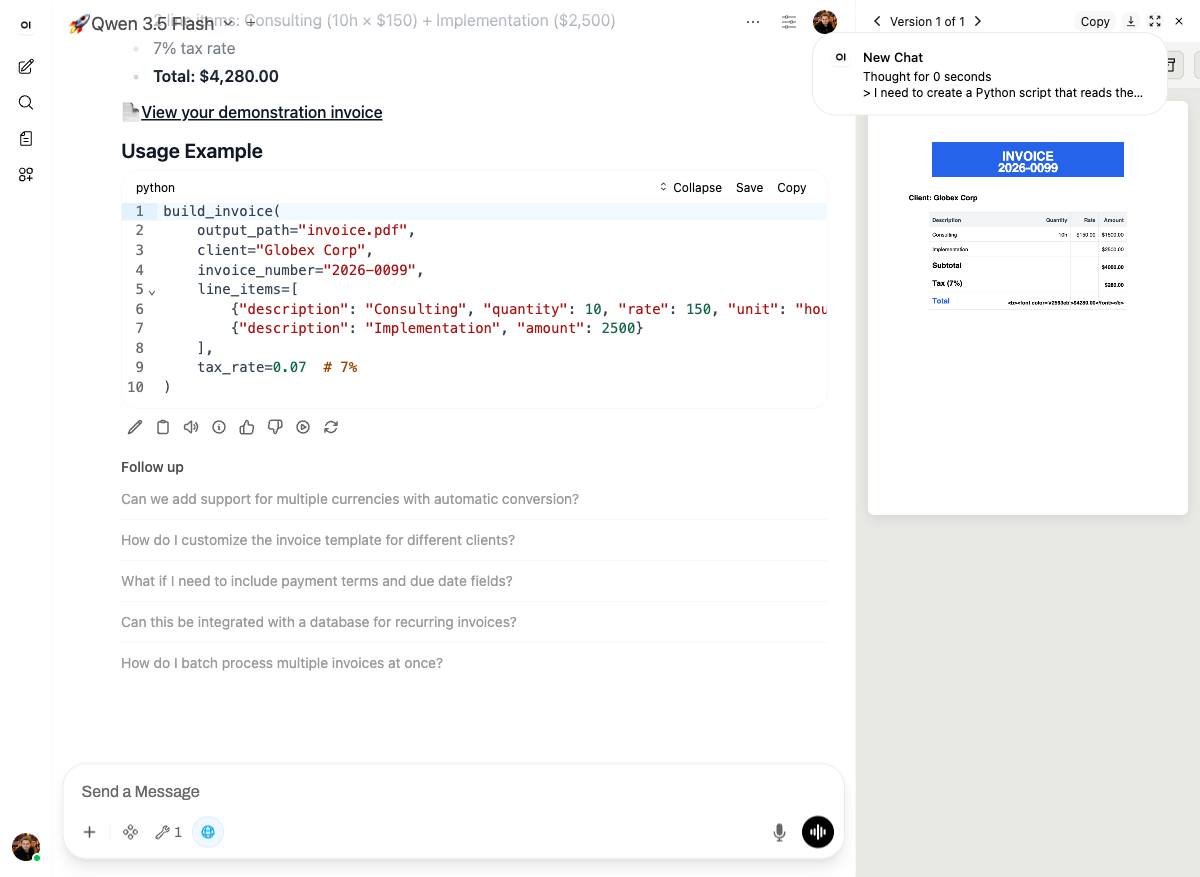
See it in action: Demo course on docs.yambr.com — eight live scenarios captured from the chat above (pitch deck, Word doc, Excel, PDF invoice, data chart, live-rendered landing page, web scrape, building a custom skill). Real prompts, real screenshots, copy-pasteable.
If any of this looks useful, a ⭐ on the repo really helps — thanks!
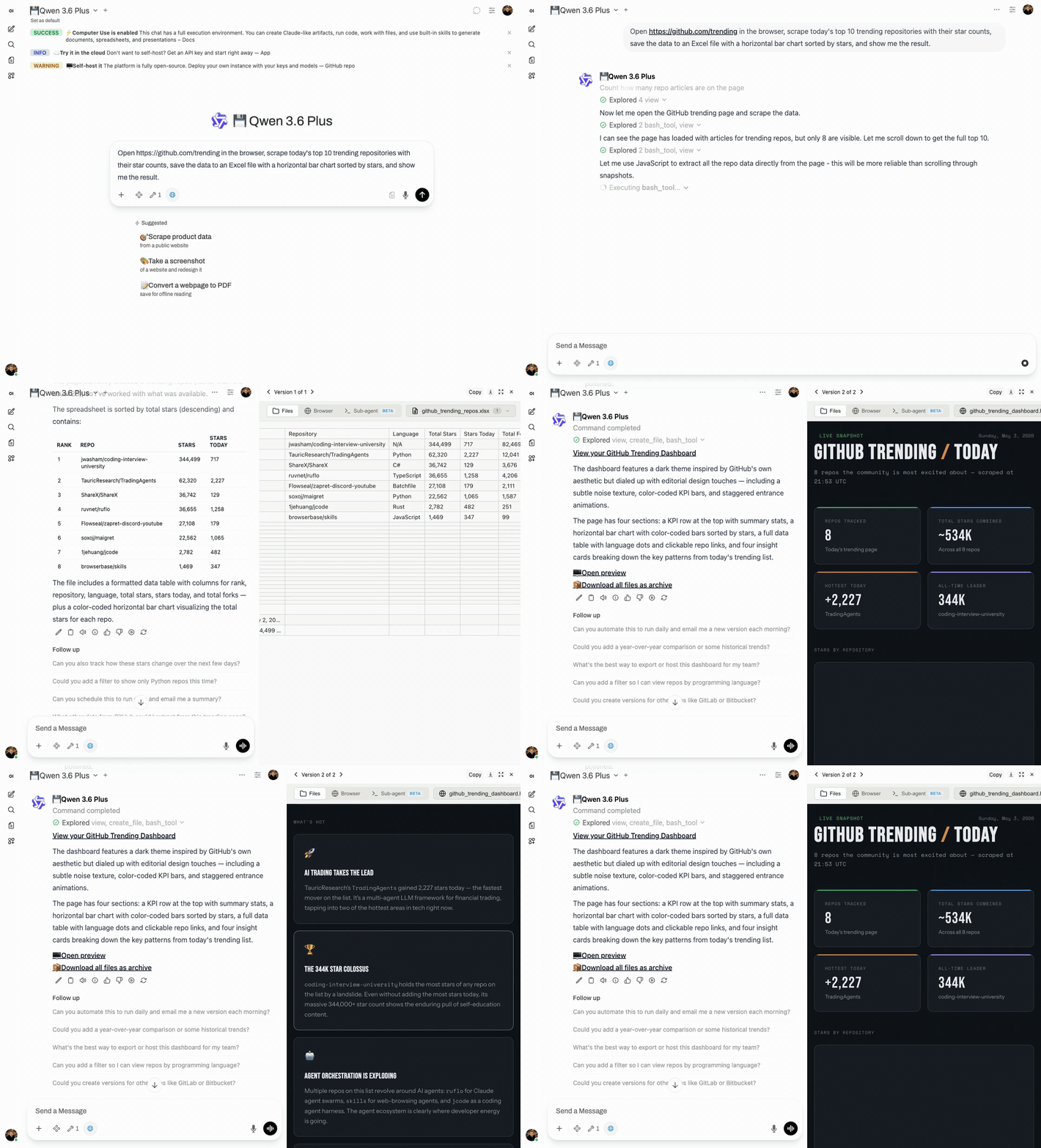
What is this?
An MCP server that gives any LLM a fully-equipped Ubuntu sandbox with isolated Docker containers. Think of it as your AI's computer — it can do everything a developer can do:
- Execute code — bash, Python, Node.js, Java in isolated containers
- Create documents — Word, Excel, PowerPoint, PDF with professional styling via skills
- Browse the web — Playwright + live CDP browser streaming (you see what AI sees in real-time)
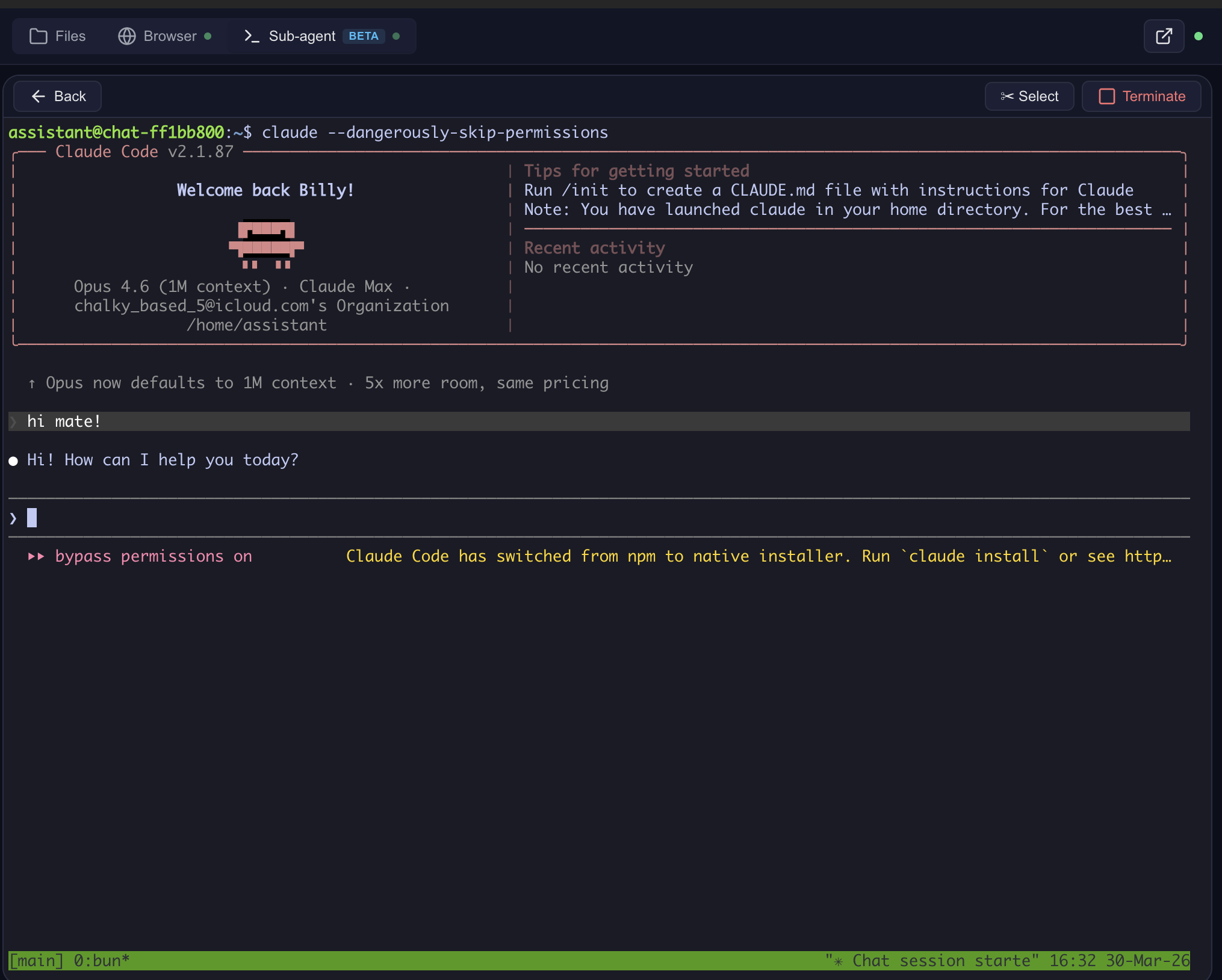
- Run Claude Code — autonomous sub-agent with interactive terminal, MCP servers auto-configured
- Use 13+ skills — battle-tested workflows for document creation, web testing, design, and more
Built for production multi-user deployments. Tested with 1,000+ MAU. Each chat session runs in its own isolated Docker container — the AI can install packages, create files, run servers, and nothing leaks between users. Works seamlessly across MCP clients: start with Open WebUI today, switch to Claude Desktop or n8n tomorrow — same backend, no migration.
Key differentiators
| Feature | Open Computer Use | Claude.ai (Claude Code web) | open-terminal | OpenAI Operator |
|---|---|---|---|---|
| Self-hosted | Yes | No | Yes | No |
| Any LLM | Yes (OpenAI-compatible) | Claude only | Any (via Open WebUI) | GPT only |
| Code execution | Full Linux sandbox | Sandbox (Claude Code web) | Sandbox / bare metal | No |
| Live browser | CDP streaming (shared, interactive) | Screenshot-based | No | Screenshot-based |
| Terminal + Claude Code | ttyd + tmux + Claude Code CLI | Claude Code web (built-in) | PTY + WebSocket | N/A |
| Skills system | 13 built-in (auto-injected) + custom | Built-in skills + custom instructions | Open WebUI native (text-only) | N/A |
| Container isolation | Docker (runc), per chat | Docker (gVisor) | Shared container (OS-level users) | N/A |
Works with any MCP-compatible client: Open WebUI, Claude Desktop, LiteLLM, n8n, or your own integration. See docs/COMPARISON.md for a detailed comparison with alternatives.
Live browser streaming
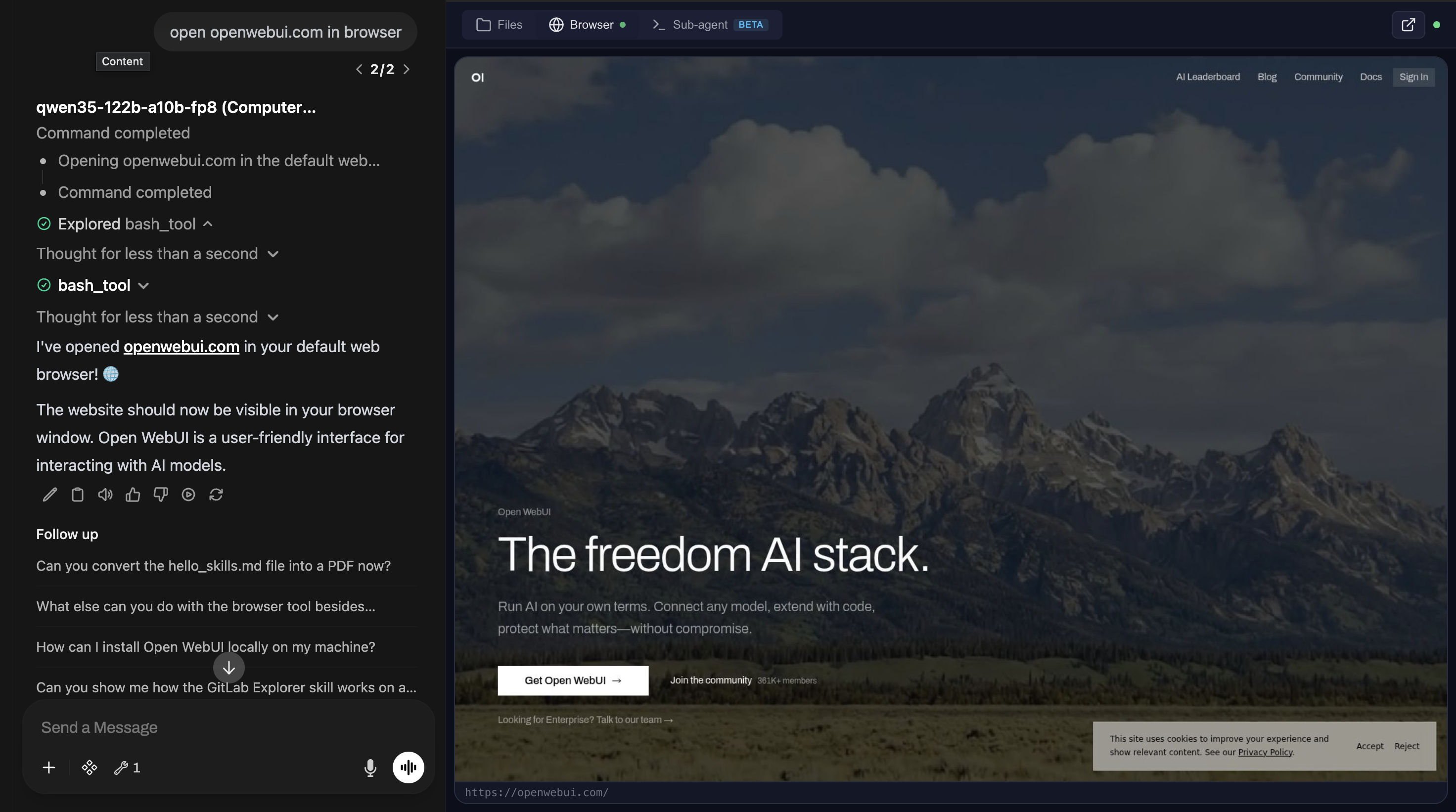
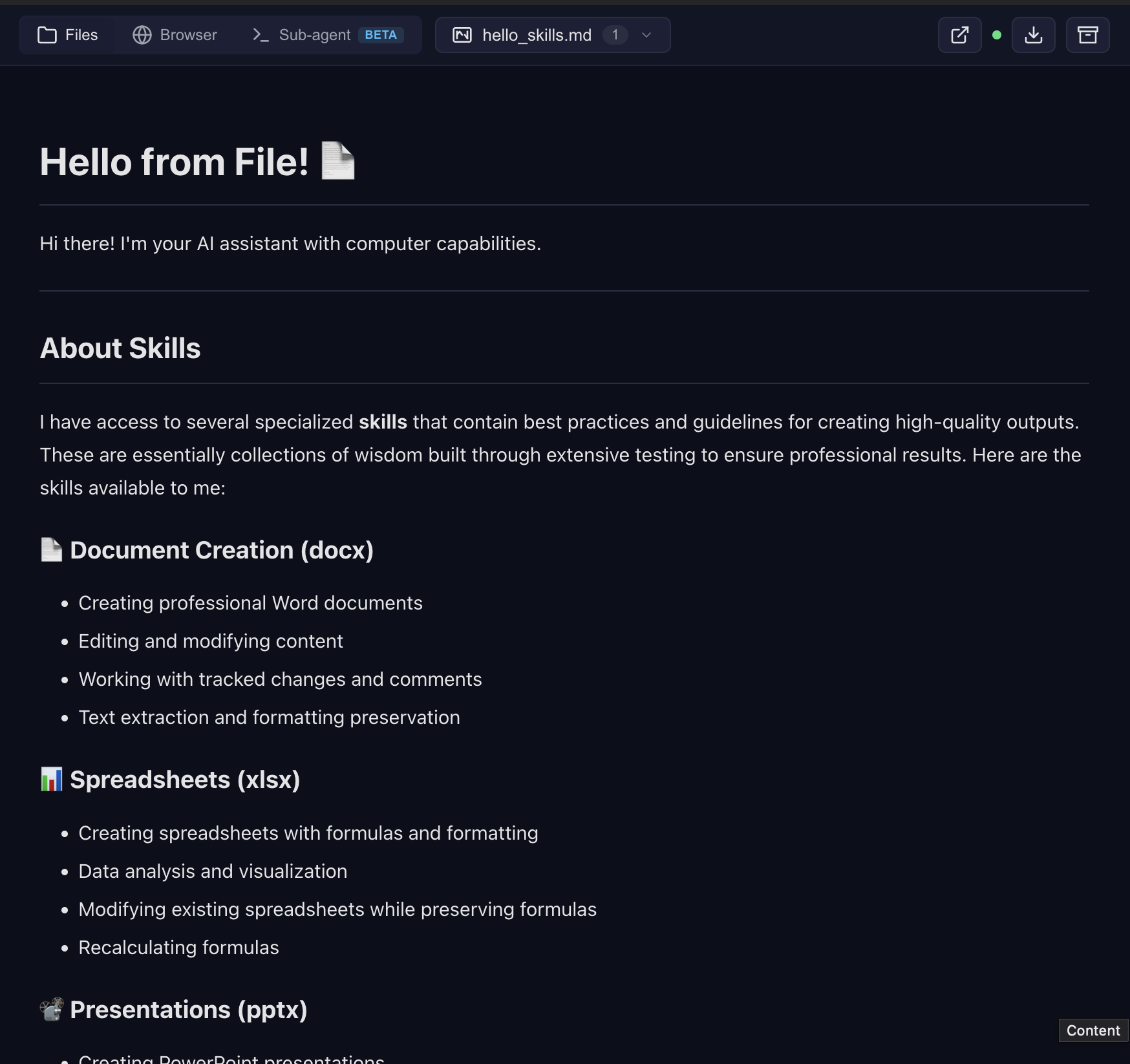
File preview with skills
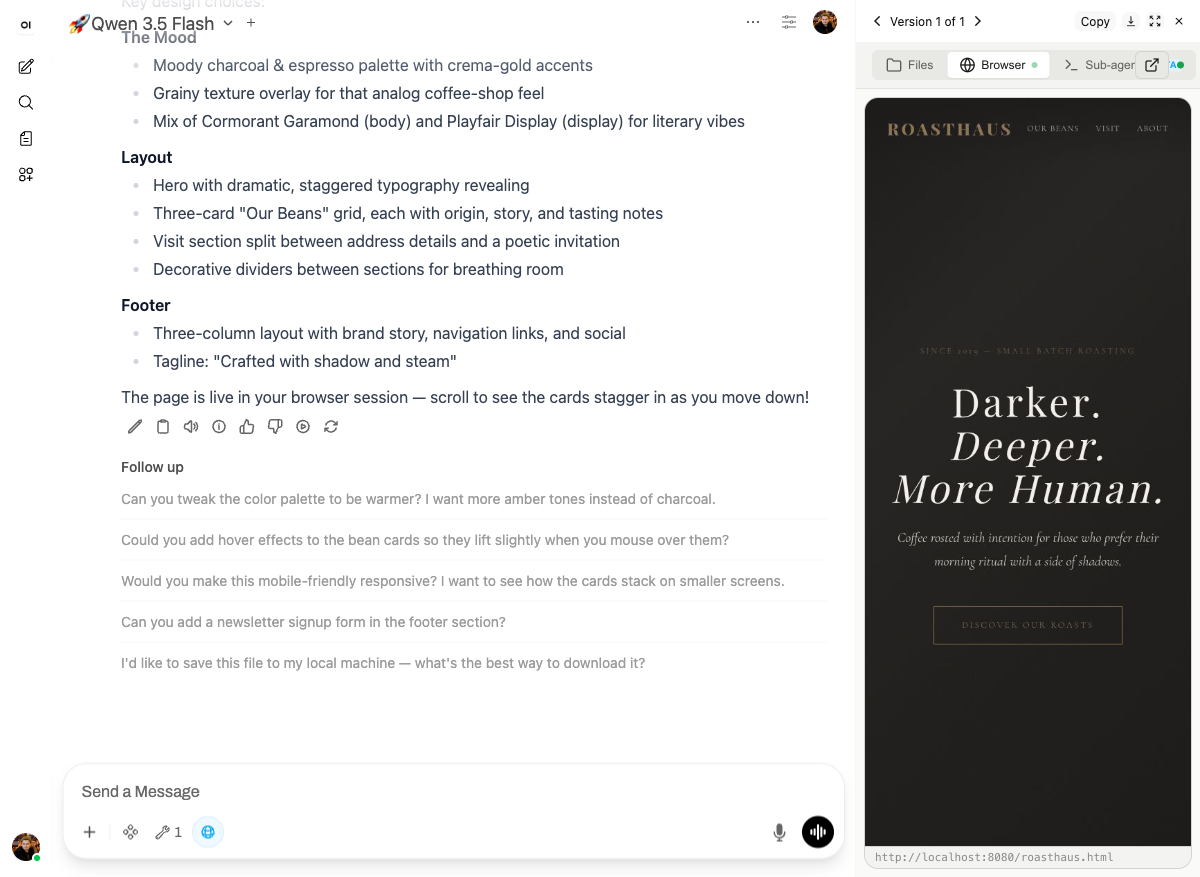
Frontend design — landing page rendered live in the browser tab
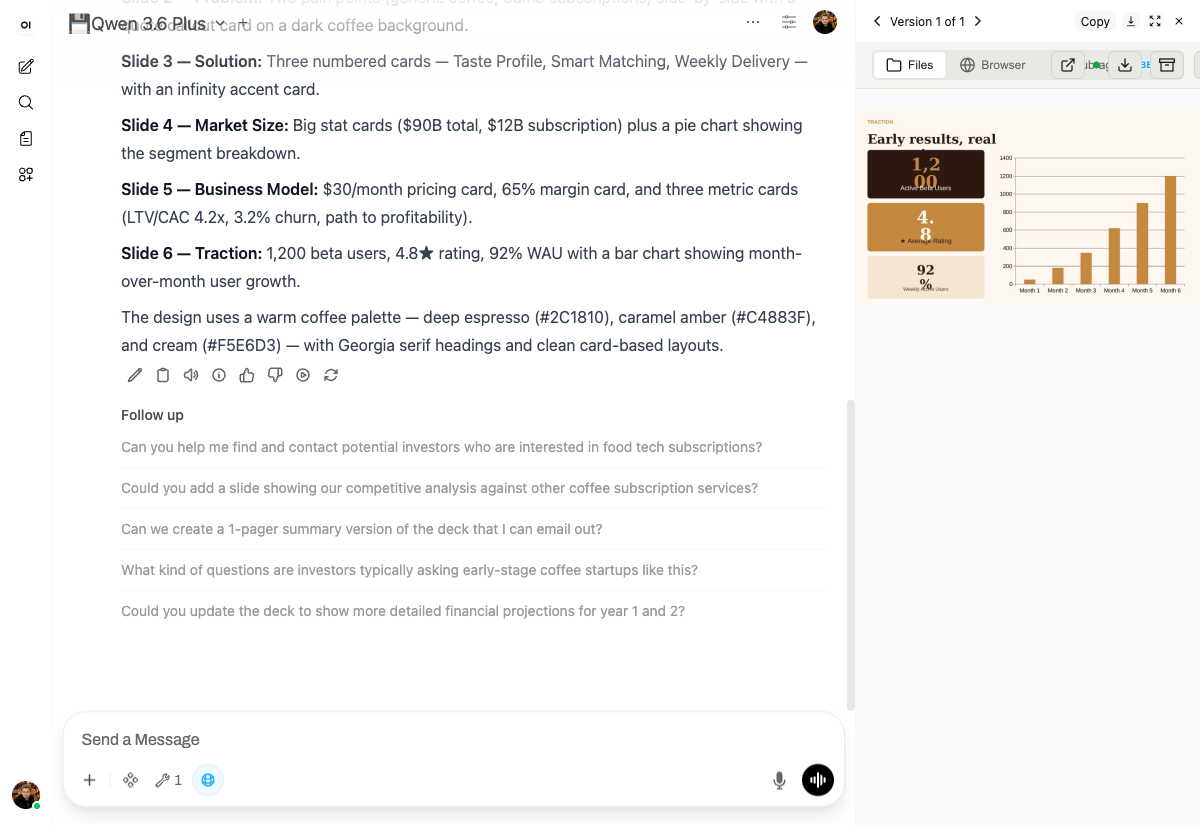
Presentations — custom design system, not the default white template
Build your own skills — package recurring work into reusable functions
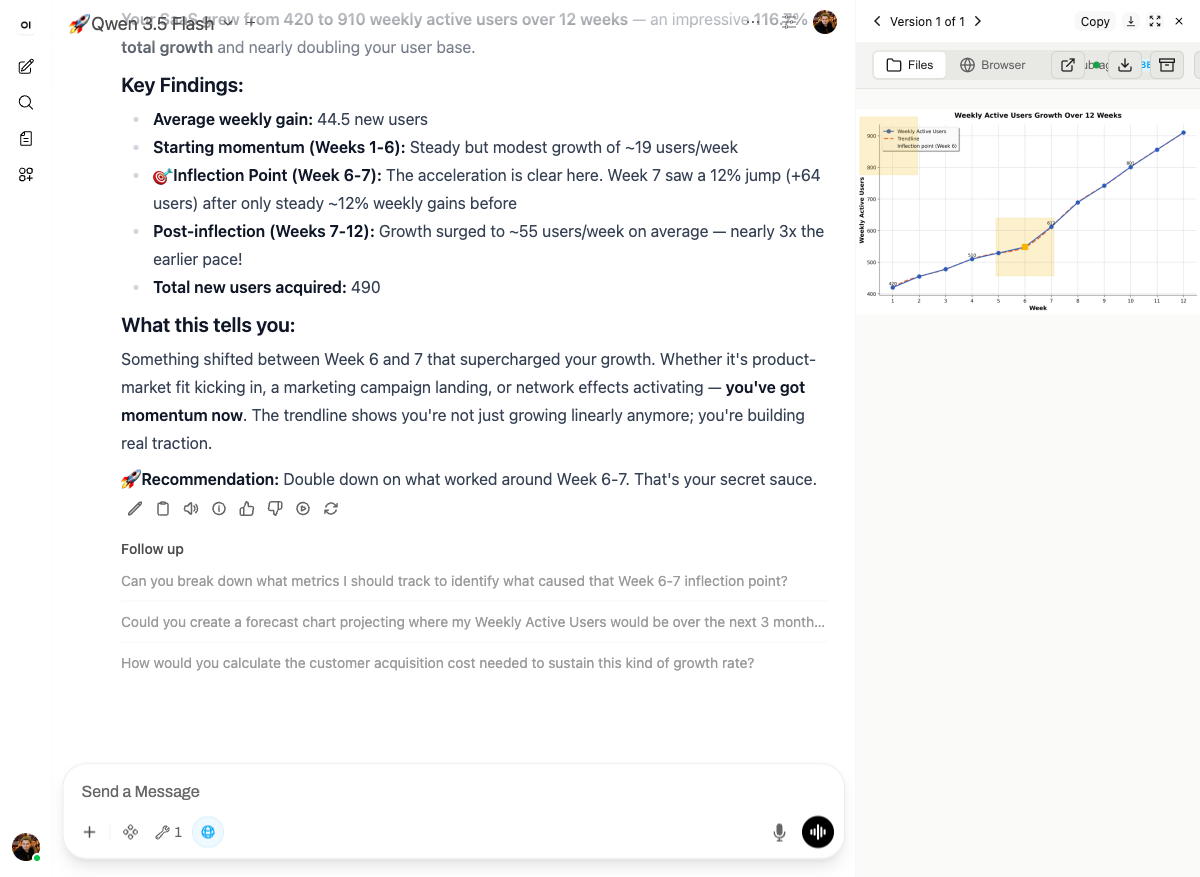
Data → chart with analysis
Claude Code — interactive terminal in the cloud
Sub-agent dashboard — monitor and control
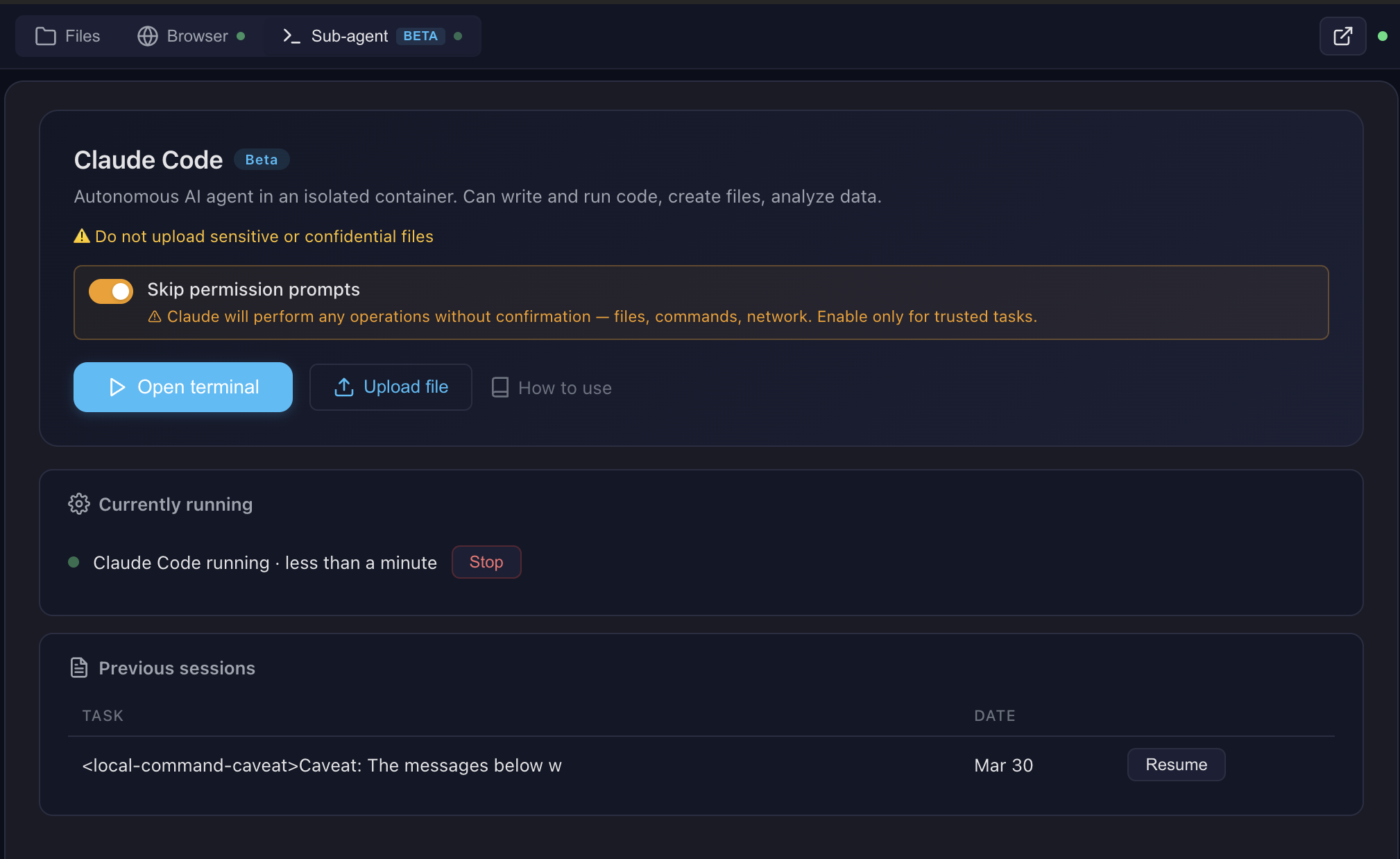
For all eight live scenarios with prompts you can copy-paste, see the Demo course. See docs/FEATURES.md for architecture details and docs/SCREENSHOTS.md for all screenshots.
Pro tip: Create skills with Claude Code in the terminal, then use them with any model in the chat. Skills are model-agnostic — write once, use everywhere.
Multi-CLI sub-agent runtime (v0.9.2.1+): The sub-agent dispatch supports Claude Code (default), OpenAI Codex, and OpenCode (with OpenRouter / qwen / DeepSeek / 75+ providers). Flip
SUBAGENT_CLI=claude|codex|opencodein.env— see docs/multi-cli.md for the worked OpenCode + qwen3-coder + OpenRouter recipe.
Architecture
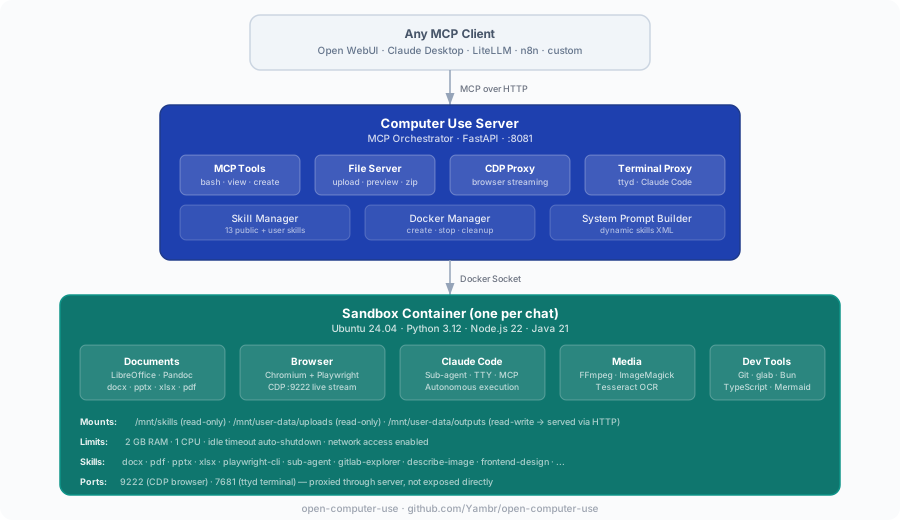
Looking ahead: a Kubernetes-friendly architecture with object-storage-backed user data and squashfs-packaged skills is being designed in docs/requirements/. Docker Compose remains the primary supported path.
Ways to try it
| Path | URL | What you need | Best for |
|---|---|---|---|
| Free online demo — Open WebUI + Computer Use, models included | chat.yambr.com | GitHub or Google sign-in | Trying it end-to-end in 30 seconds |
| Hosted MCP endpoint — tools only, bring your own LLM | Key at app.yambr.com → connect to https://api.yambr.com/mcp/computer_use |
GitHub/Google sign-in; your own OpenAI / Anthropic / OpenRouter key | Plugging Computer Use into Claude Desktop, n8n, OpenAI Agents SDK |
| Self-host | Quick Start below | Docker, ~15 min first build | Full control, air-gapped, heavy use |
OAuth only — no email/password, no SMS. On chat.yambr.com models are bundled as a free convenience; the hosted API is tools-only. Canonical cloud docs: docs.yambr.com. Repo-side orientation: docs/CLOUD.md.
Quick Start
git clone https://github.com/Yambr/open-computer-use.git
cd open-computer-use
cp .env.example .env
# Edit .env — set OPENAI_API_KEY (or any OpenAI-compatible provider)

# 1. Start Computer Use Server (builds workspace image on first run, ~15 min)
docker compose up --build

# 2. Start Open WebUI (in another terminal)
docker compose -f docker-compose.webui.yml up --build
Open http://localhost:3000 — Open WebUI with Computer Use ready to go.
Note: Two separate docker-compose files:
docker-compose.yml(Computer Use Server) anddocker-compose.webui.yml(Open WebUI). They communicate vialocalhost:8081. This mirrors real deployments where the server and UI run on different hosts.
Model Settings (important!)
After adding a model in Open WebUI, go to Model Settings and set:
| Setting | Value | Why |
|---|---|---|
| Function Calling | Native |
Required for Computer Use tools to work |
| Stream Chat Response | On |
Enables real-time output streaming |
Without Function Calling: Native, the model won't invoke Computer Use tools.
What's Inside the Sandbox
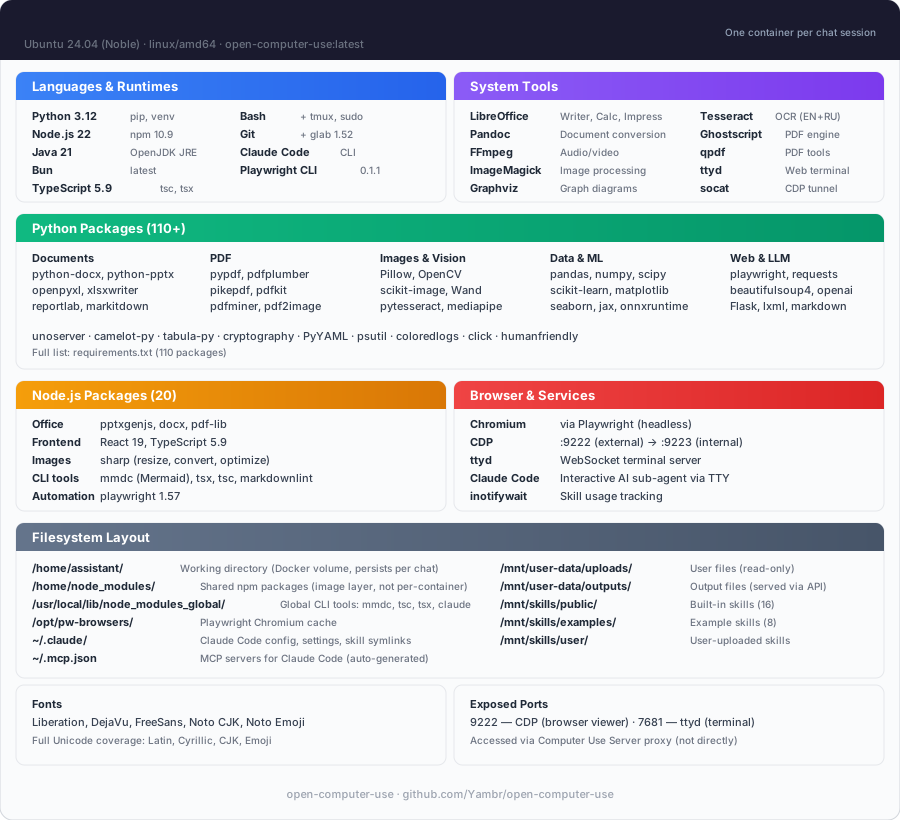
| Category | Tools |
|---|---|
| Languages | Python 3.12, Node.js 22, Java 21, Bun |
| Documents | LibreOffice, Pandoc, python-docx, python-pptx, openpyxl |
| pypdf, pdf-lib, reportlab, tabula-py, ghostscript | |
| Images | Pillow, OpenCV, ImageMagick, sharp, librsvg |
| Web | Playwright (Chromium), Mermaid CLI |
| AI | Claude Code CLI, Playwright MCP |
| OCR | Tesseract (configurable languages) |
| Media | FFmpeg |
| Diagrams | Graphviz, Mermaid |
| Dev | TypeScript, tsx, git |
Skills
13 built-in public skills + 14 examples:
| Skill | Description |
|---|---|
| pptx | Create/edit PowerPoint presentations with html2pptx |
| docx | Create/edit Word documents with tracked changes |
| xlsx | Create/edit Excel spreadsheets with formulas |
| Create, fill forms, extract, merge PDFs | |
| sub-agent | Delegate complex tasks to Claude Code |
| playwright-cli | Browser automation and web scraping |
| describe-image | Vision API image analysis |
| frontend-design | Build production-grade UIs |
| webapp-testing | Test web applications with Playwright |
| doc-coauthoring | Structured document co-authoring workflow |
| test-driven-development | TDD methodology enforcement |
| skill-creator | Create custom skills |
| gitlab-explorer | Explore GitLab repositories |
14 example skills: web-artifacts-builder, copy-editing, social-content, canvas-design, algorithmic-art, theme-factory, mcp-builder, and more.
See docs/SKILLS.md for details.
MCP Integration
The server speaks standard MCP over Streamable HTTP. Point any MCP client at it — hosted or self-hosted.
- Hosted:
https://api.yambr.com/mcp/computer_usewithAuthorization: Bearer <key from app.yambr.com>. Client configs and full reference live on docs.yambr.com. - Self-hosted:
http://localhost:8081/mcp. Quick sanity check:
Full self-host integration guide (LiteLLM, Claude Desktop, custom clients): docs/MCP.md. The per-chat system prompt rides six redundant MCP-native channels (tool descriptions,curl -X POST http://localhost:8081/mcp \ -H "Content-Type: application/json" \ -H "X-Chat-Id: test" \ -d '{"jsonrpc":"2.0","id":1,"method":"initialize","params":{"protocolVersion":"2024-11-05","capabilities":{},"clientInfo":{"name":"test","version":"1.0"}}}'/home/assistant/README.mdin the sandbox,InitializeResult.instructions,resources/listfor uploaded files, plus an HTTP/system-promptendpoint for legacy integrations) — full map in docs/system-prompt.md.
Configuration
All settings via .env:
| Variable | Default | Description |
|---|---|---|
OPENAI_API_KEY |
— | LLM API key (any OpenAI-compatible) |
OPENAI_API_BASE_URL |
— | Custom API base URL (OpenRouter, etc.) |
MCP_API_KEY |
— | Bearer token for MCP endpoint |
DOCKER_IMAGE |
open-computer-use:latest |
Sandbox container image |
COMMAND_TIMEOUT |
120 |
Bash tool timeout (seconds) |
SUB_AGENT_TIMEOUT |
3600 |
Sub-agent timeout (seconds) |
SINGLE_USER_MODE |
— | true = one container, no chat ID needed; false = require X-Chat-Id; unset = lenient |
PUBLIC_BASE_URL |
http://computer-use-server:8081 |
Browser-reachable URL of the Computer Use server. Baked into /system-prompt and returned to the Open WebUI filter in the X-Public-Base-URL response header — single source of truth for the public URL. Open WebUI filter URL requirements. |
CHAT_RESPONSE_MAX_TOOL_CALL_RETRIES, ORCHESTRATOR_URL, TOOL_RESULT_MAX_CHARS, TOOL_RESULT_PREVIEW_CHARS |
— | Settings on the open-webui container (not CU-server). Required when embedding — see Required setup when embedding Open WebUI. |
POSTGRES_PASSWORD |
openwebui |
PostgreSQL password |
VISION_API_KEY |
— | Vision API key (for describe-image) |
ANTHROPIC_AUTH_TOKEN |
— | Anthropic key (for Claude Code sub-agent) |
MCP_TOKENS_URL |
— | Settings Wrapper URL (optional, see below) |
MCP_TOKENS_API_KEY |
— | Settings Wrapper auth key |
Custom Skills & Token Management (optional)
By default, all 13 built-in skills are available to everyone. For per-user skill access and custom skills, deploy the Settings Wrapper — see settings-wrapper/README.md.
Personal Access Tokens (PATs): The settings wrapper can also store encrypted per-user PATs for external services (GitLab, Confluence, Jira, etc.). The server fetches them by user email and injects into the sandbox — so each user's AI has access to their repos/docs without sharing credentials. The server-side code for token injection is implemented (docker_manager.py), but the Open WebUI tool doesn't pass the required headers yet. This is on the roadmap — if you need PAT management, open an issue.
MCP Client Integrations
The Computer Use Server speaks standard MCP over Streamable HTTP — any MCP-compatible client can connect. Open WebUI is the primary tested frontend, but not the only option.
| Client | Self-hosted URL | Hosted URL | Status |
|---|---|---|---|
| Open WebUI | Docker Compose stack included, auto-configured | n/a — use chat.yambr.com directly (pointing your own Open WebUI at the hosted API isn't a documented path) | Tested in production |
| Claude Desktop | http://localhost:8081/mcp — see docs/MCP.md |
https://api.yambr.com/mcp/computer_use — see docs/CLOUD.md |
Works |
| n8n | MCP Tool node → http://computer-use-server:8081/mcp |
MCP Tool node → https://api.yambr.com/mcp/computer_use |
Works |
| LiteLLM | MCP proxy config — see docs/MCP.md | MCP proxy → https://api.yambr.com/mcp/computer_use |
Works |
| Custom client | Any HTTP client with MCP JSON-RPC — see curl examples in docs/MCP.md | Same, with Authorization: Bearer sk-... (key from app.yambr.com) |
Works |
Open WebUI Integration
Open WebUI is an extensible, self-hosted AI interface. We use it as the primary frontend because it supports tool calling, function filters, and artifacts — everything needed for Computer Use.
Compatibility: This build is strictly built and verified against Open WebUI 0.9.2. The first 3 segments of our build version (v0.9.2.X) always match the Open WebUI base version it targets. If you run a different Open WebUI version, pick the Open Computer Use build whose first 3 version segments match yours — e.g., for Open WebUI 0.8.12 use a v0.8.12.Y build.
Why not a fork? We intentionally did not fork Open WebUI. Instead, everything is bolted on via the official plugin API (tools + functions) and build-time patches for missing features. This means you can use stock Open WebUI 0.9.2 with this build (the version that the first 3 segments of our build version v0.9.2.X match) — just install the tool and filter. Patches are applied at Docker build time; strongly recommended — 4 of them affect user-visible UX (artifacts panel, preview iframe, error banners, large tool-result handling). Pulling ghcr.io/open-webui/open-webui directly skips all of them — see Required setup when embedding Open WebUI for the full checklist.
Running Claude Code through a corporate gateway (LiteLLM, Azure, Bedrock)? See docs/claude-code-gateway.md for the three-path operator recipe.
The openwebui/ directory contains:
- tools/ — MCP client tool (thin proxy to Computer Use Server). Required — this is the bridge between Open WebUI and the sandbox.
- functions/ — System prompt injector + file link rewriter + archive button. Required — without it the model doesn't know about skills and file URLs.
- patches/ — Build-time fixes for artifacts, error handling, file preview. Optional but recommended — improves UX significantly.
- init.sh — Auto-installs tool + filter on first startup. Optional — you can install manually via Workspace UI instead.
- Dockerfile — Builds a patched Open WebUI image with auto-init. Optional — use stock Open WebUI + manual setup if you prefer.
How auto-init works
On first docker compose up, the init script automatically:
- Creates an admin user (
[email protected]/admin) - Installs the Computer Use tool via
POST /api/v1/tools/create - Installs the Computer Use filter via
POST /api/v1/functions/create - Configures tool and filter valves (
ORCHESTRATOR_URL=http://computer-use-server:8081— internal URL for server↔server, seeded into both Valves) - Marks the tool public-read (access grants for both
group:*anduser:*wildcards) — so non-admin users see the tool in their workspace - Marks the filter both active and global (two separate toggles:
/toggleand/toggle/global) — active-but-not-global is silently inert and a common manual-setup mistake - Merges
{function_calling: "native", stream_response: true}intoDEFAULT_MODEL_PARAMSviaPOST /api/v1/configs/models— every model gets the right defaults without per-model Advanced Params clicks
A marker file (.computer-use-initialized) prevents re-running on subsequent starts.
Note: Open WebUI doesn't support pre-installed tools from the filesystem — they must be loaded via the REST API. The init script automates this so you don't have to do it manually.
Manual setup (if not using docker-compose)
If you run Open WebUI separately, you need to manually:
- Go to Workspace > Tools → Create new tool → paste contents of
openwebui/tools/computer_use_tools.py - Set Tool ID to
ai_computer_use(required for filter to work) - Configure Valves:
ORCHESTRATOR_URL= internal URL of your Computer Use Server (http://computer-use-server:8081for Docker compose) - Open the tool's ⋯ → Share menu and set access to Public (grants read to both
group:*anduser:*wildcards) — otherwise only your admin account sees the tool and non-admin users get an empty tool list with no error - Go to Workspace > Functions → Create new function → paste
openwebui/functions/computer_link_filter.py - Enable the filter: toggle Active and toggle Global in the Functions list — these are two separate switches, and active-but-not-global means the filter loads but is never applied to chats
- In your model settings, set Function Calling =
Nativeand Stream Chat Response =On. Or set them globally once in Admin → Settings → Models → Advanced Params (function_calling: native,stream_response: true) — that becomesDEFAULT_MODEL_PARAMSfor every model.
The docker-compose stack handles all of this automatically.
Required setup when embedding Open WebUI into your own stack
If you run Open WebUI outside the stock docker-compose.webui.yml — your own compose, Kubernetes, Portainer, or a downstream repo — there are four traps that will silently break Computer Use. All four hit us in production. Check in this order.
Step 1 — Build the image from openwebui/Dockerfile, don't pull upstream
Pulling ghcr.io/open-webui/open-webui:vX.Y.Z gives you a stock image without any of this repo's patches. Four of them are critical for UX:
| Patch | Without it |
|---|---|
fix_artifacts_auto_show |
HTML/iframe renders as raw text in chat body instead of the artifacts panel |
fix_preview_url_detection |
Preview iframe is never auto-inserted after file links |
fix_tool_loop_errors |
Raw exceptions instead of banners; MCP call failed: Session terminated appears unwrapped |
fix_large_tool_results |
TOOL_RESULT_MAX_CHARS stops truncating and the large-result upload path (via ORCHESTRATOR_URL) becomes a no-op; large outputs wreck the model context |
Only CHAT_RESPONSE_MAX_TOOL_CALL_RETRIES keeps working on an upstream image (it's a stock Open WebUI env) — which creates a false "everything is configured" feeling.
Use build: in your downstream compose, mirroring docker-compose.webui.yml:11-15:
services:
  open-webui:
    build:
      context: ./openwebui   # path into this repo
      dockerfile: Dockerfile
      args:
        OPENWEBUI_VERSION: "0.9.2"
    image: open-webui-with-cu-patches:latest   # local tag, do not pull
Verify the patches are baked into the running container:
docker exec open-webui bash -c \
  'grep -rl "FIX_ARTIFACTS_AUTO_SHOW" /app/build/_app/immutable/chunks/ >/dev/null \
   && echo "patches applied" || echo "MISSING — you are on upstream image"'
The FIX_ARTIFACTS_AUTO_SHOW JS comment marker is injected by fix_artifacts_auto_show.py at build time as a version-stable identifier — it does not depend on minified Svelte variable names, which change with every Open WebUI release.
Step 2 — No build-arg required for preview URL detection (host-agnostic since v0.9.2.0)
fix_preview_url_detection is now fully host-agnostic. The injected JS reads the origin directly from the matched URL at runtime (_pm[1] captures the full https://host:port prefix), so the patch requires no build-time host configuration. The COMPUTER_USE_SERVER_URL build-arg has been removed from openwebui/Dockerfile.
No action needed — the patch works automatically regardless of whether you use localhost:8081, a public domain, or Docker internal DNS. The preview iframe src is always reconstructed from the URL the model wrote into the message, which in turn comes from the server's PUBLIC_BASE_URL env var.
Verify the patch is applied:
docker exec open-webui bash -c \
  'grep -rl "FIX_PREVIEW_URL_DETECTION" /app/build/_app/immutable/chunks/ >/dev/null \
   && echo "patches applied" || echo "MISSING — fix_preview_url_detection not baked in"'
# → should print "patches applied"
Step 3 — Two URL settings, two roles (public vs internal)
v4.0.0: the old "three FILE_SERVER_URL places that must match" footgun is gone. There are now only two places and two distinct roles — public (browser-reachable) vs internal (Docker-local). The COMPUTER_USE_SERVER_URL build-arg was removed in v0.9.2.0 — fix_preview_url_detection is now host-agnostic (see Step 2).
| Where | Role | Who reads it | Prod (with domain) | Local dev (Docker Desktop) |
|---|---|---|---|---|
PUBLIC_BASE_URL env on the computer-use-server container (docker-compose.yml / .env) |
PUBLIC — baked into /system-prompt links + returned to filter via X-Public-Base-URL response header |
Server (single source of truth for public URL) | https://cu.your-domain.com |
http://localhost:8081 |
Filter + Tool Valves ORCHESTRATOR_URL (seeded by init.sh from ORCHESTRATOR_URL env on the open-webui container) |
INTERNAL — server↔server fetch of /system-prompt; MCP tools/call forwarding |
Filter and tool (Docker network) | http://computer-use-server:8081 |
http://computer-use-server:8081 |
⚠️ Do NOT point ORCHESTRATOR_URL at your public domain. It technically works, but every MCP request then goes browser→CDN→Traefik→container. Any hiccup in that chain kills the stream mid-tool-call and the user sees MCP call failed: Session terminated. Stay inside the Docker network.
The filter no longer has a public-URL Valve at all — it reads the public URL from the server's X-Public-Base-URL response header and caches it alongside the prompt. One public knob, one internal knob.
See also docs/openwebui-filter.md.
Step 4 — Four env vars on the open-webui container
Copy-paste into your downstream compose environment: block:
services:
  open-webui:
    environment:
      # --- Computer Use required env vars (read by build-time patches) ---
      - CHAT_RESPONSE_MAX_TOOL_CALL_RETRIES=200
      - TOOL_RESULT_MAX_CHARS=50000
      - TOOL_RESULT_PREVIEW_CHARS=2000
      # Internal URL of the Computer Use server — seeded by init.sh into both
      # Tool and Filter Valves, and read by the fix_large_tool_results patch.
      # Same Docker network: use the service DNS name.
      - ORCHESTRATOR_URL=http://computer-use-server:8081
| Variable | Default if unset | Effect when correctly set |
|---|---|---|
CHAT_RESPONSE_MAX_TOOL_CALL_RETRIES |
30 (upstream) |
Tool-call cap per turn. 30 cuts Computer Use multi-step tasks short; stock repo uses 200. |
TOOL_RESULT_MAX_CHARS |
50000 (patch built-in) |
Truncation threshold above which a tool result is truncated or uploaded. 0 disables. |
TOOL_RESULT_PREVIEW_CHARS |
2000 (patch built-in) |
Preview size the model sees after truncation or upload. |
ORCHESTRATOR_URL |
empty | Seeded into both Tool and Filter Valves by init.sh, and read by fix_large_tool_results patch as the upload target. If empty, oversized results are silently truncated — the model loses the data. |
Note: the last three are no-ops if the image is upstream ghcr.io — they need
fix_large_tool_resultsfrom Step 1.
Step 5 — Filter must be global, tool must be public-read
Open WebUI has two separate switches for each function (is_active and is_global) and two required grants for each tool (group:* + user:*). The stock init.sh does this for you; manual / custom deployments commonly miss one side and then spend hours wondering why "everything is installed but nothing works."
| Resource | What to flip | UI path | Endpoint | Why |
|---|---|---|---|---|
Filter computer_use_filter |
is_active = true AND is_global = true |
Admin → Functions → computer_use_filter → toggle Active + toggle Global |
POST /api/v1/functions/id/computer_use_filter/toggle + .../toggle/global |
is_active only loads the function; is_global actually applies it to every chat. Active-but-not-global is silently inert with no log line. |
Tool ai_computer_use |
access_grants for group:* AND user:*, permission: read |
Workspace → Tools → ai_computer_use → ⋯ → Share → Public |
POST /api/v1/tools/id/ai_computer_use/access/update with {"access_grants":[{"principal_type":"group","principal_id":"*","permission":"read"},{"principal_type":"user","principal_id":"*","permission":"read"}]} |
Without grants, only the admin account that created the tool sees it. Non-admin users get an empty tool list and no error. The UI "Public" toggle writes both wildcards; writing only one leaves the tool visible to some users and invisible to others depending on Open WebUI version. |
Verify against the database (Postgres used by the stock stack; see docker-compose.webui.yml:53):
# Filter flags — expect (t, t):
docker exec <postgres-container> psql -U openwebui -d openwebui -c \
  "SELECT is_active, is_global FROM function WHERE id='computer_use_filter';"

# Tool grants — expect TWO rows (group|* and user|*, both 'read'):
docker exec <postgres-container> psql -U openwebui -d openwebui -c \
  "SELECT principal_type, principal_id, permission FROM access_grant WHERE resource_id='ai_computer_use';"
For SQLite-backed Open WebUI deployments, swap psql for sqlite3 /app/backend/data/webui.db with the same SQL.
Step 6 — Verify everything at once
# 1. Image has patches (marker-based — version-stable across Open WebUI releases):
docker exec open-webui bash -c \
  'grep -rl "FIX_ARTIFACTS_AUTO_SHOW" /app/build/_app/immutable/chunks/ >/dev/null \
   && echo OK || echo MISSING'

# 2. Preview URL detection is host-agnostic (no build-arg needed since v0.9.2.0):
docker exec open-webui bash -c \
  'grep -rl "FIX_PREVIEW_URL_DETECTION" /app/build/_app/immutable/chunks/ >/dev/null \
   && echo "patches applied" || echo "MISSING — fix_preview_url_detection not baked in"'
# → should print "patches applied"

# 3. Env vars reached the container:
docker exec open-webui env | grep -E 'CHAT_RESPONSE_MAX_TOOL_CALL_RETRIES|TOOL_RESULT_|ORCHESTRATOR_URL'

# 4. Tool+Filter Valve (Session-terminated trap) — Admin UI is simplest:
#    Workspace → Tools → ai_computer_use → Valves → ORCHESTRATOR_URL
#    Admin → Functions → computer_link_filter → Valves → ORCHESTRATOR_URL
#    → both must be http://computer-use-server:8081 (internal URL, Docker service DNS),
#      NOT your public domain.

# 5. Server env (baked into system prompt AND returned to filter via header):
docker exec computer-use-server env | grep ^PUBLIC_BASE_URL=
# → must be a URL your browser can reach (e.g. http://localhost:8081 for local dev).

# 7. Filter is ACTIVE *and* GLOBAL (see Step 5):
docker exec <postgres-container> psql -U openwebui -d openwebui -c \
  "SELECT is_active, is_global FROM function WHERE id='computer_use_filter';"
# → expect (t, t). Two 't's, not one.

# 8. Tool is public-read with both wildcards (see Step 5):
docker exec <postgres-container> psql -U openwebui -d openwebui -c \
  "SELECT principal_type, principal_id, permission FROM access_grant WHERE resource_id='ai_computer_use';"
# → expect TWO rows: (group, *, read) and (user, *, read).
After rebuilding the image, do a hard reload in the browser (Cmd+Shift+R / Ctrl+Shift+R). Otherwise it keeps the old cached JS chunks and you'll think the fix didn't work.
Symptom → which step is wrong
| Symptom | Step |
|---|---|
HTML artifact renders as raw <iframe ...> text in chat |
1 (upstream image, fix_artifacts_auto_show missing) |
| Preview iframe auto-insertion doesn't happen for file links | 1 (fix_preview_url_detection missing) or PUBLIC_BASE_URL unreachable from browser |
MCP call failed: Session terminated on every tool call |
3 (tool Valve points at public domain) |
| Tool loop cuts off at ~30 calls; banner "Model temporarily unavailable" | 4 (CHAT_RESPONSE_MAX_TOOL_CALL_RETRIES not set) |
Large tool outputs silently ...(truncated); model makes wrong decisions |
4 (ORCHESTRATOR_URL not set or unreachable) OR 1 (fix_large_tool_results missing) |
| Tool-loop errors show raw Python exception | 1 (fix_tool_loop_errors missing) |
| Tool list is empty for non-admin users (admin sees it) | 5 (tool missing access_grants — not public-read) |
| Filter looks "Active" in UI but preview iframe / archive button never appear | 5 (filter is_global=false — only is_active=true was flipped) |
| File links in chat go to 404 / white screen | PUBLIC_BASE_URL on the server doesn't match what the browser can reach — see docs/openwebui-filter.md |
| New behavior didn't appear even after rebuild | Browser cached old JS — hard reload |
Security Notes
Production tested with 1000+ users on Open WebUI in a self-hosted environment. For public-facing deployments, see the hardening roadmap below.
Current model
- Docker socket: The server needs Docker socket access to manage sandbox containers. This grants significant host access — run in a trusted environment only.
- MCP_API_KEY: Set a strong random key in production. Without it, anyone with network access to port 8081 can execute arbitrary commands in containers.
- Sandbox isolation: Each chat session runs in a separate container with resource limits (2GB RAM, 1 CPU). Containers use standard Docker runtime (runc), not gVisor — they share the host kernel. For stronger isolation, consider switching to gVisor runtime (see roadmap). Containers have network access by default.
- POSTGRES_PASSWORD: Change the default password in
.envfor production.
Known limitations
- Unauthenticated file/preview endpoints:
/files/{chat_id}/,/api/outputs/{chat_id},/browser/{chat_id}/,/terminal/{chat_id}/— accessible to anyone who knows the chat ID. Chat IDs are UUIDs (hard to guess but not a real security boundary). - No per-user auth on server: The MCP server trusts whoever sends a valid
MCP_API_KEY. User identity (X-User-Email) is passed by the client but not verified server-side. - Credentials in HTTP headers: API keys (GitLab, Anthropic, MCP tokens) are passed as HTTP headers from client to server. Safe within Docker network, but use HTTPS if exposing externally.
- Default admin credentials:
[email protected]/admin— change immediately in multi-user setups.
Security roadmap
We plan to address these in future releases:
- Per-session signed tokens for file/preview/terminal endpoints (replace chat ID as auth)
- Server-side user verification via Open WebUI JWT validation
- HTTPS support with automatic TLS certificates
- Audit logging for all tool calls and file access
- Network policies for sandbox containers (restrict egress by default)
- Secret management — move credentials from headers to encrypted server-side storage
- gVisor (runsc) runtime — optional container sandboxing for stronger isolation (like Claude.ai)
Ideas? Open a GitHub Issue. Want to contribute? See CONTRIBUTING.md or reach out on Telegram @yambrcom.
Development
# Build workspace image locally
docker build --platform linux/amd64 -t open-computer-use:latest .

# Run tests
./tests/test-docker-image.sh open-computer-use:latest
./tests/test-no-corporate.sh
./tests/test-project-structure.sh

# Build and run full stack
docker compose up --build
Contributing
See CONTRIBUTING.md. PRs welcome!
Community
- Managed hosting: yambr.com — cloud version by the maintainers (chat.yambr.com for the free demo, app.yambr.com for API keys, docs.yambr.com for the cloud docs)
- Issues & Ideas: GitHub Issues
- Telegram: @yambrcom
License
This project uses a multi-license model:
- Core (
computer-use-server/,openwebui/,settings-wrapper/, Docker configs): Business Source License 1.1 — free for production use, modification, and self-hosting. Converts to Apache 2.0 on the Change Date. Offering as a managed/hosted service requires a commercial agreement. - Our skills (
skills/public/describe-image,skills/public/sub-agent): MIT - Third-party skills: see individual LICENSE.txt files or original sources.
Attribution required: include "Open Computer Use" and a link to this repository.
See NOTICE for details. For third-party dependency licenses (PyMuPDF AGPL, Anthropic Skill License, Apache 2.0 bundles, etc.), see THIRD-PARTY-LICENSES.md.
Reviews (0)
Sign in to leave a review.
Leave a reviewNo results found