claudian
Health Pass
- License — License: MIT
- Description — Repository has a description
- Active repo — Last push 0 days ago
- Community trust — 5485 GitHub stars
Code Warn
- process.env — Environment variable access in esbuild.config.mjs
Permissions Pass
- Permissions — No dangerous permissions requested
No AI report is available for this listing yet.
An Obsidian plugin that embeds Claude Code as an AI collaborator in your vault
Claudian



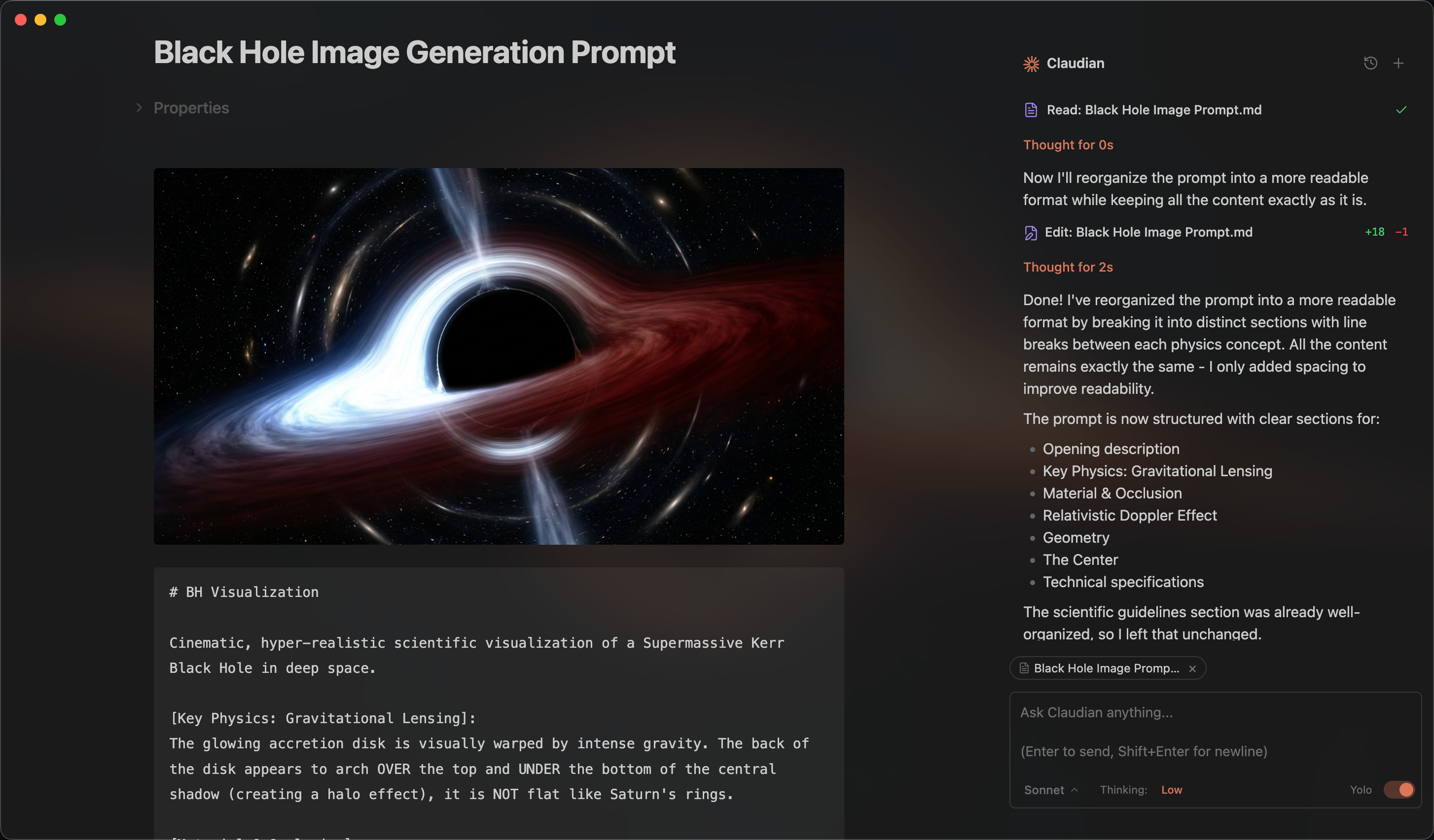
An Obsidian plugin that embeds Claude Code as an AI collaborator in your vault. Your vault becomes Claude's working directory, giving it full agentic capabilities: file read/write, search, bash commands, and multi-step workflows.
Features
- Full Agentic Capabilities: Leverage Claude Code's power to read, write, and edit files, search, and execute bash commands, all within your Obsidian vault.
- Context-Aware: Automatically attach the focused note, mention files with
@, exclude notes by tag, include editor selection (Highlight), and access external directories for additional context. - Vision Support: Analyze images by sending them via drag-and-drop, paste, or file path.
- Inline Edit: Edit selected text or insert content at cursor position directly in notes with word-level diff preview and read-only tool access for context.
- Instruction Mode (
#): Add refined custom instructions to your system prompt directly from the chat input, with review/edit in a modal. - Slash Commands: Create reusable prompt templates triggered by
/command, with argument placeholders,@filereferences, and optional inline bash substitutions. - Skills: Extend Claudian with reusable capability modules that are automatically invoked based on context, compatible with Claude Code's skill format.
- Custom Agents: Define custom subagents that Claude can invoke, with support for tool restrictions and model overrides.
- Claude Code Plugins: Enable Claude Code plugins installed via the CLI, with automatic discovery from
~/.claude/pluginsand per-vault configuration. Plugin skills, agents, and slash commands integrate seamlessly. - MCP Support: Connect external tools and data sources via Model Context Protocol servers (stdio, SSE, HTTP) with context-saving mode and
@-mention activation. - Advanced Model Control: Select between Haiku, Sonnet, and Opus, configure custom models via environment variables, fine-tune thinking budget, and enable Opus and Sonnet with 1M context window (requires Max subscription or extra usage).
- Plan Mode: Toggle plan mode via Shift+Tab in the chat input. Claudian explores and designs before implementing, presenting a plan for approval with options to approve in a new session, continue in the current session, or provide feedback.
- Security: Permission modes (YOLO/Safe/Plan), safety blocklist, and vault confinement with symlink-safe checks.
- Claude in Chrome: Allow Claude to interact with Chrome through the
claude-in-chromeextension.
Requirements
- Claude Code CLI installed (strongly recommend install Claude Code via Native Install)
- Obsidian v1.8.9+
- Claude subscription/API or Custom model provider that supports Anthropic API format (Openrouter, Kimi, GLM, DeepSeek, etc.)
- Desktop only (macOS, Linux, Windows)
Installation
From GitHub Release (recommended)
- Download
main.js,manifest.json, andstyles.cssfrom the latest release - Create a folder called
claudianin your vault's plugins folder:/path/to/vault/.obsidian/plugins/claudian/ - Copy the downloaded files into the
claudianfolder - Enable the plugin in Obsidian:
- Settings → Community plugins → Enable "Claudian"
Using BRAT
BRAT (Beta Reviewers Auto-update Tester) allows you to install and automatically update plugins directly from GitHub.
- Install the BRAT plugin from Obsidian Community Plugins
- Enable BRAT in Settings → Community plugins
- Open BRAT settings and click "Add Beta plugin"
- Enter the repository URL:
https://github.com/YishenTu/claudian - Click "Add Plugin" and BRAT will install Claudian automatically
- Enable Claudian in Settings → Community plugins
Tip: BRAT will automatically check for updates and notify you when a new version is available.
From source (development)
Clone this repository into your vault's plugins folder:
cd /path/to/vault/.obsidian/plugins
git clone https://github.com/YishenTu/claudian.git
cd claudian
Install dependencies and build:
npm install
npm run build
Enable the plugin in Obsidian:
- Settings → Community plugins → Enable "Claudian"
Development
# Watch mode
npm run dev

# Production build
npm run build
Tip: Copy
.env.local.exampleto.env.localornpm installand setup your vault path to auto-copy files during development.
Usage
Two modes:
- Click the bot icon in ribbon or use command palette to open chat
- Select text + hotkey for inline edit
Use it like Claude Code—read, write, edit, search files in your vault.
Context
- File: Auto-attaches focused note; type
@to attach other files - @-mention dropdown: Type
@to see MCP servers, agents, external contexts, and vault files@Agents/shows custom agents for selection@mcp-serverenables context-saving MCP servers@folder/filters to files from that external context (e.g.,@workspace/)- Vault files shown by default
- Selection: Select text in editor, or elements in canvas, then chat—selection included automatically
- Images: Drag-drop, paste, or type path; configure media folder for
![[image]]embeds - External contexts: Click folder icon in toolbar for access to directories outside vault
Features
- Inline Edit: Select text + hotkey to edit directly in notes with word-level diff preview
- Instruction Mode: Type
#to add refined instructions to system prompt - Slash Commands: Type
/for custom prompt templates or skills - Skills: Add
skill/SKILL.mdfiles to~/.claude/skills/or{vault}/.claude/skills/, recommended to use Claude Code to manage skills - Custom Agents: Add
agent.mdfiles to~/.claude/agents/(global) or{vault}/.claude/agents/(vault-specific); select via@Agents/in chat, or prompt Claudian to invoke agents - Claude Code Plugins: Enable plugins via Settings → Claude Code Plugins, recommended to use Claude Code to manage plugins
- MCP: Add external tools via Settings → MCP Servers; use
@mcp-serverin chat to activate
Configuration
Settings
Customization
- User name: Your name for personalized greetings
- Excluded tags: Tags that prevent notes from auto-loading (e.g.,
sensitive,private) - Media folder: Configure where vault stores attachments for embedded image support (e.g.,
attachments) - Custom system prompt: Additional instructions appended to the default system prompt (Instruction Mode
#saves here) - Enable auto-scroll: Toggle automatic scrolling to bottom during streaming (default: on)
- Auto-generate conversation titles: Toggle AI-powered title generation after the first user message is sent
- Title generation model: Model used for auto-generating conversation titles (default: Auto/Haiku)
- Vim-style navigation mappings: Configure key bindings with lines like
map w scrollUp,map s scrollDown,map i focusInput
Hotkeys
- Inline edit hotkey: Hotkey to trigger inline edit on selected text
- Open chat hotkey: Hotkey to open the chat sidebar
Slash Commands
- Create/edit/import/export custom
/commands(optionally override model and allowed tools)
MCP Servers
- Add/edit/verify/delete MCP server configurations with context-saving mode
Claude Code Plugins
- Enable/disable Claude Code plugins discovered from
~/.claude/plugins - User-scoped plugins available in all vaults; project-scoped plugins only in matching vault
Safety
- Load user Claude settings: Load
~/.claude/settings.json(user's Claude Code permission rules may bypass Safe mode) - Enable command blocklist: Block dangerous bash commands (default: on)
- Blocked commands: Patterns to block (supports regex, platform-specific)
- Allowed export paths: Paths outside the vault where files can be exported (default:
~/Desktop,~/Downloads). Supports~,$VAR,${VAR}, and%VAR%(Windows).
Environment
- Custom variables: Environment variables for Claude SDK (KEY=VALUE format, supports
exportprefix) - Environment snippets: Save and restore environment variable configurations
Advanced
- Claude CLI path: Custom path to Claude Code CLI (leave empty for auto-detection)
Safety and Permissions
| Scope | Access |
|---|---|
| Vault | Full read/write (symlink-safe via realpath) |
| Export paths | Write-only (e.g., ~/Desktop, ~/Downloads) |
| External contexts | Full read/write (session-only, added via folder icon) |
- YOLO mode: No approval prompts; all tool calls execute automatically (default)
- Safe mode: Approval prompt per tool call; Bash requires exact match, file tools allow prefix match
- Plan mode: Explores and designs a plan before implementing. Toggle via Shift+Tab in the chat input
Privacy & Data Use
- Sent to API: Your input, attached files, images, and tool call outputs. Default: Anthropic; custom endpoint via
ANTHROPIC_BASE_URL. - Local storage: Settings, session metadata, and commands stored in
vault/.claude/; session messages in~/.claude/projects/(SDK-native); legacy sessions invault/.claude/sessions/. - No telemetry: No tracking beyond your configured API provider.
Troubleshooting
Claude CLI not found
If you encounter spawn claude ENOENT or Claude CLI not found, the plugin can't auto-detect your Claude installation. Common with Node version managers (nvm, fnm, volta).
Solution: Find your CLI path and set it in Settings → Advanced → Claude CLI path.
| Platform | Command | Example Path |
|---|---|---|
| macOS/Linux | which claude |
/Users/you/.volta/bin/claude |
| Windows (native) | where.exe claude |
C:\Users\you\AppData\Local\Claude\claude.exe |
| Windows (npm) | npm root -g |
{root}\@anthropic-ai\claude-code\cli.js |
Note: On Windows, avoid
.cmdwrappers. Useclaude.exeorcli.js.
Alternative: Add your Node.js bin directory to PATH in Settings → Environment → Custom variables.
npm CLI and Node.js not in same directory
If using npm-installed CLI, check if claude and node are in the same directory:
dirname $(which claude)
dirname $(which node)
If different, GUI apps like Obsidian may not find Node.js.
Solutions:
- Install native binary (recommended)
- Add Node.js path to Settings → Environment:
PATH=/path/to/node/bin
Still having issues? Open a GitHub issue with your platform, CLI path, and error message.
Architecture
src/
├── main.ts                      # Plugin entry point
├── core/                        # Core infrastructure
│   ├── agent/                   # Claude Agent SDK wrapper (ClaudianService)
│   ├── agents/                  # Custom agent management (AgentManager)
│   ├── commands/                # Slash command management (SlashCommandManager)
│   ├── hooks/                   # PreToolUse/PostToolUse hooks
│   ├── images/                  # Image caching and loading
│   ├── mcp/                     # MCP server config, service, and testing
│   ├── plugins/                 # Claude Code plugin discovery and management
│   ├── prompts/                 # System prompts for agents
│   ├── sdk/                     # SDK message transformation
│   ├── security/                # Approval, blocklist, path validation
│   ├── storage/                 # Distributed storage system
│   ├── tools/                   # Tool constants and utilities
│   └── types/                   # Type definitions
├── features/                    # Feature modules
│   ├── chat/                    # Main chat view + UI, rendering, controllers, tabs
│   ├── inline-edit/             # Inline edit service + UI
│   └── settings/                # Settings tab UI
├── shared/                      # Shared UI components and modals
│   ├── components/              # Input toolbar bits, dropdowns, selection highlight
│   ├── mention/                 # @-mention dropdown controller
│   ├── modals/                  # Instruction modal
│   └── icons.ts                 # Shared SVG icons
├── i18n/                        # Internationalization (10 locales)
├── utils/                       # Modular utility functions
└── style/                       # Modular CSS (→ styles.css)
Roadmap
- Claude Code Plugin support
- Custom agent (subagent) support
- Claude in Chrome support
-
/compactcommand - Plan mode
-
rewindandforksupport (including/forkcommand) -
!commandsupport - Tool renderers refinement
- 1M Opus and Sonnet models
- Codex SDK integration
- Hooks and other advanced features
- More to come!
License
Licensed under the MIT License.
Star History
Acknowledgments
- Obsidian for the plugin API
- Anthropic for Claude and the Claude Agent SDK
Reviews (0)
Sign in to leave a review.
Leave a reviewNo results found