agent-manager
Health Warn
- License — License: MIT
- Description — Repository has a description
- Active repo — Last push 0 days ago
- Low visibility — Only 5 GitHub stars
Code Pass
- Code scan — Scanned 3 files during light audit, no dangerous patterns found
Permissions Pass
- Permissions — No dangerous permissions requested
No AI report is available for this listing yet.
Terminal UI to manage AI coding-agent sessions (Claude Code, OpenCode, Codex, Grok Build) in tmux: live status, group tree, live pane preview, resource gauges.
Agent Manager
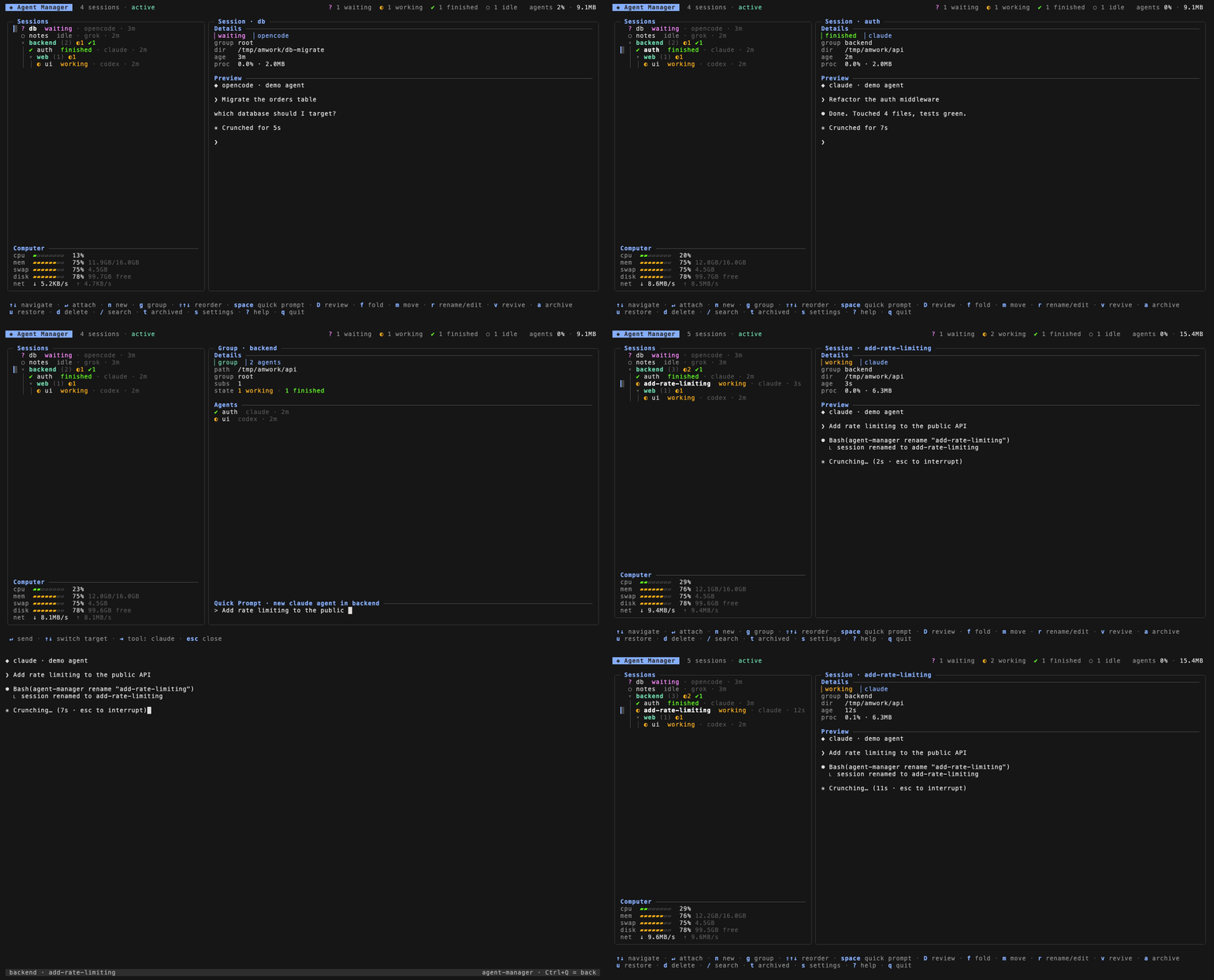
A terminal UI to manage AI coding-agent sessions on your machine. Create and enter sessions, organize them in a nested group tree with manual ordering, archive finished ones, and watch live status, a live pane preview, the combined footprint of your agents, and machine resource gauges.
Supported tools
Status detection currently supports Claude Code, OpenCode, Codex, and Grok Build out of the box. Any other CLI tool can run as a session; add a [tools.<name>] block with status rules to get live status for it (see Configuration).
Install
Homebrew (macOS / Linux)
brew install yoanwai/tap/agent-manager
Installs tmux with it if missing.
Go
go install github.com/YoanWai/agent-manager@latest
Requires Go 1.26+ and tmux; installs to $(go env GOPATH)/bin.
Prebuilt binaries
Download from Releases (macOS and Linux, amd64/arm64).
Windows
Run inside WSL2: agent-manager lives on tmux, which is a Linux/macOS tool. In a WSL shell, install with Homebrew or grab the Linux binary from Releases.
Usage
agent-manager
Sessions run inside tmux (am_* namespace), so they survive the manager quitting. Inside a session, Ctrl+Q detaches back to the manager. agent-manager --version prints the version.
Keys
| Key | Action |
|---|---|
n |
New session (name, tool, directory, optional starting prompt, group picker) |
g |
New group (name, parent, default path) |
enter |
Attach session / fold group |
ctrl+q |
Inside a session: back to the manager |
shift+↑ / shift+↓ |
Reorder session or group among its siblings |
m |
Move session to another group |
r |
Rename session / edit tool; edit group name and default path |
v |
Revive a dead session (revive_command, e.g. claude --continue, resumes the conversation) |
a / u |
Archive / restore a session, or a group and its entire subtree |
d |
Delete session, or a group + its entire subtree |
space |
Quick prompt: answer the selected session, or spawn an agent in the selected group |
ctrl+r |
Review the selected session's changes: full-screen whole-file diffs, line comments sent to the agent |
f |
Fold / unfold group |
s |
Settings (default tool for quick spawn) |
t |
Toggle archived view |
/ |
Search |
? |
Help |
q |
Quit (sessions keep running) |
Quick prompt
Press space to dock a prompt bar at the bottom of the sidebar. The target follows the cursor while the bar is open (↑↓ still navigate):
- On a session row,
entersends the typed text straight into the session's pane, so the agent gets it as a user message without you attaching. The bar stays open and clears, ready for the next answer. - On a group row,
enterspawns a new agent in that group with the prompt embedded, using the group's default path. The spawn tool starts at the Settings (s) default andtabcycles it (claude ↔ opencode ↔ any configured tool); the footer shows the current pick. The agent starts working on the prompt immediately.
esc closes the bar. The new-session form's optional prompt field launches an agent the same way; tools whose CLI takes the prompt behind a flag declare it with prompt_flag (see Configuration).
Self-naming sessions
Sessions spawned without a custom name (every quick spawn, and the form with the name left blank) get a placeholder like claude-a1b2, and their first prompt opens by asking the agent to run agent-manager rename "<name>" once with a short name for the broad feature of the session (not a single subtask). The directive also tells the agent not to rename again unless you ask. When the first prompt cannot carry the directive (a /slash command, or no prompt at all), the manager sends it as its own message once the tool's input box appears in the pane. The subcommand drops the name into a per-session file; the manager picks it up on the next poll and updates the sidebar row and the tmux status bar. This works with any tool, since it only needs the agent to read its prompt and run one shell command.
Sessions you name yourself keep that name: the first prompt only notes that agent-manager rename is available later if you ask, and does not instruct the agent to rename now. You can still ask an agent to rename its session later, or run agent-manager rename yourself from a shell inside the session.
Declaring the repo under review
A session's working directory is often an umbrella folder holding many repos, so review can only guess which one the agent means. An agent that knows which repo it is working in can say so by running agent-manager review-repo <path> from a shell inside its session. The subcommand checks that the path is (or sits inside) a git repo, resolves it to the repo root, and drops it into a per-session file; the manager picks it up on the next poll and review opens on that repo the next time you open it. A path that is not inside a git repo is rejected, so a declaration is always a fact rather than a guess.
An agent can also declare what its branch diffs against by running agent-manager review-base <ref> from inside its worktree: the ref is validated in that repo, stored per session and repo, and the "vs target" scope uses it from then on. agent-manager review-base --clear returns to automatic detection. A stored ref that stops resolving surfaces as an error in review, and B opens a target picker (the repo's branches plus an auto entry) to set or clear it by hand.
Agents usually work in git worktrees, one branch per worktree, and those worktrees can live anywhere on disk. A declared path that is a worktree root is accepted wherever it lives, so one review-repo call names both the repo and the branch under review. Review resolves its target in a fixed order: a repo you picked by hand with r or b wins for as long as the manager is running, then the agent's declared repo, then the ranking (dirty working trees first, then most recent commit). When the picked or declared path stops being a git repo, review says so in the status line and r is there to pick the right one.
MCP: how agents discover these commands
Every session the manager spawns or revives carries the agent-manager MCP server, so MCP-capable agents see rename, review_repo and review_base as native tools with descriptions telling them when to call each: no prompt injection, no per-project setup. The server lives in the same binary (agent-manager mcp, stdio) and identifies the calling session through its environment.
Registration is per tool. The built-in claude, codex, opencode and grok tools register automatically: claude gets a generated --mcp-config file, codex gets -c mcp_servers... overrides, opencode gets an OPENCODE_CONFIG merge file, and grok gets a one-time grok mcp add --scope user entry on its first launch. A custom tool opts in with mcp = "<style>" in its config section, or out with mcp = "none". The CLI subcommands keep working everywhere, MCP or not.
Diff review
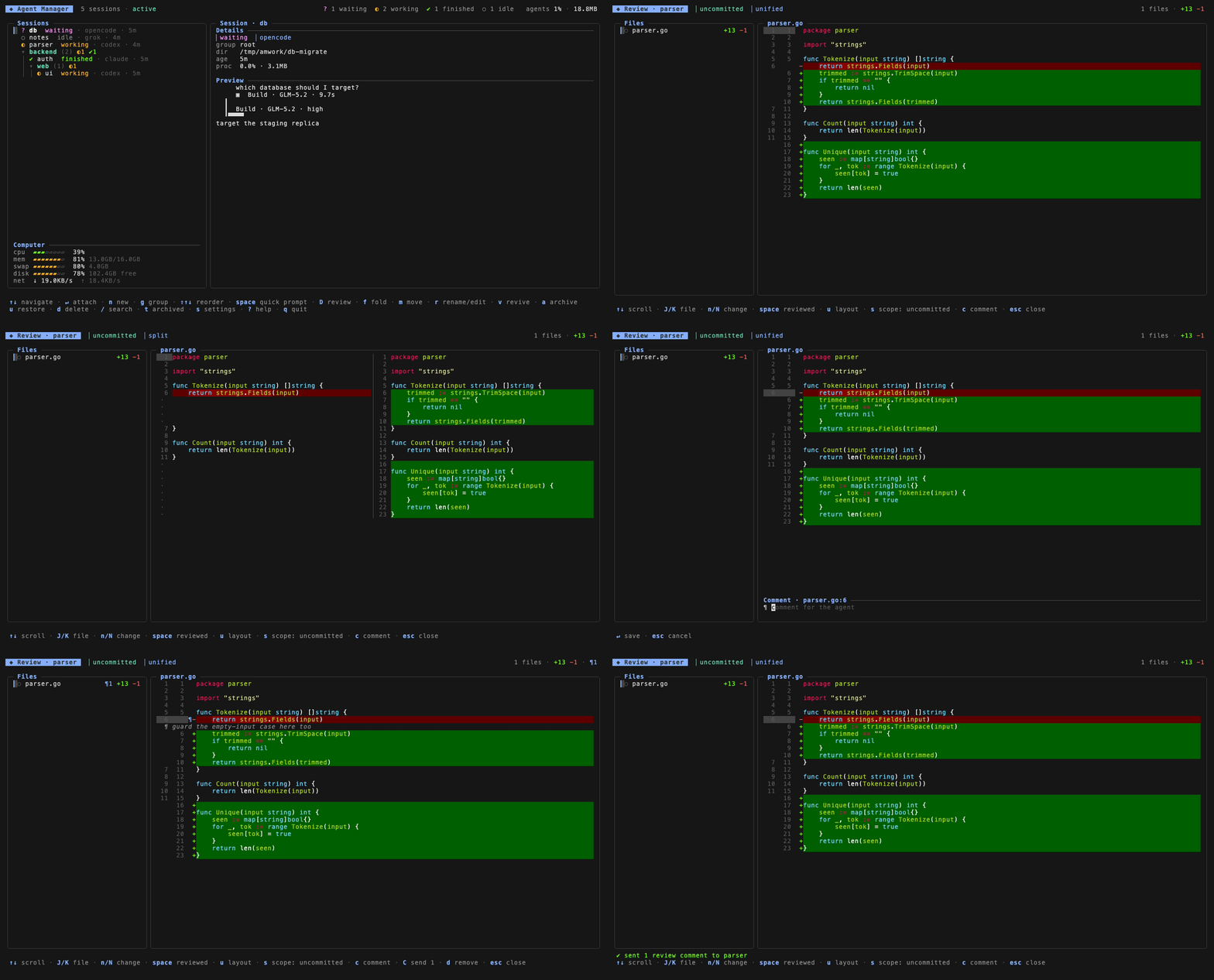
Press ctrl+r on a session to open a full-screen review of its repo: changed files with +/− counts on the left, the whole file on the right with syntax highlighting and changed lines tinted, so every edit reads in full context. Arrow keys and ctrl+d/ctrl+u scroll the file, J/K switch files, n/N jump between changes, u toggles unified and side-by-side, s cycles the scope (uncommitted, vs target, last commit, staged), and space marks a file reviewed. When the working directory holds several repos, r opens a picker you type to filter, and b lists the current repo's worktrees by branch name so you can review another branch with one keypress. B picks the target (the merge-into branch) the "vs target" scope compares against. Each changeable value in the header wears its own key, so the scope, layout, repo, and target pills read as s, u, r, B legends at a glance. The diff refreshes as the agent keeps editing.
Press c on a line to write a comment; C flattens every comment into one review prompt and sends it straight into the agent's pane, so the agent starts addressing your notes while you watch the diff update. esc closes the review.
Groups
Groups are paths (backend/api/auth) forming a tree of unlimited depth. Sessions can live at any node, including the root. Create subgroups inline with g, reorder both groups and sessions with shift+↑↓ (the order persists), fold a subtree with f, and edit a group's name and default path with r. On a session, r renames it and tab cycles the tool (status rules and revive follow the new tool; useful when you quit one agent in the pane and start another).
Status
Each session's tmux pane is polled (default every 2s) to derive a status:
| Status | Meaning |
|---|---|
working |
The agent is busy on a turn |
waiting |
Blocked on you: a dialog, a permission ask, or a plain-text question |
finished |
Turn ended — an alert that clears to idle once you enter the session |
errored |
The tool reported an error |
idle |
Nothing running |
dead |
The tmux session is gone |
Detection matches per-tool regex rules against the visible pane, analyzes the newest turn to tell finished from waiting, and treats streaming output (content changing between polls) as working. A turn that ends without any turn-summary line still resolves: when a working pane goes quiet, the turn counts as finished, or waiting when it ends on a question. Polling keeps running while you are inside a session, so statuses stay live. The selected session's pane tail renders in the preview panel, and moving the cursor fetches the preview immediately.
For Claude Code, status comes first-hand from hook events instead of pane guessing: sessions launch with a generated --settings file whose hooks write the lifecycle state (working, waiting, finished, idle) to a per-session status file that the poller reads first. Pane rules still refine it — hooks cannot see a plain-text question, an Esc interrupt, or an error line, so a matching pane verdict upgrades the hook status — and they take over fully as fallback when the hook file is missing or stale. Enabled per tool with status_source = "claude-hooks".
Stats
The header shows a fleet summary: per-status session counts, plus agents N% · X GB, the combined CPU and RSS memory of every live agent's full process tree (shell, agent, and children). Agent CPU uses ps semantics where 100% equals one full core, so the total can exceed 100% on multi-core machines. The Computer block in the sessions panel shows machine gauges: CPU (normalized to the whole machine, capped at 100%), memory (used/total), swap, root-disk free space, and network up/down rates.
Configuration
Config lives in your OS user config dir (~/Library/Application Support/agent-manager/config.toml on macOS, ~/.config/agent-manager/config.toml on Linux) and is created on first run with working defaults for Claude Code, OpenCode, Codex, and Grok Build.
Top-level: poll_interval (default "2s") sets how often panes are polled for status, preview, and stats.
Add any CLI tool as a [tools.<name>] block:
[tools.mytool]
command = "mytool"
default_status = "idle"
rules = [
  { state = "working", pattern = "esc to interrupt" },
  { state = "errored", pattern = "(?im)^\\s*error:" },
]
Rules match top-down against the visible pane text; first match wins, and default_status applies when nothing matches. Optional per-tool fields refine detection: activity_cutoff (regex locating the tool's input box, everything above it is turn content), turn_end (a turn-summary line marking the turn as over), chrome_line, blocked_line, and trailing_note. The generated config's claude and opencode blocks show all of them in use.
Other per-tool fields: revive_command is what v runs to revive a dead session (e.g. claude --continue resumes the conversation in place); status_source = "claude-hooks" switches status to Claude Code hook events (see Status).
prompt_flag controls how the new-session form's optional prompt is embedded into the launch command. Tools that take the prompt as a positional argument (Claude Code: claude 'the prompt') leave it empty; tools whose positional argument means something else declare the flag (OpenCode: prompt_flag = "--prompt", since its positional argument is the project path). The prompt only shapes the launch command; revive (v) uses revive_command untouched.
State is stored next to the config in state.db (SQLite).
Development
go test ./...   # includes end-to-end tests against a real tmux server
go run .
License
Reviews (0)
Sign in to leave a review.
Leave a reviewNo results found