a2ui-ask
Health Pass
- License — License: MIT
- Description — Repository has a description
- Active repo — Last push 0 days ago
- Community trust — 20 GitHub stars
Code Pass
- Code scan — Scanned 12 files during light audit, no dangerous patterns found
Permissions Pass
- Permissions — No dangerous permissions requested
No AI report is available for this listing yet.
Interactive UI for AI agents — turn structured questions into browser forms.
a2ui-ask
Interactive UI for AI agents — turn structured questions into browser
forms.
Give your AI agent a real UI. When Claude Code, Codex, Cursor, or any other
agent needs you to pick options or fill in structured config, a2ui-ask pops
open a real browser form — with validation, defaults, and multi-select —
instead of a wall of chat text. Your answers land in a versioned JSON file both
you and the agent can re-read later.
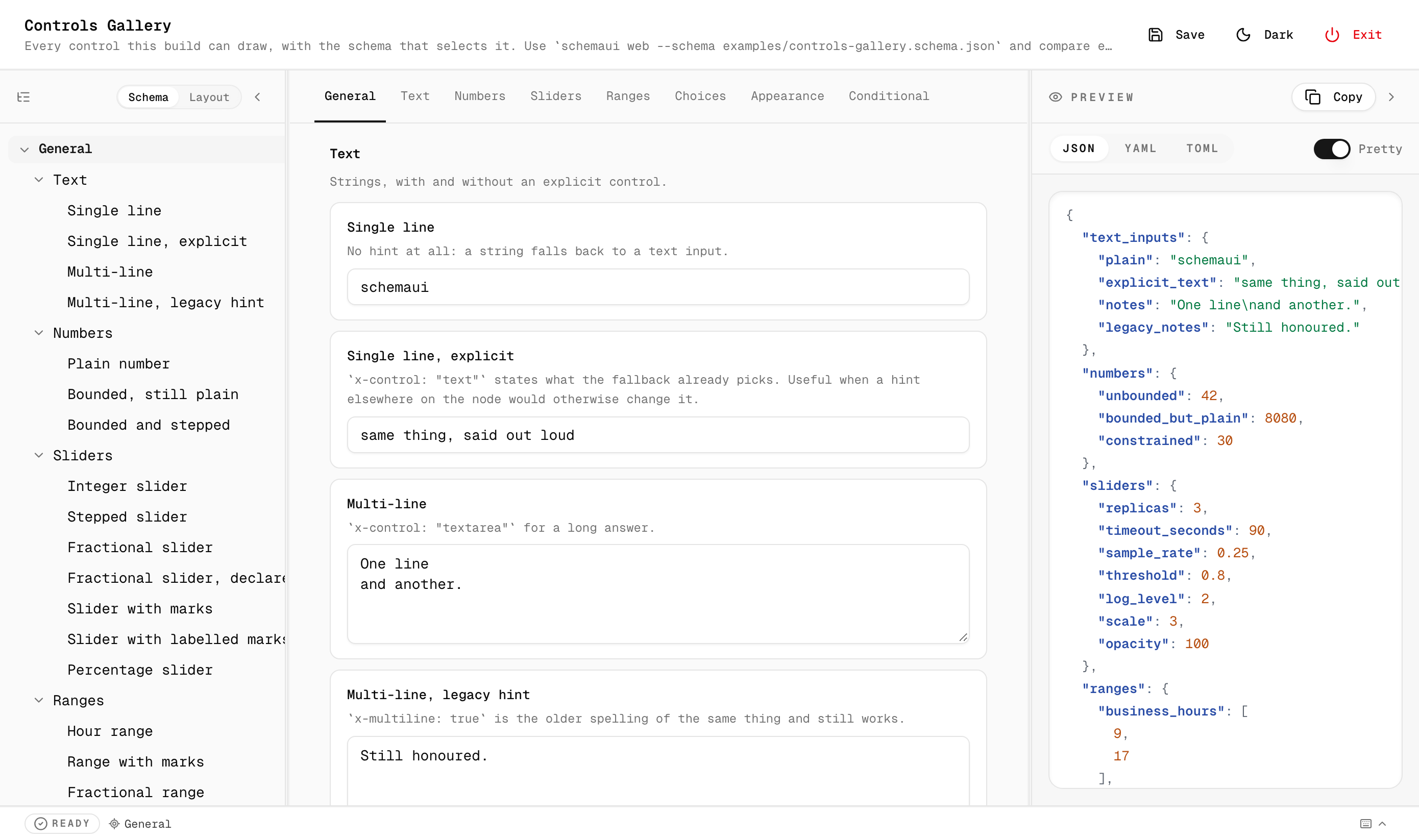
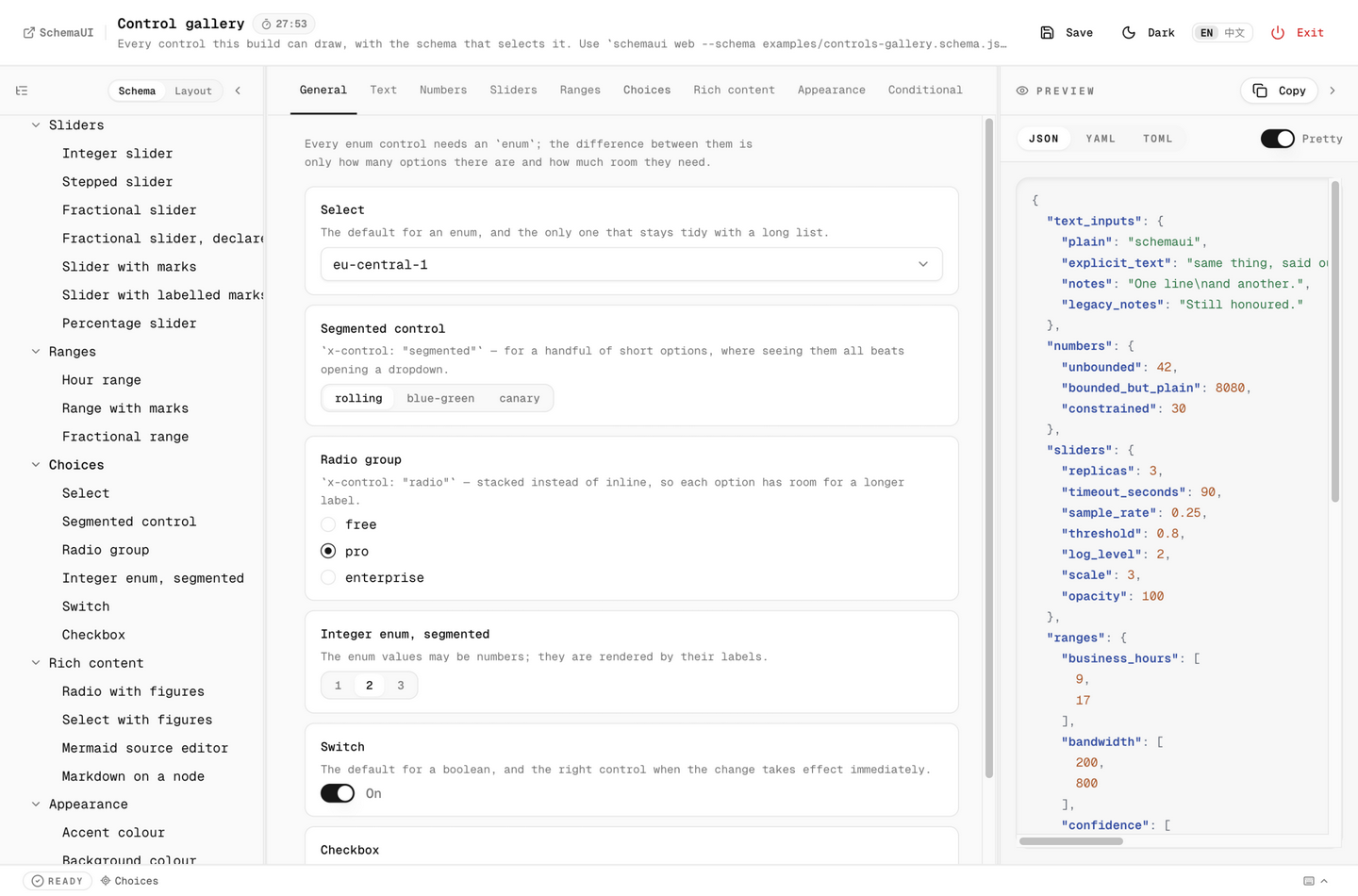
Every control the engine can draw — sliders, range sliders with marks, segmented
controls, radio groups, switches, a custom color picker, conditional fields —
driven entirely by schema hints, and the skill tells the agent to reach for
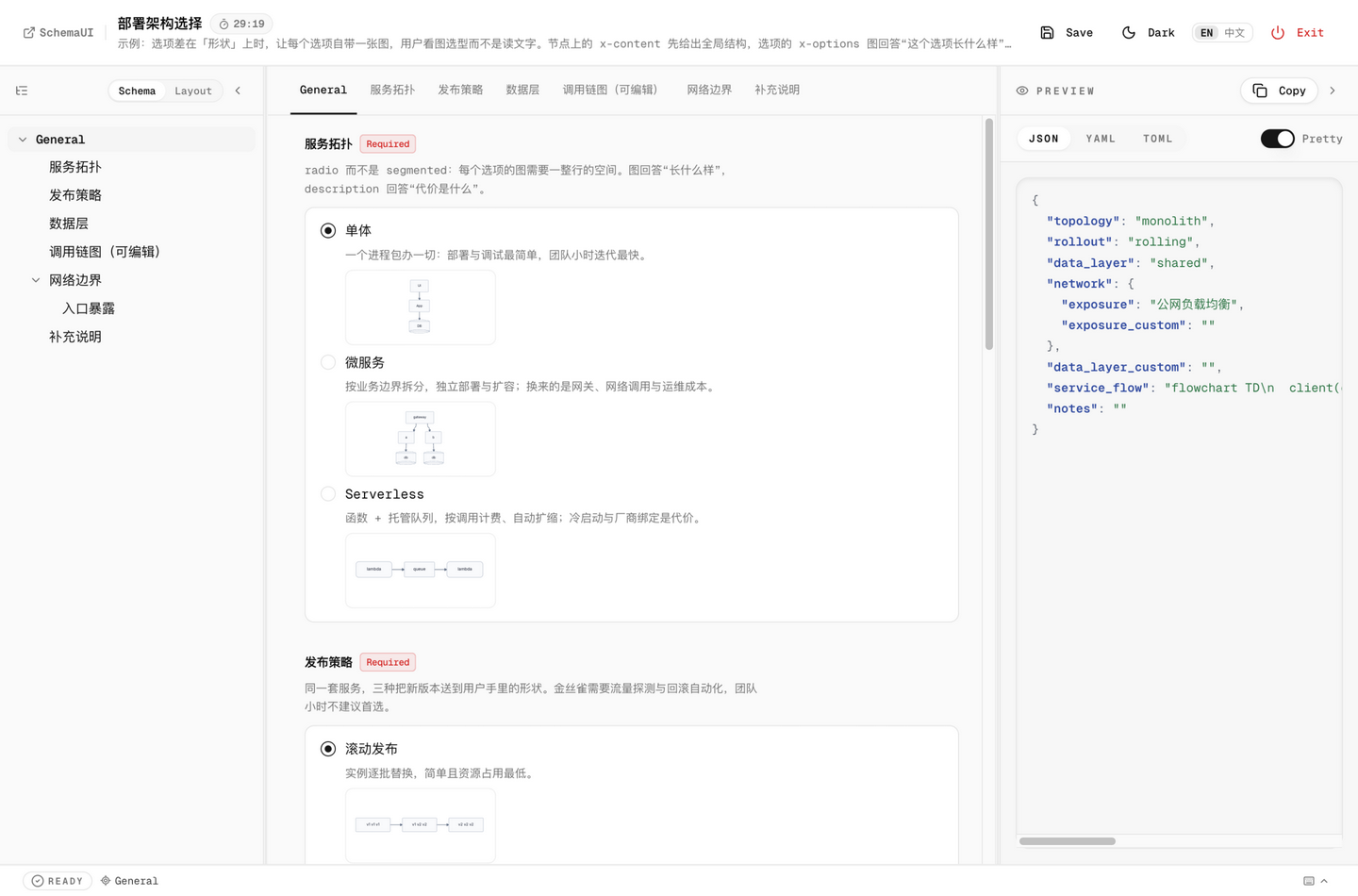
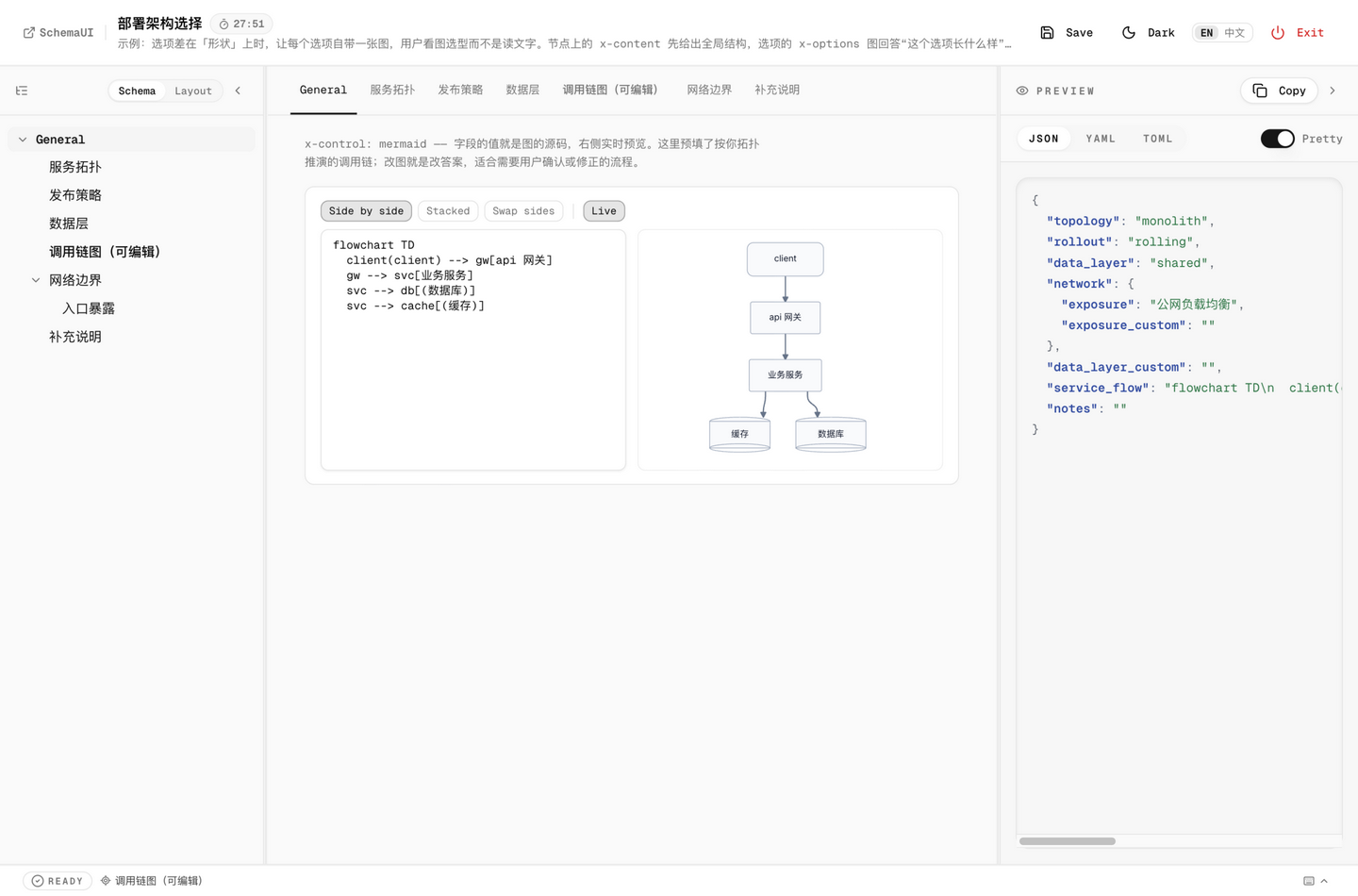
them. Figures ride the same hints: a question or an option can carry a Mermaid
diagram, an inline SVG, or sanitised Markdown (x-content / x-options), and
an answer can be a diagram via the live-preview x-control: "mermaid" editor.
The full set lives inschemaui's controls gallery
and
rich-content gallery;examples/web-research-brief.schema.json
is the worked example that uses every one of them (中文).
 |
 |
 |
Why
Agent tool calls run in subprocesses with no TTY — a terminal prompt renders
nowhere and the agent hangs on a question nobody can see. And answers shouted
into chat scroll away and can't be audited.
a2ui-ask fixes both:
- Browser form, not terminal. The agent spawns a local Web UI
(schemaui as the engine) bound to0.0.0.0, reachable from your desktop, phone, SSH tunnel, or IDE
port-forward. - File output, not stdout. Answers persist to
.schemaui/answers/<topic>-<timestamp>.json— a built-in audit trail of
every decision the agent asked about.
Agent process                     Your browser (any device)
┌──────────────┐                 ┌──────────────────┐
│ generates    │  1. spawn       │  desktop / phone │
│ schema       │───────────────► │  on the LAN      │
│              │  ask.py         │                  │
│ 2. tells you │                 │  http://<ip>     │
│ the URL in   │────────────────►│  :8787           │
│ chat         │                 │                  │
│              │  3. you fill in │  live validation │
│ 4. reads the │◄────────────────│  Save & Exit     │
│ answer file  │  JSON written   │                  │
│ 5. continues │                 │                  │
└──────────────┘                 └──────────────────┘
Install
Prerequisite: the schemaui binary (the form engine,
YuniqueUnic/schemaui). The
auto-installer detects your platform and grabs the prebuilt binary:
bash scripts/install.sh      # macOS / Linux / FreeBSD
pwsh scripts/install.ps1     # Windows / PowerShell 7+
It downloads from GitHub and falls back to the
Gitee mirror when github.com is
unreachable — the usual case from mainland China. Pin one side with--source github|gitee (sh) or -Source github|gitee (ps1):
bash scripts/install.sh --source gitee
Other channels (brew, scoop, winget, cargo, manual download): seeinstall.md.
Then pick one way to install the skill:
Option 1 — one line (recommended, via skills.sh)
npx skills add YuniqueUnic/a2ui-ask
Option 2 — let your agent install it
Say to any agent (Claude Code / Codex / Cursor / …):
Please find and install the skill at https://github.com/YuniqueUnic/a2ui-ask —
clone it into my skills directory and wire it up.
Option 3 — manual clone
# global (all projects)
git clone https://github.com/YuniqueUnic/a2ui-ask.git ~/.claude/skills/a2ui-ask
# or per-project
git clone https://github.com/YuniqueUnic/a2ui-ask.git .claude/skills/a2ui-ask
Codex / zcode users: paste the ready-made block fromprompts/ask.prompt.md into your AGENTS.md.
5-minute quickstart
From a clone of this repo, with schemaui on your PATH:
python3 scripts/ask.py \
  --schema examples/env-schema.json \
  --config examples/env-defaults.json \
  --title "Deployment Config"
- The script prints
SCHEMAUI_URL=http://127.0.0.1:8787/and opens your
browser. - You edit the form (live validation) and click Save & Exit.
- The answer JSON prints to stdout and persists to
.schemaui/answers/.
That's the whole loop. From now on your agent runs the same command whenever it
needs a decision — you get a form instead of an interrogation.
Windows / PowerShell 7+: pwsh scripts/ask.ps1 -Schema … -Title …. macOS/Linux
without Python: bash scripts/ask.sh --schema ….
What the agent learns from SKILL.md
- Ask well — explore the codebase before asking; one form per decision
cluster; every question carries a recommended answer as itsdefault;
titles/descriptions written in your language. - Escape hatches everywhere — every select offers
其他/otherplus a
free-text companion field, so you're never forced into a wrong option. The
companion only appears once you actually pick the escape option, and
paragraph-length answers get a multi-line box instead of a one-line input. - The right control for each answer — sliders, marked sliders, two-handle
ranges, colour pickers, segmented controls, radio groups, checkboxes, and
conditional fields, alongside text, number, single/multi select, oneOf
compositions, nested objects, record lists, and key/value maps. - Show, don't tell — when options differ in shape (topologies, rollout
strategies, data models), the agent attaches a diagram to each option and lets
you pick by recognising the picture; node-levelx-contentexplains a field
with a figure or prose; amermaidcontrol makes the answer itself an
editable, live-previewed diagram. - Interview discipline built in — for open-ended designs, the skill defers
to whatever grilling skill you already have, and falls back to the bundledskills/grill-with-docs: one question at
a time, every question with a recommended answer, every question grounded in
the project's docs.
Examples
Runnable forms in examples/ (each with recommended answers in
the matching .defaults.json):
| Example | Scenario |
|---|---|
env-schema.json |
minimal 4-field deploy form — first smoke test |
web-research-brief.schema.json |
research: scope a web-research task — every control in the gallery (中文) |
feature-brief.schema.json |
12-question requirements brief using every control type (EN) |
invoice-reimbursement.schema.json |
office: invoice & expense reimbursement (中文) |
ecommerce-main-image.schema.json |
design: e-commerce hero images — sizes, fonts, colors, backgrounds (中文) |
seo-diagnosis.schema.json |
SEO triage: site, issues, keywords, competitors (中文) |
deployment-architecture.schema.json |
architecture choice: every option carries a diagram (中文 — the figures reference) |
Script contract
ask.py --schema PATH|- [--config PATH] [--title T] [--description D]
       [--topic SLUG] [--output PATH] [--host 0.0.0.0] [--port 8787]
       [--timeout 300] [--open|--no-open] [--stdout-echo] [--force]
Stdout (flushed, in order): SCHEMAUI_URL=…, SCHEMAUI_LAN_URL=… (wildcard
binds), SCHEMAUI_ANSWER=…, then the answer JSON, finallySCHEMAUI_RESULT=<path>. Exit codes: 0 ok · 2 usage · 3 schemaui missing
· 4 timeout · 5 cancelled/failed · 6 bad input — agents fall back to plain
text on any non-zero exit. SCHEMAUI_BIN overrides the engine binary lookup.
Development
# unit + e2e tests (e2e drives the real schemaui HTTP API, no browser needed)
SCHEMAUI_BIN=$(command -v schemaui) python3 -m pytest tests/
# PowerShell e2e runs when pwsh is on PATH (or PWSH_BIN is set)
Links
License
MIT — see LICENSE.
Reviews (0)
Sign in to leave a review.
Leave a reviewNo results found