yuncms
Health Warn
- License — License: MIT
- Description — Repository has a description
- Active repo — Last push 0 days ago
- Low visibility — Only 7 GitHub stars
Code Warn
- network request — Outbound network request in apps/studio/src/api.js
Permissions Pass
- Permissions — No dangerous permissions requested
No AI report is available for this listing yet.
A programmable, self-hosted MySQL CMS/backend with React Studio, REST API, RBAC, Files, extensions, AI and MCP integrations.

YunCMS
A programmable MySQL CMS/backend with a focused React Studio, strong role-based access control, Files, extensions, AI/MCP integrations and a documented REST API.




Developed and maintained by Yunsoft Software.
YunCMS is currently in the
0.1.xpre-stable line. Use the managed backup/update flow and verify your own database, storage, proxy and authentication configuration before exposing a production installation.
See YunCMS in action
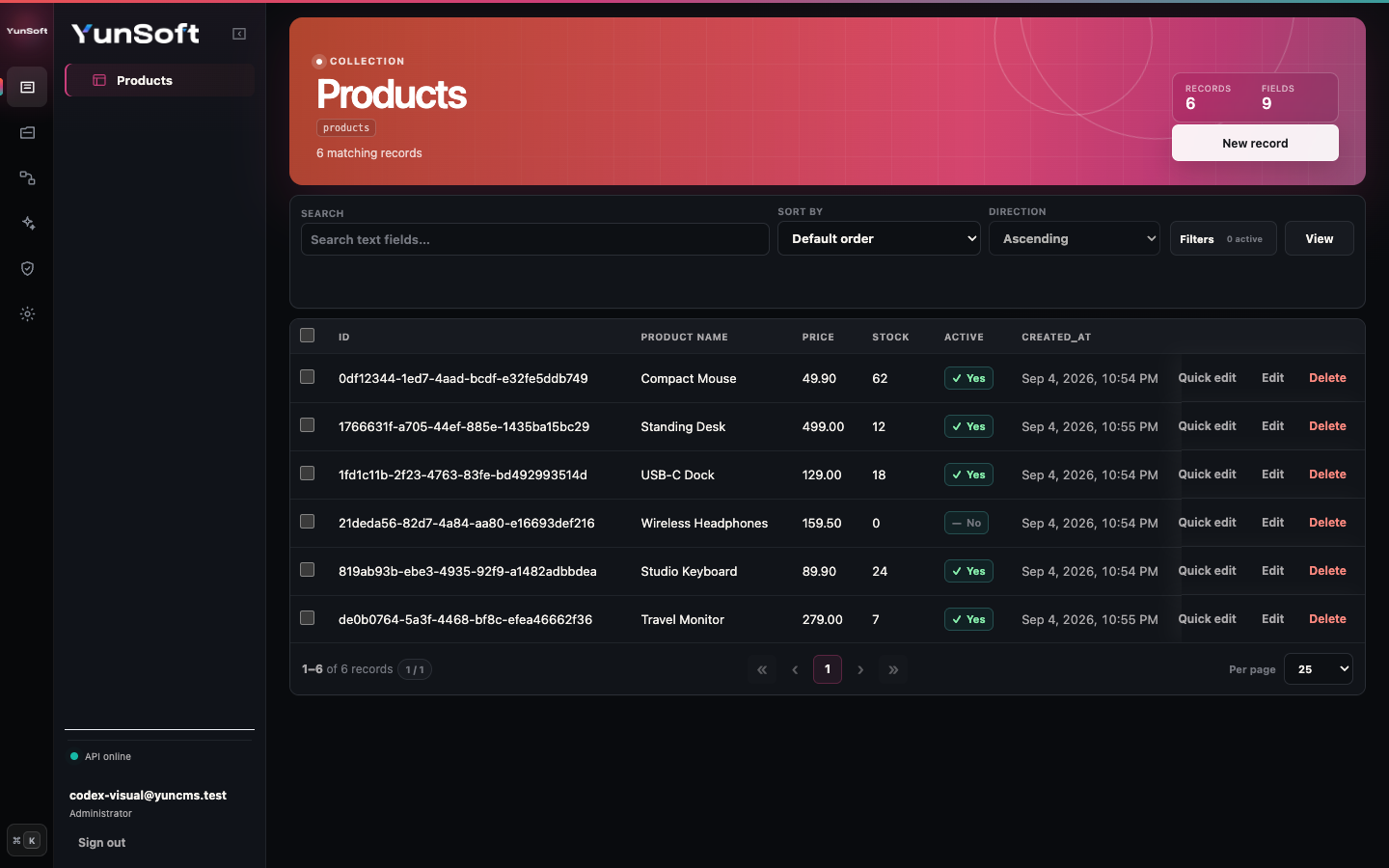
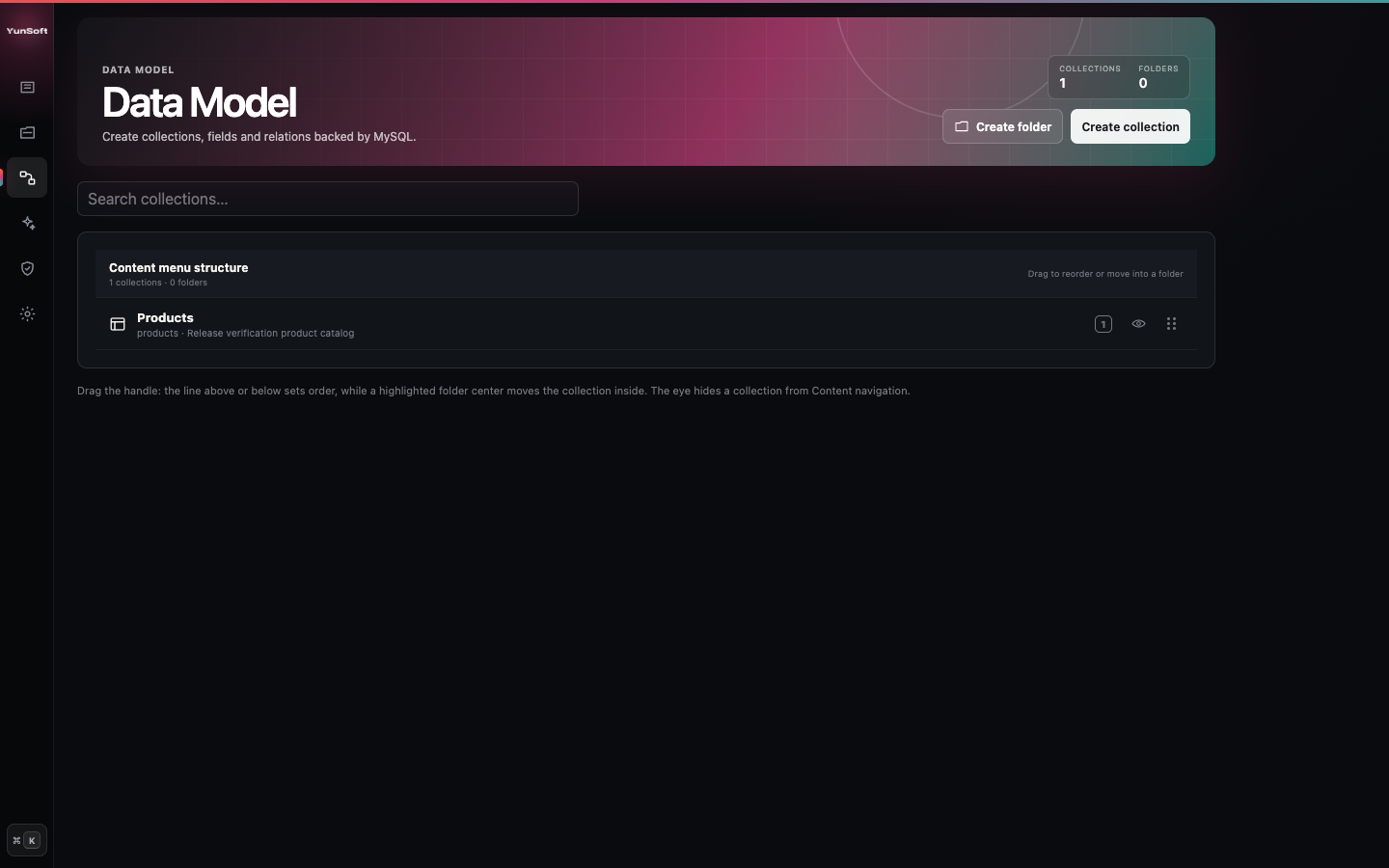
Model and organize content Create MySQL-backed collections, group the Content menu, drag to reorder and hide internal collections without changing their permissions. |
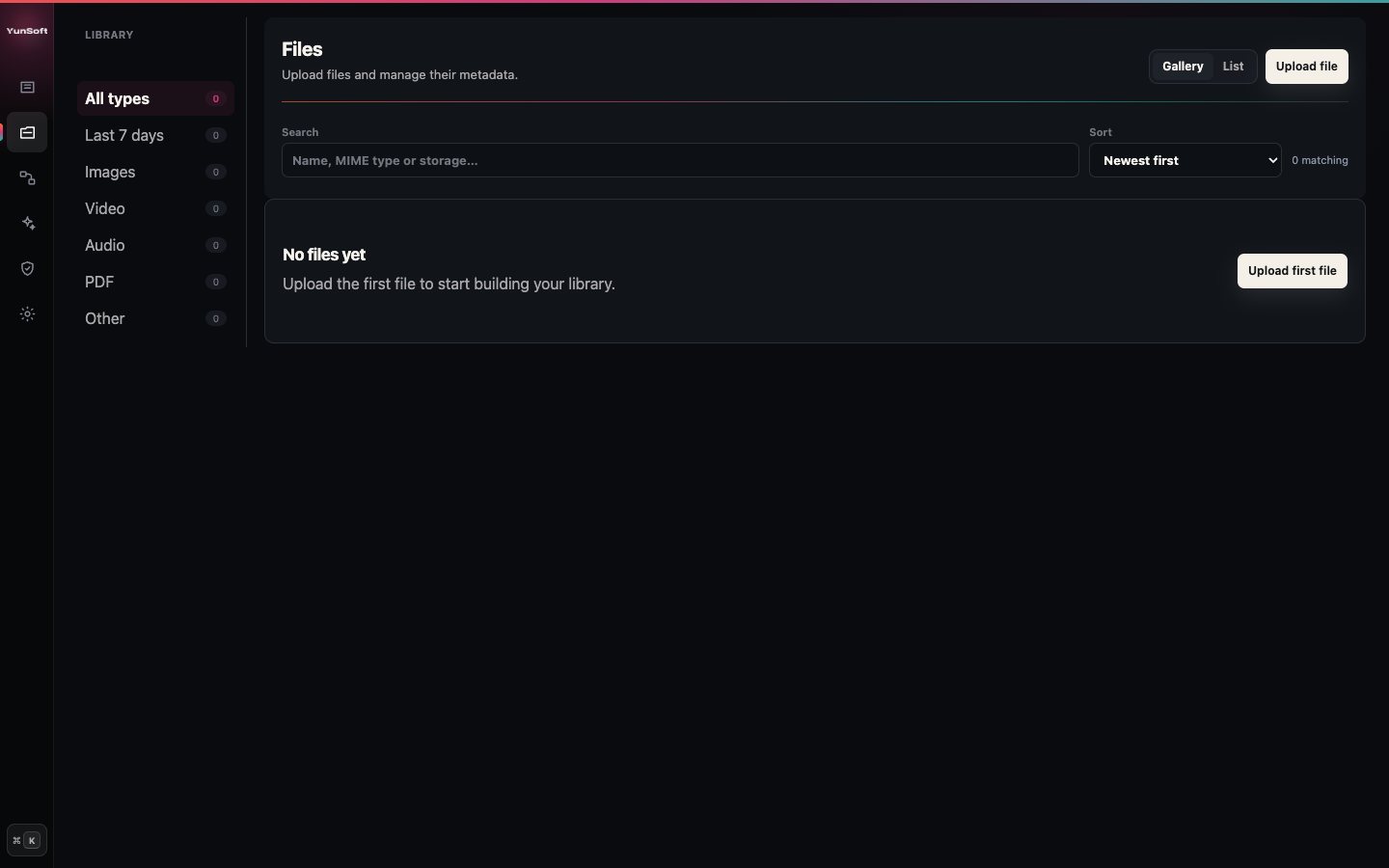
Manage files visually Upload, preview, search and manage local or S3-compatible assets through the same role-aware Studio. |
These screenshots were captured from the current published package. New users should follow the 15-minute Getting Started guide; administrators can jump directly to Using Studio.
Choose your path
| I want to… | Start here |
|---|---|
| Compare every installation method | Installation Options |
| Install YunCMS with Docker | Docker |
| Install YunCMS with npm and create my first collection | Getting Started |
| Understand Content, Files, Data Model and users | Using YunCMS Studio |
| Choose the Studio and AI language | Localization |
| Design fields and relations | Data Model Guide |
| Configure roles and safe public access | Roles and Permissions |
| Connect a frontend or integration | REST API and Items Query Language |
| Deploy, back up and update a server | Deployment, Production Readiness and Upgrades |
What YunCMS provides
- dynamic MySQL collections and fields;
- M2O, O2O, reverse O2M/O2O and managed M2M relations;
- schema-driven React Studio;
- REST CRUD for project collections;
- field selection including
*,relation.*and*.*; - filters with nested
_and/_or; search, multi-fieldsort,limit,offset;aggregateandgroupBy;- field allowlists, row filters and create/update validation rules;
- explicit Public-role permissions;
- user/session/API-token authentication;
- optional Administrator-managed public registration with a fixed normal role and email verification;
- optional OIDC, OAuth2, LDAP and SAML authentication providers;
- local and S3-compatible Files storage;
- permission-managed public/filtered Files use cases;
- endpoint, hook and scheduled-job extensions;
- optional Studio AI assistant using normal YunCMS permissions;
- optional MCP endpoint using the same service/RBAC layer;
- in-memory or Redis-backed permission cache and rate-limit state;
- single-port Studio + API runtime;
- backup, restore and managed update commands.
Installation options
YunCMS is available as the yunsoftofficial/yuncms Docker image and as the @yunsoft/yuncms npm package. Both distribution paths run the same CLI, API and Studio.
| Option | Best for | Requirements | Start here |
|---|---|---|---|
| Docker Compose | Fastest complete self-hosted stack | Docker with Compose | Docker guide |
npx |
Evaluation without a persistent package install | Node.js 24, npm 11+, MySQL | Commands below |
| Persistent npm install | Long-lived Node deployments with managed updates | Node.js 24, npm 11+, MySQL | Setup and CLI |
| Source checkout | Contributors and local core development | Git, Node.js 24, npm 11+, MySQL | Installation Options |
Docker Compose
Docker users only need Docker Engine with the Compose plugin (or Docker Desktop); the maintained stack includes MySQL 8.4 and the required Node.js runtime.
mkdir my-yuncms
cd my-yuncms
curl -fsSLO https://raw.githubusercontent.com/Yunsoft-Software/yuncms/main/compose.yaml
curl -fsSL https://raw.githubusercontent.com/Yunsoft-Software/yuncms/main/docker.env.example -o .env
Replace both example passwords in .env, then initialize and start the stack:
docker compose up -d mysql
docker compose run --rm yuncms init
docker compose up -d yuncms
During init, use mysql as the database host, yuncms as the database and user, and the password from .env; then create the first Administrator. Open http://localhost:3008 after docker compose ps reports YunCMS healthy.
The complete volume, configuration, backup and image-update workflow is in Docker.
npm and source requirements
Node.js 24 LTS
npm 11+
MySQL 8-compatible server
Quick evaluation with npx
Create an empty directory and run the published npm package directly with npx:
mkdir my-yuncms
cd my-yuncms
npx --yes @yunsoft/yuncms init
npx --yes @yunsoft/yuncms start
init interactively asks for the MySQL connection and first Administrator account, creates the project .env, verifies the database and applies the required migrations. The current directory becomes the YunCMS project directory, so .env, local Files and local extensions live there rather than inside the npm cache.
Default local URL:
http://localhost:3008
The same listener serves Studio and the API.
Persistent npm installation
The direct npx flow above is enough to initialize and run YunCMS without cloning this repository. For a long-lived installation that should record YunCMS in its own package.json and use the managed yuncms update flow, install the package once in that project directory:
npm init -y
npm install --save-exact @yunsoft/yuncms
npx yuncms init
npx yuncms start
After a local install, npx yuncms ... uses the project dependency instead of downloading a temporary copy.
Source checkout
Contributors can run the workspace directly:
git clone https://github.com/Yunsoft-Software/yuncms.git
cd yuncms
npm ci
npm run init
npm start
Source installs are intended for development. Production operators should prefer a pinned Docker image or a versioned npm dependency. See Installation Options for the comparison, state layout and update path for each method.
Useful commands:
npx yuncms init
npx yuncms bootstrap
npx yuncms start
npx yuncms backup
npx yuncms restore /path/to/backup --yes
npx yuncms update --dry-run
npx yuncms update --to <version>
npx yuncms help
If the package is not installed locally, use the full remote form instead, for example:
npx --yes @yunsoft/yuncms init
npx --yes @yunsoft/yuncms start
For initialization, backup/restore and updates, read Setup and CLI.
For a complete first project—from installation through a collection, restricted role and API request—use Getting Started.
First steps in Studio
After starting YunCMS, open http://localhost:3008 and sign in with the Administrator created during initialization.
A normal first setup is:
- open Settings → Data Model;
- create a collection;
- add fields and relations;
- open Roles & Permissions and decide who may read/write it;
- open the collection under Content and add records;
- use Files for images/documents that collection records should reference.
The detailed interface walkthrough is in Using YunCMS Studio.
Build a collection
You can use Studio or the Schema REST API.
Create a collection:
curl 'http://localhost:3008/schema/collections' \
  -X POST \
  -H 'Authorization: Bearer ADMIN_TOKEN' \
  -H 'Content-Type: application/json' \
  -d '{
    "name":"Customer Requests",
    "collection":"customer_requests",
    "systemFields":[
      "created_at",
      "updated_at",
      "created_by",
      "updated_by"
    ]
  }'
Add a field:
curl 'http://localhost:3008/schema/collections/customer_requests/fields' \
  -X POST \
  -H 'Authorization: Bearer ADMIN_TOKEN' \
  -H 'Content-Type: application/json' \
  -d '{
    "name":"Title",
    "field":"title",
    "type":"string",
    "length":255,
    "required":true
  }'
Create data:
curl 'http://localhost:3008/items/customer_requests' \
  -X POST \
  -H 'Authorization: Bearer YOUR_TOKEN' \
  -H 'Content-Type: application/json' \
  -d '{"title":"New quote request"}'
Human-readable labels and stable API/database keys are separate. Changing the label later does not silently rename the REST collection/field key.
Read Data Model Guide for field types, defaults, system fields, singletons and all relation types.
Query the Items API
Every project collection has the normal CRUD surface:
GET    /items/:collection
GET    /items/:collection/:id
POST   /items/:collection
PATCH  /items/:collection/:id
DELETE /items/:collection/:id
Select fields and relations
Specific fields:
GET /items/articles?fields=id,title,status
All readable scalar fields:
GET /items/articles?fields=*
A relation field:
GET /items/articles?fields=id,title,author_id.name
All readable fields inside a relation:
GET /items/articles?fields=id,title,author_id.*
All readable root fields and readable first-level relations:
GET /items/articles?fields=*.*
Nested relation paths are supported within documented depth/cost limits:
GET /items/articles?fields=id,author_id.company_id.country_id.name
Filter
curl --get 'http://localhost:3008/items/orders' \
  -H 'Authorization: Bearer YOUR_TOKEN' \
  --data-urlencode 'filter={"status":{"_in":["paid","processing"]},"total":{"_gte":1000}}'
Supported comparison/text/null operators include:
_eq  _neq  _lt  _lte  _gt  _gte
_in  _nin  _null  _nnull
_contains  _starts_with  _ends_with
Nested boolean logic uses _and and _or.
Search, sort and paginate
curl --get 'http://localhost:3008/items/customers' \
  -H 'Authorization: Bearer YOUR_TOKEN' \
  --data-urlencode 'search=acme' \
  --data-urlencode 'sort=-created_at,name' \
  --data-urlencode 'limit=25' \
  --data-urlencode 'offset=0'
Aggregate and group
curl --get 'http://localhost:3008/items/orders' \
  -H 'Authorization: Bearer YOUR_TOKEN' \
  --data-urlencode 'aggregate={"count":"*","sum":"total","avg":"total"}' \
  --data-urlencode 'groupBy=status'
Supported aggregate functions are count, countDistinct, sum, avg, min and max.
The complete grammar, exact limits, relation behavior and error cases are documented in Items API Query Language.
Roles, permissions and Public access
Access is deny-by-default. Project collection permissions can control:
read,create,update,delete;- readable/writable field allowlists;
- server-side row filters;
- prospective create/update validation.
A caller's filter is combined with the permission row filter using AND; query parameters do not replace RBAC.
The Public role follows the same explicit grant model. You can intentionally expose a collection or a filtered subset of Files without making unrelated resources public.
Read Roles and Permissions.
Files
YunCMS Files supports:
- gallery/list browsing in Studio;
- local storage;
- S3-compatible storage;
- raw binary upload;
- metadata edit;
- permission-aware download;
- image/media previews in Studio;
- File/Image collection fields;
- administrative storage reconciliation.
Example upload:
curl 'http://localhost:3008/files?storage=local' \
  -X POST \
  -H 'Authorization: Bearer YOUR_TOKEN' \
  -H 'Content-Type: application/octet-stream' \
  -H 'X-Filename: product-photo.png' \
  -H 'X-Mimetype: image/png' \
  --data-binary '@./product-photo.png'
Read Files and Storage.
Authentication
YunCMS supports:
- email/password sessions;
- rotating refresh credentials;
- static API tokens;
- logout / logout-all;
- password reset;
- email verification;
- optional public self-registration with a server-controlled role;
- OIDC;
- OAuth2;
- LDAP;
- SAML.
Read Authentication, Public Registration and Configuration.
Extensions
Trusted JavaScript extensions can add:
/extensions/:idHTTP endpoints;- pre-mutation filters;
- post-mutation actions;
- startup lifecycle handlers;
- five-field cron scheduled jobs.
Scheduled jobs can run per process or in singleton mode using a MySQL advisory lock so only one replica performs the job.
Read Extensions.
AI assistant and MCP
The optional Studio AI assistant operates through the current user's normal YunCMS accountability. Data-changing tools require both Administrator-level feature enablement and the user's selected access mode; neither grants permissions the role does not already have.
Read AI Assistant.
The optional MCP endpoint exposes bounded schema/data tools through the same service/RBAC layer. It is disabled and read-only by default; Administrators configure it under Settings → MCP Connection without editing .env or restarting YunCMS.
Read MCP.
Configuration and Redis
Single-process installations can keep permission-cache and rate-limit state in memory. Multi-replica installations can select Redis independently for:
- permission cache;
- global API rate limits;
- authentication rate limits.
Example:
CACHE_STORE=redis
API_RATE_LIMIT_STORE=redis
AUTH_RATE_LIMIT_STORE=redis
REDIS_URL=redis://redis.internal:6379
REDIS_PREFIX=yuncms:production:
REDIS_REQUIRED=true
The full environment-variable reference is Configuration.
Documentation
The complete user/operator/integrator index is docs/README.md.
Getting started and administration
- Documentation index
- Installation Options
- Getting Started
- Setup and CLI
- Using YunCMS Studio
- Configuration
- Data Model Guide
- Studio Customization
API and integrations
- REST API Reference
- Items API Query Language
- Authentication
- Public Registration
- Roles and Permissions
- Files and Storage
- Extensions
- MCP
- AI Assistant
Production and operations
- Docker
- Deployment
- Upgrades / Backup / Restore
- Security
- Production Readiness
- Database Operations
- Architecture Reference
Production notes
For a production installation:
- use HTTPS behind a correctly configured reverse proxy;
- set
TRUST_PROXY_HOPSto the exact trusted proxy depth; - keep database, SMTP, S3, Redis and external-auth secrets outside source control;
- back up MySQL and local Files storage, or configure provider-level S3 backup/versioning;
- preserve
.yuncms/ai-settings.keywhen AI provider credentials are configured; - use Redis shared state where multiple API replicas require coherent cache/rate-limit behavior;
- start MCP read-only and AI writes disabled until permissions have been verified with representative accounts;
- use the managed backup/update flow for npm installations or pinned-image replacement flow for Docker installations.
See Deployment and Production Readiness.
License
MIT.
Reviews (0)
Sign in to leave a review.
Leave a reviewNo results found