cpa-plugin-claude-seat-pacer
Health Warn
- License — License: MIT
- Description — Repository has a description
- Active repo — Last push 0 days ago
- Low visibility — Only 5 GitHub stars
Code Fail
- rm -rf — Recursive force deletion command in .github/scripts/build-darwin-amd64.sh
- rm -rf — Recursive force deletion command in .github/scripts/load-test-darwin-amd64.sh
Permissions Pass
- Permissions — No dangerous permissions requested
No AI report is available for this listing yet.
CLI Proxy API (CPA) Plugin - Prioritize Claude seats reaching their weekly limits
 Claude Seat Pacer
A CLIProxyAPI plugin for pooling several Claude subscriptions. It spends each seat's weekly quota before the reset instead of letting it lapse, and keeps each conversation on one seat so its prompt cache keeps hitting.
Why
A Claude subscription has weekly limits, and most plans add a 5-hour limit;
weekly quota left at the reset is gone. More seats raise the ceiling, and
CLIProxyAPI, a proxy that puts several subscription logins behind one API
endpoint, makes pooling them easy. Its fill-first and round-robin strategies
don't track how far each seat is into its week, though, so a seat can reach its
reset with quota to spare while work goes to seats whose weeks have days left.
Moving a conversation has a price too. Anthropic's prompt cache never crosses
organizations, and a long conversation's input is nearly all cache reads, so a
conversation moved to another seat pays full price for everything it has
already sent.
I run several Claude Code sessions at once across a few seats, and wanted a
pick that spends every seat's week and never moves a conversation without a
reason. This plugin is that pick.
How it works
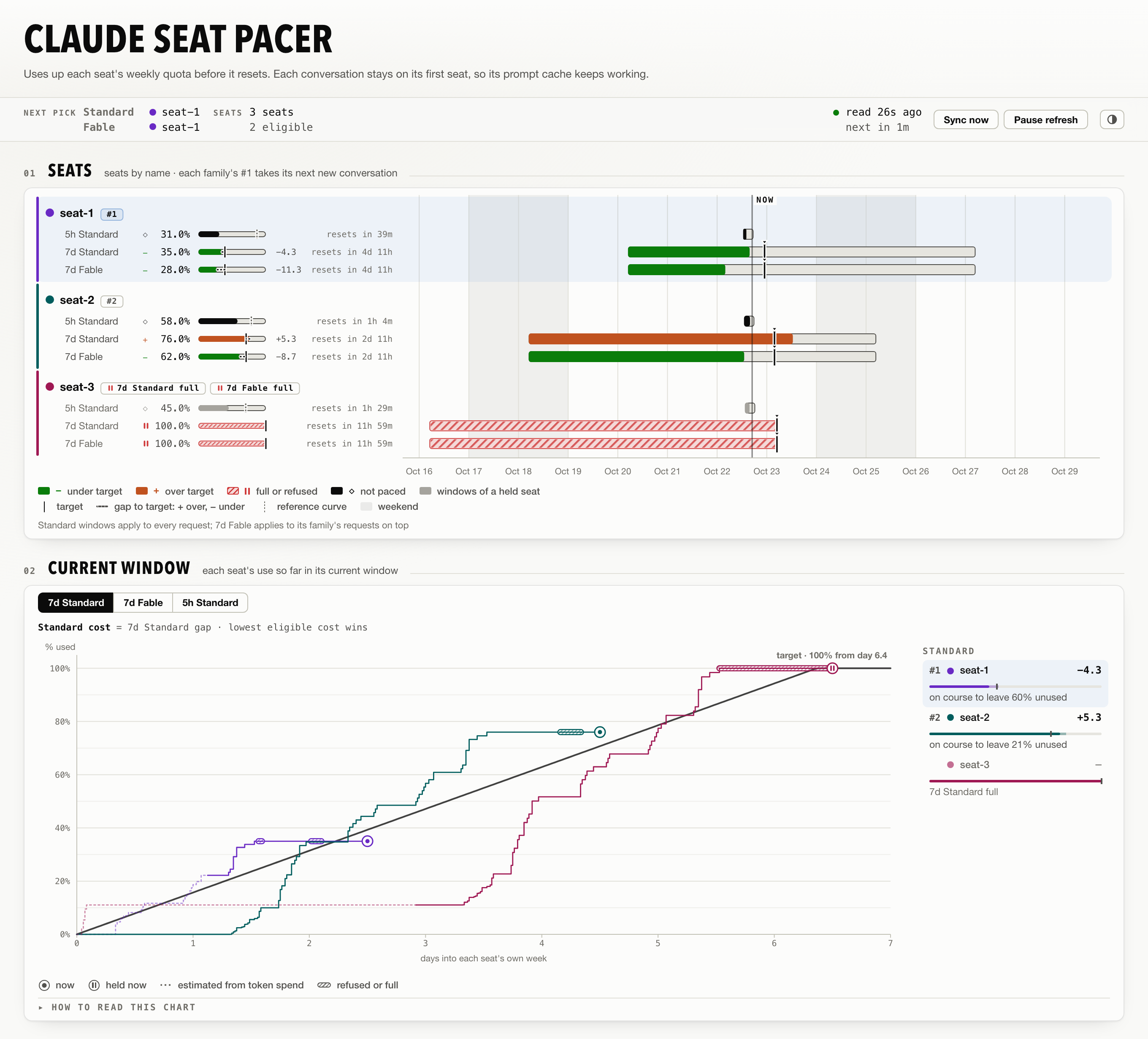
- Every seat gets a plan for its week. The plan rises from nothing at the
window's start to the full quota a little before its reset. A seat resetting
in a day with 5% left is on track; one resetting in three days with 70% left
is behind. - The seat furthest behind takes the next conversation. A seat still
holding quota near its reset goes first, and one that just reset waits until
the others are closer to their plans. A seat with no weekly cap on the
model, whose 5-hour window is its only quota, goes ahead of them all. - Conversations stay on their seat. Each conversation, and its subagents
on the same model, keeps its seat. It moves only if that seat refuses it,
fails a request or drops out of the host's rotation, or after an hour idle. - It sends no probe requests. Each seat's reading comes from Anthropic's
usage endpoint, read every two minutes, and from the rate-limit headers on
every response your own requests get. The usage read is its only request of
its own. - It declines rather than breaks. The pick reads memory only and never
fails a request. When it can't help, the host's own selector routes the
request.
See the pool
The plugin adds a status page to the Management Center showing the next pick,
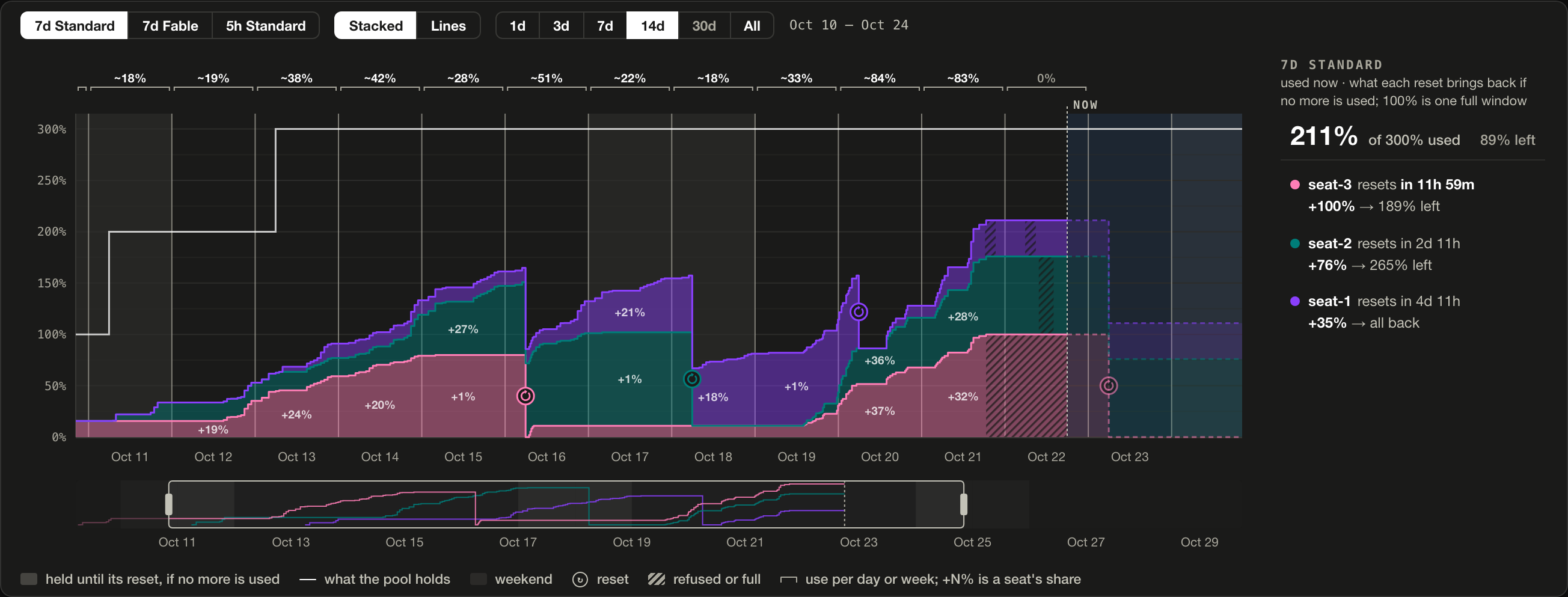
every seat against its plan, the live bindings and the routing log. Over time
piles every seat's use into the pool's total and totals each day, so you can
see whether the pool has enough seats.
Install
You need CLIProxyAPI 7.2.145 or newer; the plugin is tested against 7.3.10,
7.3.15, 8.0.4, 8.0.13, 8.0.15, 8.0.20 and 8.0.35.
Turn plugins on and set a management key, which the status page asks for:
management:
  secret-key: "<a long random string>"
plugins:
  enabled: true
  dir: "~/.cli-proxy-api/plugins"
Before CLIProxyAPI 8.0,
managementisremote-management.Install Claude Seat Pacer from the Plugin Store in the Management Center.
It loads without a restart.Keep the seats you want paced together on one
priority. They share one
by default.
Every setting has a default. Configuration lists them,
and Install covers manual installs, building from source,
updating and uninstalling.
Privacy
The plugin sends each seat's token only to Anthropic's usage endpoint, or to a
loopback host you set as usage-url, through the host's own HTTP client, and
never logs a token or a request body. The status page masks email addresses,
so it is safe to put on a screen. Privacy and data covers
what it stores.
Documentation
- How it picks: when a seat is eligible, how it is
ranked, and when a conversation moves. - Status page: every section of the page, and its
routes. - Configuration: every setting and its bounds.
- Install: the Plugin Store, manual installs, building from
source, updating. - Privacy and data: what the plugin sends, shows and
stores. - Troubleshooting: the failures seen so far.
Contributing
Bug reports and questions go to
Issues.
Open an issue before writing code; CONTRIBUTING.md has the
policy, the build and the commit convention.
Licence
MIT; see LICENSE. NOTICE carries the attribution for the CLIProxyAPI ABI
types this plugin mirrors, and THIRD_PARTY_NOTICES the licences of the code
the library links statically. Each release zip carries all three.
Reviews (0)
Sign in to leave a review.
Leave a reviewNo results found