kitaru
Health Pass
- License — License: Apache-2.0
- Description — Repository has a description
- Active repo — Last push 0 days ago
- Community trust — 75 GitHub stars
Code Pass
- Code scan — Scanned 12 files during light audit, no dangerous patterns found
Permissions Pass
- Permissions — No dangerous permissions requested
This tool provides durable execution infrastructure for AI agents built in Python. It allows developers to add crash recovery, human approval gates, and cost tracking to their existing agents using simple decorators, avoiding the need for complex rewrites or framework lock-in.
Security Assessment
The overall risk is rated as Low. A light code scan across 12 files found no dangerous patterns, no hardcoded secrets, and the tool requests no dangerous system permissions. The package does require network communication to function properly, as it connects to a backend server (locally or remotely) for dashboard observability and SQL database persistence. However, this requires explicit user configuration (`kitaru login`) and does not happen opaquely. No unexpected shell command executions were detected.
Quality Assessment
The project demonstrates strong health and maintenance signals. It is very active, with its last code push occurring today. Backed by a permissive Apache-2.0 license, it is entirely safe for integration into commercial and open-source projects. Community trust is currently moderate but growing, indicated by 75 GitHub stars. The provided documentation, quick start guides, and built-in visual dashboard reflect a mature, developer-friendly utility.
Verdict
Safe to use.
Durable execution for AI agents, built on ZenML

You build your agents. We make them durable.
Kitaru (来る, "to arrive") — open-source agent infrastructure for Python. Any framework. Any cloud. Built on ZenML.




Docs · Quick Start · Examples · Getting Started Guide
Your agent crashed at step 7. Kitaru replays from step 7 — not from scratch.
Add two decorators to your existing Python agent and get crash recovery, human
approval gates, cost tracking, and a full dashboard. No rewrite. No framework
lock-in. No distributed systems overhead.
Why Kitaru?
Python-first, no graph DSL
Write normal Python. Use if, for, try/except — whatever your agent needs.
Kitaru gives you two decorators (@flow and @checkpoint) and a handful of
utility functions. That's it.
from kitaru import checkpoint, flow

@checkpoint
def research(topic: str) -> str:
    return do_research(topic)

@checkpoint
def write_draft(research: str) -> str:
    return generate_draft(research)

@flow
def writing_agent(topic: str) -> str:
    data = research(topic)
    return write_draft(data)

result = writing_agent.run("quantum computing").wait()
Deployment flexibility
No workers, no message queues, no distributed systems PhD required. Kitaru runs
locally with zero config, and scales to production with a single server backed by
a SQL database. Deploy your agents anywhere — Kubernetes, Vertex AI, SageMaker,
or AzureML — using Kitaru's stack abstraction.
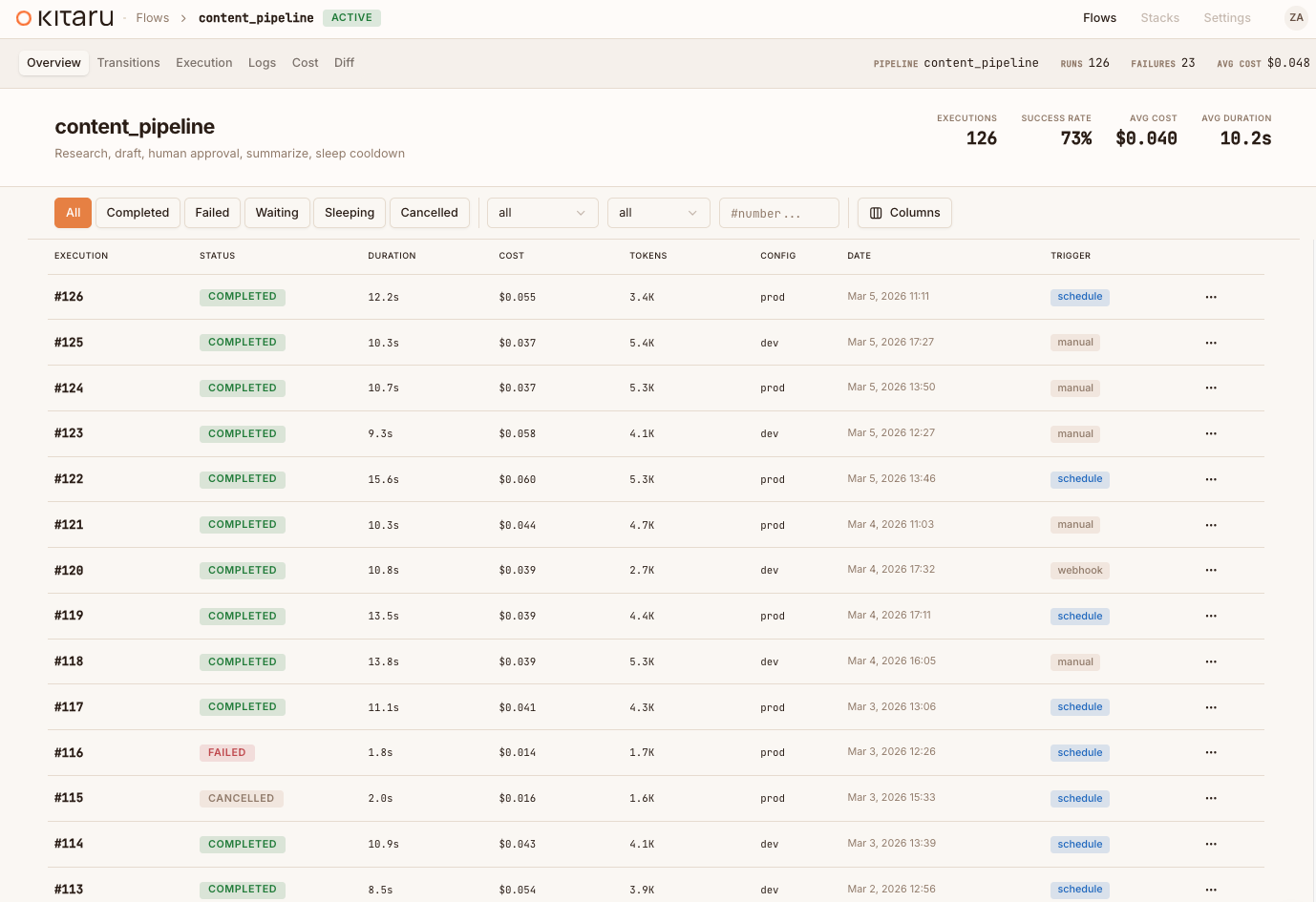
Built-in dashboard
Every execution is observable from day one. See your agent runs, inspect
checkpoint outputs, track LLM costs, and approve human-in-the-loop wait steps —
all from a visual dashboard that ships with the Kitaru server. The dashboard
ships free, with the server, from day one.
To start that server locally, run kitaru login after installing kitaru[local].
To connect to an existing remote server, run kitaru login <server>.
Quick Start
Install
pip install kitaru
Or with uv (recommended):
uv pip install kitaru
Optional: start a local Kitaru server
Flows run locally by default with the base install. If you also want the local
dashboard and REST API, install the local extra and then run bare kitaru login:
uv pip install "kitaru[local]"
kitaru login
kitaru status
Optional: connect to an existing remote Kitaru server
If you already have a deployed Kitaru server, connect to it explicitly:
kitaru login https://my-server.example.com
# add --project <PROJECT> or other remote-login flags if your setup requires them
kitaru status
Initialize your project
kitaru init
Write your first flow
# agent.py
from kitaru import checkpoint, flow

@checkpoint
def fetch_data(url: str) -> str:
    return "some data"

@checkpoint
def process_data(data: str) -> str:
    return data.upper()

@flow
def my_agent(url: str) -> str:
    data = fetch_data(url)
    return process_data(data)

result = my_agent.run("https://example.com").wait()
print(result)  # SOME DATA
Run it
python agent.py
Every checkpoint's output is persisted automatically. You can inspect what
happened, replay from any checkpoint, or resume a waiting flow:
kitaru executions list
kitaru executions get <EXECUTION_ID>
kitaru executions logs <EXECUTION_ID>
kitaru executions replay <EXECUTION_ID> --from process_data
Learn more
| Resource | Description |
|---|---|
| Getting Started Guide | Full setup walkthrough with all examples |
| Documentation | Complete reference and guides |
| Examples | Runnable workflows for every feature |
| Stack Selection Guide | Deploy to Kubernetes, Vertex AI, SageMaker, or AzureML |
Contributing
We welcome contributions! See CONTRIBUTING.md for development
setup, code style, and how to submit changes. The default branch is develop —
all PRs should target it.
Community and support
- Slack — chat with the team and other users
- GitHub Issues — bug reports and feature requests
- kitaru.ai — landing page and docs
License

Reviews (0)
Sign in to leave a review.
Leave a reviewNo results found