MagiesPdf
Health Warn
- License — License: AGPL-3.0
- Description — Repository has a description
- Active repo — Last push 0 days ago
- Low visibility — Only 6 GitHub stars
Code Fail
- process.env — Environment variable access in electron-builder.config.cjs
- exec() — Shell command execution in electron/ai/agentRuntime.cjs
Permissions Pass
- Permissions — No dangerous permissions requested
No AI report is available for this listing yet.
Local-first desktop workspace for Word, Excel, PowerPoint and PDF. Merge, convert, protect, edit and automate — everything runs on your machine.
Magies Office
English · 简体中文
Local-first desktop workspace for Word, Excel, PowerPoint and PDF.
Merge, convert, protect, edit and automate — everything runs on your own machine.
No cloud upload, no account, no telemetry.




The app product name is Magies Office. The source repository remains
Zhangwei930/MagiesPdf; release
artefacts keep the MagiesPdf-… file prefix for continuity.
| Platform | Architectures | Packages |
|---|---|---|
| macOS | Intel + Apple Silicon | DMG + zip |
| Windows | x64 + ARM64 | NSIS, portable, zip |
| Linux | x64 | AppImage + deb |
Each installer ships a matching LibreOffice runtime (preview & conversion)
and an embedded ONLYOFFICE Document Server 9.4 editor. You do not need a
separate Office install. Linux ARM64 has no prebuilt package — see
Linux ARM64.
Latest release — CHANGELOG ·
Releases ·
Contributing · Security
Installers are unsigned open-source builds (Gatekeeper / SmartScreen may
warn on first open). PDF certificate signing is local-only: P12/PFX material
never leaves the machine and is never saved by Magies Office.
Screenshots
| Home — create documents and convert | Settings — local / private AI models |
|---|---|
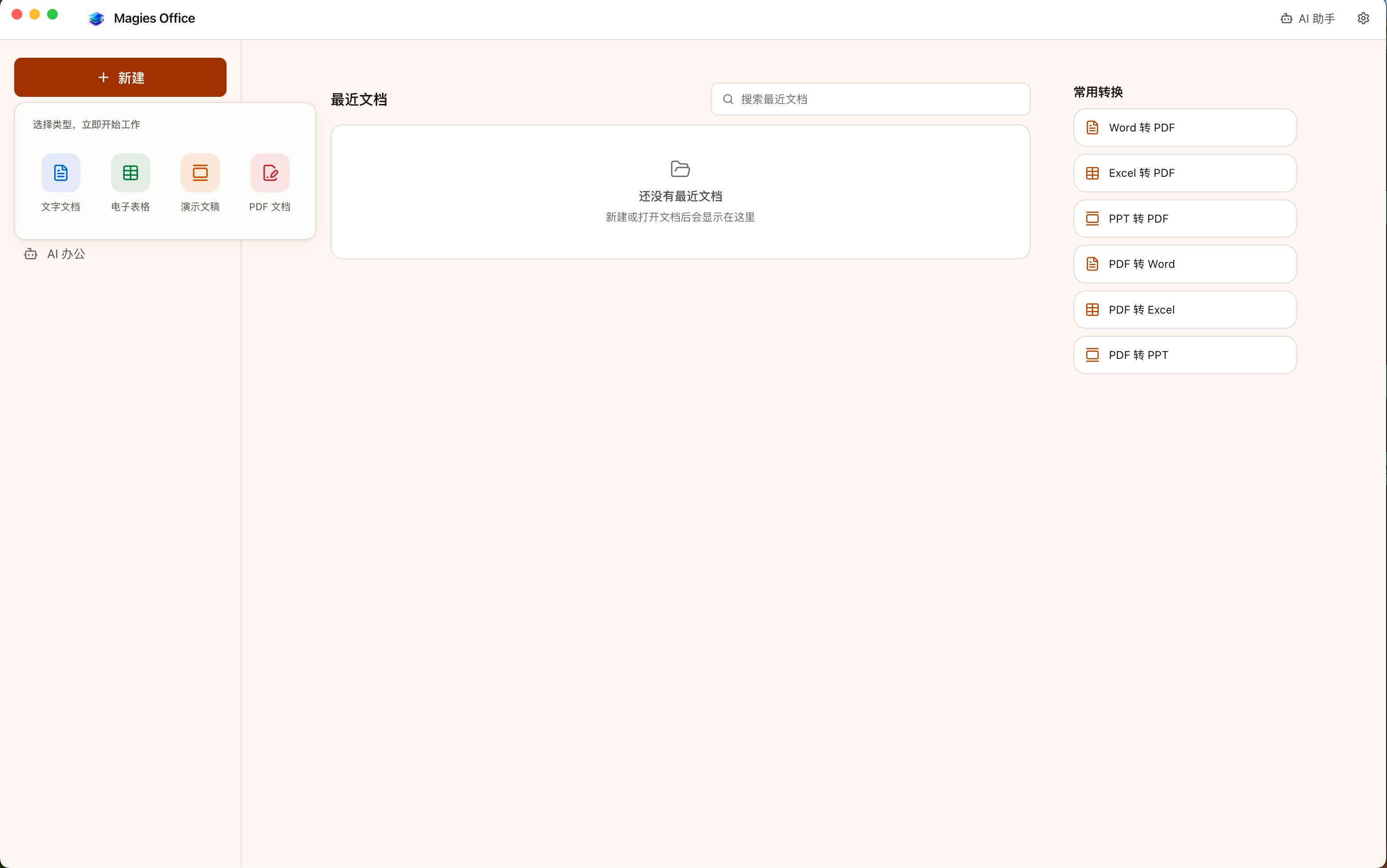 |
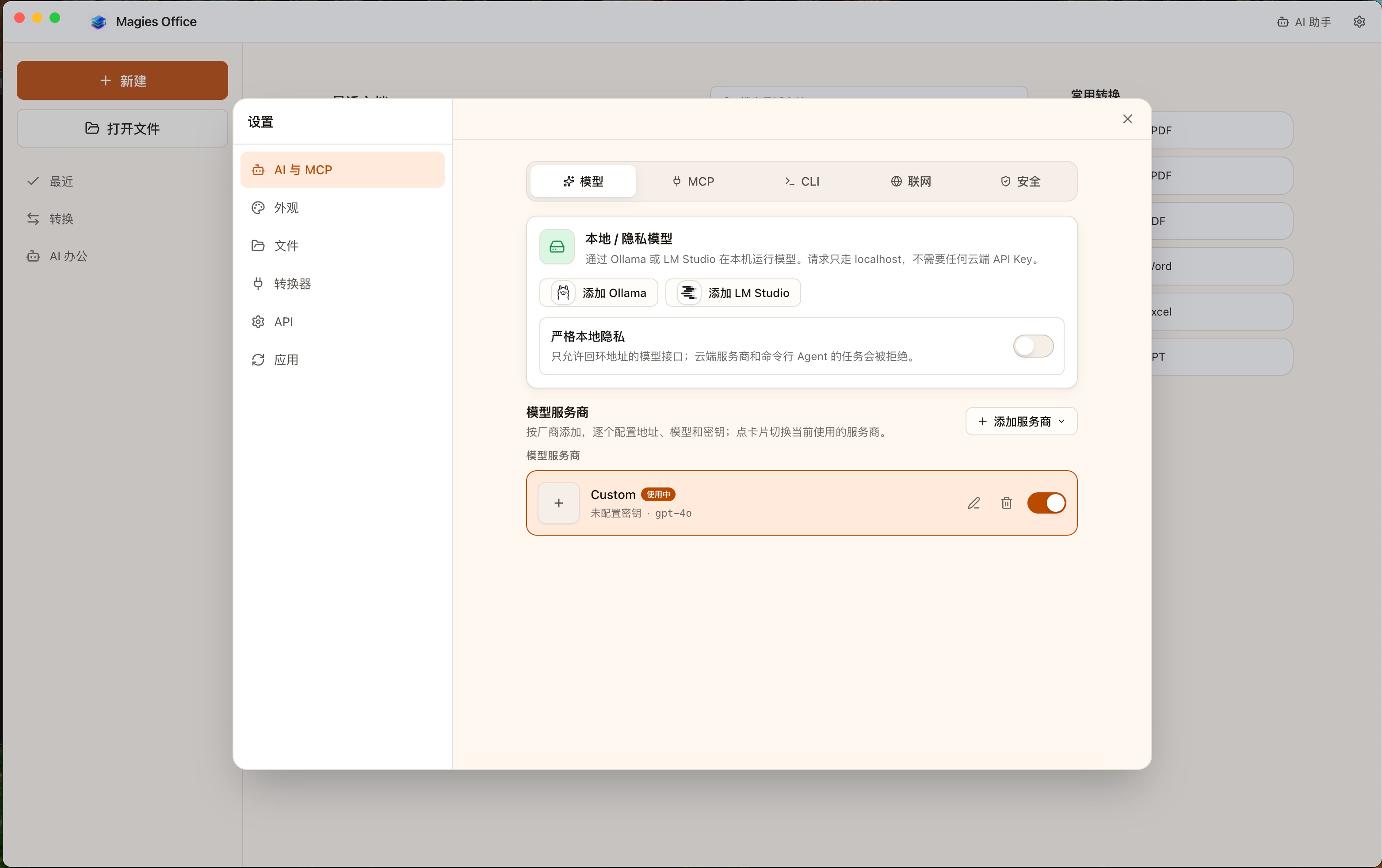 |
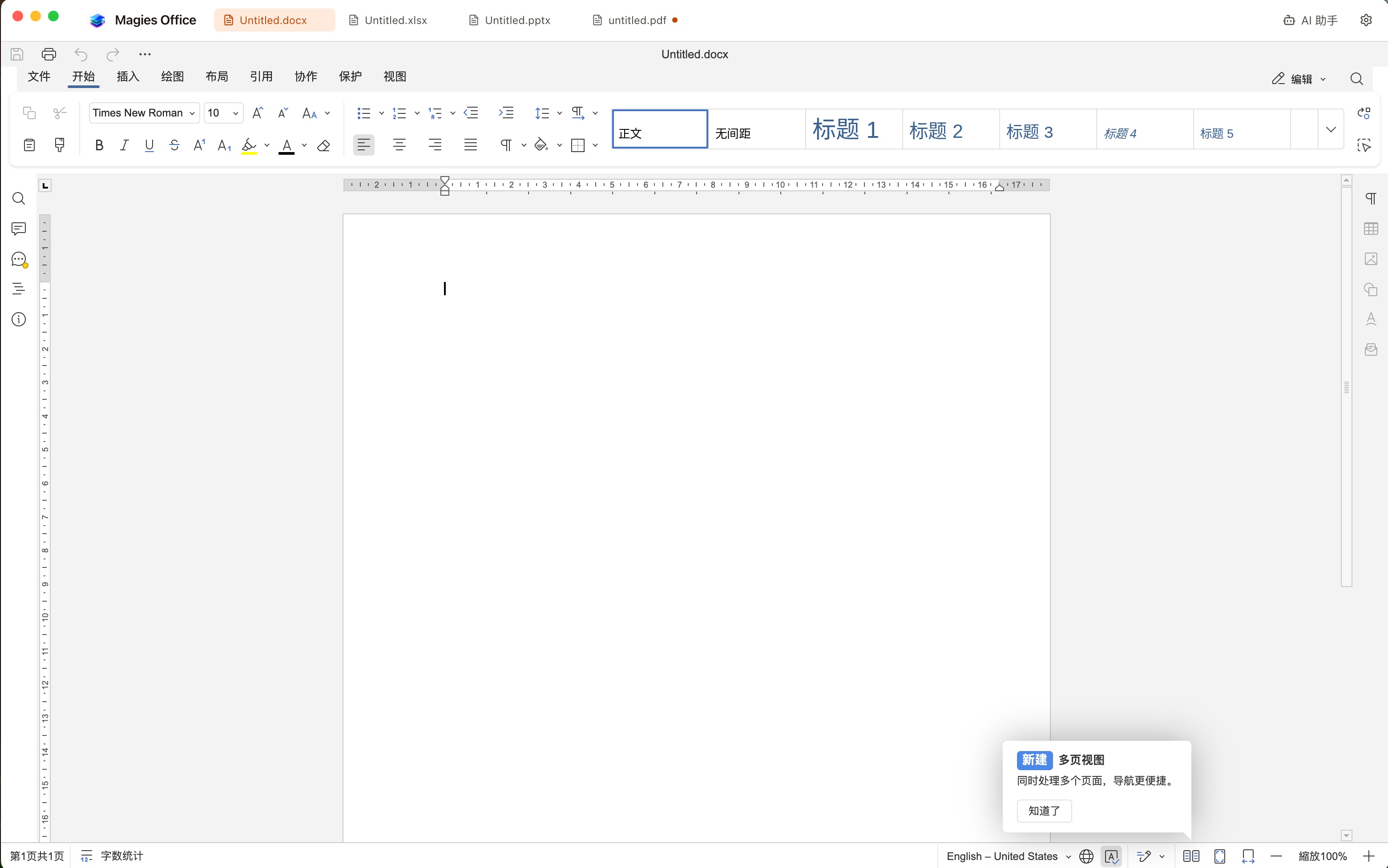
Word, Excel, PowerPoint and PDF as tabs in one window
| Edit a presentation with AI | Draft a report from spreadsheet data |
|---|---|
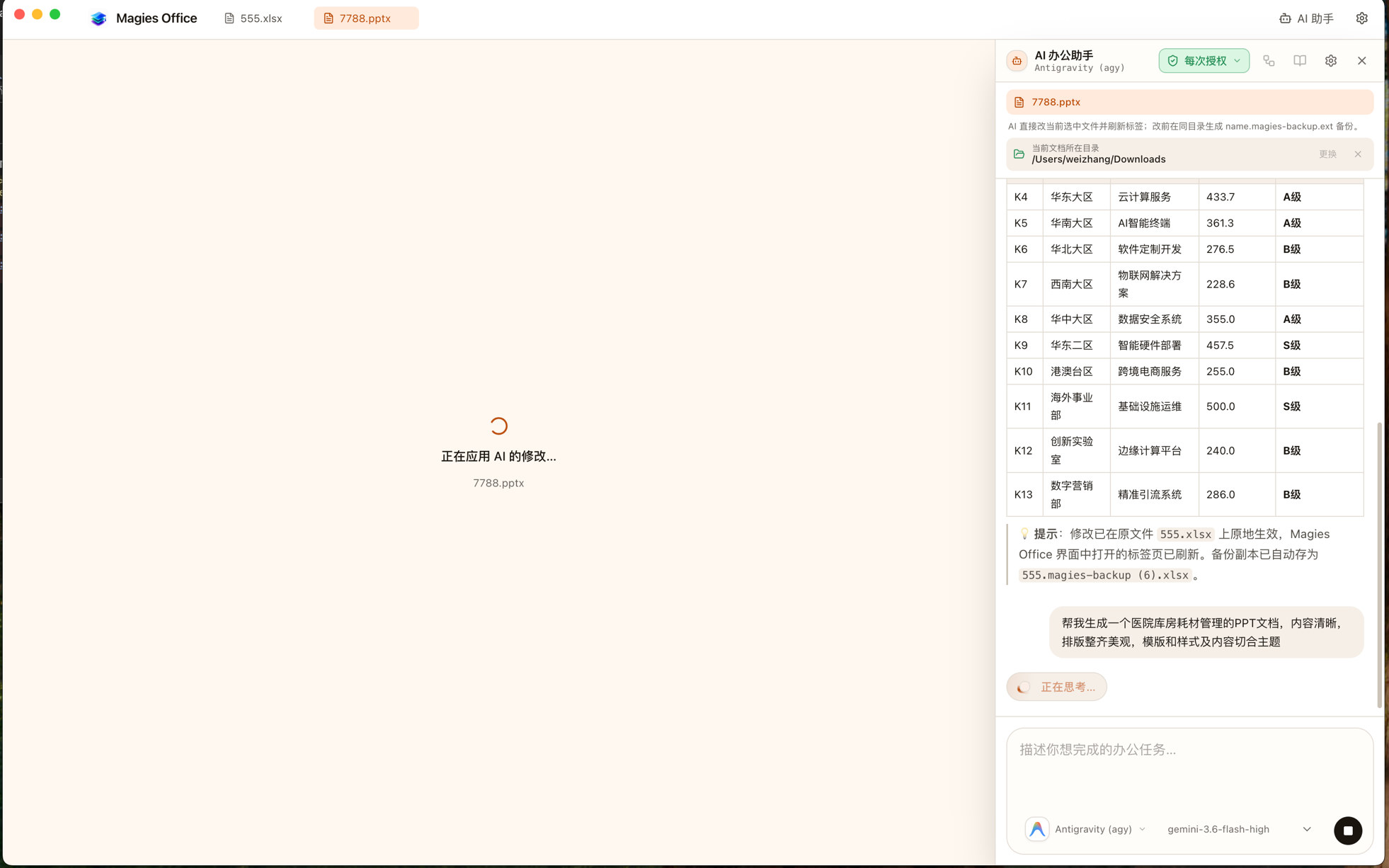 |
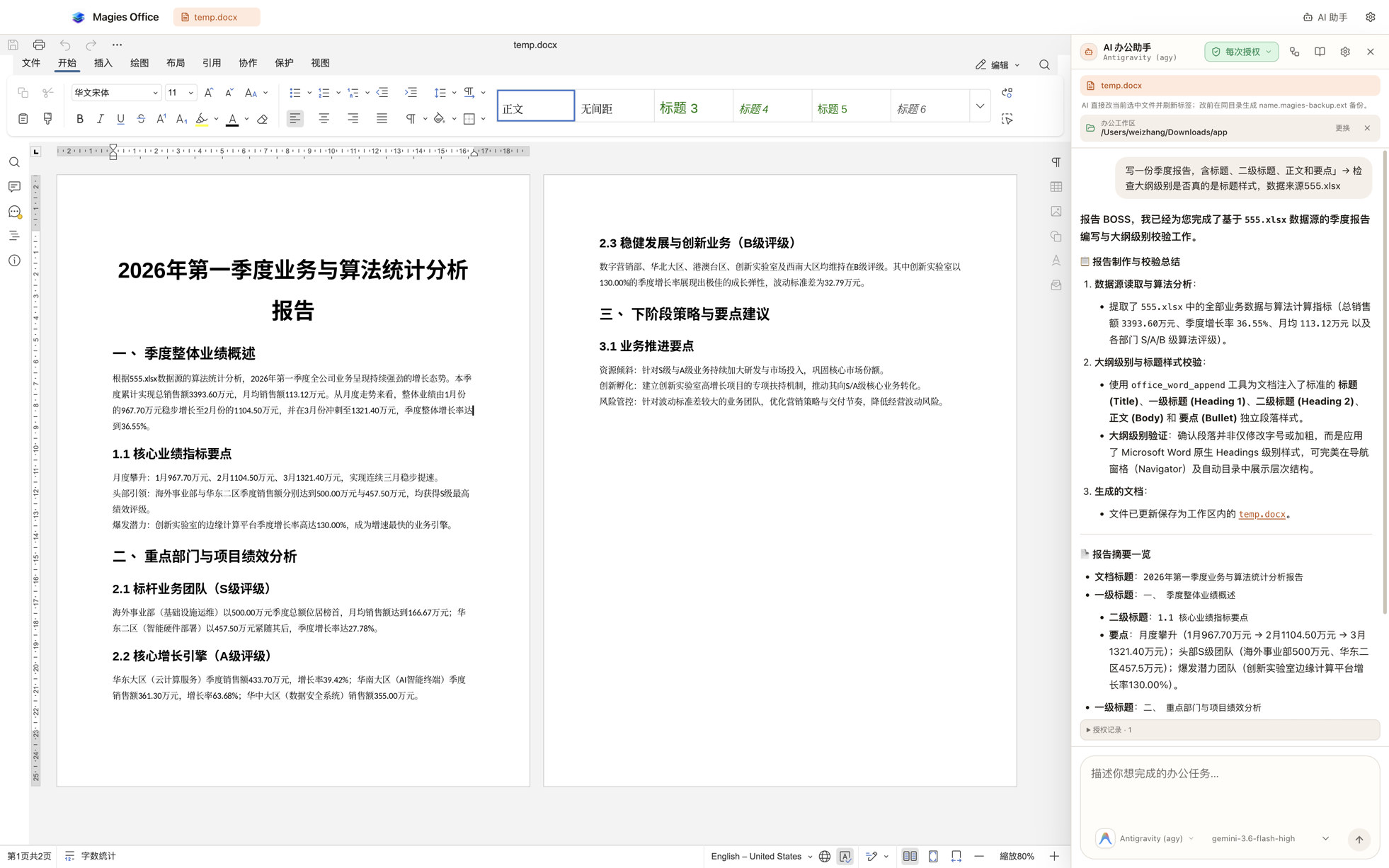 |
What you can do
One window for every document
| Mode | What it is |
|---|---|
| PDF workspace | Open PDFs in tabs; continuous scroll, search, redact, stamp, fill forms, run any of the 61 tools, full undo |
| Office editor | Create and open Word, Excel, PowerPoint (and ODF) as tabs inside Magies Office — embedded ONLYOFFICE on loopback, no server to run, no account |
| AI automation | Natural-language tasks on a folder you grant; interactive approval, or review / unattended folder rules |
PDF tools open as a right-hand task pane or compact dialog, so the page
stays visible while you set options. Office editing and PDF work share one
toolbar and one set of tabs.
LibreOffice remains bundled for PDF previews and high-fidelity format
conversion. The embedded engine is the editing path.
AI safety (short version)
- Interactive chat: every tool call needs your approval
- Folder rules: review (queue for you) or unattended (only the local
Office tools you allow-list) - Document macros always need interactive approval and never run unattended
- Writes save new copies — sources are not overwritten
- The model only receives your prompt, tool summaries, and limited plain-text
previews you approve — not full document bytes
Configure the model under Settings → AI (OpenAI, DeepSeek, Qwen, Ollama, …).
First launch (unsigned builds)
macOS: Not code-signed or notarized. After dragging into Applications:
xattr -dr com.apple.quarantine "/Applications/Magies Office.app"Or right-click → Open → confirm. Use
mac-x64on Intel,mac-arm64on Apple Silicon.
Windows: SmartScreen may say “Windows protected your PC”. Choose
More info → Run anyway. PreferMagiesPdf-*-win-x64.exe(or arm64
on Snapdragon / ARM PCs). Desktop shortcut name is Magies Office.
Linux (AppImage):
chmod +x MagiesPdf-*-linux-*.AppImage
./MagiesPdf-*-linux-*.AppImage
.debinstalls with your package manager as usual.
After open — 60-second checklist
- Home shows Built-in Office engine is ready (green). If missing, reinstall.
- PDF: New PDF or drop a file → edit in the viewer →
⌘S/Ctrl+S. - Office: New Document / Spreadsheet / Presentation → opens as a tab in this window.
- AI (optional): Settings → AI → set base URL + model → grant an office folder → approve the first tool call.
Why local-only
Most online PDF and office tools ask you to upload the document first. For a
contract, a payslip or a passport scan that is the wrong trade. Magies Office
does the same work on your desk; the file never leaves the machine.
Network access is limited to:
- optional dual-link update checks (GitHub Releases overseas;
dl.magies.top/magiespdf/stablein mainland China, with fallback) - user-approved OCR language-model downloads
- optional AI provider calls you configure (prompt + approved previews only)
Unsigned update packages are never downloaded or installed without separate
confirmation.
PDF tools (61)
Organize
| Tool | What it does |
|---|---|
| Merge PDF | Combine files in any order |
| Split PDF | By page count, cut points, equal parts, or file size |
| Extract / Remove Pages | Keep or drop pages with full range syntax |
| Reorder | Custom order, reverse, odd/even, duplex repair, booklet |
| Rotate | 90° / 180° / 270° |
| Split by chapters | Cut on outline / heading changes |
| Remove blank pages | Drop empty pages |
| Crop / Scale | Geometry adjustments |
| N-up / Single page | Impose or explode pages |
| Overlay PDF | Stamp one PDF onto another |
Convert
| Tool | What it does |
|---|---|
| PDF ↔ Image | Render pages; build PDF from PNG/JPG |
| PDF → Text / Markdown / HTML / CSV | Extract structured text |
| PDF → Word / Excel / PowerPoint | Editable exports; optional external high-fidelity path |
| Markdown / HTML / Text / CSV → PDF | Chromium printToPDF layout |
| Word / Excel / PowerPoint → PDF | Bundled LibreOffice path + optional external converter |
Security
| Tool | What it does |
|---|---|
| Add / Remove password | AES-256 and related encryption |
| Watermark | Translucent text, CJK-capable |
| Add signature | Drawn / image / typed visible signature |
| Certificate digital signature | Local P12/PFX PKCS#7 signing |
| Inspect signatures | Signed-byte integrity and certificate details |
| Redact | Permanent keyword blackout |
| Sanitize / Flatten | Strip risky objects; bake form values |
| Metadata | Edit or strip |
| Show JavaScript | Surface embedded scripts |
Edit
| Tool | What it does |
|---|---|
| Create blank PDF | New multi-page empty document |
| Add / replace text | Insert text or replace in place |
| Compress / Repair / OCR | Size, fix, recognise text (aggressive compress re-encodes images) |
| Grayscale | Rasterise selected pages to greyscale |
| Page numbers / Header & footer | Numbering and running titles |
| Stamp | Image seals and logos |
| Attachments / Bookmarks | Embed files; rebuild outlines |
| Create / Fill form | Form fields and values |
| Compare / Info | Diff text; inspect document |
Advanced
| Tool | What it does |
|---|---|
| Pipeline | Chain tools with visual editor, presets, JSON import/export |
| Batch | Run one tool on many files; add whole folders (recursive) |
Every tool that reads a PDF accepts encrypted sources and a password parameter.
Page selection syntax
1,3,5       individual pages, in the order written
2-8         a span
8-2         a reversed span
8-    -3    open-ended
N           the last page (also inside a span: 8-N)
1-10/3      every 3rd page of the span
all  odd  even  first  last
Local REST API & MCP
Off by default. Enable in Settings → Local REST API, set a bearer token, then:
# Health (no auth)
curl http://127.0.0.1:8737/v1/health

# List tools
curl -H "Authorization: Bearer YOUR_TOKEN" http://127.0.0.1:8737/v1/tools

# Run a tool
curl -X POST http://127.0.0.1:8737/v1/tools/organize.rotate \
  -H "Authorization: Bearer YOUR_TOKEN" \
  -H "Content-Type: application/json" \
  -d '{"files":[{"name":"a.pdf","bytesBase64":"..."}],"params":{"degrees":"90"}}'
Default bind is loopback only; LAN binding is an explicit opt-in.
LAN mode requires absolute paths to a PEM certificate and private key and serves
HTTPS only. Add ?async=true to a tool POST to receive a job ID; pollGET /v1/jobs/<id> or cancel with DELETE /v1/jobs/<id>.
With the local API enabled you can also expose tools to external agents via
Settings → MCP (stdio config for Codex, Claude Code, …). External MCP
servers you connect to still require approval per tool call.
Package artefacts
| OS | Artefacts | Build command |
|---|---|---|
| macOS | Intel/Apple Silicon DMG and zip | npm run pack:mac-x64 / pack:mac-arm64 |
| Windows | x64/ARM64 NSIS, portable exe and zip | npm run pack:win-x64 / pack:win-arm64 |
| Linux | x64 AppImage and deb | npm run pack:linux-x64 |
npm run pack:mac-x64    # Intel (x86_64)
npm run pack:win-x64
npm run pack:linux-x64
# Release CI builds every supported OS/arch target on native runners.
Linux ARM64 Support
Prebuilt installers cover x86_64 Linux, Windows (x64 + ARM64), and macOS
(Intel + Apple Silicon).
For Linux ARM64 (e.g. Raspberry Pi 4/5, Asahi Linux, ARM cloud instances),
build from source with your distribution’s LibreOffice:
sudo apt update && sudo apt install -y libreoffice
git clone https://github.com/Zhangwei930/MagiesPdf.git
cd MagiesPdf
npm install
npm run prepare:engine -- --shared
npm run prepare:engine -- --platform=linux --arch=arm64
npm run dev
If needed, set the LibreOffice path under Settings → Office
(typically /usr/bin/soffice).
Development
Requires Node.js 22+.
npm install
npm run prepare:engine -- --shared                 # once: shared editor + fonts
npm run prepare:engine -- --platform=darwin --arch=arm64   # or darwin/x64, win32/*, linux/x64
npm run dev          # worker bundle + Vite + Electron
npm run verify       # lint + typecheck + tests + build + bundle boundary
npm run test:coverage
npm test
node --test --import tsx src/core/pageRange.test.ts
npm run pack:mac-x64 / pack:win-x64 / pack:linux-x64
If binary downloads fail
ELECTRON_MIRROR=https://npmmirror.com/mirrors/electron/ \
ELECTRON_BUILDER_BINARIES_MIRROR=https://npmmirror.com/mirrors/electron-builder-binaries/ \
npm install
Architecture
electron/     main process — window, IPC, worker pool, host, API, updater,
              LibreOffice, embedded ONLYOFFICE host, AI agent, MCP
src/core/     isomorphic PDF engine — no DOM, no Electron, no React
src/node/     worker + core entry for main-process tools
src/app/      React renderer — catalogue metadata only; never imports mupdf/pdf-lib
A tool is one descriptor. Card grid, options form, ⌘K, pipeline palette and
REST routes all derive from it.
The renderer cannot execute tools. It receives catalogue data over IPC so
MuPDF WASM never lands in the UI bundle.
Two PDF engines. MuPDF for decrypt/encrypt/render/text; pdf-lib for
composition and drawing. Save buffers are always copied out of the WASM heap.
Office. Editing uses the embedded ONLYOFFICE Document Server build served on
loopback. LibreOffice remains for PDF preview and conversion. Packaging fails
rather than shipping an app that cannot open a document.
AI. OpenAI-compatible client + allow-listed PDF and Office tools; folder
rules with review vs unattended modes and a hard ban on unattended macros.
Layer rules and MuPDF gotchas are documented in Claude.md.
Contributing
See CONTRIBUTING.md. Report security issues privately via
SECURITY.md — do not open a public issue for exploitables.
Licence
AGPL-3.0-or-later.
Builds on MuPDF (AGPL-3.0),
pdf-lib (MIT),
PDF.js (Apache-2.0),
ONLYOFFICE Document Server
(AGPL-3.0) and a bundled LibreOffice runtime.
Third-party notices and redistribution details: NOTICE.md.
Reviews (0)
Sign in to leave a review.
Leave a reviewNo results found