solopdf
Health Warn
- License — License: MIT
- Description — Repository has a description
- Active repo — Last push 0 days ago
- Low visibility — Only 8 GitHub stars
Code Fail
- rm -rf — Recursive force deletion command in .github/workflows/build.yml
- network request — Outbound network request in app/src/ai.ts
Permissions Pass
- Permissions — No dangerous permissions requested
No AI report is available for this listing yet.
Free, ad-free, local-first PDF reader & offline toolkit — highlights become plain Markdown notes (.annotations.md). Scan deskew/binarize, visual blink diff, math/table snip, 56-tool MCP server & CLI. Tauri 2 + Rust, MIT.
SoloPDF
Free, ad-free, local-first PDF reader & offline document toolkit — where every highlight becomes a plain Markdown file.






Download Latest Release · App Store (macOS & iOS) · What's New in v1.1 · Website · Companion App: SoloMD
⭐ If SoloPDF earns a place on your machine, star it on GitHub — it is 100% free, ad-free, MIT-licensed, and stars are how other readers, researchers, and developers find it.
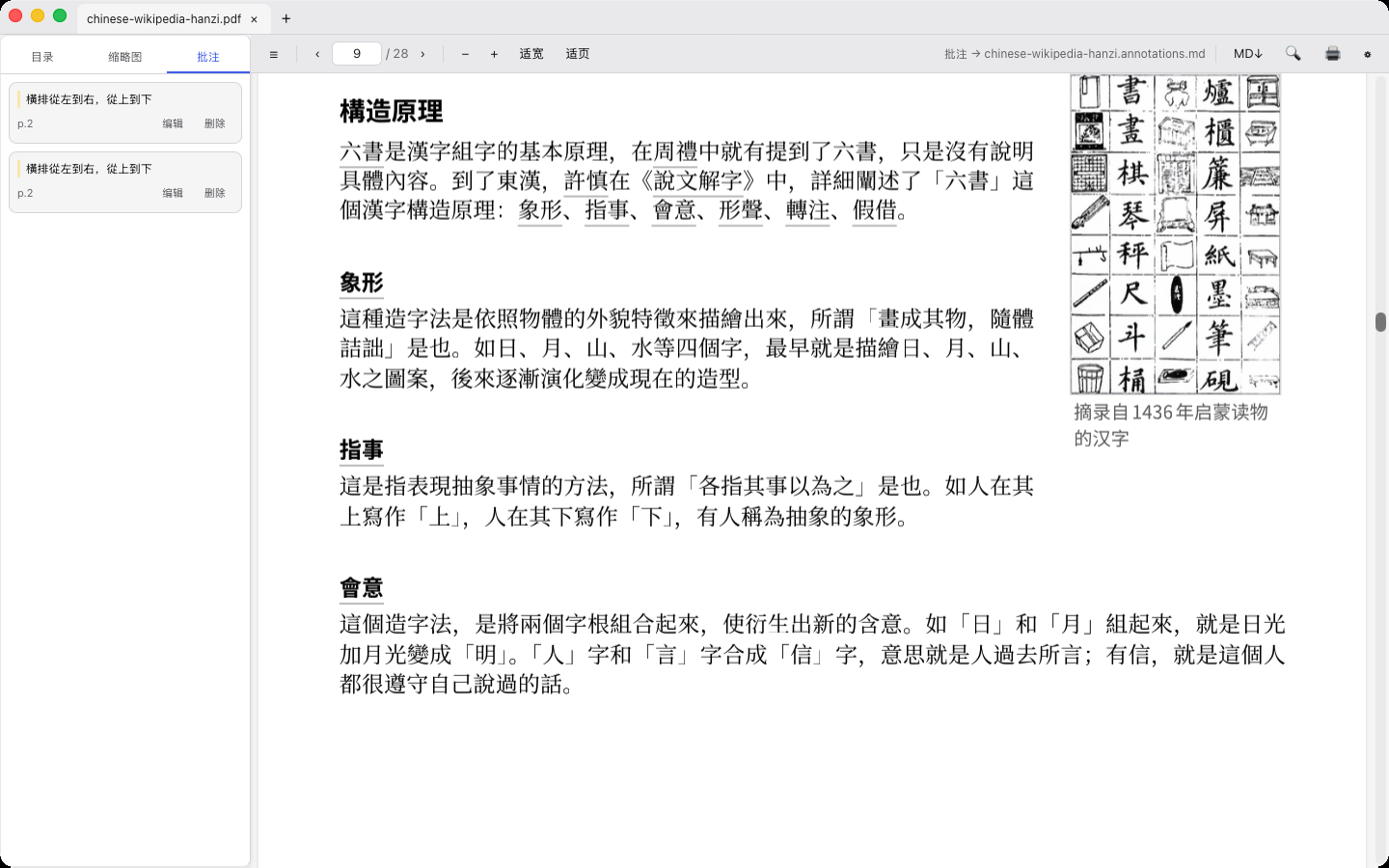
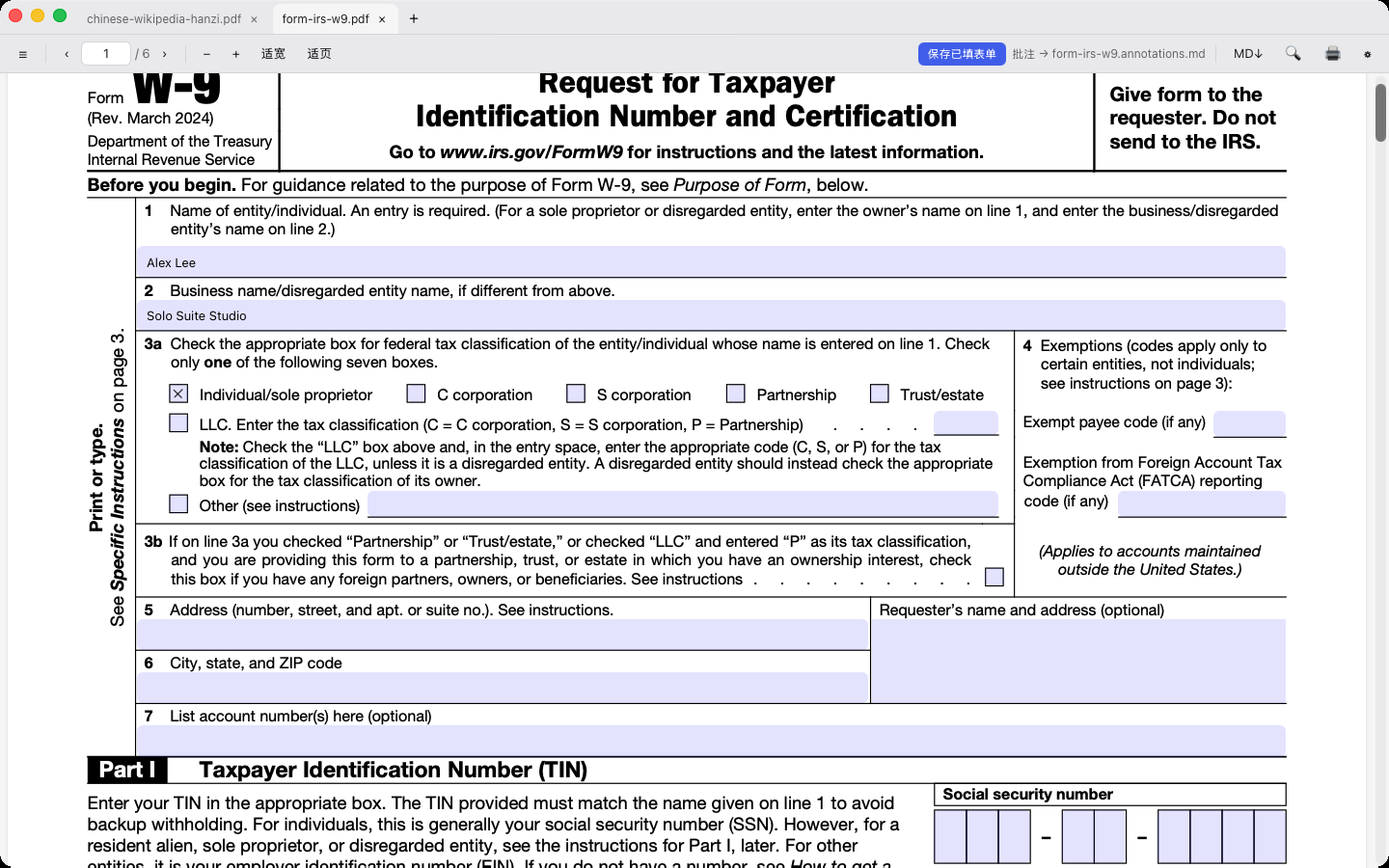
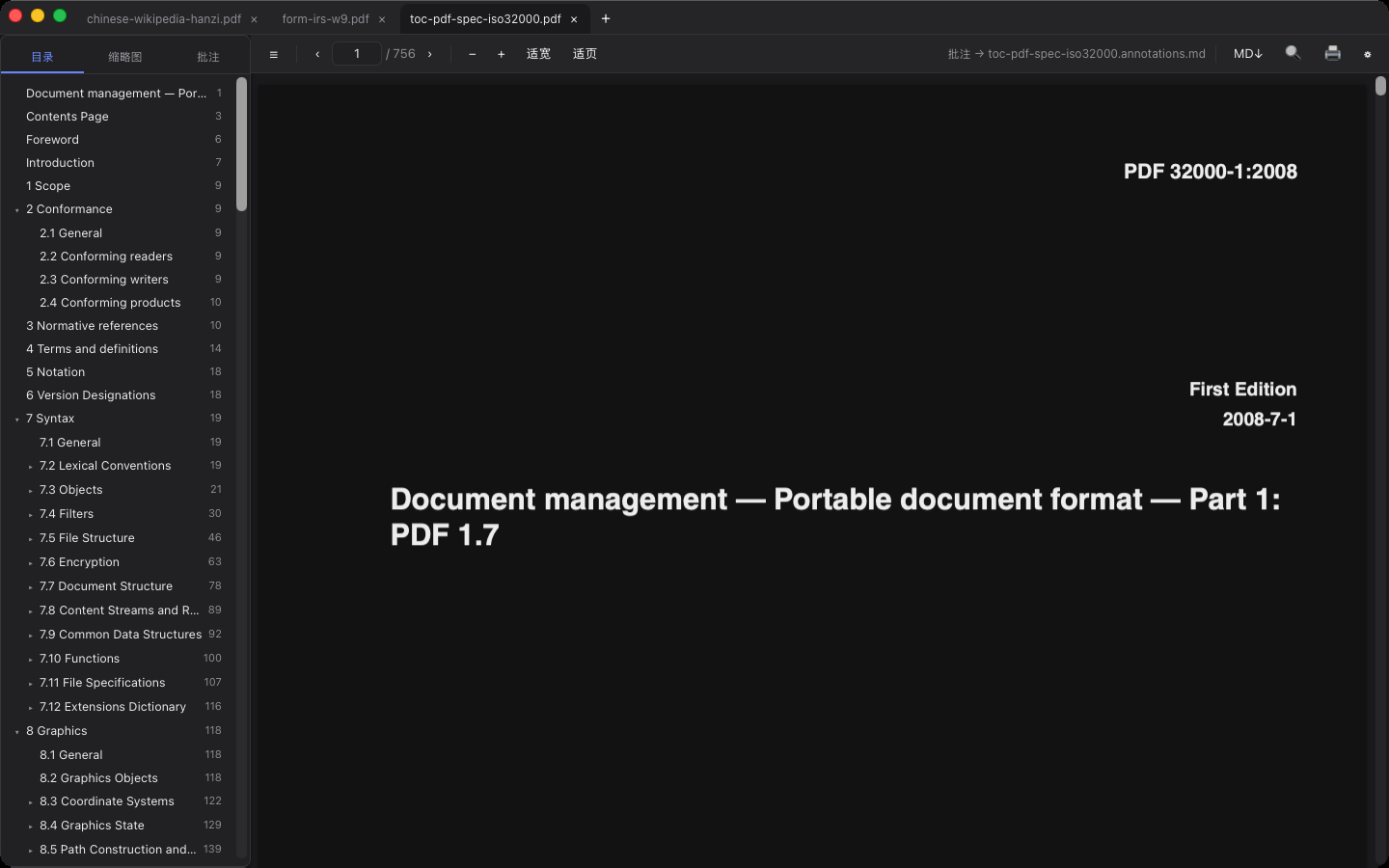
Why SoloPDF?
Desktop PDF readers today force an ugly trade-off: bloatware that nags you with ads and cloud upsells (Adobe / Foxit / WPS), barebones browser tabs (Edge / Chrome), or self-hosted web suites like Stirling-PDF that require running Docker + a 1.5 GB JVM just to deskew a scan or redact a contract. Meanwhile, PKM tools lock your highlights inside opaque SQLite databases.
SoloPDF is built on Tauri 2 + Vue 3 + Rust (~24 MB macOS Universal .dmg, native across macOS, Windows x64/ARM64, Linux x64/ARM64, iOS/iPadOS, and Android):
- Highlights = Plain Markdown (
.annotations.md). Every highlight, underline, sticky note, freehand sketch, and region screenshot is saved right next to your PDF as a human-readable Markdown file withsolopdf://deep links. Open and edit it in SoloMD, Obsidian, VS Code, or Git — triple-layer anchoring (text fingerprint > page + coordinates) keeps highlights attached even if the PDF is re-exported, and your notes never get overwritten. - 20+ Offline PDF Tools in Pure Rust (Strict Copy-Out). Auto-deskew, Sauvola adaptive binarization, 2-up scan split, 17-step batch pipelines, true content-stream redaction, N-up & saddle-stitch booklet imposition, X.509/PKCS#7 signature verification, lossless image extraction, and smart outline generation — zero Docker, zero Java, zero network uploads, and your original PDF is never modified in place.
- Academic & Legal Superpowers. Drag a box to snip math formulas into LaTeX (
$...$/$$...$$) or tables into Markdown / CSV; aggregate#tagsacross dozens of papers into a Cross-PDF Topic Digest; export Anki / Obsidian flashcards; or run Visual Pixel Overlay & A↔B Blink Compare to catch subtle contract or CAD revisions in seconds. - AI-Native CLI + 56-Tool MCP Server. Drive every reading, retrieval (offline BM25 with
[p.N]citations), OCR, comparison, and document operation from your terminal or directly inside Claude Code, Claude Desktop, Cursor, and Windsurf.
| Capability | SoloPDF | Adobe / Foxit | PDF Expert | Stirling-PDF | Zotero |
|---|---|---|---|---|---|
| Price & License | Free · MIT | Freemium / Sub | Paid ($80+/yr) | Free · Self-host | Free · AGPL |
| Install Footprint | ~24 MB native | 500 MB – 2 GB | ~180 MB (Apple only) | Docker + JVM (~1.5 GB) | ~250 MB |
| Ads / Telemetry / Account | Zero | Heavy upsells | Account nag | Zero | Optional sync |
| Annotations Format | Plain .annotations.md |
Locked in PDF | Locked in PDF | N/A | SQLite DB |
| Visual Pixel & Blink Diff | Built-in (Anaglyph + Blink) | Paid Pro only | No | Limited | No |
| Scan Deskew + Sauvola Binarize | 17-step Rust pipeline | Paid Pro only | No | Docker required | No |
| Math → LaTeX & Table → MD Snip | 100% Offline | No | No | No | Plugins needed |
| True Content-Stream Redaction | Built-in (Offline) | Paid Pro only | Paid | Yes | No |
| CLI + MCP Server for AI Agents | CLI + 56 MCP Tools | No | No | REST API | 3rd-party MCP |
| Platforms | Mac · Win · Linux · iOS · Android | Mac · Win · Mobile | Mac · iOS | Web (Docker) | Mac · Win · Linux · iOS · Android |
What's New in v1.1
- Scan Mastery Closed Loop — Auto-Deskew & border cleanup (projection profile variance maximization + bilinear rotation), Sauvola local adaptive binarization ($O(1)$ integral-image windowing that eliminates phone-camera shadows), 2-up scan center-gutter split (supports skipping single-page covers and RTL manga/ancient texts), Single continuous vector page stitch, blank scan ink-ratio detection & removal, and vector PDF letterhead overlay.
- Visual Page Comparison (Overlay & Blink Diff) — Alongside word/character-level text diff, inspect scanned contracts, stamps, and CAD drawings with Red/Cyan pixel anaglyph overlay, 16×16 connected-component change hotspots (
Δ X.XX%), and 650 ms A ↔ B Blink Compare. - Math Snip → LaTeX & Cross-PDF
#tagTopic Digest — Box-select equations on any page to copy inline$...$or display$$...$$LaTeX (superscripts/subscripts, stacked fractions, radicals, Greek/calculus symbols). Aggregate.annotations.mdacross open tabs or an entire literature folder by#tag(#method,#limitation, etc.) into a structured Markdown synthesis ready for SoloMD or Obsidian. - 17-Step In-Memory Pipeline & Multi-File Batch Queue — Chain up to 17 atomic PDF operations in memory (5 built-in presets: Scan Cleanup, Crisp B&W Scan, Confidential Share, Handout Print, Archive Slim) and run them across a batch of PDFs in one go, plus Smart Auto-Rename (
{year} - {author} - {title}.pdf) and/EmbeddedFilesattachment read/write/strip.
Core Capabilities
Reading & Companion Markdown Notes
- Highlight →
.annotations.md: Highlights, underlines, strikethroughs, squiggly lines, sticky notes, freehand ink, and region screenshots (saved in<doc>.annotations.assets/and referenced via standardMarkdown) sync live with your companion.annotations.mdfile. - Bi-directional Round-Trip: Import existing PDF annotations left by Acrobat, Apple Preview, PDF Expert, Zotero, or Foxit in one click (undoable, deduplicated, non-destructive). Export companion notes back into a new standard-annotated PDF copy anytime.
- Instant Streaming & CJK-First Search: Cold-starts a 157 MB / 1,048-page PDF in ~1s with constant-memory virtual scrolling. Full-text search normalizes NFKC codepoints (fixing the notorious Kangxi radical mismatch in Skia-exported PDFs).
- Side-by-Side Split & Reading Aids: View two sections of the same PDF or two separate PDFs side-by-side (with optional page-locked sync scroll), smart dark mode (inverts text pages while keeping photo-heavy pages intact), auto-crop margins for two-column papers, column-aware Reading Ruler (
L), 2–4× HD Loupe (holdZ), and built-in offline Chinese-English dictionary (CC-CEDICT). - Multi-Format: PDF · EPUB · MOBI/AZW3 · FB2 (
.fb2/.fbz, auto encoding detection) · TXT · CBZ/CBR comics · DjVu · Multi-page TIFF (CCITT G3/G4 fax, LZW, Deflate, JPEG).
100% Local OCR & Optional BYOK AI
- On-Device OCR (Zero Network): Turn scanned PDFs or camera photos into searchable PDFs (Tesseract-style invisible
GlyphLessFonttext layer — selectable, searchable, and highlightable without bloating file size) or structured Markdown. Uses Apple Vision on macOS/iOS (zero bundle overhead) and bundled PP-OCRv4 ONNX on Windows/Linux. - Ask AI (Off by Default, BYOK / Local Ollama): Point SoloPDF at your own
http://localhost:11434/v1(Ollama / LM Studio) or OpenAI-compatible key for streamed Q&A with[p.N]page citations and map-reduce long-document summaries. Explicit endpoint consent before a single byte leaves the app.
Complete Offline Document Toolkit (Copy-Out Only)
- Outlines / Bookmarks: Visual tree editor + 1-click smart outline generator from heading font-size gradients or chapter regexes (
Chapter N,1.1,第X章). - Imposition & Prepress: N-up (
2/4/6/9/16pages per sheet, vector/Form XObject), Saddle-stitch Booklet, 2-up Split, Single Continuous Page, Grayscale + scan background whitening, Normalize Page Size (A4/A3/Letter/Legal), and Auto-Crop margins (with symmetric odd/even binding gutters). - Watermarks, Stamps & Measurement: Tiled/diagonal CJK text & alpha PNG watermarks, Bates numbering (
DOC-{n:06}, outside-edge alignment), 8 localized vector stamps + dynamic signer/date stamps, and calibrated scale ruler for distance, perimeter, and polygon area (mm/cm/m/in/pt). - Security, True Redaction & Digital Signatures: AES-256 open passwords, true content-stream Redaction (strips underlying
Tj/TJoperators — impossible to copy-paste underneath — with built-in phone/email/ID/card/IPv4 regex presets), metadata & script Sanitization, AcroForm filling & Flattening, and X.509 / PKCS#7 signature verification & signing.
Install
# macOS (Homebrew)
brew install --cask zhitongblog/tap/solopdf

# Windows (Scoop)
scoop bucket add zhitongblog https://github.com/zhitongblog/scoop-bucket
scoop install solopdf
- macOS (Apple Silicon & Intel Universal): Download
SoloPDF_*_universal.dmgfrom GitHub Releases, runbrew install --cask zhitongblog/tap/solopdf, or install from the Mac App Store. - Windows (x64 & ARM64): Download
*-setup.exeor*.msifrom GitHub Releases (offline PP-OCRv4 models included), or install via Scoop above. - Linux (x64 & ARM64): Download
*.AppImageor*.debfrom GitHub Releases. - iOS / iPadOS: App Store.
- Android: Download
app-universal-release.apkfrom GitHub Releases.
Drive PDFs from Claude Code, Cursor, or Terminal (MCP + CLI)
MCP Server (56 tools: 25 read-only + 31 write-gated)
# Read-only mode (safe inspection, search, BM25 retrieval, math/table snip, visual/text diff):
claude mcp add solopdf -- node /path/to/solopdf/dev-mcp/src/index.mjs

# Enable Copy-out document & annotation tools (--allow-write):
claude mcp add solopdf -- node /path/to/solopdf/dev-mcp/src/index.mjs --allow-write
- Read-only tools (25):
solopdf_info·solopdf_extract_text·solopdf_search·solopdf_search_library·solopdf_retrieve(local BM25 chunks with page numbers, zero LLM calls) ·solopdf_read_annotations·solopdf_pdf_annotations·solopdf_page_image·solopdf_links·solopdf_attachments·solopdf_layers·solopdf_outlines·solopdf_cite·solopdf_auto_rename·solopdf_compare·solopdf_visual_diff·solopdf_extract_table·solopdf_extract_math·solopdf_export_markdown·solopdf_export_flashcards·solopdf_export_digest·solopdf_detect_blank_pages·solopdf_verify_signatures·solopdf_define·solopdf_translate - Write-gated tools (
--allow-write, 31 — all Copy-out):solopdf_add_annotation·solopdf_import_annotations·solopdf_export_annotated_pdf·solopdf_pages·solopdf_merge·solopdf_split_by_bookmarks·solopdf_split_2up·solopdf_single_page·solopdf_remove_blank_pages·solopdf_deskew·solopdf_binarize·solopdf_crop·solopdf_nup·solopdf_booklet·solopdf_grayscale·solopdf_resize_pages·solopdf_overlay·solopdf_watermark·solopdf_page_numbers·solopdf_write_outlines·solopdf_extract_images·solopdf_extract_attachment·solopdf_add_attachments·solopdf_remove_attachments·solopdf_sanitize·solopdf_flatten·solopdf_redact·solopdf_redact_by_text·solopdf_cert_sign·solopdf_pipeline·solopdf_batch_pipeline
Command Line (solopdf)
# Reading, Search, Citations, Snipping & Synthesis
node cli/src/index.mjs info paper.pdf                        # pages, outlines, metadata (PDF / FB2 / TIFF)
node cli/src/index.mjs extract-text paper.pdf --pages 1-5
node cli/src/index.mjs search ./papers "transformer"         # cross-library search
node cli/src/index.mjs retrieve paper.pdf "loss function" --k 6  # local BM25 top-k chunks -> JSON
node cli/src/index.mjs cite paper.pdf --format bibtex        # bibtex | apa | gbt | all | json
node cli/src/index.mjs auto-rename paper.pdf --out-dir ./clean
node cli/src/index.mjs extract-table paper.pdf --page 3 --format md
node cli/src/index.mjs extract-math paper.pdf --page 2 --rect 80,200,420,90
node cli/src/index.mjs export-flashcards paper.pdf --format anki
node cli/src/index.mjs export-digest ./papers --out review.md # cross-PDF #tag literature synthesis
node cli/src/index.mjs compare v1.pdf v2.pdf --visual-page 1 --visual-out diff.png
node cli/src/index.mjs ocr scan.pdf --out scan-searchable.pdf

# Native Rust PDF Engine (solopdf-doc — strictly writes new files)
node cli/src/index.mjs doc deskew scan.pdf fixed.pdf --clean-borders 1
node cli/src/index.mjs doc binarize scan.pdf crisp-bw.pdf --window 31 --k 0.2
node cli/src/index.mjs doc split-2up book-scan.pdf single.pdf --only-wide 1
node cli/src/index.mjs doc pipeline raw.pdf clean.pdf steps.json
node cli/src/index.mjs doc batch-pipeline out-dir/ steps.json a.pdf b.pdf c.pdf
node cli/src/index.mjs redact-text contract.pdf --presets phone,email,idcard --out redacted.pdf
node cli/src/index.mjs verify-signatures signed.pdf
Companion Markdown Format
# "Document Title" Annotations
<!-- solopdf:meta v1 name=... -->

## p.23 — Highlight <!-- solopdf:id a1b2c3 -->
> Quoted passage from the PDF
Your own note (edit freely in SoloMD, Obsidian, or Vim — SoloPDF never clobbers your prose)
[Jump to passage](solopdf://open?file=...&page=23&annot=a1b2c3)
<!-- solopdf:anchor a1b2c3 {"page":23,...} -->
Rule: SoloPDF only updates or appends blocks by anchor id and never rewrites the whole file; deleting an anchor comment gracefully degrades that entry to a plain note.
Architecture & Development
app/            Tauri 2 + Vue 3 + Rust desktop & mobile app (pdfops, OCR, DjVu)
core/           Shared domain logic: sidecar format, triple anchoring, diff, math/table snip, digest
cli/            solopdf CLI (shares exact pdf.js + core engine with the app)
dev-mcp/        56-tool Model Context Protocol server for AI agents
test-fixtures/  Standard acceptance fixtures
pnpm install
pnpm --filter @solopdf/core build
pnpm --filter @solopdf/core test                             # 311 unit tests
cargo test --lib --manifest-path app/src-tauri/Cargo.toml    # Rust pdfops / signature / scan tests
node scripts/check-i18n.mjs                                  # 4 locales parity check (zhCN/zhTW/en/ja)
pnpm tauri dev
Third-party notices: NOTICE.md.
License
Reviews (0)
Sign in to leave a review.
Leave a reviewNo results found