MiniAgent
Health Pass
- License — License: Apache-2.0
- Description — Repository has a description
- Active repo — Last push 0 days ago
- Community trust — 110 GitHub stars
Code Fail
- rm -rf — Recursive force deletion command in miniagent/agent.py
Permissions Pass
- Permissions — No dangerous permissions requested
No AI report is available for this listing yet.
🚀「 5分钟手搓一个 AI Coding 助手 + 命令行版 Manus」 ⚡️Build an AI Coding Assistant + CLI-based Manus in 5 Minutes!
MiniAgent
🚀 5分钟手搓一个 AI Coding 助手 + 命令行版 Manus! | English



💡 核心特性
一个 agent.py 核心文件,复刻 Claude Code 的编程能力 + Manus 的系统操控能力!
MiniAgent 是一个极简、透明、强大的 CLI Agent 框架,拒绝臃肿的依赖和复杂的架构:
- 🧠 Code Agent: 像 Claude Code 一样写代码、修 Bug、跑测试
- 🦾 OS Agent: 像 Manus 一样操控浏览器、编辑文档、管理应用
- ⚡ 极简实现: 核心引擎
agent.py完全透明可控,适合学习和魔改 - 🤖 全模型支持: DeepSeek、OpenAI、Claude 等所有兼容 OpenAI 接口的模型
- 🔌 高扩展性: 极简装饰器模式,3行代码即可挂载自定义工具
- 🔄 双模式工具调用: 文本解析模式(透明可学习)+ 原生 Function Calling 模式(更可靠)
- 🎯 Skill 系统: 可复用的 Agent 配置,内置 coder/researcher/reviewer/tester 四个角色
- 🛡️ 安全防护: 危险命令自动拦截确认,防止 LLM 幻觉导致破坏性操作
- 💬 流式输出: 打字机效果实时输出,长对话自动压缩上下文
- 🔗 MCP 协议: 支持连接 MCP 工具服务器,接入社区生态
- 🤝 Agent 编排: 内置编排器,支持任务分解 + 多角色协同
🤔 Why MiniAgent?
| MiniAgent | smolagents | pydantic-ai | LangChain | |
|---|---|---|---|---|
| 核心定位 | CLI Agent 教科书 | HuggingFace 生态 | 企业级类型安全 | 万能框架 |
| 核心代码 | 单文件可读 | ~1,000行 | 182MB | 10万+行 |
| 工具调用 | 文本解析 + 原生FC | Code Agent | 原生FC | 多层抽象 |
| 学习曲线 | ⭐ 30分钟上手 | ⭐⭐ | ⭐⭐⭐ | ⭐⭐⭐⭐⭐ |
| 依赖 | 7个 | ~20个 | ~15个 | 50+ |
| OS 控制 | bash 万能 | 需扩展 | 需扩展 | 需插件 |
MiniAgent 的独特价值:最好的 AI Agent 教科书。 没有魔法、没有抽象,初学者可以完全理解 Agent 是如何工作的。
设计哲学
MiniAgent 不内置 100 个工具,而是用 6 个代码工具 + bash 实现无限可能。
- 要截图?LLM 会
bash: python -c "from mss import mss; mss().shot()" - 要控制鼠标?LLM 会
bash: python -c "import pyautogui; pyautogui.click(100,200)" - 要爬网页?LLM 会
bash: curl ... | python -c "..."
这就是极简的力量:让 LLM 做它最擅长的事 — 思考和组合。
快速开始
git clone https://github.com/ZhuLinsen/MiniAgent.git && cd MiniAgent
pip install -r requirements.txt && pip install -e .
cp .env.example .env  # 填入你的 API Key
miniagent              # 启动!
安装
git clone https://github.com/ZhuLinsen/MiniAgent.git
cd MiniAgent
pip install -r requirements.txt
pip install -e .  # 安装 miniagent 命令
配置
创建 .env 文件(参考 .env.example):
LLM_API_KEY=your_api_key_here
LLM_MODEL=deepseek-chat
LLM_API_BASE=https://api.deepseek.com/v1
运行
miniagent # 或 python -m miniagent
使用示例
you: 帮我创建一个 hello.py 文件
  ● write hello.py (1 lines)
    → ok
🤖 已创建 hello.py 文件!

you: 运行一下
  ● bash python hello.py
    → Hello World!
🤖 运行成功!
⚡ 演示
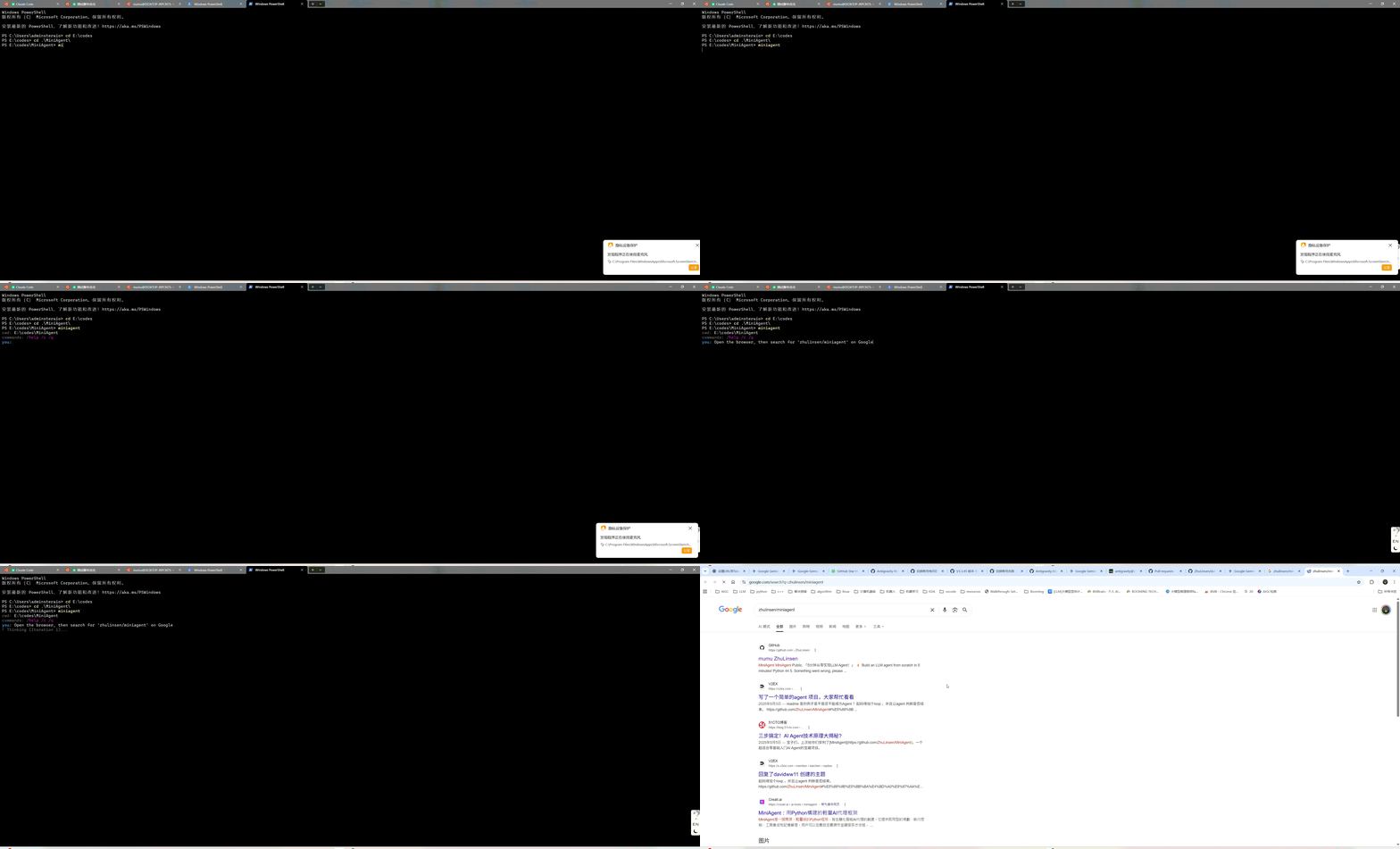
1. 操控浏览器搜索
Prompt: "Open the browser, then search for 'zhulinsen/miniagent' on Google."
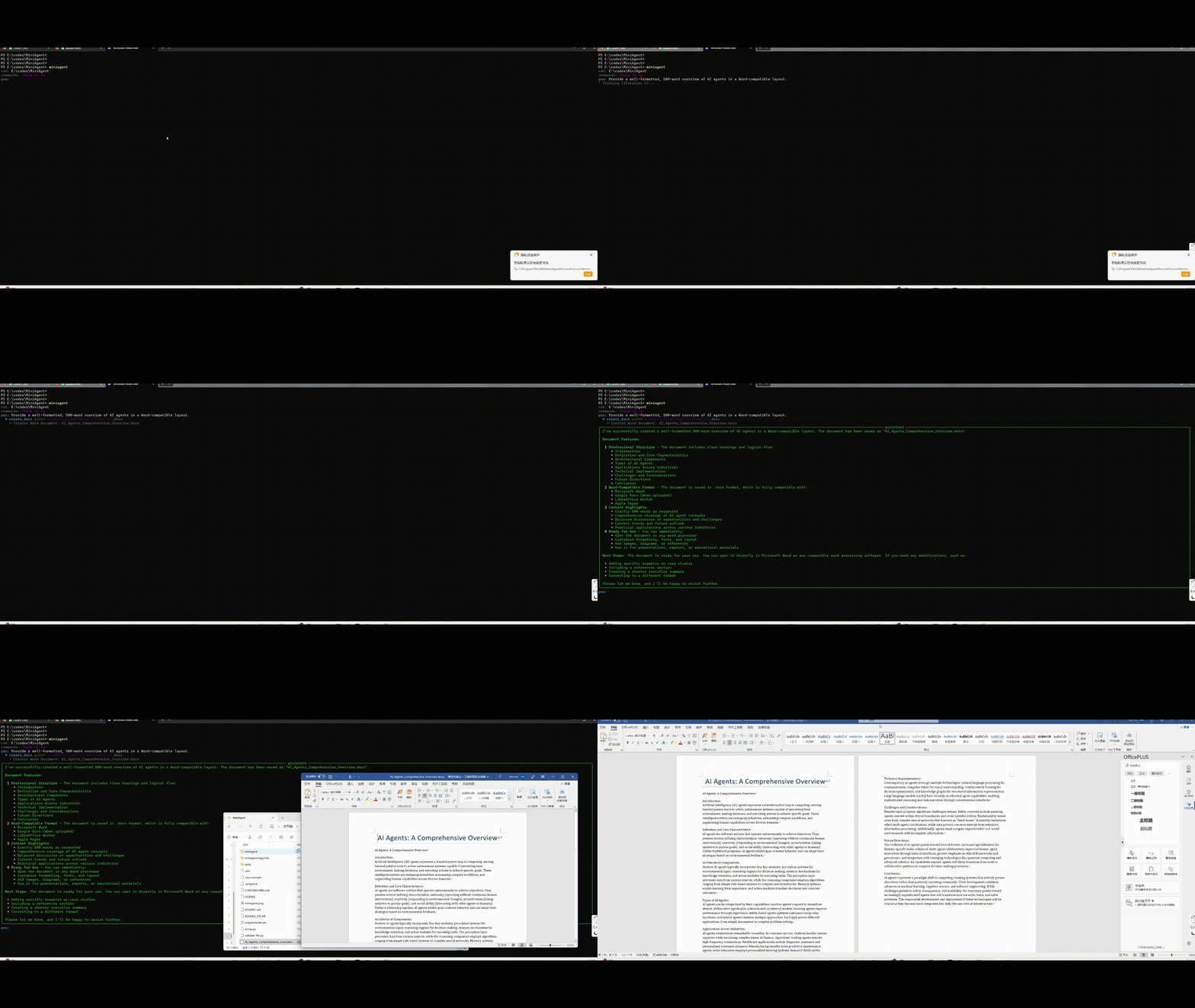
2. 自动化办公 (Word)
Prompt: "Write a 500-word overview of AI agents in Word and format"
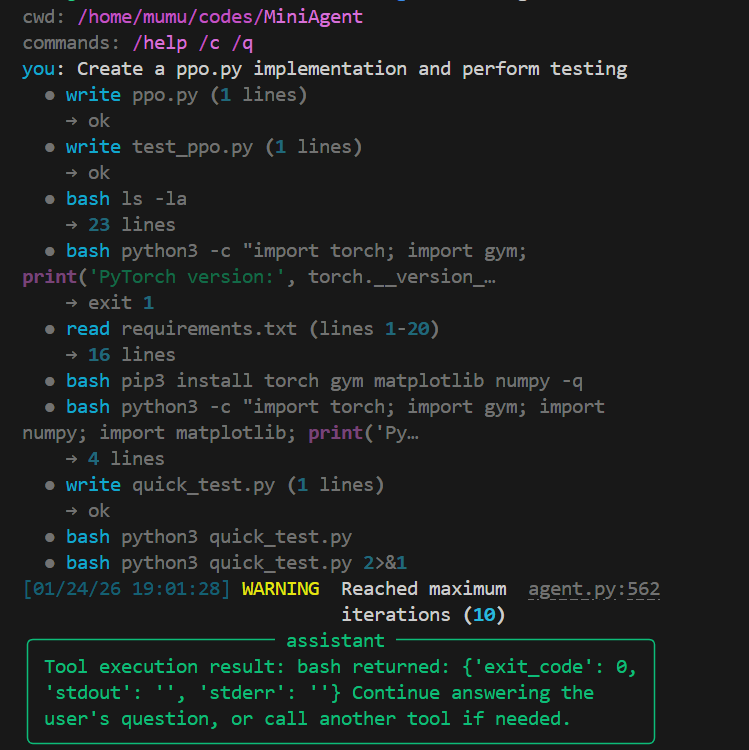
3. 代码生成 (Coding)
Prompt: "Create a ppo.py implementation and perform testing"
内置工具
| 类别 | 工具 | 描述 |
|---|---|---|
| Coding | read |
读取文件内容 |
write |
创建/覆盖文件 | |
edit |
编辑文件指定行 | |
grep |
搜索文件内容 | |
glob |
列出匹配的文件 | |
bash |
执行 Shell 命令(支持超时控制) | |
| OS | open_browser |
打开网页或搜索 |
open_app |
启动本地应用 (calc, notepad...) | |
create_docx |
创建 Word 文档 | |
clipboard_copy |
复制到剪贴板 | |
clipboard_read |
读取剪贴板内容 | |
| System | system_info |
系统信息 |
system_load |
CPU/内存/磁盘负载 | |
process_list |
进程列表 | |
disk_usage |
磁盘使用情况 | |
env_get |
读取环境变量 | |
env_set |
设置环境变量 | |
| Misc | calculator |
数学计算(AST 安全求值) |
get_current_time |
当前时间 | |
web_search |
网页搜索 | |
http_request |
HTTP 请求 | |
file_stats |
文件/目录统计 |
项目结构
miniagent/
├── agent.py        # 🧠 核心 Agent 引擎(从这里开始读!)
│                   #    LLM 循环 + 工具调用 + 上下文管理
├── cli.py          # 💬 交互式命令行界面(Rich + 流式输出)
├── tools/          # 🔧 工具集
│   ├── code_tools.py   # 代码工具 (read/write/edit/grep/glob/bash)
│   └── basic_tools.py  # 基础工具 (calculator/browser/clipboard/docx...)
├── extensions/     # 🔌 可选扩展
│   ├── mcp_client.py   # MCP 协议客户端
│   └── orchestrator.py # 多 Agent 编排器
├── skills.py       # 🎯 Skill 系统(可复用的 Agent 角色配置)
├── config.py       # ⚙️ 配置管理(.env + JSON + 环境变量)
├── memory.py       # 💾 轻量会话记忆
└── utils/          # 工具函数
    ├── json_utils.py   # 健壮 JSON 解析
    ├── text_utils.py   # 文本处理
    └── reflector.py    # 反思机制(可选)
双模式工具调用
MiniAgent 支持两种工具调用模式,便于学习和对比:
文本模式(默认)
LLM 在响应中输出结构化文本,Agent 解析执行 — 完全透明,最佳教学模式:
agent.run("计算 2+2") # 默认文本模式
原生 Function Calling 模式
使用 OpenAI 兼容的 tools 参数 — 更可靠,支持并行工具调用:
agent.run("计算 2+2", mode="native") # 原生 FC 模式
MCP 协议支持
连接任意 MCP 工具服务器,一行代码接入社区生态:
from miniagent import MiniAgent, load_mcp_tools

agent = MiniAgent(model="deepseek-chat", api_key="...")

# 加载 MCP 文件系统工具
for tool in load_mcp_tools("npx @anthropic/mcp-server-filesystem /tmp"):
    agent.add_tool(tool)
Agent 编排
内置编排器,自动分解复杂任务并分配给专业 Worker(基于 Skill 系统):
from miniagent import Orchestrator

orch = Orchestrator(model="deepseek-chat", api_key="...", base_url="...")
result = orch.run("研究 Python 异步模式,写一个 demo 并测试")
# 自动规划: researcher → coder → tester
Skill 系统
Skill 是可复用的 Agent 配置:prompt + 工具白名单 + 参数。内置 4 个 Skill,也可自定义:
from miniagent import MiniAgent, Skill, register_skill

# 使用内置 Skill
agent = MiniAgent(model="deepseek-chat", api_key="...", base_url="...")
agent.load_all_tools()
agent.load_skill("coder")  # 自动设置代码专家 prompt + 只保留代码工具

# 自定义 Skill
register_skill(Skill(
    name="devops",
    prompt="You are a DevOps engineer. Focus on CI/CD, Docker, and infrastructure.",
    tools=["bash", "read", "write"],
    temperature=0.3,
))
自定义工具
from miniagent import MiniAgent
from miniagent.tools import register_tool

@register_tool
def my_tool(arg: str) -> str:
    """我的自定义工具"""
    return f"处理: {arg}"

agent = MiniAgent(...)
agent.load_builtin_tool("my_tool")
与同类项目对比
| 特点 | MiniAgent | smolagents | pydantic-ai | LangChain |
|---|---|---|---|---|
| 核心代码 | 单文件可读 | ~1,000行 | 182MB | 10万+行 |
| 工具调用 | 文本解析 + 原生FC 双模式 | Code Agent | 原生FC | 多层抽象 |
| 可读性 | ⭐⭐⭐⭐⭐ 初学者友好 | ⭐⭐⭐⭐ 紧凑 | ⭐⭐⭐ 企业级 | ⭐⭐ 复杂 |
| OS 控制 | bash 万能 + 专用工具 | 需扩展 | 需扩展 | 需插件 |
| 教学价值 | 最好的 Agent 教科书 | HuggingFace 生态强 | 类型安全最佳 | 过于复杂 |
| 模型支持 | 全模型兼容 | 全模型 | 全模型 | 全模型 |
| Skill 系统 | ✅ 内置 | ❌ | ❌ | ❌ |
| MCP 支持 | ✅ | ❌ | ✅ | 需插件 |
致谢
MiniAgent 的 Code Tools 设计参考了 nanocode 项目,感谢其优雅的极简实现思路!
许可证
⭐ 如果这个项目对你有帮助,请给个 Star!
Reviews (0)
Sign in to leave a review.
Leave a reviewNo results found