imnotarobot
Health Pass
- License — License: MIT
- Description — Repository has a description
- Active repo — Last push 0 days ago
- Community trust — 50 GitHub stars
Code Pass
- Code scan — Scanned 12 files during light audit, no dangerous patterns found
Permissions Pass
- Permissions — No dangerous permissions requested
No AI report is available for this listing yet.
I am not a robot — a captcha solver for macOS: local model, Gemini vision, a stealth browser for checkbox captchas, RuCaptcha as the last resort. 2Captcha-compatible API and an MCP server.
I'm Not a Robot
English · Русский




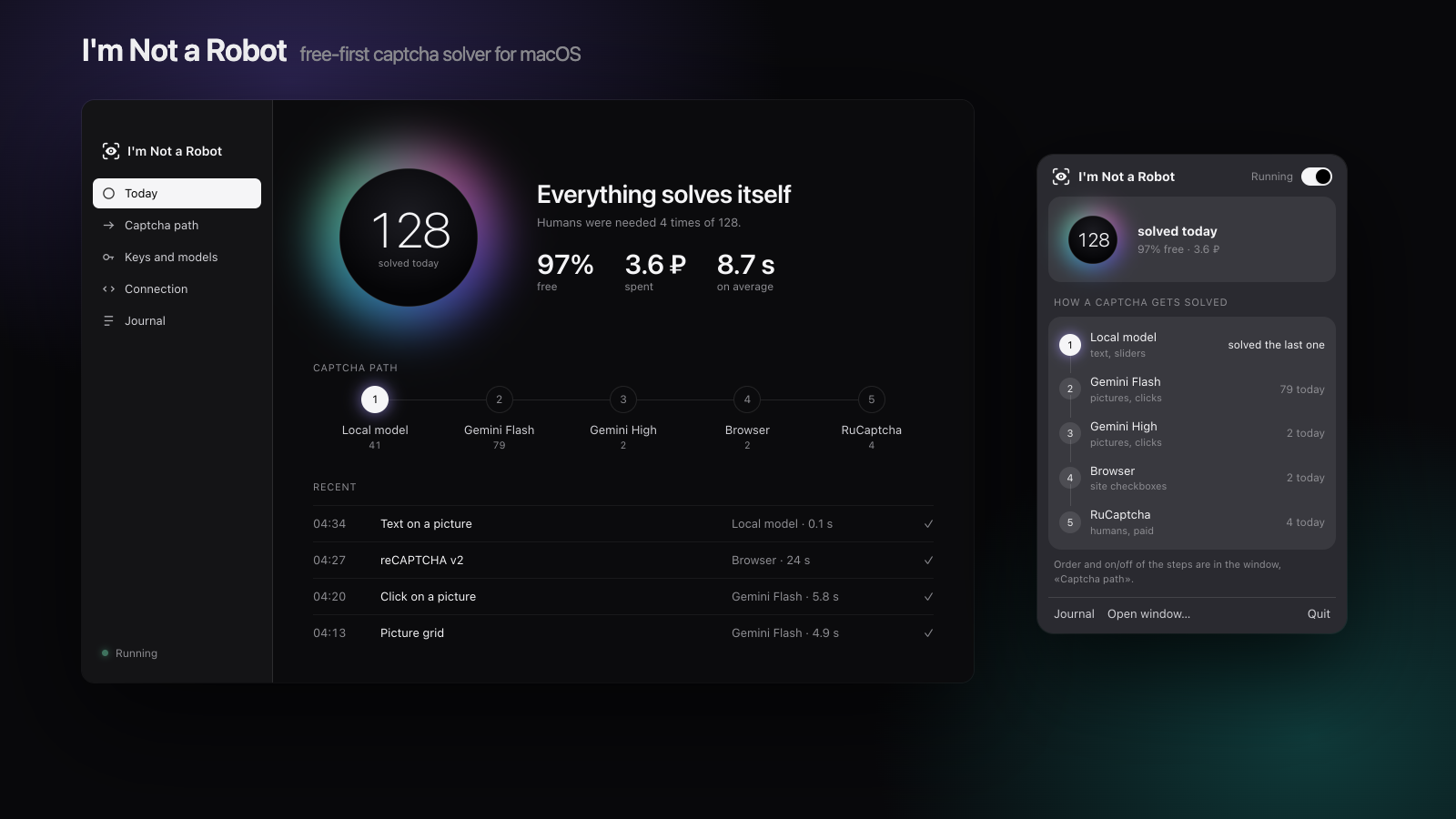
A free-first captcha solver for macOS. A drop-in replacement for the 2Captcha / RuCaptcha API that tries free solvers first — a local model, then any vision model you choose, then an invisible browser — and pays human workers only when nothing else worked. Comes with a menu bar app and an MCP server for AI agents.
Why
- Any model, free if you like. Bring a key of any vision model — GPT, Claude, Gemini, Qwen, DeepSeek, Grok, OpenRouter, a reseller or a local model via Ollama. The best one for captchas switches on by itself. With a free-tier key or a local model most captchas never reach the paid step.
- No code changes. Any program that speaks the 2Captcha or RuCaptcha API works after changing one address.
- A ladder, not a single bet. Local model → vision model → backup vision model → browser → humans. A step that is unsure, wrong or silent hands the captcha to the next one.
- It learns from mistakes. Report a wrong answer and the step is no longer used on that picture; a step that keeps failing on a kind of captcha is skipped for that kind; complaints about human answers go to the service, which refunds them.
- You see everything. Journal of every captcha with the picture, the answer and the path it took; daily money limits; side-by-side model comparison.
- Agents welcome. An MCP server lets Claude, Cursor and other agents solve captchas through the app.
Quick start
- Download
ImNotARobot.dmgfrom Releases and move the app to Applications. It is not signed by Apple yet: if macOS blocks the first launch, press Open Anyway in System Settings → Privacy & Security. Later versions install from the app: it checks GitHub once a day and shows an Update button. - Paste a key of any vision model into Keys and models: the provider is detected and the best model for captchas switches on by itself. No key yet? Gemini has a free tier at aistudio.google.com/apikey.
- In your program, change the captcha service address to
http://127.0.0.1:8765and the API key to the access key from Connection. - Want captchas solved right in the browser, with no program at all? Connection → Browser extension shows the bundled Chrome extension: load it unpacked (or into an anti-detect browser profile) and paste the access key into it once.
Optional: add a RuCaptcha or 2Captcha key as the last, paid step.
How it works
| Step | Solves | Cost | Time |
|---|---|---|---|
| 1. Local model (ddddocr, piece matching) | text, sliders | free | milliseconds |
| 2. Vision model (any: GPT, Claude, Gemini, Qwen, DeepSeek, Grok, local) | text, picture grids, clicks | free tier or cents | 3–8 s |
| 3. Backup vision model (another model or the same with thinking) | what step 2 was unsure about | free tier or cents | 10–50 s |
| 4. Browser (invisible Chrome) | reCAPTCHA v2/v3, hCaptcha, Turnstile | free | 3 s – 2 min |
| 4a. Your own browser over CDP (anti-detect profile) | DataDome slider, Arkose FunCaptcha | free | 5–60 s |
| 5. RuCaptcha / 2Captcha | anything | paid | 10–60 s |
Measured results
On our test set and the official demo pages, October 2026. Small samples; rerun the checkbox part yourself with python -m imnotarobot.demo_bench --runs 10.
| Captcha | Result |
|---|---|
| Text, picture grids (vision model) | 100% |
| Clicks on real captchas (vision model) | 69–72% of 39 |
| reCAPTCHA v2 demo (browser) | accepted by Google 2 of 3, median 118 s |
| reCAPTCHA v3, Turnstile test key (browser) | 5 of 5, 3–4 s |
| hCaptcha demo (browser) | 5 of 5, median 82 s |
| DataDome slider on etsy.com, seloger.com (own Chrome over CDP) | 2 of 2; an IP block is reported as such |
| Arkose FunCaptcha | not checked on a live challenge yet |
Which model is best
People share their model comparisons from the app (Share results, nothing is sent without you pressing Submit on GitHub); the table is in community results.
Compared with
| I'm Not a Robot | 2Captcha / CapSolver | OhMyCaptcha | hcaptcha-challenger | |
|---|---|---|---|---|
| Price | free first, paid last | paid per captcha | free | free |
| Drop-in 2Captcha API | ✓ | ✓ | YesCaptcha API | — |
| Captcha kinds | 8 own + any via humans | 30+ | 19 | hCaptcha |
| Desktop app, journal, limits | ✓ | web dashboard | — | — |
| MCP for agents | ✓ | ✓ | — | — |
| Runs on servers / Docker | ✓ | ✓ | ✓ | ✓ |
Use from code
import time, requests

API, KEY = "http://127.0.0.1:8765", "your-access-key"
task = requests.post(f"{API}/createTask", json={"clientKey": KEY, "task": {
    "type": "RecaptchaV2TaskProxyless", "websiteURL": "https://example.com/login", "websiteKey": "SITE_KEY"}}).json()
while (r := requests.post(f"{API}/getTaskResult", json={"clientKey": KEY, "taskId": task["taskId"]}).json())["status"] == "processing":
    time.sleep(2)
print(r["solution"]["gRecaptchaResponse"], "solved by", r["layer"])
The old API (in.php / res.php) works too. Besides the 2Captcha fields, getTaskResult returns layer, confidence, notes (what was tried before) and lowConfidence.
MCP
{"mcpServers": {"imnotarobot": {"command": "/Applications/ImNotARobot.app/Contents/MacOS/ImNotARobot", "args": ["--mcp"]}}}
Tools: solve_image_captcha, solve_token_captcha, solve_in_browser, get_result, report_wrong, captcha_status.
Task types
| Type | local | vision | browser | humans |
|---|---|---|---|---|
ImageToTextTask |
✓ | ✓ | ✓ | |
GridTask (answer is tile numbers from 1) |
✓ | ✓ | ||
CoordinatesTask (answer in pixels) |
✓ | ✓ | ||
SlideMatchTask (own: target + background) |
✓ | |||
RecaptchaV2TaskProxyless, RecaptchaV3TaskProxyless, HCaptchaTaskProxyless, TurnstileTaskProxyless |
✓ | ✓ | ||
DataDomeSliderTask, FunCaptchaTask, FunCaptchaTaskProxyless with cdpEndpoint |
✓ | ✓ | ||
| Any other 2Captcha type | ✓ |
DataDome and Arkose in your own browser
Both judge the browser and its IP more than the answer, and the cookie or token they give is bound to that browser.
So they are solved where they appear: in your anti-detect profile (Dolphin, AdsPower, Multilogin, Octo or Chrome
started with --remote-debugging-port). Pass the profile's DevTools address as cdpEndpoint; websiteURL picks the tab.
{"type": "DataDomeSliderTask", "cdpEndpoint": "http://127.0.0.1:9222", "websiteURL": "https://www.etsy.com/"}
The tab passes by itself; the answer also carries cookie and userAgent (DataDome) or token (Arkose).
The browser is only connected to, never closed. If DataDome blocks the IP outright ("Access is temporarily restricted")
no solver helps: the answer says so, change the proxy. Without cdpEndpoint the task goes to RuCaptcha.
Server (Docker)
The same API and MCP on Linux, without the window. A ready image for x86 and ARM servers is published with every release:
docker run -d --restart unless-stopped -p 8765:8765 -e GEMINI_API_KEY=... -e CLIENT_KEY=your-access-key \
  -v imnotarobot:/data --name imnotarobot ghcr.io/zigansh1n/imnotarobot
To update: docker pull ghcr.io/zigansh1n/imnotarobot, then remove the container and run the same command again; keys and history stay in the imnotarobot volume. To build it yourself: docker build -t imnotarobot .
HUMAN_API_KEY (and HUMAN_PROVIDER=2captcha if needed) adds the paid last step. Keys are kept in /data/secrets.json, readable only by the server.
Build from source
uv venv -p 3.12 .venv && uv pip install -p .venv/bin/python -e ".[test]" pyinstaller
.venv/bin/python -m pytest -q
packaging/build.sh          # builds ImNotARobot.app into ~/Applications
.venv/bin/python -m imnotarobot --port 8765   # the server alone, no window
The app speaks the system language: English or Russian.
Signing the build
Without a signing identity every build is ad hoc: macOS treats each build as a new program and asks
again for "Allow in the Background" (the login item) and notifications after every build. Runpackaging/make_cert.sh once: it creates a self-signed certificate "ImNotARobot Local" in your
login keychain (no password needed), and build.sh then signs every build with it — to macOS it is
the same program from build to build. The app window still warns when either permission is off,
with a button into the right System Settings pane.
IMNOTAROBOT_SIGN_IDENTITY signs with another identity; IMNOTAROBOT_DISTPATH together withIMNOTAROBOT_NO_INSTALL=1 builds into a directory of your choice without installing into
~/Applications.
Responsible use
Use it on your own sites, for testing, and for automation you are allowed to run. Respect the terms of the sites you visit. The project does not target any particular site.
License
Reviews (0)
Sign in to leave a review.
Leave a reviewNo results found