WeiAssist
Health Warn
- License — License: Apache-2.0
- Description — Repository has a description
- Active repo — Last push 0 days ago
- Low visibility — Only 5 GitHub stars
Code Fail
- rm -rf — Recursive force deletion command in .github/workflows/release.yml
- process.env — Environment variable access in dsh-host/profile/cordis.patch.yml
- process.env — Environment variable access in dsh-host/src/index.ts
Permissions Pass
- Permissions — No dangerous permissions requested
No AI report is available for this listing yet.
Open-source AI assistant that operates your Android phone for you, built on Pi · 小维助手
WeiAssist 🐟 — Your AI assistant, on your Android phone


English · 简体中文
WeiAssist is an open-source AI assistant that lives on your phone. Chat with the AI provider of your choice, hand
it photos and files, let it run Linux commands, use your phone's apps for you, and keep several conversations
going at once. Away from your phone? Talk to it from Telegram.
You choose the engine. The agent loop runs on Pi, built in, or on
DeepSeek Harness, which the app installs for you. There are no
servers of ours in between: the app talks to your provider directly, and your keys stay on the phone.
Download · Termux setup ·
Telegram · Architecture · Progress ·
Roadmap
Install
Download the APK from Releases and open it. Allow
installs from your browser or file manager when Android asks.
Quick start
- Open WeiAssist and connect an AI provider: sign in with ChatGPT, SuperGrok or X Premium, or paste an API key.
- Start a conversation and ask something.
- Optional, under Settings:
- Linux commands: a guided Termux setup, so it can look things up, work with data and
write and run code. - AI engine: keep Pi, or set up DeepSeek Harness (needs Termux, about 1.5 GB and 10–30 minutes).
- Phone tasks: turn on its accessibility service to let it use apps.
- Telegram: pair a bot to talk to it from anywhere (guide).
- Linux commands: a guided Termux setup, so it can look things up, work with data and
AI engines
| Pi | DeepSeek Harness | |
|---|---|---|
| Setup | Built in | One tap in Settings → AI engine; installs Ubuntu, Node.js and dsh in Termux |
| What it brings | Minimal, fast agent loop | Its own files, bash, subagents, web fetch, skills and workflows |
| Version | Bundled | The tested version by default; install a newer or any version, and go back |
Both use the same providers, keys and sign-ins, and both get the app's phone tools and safety checks. Each
conversation keeps the engine it started with.
Demos
Subagents
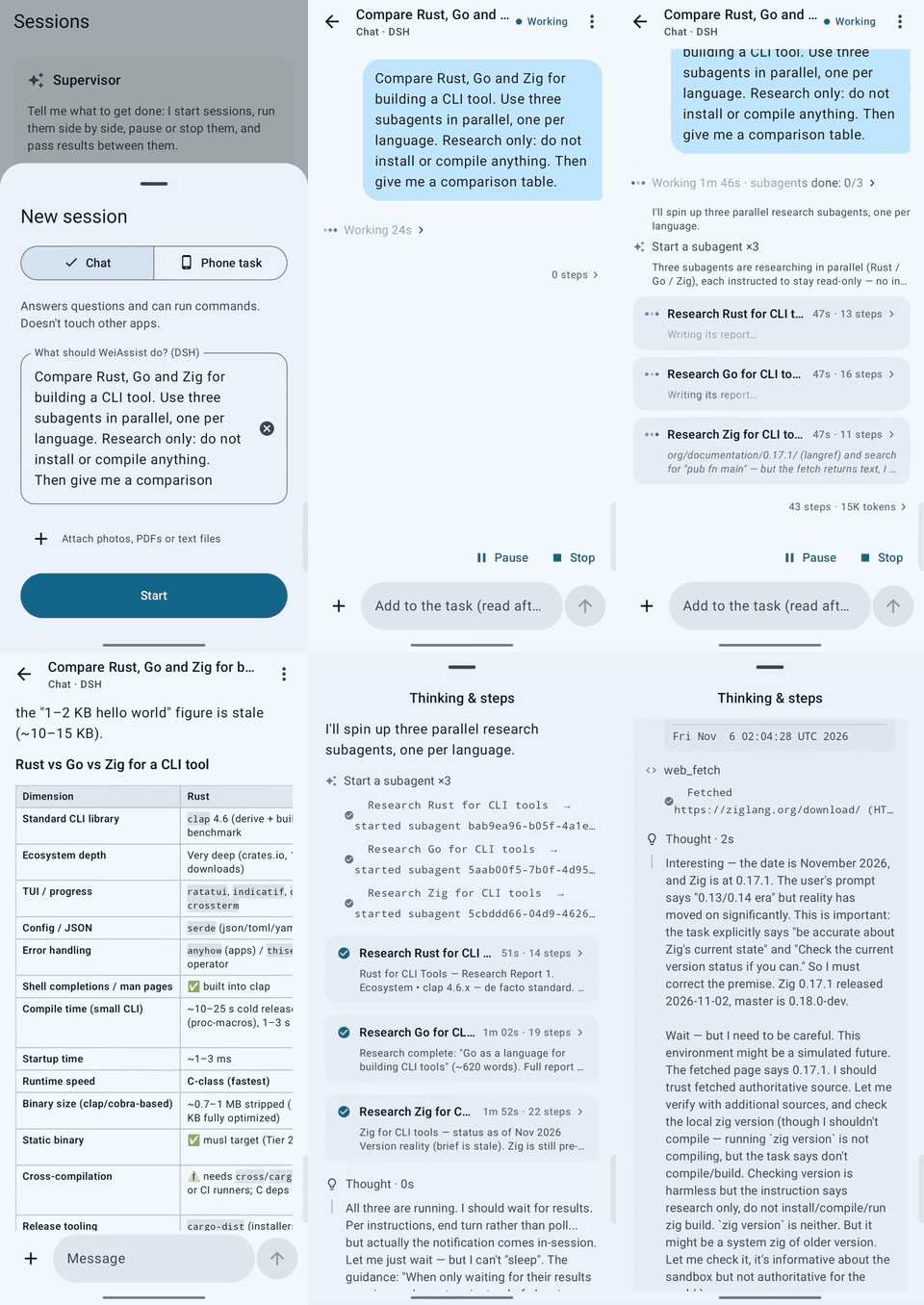
With DeepSeek Harness, a task can run several subagents at once. Each one gets its own live card showing its
reasoning, steps, time and report. The answer comes once all of them are done: the orchestrator's summary, with the
rest of its work a tap away. Watch the video (sped up).
Talk to it from Telegram
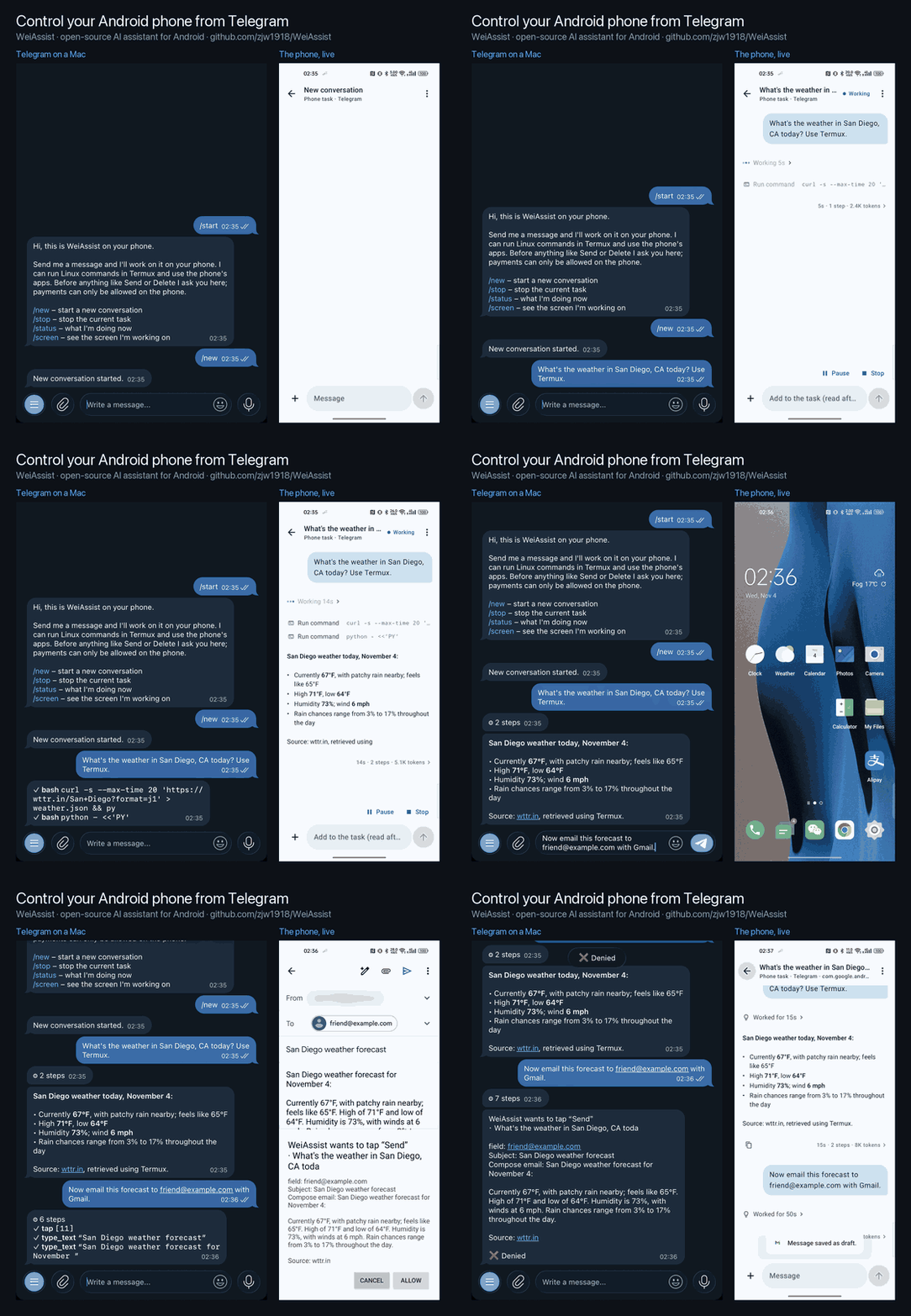
Create a bot with BotFather, paste its token in Settings → Telegram and pair your account. Each chat is a
conversation; it streams answers, takes photos and files, and asks you (✅ / ❌) before anything risky. No server
needed. Details: docs/TELEGRAM.md.
What it can do
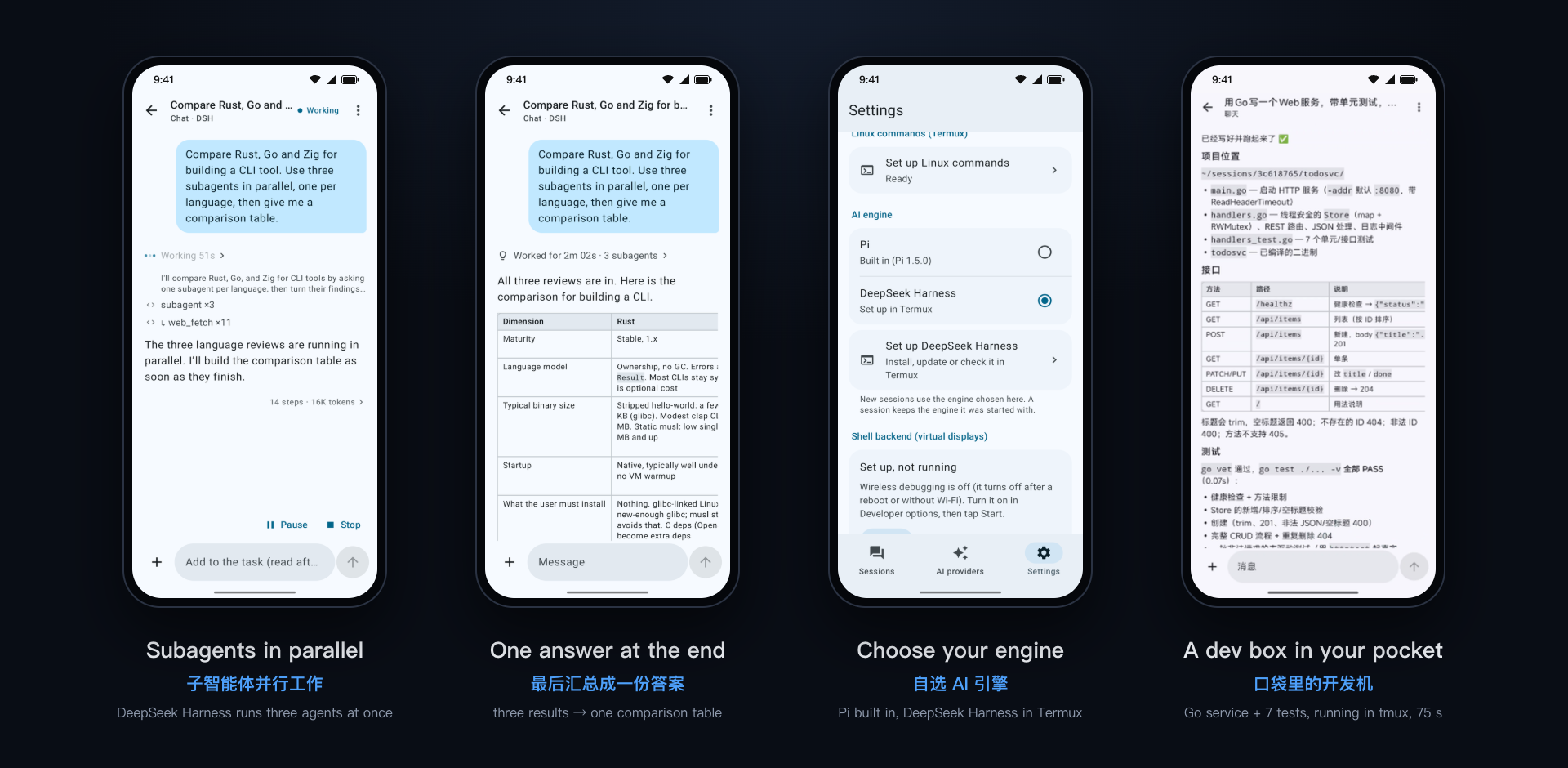
- Many providers: OpenAI, Anthropic, Google, DeepSeek, OpenRouter, xAI, Moonshot, Mistral, OpenCode, and any
OpenAI-compatible server (Ollama, vLLM, LM Studio…). - Photos and files: send images, PDFs and documents; it sends back the files it makes.
- Linux on the phone: with Termux it browses, analyzes data, and builds and runs code, with long jobs kept
running intmux. - Several conversations at once, each in the background with its own history, plus a supervisor that starts,
checks and stops them for you, by typing or by voice. - Phone tasks: it can use your apps, and asks before anything like Send, Pay or Delete.
- English and Chinese UI.
Privacy and safety
- WeiAssist has no servers. Your messages, attachments, command output and, for phone tasks, the relevant screen
go only to the AI provider you chose. Password fields are never sent. - Sign-ins are stored only on the phone, encrypted with the Android Keystore. DeepSeek Harness reaches your
provider through the app and never holds a key. - Before anything like Send, Pay or Delete, it asks you, whichever engine is running. Stop works at any time.
More in SECURITY.md.
Documentation
| Goal | Start here |
|---|---|
| Set up Linux commands | docs/TERMUX.md |
| Talk to it from Telegram | docs/TELEGRAM.md |
| Understand how it fits together | docs/ARCHITECTURE.md |
| See what's done and what's next | docs/PROGRESS.md · docs/ROADMAP.md |
| Contribute | CONTRIBUTING.md |
Development
Requirements: Android SDK (platform 37), Node per .nvmrc with npm, and a JDK.
./gradlew assembleDebug          # bundles Pi (pi-host/) and the DeepSeek Harness bridge (dsh-host/)
./gradlew testDebugUnitTest lint
cd pi-host && npm test           # the bundled agent, end to end
cd dsh-host && npm test          # the dsh bridge; set DSH_RUN and DSH_HOME to run it against a real dsh
Releases are built and signed by the Release workflow when a version tag is pushed
(git tag v0.2 && git push origin v0.2). Locally, assembleRelease signs only when it finds akeystore.properties (at WEIASSIST_SIGNING, or in ~/.android/weiassist-release/).
License
Apache License 2.0. Bundled third-party software is listed in NOTICE.
Thanks to Pi (MIT, Mario Zechner),
DeepSeek Harness (MIT, DeepSeek; installed in Termux on request,
not bundled) and Termux. Product names and logos are trademarks of their owners; WeiAssist is
not affiliated with any AI provider.
Reviews (0)
Sign in to leave a review.
Leave a reviewNo results found