claude-code-message-timestamps
Health Warn
- License — License: MIT
- Description — Repository has a description
- Active repo — Last push 0 days ago
- Low visibility — Only 8 GitHub stars
Code Pass
- Code scan — Scanned 7 files during light audit, no dangerous patterns found
Permissions Pass
- Permissions — No dangerous permissions requested
No AI report is available for this listing yet.
Show local time on every Claude Code message, and let Claude know when each prompt was sent. Zero-config plugin, cross-OS, graceful degradation.
⏱ Message Timestamps for Claude Code
See the time on every message in Claude Code — and let Claude know it too.
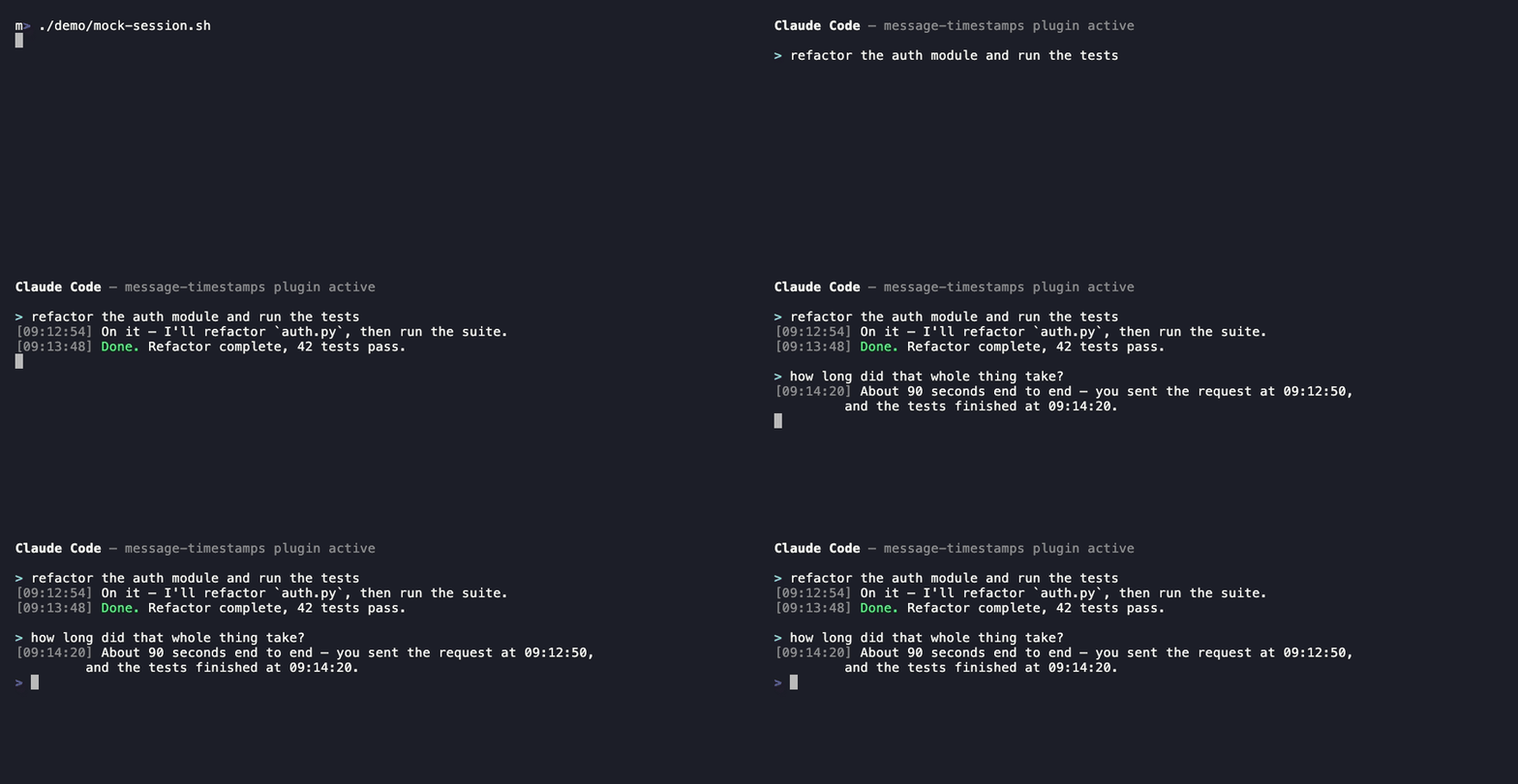
Illustration of the plugin in action — each reply is prefixed with the local time, and Claude can reason about elapsed time.
[09:12:54] Here's the plan: I'll start by …
Claude Code doesn't show when anything happened. Long sessions blur together: you
can't tell how long a build took, when you asked something, or point a teammate to
"the part around 09:15." This plugin fixes that in two ways, and installs in 15 seconds.
Why this exists
Timestamps are one of the most-requested missing features in Claude Code. At least
11 issues ask for some form of it:
#2441 · #60711 · #44763 · #30745 · #21051 · #63488 · #61672 · #52944 · #56855 · #49084 · #60492
This plugin is a working solution today, while we wait to see if it ships natively.
Why you want this (the 10-second version)
| Without it | With it |
|---|---|
| "How long did that step take?" — no idea | Read it off the timestamps |
| "When did I ask that?" — scroll and guess | It's right there on the message |
| "Look at the part around 9am" — good luck | Every message is time-labeled |
| Claude has no sense of elapsed time | Claude knows when each prompt was sent and can reason about it |
No tracking, no telemetry, no account, no network calls. It just reads your computer's
clock. Runs in a few milliseconds per message.
Install (copy, paste, done)
In Claude Code, run these two lines:
/plugin marketplace add zoharbabin/claude-code-message-timestamps
/plugin install message-timestamps@zoharbabin-claude-tools
Restart Claude Code. That's it — timestamps now appear on every message, in every
project. ✅
Prefer the terminal?
claude plugin marketplace add zoharbabin/claude-code-message-timestamps
thenclaude plugin install message-timestamps@zoharbabin-claude-tools.
To remove it: /plugin uninstall message-timestamps@zoharbabin-claude-tools.
Requirements
- Claude Code 2.1.152 or newer — that version added the
MessageDisplayhook
used for the on-screen timestamps. (Older versions still get the "Claude knows the
time" half.) jqon yourPATH:- macOS:
brew install jq - Linux:
sudo apt-get install jq/sudo dnf install jq - Windows:
winget install jqlang.jqorchoco install jq
- macOS:
- Windows only: the hooks are bash scripts, so you need Git Bash (bundled with
Git for Windows). Claude Code runscommandhooks via
Git Bash automatically when it's installed.
If jq is missing the plugin fails safe — it adds no timestamp rather than breaking
anything, so you never lose a message. It also shows a one-time message at session start
telling you exactly how to install jq. Install it, restart, and timestamps light up.
Platform support — what to expect on each OS
The hooks are small Bash scripts that call date (for local time) and jq (to build
JSON safely). Claude Code runs command hooks through a shell: sh -c on macOS/Linux,
and Git Bash on Windows (falling back to PowerShell if Git Bash isn't installed).
Here's exactly how that plays out:
| macOS | Linux | Windows | |
|---|---|---|---|
| Shell used for hooks | sh / system bash |
sh / system bash |
Git Bash (auto-detected) |
date (local time) |
built in | built in | provided by Git Bash |
jq |
brew install jq |
apt/dnf install jq |
winget/choco install jq |
On-screen [HH:MM:SS] |
✅ (Claude Code 2.1.152+) | ✅ (2.1.152+) | ✅ (2.1.152+, with Git Bash) |
| Claude knows the time | ✅ | ✅ | ✅ (with Git Bash) |
| If Git Bash is absent | n/a | n/a | scripts can't run — install Git Bash |
If jq is absent |
one-time notice, no timestamps | one-time notice, no timestamps | one-time notice, no timestamps |
Why it works without fuss:
- No executable-bit dependency. The hooks are invoked as
bash <script>(Claude
Code's "exec form"), so they run even when a clone, a ZIP download, orgit config core.fileMode=falsedrops the+xpermission — common on Windows. - Local time, not UTC. Time comes from your shell's
date, so it matches your wall
clock. (The scripts deliberately avoidjq'snow | strftime, which is UTC-only.) - Graceful, explained degradation. Missing
jqnever breaks a message or errors the
session; you get a one-timeSessionStartnotice with the exact install command for
your OS, and normal output continues untouched.
Windows, specifically: install Git for Windows (this
provides Git Bash, bash, and date) plus jq. Claude Code then routes the hooks
through Git Bash automatically — no extra configuration. Native cmd.exe/PowerShell
without Git Bash is not supported, because the hooks are Bash scripts.
WSL / dev containers / SSH remotes: these are Linux environments, so they behave
exactly like the Linux column — just make surejqis installed inside that
environment, not only on the host.
What you'll see
Each assistant reply is prefixed with the local time, once per message:
[09:12:54] Sure — here's how that works …
[09:13:48] Done. Tests pass.
The gap between two stamps tells you how long the work in between took.
How it works
Three small hooks, each on a
different Claude Code event:
You see the time (
MessageDisplay) — prepends[HH:MM:SS]to each assistant
message on screen only. It never touches the transcript or what Claude reads, so it
can't confuse the model. It stamps just the first chunk of each streamed message, so
you get exactly one timestamp per reply.Claude knows the time (
UserPromptSubmit) — addsMessage sent at local time 09:12:54 EDTto Claude's context when you send a prompt. Claude Code wraps this in a<system-reminder>, which the model is trained to treat as background metadata —
not as text you typed. So Claude can answer "how long ago did I ask that?" without
ever echoing or fixating on the clock.It tells you if something's missing (
SessionStart) — runs once when a session
starts and, only ifjqisn't installed, shows a one-time notice with the install
command for your OS. When everything's present it stays silent.
This split is deliberate: the visible marker stays out of the model's context (zero
risk of confusion), and the model's time-awareness stays out of your view (zero visual
clutter). Both halves use a tiny, fixed token footprint and your machine's local
timezone.
Files
claude-code-message-timestamps/
├── .claude-plugin/
│   ├── plugin.json          # plugin manifest
│   └── marketplace.json     # lets you install straight from this repo
├── hooks/
│   ├── hooks.json           # wires up the three hooks
│   └── scripts/
│       ├── timestamp-context.sh   # UserPromptSubmit → tells Claude the time
│       ├── timestamp-display.sh   # MessageDisplay → shows you the time
│       └── dependency-check.sh    # SessionStart → warns once if jq is missing
└── README.md
Customize
The format lives in the scripts in hooks/scripts/. They use the standard date
format string.
- Add the date too: change
+%H:%M:%Sto+%Y-%m-%d %H:%M:%Sintimestamp-display.sh. - 12-hour clock: use
+%I:%M:%S %p. - Different wording for Claude: edit the
additionalContextstring intimestamp-context.sh.
Note on timezones: the scripts use the shell's
datecommand, which respects
your local timezone. They intentionally avoidjq'snow | strftime, which renders
in UTC and would show the wrong time.
Prefer not to install a plugin?
You can paste the same hooks into ~/.claude/settings.json by hand under a "hooks"
key. The plugin is just a cleaner, updatable, no-clobber way to do it — and it won't
overwrite hooks you already have.
FAQ
Does this send my data anywhere? No. It reads your local clock and nothing else.
Will it slow Claude Code down? No — each hook runs in a few milliseconds.
Can I timestamp my own messages on screen too? Not currently — Claude Code'sMessageDisplay hook only renders assistant messages. Your send-times still reach
Claude via the other hook, so the elapsed-time math is intact.
Does it work in every project? Yes, once installed it's global across all
projects and sessions.
License
MIT © Zohar Babin
Reviews (0)
Sign in to leave a review.
Leave a reviewNo results found