plano
Health Warn
- License — License: MIT
- Description — Repository has a description
- Active repo — Last push 0 days ago
- Low visibility — Only 5 GitHub stars
Code Fail
- process.env — Environment variable access in build/afterPack.js
- fs module — File system access in build/afterPack.js
- process.env — Environment variable access in scripts/agent-host-test.mjs
- rm -rf — Recursive force deletion command in scripts/auto-install-final.sh
- fs module — File system access in scripts/cdp-check.js
- network request — Outbound network request in scripts/cdp-check.js
- process.env — Environment variable access in scripts/daemon-web-test.mjs
- network request — Outbound network request in scripts/daemon-web-test.mjs
- process.env — Environment variable access in scripts/dbg-cascade.mjs
- network request — Outbound network request in scripts/dbg-cascade.mjs
Permissions Pass
- Permissions — No dangerous permissions requested
No AI report is available for this listing yet.
Orchestrate AI coding agents that actually talk to each other — Claude Code, Codex, Gemini, Pi. One agent spawns three more, delegates work and waits for their reports. Whichever model, whichever CLI, one mesh. 100% local: your CLIs, your subscriptions, no cloud.
PLANO
The IDE where your AI agents work together — whichever model, whichever CLI
Claude Code hands work to Codex. Codex asks Gemini. Gemini spawns three Pi agents and waits for
all three. Different vendors, different models, different CLIs — one conversation, on one
infinite canvas, where you can see all of them at once.
No account. No cloud. No telemetry. PLANO drives the AI CLIs you already have, with your own
subscriptions, on your own machine.






-informational?style=flat-square&color=3a3a3a)

Download
- Windows —
.exeinstaller. Self-updating: PLANO checks for new releases on launch and
every 4 hours, downloads in the background, and installs on restart or quit. - macOS —
.dmg(Apple Silicon). Unsigned CI builds; right-click → Open on first launch. - Linux —
.AppImage(x64). Make it executable and run it; there is no install step.
Requires Windows 10 1809+ (for ConPTY), macOS 12+, or Linux (Fedora 40+, KDE Plasma, Wayland or X11).
One mesh, any harness
Every AI CLI you open joins the same mesh — Claude Code, Codex, Gemini, Oh My Pi, Grok, Cursor,
OpenCode, Aider, Kiro. They reach each other through one command surface, and none of them has
to know what the other one is:
plano roster                          # everyone running, whatever they are
plano send  <agent> "review this"     # Claude → Codex, Gemini → Pi, any direction
plano ask   <agent> "which approach?" # blocks until they actually answer
plano spawn codex . --count 3         # a Pi agent opening three Codex agents is normal here
There is no adapter per vendor and no lowest common denominator. An agent participates because it
can run a command — that is the entire requirement. The one that spawned the others is not special
either: any of them can spawn, ask, delegate and wait on any other.
flowchart TD
    You([you]) -->|one prompt| C

    C["Coordinator — Claude Code"]
    W1["Worker — Pi"]
    W2["Worker — Codex"]
    W3["Worker — Gemini"]
    S1["Sub-worker — Oh My Pi"]

    C -->|plano spawn --count 3| W1
    C --> W2
    C --> W3
    W2 -->|plano spawn| S1

    W1 -.->|plano send · report| C
    W2 -.->|plano ask · which approach?| C
    W3 -.->|plano send · report| C

    classDef coord fill:#241a15,stroke:#d97757,stroke-width:2px,color:#f5f4f1
    classDef work fill:#161b24,stroke:#4f8cf7,stroke-width:1.5px,color:#f5f4f1
    classDef sub fill:#241c12,stroke:#f97316,stroke-width:1.5px,color:#f5f4f1
    class C coord
    class W1,W2,W3 work
    class S1 sub
Solid arrows are work going out, dashed ones are answers coming back. Every arrow is one plano
command, and every box is a real terminal on the canvas — placed exactly where the diagram puts it,
because that is how PLANO lays spawned agents out.
That is what turns a pile of terminals into something closer to a team: work arrives, gets
split, comes back, and you watch it happen instead of shuttling context between tabs yourself.
Why a canvas
One agent is a chat window. Five agents is a mess — tabs you cannot see at once, work you cannot
place, and no way to tell who is waiting on whom. PLANO gives that swarm a shape:
| Terminal tabs | Chat / cloud tools | PLANO | |
|---|---|---|---|
| See every agent at once | ✗ one at a time | ✗ one thread at a time | ✓ all of them, side by side |
| Who delegated to whom | invisible | invisible | ✓ children open beneath their parent |
| Agents talk to each other | ✗ | ✗ | ✓ send · ask · reply · spawn |
| Across vendors | ✗ | ✗ one vendor per thread | ✓ Claude ↔ Codex ↔ Gemini ↔ Pi |
| Survives closing the app | ✗ | n/a | ✓ detached host, reattach on reopen |
| Your models, your subscriptions | ✓ | ✗ their inference | ✓ your CLIs, your keys |
| Where your code goes | your machine | their servers | ✓ your machine, always |
Everything is local. Not "private by default" — local.
- No account, no sign-in, no telemetry. There is nothing to opt out of.
- PLANO has no model and no API key of its own. It runs your CLIs — Claude Code, Codex,
Gemini, Oh My Pi — under your subscriptions. Your prompts go where they already went. - The mesh is loopback. Agent-to-agent messaging binds to
127.0.0.1. The only network
surface is PLANO Mobile on your own Wi-Fi, and it is token-authenticated. - Redaction before sharing. When one agent reads another's transcript, it passes through a
central redactor (tokens, keys, passwords, PEM blocks) first. - Your workspace is a file you own. Layout lives in
.plano/workspace.jsoninside your
project. Delete the folder and PLANO forgets everything.
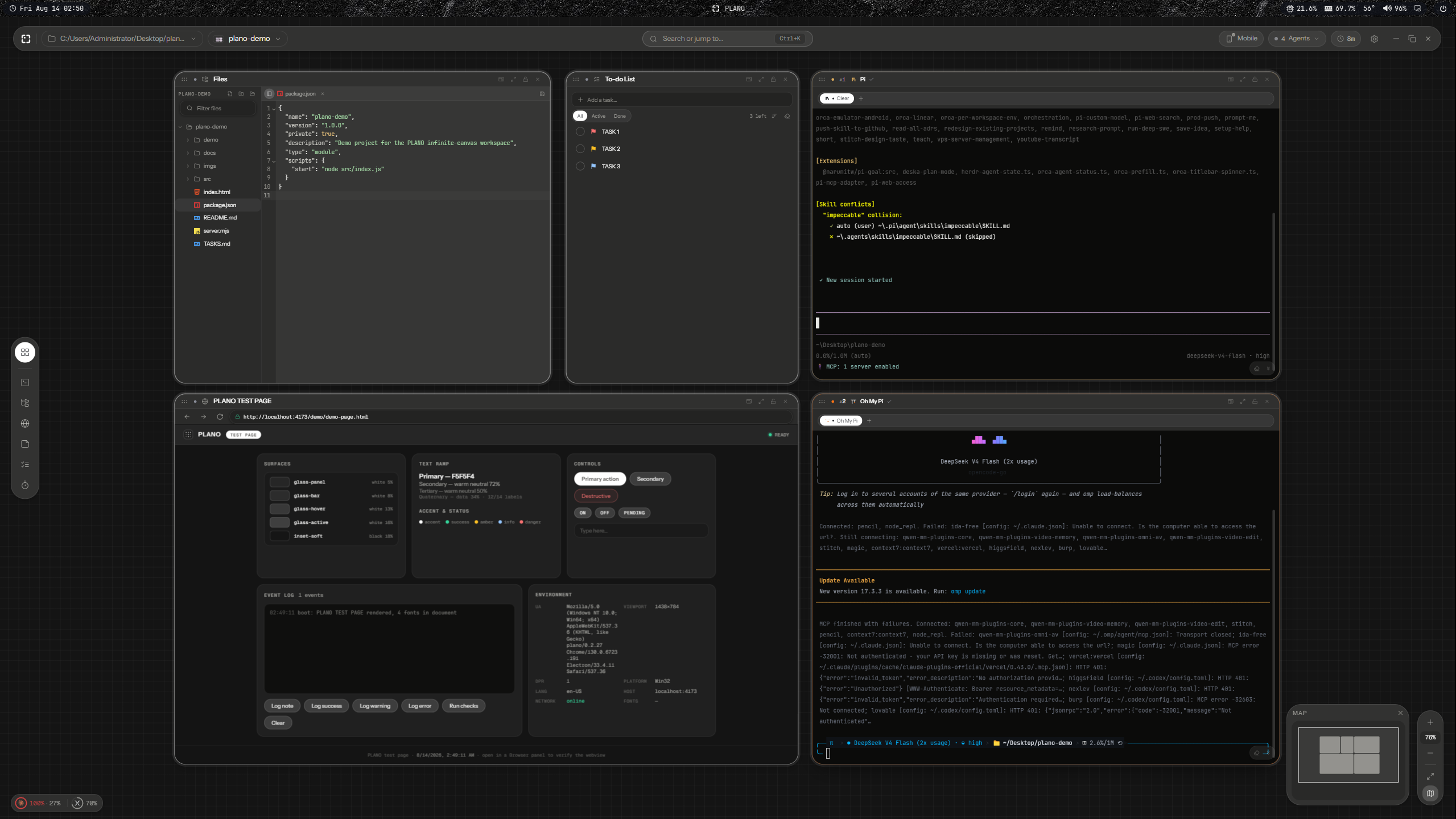
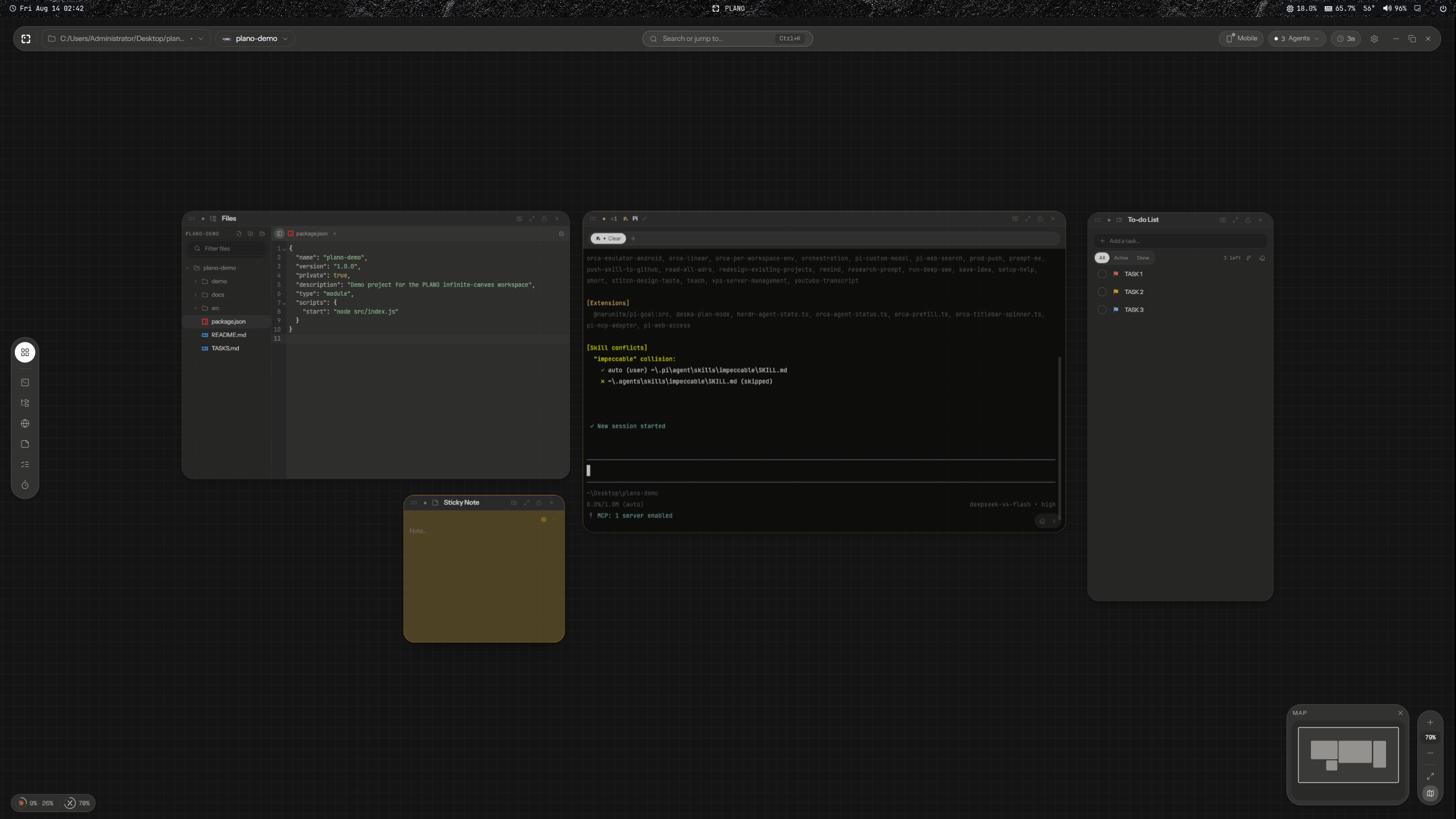
A canvas, not tabs
Panels float on one infinite space per project — terminals, code editors, browsers, markdown,
sticky notes. Pan and zoom. The layout is saved per project, so reopening a folder puts every
panel back exactly where it was.
Terminals that become agents
Run Claude Code, Codex, Gemini, Oh My Pi or any other AI coding CLI inside a terminal panel and
PLANO notices — the panel morphs into agent mode, tinted with that agent's own accent. No
configuration: detection reads the process tree and the output banner.
Agents that spawn agents — as a map you can read
plano spawn opens new agents below the one that asked for them, siblings side by side and
centred on their parent. The canvas becomes the org chart of the work: who delegated to whom is
visible from the shape alone, and depth grows downward instead of running off-screen.
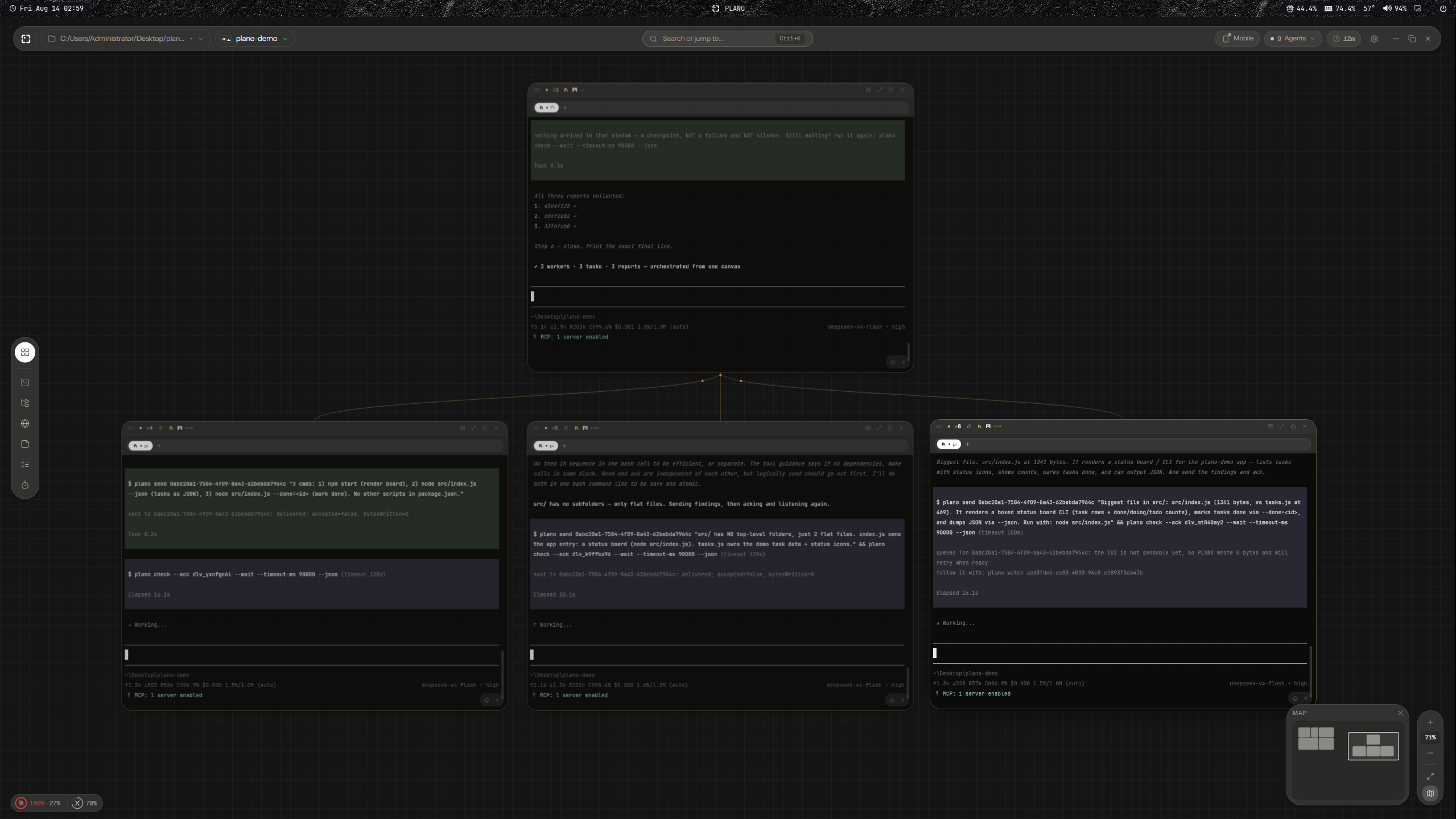
One coordinator, three workers it spawned, three reports back — read off the canvas.
Messages that cannot quietly go missing
A team only works if the messages arrive, so delivery is durable first and typed second:
sendnever refuses. The message is recorded before it is routed, so a peer that is booting,
mid-turn, or busy still gets it. There is nothing to retry.- Waiting is a command, not a state. An agent listens by blocking on
plano check --wait;
when mail arrives it is woken in milliseconds, with the message as that command's own output.
No polling, no sleeping, no watching the screen. - A timeout is a checkpoint, never silence. It says so in words, so an agent does not conclude
the mesh is dead and stop listening. - A batch replays until acknowledged, so an agent that dies mid-task loses nothing.
Agents survive the app closing
Terminals run in a detached agent host, so quitting PLANO never kills the agents you left
working. Reopen and they reattach — same process, same scrollback. You can also watch and talk
to them from your phone on the same Wi-Fi, with the desktop app closed.
Everything on the canvas
| Panel | What it is |
|---|---|
| Terminal | Real PTY (ConPTY on Windows). Tabs inside one panel, per-terminal font zoom, themes, and a git badge showing branch + state for its live directory. |
| Agent | Any terminal running an AI CLI. Detected automatically, tinted with that agent's accent, and joined to the mesh. |
| Files | File tree with an inline code editor (CodeMirror 6, lazy per language) and an image viewer. Create, rename, delete to trash. |
| Browser | Electron <webview> that transforms with the canvas — a real browser panel, not a screenshot. |
| Markdown | Typographic renderer with GFM and fenced code. |
| Sticky note · Text · Region | Annotations that live on the canvas ground, behind the panels. |
| To-do · Pomodoro | Small utilities that persist with the workspace. |
| Beyond the panels | |
|---|---|
| Workspaces (spaces) | Several canvases per project, each with its own layout and colour. |
| Docking | Drag one panel onto another to merge them into a split group, VS Code style. |
| Snapping | Lego-style align and flush-stick, plus tile zones at the window edges. |
| Command palette | Ctrl+K for every command; Alt+<letter> to create a panel. |
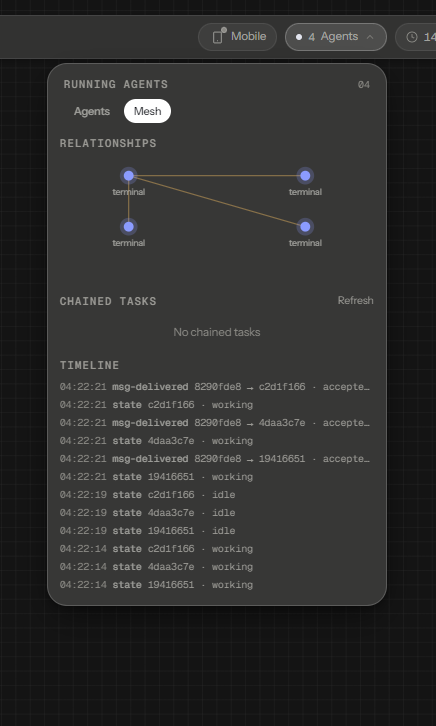
| Mesh overlay | Ctrl+Shift+A — every running agent, their relationships, and a live delivery timeline. |
| PLANO Mobile | View, talk to, create and kill agents from your phone on the same Wi-Fi, with the desktop app closed. |
| Voice (Odla) | Local speech control — the model runs on your machine, nothing is uploaded. |
| Session restore | Terminals reattach after a restart, and agent conversations can be resumed. |
Requirements
- Windows 10 1809+ (ConPTY), macOS 12+, or Linux (Fedora 40+, KDE Plasma, Wayland or X11)
- An AI coding CLI (Claude Code, Codex, Gemini, …) only if you want agent mode — plain
terminals work standalone.
Auto-updates
Installed PLANO builds self-update from this repo's
Releases. One repo: the code you are reading and the
installer you download. No tokens are needed on client machines because the repo is public.
Development
Stack
| Layer | Tech |
|---|---|
| Runtime | Electron 33 + electron-vite |
| UI | React 18 + TypeScript + Tailwind CSS 3 |
| Canvas state | zustand + immer |
| Terminals | @xterm/xterm (WebGL) + node-pty (ConPTY on Windows) |
| Editor | CodeMirror 6 (lazy per-language) |
| Browser panels | Electron <webview> (DOM-transformable) with a WebContentsView fallback |
| Validation | zod (every IPC payload + on-disk schema) |
Getting started
npm install
npm run rebuild   # build node-pty against Electron's ABI (run once after install / after Electron upgrades)
npm run dev       # launch PLANO with HMR
Windows:
node-ptyneeds the Desktop development with C++ workload (VS Build Tools) if
no prebuilt binary is available, and Windows 10 1809+ (ConPTY).Linux (Fedora): See
docs/engineering/LINUX_SETUP.mdfor the
package list, rebuild steps, and Wayland launch flags.
Scripts
| Script | Purpose |
|---|---|
npm run build |
Production build into out/ |
npm run typecheck |
Type-check main+preload and renderer projects (the only gate) |
npm run build:web |
Build the PLANO Mobile web app into web-dist/ |
npm run dist |
Build + package an installer with electron-builder |
npm run release:win |
Build the Windows installer and publish it as a GitHub release |
npm run dist:linux |
Build the Linux AppImage locally (no upload) |
npm run release:linux |
Build the Linux AppImage and publish it as a GitHub release |
Publishing a new version (the whole release flow):
npm run release:win                       # build installer + publish v<version> (uses your gh CLI)
node scripts/publish-release.mjs         # publish artifacts already in release/ (no rebuild)
node scripts/publish-release.mjs --platform mac   # publish macOS artifacts (dmg + zip + latest-mac.yml)
node scripts/publish-release.mjs --platform linux # publish Linux artifacts (AppImage + latest-linux.yml)
node scripts/publish-release.mjs --replace        # delete + re-publish an existing vX release
node scripts/publish-release.mjs --prerelease      # publish as a prerelease (not "Latest")
The release must be tagged v<version> (the script does this). A tag that ships artifacts for only one platform is published with --prerelease, so the previous all-platform release stays GitHub’s “Latest” and installed Windows/macOS builds still find their latest.yml/latest-mac.yml. The trade-off: electron-updater ignores prereleases, so nothing auto-updates from that tag until it is re-published with --replace and without --prerelease. Mac builds include a zip target because macOS updates need it.dist* scripts build locally with --publish never; only release* uploads.
Architecture (one screen)
renderer (Chromium, sandboxed)  ──window.plano──▶  preload (bridge)  ──IPC──▶  main (Node, privileged)
  React canvas + panels                 typed invoke/on            services: PtyManager, AgentDetection,
  zustand stores                        (contextBridge)            Workspace, FileSystem, Git, Browser…
src/shared— types + IPC contracts shared by both sides. Zero node/electron/dom imports.src/main— privileged Node process. Owns PTYs, process inspection, FS, git, persistence.src/preload— the only bridge. Exposes a frozen, typedwindow.plano.src/renderer— the UI: infinite-canvas engine, one folder per panel type, app chrome, stores.
See the documentation index, architecture,
and design system for the full specification.
Security posture
contextIsolation: true, nodeIntegration: false, sandbox: true. The renderer is treated as
untrusted: every IPC payload is zod-validated in main; embedded web content runs in an isolated
session partition with denied permissions by default. See the SecurityService section in the
architecture doc.
Agent Mesh
PLANO's cross-workspace agent coordination: detect any AI coding CLI running in a terminal
(Claude Code, Codex, Gemini, Oh My Pi, Grok, …), see them all from one overlay (Ctrl+Shift+A),
and let them coordinate with each other through the plano CLI.
- CLI-first, no MCP. Any harness that can run a command participates — no server handshake,
no config files to merge. The CLI speaks JSON-RPC to the agent host over loopback, and identity
rides the terminal environment. - Delivery is durable, not typed-and-hoped. A message is recorded before it is routed, so a
peer that is booting, mid-turn or parked onplano check --waitstill receives it.send
never refuses. - Receiving is a blocking call, not a poll.
plano check --waitreturns the moment mail
arrives; a timeout is an explicit checkpoint, never mistaken for silence. - Context lives in the agent host — it keeps working with the desktop app closed, and every
tail, transcript and search passes through one redactor (tokens/keys/passwords/PEM) before it
reaches another agent.
Privacy: nothing leaves your machine. The mesh binds to loopback; the LAN surface (PLANO Mobile)
is token-authenticated.
Support
PLANO is free and open source. If it saves you time, you can
buy me a coffee — entirely optional, and it changes nothing about the
app: no paid tier, no locked features, no telemetry either way.
License
MIT — see LICENSE.
Reviews (0)
Sign in to leave a review.
Leave a reviewNo results found