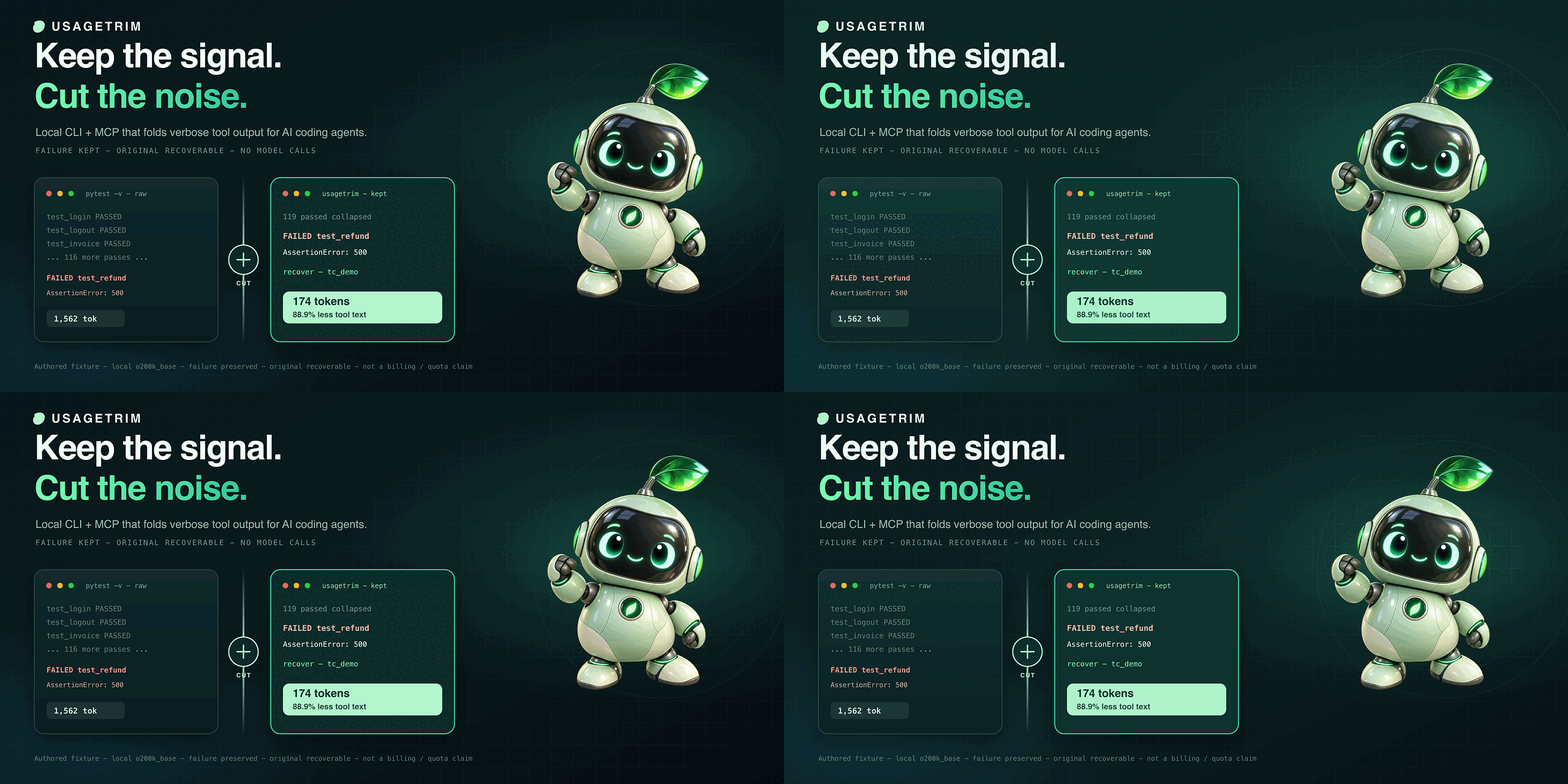
tokencut
Health Uyari
- License — License: MIT
- Description — Repository has a description
- Active repo — Last push 0 days ago
- Low visibility — Only 5 GitHub stars
Code Basarisiz
- exec() — Shell command execution in scripts/benchmark_code.py
Permissions Gecti
- Permissions — No dangerous permissions requested
Bu listing icin henuz AI raporu yok.
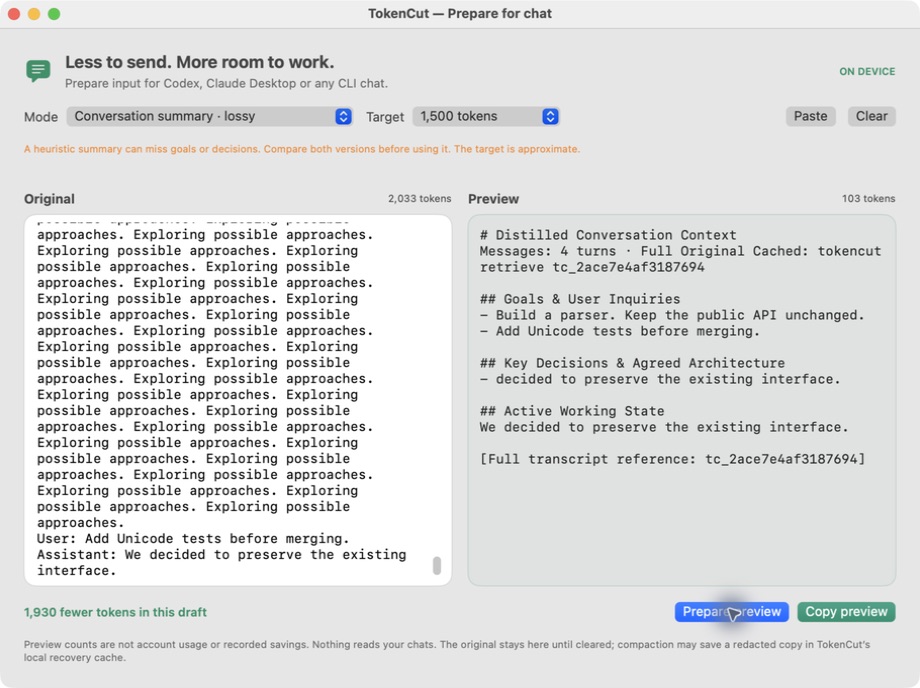
Reduce verbose AI coding output with a local CLI and MCP server. Targeted reads, output budgets, and recoverable context for Claude Code and Codex.
Smaller tool outputs, zero LSP daemons, with omitted context available on demand.
A local CLI, MCP server, and macOS desktop HUD for Claude Code, Codex / ChatGPT Desktop, Antigravity, and Cursor.
Try in 1 Min · macOS Desktop Pet · Zero-LSP Code Intel · Architecture · Integrations
Try it in one minute
Requires Python 3.11+ and uv.
Install this repository: the PyPI name tokencut belongs to another project.
uv tool install 'git+https://github.com/00200200/tokencut.git'
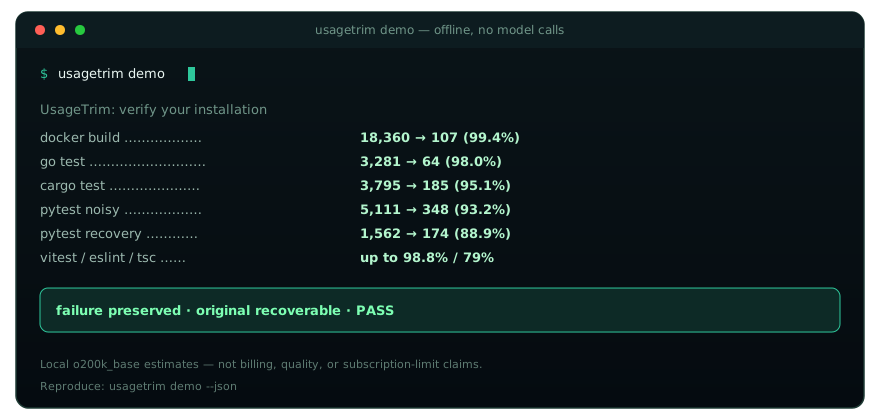
tokencut demo
The demo works outside a project and makes no model calls. It measures an
authored log, checks the complete diagnostic tail, verifies recovery of the
original, and confirms that unfamiliar output stays unchanged. Checks printPASS or FAIL; a failed check returns a nonzero exit code. Use tokencut demo --json for machine-readable results. Demo data uses a disposable cache.
Then try your own command: tokencut run -- <command> <args>, or connect
Claude Code, Claude Desktop,
Codex, or Antigravity.
Smaller tool output is the measured benefit; subscription limits and task quality
need separate evaluation.
Illustrative terminal demo. Run the fixture benchmark below for reproducible measurements.
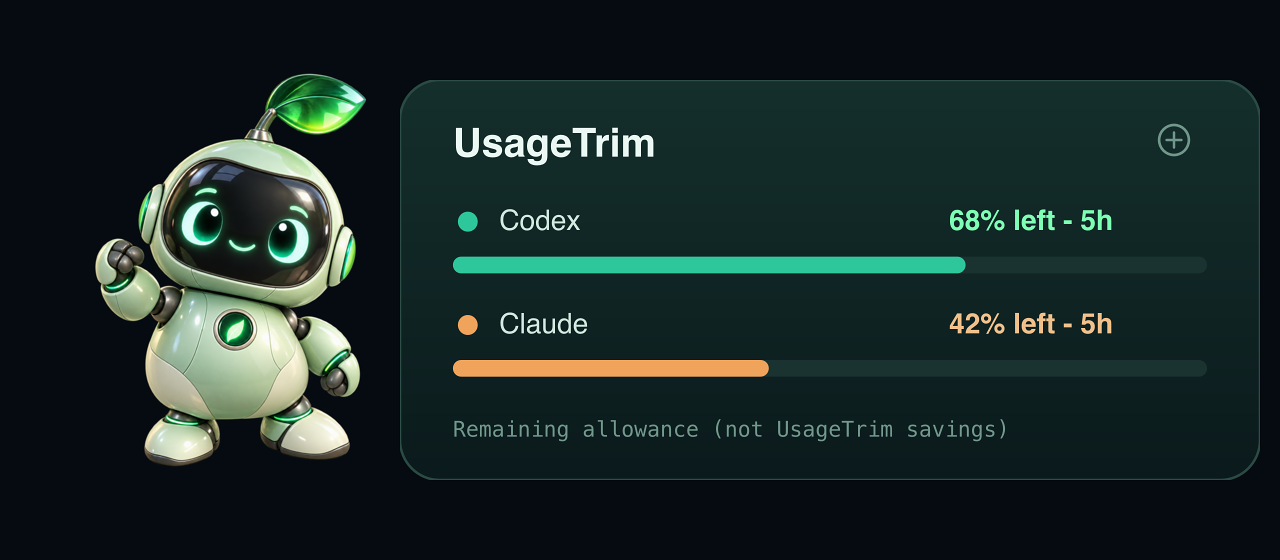
macOS desktop pet companion (local preview)
TokenCut Desktop Pet — A draggable macOS companion monitoring real-time tool output reduction and 5-hour model quota windows.
A small draggable SwiftUI pet lives above other windows, remembers its position,
and keeps working across Spaces. Click it to see quota windows, reset times and
estimated tool-output reduction, before/after counts,
recovery costs, seven days of history and breakdowns by client, Git project and tool.
The UI is in English, follows the system appearance, and runs without a Dock icon.
The mint robot uses bundled 3D-rendered artwork on a transparent background, with
a small glass-style quota card. Its subtle hover response respects Reduce Motion;
there is no idle animation, live 3D renderer, or runtime image generation.
Quota percentages are fetched from services, separately from TokenCut savings.
Neither counter measures model reasoning or task quality.
Build with Apple's Swift toolchain (macOS 13+), after installing this checkout:
uv tool install --force .
bash macos/build.sh
open macos/build/TokenCut.app
Preview releases also include a prebuilt macOS ZIP, Python packages and SHA-256
checksums on GitHub Releases.
Install the matching TokenCut CLI first, extract the app into ~/Applications,
and launch it. The app resolves ~/.local/bin/tokencut for the current user.
The ZIP filename states its CPU architecture; it is not a universal binary.
The build is locally ad-hoc signed, not notarized or a public installer. The default
backend is ~/.local/bin/tokencut; set TOKENCUT_EXECUTABLE while building to override
it. Click the pet's × button to hide it while monitoring continues in the menu
bar. Click the menu item, then Show pet to restore it. Double-clicking the app
also restores the pet. Its menu can open the full panel, restore its corner
position, or enable the optional menu bar item while the pet is visible.
The menu item showsTC — when no measurements exist, and TC Ⅱ while paused. Refresh is at most every
5 seconds while visible, 30 seconds in the background. The pause is reversible;
it affects new wrapper, MCP and hook transformations, not already running calls.
The app owns a tokencut monitor --stdio subprocess; there is no network listener or
AI call. JSON-lines requests support snapshot, pause (boolean paused), check,export, usage, and usage-refresh, with an echoed id and result or error.
Quota reads run in background workers and never block the savings panel. The check exercises a fresh
local MCP connection; it does not establish that another running app loaded it.
Existing MCP sessions must reconnect after upgrading the executable.
telemetry.dbstores counters and metadata beside each client'scache.db.
Recovery content stays incache.db, never in telemetry or exports.- The collector discovers the configured Codex sandbox cache without granting it
additional permissions; aggregates live in~/.tokencut/metrics.db. SetTOKENCUT_STATE_DIRto isolate companion state during development. - Event IDs make collection and repeated Claude hook delivery idempotent. Legacy
counts retain unknown client/project, separately from current measurements. - The main counter uses
o200k_base, includes retrieval costs and can be negative.
Claude hook reductions are prepared, separately displayed, because there is
no acceptance acknowledgment. Alternate tokenizer estimates are not added to it. - Optimization and code navigation use TokenCut's own modules. No external
optimizer or navigation MCP server is launched or configured by the companion. - Add
TOKENCUT_CLIENT=codex|claude-code|claude-desktop|antigravityto an MCP entry's
environment for attribution. Without a known client, it is labeledmcp/cli.
No conversations or session transcripts are inspected.
Task memory and native compaction
The Context tab shows saved task checkpoints, observed native compactions,
and prepared hook context. It does not estimate savings from unseen chat history.
The client still decides when to compact; TokenCut makes no extra AI calls.
tokencut_context provides save, read, list, and forget. A checkpoint containsgoal, constraints, decisions, progress, next_steps, and references.
Use an absolute root and a distinct task ID. Saving requires expected_revision
(0 for a new task); conflicting updates fail instead of overwriting newer notes.
Notes are capped at 1,500 o200k_base tokens, with no silent truncation, and the
last 20 revisions can be read. forget requires the current revision and deletes
all retained notes for that task. CLI fallback: tokencut context --request-file request.json
or pipe the same JSON request into tokencut context.
Opt into lifecycle hooks after configuring the TokenCut MCP server:
tokencut context-install --client codex --cache-dir /absolute/path/to/codex-tokencut-cache
tokencut context-install --client claude-code --cache-dir "$HOME/.tokencut"
The cache must match the client's TOKENCUT_CACHE_DIR. Installation preserves
existing hooks/settings and creates a private backup. Reopen the session after
installing; Codex hooks also require native review and trust. TokenCut never
changes trust records or bypasses that review. "Configured" and "hook execution
observed" are separate states; protocol tests do not prove live-client activation.
At session start the hook tells the agent its exact task ID. The agent saves
checkpoints at useful milestones during its existing work. On resume or after
native compaction, the hook prepares the same session's latest checkpoint. It
does not load another task merely because it shares a project, restore afterclear, alter your messages, or trigger compaction on every turn. Continuing in a
different session requires explicitly reading the previous task's notes.
Explicit notes live in a private context.db beside the client's cache, separate
from telemetry. Clearing that cache also removes the notes. They are not a full
transcript backup; verify old notes against current files and newer user requests.
No transcripts, prompts or native summaries are scanned or automatically stored.
Known secret patterns are redacted, but do not put credentials in notes.
Statistics exports contain only metadata/counts. Hook text counts as prepared
overhead, and MCP/CLI replies count as returned overhead, never invented savings.
Full conversation usage, cache-hit rates and native compaction cost are not yet
connected to this panel. Native compaction can itself consume provider usage.
Account limits
- Codex uses the logged-in local CLI's documented
account/rateLimits/readrequest.
It only initializes the connection and reads quota; no thread or model turn is
created. The CLI account can differ from the one in the Codex desktop app. - Claude uses the optional CodexBar CLI
adapter:brew install --formula steipete/tap/codexbar. It runsusage --provider claude --source cli --format json --json-onlyagainst the logged-in Claude Code
CLI. No browser-cookie import orcosttranscript scan is requested. Logged-out
or unsupported clients show unavailable data. The Code tab in Claude Desktop
is a separate session, potentially using a different CLI version and sign-in.
A missing terminal CLI sign-in is shown as CLI not linked; it does not mean
Claude Desktop is signed out. Adapter failures are diagnosed separately. The
Limits panel links to Claude's own account-usage page.CLAUDE_CLI_PATHcan select
an existing terminal CLI; no Desktop credentials are copied or extracted. - Service reads happen at most once every five minutes per provider; manual
refresh has a 30-second minimum interval. Network requests go through the
providers' existing clients. No prompts or paid model calls are sent. - The pet shows remaining percentage for the most constrained reported
window; details show every available window and the last successful read time.
Missing windows, failed reads and elapsed resets never imply 100% remaining.
Quota data stays in memory and is excluded from savings exports. - ChatGPT chat quotas and Antigravity quotas are not connected in this version.
TokenCut filters selected tool results; it does not intercept all chat input,
generated replies or model reasoning, and it cannot increase subscription limits.
Built-in command filtering
tokencut run --engine auto|tokencut|none -- COMMAND executes COMMAND once.
Both auto and tokencut use TokenCut's own filter; none preserves raw output.
The default conservative profile preserves diagnostics and unfamiliar output.
Explicit --budget or --compact enables stronger reduction with recoverable
original context. Recovery hints count toward the delivered text size.
External engine selections are rejected before running the command. Historical
external-engine records remain separate for recovery and accounting compatibility;
they are never relabeled as TokenCut savings.
Companion preference changes have unique backups beside companion.json. Restore
one of those files to roll back a preference change. Client configuration changes
should preserve other MCP entries and keep a backup before reconnecting a client.
Where it helps
Verbose tests, builds, files, and lockfile diffs can fill an agent's context with
irrelevant text. TokenCut filters routine command output and caches the redacted
original for selective retrieval. Command execution preserves diagnostics by
default; truncation requires an explicit budget or compact mode. An opt-in Claude
Code hook filters native Bash results. Other clients use TokenCut's MCP tools or
CLI wrapper. TokenCut does not compress model reasoning or change plan limits.
The 5-Hour Rate Limit Wall — Real multi-turn development session comparison. Unbounded tool results exhaust token allowances prematurely; TokenCut retains 100% reasoning while keeping tool outputs bounded.
Smaller output is not proof of better answers or longer subscription access.
Task success, follow-up reads, prompt caching, and model reasoning all matter.
Development and evaluation
TokenCut owns its filtering, output budgets, local retrieval, code-index queries,
guarded edits and companion. External tools may serve as benchmark baselines;
they are not runtime optimization or navigation integrations. No head-to-head
task-quality evaluation has established general superiority over other tools.
Development priorities:
- Compare TokenCut, unfiltered output and independent baselines on the same completed coding tasks.
Record success, retries, latency, total input/output, cache hits, and reasoning
usage where available. Report model versions and repeated runs, including losses. - Extend command-specific parsers and syntax-index coverage; syntax matches
are not language-server references. Test ambiguous
symbol names, long tracebacks, Unicode, malformed output, and retrieval paths. - Keep tool schemas small, measure discovery overhead, and add opt-in client
hooks only with real client tests. Measure net session savings before enabling
duplicate suppression or automatic routing by default.
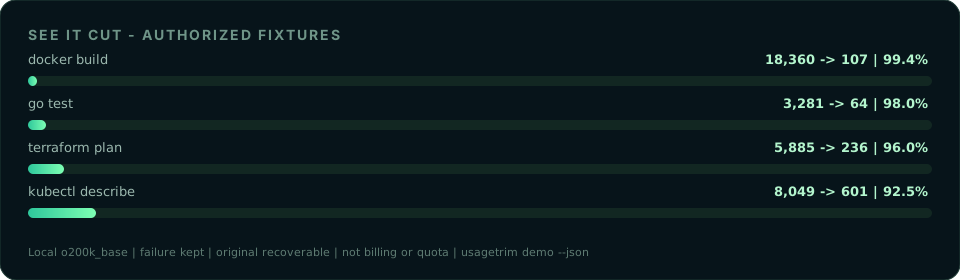
Reproducible fixture benchmarks
Run python scripts/benchmark_suite.py (or add --json) from the source checkout.
The suite uses authored test/build logs, a synthetic lockfile diff, this
repository's CLI source, and a long-line MCP read. It checks selected diagnostics
for compact mode, exact preservation of a complete failure tail in safe mode,
exact cache recovery, and unchanged unfamiliar output. It reports local token
estimates and tool-schema overhead, with an isolated temporary cache. No model is
called and reasoning quality is not evaluated.
python scripts/benchmark_code.py tests locating/reading one method among 100
Python classes, warm-index reuse, and a guarded edit with behavior checks. Add--serena /absolute/path/to/serena for an isolated local Serena comparison
(requires the mcp extra and a working Python language server). It does not change
the active Serena project. Tool text and discovery overhead are reported separately.
On the development Mac, a full-file read was 4,000 estimated tokens, TokenCut
lookup + read 130, TokenCut direct read 90, and Serena direct read 87. Tool schemas
were 1,279 vs 6,569 estimated tokens for 8 vs 23 tools with different capabilities.
This fixture establishes neither general superiority nor subscription savings.
The local counter uses o200k_base (with a cl100k_base fallback). Claude and
Gemini values are uncalibrated heuristics. These are not exact counts for Astra,
Fable, Opus, or any named model, and not measurements of subscription limits.
MCP session stats include recovery notices, exit status, and subsequent retrieval
text; they exclude tool schemas, JSON envelopes, conversation input, and reasoning.
The demo and CLI statistics report local text estimates, not dollar savings.
Architecture
End-to-end architecture: Client & HUD layer, TokenCut Core Engine (CCR + Zero-LSP Code Intelligence + Guarded Symbol Editor), and 100% private local persistence.
tokencut provides these local context tools:
1. Compress-Cache-Retrieve (CCR)
tokencut run and MCP tokencut_exec default to conservative filtering: fold
recognized pytest pass records and exact adjacent repeats, retaining their counts.
Once diagnostics begin, keep the remaining output. Short results and content
outside these patterns pass through after redaction. This mode has no fixed output ceiling.
Use CLI --compact for the older lossy filtering, or --budget for an explicit
token ceiling. In MCP tokencut_exec, supplying max_tokens or max_lines opts
into truncation. MCP read, diff, and retrieve retain their default 2,000-token
budget (max_tokens, 64–32,000). Budgets use local estimates and include recovery
references and, for exec, exit status. Cached output is stored after recognized
secrets are redacted in SQLite
(~/.tokencut/cache.db; override with TOKENCUT_CACHE_DIR):
[... 340 lines of routine output omitted by tokencut (-84.1%). Ref: tc_8f2a1b ...]
If an agent or developer needs the omitted output, it can be fetched instantly:
tokencut retrieve tc_8f2a1b --lines 120-160
Or call tokencut_retrieve with ref_id and lines. Redacted values cannot be
recovered. Long diagnostics may be omitted from a bounded response: retrieve them
before diagnosing or reviewing a change. Regex redaction is best effort, not a
complete secret scanner. Cache data remains local until removed.
2. Repository Token Profiling (tokencut tree)
Identifies high-consumption files and directories before context is loaded into an agent session:
tokencut tree .
tokencut/ · 170,499 tok (100.0%)
├── src/ · 15,282 tok (9.0%)
├── tests/ · 2,628 tok (1.5%)
└── uv.lock · 148,640 tok (87.2%) [Top Consumer]
3. AST Code Skeletonization (tokencut cat --skeleton)
During multi-file codebase navigation, feeding complete implementation bodies into the prompt exhausts context rapidly. tokencut cat parses Python files via the standard library ast module and other languages (TypeScript, JavaScript, Go, Rust) via structural regex to extract classes, method signatures, type annotations, and docstrings:
# View outline of a module
tokencut cat src/auth.py --skeleton
# Extract a specific class or method
tokencut cat src/auth.py --symbol AuthService.verify_token
# Extract specific line slice with file context
tokencut cat src/auth.py --lines 45-80
4. Local Code Intelligence & Guarded Edits (tokencut code / tokencut edit-symbol)
tokencut code uses ast-grep (MIT)
and SQLite FTS5, without model calls or background language servers. It indexes changed
files incrementally, respects Git ignores, skips dependency/build folders and symlinks,
and reports unparseable files cleanly. Python, JS/TS/TSX, Rust, Go, Swift, Java,
and C/C++ have syntax-based declaration lookup:
# Rapid symbol hierarchy and file outline (classes, methods, signatures)
tokencut code "$PWD" --mode outline --file src/auth.py
# Structural discovery and occurrences
tokencut code "$PWD" --mode map --limit 20
tokencut code "$PWD" --mode symbols --query AuthService.verify_token
tokencut code "$PWD" --mode occurrences --query verify_token
tokencut code "$PWD" --mode search --query 'authentication expired'
tokencut code "$PWD" --mode pattern --query 'print($A)' --file src/auth.py
tokencut retrieve tc_REFERENCE --query 'ConnectionRefusedError'
Symbol reads preserve decorators and comments, returning the file SHA-256 digest.
Guarded edits (tokencut edit-symbol / MCP tokencut_edit_symbol) perform atomic
AST replacements protected by the SHA-256 pre-condition guard, defaulting to unified diff preview:
tokencut cat "$PWD/src/auth.py" --symbol AuthService.verify_token
# Write the complete replacement declaration to /tmp/replacement.py
tokencut edit-symbol "$PWD/src/auth.py" AuthService.verify_token \
--replacement-file /tmp/replacement.py --expected-hash HASH_FROM_READ
# Add --apply to write atomically. Stale hashes, syntax errors, or ambiguities abort safely.
5. Git Diff Slimming (tokencut diff)
Package lockfiles (uv.lock, package-lock.json, pnpm-lock.yaml) often generate thousands of lines of machine-generated diffs that crowd out actual application changes. tokencut diff collapses lockfile modifications into summary counts while retaining application changes. MCP output is bounded; retrieve omitted context before reviewing.
6. Credential & Secret Scrubbing
Best-effort pattern matching redacts recognized API keys, JWTs, and password-bearing database URLs before MCP display and cache storage. It is not a complete secret scanner.
7. Prompt Cache Optimization (tokencut lint)
Cache behavior and pricing depend on the provider and model. tokencut lint analyzes system instruction files (CLAUDE.md, .cursorrules, system prompts) to identify dynamic timestamps, non-deterministic paths, and volatile headers that invalidate prompt caches.
8. Structured JSON & API Payload Compaction (tokencut json)
Folds arrays, long strings, and deeply nested values into a preview with sample
items. The redacted original is cached for recovery. Omitted items may contain
different fields or important values; retrieve them before drawing conclusions.
9. System Diagnostics & Auto-Configuration (tokencut doctor)
Checks the Python runtime, cache, client configuration, and shell aliases.tokencut doctor --fix and tokencut install configure supported integrations.
A successful configuration check does not establish that a live agent used the tools.
10. Pull Request Token Impact Analyzer (tokencut pr)
Estimates token changes against a Git base ref, grouped into code, documentation,
and lockfiles. --markdown emits a review summary; --max-delta <N> sets a CI
threshold. This measures repository text, not model usage during a task.
Local Code Intelligence (Replacing Heavy LSP / Serena)
Coding assistants perform best when given precise symbol context rather than whole-file dumps. Traditional solutions like Serena connect AI assistants to external Language Server Protocol (LSP) daemons (e.g. Pyright, rust-analyzer, gopls).
While LSP is valuable for human IDEs, it introduces severe bottlenecks for AI coding agents:
- Massive Discovery Token Bloat: Serena defines 23 separate MCP tools, creating a massive 6,569 token discovery tax injected into every turn. This permanently consumes precious context window capacity before the user types a single character.
- Daemon Memory & Background Stalls: Running 1–3 language server background daemons consumes 800MB–2GB+ of RAM, requires complex environment orchestration, and frequently desynchronizes during file changes.
- Failure on Partial Syntax: Human and AI developers write code in an intermediate, syntactically broken state. Full LSP servers often lock up, fail symbol resolution, or crash when syntax errors are present.
TokenCut replaces heavyweight LSP daemons with native, in-process syntax indexing and atomic surgery powered by ast-grep (tree-sitter), Python standard library ast, and SQLite FTS5:
| Metric / Capability | Serena (LSP Daemons) | TokenCut (Native AST + SQLite) | Architectural Advantage |
|---|---|---|---|
| Language Server Daemons | 1–3+ background daemons | 0 daemons (pure in-process AST) | Zero process management, zero RAM bloat |
| MCP Discovery Overhead | 6,569 tokens (23 tools) | 1,769 tokens (10 lean tools) | -73% context waste per turn |
| Memory Consumption | 800MB – 2GB+ per language | < 45MB (embedded SQLite WAL) | >95% lighter footprint |
| Warm Query Latency | 150ms – 400ms RPC roundtrip | ~16ms local query | 10x–25x faster symbol lookups |
| Syntax Error Resilience | Fails / hangs on incomplete syntax | Resilient tree-sitter AST matching | Safe during incomplete active edits |
| Structural Outline | Multi-tool JSON traversals | tokencut_code(mode="outline") |
Compact line-numbered signatures |
| Guarded Symbol Editing | Unverified patch / full rewrite | tokencut_edit_symbol (atomic) |
Pre-condition SHA-256 integrity guard |
| Privacy & Security | Language server downloads / RPC | 100% local, zero network calls | Completely private |
Native AST Outlines (tokencut_code with mode: "outline")
Rather than consuming 4,000+ tokens reading an entire file to understand what functions it contains, agents call tokencut_code with mode: "outline". This returns a compact signature map in sub-20ms:
tokencut code "$PWD" --mode outline --file src/tokencut/core/code_index.py
# outline: 1 files, 0 reindexed; syntax index (not LSP)
code_index.py:28-45 [class_definition] Symbol | class Symbol:
code_index.py:48-62 [class_definition] Occurrence | class Occurrence:
code_index.py:65-120 [class_definition] CodeIndex | class CodeIndex:
code_index.py:80-92 [function_definition] CodeIndex.__init__ | def __init__(self, root: Path, cache_dir: Path | None = None) -> None:
code_index.py:145-180 [function_definition] CodeIndex.sync | def sync(self) -> int:
code_index.py:380-440 [function_definition] CodeIndex.query | def query(self, mode="map", query="", file=None, limit=30) -> str:
Guarded Atomic Symbol Editing (tokencut_edit_symbol)
Full-file rewriting is a leading cause of agent regressions: models drop comments, lose subtle type annotations, or hallucinate neighboring code. tokencut_edit_symbol allows the agent to replace only the targeted symbol declaration and body.
Every edit is cryptographically protected by the expected_hash returned by tokencut_read:
{
"path": "/absolute/path/to/src/auth.py",
"selector": "AuthService.verify_token",
"replacement": " def verify_token(self, token: str) -> bool:\n return self.jwt.decode(token, verify_exp=True)",
"expected_hash": "e3b0c44298fc1c149afbf4c8996fb92427ae41e4649b934ca495991b7852b855",
"apply": false
}
- Safe Preview by Default (
apply: false): Returns a unified diff preview. Neither the file nor its timestamp changes. - Atomic Disk Write (
apply: true): Re-computes the file's SHA-256 digest on disk. If the hash matchesexpected_hashand the new syntax compiles cleanly, the change is written atomically. - Collision Prevention: If another agent, process, or human modified the file in the interim, the operation aborts immediately with an error, preventing silent overwrites.
The desktop pet companion continuously monitors symbol queries and guarded edits via tokencut monitor --stdio, keeping local token accounting accurate with zero cloud tracking.
Quickstart
Install this repository with uv
The PyPI name tokencut belongs to another project. Use this Git source, notpip install tokencut or bare uvx tokencut:
uv tool install 'git+https://github.com/00200200/tokencut.git'
For reproducibility, append @<commit-sha> to the Git URL. Then:
# Run any command through tokencut
tokencut run -- pytest -v tests/
# Explicitly allow truncation when bounded output is more useful
tokencut run --budget 2000 -- pytest -v tests/
# Visualize token distribution across your repository
tokencut tree .
# Inspect code structure without function bodies
tokencut cat src/server.py --skeleton
# Inspect git diff with folded lockfiles
tokencut diff
# Preview a large JSON response with recovery references
tokencut json api_response.json
# Check local integration configuration
tokencut doctor
# Estimate the token impact of a change
tokencut pr --base main --markdown
# Audit CLAUDE.md for prompt cache busting
tokencut lint CLAUDE.md
# Verify filtering and recovery with a built-in fixture
tokencut demo
Develop locally
git clone https://github.com/00200200/tokencut.git
cd tokencut
uv sync --all-extras
Integrations & Supported Platforms
tokencut operates across desktop applications, AI-enabled IDEs, coding agents, and terminal command-line pipelines.
Configuration helpers
After installing this repository, configure supported targets or inspect their status:
tokencut install --all
tokencut doctor
Use individual install flags for specific clients. These commands expose tools;
they do not make every client route all output through TokenCut.
Claude Code CLI
Register the MCP server:
claude mcp add --scope user tokencut -- tokencut mcp
This exposes ten lean tools (1,769 discovery tokens vs 6,569 for Serena):
tokencut_code: Incremental syntax index: map, qualified symbols, occurrences, full-text search, and module outline (0 LSP daemons).tokencut_edit_symbol: Hash-guarded atomic symbol replacement with diff preview and syntax validation.tokencut_exec: Runs bash commands with diagnostic-first stream compaction and CCR caching.tokencut_read: Reads files with AST skeletons, qualified symbols, line ranges, and SHA-256 digests.tokencut_retrieve: Retrieves omitted slices or matching chunks from cached results by reference ID (tc_*).tokencut_diff: Generates slim git diffs with lockfile folding.tokencut_tree: Profiles repository token distribution.tokencut_json: Previews JSON with folded arrays and recoverable omitted values.tokencut_context: Explicit task checkpoint memory (save,read,list,forget).tokencut_stats: Reports estimated net session output reduction, including retrieval overhead.
To filter native Bash output automatically, opt in to the Claude Code hook:
tokencut hook --install --client claude
The installer merges a PostToolUse hook into ~/.claude/settings.json, keeps
existing settings and hooks, and backs up changed configuration. Restart Claude
Code to activate. The hook filters stdout and stderr with safe mode and keeps
the remaining result fields, including exit status. It does not approve commands
or rewrite their inputs. Commands reported through PostToolUseFailure keep their
original diagnostics. This is a Claude Code integration, not a Claude Desktop chat hook.
Claude Desktop (macOS)
tokencut install --claude-desktop
Or merge the mcpServers entry shown below into~/Library/Application Support/Claude/claude_desktop_config.json. Use an absolute
binary path from command -v tokencut, restart Claude Desktop, and check
Settings → Developer or + → Connectors for the connected server.
This exposes tools; it does not filter every conversation or other tool result.
The Desktop Pet companion floats alongside Claude Desktop, monitoring 5-hour
quota windows via the local CodexBar adapter and displaying real-time MCP output reduction.
Cursor & Windsurf
Use tokencut install --cursor for ~/.cursor/mcp.json, tokencut install --windsurf for ~/.codeium/windsurf/mcp_config.json, or merge this entry
into the client's MCP configuration:
The Desktop Pet companion persists across macOS Spaces, floating above your editor
windows and displaying live output reduction counters as the agent executes tools.
{
"mcpServers": {
"tokencut": {
"command": "/absolute/path/to/tokencut",
"args": ["mcp"]
}
}
}
Codex / local ChatGPT desktop
codex mcp add tokencut -- tokencut mcp
Codex CLI and desktop share ~/.codex/config.toml. Restart/reconnect MCP after
installation. For desktop clients, use the absolute binary path fromcommand -v tokencut if their PATH differs from your terminal.
Use explicit tokencut run -- <command> inside Codex's native shell tool to
retain its sandbox and approval flow. This wrapper is intended for
noninteractive commands. Avoid granting a blanket approval to all wrapped
commands.
An offline protocol check on CLI 0.154.0 and desktop 0.155.0-alpha.9.2 found thatPostToolUse with continue: false does not replace the value returned bytools.exec_command() inside code mode: JavaScript can still return the raw
output to the model. TokenCut therefore does not install a Codex output hook.
This check used fixed tool calls and a local mock, not a model evaluation.
When paired with the ChatGPT Desktop application or Codex CLI, the Desktop Pet companion
queries local rate limits via account/rateLimits/read, displaying live 5-hour quota
consumption and reset countdowns in its floating HUD card while the assistant works.
Persistent tool preferences
Keep guidance short and conditional on TokenCut being available:
Prefer TokenCut for large command results and targeted reads. Preserve errors
and exit status, retrieve omitted details when needed, and retain existing
permissions. Avoid extra filtering calls for short results.
- Codex: add to
~/.codex/AGENTS.md, then start a new session. - Claude Code: add to
~/.claude/CLAUDE.md; reload through/memoryor start a new session. - Claude Desktop: save in Settings → Account → Instructions for Claude
(called profile preferences in older versions).
These are tool-selection preferences, not guaranteed interception. Local MCP
configuration does not apply to ChatGPT web. Reducing tool text does not establish
how much longer Astra, Fable, Opus, or another model's usage allowance will last;
that requires task-level measurements including retries, cache and reasoning.
Client references: Codex MCP,
Codex instructions,
Claude Code instructions,
Claude Desktop instructions.
Antigravity / Gemini CLI
Use the same mcpServers JSON above. In Antigravity, open MCP Servers → Manage
MCP Servers → View raw config. Current versions use ~/.gemini/config/mcp_config.json;
older IDE versions may use ~/.gemini/antigravity/mcp_config.json. Gemini CLI uses~/.gemini/settings.json. Merge the entry with existing configuration, then refresh.
For exec/diff, pass the target project's absolute cwd. Prefer absolute file paths.
Installation exposes tools; it does not automatically rewrite native shell calls.
The Desktop Pet companion visualizes agentic tool calls and output reduction
in real time, storing telemetry locally in SQLite with zero cloud transmission.
Terminal CLI & POSIX Pipelines (Gemini CLI, Codex, bash, zsh)
tokencut integrates into standard terminal workflows:
# Add 'cc' shortcut to ~/.zshrc or ~/.bashrc
tokencut install --alias
# Run commands with automatic token compaction
cc pytest -v tests/
cc npm test
# Pipe stdout/stderr through tokencut
cargo test 2>&1 | tokencut pipe
curl https://api.github.com/repos/00200200/tokencut/commits | tokencut json
GitHub Actions CI Gatekeeper
The composite action can audit PR token delta or wrap test steps:
- name: Check PR Token Impact
uses: 00200200/tokencut@main
with:
pr-check: 'true'
max-token-delta: '25000'
Pre-Commit Hook
Add audits to your .pre-commit-config.yaml:
repos:
- repo: https://github.com/00200200/tokencut
rev: main
hooks:
- id: tokencut-lint
- id: tokencut-pr
CLI Reference
| Command | Description |
|---|---|
tokencut run -- <cmd> |
Safely filters command output; --compact or --budget permits truncation. |
tokencut code <root> |
Queries local syntax index (--mode outline|symbols|map|search|pattern; 0 LSP daemons). |
tokencut edit-symbol <path> <sym> |
Performs guarded atomic symbol surgery (--replacement-file, --expected-hash, --apply). |
tokencut context |
Explicit task checkpoint memory (save, read, list, forget). |
tokencut tree [dir] |
Hierarchical directory token consumption profiler. |
tokencut cat <file> -s |
AST structural skeleton (classes, signatures, docstrings). |
tokencut cat <file> -y <sym> |
Extracts a specific class, method, or function by name. |
tokencut cat <file> -l <range> |
Extracts a specific line range with file context. |
tokencut retrieve <ref_id> |
Retrieves uncompressed output from the CCR cache. |
tokencut json [path] |
Compacts large JSON payloads, folding arrays and caching raw data. |
tokencut pipe |
POSIX stdin filter for shell integration. |
tokencut diff [--staged] |
Slims git diffs by folding lockfiles and condensing whitespace. |
tokencut doctor [--fix] |
Checks local integration configuration and optionally applies fixes. |
tokencut install [--all] |
Configures supported MCP clients and shell aliases. |
tokencut pr [--base] [-m] |
Analyzes PR token delta and formats Markdown summaries for CI. |
tokencut cache [stats|clear] |
Manages the local SQLite Compress-Cache-Retrieve store. |
tokencut lint [file] |
Lints agent instruction files for prompt cache-busting elements. |
tokencut mcp |
Starts the stdio JSON-RPC Model Context Protocol server. |
tokencut hook --install --client claude |
Opts in to conservative filtering of Claude Code Bash results. |
tokencut stats [--format] |
Displays estimated lifetime savings in table, JSON, or Markdown. |
tokencut demo |
Interactive visual demo benchmarking token savings on realistic failures. |
Development
Run the regression suite and linter:
# Run unit, integration, and CLI tests
uv run pytest -v
# Run the linter
uv run ruff check .
# Run authored fixture benchmarks (no model calls)
uv run python scripts/benchmark_suite.py
License
Released under the MIT License.
Yorumlar (0)
Yorum birakmak icin giris yap.
Yorum birakSonuc bulunamadi