Switcher
Health Uyari
- License — License: MIT
- Description — Repository has a description
- Active repo — Last push 0 days ago
- Low visibility — Only 7 GitHub stars
Code Basarisiz
- rm -rf — Recursive force deletion command in .github/workflows/release.yml
- rm -rf — Recursive force deletion command in install.sh
Permissions Gecti
- Permissions — No dangerous permissions requested
Bu listing icin henuz AI raporu yok.
All your AI subscriptions in one place. Switch Claude Code, Codex and Claude Desktop between your accounts in one click, fail over when one runs out, and share one host with all your Macs. With usage limits, an agent skill, a phone page and a CLI. Menu bar app and dashboard for macOS and Linux.

Switcher
All your AI subscriptions in one place.
Switch Claude Code, Codex and Claude Desktop between your accounts in one click,
never get stuck at a limit, and share one host with all your Macs.
Download for macOS · Linux · Command line · On your phone · Share between Macs · Details
Why Switcher
You pay for more than one subscription and want your tools to use the right
one, without logging out, editing config files or interrupting the agents that
are already running. Switcher sits between your tools and the providers on
your own Mac and answers two questions: which account am I using, and
switch me to that one.
It does not pool accounts or rotate requests between them. Each provider uses
the account you picked until you pick another, until that account runs out,
or until it reaches a usage limit you set; then Switcher moves on to the
account with the most usage left. Errors and limits are the provider's own.

Switcher in 45 seconds. Switching, failover, limits, agents, Claude Desktop, a host for your other Macs, your phone, costs, load and the menu bar.
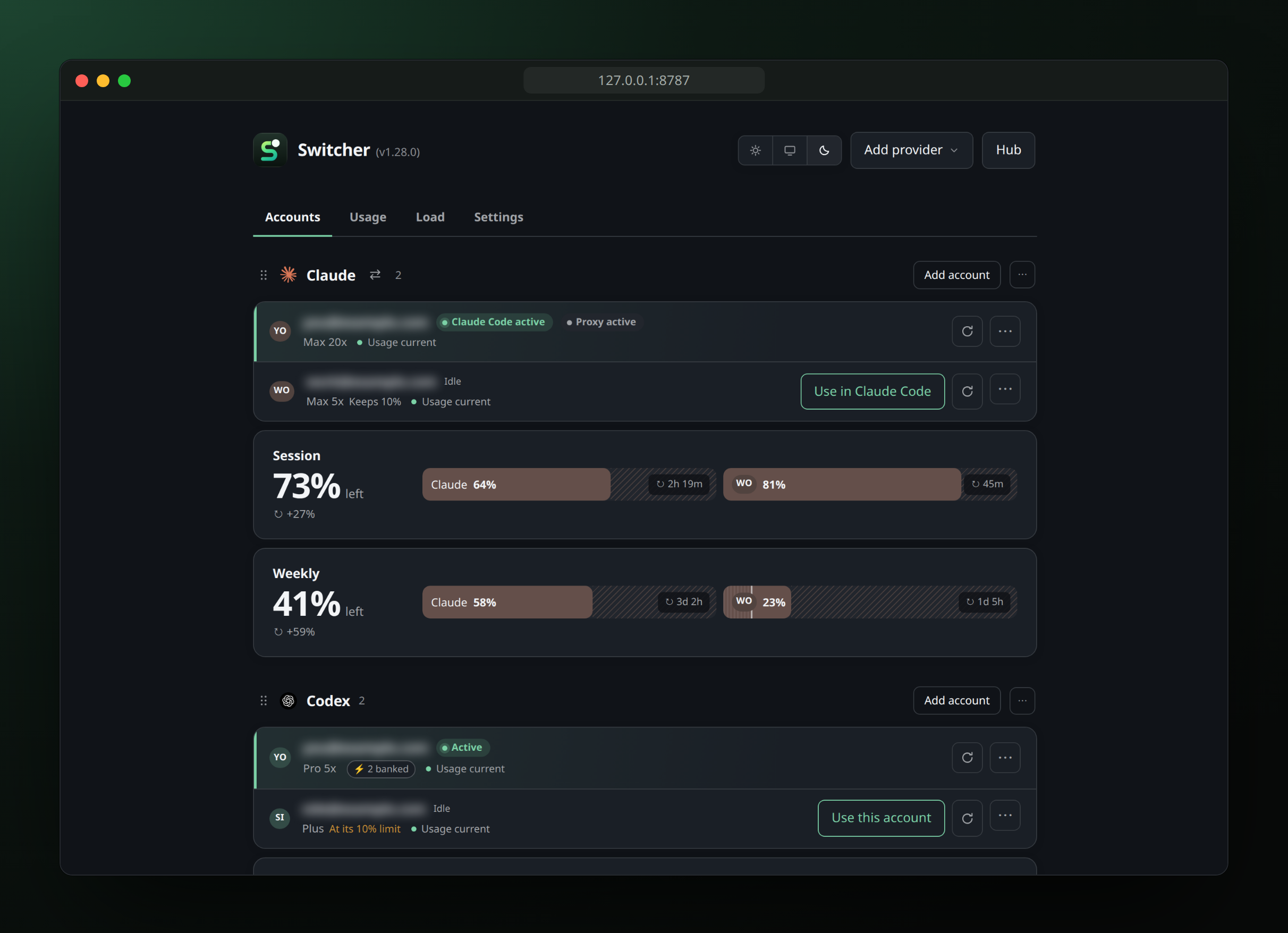
Switch in one click
Use in Claude Code switches Claude Code's own login and Switcher's proxy
together; running sessions follow within about 30 seconds. Codex, the T3 Code
hub and, if you want, Claude Desktop use the account you pick. Through the
Desktop relay, Claude Code uses the account you pick and keeps its login, so
Remote Control sessions survive a switch. All of it from the menu bar, the
dashboard or switcher use.
Every quota is in view while you choose: session, weekly and monthly windows
with reset countdowns, side by side per account if you merge them, with
optional alerts when a window resets.
Never stuck at a limit
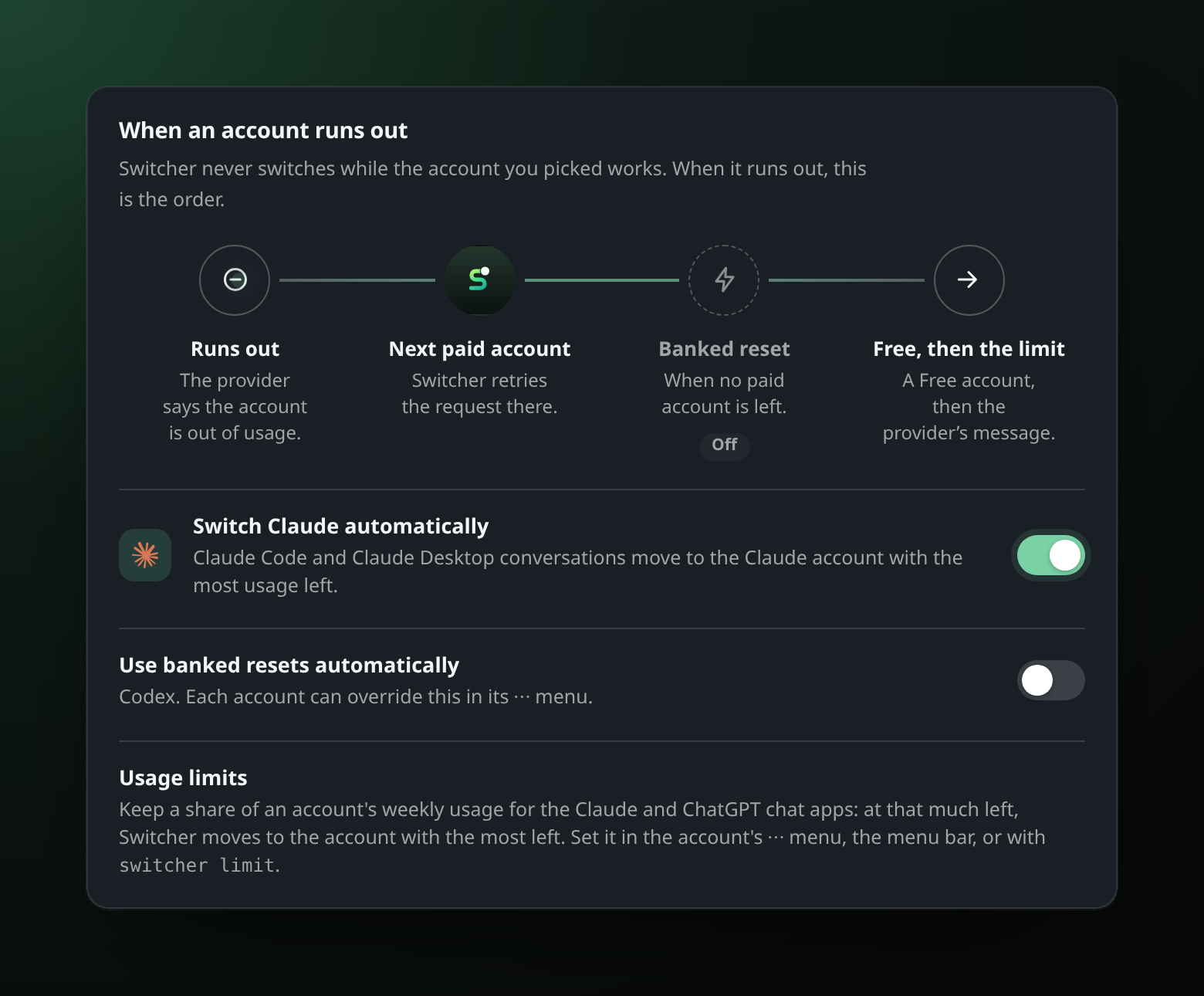
When an account runs out, Switcher moves on by itself. Codex retries the
request on another paid account, with a banked reset before any Free account.
Claude Code's login switches to the Claude account with the most usage left,
and a Claude Desktop conversation moves over before Desktop even sees the
refusal.
One host for all your Macs
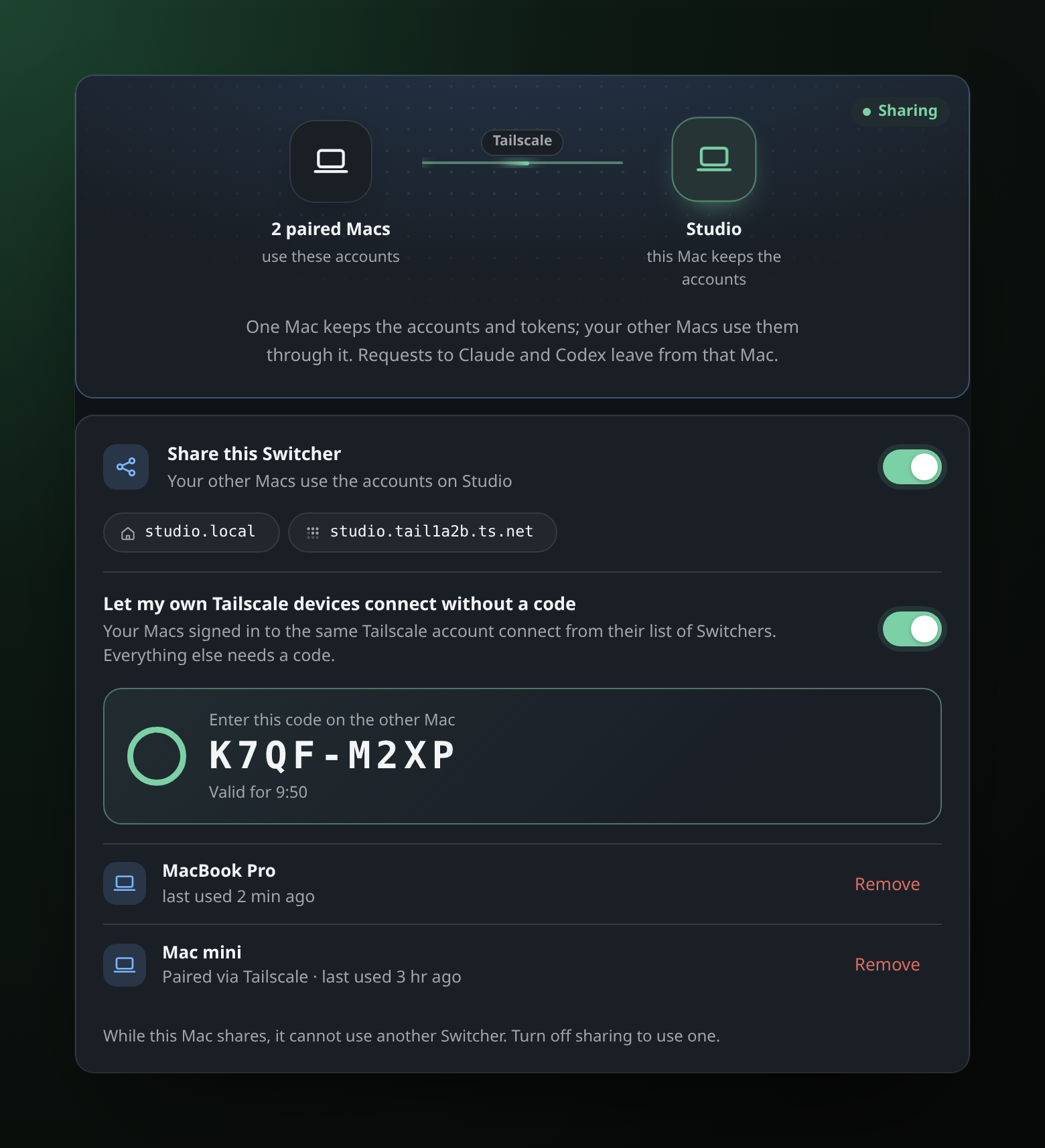
Make one computer the host: a Mac, or a Linux server that is always on. It
keeps the accounts and tokens; your other Macs pair with a code once and use
them, at home or anywhere with the optional Tailscale add-on. Your own
devices on Tailscale connect without a code. Switches, limits and usage follow
the host, a paired Mac can update the host's Switcher, and if the host goes
down a Mac can work on its own accounts until it is back.
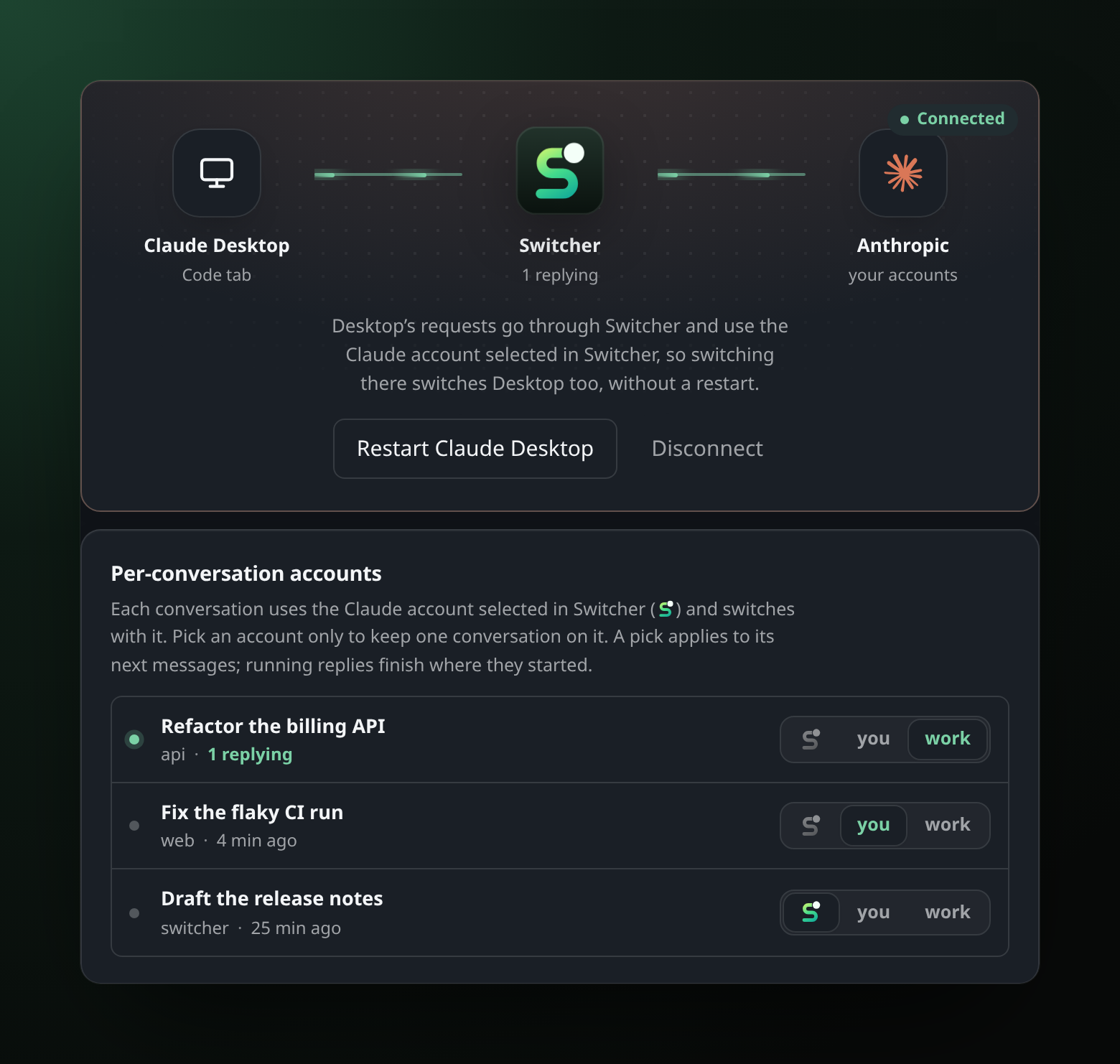
Claude Desktop too
Connect Claude Desktop and its Code tab goes through Switcher: switching the
Claude account switches Desktop as well, without a restart. Or pick an account
for a single conversation and leave the rest where they are.
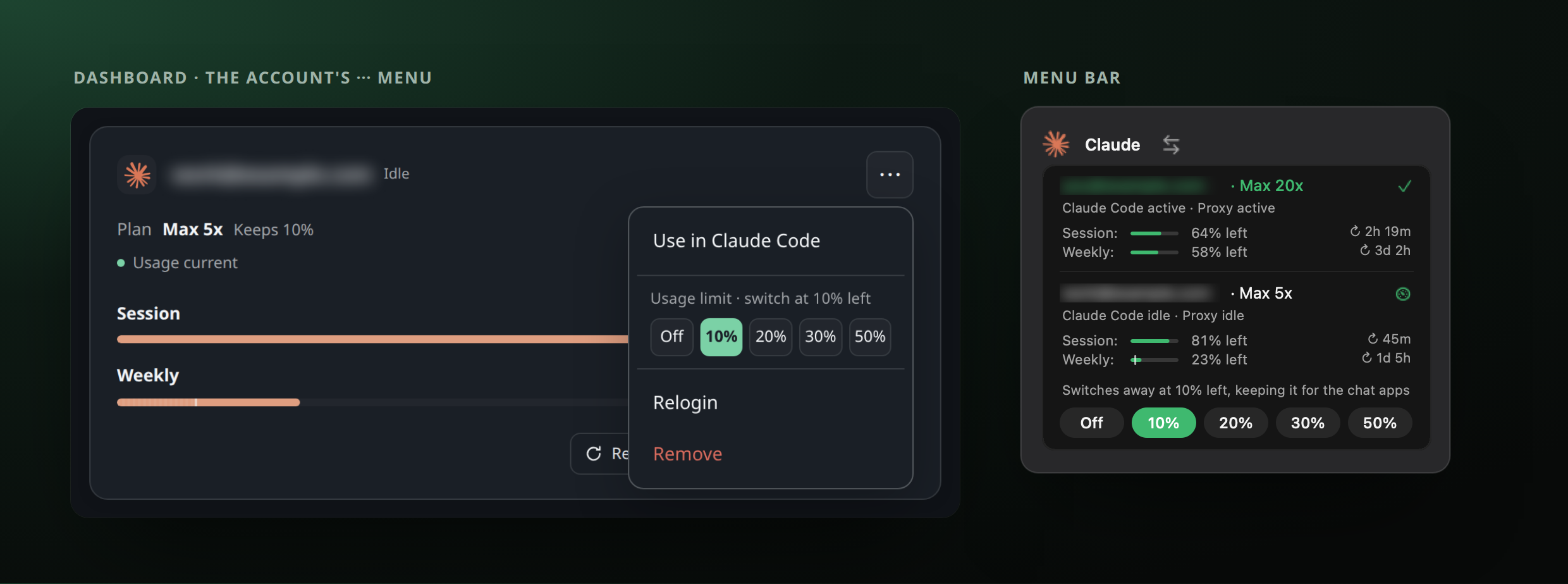
Keep a share for the chat apps
The Claude and ChatGPT apps and websites can't be routed, so an account your
tools burn through leaves them nothing. Give that account a usage limit,
say 10%: when it has that much of its weekly usage left, Switcher moves your
tools to the account with the most left. Two clicks in the dashboard or the
menu bar, or switcher limit work 10; a limit never blocks a request.
Your agents can run it
Switcher ships a skill that teaches Claude Code, Codex and other agents what
Switcher is and how to drive it: "which account am I on?", "switch Codex to
my work account", "keep 10% on this account and switch automatically",
"what's eating my server?". The skill knows the commands, reads their JSON and
never spends a banked reset or removes anything you did not ask for.
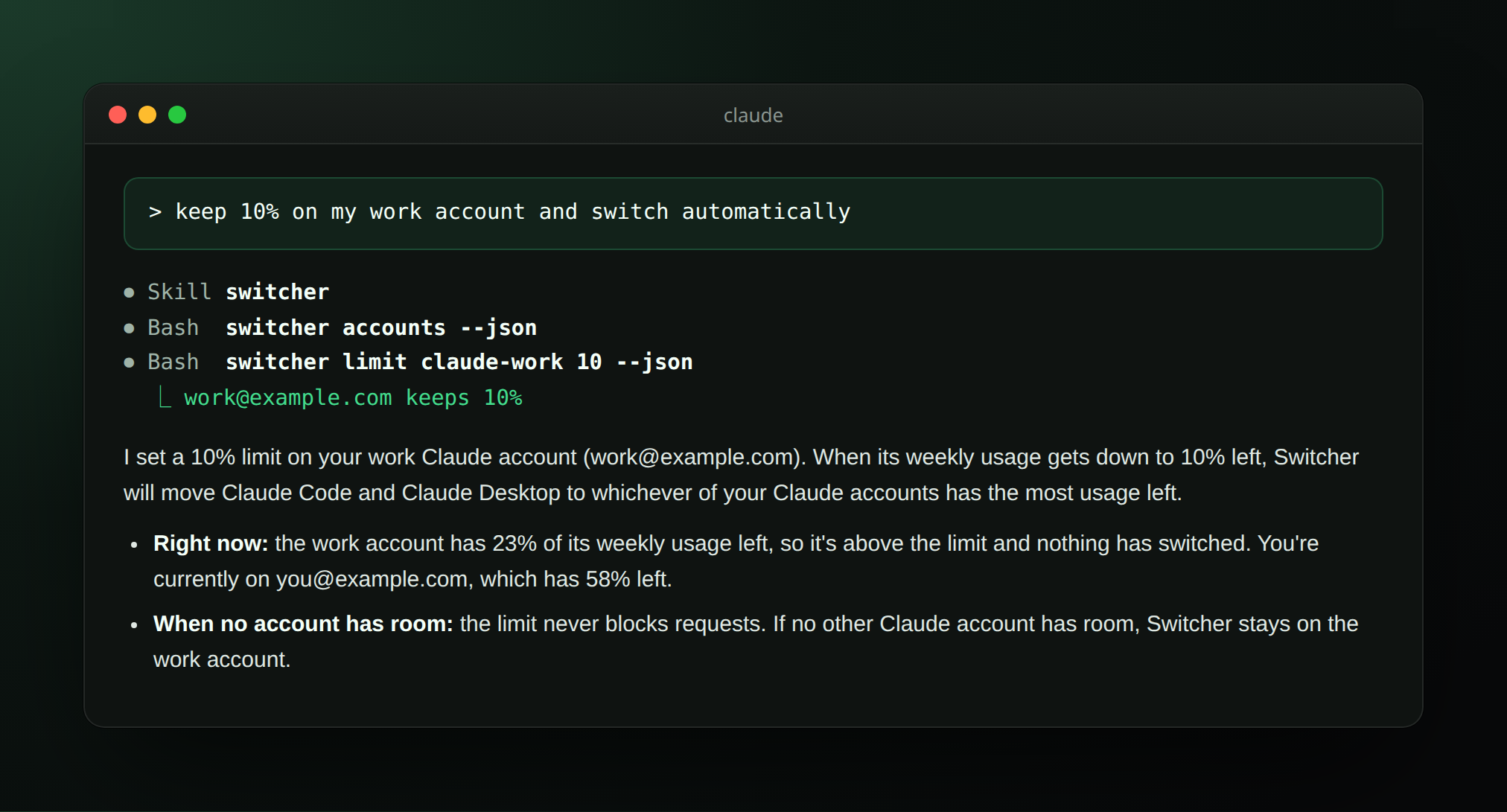
A real run: Claude Code with the Switcher skill, against made-up accounts.
A first install puts the skill in ~/.agents/skills and links it for Claude
Code; otherwise add it from Settings → Command line & tools or withswitcher skill install. On a Mac that uses a host, Install on both puts
it on the host too.
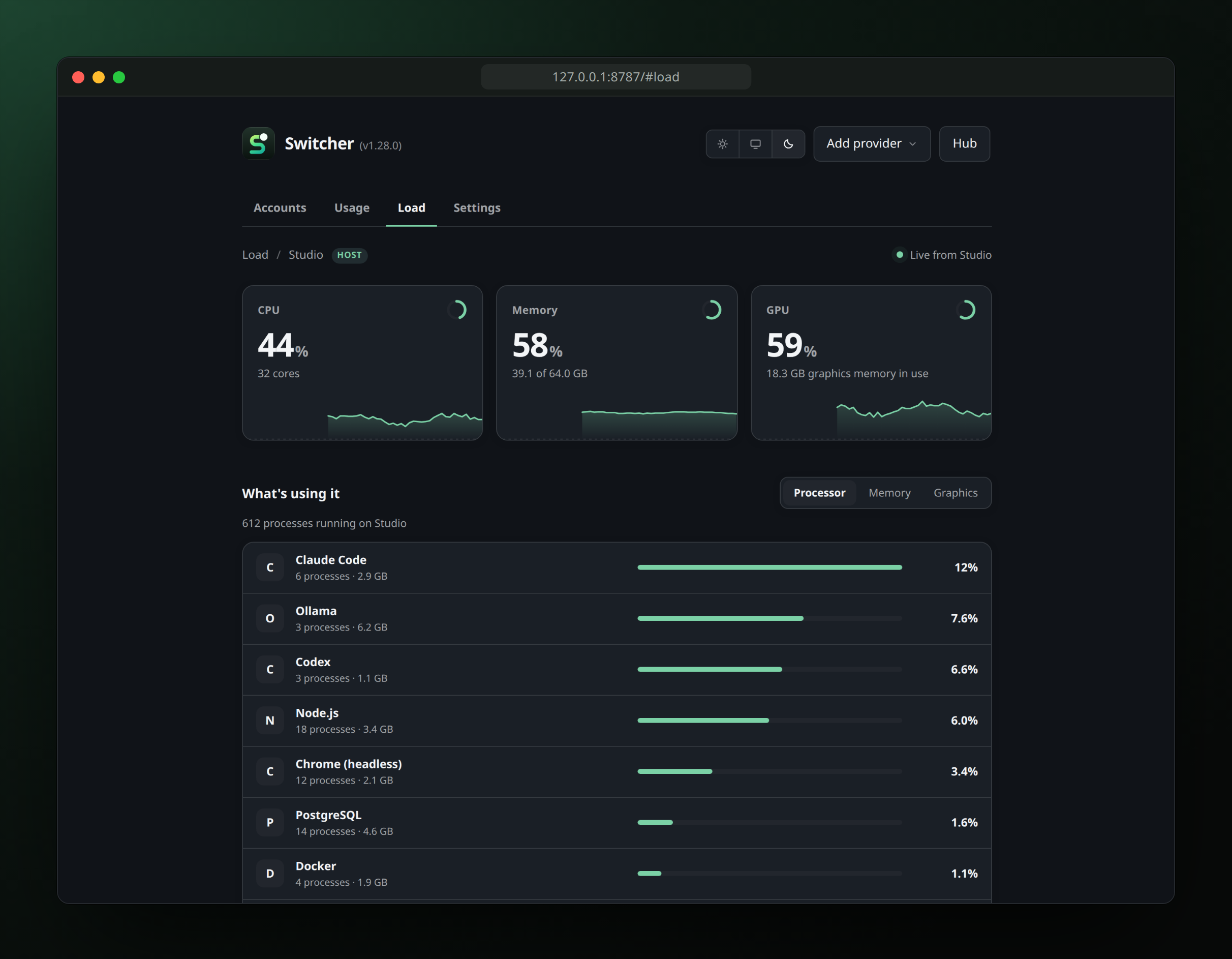
See what's using your Mac
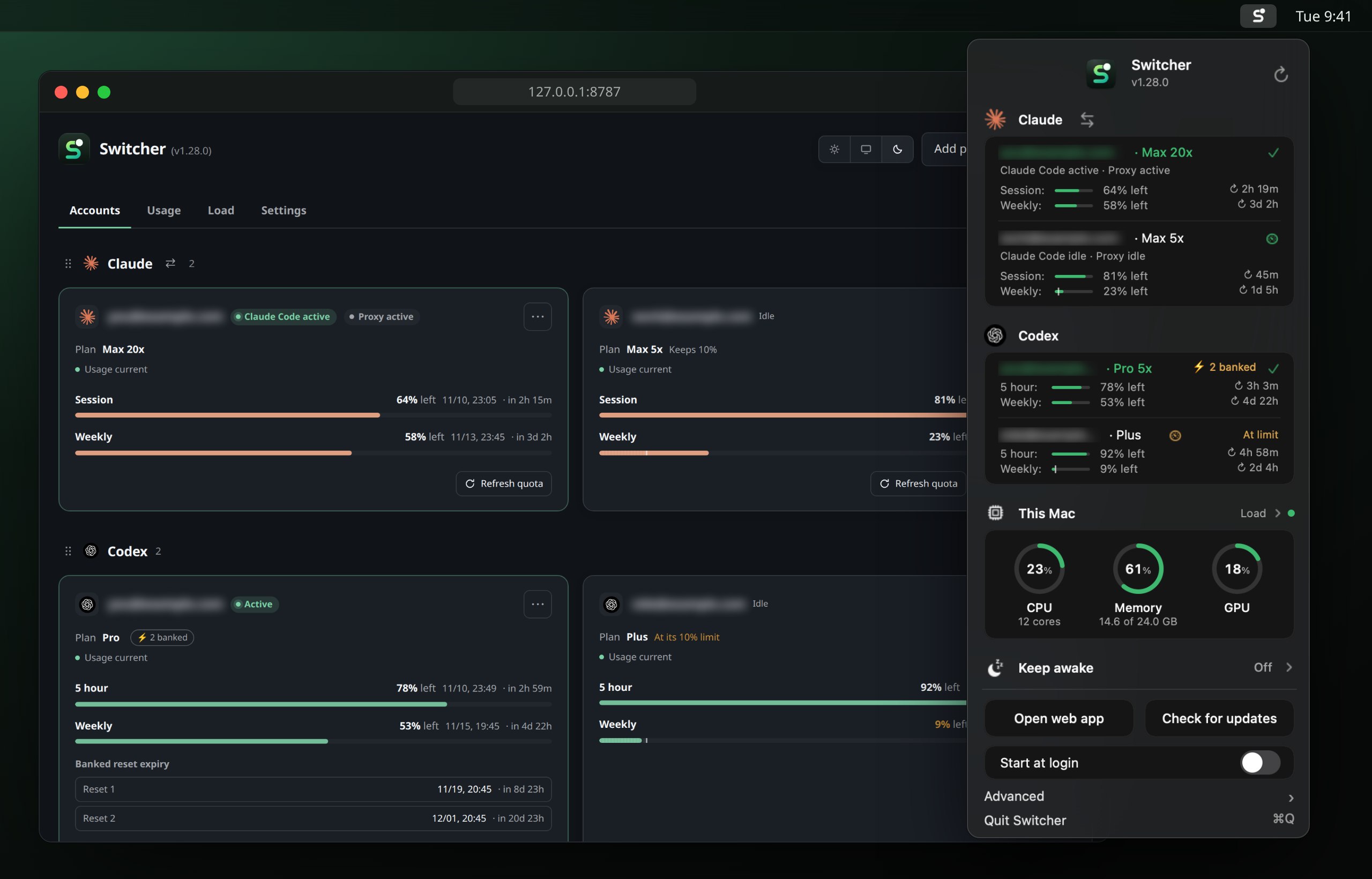
The menu bar shows CPU, memory and graphics load as three live rings: this
Mac's, or the host's while you use its accounts. Click them for the Load
page: two minutes of history, and every app using the computer, grouped and
ranked by processor, memory or graphics (per-app graphics and graphics memory
on Linux hosts with AMD or Intel graphics). Names only, never arguments or
files; switcher load --apps prints the same.
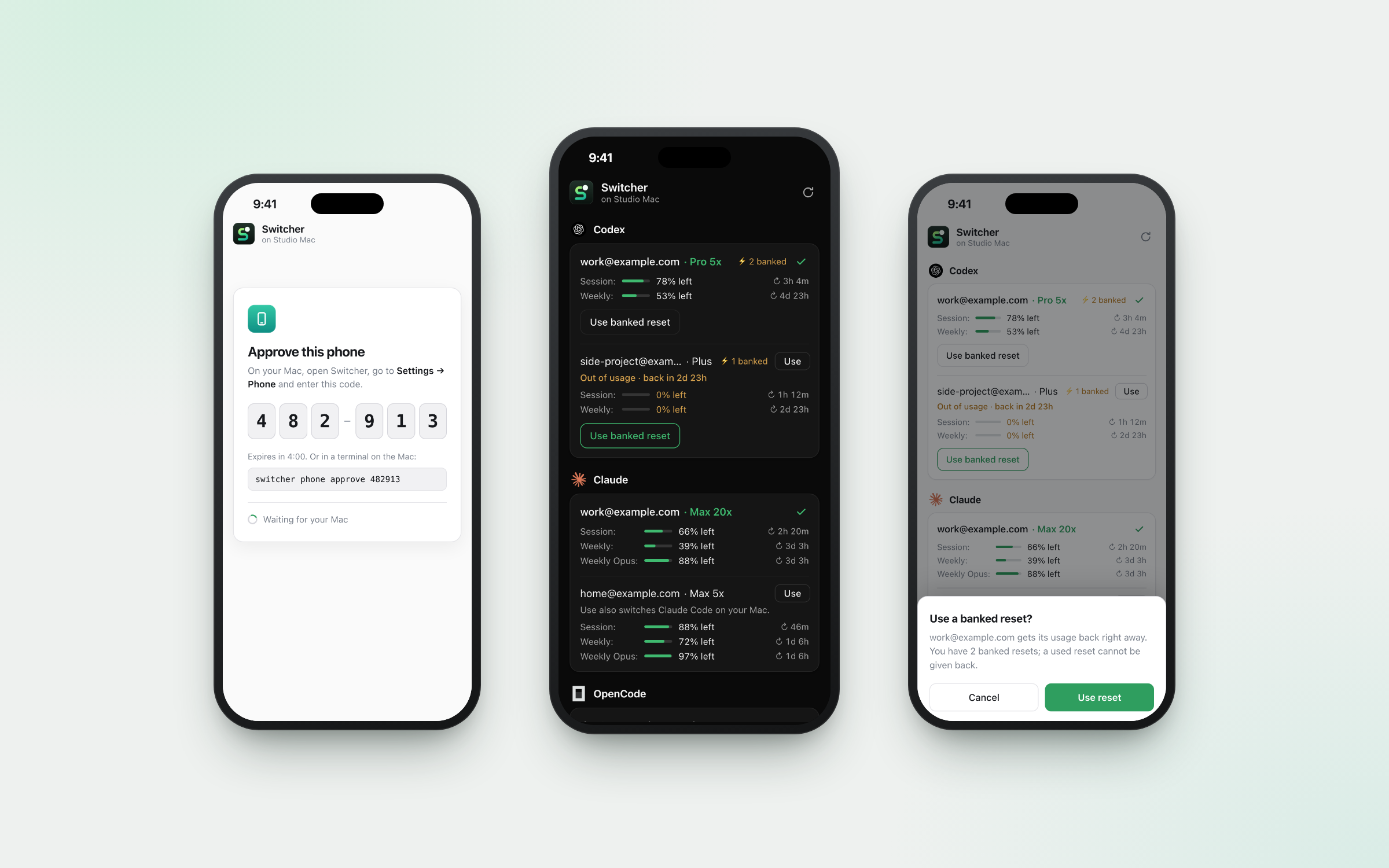
In your pocket
Check usage, switch accounts (Claude Code's login included) and spend a banked
reset from your phone, wherever you are, over Tailscale. Setup is a QR code
and a six-digit code; only phones you approve on the Mac get in.
And the rest
- Costs and tokens. A Usage tab reads your CLIs' own session logs and
prices them, per day, provider and model. - A command line for you and your agents. Switch, sign in, set limits,
share between Macs and set up Claude Desktop from a terminal or over SSH,
with JSON output and stable exit codes. - Keep awake for long runs. From the menu bar, keep the Mac awake for 15
minutes up to 8 hours, until a set time or until you turn it off, even with
the lid closed. Sleep comes back by itself when time is up, when the battery
runs low or when Switcher quits; an update's restart keeps it going. - Linux. The same server, dashboard and command line, with a tray icon
instead of the menu bar: a good always-on host. - Private by default. Local only, no telemetry, prompts never inspected,
and account emails blurred until you hover.
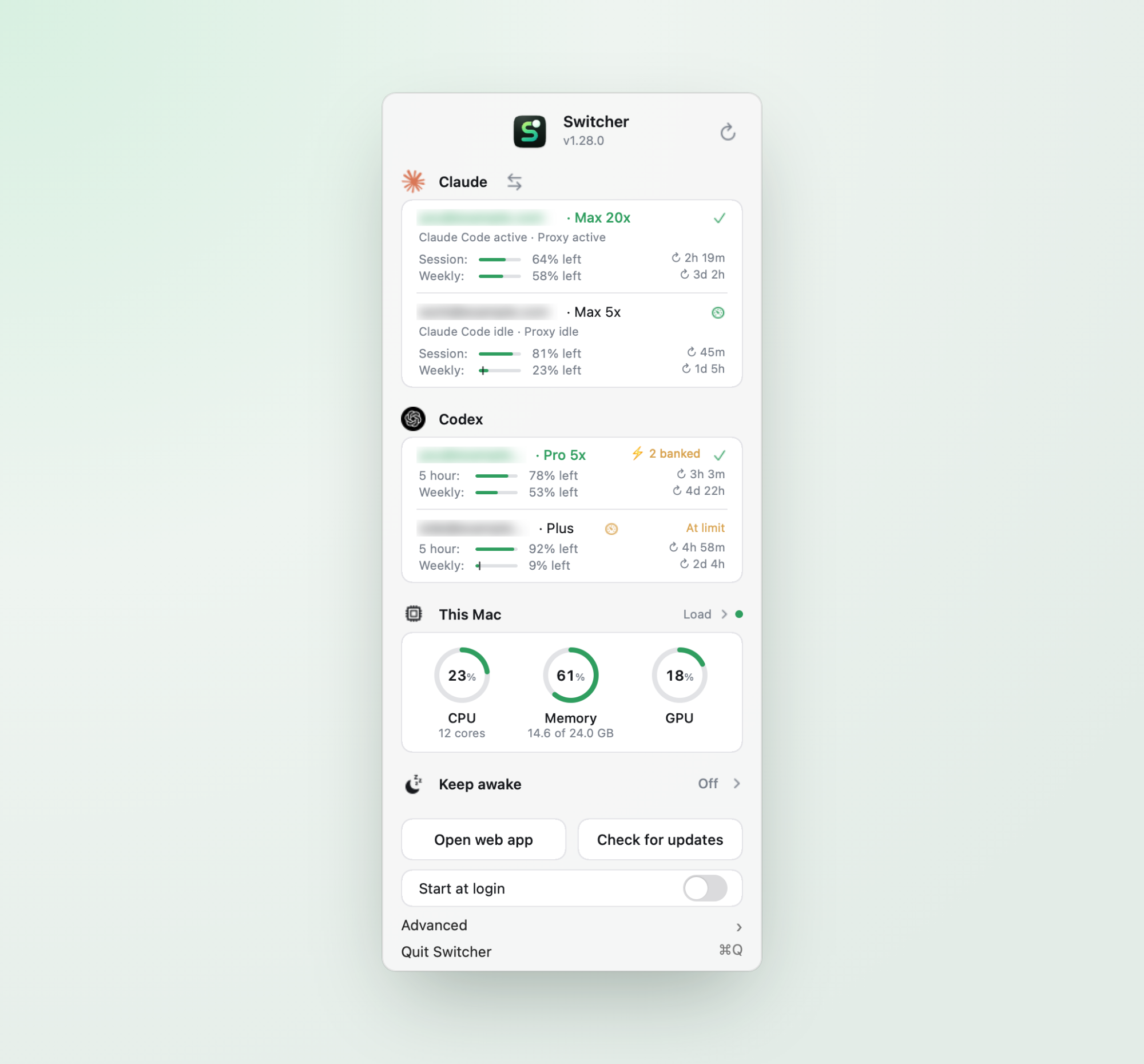 Menu bar. Usage, limits and load without opening anything. |
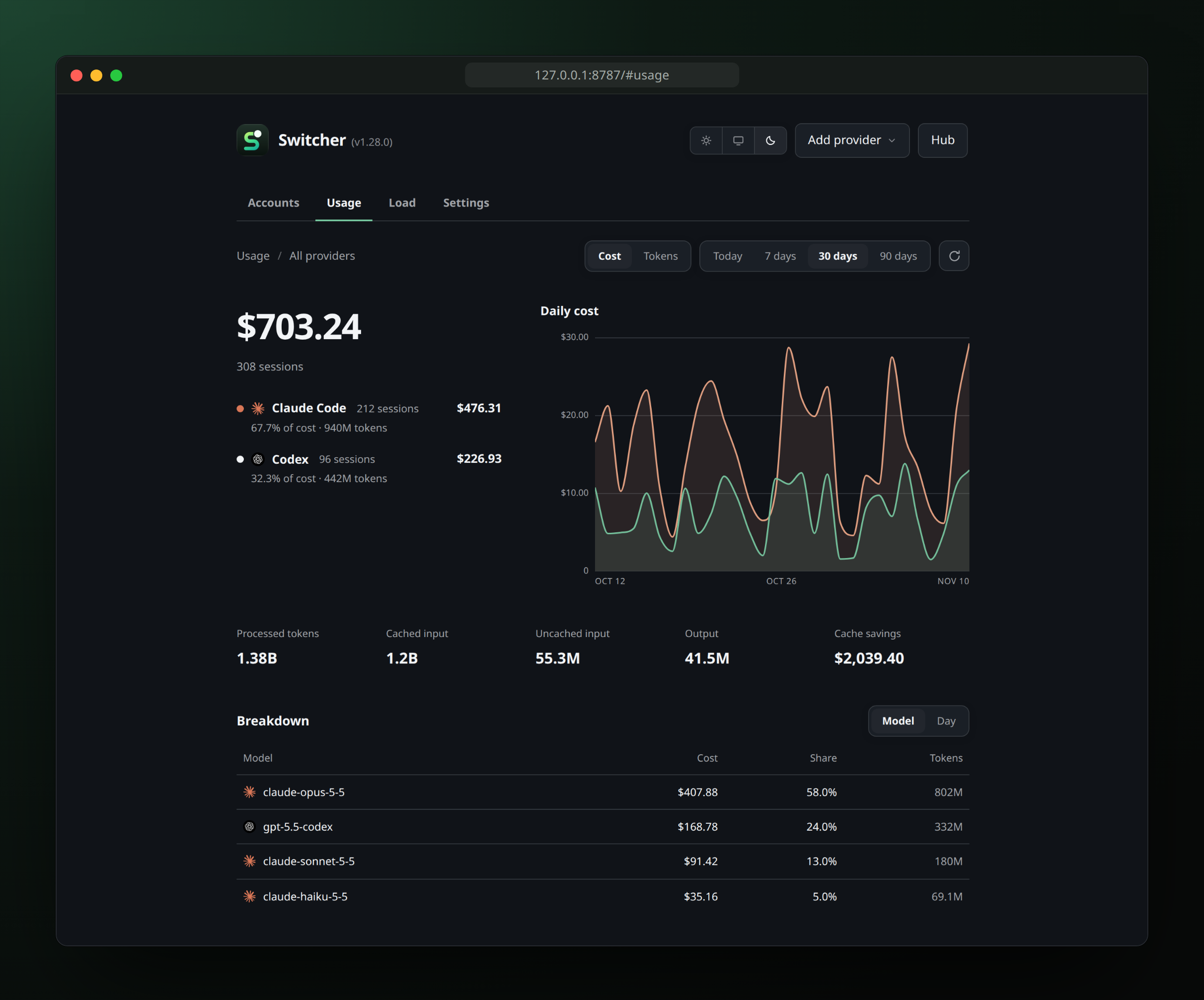 Costs and tokens. From your CLIs' own session logs. |
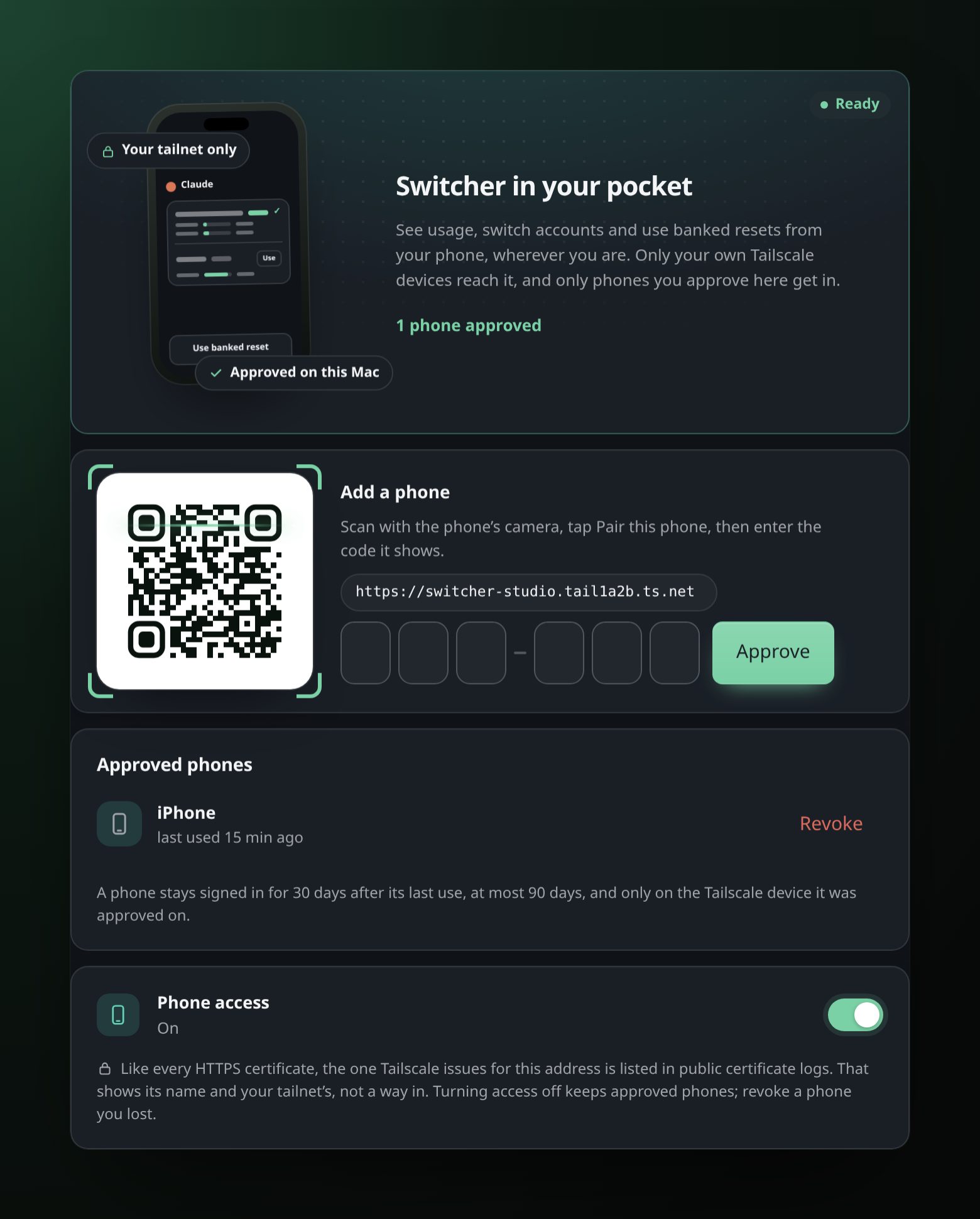 Phone setup. Scan, tap Pair, type the code. Done. |
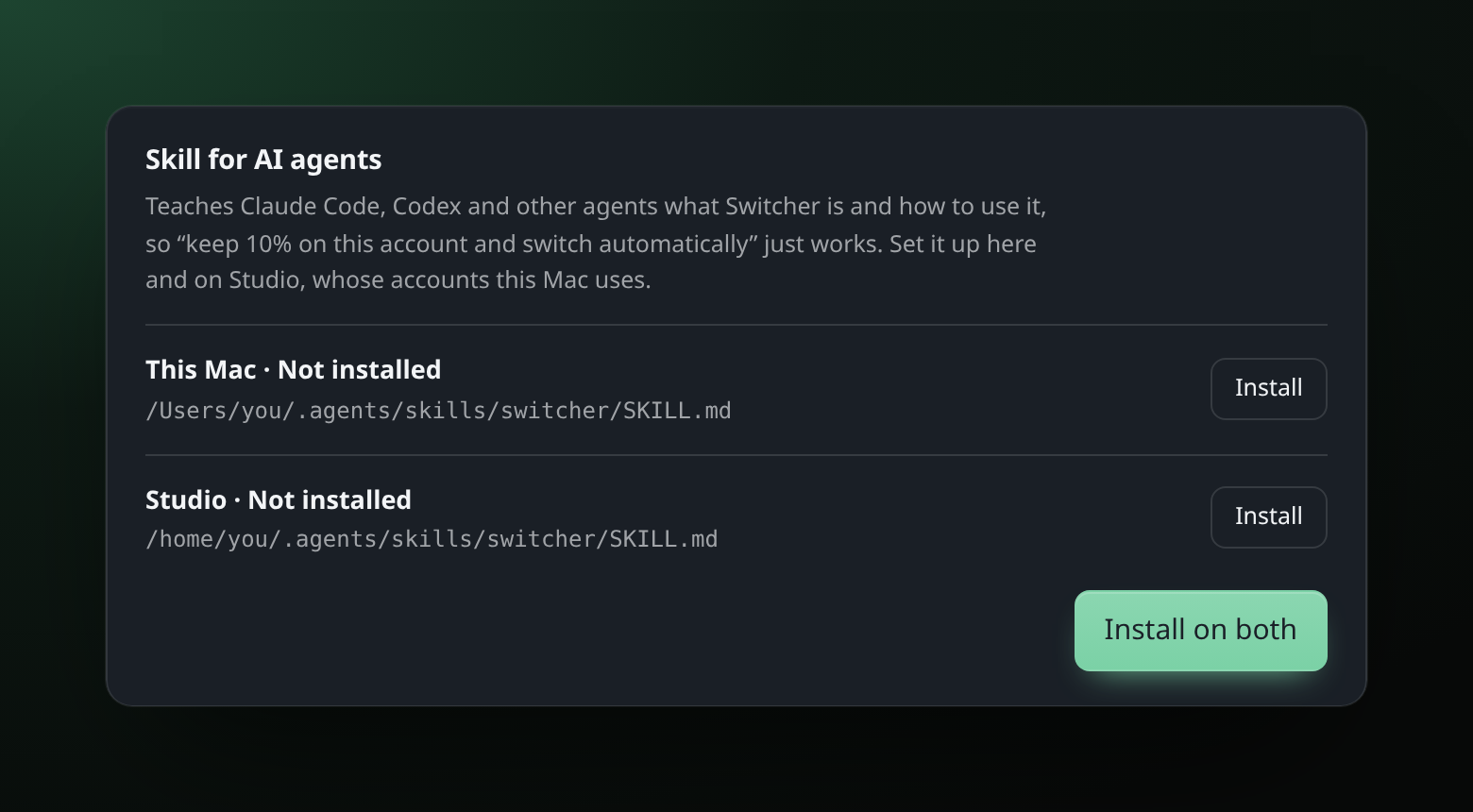 Agent skill. On this Mac and its host at once. |
Install
curl -fsSL https://raw.githubusercontent.com/00xmario/switcher/main/install.sh | sh
The script installs the latest release into Applications, adds theswitcher command, on a first install adds the skill that teaches AI agents,
Claude Code included, to use Switcher (~/.agents/skills/switcher;SWITCHER_SKILL=0 skips it) and starts Switcher. It works over SSH too.
Or download Switcher_<version>.dmg from
Releases and drag
Switcher into Applications. Switcher is signed ad hoc rather than with a paid
Developer ID, so macOS may block the first launch of a browser download;
clear the flag once with:
xattr -dr com.apple.quarantine /Applications/Switcher.app
On Linux the same script installs ~/.local/bin/switcher, starts it at
login with a systemd user service and opens its tray icon. The dashboard is
the main UI there; see Switcher on Linux for what differs.
Switcher runs on macOS 13 or later, on Apple silicon and Intel Macs, and on
Linux. It lives in the menu bar and serves its dashboard on
http://127.0.0.1:8787.
Turn on Start at login in its menu to keep it around. To build from
source (Go 1.27+): make install.
Updates. When a new release is out, the menu bar icon shows a small
arrow badge. Install update in the menu or the dashboard downloads the new
release straight from GitHub, checks it and replaces the whole app, then
Switcher restarts by itself; the menu and the dashboard show a progress
bar meanwhile. It always installs the newest release, skipping any in
between. A Mac that uses another Mac's accounts can update that host from
its own menu or dashboard (see sharing). No GitHub account or command-line tools are needed. If
Switcher sits in a folder you cannot change, such as Applications
on a standard account, macOS asks for an administrator password. Versions
up to 1.11 updated through the GitHub CLI and fail on Macs without it;
update those once with the install script above.
Quick start
- Add accounts. Open the dashboard from the menu bar and click
Add account, or runswitcher login claude. Claude can also import the
login Claude Code already has. - Switch. Click Use in Claude Code or Use this account, or run
switcher use [email protected]. - Point Codex at Switcher once:
switcher setup codex, or
Settings → Command line & tools → CLI setup. - Keep a share of an account for the chat apps: its ⋯ menu → Usage
limit, orswitcher limit [email protected] 10. Or ask your agent.
Your other Macs can skip all of this: switcher connect <this Mac> --code <code>
lets them use this Mac's accounts. See sharing.
Command line
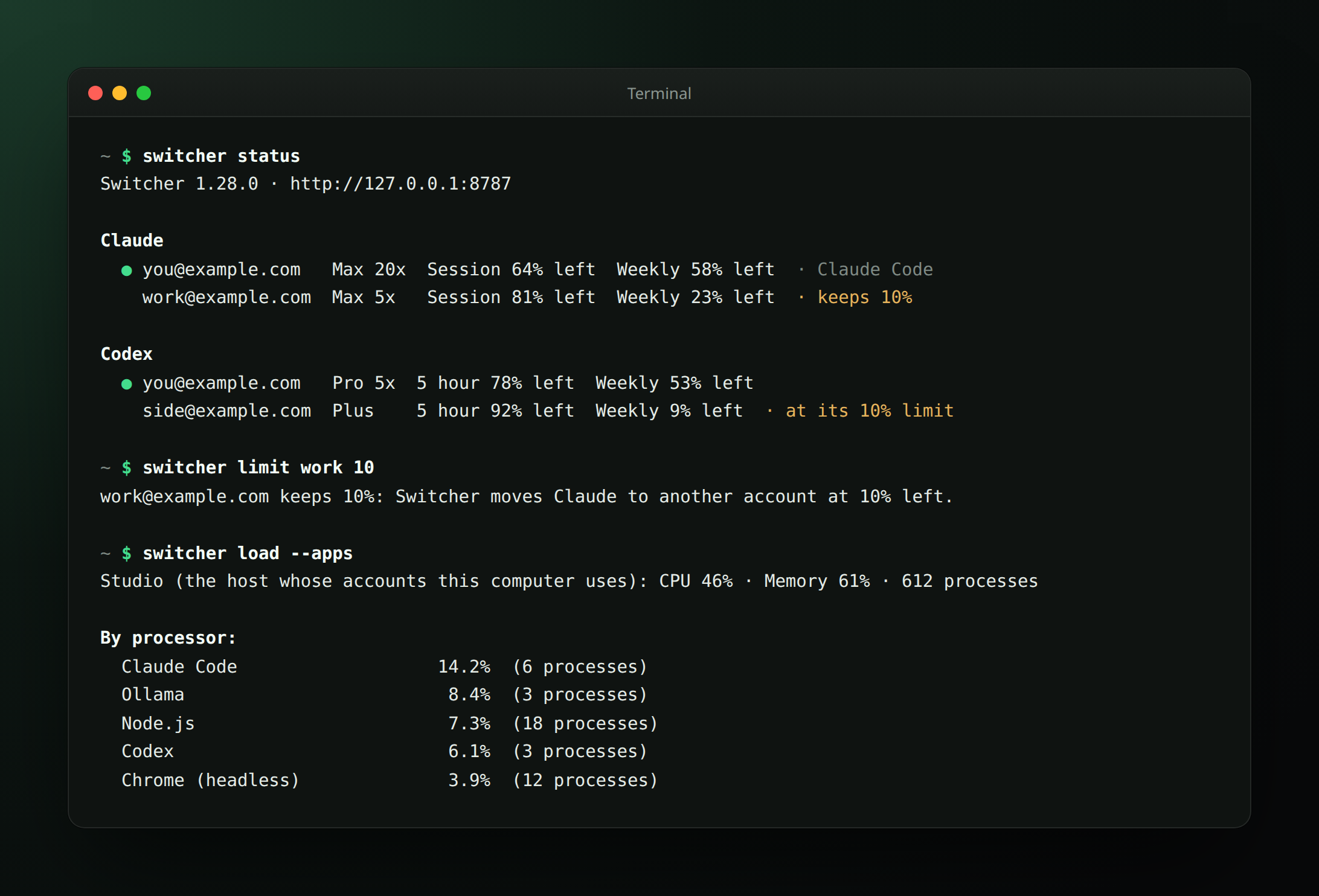
switcher status                            # accounts, usage, sharing, Claude Desktop
switcher use [email protected]              # switch; Claude also switches Claude Code
switcher login claude                      # sign in, also over SSH
switcher share on && switcher share code   # let your other Macs use this one
switcher connect studio.local --code K7QF-M2XP
switcher desktop connect                   # route Claude Desktop through Switcher
switcher limit [email protected] 10         # keep 10%: switch away at 10% left
switcher load                              # CPU, memory and GPU of this Mac or the host
switcher load --apps                       # and what is using it, by app
switcher reset codex --yes                 # spend a banked reset
switcher phone on                          # use Switcher from your phone
switcher use-host off                      # host down? work on this Mac's own accounts
switcher hand-back on --yes                # before removing Switcher: tools go direct again
switcher status --json                     # for agents and scripts
Signing in over SSH works. Open the printed link in a browser on any
device. The browser ends on a localhost page that cannot load; paste that
address back into the command and Switcher finishes the sign-in on its own
Mac. Agents use --no-wait --json and switcher login finish. Everything is
in the command line guide.
Providers
| Provider | Sign in | What Switcher does |
|---|---|---|
| Claude | Browser, or import Claude Code's login | Switches Claude Code's own login and the Claude proxy, by itself when an account runs out; optional Claude Desktop routing |
| Codex | ChatGPT in the browser | Proxy for the Codex CLI, one-command setup, banked resets |
| Grok Build | Device code | Proxy for the session service |
| OpenCode Go | API key | Proxy |
| Gemini, Antigravity | Google in the browser | Accounts and usage |
| GitHub Copilot | Device code, or import Copilot CLI | Accounts and usage |
The full matrix, including what is verified per native CLI, is in
details.
Privacy and security
- By default Switcher listens on
127.0.0.1only and needs no account of its
own. Requests go straight from your Mac to the provider, with your tokens. - Tokens stay in
~/.switcher/(mode0600), like the CLIs keep theirs.
Request bodies are forwarded as they are; Switcher never reads prompts. - Sharing between Macs uses a pinned certificate, a pairing code proved in
both directions (or, for your own Tailscale devices, Tailscale's device
identity, checked on both sides) and a revocable token per Mac, and only
accepts your own network and Tailscale. - The phone page is reachable only inside your tailnet, only from your own
Tailscale devices, and only for phones you approve on the Mac; sessions
are bound to the phone. See phone. - Keeping the Mac running with the lid closed needs root once: an
administrator approves a sudoers rule, checked withvisudo, that lets
your user run onlypmset disablesleep 1andpmset disablesleep 0
(/etc/sudoers.d/switcher_lid_<user>). Switcher turns sleep back on when
keep awake ends and never undoes a sleep setting another app made. - Updates come only from this repository's GitHub releases over HTTPS. The
download must match its published SHA-256, and the new app's version,
signature and server must check out before it replaces the old one. - An optional dashboard password and an opt-in TLS LAN listener are in
Settings. The full model is in details.
Before you remove Switcher
Settings → Command line & tools → Hand back to the providers (or the menu
bar's Advanced submenu, or switcher hand-back on --yes) undoes Switcher's
setup: Codex gets its previous provider back,
Claude Desktop its settings, sharing turns off, and Claude Code and Codex keep
a login of their own, so your tools talk to Anthropic and OpenAI directly and
keep working once Switcher is gone. Switcher then stops using its accounts
entirely. Turning it off again sets everything back up.
Documentation
- Switcher in detail: every feature, the switching rules, security
- Switcher on Linux: install, the tray, what differs from a Mac
- Command line: commands, JSON for agents, signing in over SSH
- Share between Macs: pairing, Away from home, what follows the host
- Switcher on your phone: setup and who can get in
- Claude Desktop: per-conversation accounts
- All documentation, including development notes
Development
make dev       # serve the UI from web/ (refresh to see changes)
make verify    # every check that runs before a release
The frontend is plain JavaScript embedded in a single Go binary; the menu bar
app is one Swift file. See details for the layout.
Disclaimer
Switcher is an unofficial tool and is not affiliated with Anthropic, OpenAI,
xAI, Google or GitHub. It uses your own accounts on your own machine; what you
do with that is your responsibility.
License
MIT. See LICENSE and third-party notices.
Run switcher licenses to read the bundled notices.
Yorumlar (0)
Yorum birakmak icin giris yap.
Yorum birakSonuc bulunamadi