Hearth
Health Uyari
- License — License: MIT
- Description — Repository has a description
- Active repo — Last push 0 days ago
- Low visibility — Only 9 GitHub stars
Code Basarisiz
- exec() — Shell command execution in _launch_cli.py
- exec() — Shell command execution in _launch_tray.py
Permissions Gecti
- Permissions — No dangerous permissions requested
Bu listing icin henuz AI raporu yok.
Your computer finally has an AI that can use it.
Hearth
The local AI that actually runs your computer.
It talks. It listens. It opens your apps, reads and writes your files, drives a real browser you can watch, and remembers you, all on your own machine.
No account. No cloud required. No telemetry.









The framework is Hearth. The assistant it ships with is named JARVIS, rename it to anything. The resident, and the house.
Why Hearth exists
The smartest AI in the world lives in someone else's cloud. It's brilliant, and it can't touch your computer, it forgets you the moment the tab closes, and the meter never stops.
So you ran a model locally. Now what? Most "local AI" projects are one of three things:
- A chat UI around a model (LibreChat, Open WebUI, big-AGI). Beautiful, but it's just chat. It can't open your files or do anything on your machine.
- A coding agent (Aider, Cline, Continue, Open Interpreter). Powerful, but scoped to "write code in this folder," not "be the AI on my PC."
- A cloud-locked assistant (ChatGPT, Claude, Gemini). Great, until they change the rules, deprecate your model, or you go offline.
Hearth is the fourth thing. A local-first operator that runs on the model you already have, controls your actual Windows PC, files, shell, apps, browser, the desktop itself (clicks and types), screenshots, voice, talks back, listens, and remembers you across sessions. Nothing ever leaves your machine except a web search, and only when you ask.
And it keeps growing: skills are shareable. A skill is a folder that teaches Hearth a workflow ("clean up my Downloads", "turn this folder of photos into a contact sheet"). Installing one someone else wrote is a single line, /skill install someone/their-repo, and writing your own is one command.
Reach it however you work: a terminal CLI, a desktop/web app, a headless bridge, or an MCP server.
v0.7-preview, the CLI and desktop app are the daily drivers. Voice and the bundled llama.cpp server work but are preview-quality (see notes below). Windows is the supported platform; macOS/Linux run from source with most tools working.
Where it's headed, grounded computer-use (it watches the screen, points, and acts), a guided "walk me through this" mode, and Mac/Linux, is in the Roadmap.
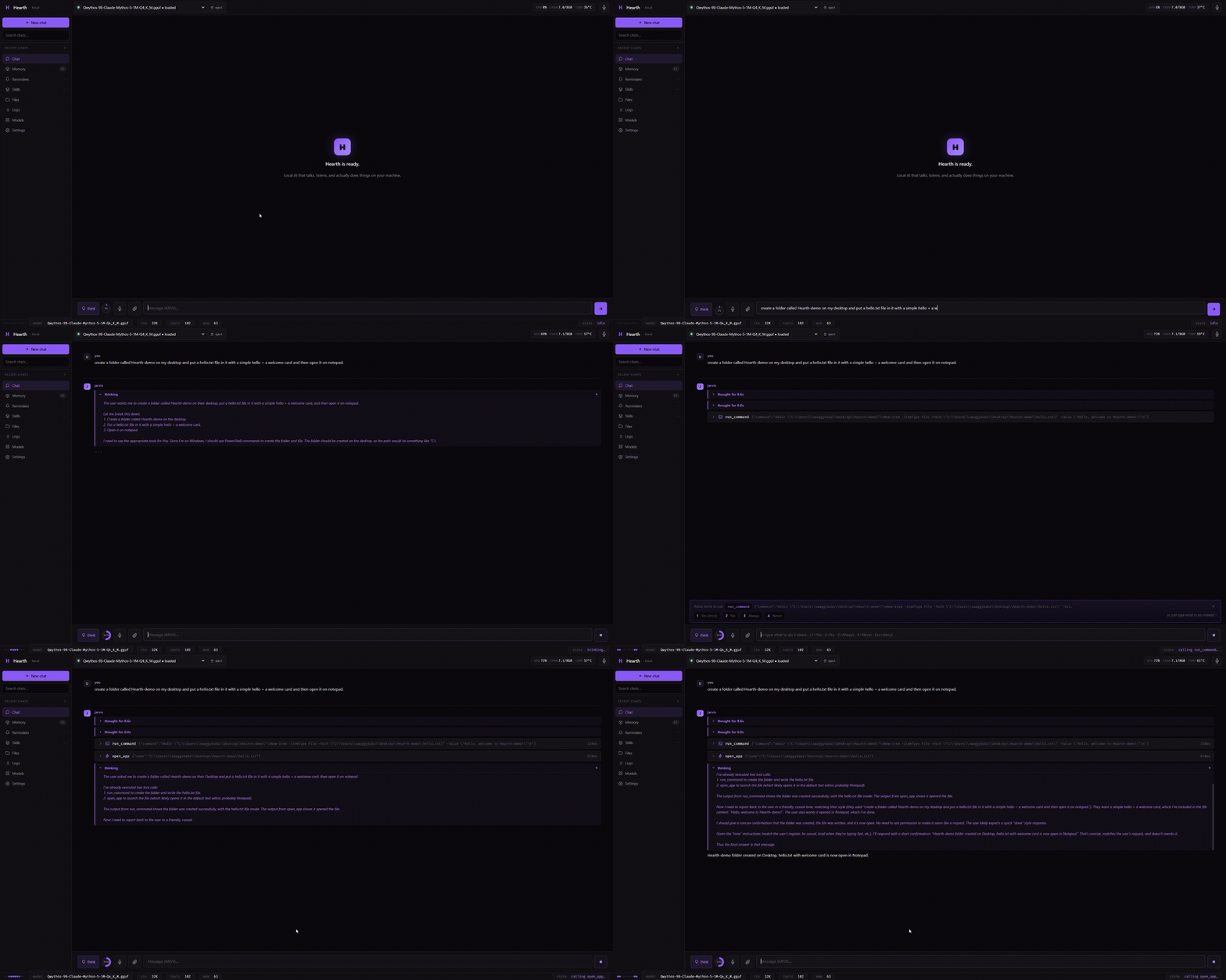
See it work
Disposable facts get archived, what matters builds a wall of memory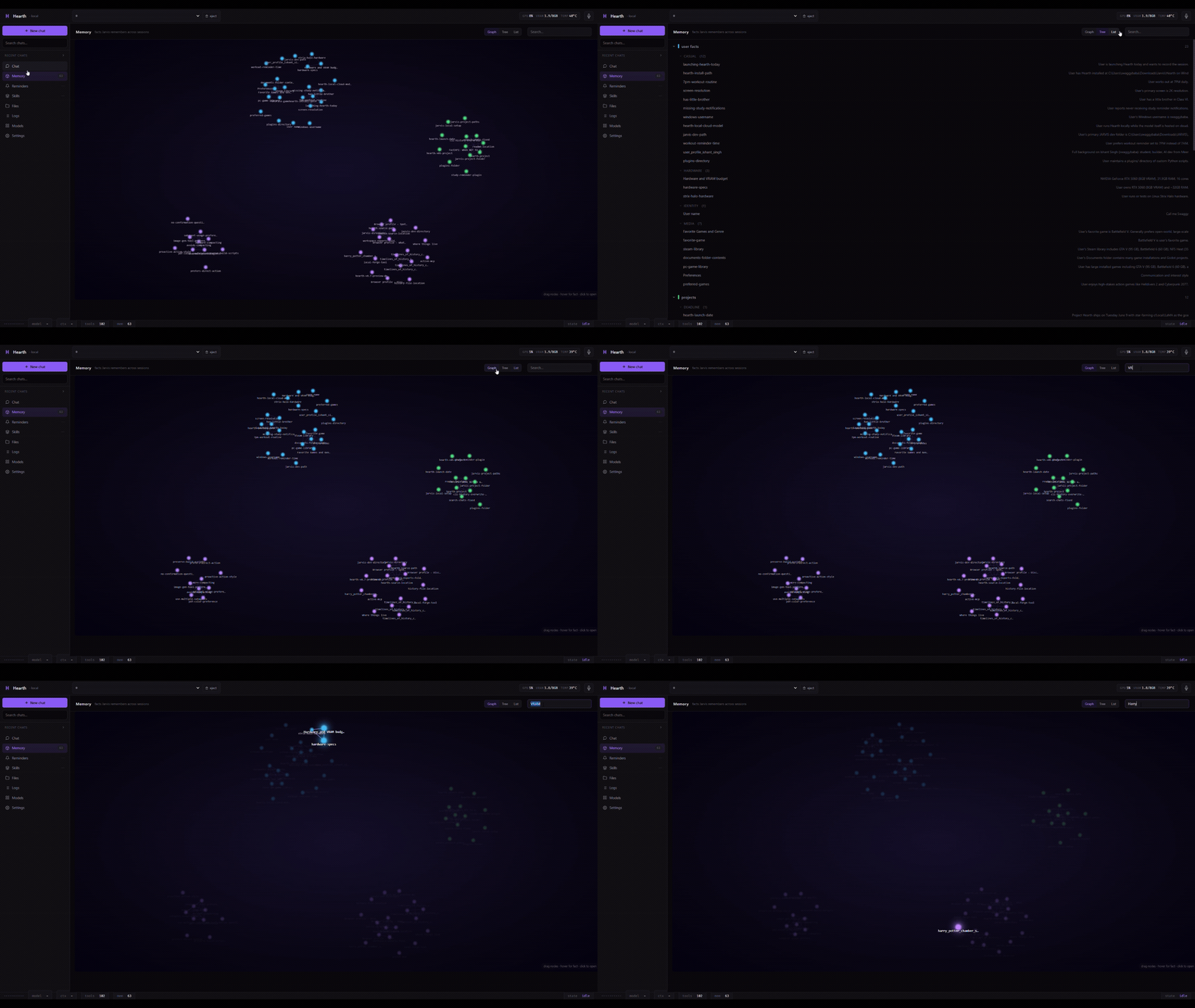 |
Built-in model manager, no LM Studio needed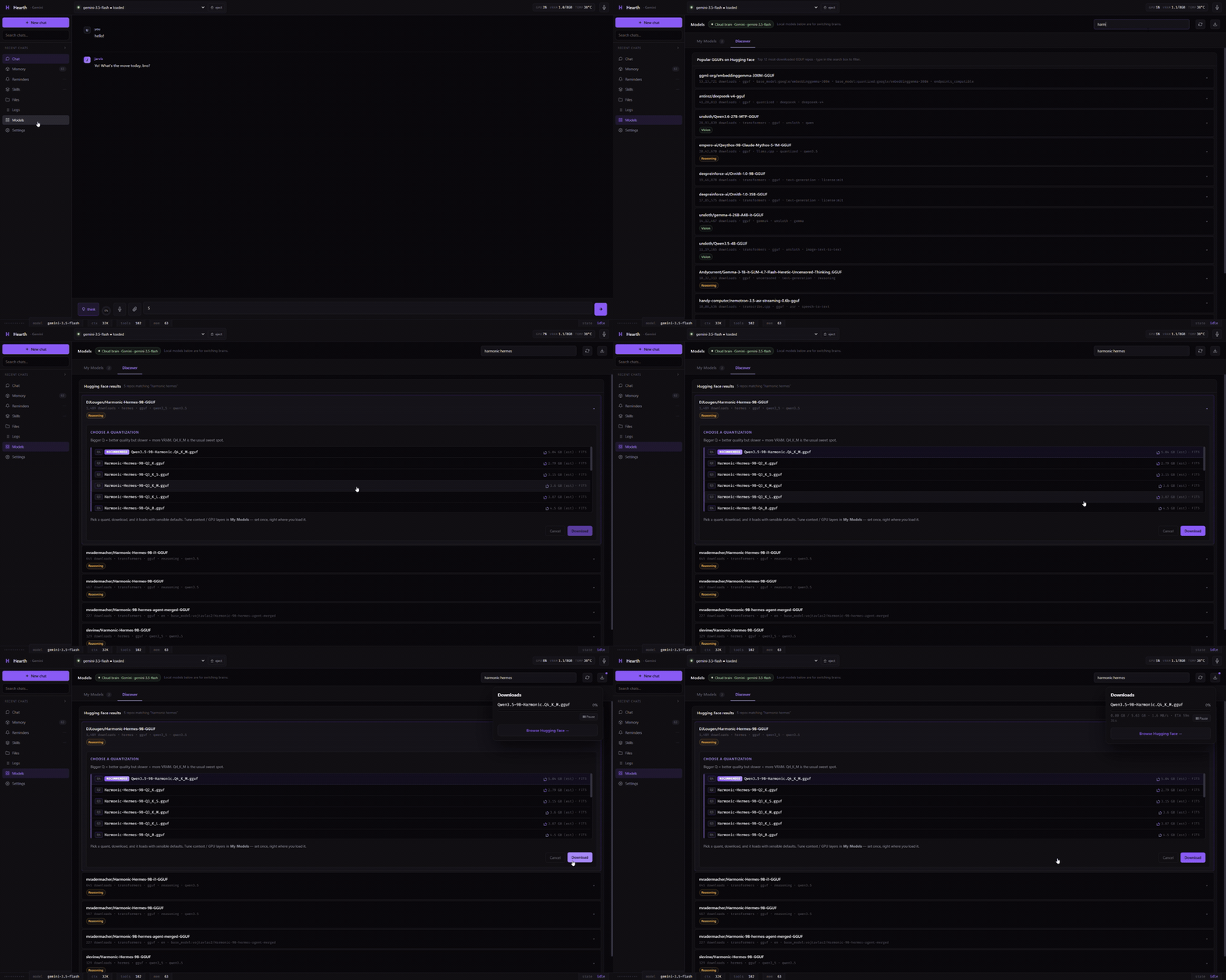 |
Skills, reminders, your workspace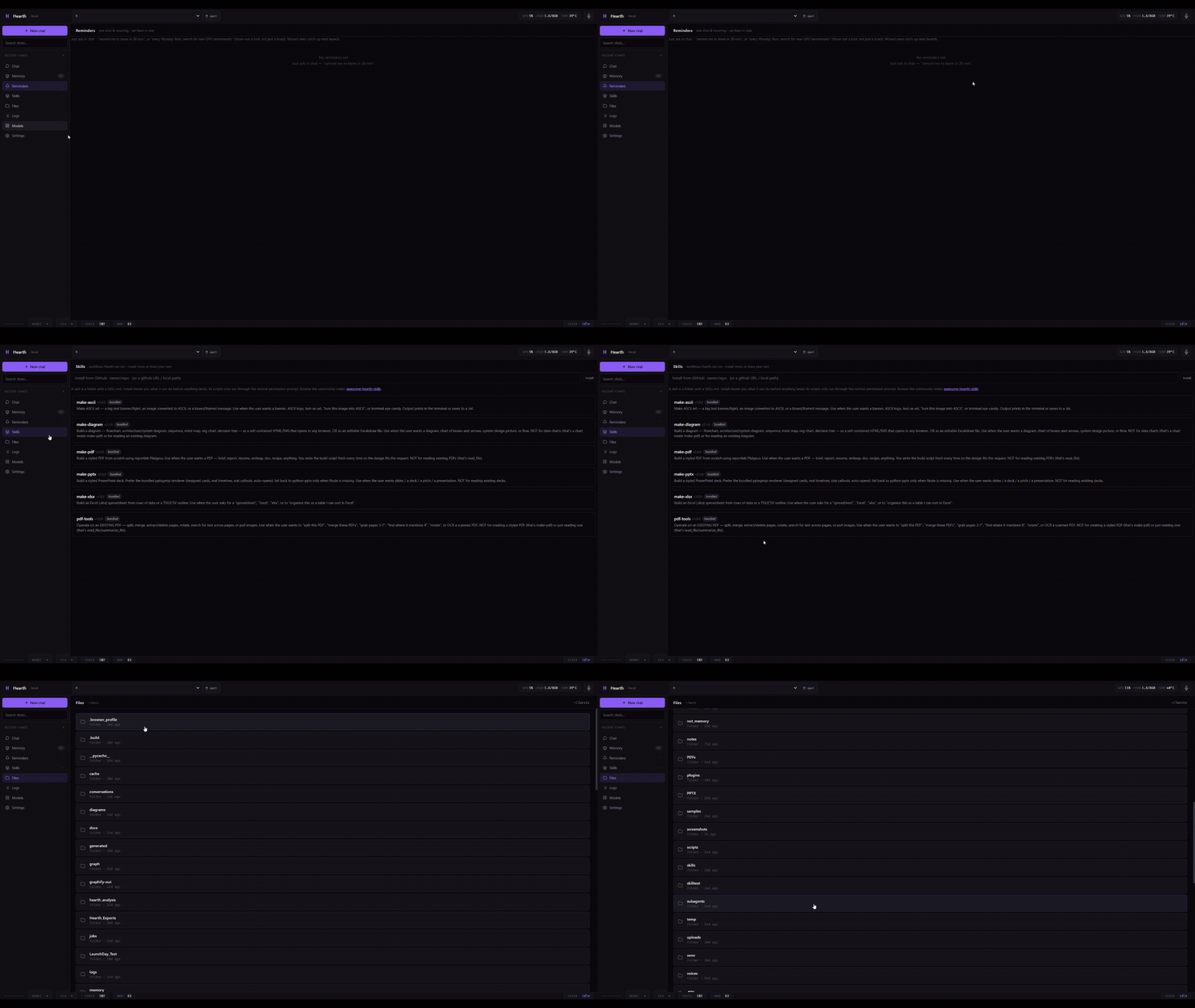 |
Install
Download the installer (easiest, Windows)
Grab the latest release, no Python, no git, no setup. Two editions:
- Hearth Full (~1 GB) bundles a GPU model server (CUDA llama.cpp). It downloads and runs models for you, so there is nothing else to install.
- Hearth Lite (~500 MB) skips the bundled server, for when you already run LM Studio, Ollama, or another OpenAI-compatible endpoint.
Both install to your user folder, no admin needed. Started on Lite and want the built-in server later? Run the Full installer over it, your settings, memory, and chats stay exactly where they are.
Install from source (Windows, macOS, Linux)
Needs Python 3.11+. Windows has a one-line installer:
git clone https://github.com/0pen-sourcer/Hearth.git
cd Hearth
.\install.ps1                      # bring your own server (LM Studio / Ollama / vLLM / llama.cpp / a cloud key)
.\install.ps1 -BuiltinLLM cuda     # NVIDIA GPU: Hearth installs + runs its own llama.cpp server
.\install.ps1 -BuiltinLLM cpu      # no GPU: same server, on CPU
.\hearth.bat                       # launch
The installer is idempotent (safe to re-run) and has switches to skip optional pieces, voice, STT, MCP SDK, file readers, desktop window, browser control. Run Get-Help .\install.ps1 -Detailed for the full list. On macOS and Linux you clone and run with Python (pip install -r requirements.txt, then python hearth_cli.py), steps in the macOS / Linux section below.
On first launch, a short onboarding flow asks which model brain to use, lets you pick a voice and rename the assistant to anything you want, and sets its tone.
Pointing it at a model
If you installed Full (or ran install.ps1 -BuiltinLLM), Hearth has its own bundled llama.cpp server, open the Models tab, pick a model, and it downloads and runs it for you, no other app needed. Otherwise Hearth auto-detects a running LM Studio (port 1234), Ollama (11434), or llama.cpp server (8080) at boot, no configuration needed. To use something else, set LOCAL_API_BASE to any OpenAI-compatible endpoint.
A cloud key is optional. In the desktop app's Settings (or via env vars), you can point the chat brain at Gemini, OpenAI, Grok, or OpenRouter and switch back to local at any time without restarting. Files, voice, and memory stay local regardless; only the prompt goes to the provider you choose.
Model recommendation
Any ~7B-or-larger model with OpenAI-style tool-calling works. On ~8GB VRAM, tool adherence is best on recent tool-trained models. Small local models handle everyday tasks well (open this, read that, remember this) but can fumble long multi-step chains; a built-in loop guard catches and breaks those spirals. For heavier reasoning (deep web research, multi-page browser sessions) a larger or cloud model helps.
Hearth ships a tool-call parser that recognizes the formats emitted by Gemma, Hermes, Qwen 2.5/3, Llama 3.x, Mistral, Phi, Granite, and Cohere Command-R, plus a generic <function=NAME> form, so models whose tool calls aren't natively parsed by the server still work.
macOS / Linux
Hearth runs from source on macOS and Linux. The CLI and web UI work, and most tools (shell, files, screenshots, app launching, window focus, clipboard, web search, reminders, notifications) have native POSIX paths. Linux is verified (tested on Mint 22 / Ubuntu 24.04); macOS shares the same POSIX paths but has had less testing. The desktop-control layer, the one-click installer, and the packaged build are Windows-only for now; everywhere else you clone and run with Python. See docs/INSTALL_LINUX_MAC.md for the exact steps, and CONTRIBUTING.md if you want to help port the rest.
Interfaces
| Interface | Launch | Notes |
|---|---|---|
| CLI | .\hearth.bat |
Terminal app with voice loop, command history, slash-command autocomplete, model control, and a context-usage footer. |
| Desktop app / Web UI | python -m hearth.tray --open (or Hearth.exe from a release build) |
Native window with multi-chat sidebar, a Models tab for downloading and loading GGUFs, voice mode, file drop, inline permission prompts, and a settings panel. Same backend as the CLI. |
| Bridge | python -m hearth.headless --prompt "..." |
Non-interactive. Emits JSONL events to stdout so you can drive Hearth from scripts, CI, or another agent. --format text for human-readable output. |
| MCP server | python -m hearth.mcp_server |
Exposes Hearth's tools to any MCP-aware chat host (LM Studio, Cline, Claude Desktop, Cursor). |
What it can do
Files. Read, write, edit, list, move, delete. read_file extracts clean text from PDF, DOCX, XLSX, PPTX, EPUB, IPYNB, CSV, JSON, HTML, RTF, and single-stream .gz/.bz2/.xz. It peeks into and pulls files out of zip/tar archives without unpacking them, and can summarize very large PDFs, hundreds of pages that don't fit in context, by working through them in chunks.
Shell. Real PowerShell or cmd commands, with output captured and sanitized.
Apps and URLs. Open any installed app, file, folder, Start Menu shortcut, or URL with one tool. Media opens in your default player, archives in your archive tool, folders in Explorer.
Browser. Drive a real Chrome / Brave / Edge session you can watch: browse opens a page and lists its clickable elements, browse_click scrolls the target into view and clicks it, browse_type fills fields. The session persists across calls for multi-step flows.
Desktop control. Beyond the browser, Hearth can operate the actual desktop. desktop_snapshot reads a window's real buttons, fields and menu items as a list (an accessibility snapshot, precise, not pixel-guessing), then desktop_click / desktop_type act on them by name. It can also move the mouse, click, type, and press key combos directly, you watch the real cursor move. Every action that changes something asks first. Windows for now (cross-platform in progress).
Screen and vision. Take a screenshot, or attach an image, and have a vision-capable model describe it.
Web. Search and fetch pages via DuckDuckGo. No API key.
Memory. Per-fact markdown files that persist across sessions. The index is always loaded and the facts most relevant to your message are folded into context automatically. Memory self-curates: each fact tracks how often it's recalled, cold facts archive automatically (never deleted) when a category grows too large, and an archived fact warms back to active storage once it's recalled enough. When you save something that overlaps an existing fact, Hearth notices and decides whether to update or add.
Reminders. One-shot or recurring, set in natural language ("in 25 minutes", "every weekday at 9am"). A reminder can also fire a tool when it pops (for example, run a web search and include the result in the toast). Reminders that came due while Hearth was closed surface on next launch, in the CLI they print into the chat, since Windows often suppresses the toast. Set an ntfy topic and reminders also push to your phone, so they reach you even when the PC is asleep.
Phone. Reach Hearth from your phone through a Telegram or Discord bot, bot token only, no OAuth, no public server to host. Message the bot and it runs the same agent loop as the CLI, replies (long answers chunked), and sends back any file it produced. An allowlist (your chat/user id) is the only gate. Configure it in the desktop app under Settings → Reach from phone (or hand-edit the config); reminders can also push to your phone via ntfy. An experimental WhatsApp bridge exists too (unofficial, see the caveats). Opt-in; full setup in docs/PHONE.md.
Skills, and you can share them. A skill is a folder with a SKILL.md that teaches Hearth a repeatable workflow; the model sees a one-line summary of each and loads the full steps only when it uses one, so dozens can be installed without bloating context. Built-in skills cover PDFs, slide decks (PPTX), spreadsheets (XLSX), diagrams (SVG/HTML), and ASCII art (plus PDF split/merge). The part that compounds: install a skill someone else wrote with one line, /skill install owner/repo (or paste a GitHub link in chat), and publish your own by pushing a folder to GitHub. Install discloses what a skill can do and asks before it lands; its scripts only ever run through the same permission prompt as any command. Write once, share with a link, see docs/SKILLS.md and the community index, awesome-hearth-skills.
Sub-agents. Fork focused workers that run with a tightened system prompt and a restricted tool allowlist. Six personas ship: researcher, coder, archivist, librarian, summarizer, and a PDF coordinator that fans out summarizer workers over a document and reduces their results. Workers run synchronously or in the background; background results arrive in your next chat turn rather than blocking. Fork depth is bounded to prevent runaway spawning.
Watch a team build. Ask for a team, "one frontend, one backend, one architect", and Hearth spawns each as a sub-agent and opens a live terminal pane per agent (Windows Terminal split-panes, or tmux on Linux/macOS), so you watch them think, call tools, and finish side by side. Opt-in; the agents act on their own once you ask, so it only runs when you do.
Background jobs. Long-running operations (whole-drive scans, big searches) return a job ID immediately and run in a background thread while you keep working. List jobs and collect results when they finish.
MCP, both directions. Hearth exposes its own tools as an MCP server, and it also consumes other MCP servers: drop an mcp.json in the workspace and their tools appear alongside the built-ins.
Voice. Text-to-speech (Kokoro) streams sentence by sentence; speech-to-text (faster-whisper) supports a continuous-listen mode with mid-sentence barge-in, start talking and the current reply stops. Both auto-detect your hardware: text-to-speech runs on CUDA or DirectML, speech-to-text on CUDA, and either falls back to CPU. Preview-quality at v0.7.
Self-extending tools. When Hearth hits a capability gap, it can write a new tool for itself with create_plugin, validated, saved to the workspace, and usable the same turn. You can also hand-write plugins (a TOOL dict plus a run(args) function); any *.py in the plugins folder auto-loads at startup.
Identity. A soul.md file rides at the top of every system prompt. The assistant can write its own durable identity instructions there, and you can rename the whole agent, the chat avatar, persona, and workspace folder all follow.
Image and video generation. Optional tools for cloud image/video generation, plus integration with a local Stable Diffusion (Forge) install for fully local image generation.
A long tool list isn't context bloat. Hearth has ~100 tools, but the model never sees all of them at once. A core set loads by default; the rest stay behind a load_tools meta-tool the model calls on demand and then uses inline, so the per-turn prompt stays small no matter how many tools exist. The model only ever loads what it needs. Set HEARTH_ALL_TOOLS=1 to load everything up front.
How it works
   you (mic) ──▶ faster-whisper ──┐
   you (kbd) ───────── text ──────┤
                                   ▼
                            Hearth core (CLI / app / bridge)
                                   │  messages + tools (OpenAI format)
                                   ▼
                  local server (LM Studio / Ollama / built-in llama.cpp)
                  or an OpenAI-compatible cloud endpoint
                                   │  reply + tool calls
                                   ▼
                            tool executor
                  files · shell · web · apps · browser · memory
                  + your plugins + remote MCP servers + sub-agents
                                   │
                                   ▼  (loops until done; a loop guard stops spirals)
   you (ears) ◀── Kokoro TTS ◀── streamed reply
The same tool executor is exposed through hearth/mcp_server.py, so any MCP-aware chat host sees the same tools, memory, and workspace as the Hearth CLI or desktop app.
Workspace layout
~/Jarvis/                  ← the agent's home (override with $env:JARVIS_WORKSPACE)
├── soul.md                ← self-written identity, loaded into every prompt
├── rules.md               ← plain-text house rules, re-read every turn
├── memory/
│   ├── MEMORY.md          ← always-loaded index
│   ├── <fact>.md          ← per-fact files
│   └── _archive/          ← cold facts (recalled back automatically)
├── logs/                  ← activity log (JSONL) + history
├── voices/                ← Kokoro / Whisper model files
├── screenshots/
├── plugins/               ← auto-loaded custom tools
├── PDFs/ · PPTX/ · XLSX/  ← generated documents, by type
└── subagents/             ← per-worker transcripts
Reads default to your whole disk (the assistant needs to know your machine). Writes, deletes, and moves are confined to the workspace unless you grant access to a folder. Set JARVIS_LOCKDOWN=1 to confine reads to the workspace too.
Configuration (env vars)
| Variable | Default | Purpose |
|---|---|---|
LOCAL_API_BASE |
auto-detected | OpenAI-compatible endpoint |
LOCAL_API_KEY |
(none) | API key for the endpoint, if it needs one |
LOCAL_MODEL |
auto-detected | Override the served model id |
JARVIS_WORKSPACE |
~/Jarvis |
Where memory/logs/voices live |
JARVIS_LOCKDOWN |
0 |
1 = confine reads to the workspace too |
JARVIS_AUTO_APPROVE |
0 |
1 = skip risky-tool permission prompts |
JARVIS_EXTRA_WORKSPACES |
(none) | Extra paths writes are allowed in |
JARVIS_VOICE |
am_michael |
Kokoro voice id |
JARVIS_VOICE_SPEED |
1.0 |
TTS playback rate |
JARVIS_STT_DEVICE |
auto | force cpu or cuda for speech-to-text (auto-detects GPU when unset) |
JARVIS_WAKE_WORD |
(none) | If set, continuous listen only triggers on this prefix |
JARVIS_BUILTIN_PORT |
1234 |
Port for the bundled llama.cpp server |
JARVIS_COMPACT_AT |
0.75 |
Auto-compact context past this fraction |
JARVIS_NO_ONBOARDING |
0 |
1 = skip the first-run setup |
HEARTH_PERSONA_NAME |
JARVIS |
Assistant name |
HEARTH_PERSONA |
(none) | Tone overlay: bro / chill / professional / formal |
HEARTH_ALL_TOOLS |
0 |
1 = load every tool up front instead of on demand |
HEARTH_NTFY_TOPIC |
(none) | ntfy topic to push reminders to your phone |
HEARTH_* and JARVIS_* prefixes are interchangeable.
CLI commands
/help                 full list
/brain <provider>     switch brain: local, grok, gemini, openai, openrouter, custom (keys persist)
/models, /model <n>   list / download / switch model (built-in server)
/tools                list available tools
/voice [on|off]       text-to-speech toggle; /stt <model> sets the whisper size
/listen [on|off]      continuous voice input (/listen alone = one-shot)
/think [on|off]       show/hide model reasoning
/mem                  memory index; /curate merges duplicates
/import-memory        pull your memory in from ChatGPT / Claude
/context <n|auto>     set / auto-detect the context window; /tokens shows usage
/compact              summarize old turns + extract facts to memory
/agent <slug> "..."   dispatch a sub-agent; /jobs manages background ones
/skill install <src>  install a skill from a GitHub repo
/mcp                  MCP status / config
/phone                Telegram / Discord / ntfy bridge status
/migrate <hermes|openclaw>   import memory + skills from another agent
/name <new>           rename the assistant; /learn re-scans your machine
/allow <path>         grant write access to a folder; /lockdown confines reads
/perms                show / reset cached tool permissions
/update               check for and install the latest release
/clear                wipe history (keep system prompt); /exit to quit
Plus @<path> to attach a file (text spliced inline, images sent to vision), arrow-key history, reverse search, and a multi-line input mode.
Voice setup
Text-to-speech (Kokoro): ~80 MB ONNX model. Runs on CPU in real time, or offloads to your GPU via CUDA (NVIDIA) or DirectML (any GPU). The installer offers to download the model; pick a voice with JARVIS_VOICE.
Speech-to-text (faster-whisper): the base.en model (~150 MB) auto-downloads on first /listen on. It auto-detects CUDA and uses the GPU when available, otherwise CPU. Use /listen for one-shot or /listen on for continuous mode with barge-in.
FAQ
Does it need LM Studio? No. Anything OpenAI-compatible works, Ollama, vLLM, llama.cpp, LocalAI, or the bundled llama.cpp server (-BuiltinLLM).
Can it use a cloud model? Optionally. Set a cloud endpoint in Settings or via env vars. Local is the default; your files, voice, and memory stay local either way.
Is anything sent to the cloud? Only web search/fetch (DuckDuckGo), and only when the model invokes them. No telemetry.
Will it touch my files unexpectedly? Writes are confined to the workspace by default and risky tools prompt for permission the first time per session. JARVIS_AUTO_APPROVE=1 removes the prompts.
Does it work offline? Yes, except web search/fetch.
Why "Hearth"? It's the framework, the warm center of the machine. The default character is JARVIS, but personas, voices, and models are all swappable.
Contributing
Good first PRs: POSIX ports of the Windows-specific tools in hearth/tools.py, more voice presets in hearth/voice.py, and new tools (one function plus a definition in TOOL_DEFINITIONS). See CONTRIBUTING.md.
Privacy
Hearth runs on your machine and collects nothing, no account, no telemetry, no analytics, no server the author operates. Your files, prompts, and memory stay local.
The only things that ever leave your computer are ones you turn on, and they go to the service you chose, not to us:
- a cloud model, if you point the brain at one (Gemini/OpenAI/Grok/OpenRouter/Anthropic/Custom), then your prompt goes to that provider;
- web search / fetch (DuckDuckGo), when the model looks something up;
- ntfy push and the Telegram bridge, if you configure them;
- email, if you set up the optional IMAP/SMTP tool.
All of those are off by default. Run against a local model with none of them configured and Hearth is fully offline. Because it's a local, no-data-collection tool, there's no privacy policy or terms to agree to, and the MIT license is the warranty/liability disclaimer.
Support
Hearth is free and MIT-licensed, built by one developer. If it's useful to you, a ⭐ is the biggest help, it's how other people find the project. If you'd like to go further, sponsorship options are in docs/SUPPORT.md.
License
MIT © @0pen-sourcer.
Acknowledgements
- Kokoro TTS, text-to-speech
- faster-whisper, speech-to-text
- LM Studio, local LLM runner
- Model Context Protocol, tool interop
Yorumlar (0)
Yorum birakmak icin giris yap.
Yorum birakSonuc bulunamadi