HermitFlow-VibeIsland
Health Uyari
- License — License: MIT
- Description — Repository has a description
- Active repo — Last push 0 days ago
- Low visibility — Only 5 GitHub stars
Code Basarisiz
- rm -rf — Recursive force deletion command in scripts/package.sh
Permissions Gecti
- Permissions — No dangerous permissions requested
This tool is a native macOS application that creates a floating status bar to monitor and manage local AI coding sessions, such as Claude Code and Codex, directly from your screen.
Security Assessment
Overall Risk: Medium. The application accesses sensitive data by reading local SQLite databases, logs, and session files in your home directory to aggregate CLI state. It also executes shell commands and scripts, notably synchronizing settings and writing custom hook scripts directly to your file system. A concerning finding in the audit is the use of a recursive force deletion command (`rm -rf`) within its packaging scripts, which can be dangerous if modified or triggered unexpectedly. Additionally, it sets up a local HTTP server to handle approval callbacks, though no hardcoded secrets were found and it does not request broad system permissions.
Quality Assessment
The project is very new and has low community visibility, currently sitting at only 5 GitHub stars. However, it is actively maintained, with its most recent code push occurring today. It is properly licensed under the standard MIT license, making it safe for open-source use and modification.
Verdict
Use with caution due to sensitive local file access and potentially destructive shell commands, though the utility is actively maintained and transparent.
HermitFlow is a SwiftUI-based macOS top island app that surfaces local Claude Code, Codex, and other CLI session activity, approval requests, and quick focus targets.
HermitFlow
HermitFlow is a SwiftUI-based macOS top island app that surfaces local Claude Code, Codex, and other CLI session activity, approval requests, and quick focus targets.
Its goal is not to replace your terminal or desktop client, but to keep the most important CLI state visible at the top of the screen while you work.
Why The Name
HermitFlow comes from two parts:
Hermit: the hermit crab, representing an AI or CLI agent that attaches itself to the system while it is runningFlow: representing task flow, agent flow, and the CLI activity stream
Together, the name describes AI and task flows that live inside the system and keep moving while you work.
Features
- Borderless floating window centered at the top of the screen and aligned with the safe area and camera housing
- Three display modes: hidden, island, and expanded panel
- Aggregates recent local sessions from both
Claude CodeandCodex - Shows session origin, working directory, runtime status, and last update time
- Detects approval requests and lets you handle them directly from the island or panel
- Provides one-click focus targets for supported sessions
- Status bar menu supports show/hide and switching the left-side brand logo
- Status bar menu supports manual
Resync Claude Hooks - Built-in diagnostic card in the panel for Claude hook sync errors
Codex CLIapprovals can be executed through macOS Accessibility automationClaude Codeis integrated through local hooks, with approvals resolved through a local HTTP callback
Showcase
Idle
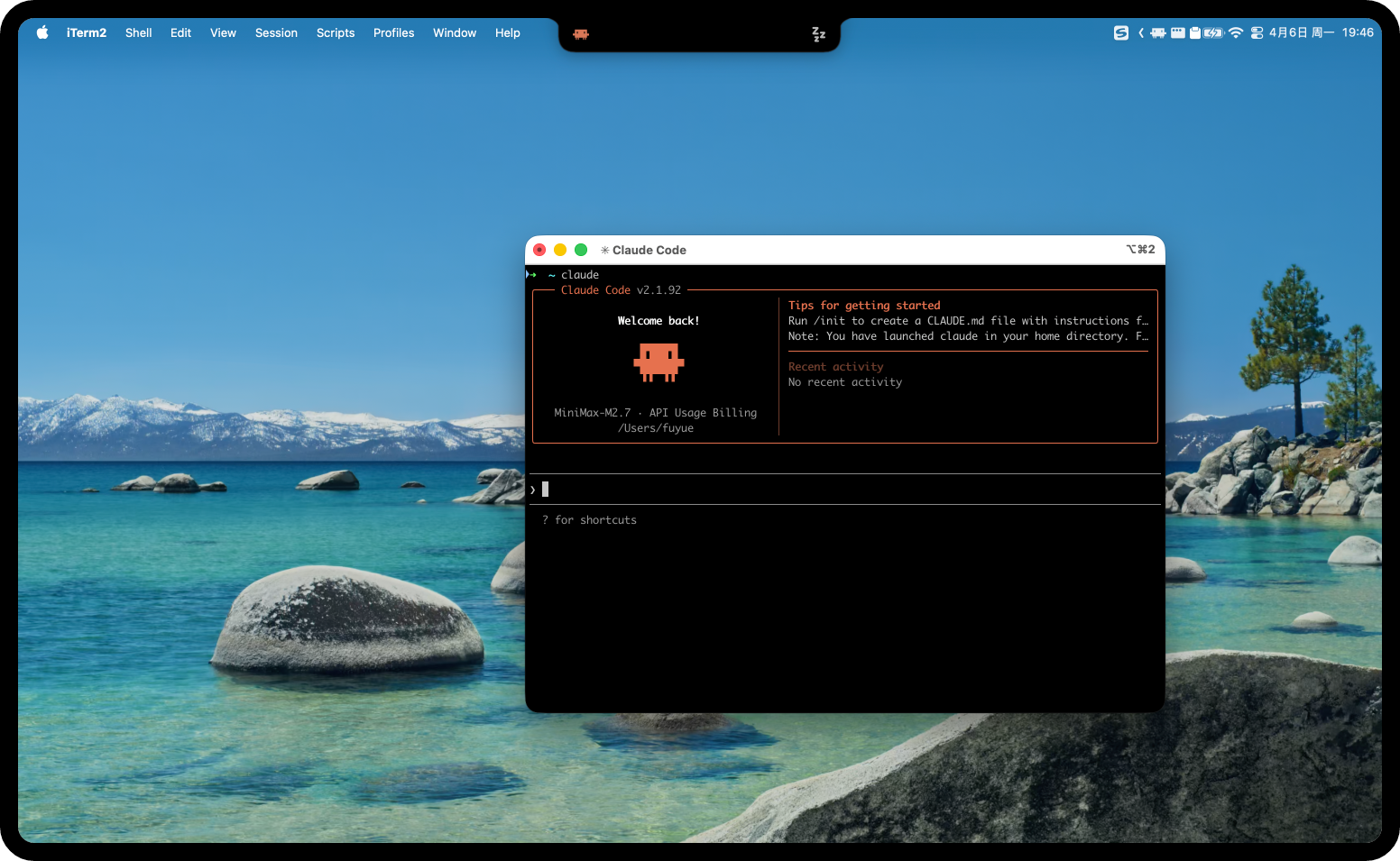
Running
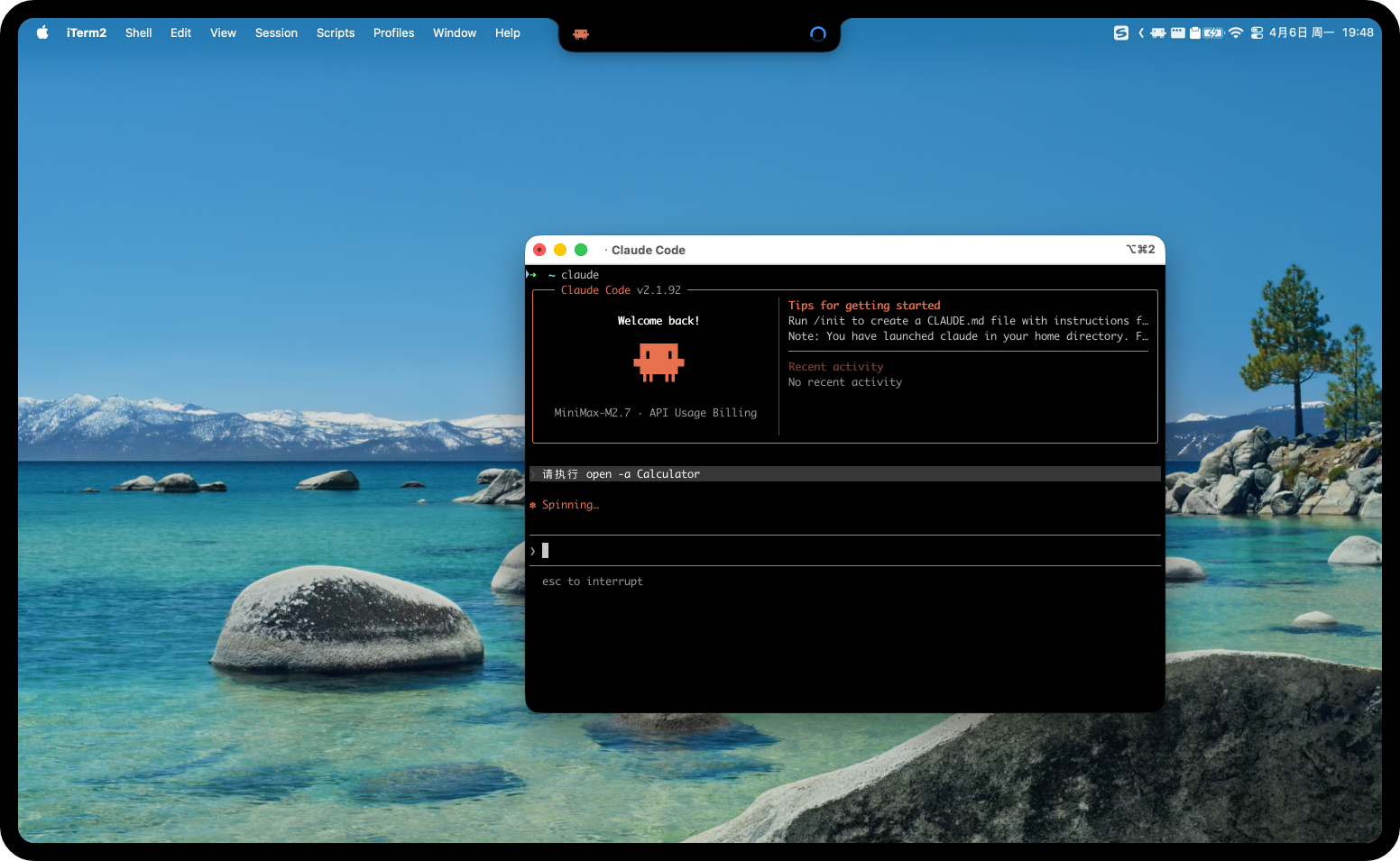
Approval Request
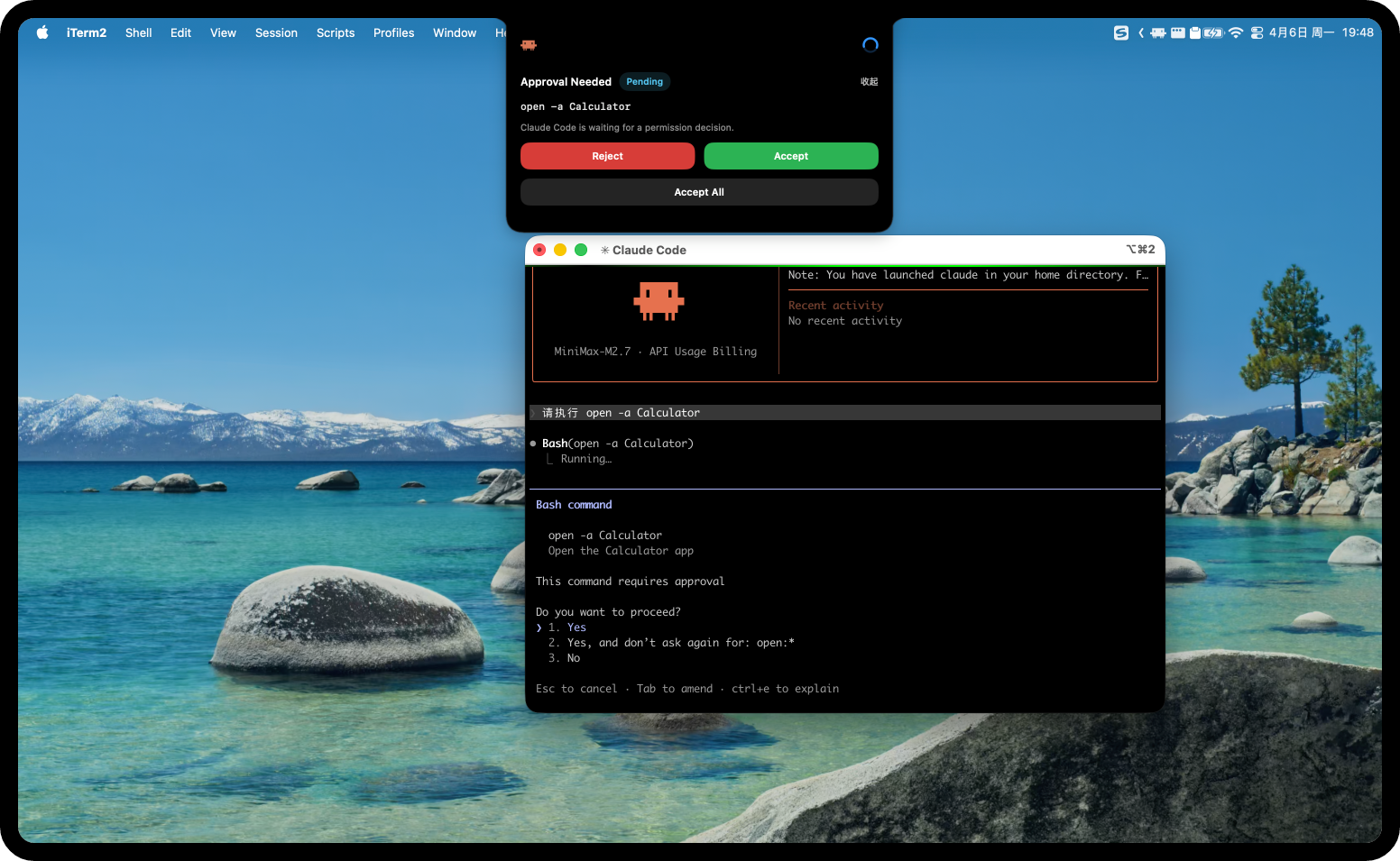
Approval Success
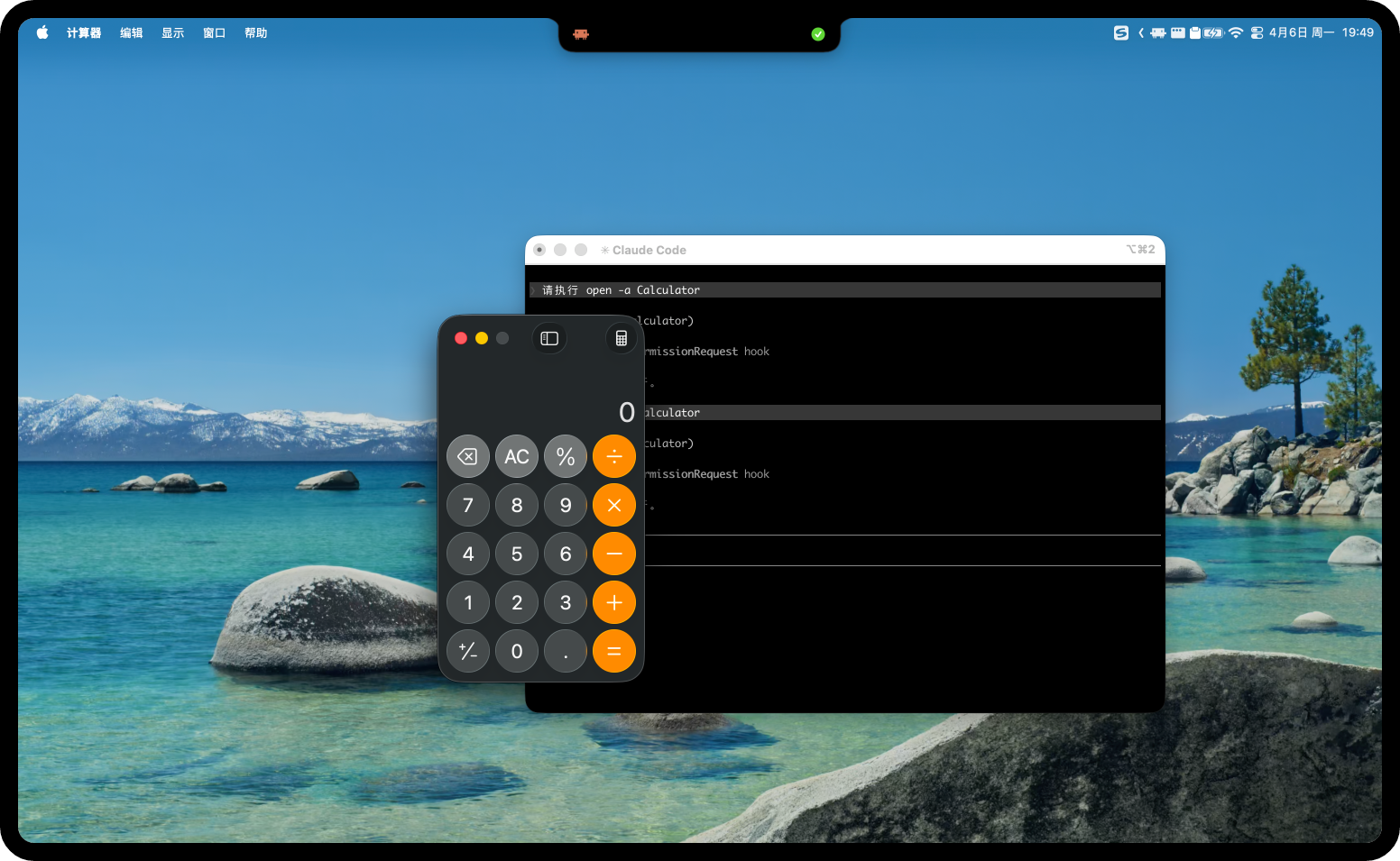
How It Works
Codex
On launch, the app polls local files under ~/.codex and aggregates recent Codex sessions, their state, and possible focus targets. The current implementation reads from:
~/.codex/state_5.sqlite~/.codex/logs_1.sqlite~/.codex/sessions/~/.codex/.codex-global-state.json~/.codex/log/codex-tui.log~/.codex/shell_snapshots/
If these files are missing, HermitFlow still runs, but Codex state will be shown as unavailable or idle.
Claude Code
HermitFlow is already integrated with Claude Code. On launch, it performs the following setup steps:
- Starts a local listener for Claude Code hook events
- Writes a hook script under
~/.hermitflow/claude-hooks/ - Synchronizes Claude settings files and registers the required hooks
In practice:
- State events are reported through local command hooks
- Approval requests are sent back to HermitFlow through a local HTTP hook
- The HermitFlow-specific approval callback path is
/permission/hermitflow - Claude approvals do not require macOS Accessibility permissions
If node is not available on the machine, Claude hook integration will not work.
Requirements
- macOS
- Xcode
- A local environment where
CodexorClaude Codehas already been used - For Claude Code integration: an executable
nodein the environment - For Codex auto-approval: macOS Accessibility permission granted to HermitFlow
Open And Run
- Open HermitFlow.xcodeproj in Xcode
- Select the
HermitFlowscheme - Run the app
On first launch, the app immediately:
- starts local session monitoring
- attempts to install and sync Claude Code hooks
- checks Accessibility permission state
If Claude hook initialization fails, the app still runs, but Claude Code status and approvals will not work. Related errors are shown in the panel's Diagnostic card.
Usage
- Single-click the island: hidden -> island, or island -> panel
- Double-click the island: island/panel -> hidden
- Open the panel to inspect recent sessions, approval requests, and session details
- When an approval request exists, the island expands into an inline approval card
- The
Diagnosticcard shows Claude hook sync failures - Use
Resync Claude Hooksfrom either the panel or the status bar menu to retry hook synchronization - Use the status bar icon to show/hide the window and switch the left-side logo
Permissions And Configuration
Accessibility
Only Codex CLI auto-approval depends on macOS Accessibility permission. If permission is missing, HermitFlow shows a prompt in the panel and provides a shortcut to open System Settings.
Claude Settings Sync
To integrate Claude Code, HermitFlow updates the hooks section in ~/.claude/settings.json by default and writes its own local hook script. If you already have custom Claude hooks, HermitFlow tries to update only its own related entries instead of overwriting the whole file.
Supported sync targets:
- Default path:
~/.claude/settings.json - Additional path file:
~/.hermitflow/claude-settings-paths.json - Additional environment variable:
HERMITFLOW_CLAUDE_SETTINGS_PATHS
~/.hermitflow/claude-settings-paths.json supports two formats:
- JSON array, for example
["~/custom-claude/settings.json", "/opt/company/claude/settings.json"] - Object form, for example
{"paths":["~/custom-claude/settings.json","/opt/company/claude/settings.json"]}
HERMITFLOW_CLAUDE_SETTINGS_PATHS supports multiple paths separated by newlines or semicolons.
The default path ~/.claude/settings.json always remains part of the sync list.
These edge cases are handled safely:
- custom
settings.jsondoes not exist: it will be created - custom
settings.jsonis empty: it will be treated as an empty object{}and then written claude-settings-paths.jsoncontains a common trailing comma: it is parsed with relaxed compatibility
Packaging
The repository includes a local packaging script:
./scripts/package.sh
By default it builds a Release package for the current machine architecture and outputs HermitFlow-<arch>.app and HermitFlow-<arch>.pkg.
For example, on Apple Silicon it outputs:
/Users/fuyue/Documents/HermitFlow/dist/HermitFlow-arm64.app/Users/fuyue/Documents/HermitFlow/dist/HermitFlow-arm64.pkg
To build an Intel (x86_64) installer from Apple Silicon:
./scripts/package.sh Release intel
This outputs:
/Users/fuyue/Documents/HermitFlow/dist/HermitFlow-intel.app/Users/fuyue/Documents/HermitFlow/dist/HermitFlow-intel.pkg
To build a Debug package:
./scripts/package.sh Debug
Project Structure
HermitFlow.xcodeproj: Xcode projectDynamicCLIIsland/: main application sourceDynamicCLIIsland/Views/: SwiftUI UIDynamicCLIIsland/Stores/: state aggregation and UI state managementDynamicCLIIsland/Sources/: local Claude/Codex sources and hook integrationDynamicCLIIsland/Services/: focus, approval execution, and system integrationDynamicCLIIsland/Resources/: bundled image assets and resource licensing filescripts/package.sh: local packaging scriptdist/: packaging output directory
Known Limits
- HermitFlow depends on local Claude/Codex files and processes and does not provide remote sync
- Claude Code integration depends on local hook support and
node - Codex auto-approval depends on Accessibility permission and terminal foreground control
- If a CLI session has already exited or its window is gone, some focus targets may no longer work
- If a target Claude settings file is not a valid top-level JSON object, HermitFlow will not overwrite it
License
Source code is licensed under the MIT License.
Image and artwork assets in DynamicCLIIsland/Resources are NOT covered by the MIT license. Rights remain with their respective copyright holders. See DynamicCLIIsland/Resources/LICENSE for details.
- Clawd and Claude Code related character and visual assets belong to Anthropic.
- Codex and OpenAI related character and visual assets belong to OpenAI.
- ZenMux related character and visual assets belong to Zenmux.
- This project is an unofficial fan project and is not affiliated with, endorsed by, or sponsored by the entities above.
- Copyright for third-party contributions remains with their respective authors.
Yorumlar (0)
Yorum birakmak icin giris yap.
Yorum birakSonuc bulunamadi