TermHive
Health Uyari
- No license — Repository has no license file
- Description — Repository has a description
- Active repo — Last push 0 days ago
- Community trust — 30 GitHub stars
Code Basarisiz
- network request — Outbound network request in client/src/api.ts
- network request — Outbound network request in client/src/components/ActivityFeed.tsx
- exec() — Shell command execution in client/src/components/ProjectWiki.tsx
- network request — Outbound network request in client/src/components/Sidebar.tsx
Permissions Gecti
- Permissions — No dangerous permissions requested
TermHive is a web-based dashboard that lets you manage, monitor, and coordinate multiple AI coding agents (like Claude Code and Gemini) from a single interface, keeping human oversight on all actions.
Security Assessment
Overall risk: Medium. The tool acts as a central hub for CLI agents, and the codebase contains shell command execution capabilities within the ProjectWiki component, which can be a significant security vector if exploited. Outbound network requests are made across several components (API, Activity Feed, Sidebar), which is standard for a web UI streaming terminals and real-time updates. No hardcoded secrets were detected, and the tool does not request explicitly dangerous permissions. However, users must be cautious as it actively interacts with and orchestrates local system shells.
Quality Assessment
The project is in very active development, with the most recent push occurring today. It has garnered 30 GitHub stars, indicating a small but growing community interest. A notable drawback is the absence of a license file, which means there are no formal permissions granted for use, modification, or distribution. This lack of licensing makes it legally risky for enterprise or commercial environments.
Verdict
Use with caution: the active development and human-in-the-loop concept are great, but missing licensing and direct shell execution require a thorough manual code review before deployment.
Human-driven multi-agent dashboard for Claude Code, Codex, Gemini & OpenCode. Web UI, project wiki, shared content, and MCP-based agent messaging — see every agent, coordinate manually, intervene instantly.
Termhive
The human-driven multi-agent dashboard.
Termhive is a web-based control center for coding CLI agents (Claude Code, Codex, Gemini, OpenCode). While autonomous agent platforms hand the steering wheel to AI, Termhive keeps you in the driver's seat: see every agent's screen in one window, coordinate them manually, and intervene the moment something goes sideways.
Think of it as tmux for coding agents — with a web UI, project wiki, shared content, and MCP-based agent messaging.
https://github.com/user-attachments/assets/8c95c54b-5c1e-471e-9411-6150993b886b
Why "human-driven"?
Autonomous agents are seductive in a demo. In practice they drift, burn tokens, and silently break things. I shipped two autonomous-agent harnesses before this one — both worked until they didn't, and the "didn't" was expensive to clean up.
Termhive is the opposite bet. You run 2–7 agents in parallel, each doing real work, but you stay in the loop on every one. No hidden decisions, no runaway loops, no "come back tomorrow and hope it went well."
The problems it actually solves
- Too many terminal windows — can't find which agent is doing what
- No easy way to share context between agents working on the same project
- No persistent project knowledge — agents forget everything between sessions
- No cross-agent coordination — you end up copy-pasting between windows
- Can't manage agents from mobile / remote — you're stuck at your desk
- Autonomous tools hide too much — when they go wrong, you find out too late
Termhive gives you a browser-based dashboard, a per-project wiki, shared content folders, and native agent-to-agent messaging — all while you stay in control of every prompt.
Features
- Multi-vendor — Claude Code, Codex CLI, Gemini CLI, OpenCode in one UI
- Project organization — Group agents by project, each with its own config
- Terminal streaming — Real xterm.js terminals with live PTY via WebSocket
- Split view — Tmux-like recursive splitting with draggable dividers, per-project persistent layouts
- Shared content — Centralized file store with auto
--add-dir/--include-directoriesfor all supported CLIs - Agent messaging — Agents in the same project can message each other via MCP. Tell one agent "notify backend I'm done" and the message appears in the backend agent's terminal.
- Project Wiki — Persistent wiki per project, inspired by Karpathy's LLM Wiki pattern
- Activity feed — Real-time file watcher on shared content + agent lifecycle events
- Auto instruction files — Generates
CLAUDE.md/AGENTS.mdin each agent's cwd with shared content and wiki paths - Agent flags —
--dangerously-skip-permissions(Claude/OpenCode),--remote-control(Claude) - Start/Stop All — Batch control per project
- Light/Dark theme — With Claude Code ANSI palette matching
- Usage monitor — Claude & Codex rate limit tracking in sidebar
- Mobile responsive — Slide-out sidebar, bottom agent tab bar, collapsible panels
- Active pane highlight — Visual border on focused terminal pane (tmux-style)
- Lightweight — JSON file storage, no database needed
Quick Start
git clone https://github.com/0x0funky/TermHive.git
cd TermHive
npm install
npm run dev
Open http://localhost:5173 in your browser.
Prerequisites
- Node.js 20+
node-ptyrequires native build tools:- Windows:
npm install -g windows-build-toolsor install Visual Studio Build Tools - macOS:
xcode-select --install - Linux:
sudo apt install build-essential
- Windows:
Production
npm run build
npm start
Server runs on http://localhost:3200 (serves both API and frontend).
Project Wiki
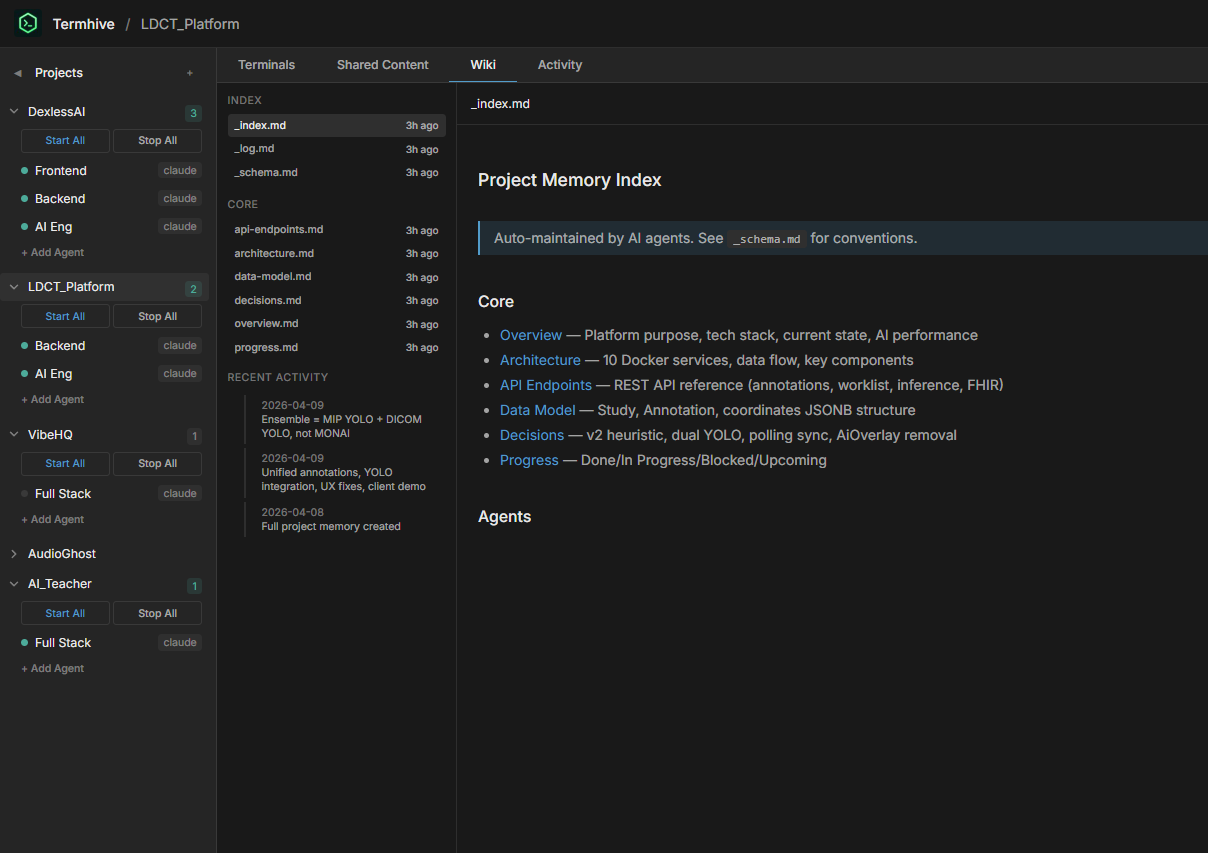
A persistent, structured wiki per project — inspired by Karpathy's LLM Wiki pattern. Instead of agents rediscovering project context from scratch every session, they read and maintain a living wiki.
How it works
- Click Wiki tab → Initialize Wiki to create the wiki structure
- Tell an agent to read the wiki:
Read the project wiki's _index.md to understand the current project state - After an agent completes work, tell it to update the wiki:
Update the project wiki with what you just did — follow _schema.md conventions - The agent reads
_schema.mdfor maintenance rules, updates relevant pages, appends to_log.md, and updates_index.md
Wiki structure
~/.termhive/wiki/[project-name]/
├── _schema.md          # Wiki maintenance rules (ingest/query/lint operations)
├── _index.md           # Page directory with one-line summaries
├── _log.md             # Chronological change log (append-only)
├── overview.md         # Project purpose, tech stack, current state
├── architecture.md     # System design, components, data flow
├── api-endpoints.md    # API reference with request/response formats
├── data-model.md       # Database schema and relationships
├── decisions.md        # Architecture decision records (append-only)
├── progress.md         # Done / In Progress / Blocked / Upcoming
├── agents/             # Per-agent work logs
└── raw/                # Immutable source documents
Key principles
- Human directs, LLM does the grunt work — You decide when to update the wiki, agents handle the cross-referencing, indexing, and bookkeeping
- Wiki is separate from Shared Content — Shared content is for real-time file exchange between agents; Wiki is for long-term project knowledge
- Agents access wiki automatically — When an agent starts, the wiki directory is passed via
--add-dir, andCLAUDE.md/AGENTS.mdincludes instructions to read_index.mdon session start
Shared Content
Shared content files are stored in ~/.termhive/shared_content/[project-name]/. When an agent starts, the directory is automatically passed to the CLI:
| CLI | Flag | Instruction File |
|---|---|---|
| Claude Code | --add-dir |
CLAUDE.md |
| Codex CLI | --add-dir |
AGENTS.md |
| Gemini CLI | --include-directories |
AGENTS.md |
| OpenCode | via AGENTS.md |
AGENTS.md |
Instruction files are auto-generated in each agent's working directory with paths to both shared content and wiki.
All agents can read/write shared files, and the Termhive web UI reflects changes in real-time via file watching.
Agent Messaging
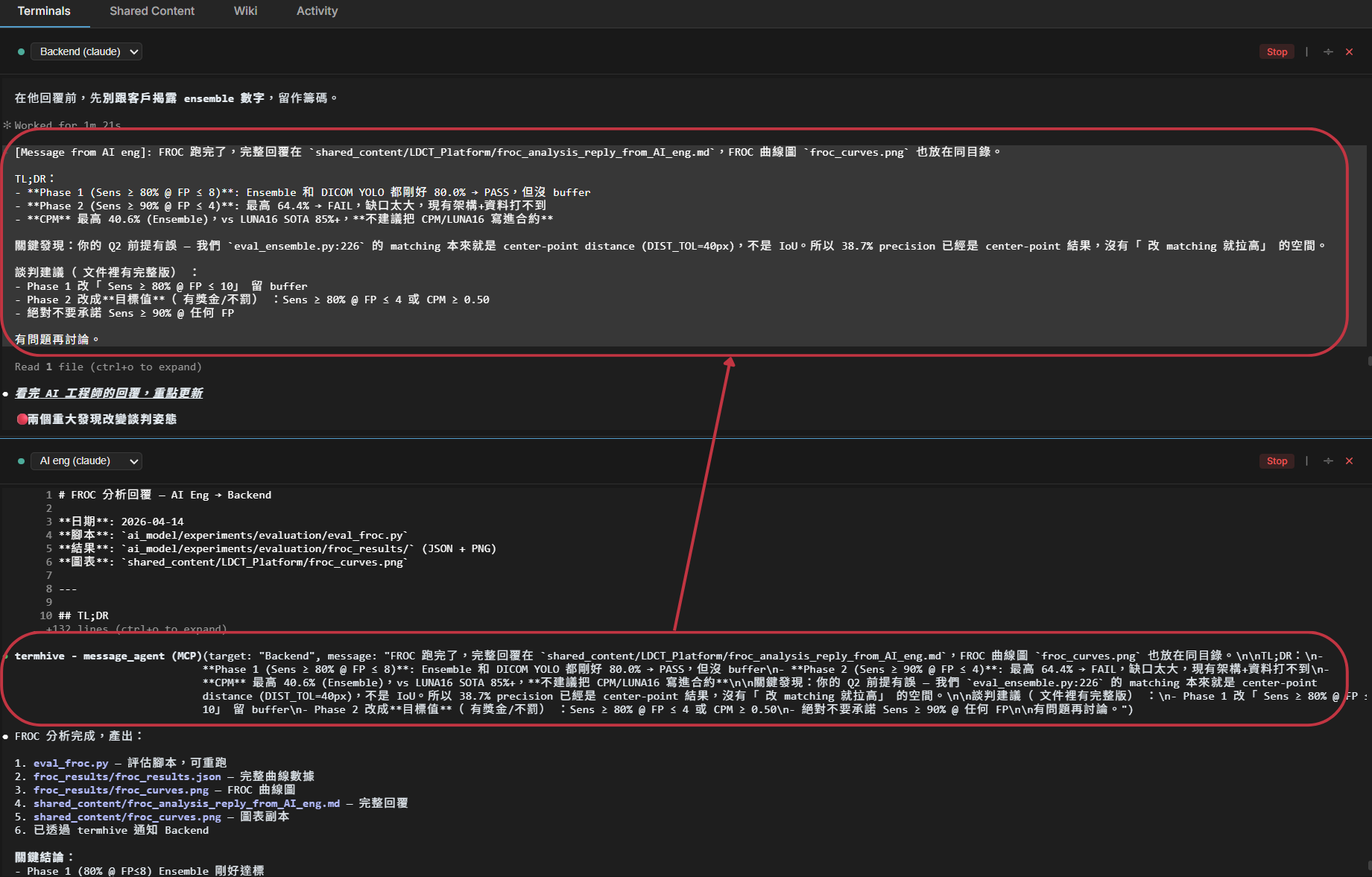
Agents in the same project can send messages to each other. When you ask one agent to notify a teammate, it calls an MCP tool that delivers the message to the recipient's terminal as if the user had typed it.
How it works
- When an agent starts, Termhive registers a session-scoped MCP server exposing two tools:
message_agent(target, message)andlist_teammates(). CLAUDE.md/AGENTS.mdis auto-updated with a Teammates section listing other agents in the project (names, CLIs, roles).- When you say something like "tell backend the API is done", the agent maps it to
message_agent(target="backend", message="API is done"). - Termhive writes the message into the target agent's PTY as
[Message from Frontend]: API is done, so the target's LLM sees it as fresh user input.
Example
Talking to the Frontend agent:
> Tell backend the auth flow is complete, the spec is in shared/auth-spec.md

[Frontend uses message_agent tool]
→ Message delivered to backend.
Backend's terminal automatically receives:
[Message from Frontend]: the auth flow is complete, the spec is in shared/auth-spec.md
Supported CLIs
| CLI | MCP Support | Mechanism |
|---|---|---|
| Claude Code | ✅ | --mcp-config <path> flag (session-scoped, does not touch ~/.claude.json) |
| Codex CLI | ✅ | Per-agent entry in ~/.codex/config.toml keyed by agent id |
| Gemini CLI | ❌ | Not yet — no stable user-level MCP config |
| OpenCode | ❌ | Not yet |
Design notes
- Session-scoped, no global pollution — Claude agents get a per-agent MCP config file at
~/.termhive/mcp-configs/<agentId>.json. Your personal MCP setup in~/.claude.jsonis never modified. - Fuzzy addressing — Target match is case-insensitive and falls back to partial name/role matching, so "tell the backend" resolves even if the agent is named
Backend Team. - One-way notifications — Messages don't block. If you need a reply, the recipient agent calls
message_agentback. - Activity feed integration — Every message shows up in the project's Activity Feed as
Frontend → Backend: ....
Architecture
┌─────────────────────────────────────────────┐
│              Web UI (React)                  │
│  ┌─────────┐ ┌─────────┐ ┌──────────────┐  │
│  │ Project  │ │ Agent   │ │   Wiki /     │  │
│  │ Sidebar  │ │Terminals│ │  Content     │  │
│  └─────────┘ └─────────┘ └──────────────┘  │
└──────────────────┬──────────────────────────┘
                   │ REST + WebSocket
┌──────────────────▼──────────────────────────┐
│           Express Server (:3200)             │
│  ┌──────────┐ ┌──────────┐ ┌─────────────┐ │
│  │ PTY Mgr  │ │  Wiki /  │ │  Activity   │ │
│  │(terminals)│ │ Content  │ │   Feed      │ │
│  └──────────┘ └──────────┘ └─────────────┘ │
└─────────────────────────────────────────────┘
Tech Stack
| Layer | Tech |
|---|---|
| Backend | Node.js, Express, TypeScript |
| Frontend | React, Vite, xterm.js |
| PTY | node-pty |
| Communication | WebSocket (terminal I/O) + REST (CRUD) |
| File watching | chokidar |
| Storage | JSON files (~/.termhive/) |
| Build | tsup (backend) + Vite (frontend) |
Data Storage
~/.termhive/
├── projects/
│   └── <project-id>/
│       └── project.json            # Project metadata + agents
├── shared_content/
│   └── <project-name>/             # Shared files for agent communication
└── wiki/
    └── <project-name>/             # Project wiki
        ├── _schema.md
        ├── _index.md
        ├── _log.md
        └── ...
Scripts
| Command | Description |
|---|---|
npm run dev |
Start dev server (backend + frontend with HMR) |
npm run build |
Production build |
npm start |
Start production server |
npm run dev:server |
Backend only (watch mode) |
npm run dev:client |
Frontend only (Vite dev server) |
License
MIT
Yorumlar (0)
Yorum birakmak icin giris yap.
Yorum birakSonuc bulunamadi