jig
Health Uyari
- License — License: MIT
- Description — Repository has a description
- Active repo — Last push 0 days ago
- Low visibility — Only 5 GitHub stars
Code Basarisiz
- rm -rf — Recursive force deletion command in .agents/skills/jig-update/scripts/update-claude-standalone.sh
- rm -rf — Recursive force deletion command in .claude/skills/jig-update/scripts/update-claude-standalone.sh
- rm -rf — Recursive force deletion command in dist/antigravity/.agents/skills/jig-update/scripts/update-claude-standalone.sh
Permissions Gecti
- Permissions — No dangerous permissions requested
Bu listing icin henuz AI raporu yok.
same cut, every project — repository procedures installed as skills into Claude Code, Codex, and Antigravity, with the repository state converged to match.
jig




same cut, every project — a jig holds the work so every cut lands the same. This one holds your repository procedures so every project and every AI agent CLI runs them the same way.
Quick Start · Skills · Docs · Updating · License
What This Is
Using AI agents (Claude Code, Codex, Antigravity CLI) across side projects means re-explaining branch rules, commit rules, and release procedures to every project and every agent. jig installs one procedure source into any agent environment, then keeps every installation current and diagnosable. What a rules file can only ask for, jig grades, enforces, and versions.
- The release grade is decided once instead of re-argued at every release
- A force push or a direct
mainpush fails at the command, so nothing rests on remembering the rule - One command shows which repositories fell behind, and brings them all forward together
Supported: Claude Code (recommended), Codex, Antigravity CLI
Quick Start
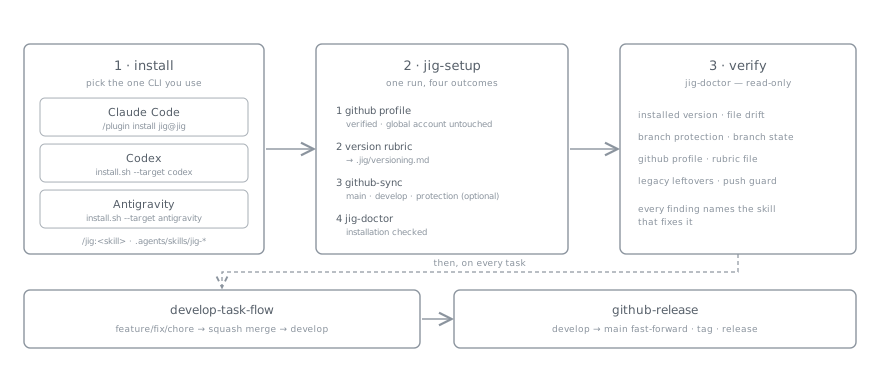
You need a git repository, plus curl or wget for Codex and Antigravity. A gh login is required to converge GitHub settings, but not to install the skills.
1. Install — pick the one CLI you use
Claude Code (recommended) — run inside a session. The plugin host manages install, update, and removal, and the PreToolUse guard hook that inspects push commands before they run ships only here.
/plugin marketplace add 0x0w1/jig
/plugin install jig@jig
Codex and Antigravity CLI — run from the repository root.
curl -fsSL https://raw.githubusercontent.com/0x0w1/jig/main/install.sh \
  | sh -s -- --target codex --scope project        # or --target antigravity
Options, install layout, skill namespacing, and removal: installation guide.
2. Bind the repository
Run jig-setup in an agent session: /jig:jig-setup on Claude Code, jig-setup on Codex and Antigravity.
One run settles four things.
- Selects and verifies the GitHub profile this repository uses (the globally active account is left alone)
- Settles the version grading rubric and records it in
.jig/versioning.md - Converges the
mainanddevelopbranches throughgithub-sync, and asks before setting up branch protection — optional, since GitHub allows it on public repositories and on private ones only with a paid plan - Checks the installation with
jig-doctor
github-sync installs the tracked pre-push guard source through its shipped manager instead of asking the agent to rewrite hook code. Before uninstalling jig from a project, run github-sync cleanup so the clone-local jig hook is removed and any backed-up user hook is restored.
3. Verify
Run /jig:jig-doctor (jig-doctor on Codex and Antigravity) for a read-only inventory of every detected Claude Code, Codex, and Antigravity installation across project and user scopes, including each version, selection, drift, and standalone provenance state. Project-scoped reports also cover branch protection, the GitHub profile, and the rubric file. Anything that needs fixing is reported along with the skill that fixes it.
From there, call a skill by name or just say what you want; the agent picks it.
Skills
Unlike a plain collection of skills, jig converges repository state — the branch model, branch protection, release discipline — and not only session procedures, then manages the install afterwards with jig-update and jig-doctor. One procedure source (skills/) is rendered into each CLI's native format: a plugin for Claude Code, jig- prefixed files for Codex and Antigravity.
| Skill | Role |
|---|---|
develop-task-flow |
Branch, work, grade, squash merge into develop |
github-release |
Fast-forward develop to main, tag, publish notes |
github-sync |
Branches, optional protection, local pre-push guard |
jig-setup |
Bind the repository to a GitHub CLI profile |
jig-update |
Update an installation to the latest release |
jig-doctor |
Read-only health check of the installation |
readme |
Draft a README, or fix its drift against the code |
version-rubric |
Settle patch/minor/major in .jig/versioning.md |
rubric-scan |
Classify the project type, recommend a rubric |
There is a single merge flow, solo-cli: a work branch is squash-merged into develop locally and pushed directly. No pull requests.
Skill bodies and the rubric catalog are written in English. What a skill produces — reports, commit bodies, release notes, a README — follows the language that repository already uses.
Documentation
English guides live under docs/en/; matching Korean guides live under docs/ko/. The rubric catalog remains English-only because it ships as skill payload.
- Documentation home: all English guides and the skill documentation entry point.
- Skill guides: detailed workflows, safety boundaries, and diagrams for every
SKILL.md. - Installation guide: what lands where for each CLI, installer options, skill namespacing, and removal.
- Version rubric: how an installed project grades
patch/minor/majoron its own terms, plus the.jig/versioning.mdfile contract. - Rubric catalog by project type: 17 rubric drafts and the detection signal table
rubric-scanuses. In English. - Versioning policy: commentary on how jig itself grades releases. The normative source is
.jig/versioning.md. - GitHub repository settings: what the installer applies, and how optional branch protection is decided.
- Roadmap: jig's identity and its trigger-conditional direction candidates.
Updating
Run the jig-update skill. It inventories jig across Claude Code, Codex, and Antigravity in the current project and user scopes, then updates every detected installation together regardless of which agent invoked it. Claude Code inventory includes both plugin scopes and existing standalone copies under .claude/skills or ~/.claude/skills. It preserves each target's selected skill set, summarizes the releases in between, and converges repository settings with github-sync.
/jig:jig-update
To do it by hand instead, use what each CLI provides. On Claude Code the plugin host owns the update:
/plugin marketplace update jig
/reload-plugins
On Codex and Antigravity, run the install command again. The installer is idempotent and backs up changed files as .bak.
Existing Claude Code standalone jig skills are updated only through jig-update: it verifies per-skill jig provenance before touching .claude/skills, rejects payload paths or symlinks that escape an owned skill directory, preserves the directories already installed, and records their version and selection in .jig-installation. It downloads the complete payload before applying it, backs up changed files as .bak, and rolls the installation back if any apply step fails.
License
This project is licensed under the terms of the MIT license.
Yorumlar (0)
Yorum birakmak icin giris yap.
Yorum birakSonuc bulunamadi