claude-standby
Health Uyari
- License — License: MIT
- Description — Repository has a description
- Active repo — Last push 0 days ago
- Low visibility — Only 5 GitHub stars
Code Basarisiz
- rm -rf — Recursive force deletion command in install.sh
Permissions Gecti
- Permissions — No dangerous permissions requested
Bu listing icin henuz AI raporu yok.
Survive Claude Code usage limits: Claude Standby waits for the reset and auto-resumes your exact conversation. Zero tokens, runs while you're limited. CLI + VS Code cockpit. macOS/Linux.
claude-standby
Your Claude Code task hit a usage limit at 2 AM. It finished anyway.
Auto-resume for Claude Code: detects when the limit lifts, resumes your
session with context, and never makes you babysit a terminal again.







Install · Quick start ·
Commands · How it works ·
Docs · Contributing
$ claude
  … ✗ You've hit your session limit · resets 4:10pm (Asia/Dhaka)

$ claude-standby resume-at
  Resume scheduled.
    workspace  : ~/projects/my-app
    resume at  : auto-detect (probing every 30 min until the limit lifts)
    session    : 612fb08b — the original conversation continues (claude --resume)
    importance : critical
    daemon     : running detached, wakes every 60s

$ # …close the laptop lid. Walk away.
  # At reset: desktop notification → YOUR session picks up where it stopped.
Screenshots
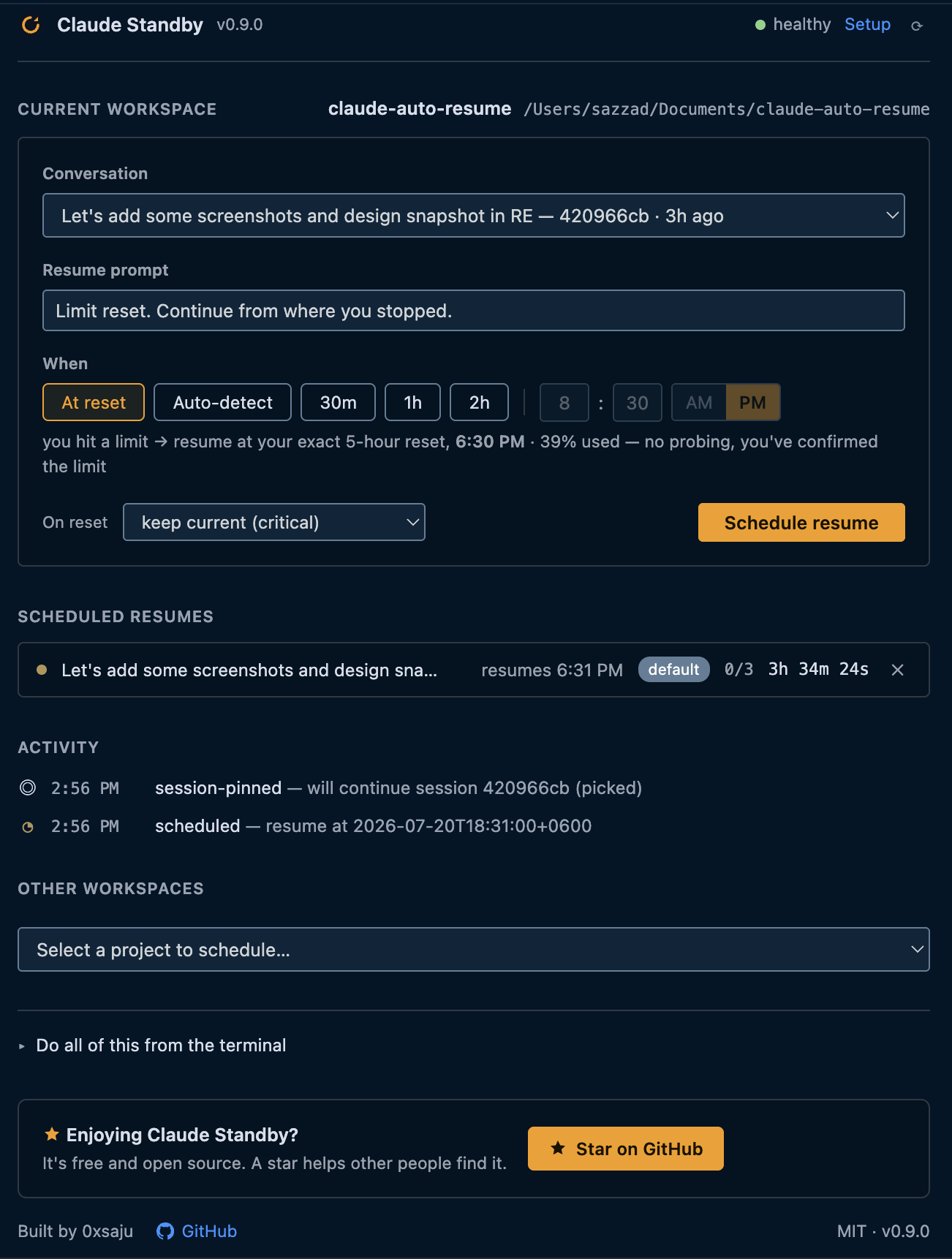
The VS Code cockpit (it follows your editor theme):
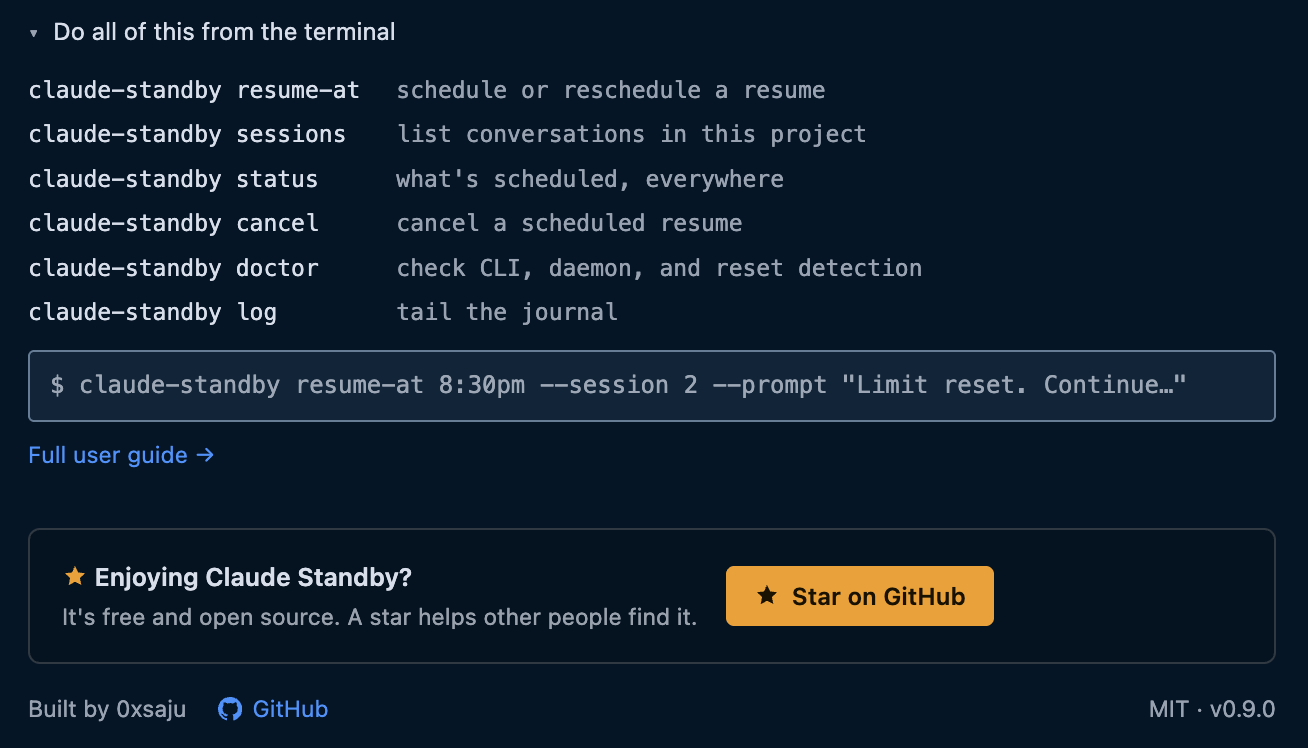
Everything in the panel maps 1:1 to a CLI command — the reference is built in:
Why
Long agentic tasks regularly outlive a usage window. When the limit hits,
the session dies mid-task — and you check back every twenty minutes so you
can type "continue" the moment it resets. That's an alarm clock job, not a
developer job. claude-standby takes the shift for you: one command
after the limit hits (soon: zero commands), and the task resumes itself
the moment resuming is possible.
Features
| True session resume | The interrupted conversation itself continues (claude --resume <session-id>) — not a fresh chat. The newest session is pinned automatically; claude-standby sessions lists them, --session picks another, and the VS Code cockpit shows them as one-click plates. |
| Exact reset detection | Auto mode reads your live reset time from Claude Code's own usage data and schedules the resume for that exact moment — no polling, no quota. Works with zero setup when your status line already caches it (or setup-statusline to add a tiny sensor); falls back to a single limit-message probe when no local data exists. |
| Works when nothing else does | The CLI costs zero tokens and needs no model turn — it works while you're rate-limited, which is precisely when you need it. |
| Importance tiers | critical resumes silently, normal gives you a 5-minute window to object, low only notifies. |
| Suspend-safe | The daemon compares wall-clock time on 60-second ticks — a closed lid delays nothing. |
| Context-aware resume | The resumed conversation already carries its full context (claude --resume), so it continues instead of starting over — no re-priming needed. Point a custom --prompt at a progress/handoff file for even more reliable pickups. |
| Safety rails | Bounded retries, backoff when a resume bounces off a still-active limit, instant cancel (kills in-flight work), no dangerous permission flags unless you opt in. |
| Honest by design | Detection is built from measured behavior, never guessed message formats. Weekly caps can't be beaten, and the docs say so. |
Installation
One command — no root, no dependencies beyond bash (jq recommended,python3 used if present):
curl -fsSL https://raw.githubusercontent.com/0xsaju/claude-standby/main/install.sh | bash
This is the complete setup: the CLI lands on your PATH
(~/.local/bin) and the engine in ~/.claude-standby. Nothing else to
configure — exact-reset detection works automatically if your status line
already caches your usage (otherwise claude-standby setup-statusline
adds a tiny sensor, opt-in).
The tool manages itself from then on:
claude-standby update       # get the latest version (download + swap)
claude-standby doctor       # verify the whole environment
claude-standby uninstall    # remove cleanly (keeps your task state)
Windows: best-effort via WSL/Git Bash for now; native support
(Task Scheduler) is on the roadmap.
The cockpit (optional GUI)
A thin VS Code / Cursor panel over the same CLI — status bar, one-click
scheduling, and a dashboard. Install from your editor's Extensions view
(search "Claude Standby"), or directly:
- VS Code → Marketplace
- Cursor / Windsurf / VSCodium → Open VSX
On first run it offers to install the CLI above for you. The cockpit drives
the CLI; it never spawns or parses Claude Code itself.
Quick start
The day a limit interrupts you:
cd ~/projects/my-app
claude-standby resume-at          # auto-detect the reset, resume, done
Prefer an exact time, or want to watch?
claude-standby resume-at 20:00    # resume precisely at 20:00
claude-standby status             # task state, attempts, journal
claude-standby watch              # follow the daemon log live
claude-standby cancel             # stop everything, immediately
Track a long task up front so it carries an importance tier:
claude-standby start critical "Migrate the billing service to the new API"
Tip: alias cs='claude-standby'.
Commands
| Command | Description |
|---|---|
resume-at [when] [tier] [--session …] [--prompt …] [--workspace …] |
Schedule an auto-resume. when accepts reset (you just hit a limit → resume at the exact reset time from your usage data, no probe), auto (arm and watch), 20:00, 2h30m, 45m, ISO-8601, now. --session <n|id|latest|new> picks the conversation to continue (default: newest); --prompt sets the message the resumed session receives; --workspace targets another project. |
sessions [--workspace <path>] |
List a workspace's Claude Code sessions — pick which one resumes. |
start <tier> <description> |
Track this workspace (critical | normal | low). |
status |
Task state, tier, attempts, resume time, journal. (default) |
list |
All tracked workspaces. |
cancel |
Stop now: daemon and any in-flight resume are killed. |
log [n] / watch |
Show / follow the log. |
doctor |
Full environment self-check. |
setup-statusline / remove-statusline |
Opt-in: capture the exact reset time from your status line for exact-reset detection (chains any existing status line). |
update / uninstall / version |
Tool management. |
Full reference with examples: User Guide.
How it works
One small engine behind state.json, fed by data Claude Code already
produces. Nothing polls a server, nothing guesses — the whole flow, from
the limit to the resumed conversation:
sequenceDiagram
    actor You
    participant CC as Claude Code
    participant AR as claude-standby
    participant D as daemon
    Note over You,CC: your long task is running
    CC-->>You: 5-hour limit hit — task stops
    You->>AR: resume-at reset
    AR->>CC: read the exact reset time, pin your session
    AR->>D: schedule and spawn (detached)
    D->>D: wait for the reset (checks the clock)
    Note over D: window resets — quota is back
    D->>CC: claude --resume (your conversation)
    CC-->>You: same conversation continues
- Schedule —
resume-atpins the session to continue, records the task
in~/.claude/auto-resume/state.json, and spawns a small detached daemon. - Wait — the daemon wakes every 60 seconds, re-reads state (so cancel
and reschedule always take effect within a tick), and compares wall-clock
time. Each tick is a few local file reads: zero tokens, zero network. - Detect the reset — auto mode reads your live reset time from Claude
Code's own usage data (streamed to the status line — a source we
measured, F4) and schedules for that exact moment, no probe, no quota.
No local data? It falls back to one minimalhaikuprobe whose limit
message announces the reset time (…resets 4:10pm, measured — F1). - Resume — a safety beat after the reset,
claude --resume <session>
continues the exact conversation headlessly. Success →done; a bounce
off a still-active limit → back off and retry, bounded bymax_resumes.
Task states move waiting → resuming → done (or failed / cancelled).
Everything the daemon knows lives in that one human-readable state.json —
also the contract every UI reads. One engine, many front doors:
bin/claude-standby    the CLI — the only interface
plugin/scripts/           the engine: state, daemon, rate sensor, time parsing
vscode-extension/         status-bar + dashboard cockpit for VS Code
test/                     fake-claude stub + full test suite
docs/                     user guide · architecture · decision log · findings
Detection is measured, never guessed
The exact behavior Claude Code emits at a limit hit is undocumented, and
code built on guessed formats fails silently at the worst possible moment
— so this project refuses to guess. Every detection path is written only
against formats we measured and recorded in
HOOK-FINDINGS.md, and cites them: the live rate
stream that carries the exact reset time (F4), the limit message the
fallback probe reads (F1), and the session store the resume id comes from
(F2). If we haven't measured it, we don't ship logic on it — and weekly
caps we can't beat, the docs say so plainly.
Project status
Alpha — the resume flow is complete and tested end-to-end against the
test harness (test/fake-claude.sh). Resuming through a real usage limit
is still unverified — see Contributing if you can help confirm it.
| Capability | Status |
|---|---|
True session resume (--resume, session picker in CLI + cockpit) |
✅ |
| Exact reset detection from local rate data (no polling) | ✅ |
| Probe fallback with measured limit-message parsing | ✅ |
| Scheduled resume at a known time | ✅ |
| Resume daemon: tiers, backoff, caps, reset safety grace, instant cancel | ✅ |
Task tracking, journal, multi-workspace list |
✅ |
| One-command install | ✅ |
| Full CLI tool surface (update/uninstall/doctor/…) | ✅ |
| VS Code / Cursor cockpit | ✅ published (VS Marketplace + Open VSX) |
/warmup window scheduler · stuck detection · resume verification |
🕐 Planned |
| Native Windows (Task Scheduler) · reboot-surviving schedules | 🕐 Planned |
Development
git clone https://github.com/0xsaju/claude-standby
cd claude-standby
bash test/run-tests.sh        # full suite, no real quota ever spent
The suite exercises the state library across three JSON engines (jq,python3, pure awk/sed), the daemon's full lifecycle, auto-detection
(rate-snapshot and probe paths) against a mode-switchable fake claude, the
status-line rate sensor, and the installer end-to-end. Ground rules live in
CLAUDE.md; every non-obvious decision is logged in
DECISIONS.md.
Documentation
| Document | What's in it |
|---|---|
| User Guide | Install, workflows, full command & config reference, troubleshooting, FAQ |
| Architecture | Components, state contract, lifecycle, design constraints |
| Decision Log | Append-only: every decision, dated, with reasoning |
| Hook Findings | Measured Claude Code behavior (limit message, session store, rate stream) — the source of truth for detection |
| Contributing | Dev setup, testing rules, how to help |
Contributing
Contributions are welcome — see CONTRIBUTING.md.
Real-limit verification is especially valuable: confirming the exactused_percentage at a genuine block, and that --resume continues the
conversation once it lifts.
Limitations
Stated plainly, because a tool that manages your quota shouldn't oversell:
- Weekly caps are untouchable. Everything here helps the rolling
window only; nothing resumes you past a weekly cap (auto mode detects
this case and tells you instead of probing forever). - Resuming spends quota the moment it resets — that's the point, but
choosecriticaldeliberately. - Headless resumes need pre-approved permissions to edit files;
configure an allowlist (User Guide §6). The tool never adds--dangerously-skip-permissionsfor you. - Daemons don't survive reboots yet (roadmap: OS-level one-shots).
License
MIT © claude-standby authors
Yorumlar (0)
Yorum birakmak icin giris yap.
Yorum birakSonuc bulunamadi