Daedalus
Health Uyari
- License — License: Apache-2.0
- Description — Repository has a description
- Active repo — Last push 0 days ago
- Low visibility — Only 5 GitHub stars
Code Basarisiz
- rm -rf — Recursive force deletion command in scripts/install-native.sh
Permissions Gecti
- Permissions — No dangerous permissions requested
Bu listing icin henuz AI raporu yok.
Rust workspace manager for humans and AI agents. Built-in persistent terminals, five TUI layouts, checkpoints, hooks, goal continuation and a Telegram bridge. Control work through the TUI, CLI or local JSON API; tmux and Herdr are optional adapters.
Daedalus runs persistent terminals and brings your shells, AI coding agents and Telegram controls into one workspace.













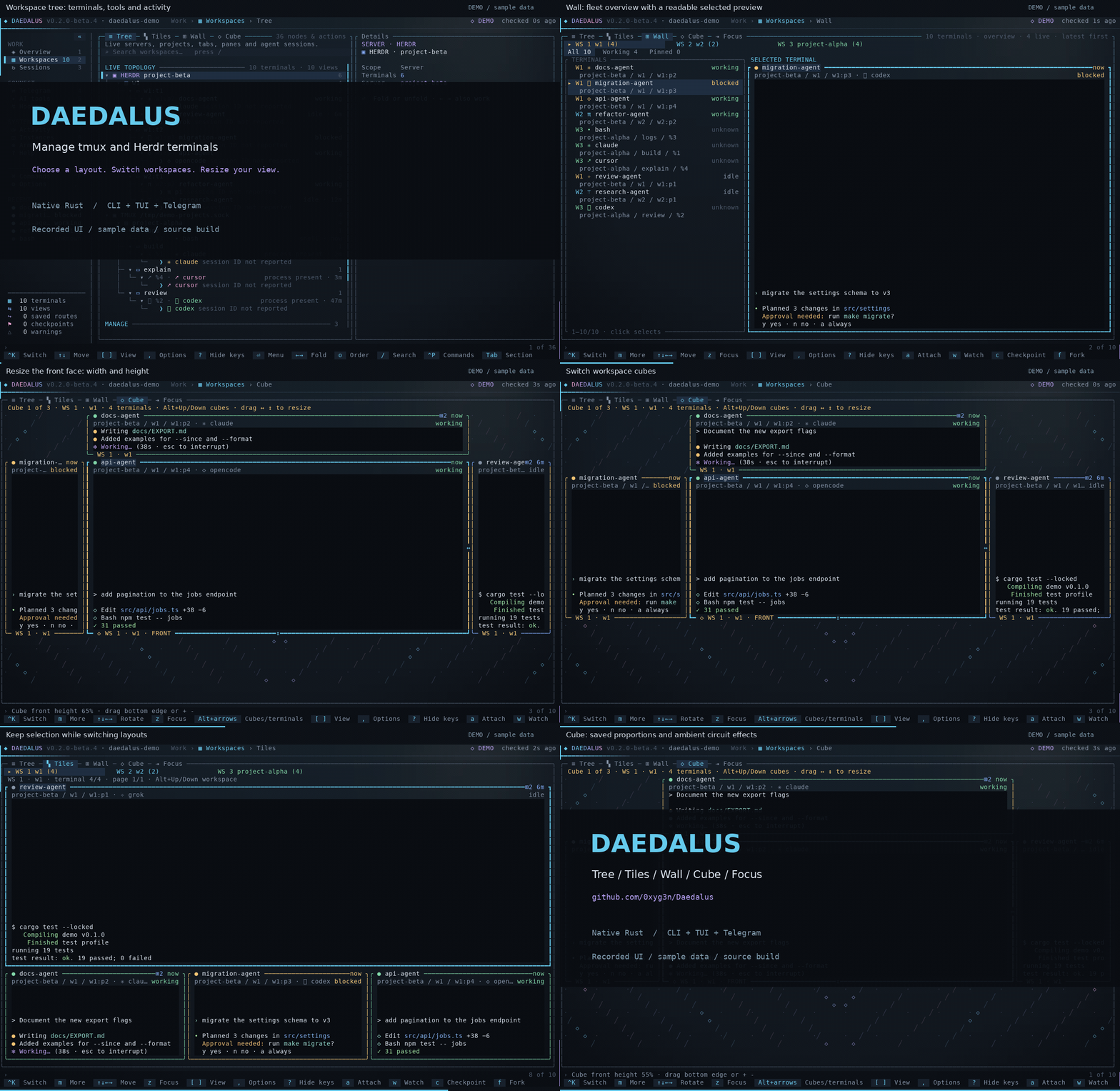
See the layout controls in action: watch the 30-second video with music (MP4).
A faster cut of the native TUI, with an original electronic soundtrack and brief glitch transitions. The GIF is silent.
Recorded using built-in sample data; the music and transition effects are video editing, not terminal features.
The tour uses built-in sample workspaces and terminal output.
The current release is 0.2.0-beta.14, with Linux and Windows x86-64 binaries and SHA-256 checksums. Daedalus ships as one Rust executable, including the TUI, CLI, Telegram service and hooks. See architecture and supported operations for runtime details and feature boundaries.
What it does
Start a shell or coding agent directly in Daedalus, then keep working across terminal views without stopping the process. Its built-in terminal backend uses Linux PTYs and Windows ConPTY; tmux and Herdr are optional adapters for existing sessions. The TUI, CLI and Telegram bridge share the same operations. Agents keep their own accounts and sign-in.
- Choose your layout. Browse the hierarchy in Tree, work within a project in Tiles, scan the fleet in Wall, rotate and resize terminal faces in Cube, or use Focus with its workspace tree. Compare the layouts below.
- Watch or take over. Observe a terminal read-only, or attach and type. Detaching (Ctrl+] then D) leaves the process running. In Focus, drag split dividers or use Alt+arrows to resize the actual panes; while attached, press Ctrl+] first.
- Start and organize work. Create native workspaces and terminals without installing a multiplexer. Existing tmux and Herdr sessions keep their backend-specific tabs and split controls.
- Keep sessions. Save named checkpoints or context-only excerpts from a terminal, resume or fork a conversation where the tool supports it, duplicate a view, hand context to another tool, and save layouts and workflows.
- Drive agents from Telegram. An authorized chat is bound to one exact agent. Text, photos and files go in; replies and progress come back.
- Hooks and goals. Reviewed per-tool hook profiles report lifecycle, replies and progress. Goals continue a directive where the tool has a native way to do so.
- Optional extras. Armonia keeps stable agent numbers and aliases; Hindsight adds scoped memory. Neither is needed for routing.
Ctrl+K opens a searchable terminal
switcher with pinned and recent destinations; Alt+1–9 opens a visible result.
Herdr selection time and visit counts are private local aggregates, not token or
billing measurements. See quick switching and usage.
How it works
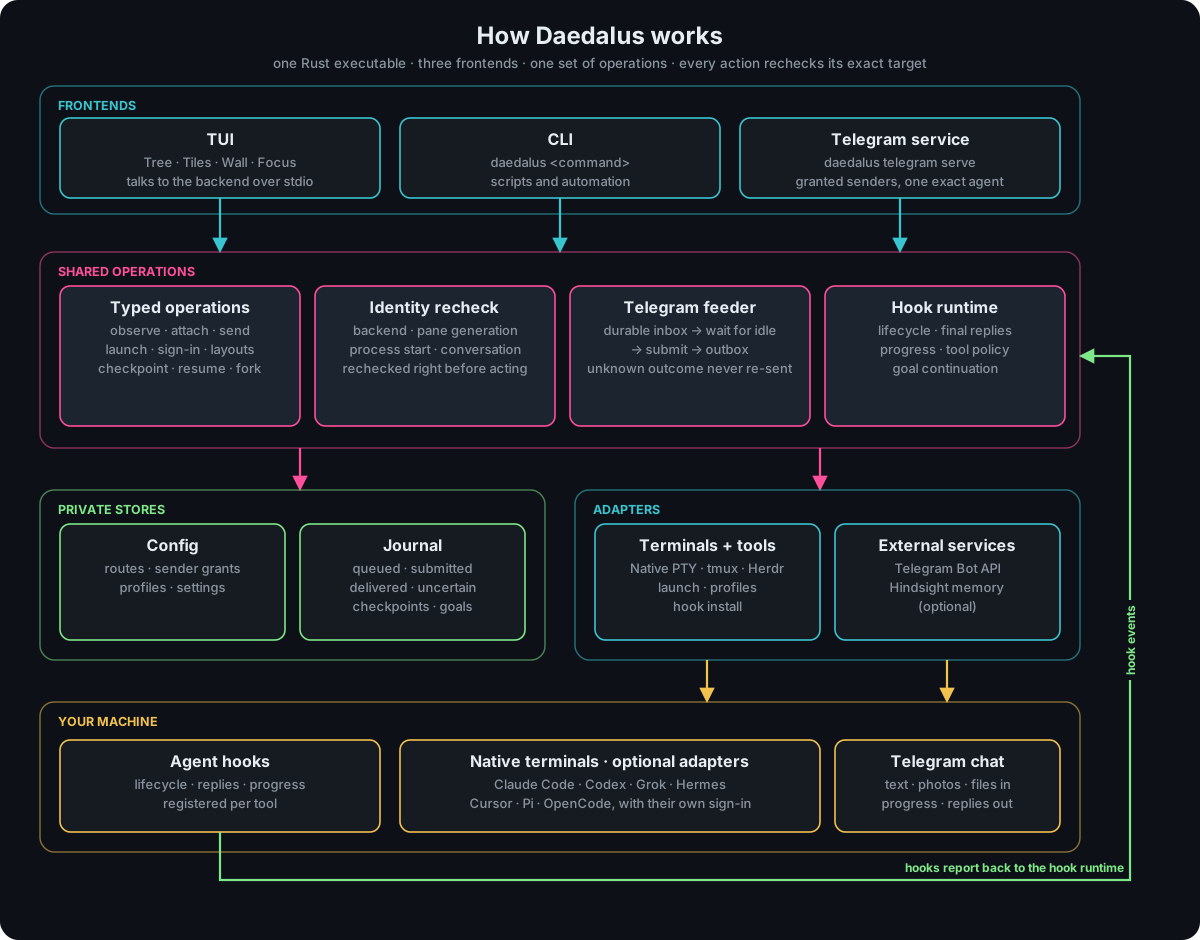
- Discovery. Daedalus discovers its own native terminals across launch directories, plus available tmux servers and Herdr sessions. External shell processes appear in a separate read-only group. Each terminal gets an exact identity: backend, server, pane, generation, process start and, where known, the agent's conversation. Display names are only labels.
- One set of operations. The TUI, the CLI and Telegram call the same operations. Each one rechecks the identity just before it acts, so a terminal that was replaced or renamed is never targeted by mistake.
- Hooks report back. A registered agent's hooks send its lifecycle events to a durable journal. That is how Daedalus knows a turn has finished and what to deliver.
- Receipts, not guesses. Queued, submitted, delivered and uncertain are recorded separately. A send with an unknown outcome stays uncertain and is never retried as a new message.
Layouts
| Layout | Use it for | Controls |
|---|---|---|
| Tree | Browse servers, workspaces, tabs, panes and agent sessions in their hierarchy. | Arrows navigate and fold branches; / searches. |
| Tiles | Work within one workspace, with a large selected screen and a strip of companion terminals. | Arrows select; PageUp/PageDown pages; Alt+Up/Down changes workspace. |
| Wall | Scan terminal activity across the fleet, then inspect one readable screen. | Click a row to select; All / Working / Pinned changes scope. |
| Cube | Rotate terminals within a workspace and adjust the front face to your task. | Click a face to attach; click outside the faces to detach. Arrows rotate; Alt+Up/Down changes cube. |
| Focus | Work with a terminal and its native split tab while keeping the workspace tree visible. | z opens Focus; Esc returns; drag native split dividers to resize. |
Use [ / ] to change layouts while keeping the selected terminal. In Cube,
Tiles and Wall, a attaches in place; Ctrl+] then D detaches without stopping
the terminal. In Cube, one click on a face attaches and a click outside the faces
detaches. Drag ↔ / ↕ on the front face, or use < / > for width
and + / - for height. While typing, press Ctrl+] before a resize key.
Proportions persist in your local layout.
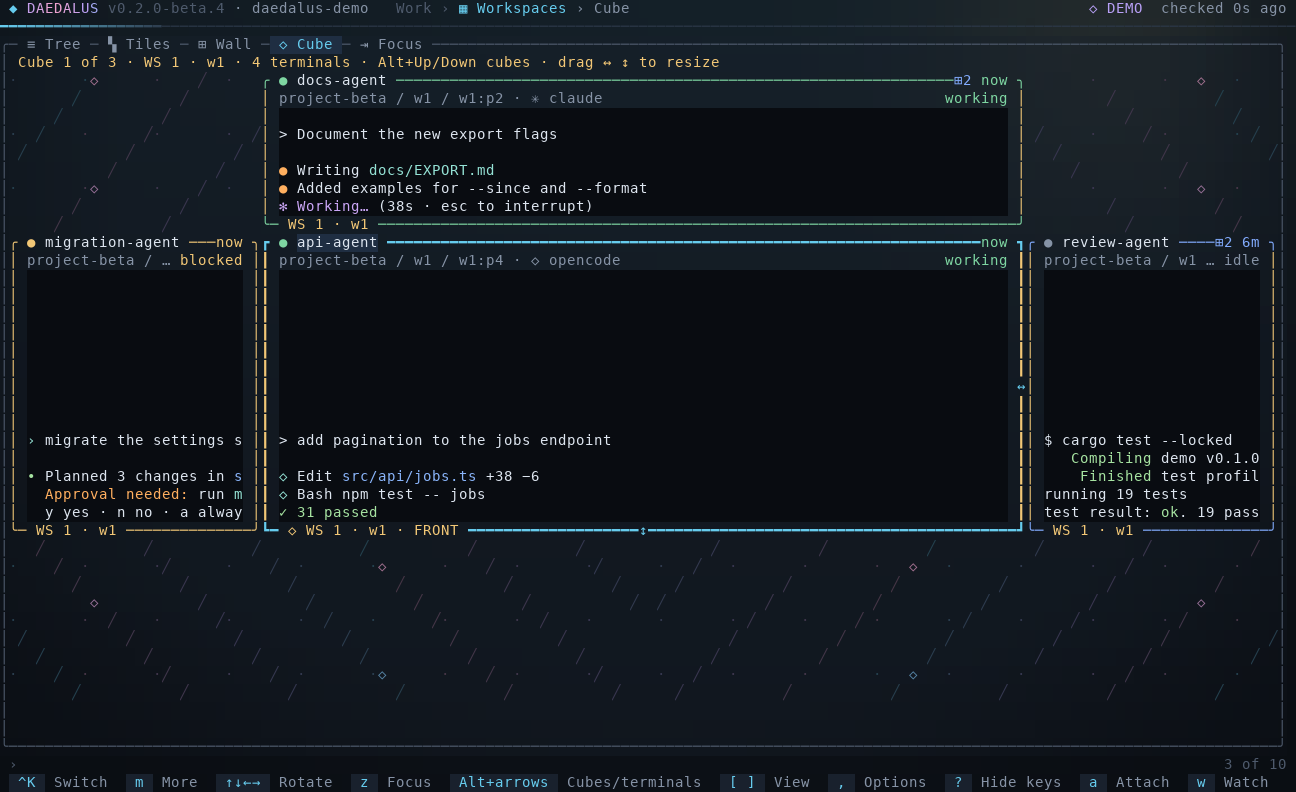
| Cube: rotate and resize | Wall: fleet status and a selected screen |
|---|---|
 |
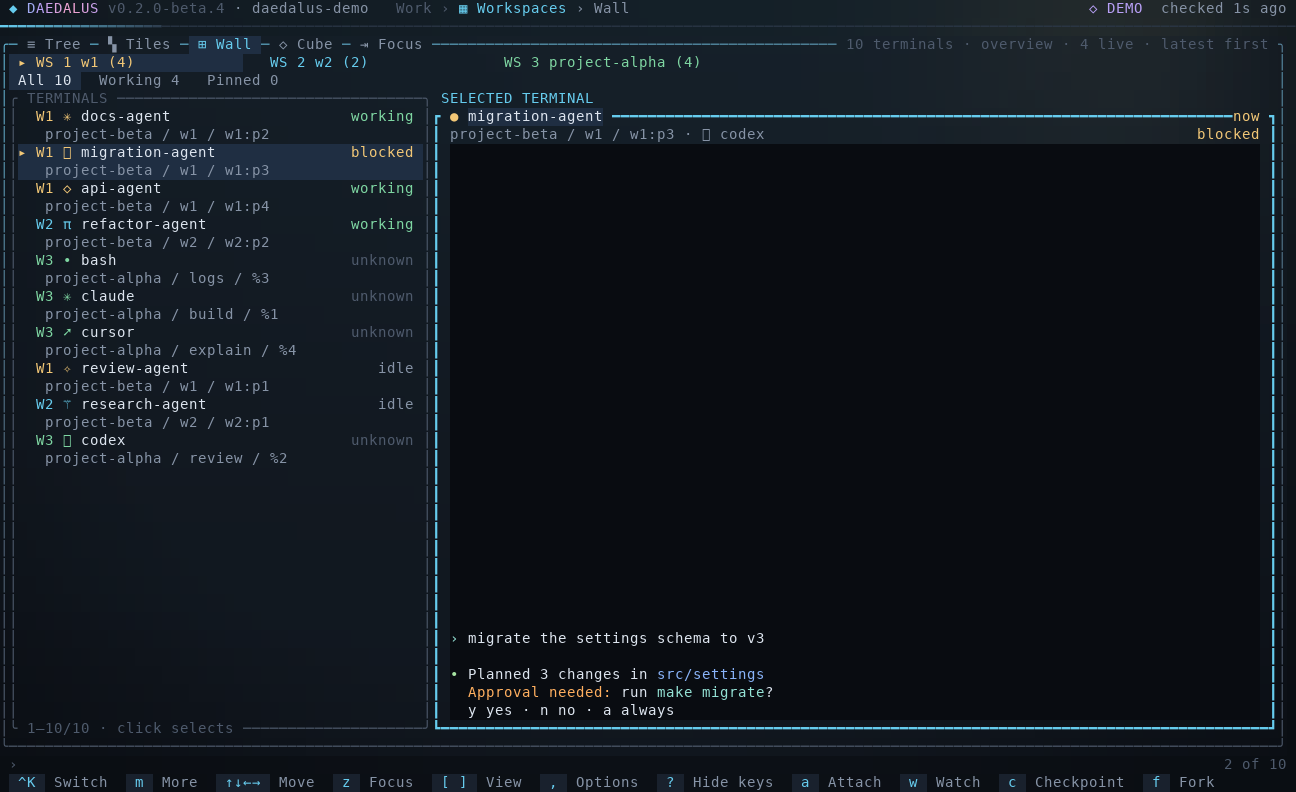 |
These captures use built-in sample data. See the TUI guide
for attachment, resizing, saved layouts and reduced-motion settings.
Built-in terminals
Run a persistent shell without installing tmux or Herdr:
daedalus shell --workspace my-project --name dev
Or start an installed agent directly, using its normal arguments:
daedalus shell --workspace my-project --name agent -- claude
Ctrl+] then D disconnects your view and leaves the process running. Open
Daedalus from another terminal to find it under Native terminals, then
Watch or Attach. One client controls input and terminal size at a time;
other views can observe. Closing the terminal ends its process. Sessions survive
detaching the UI, not a machine restart.
The native registry is shared by your local user, independently of the current
project or configuration directory. Linux stores it under~/.local/share/daedalus/terminals; Windows uses%LOCALAPPDATA%\Daedalus\terminals. It contains private local connection state
and must stay outside version control.
With automatic discovery enabled, Daedalus queries running Herdr sessions and
configured or discoverable tmux endpoints independently of the directory from
which you start the TUI. It searches PATH and common per-user locations for
Herdr; set DAEDALUS_HERDR_BIN to an absolute executable path for a custom
installation. The first Windows setup uses your user profile as its workspace,
not the installer's temporary directory.
Already-open shells: Linux discovery identifies your controlling terminals
in the current process namespace. Windows discovery lists owned shell and terminal
host processes; it does not reconstruct every application's windows or virtual
desktops. An arbitrary existing Bash, CMD or PowerShell process cannot be safely
reattached to a new PTY. These entries are read-only; start future work throughdaedalus shell for capture, input and resize. WSL and native Windows are separate
environments. Windows ConPTY is compiled in; real Windows runtime validation is
still required.
Native terminals support capture, input, resize, rename, workspace grouping and
close. A native workspace groups independent terminals; it is not an OS desktop.
Backend-specific physical split trees and duplicate-view launchers remain
separate capabilities. Checkpoints and Telegram require a supported harness and
verified hooks; seeing a shell in the inventory does not establish agent readiness.
Telegram feeder
The feeder connects one Telegram chat to one exact agent conversation. A message you send to your bot is typed into that agent's prompt, and the agent's reply comes back to the chat.
- Admit.
daedalus telegram servepolls your bot. Only granted senders are accepted; forwarded commands are refused. In groups input requires/listen, a mention or a reply to the bot. - Store. Photos (largest size) and documents up to 20 MiB are downloaded into the private configuration directory as
attachments/<sha256>.<ext>. The original file name is never used as a path. - Queue. The message joins a durable inbox bound to the chat's route: terminal, conversation and route revision. A 👀 reaction confirms that it was saved, not that the agent has processed it.
- Wait for idle. It is typed only when the agent's hooks report the conversation idle. While the agent works, the message stays queued (
Waiting for verified agent readiness; input remains queued). A changed or revoked route blocks it instead of sending it elsewhere. - Type. The agent receives one inert line,
/usr/bin/false -- '{…}', holding a JSON envelope with the sender, chat, message text, attachment path, size and SHA-256, and a correlation ID. If that line ever reached a shell it would do nothing. - Report. One progress message is edited in place (
Agent started responding,Agent activity observed,Agent turn finished). Verified assistant replies are sent as plain text, split at Telegram's 4096 UTF-16-unit limit. Typing refreshes while the registered conversation reports Busy; it is not a task-completion signal.
| Feature | Support |
|---|---|
| Text and captions | Yes |
| Photos | Yes, largest size up to 20 MiB, saved with their image extension so the agent can open them |
| Documents and files | Incoming only, up to 20 MiB, saved with their extension; outbound file/media delivery is not yet available |
| Voice, audio, video, stickers | Ignored; only the caption is used |
| Replies | Verified assistant text from provider hooks; plain text, with no rich Markdown rendering yet |
| Receipt and typing | 👀 after durable admission; typing while verified Busy. Cosmetic feedback is best effort and does not block delivery |
| Progress | One message edited in place per binding |
| Streaming | /stream, /reason, /verbose in private chats where supported: assistant text or tool names. Grok live streaming remains unavailable. No tool arguments, results or hidden reasoning |
| Command menu | Canonical commands are registered for Telegram autocomplete; command aliases use the same permissions and route checks |
| Remote control | /status, /windows, /use, /say, /capture, /interrupt, /stop, /new claude, checkpoints, goals and Claude Code slash commands |
| Group chats | /listen and /quiet, mentions and replies |
Requirements and limits: routing needs a verified terminal, process and conversation ID. Native Daedalus terminals obtain conversation identity from their registered agent hooks. Herdr can report it through its agent integration (for Claude Code, herdr integration install claude). A shell or tmux pane without verified conversation evidence is not a feeder destination. The chat's route and reply binding are set in the TUI (Telegram) or with daedalus telegram config import. See Commands for every command.
Terminal backends
| Backend | What Daedalus uses | |
|---|---|---|
|
tmux | Servers, sessions, windows and panes on any socket you add; live previews, attach, send keys, split, create sessions |
|
Herdr | Workspaces, tabs and panes; agent status and conversation IDs reported by Herdr's agent integrations; required for Telegram input |
Supported tools
| Tool | Launch, profile and sign-in | Hook profile | Guided launch with hooks | Session resume/fork | Goal continuation |
|---|---|---|---|---|---|
| Claude Code | Yes | Yes | Yes | Yes | Yes |
| Codex | Yes | Yes | Existing process | Yes | Yes |
| Grok | Yes | Yes | Yes | Yes | Yes |
| Hermes | Yes | Yes | Existing process | No | No |
| Cursor | Yes | Yes | Existing process | No | Yes |
| Pi | Yes | Yes | Yes | Yes | Yes |
| OpenCode | Yes | Yes | Existing process | No | No |
AGY (agy) |
Terminal only | No | No | No | No |
The table above describes Linux support. Native Windows has a smaller hook and harness compatibility matrix. "Existing process" means hooks are registered on a running, verified process rather than through a guided first launch. Resume and fork are offered only when the installed CLI advertises them. Version details are in the harness guide.
Use Daedalus from another agent
An agent with a local command tool can call the same Rust operations as the TUI. daedalus agent capabilities lists the available operations; daedalus agent call accepts one JSON request on stdin and returns a versioned JSON result.
{"tool":"inventory","args":["--config-dir","/abs/instance","--json"]}
Pass that request to daedalus agent call. Terminal control, checkpoints, routes, hooks, goals, Telegram administration and diagnostics use their existing identity checks and preview/apply rules. No approval flags are added automatically. Interactive attachment, sign-in and setup stay in the native CLI or TUI. This is a local JSON CLI interface; it is not an MCP server. Requests can include a request_id for response correlation. workspace_usage reads private Herdr selection aggregates without capturing terminal text. See the agent tools guide for integration examples and current coverage.
Platform support
| Platform | Status | Terminal backends | Installation |
|---|---|---|---|
| Linux x86-64 | Current beta; tested locally | Built-in PTY; optional tmux and Herdr | Linux executable and checksum or source build below |
| Windows x86-64 | Native preview; real Windows validation pending | Built-in ConPTY; optional Herdr, PSMux or tmux-windows through the tmux adapter | One-click Windows setup |
Both platforms use the same standalone Rust executable and Ratatui interface. On Windows, the Start Menu shortcut opens Daedalus in a console; Windows Terminal is recommended for the best display. No additional multiplexer is required for built-in terminals. Set DAEDALUS_TMUX_BIN to the absolute path of psmux.exe or tmux.exe to select a particular multiplexer. Native provider launches require .exe files; .cmd and .bat wrappers are refused.
The Windows preview is cross-compiled; platform-independent tests have also run under Wine. Actual Windows Terminal/ConPTY, NTFS permissions and live backend/provider behavior still need validation on Windows. Hook support differs by platform, guided launch with hooks is unavailable on Windows, and Herdr duplicate attachment is unavailable there. See the Windows boundaries and local Windows checks. macOS and native Windows ARM64 are not currently validated or distributed.
Install
The current Linux x86-64 beta includes a binary and checksum:
base=https://github.com/0xyg3n/Daedalus/releases/download/v0.2.0-beta.14
curl -fLO "$base/daedalus-0.2.0-beta.14-x86_64-linux"
curl -fLO "$base/daedalus-0.2.0-beta.14-x86_64-linux.sha256"
sha256sum -c daedalus-0.2.0-beta.14-x86_64-linux.sha256
mkdir -p ~/.local/bin
install -m 0755 daedalus-0.2.0-beta.14-x86_64-linux ~/.local/bin/daedalus
daedalus setup
To build from source instead (Rust 1.88+):
git clone https://github.com/0xyg3n/Daedalus.git
bash Daedalus/install.sh --source "$PWD/Daedalus"
~/.local/bin/daedalus setup
On Windows, download Daedalus-0.2.0-beta.14-setup.exe from the current release and double-click it. It installs for the current user, creates a Start Menu shortcut and opens Daedalus. No PowerShell, Git, Rust or tmux is needed. The standalone Windows executable is also available for advanced use; install it before using in-app updates. See the Windows install guide for source builds and other options.
Setup detects the operating system and architecture. It defaults to built-in native terminals; tmux and Herdr are optional, separately selected backends. Missing selected tools appear in a review before installation. Windows uses native backend installation guidance. Sign in through each tool's own flow. Telegram needs your own bot token, sender grants and a route; installing never starts a bot.
The TUI checks releases in the background at launch and before exit, and offers an update when one is available (Later at launch; Exit when closing). There are no periodic checks. Options → Application → Check for updates checks on demand (Ctrl+U); inside an attached terminal use Ctrl+], then U. Beta installations include newer betas; stable installations select stable releases. Installation requires your approval and verifies checksums. Linux activates the verified binary while retaining the previous one. On Windows, Daedalus downloads the verified setup package, closes its TUI, and runs the installer after the old process exits. DAEDALUS_UPDATE_CHECK=0 disables automatic checks; manual checks remain available. daedalus update check --json only checks. Details are in the install guide.
Documentation
| Guide | Contents |
|---|---|
| Install | Installer, first run, configuration directory, update and removal |
| TUI | Pages, views, keys, workspaces and Armonia |
| Agent tools | JSON requests for harness command tools; capabilities, reviews and limitations |
| Commands | CLI, Telegram commands and diagnostics |
| Harnesses | Per-tool contracts and tested versions |
| Hooks | What each hook does, its limits, and optional memory |
| Goals | Goal continuation per tool |
| Architecture | How the parts fit, code map, testing |
| Security | Trust boundaries and known limits |
Repository layout
| Path | Purpose |
|---|---|
src/tui/ |
The Rust executable: interface, shared operations (app), stores (core) and terminal and tool adapters (adapters) |
bin/ |
Command entry points for a source checkout |
config/ |
Public configuration example; real settings live outside Git |
docs/ |
User and developer guides |
scripts/ |
Local checks and the native installer |
assets/ |
Logo, tool icons, screenshots, the architecture diagram and the demo recording |
tests/fixtures/ |
Contract fixtures used by the Rust tests |
Development
Run ./scripts/check.sh before publishing; it runs formatting, tests, clippy and a release build. Coding agents should read AGENTS.md.
License
Daedalus is licensed under the Apache License 2.0. Tool names and icons belong to their owners; see NOTICE.
Yorumlar (0)
Yorum birakmak icin giris yap.
Yorum birakSonuc bulunamadi