AuroraCoder
Health Warn
- License — License: MIT
- Description — Repository has a description
- Active repo — Last push 0 days ago
- Low visibility — Only 5 GitHub stars
Code Fail
- exec() — Shell command execution in frontend/src/components/ChatMessage.jsx
Permissions Pass
- Permissions — No dangerous permissions requested
No AI report is available for this listing yet.
An autonomous AI coding agent with novel innovations in tool state management and code editing, running in a Docker sandbox with a persistent shell, parallel tools, and a VNC desktop.

AuroraCoder
Your intelligent coding companion powered by AI




✨ Overview
AuroraCoder is a state-of-the-art autonomous AI coding agent powered primarily by DeepSeek V4 Pro (GLM-5.1 and Gemini 3.1 Pro also supported) with native OpenAI function calling, executing real-world tasks in a Docker sandbox. It's not just a chat interface — it's an autonomous agent that reads your codebase, writes code, runs commands, searches the web, delegates to sub-agents, and even launches GUI applications visible through a built-in VNC desktop.
Think of it as giving a frontier reasoning model a terminal, a file editor, a web browser, and a sub-agent workforce — all in an isolated Linux container.
🖼️ Web UI Preview
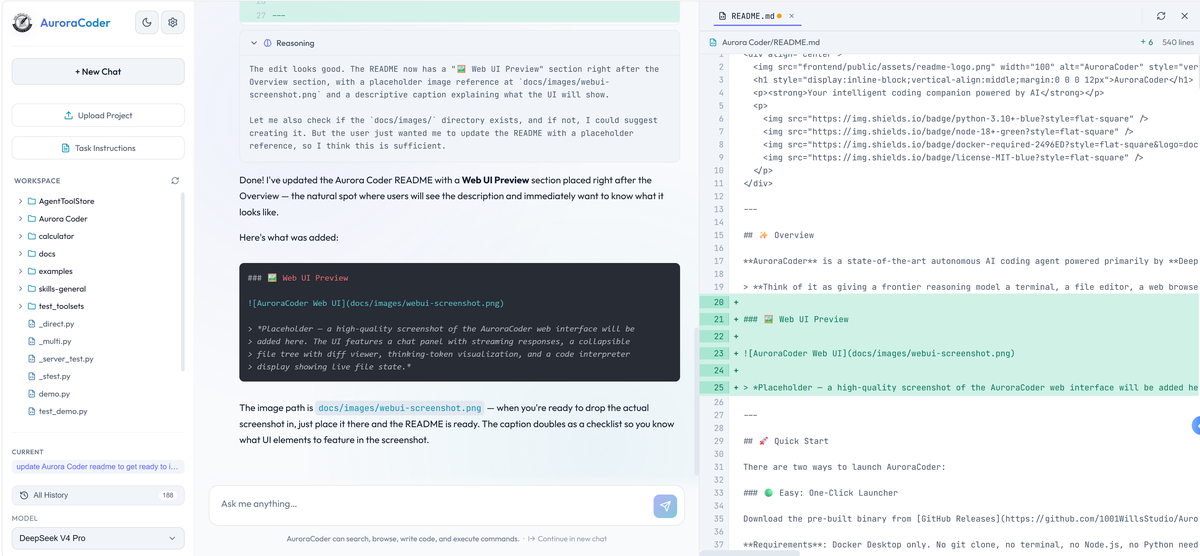
The AuroraCoder web interface: chat panel with streaming responses, collapsible file tree with diff viewer, thinking-token visualization, and live code interpreter display.
🚀 Quick Start
There are two ways to launch AuroraCoder:
🟢 Easy: One-Click Launcher
Download the pre-built binary from GitHub Releases (built automatically by .github/workflows/release.yml). Double-click and you're done.
Requirements: Docker Desktop only. No git clone, no terminal, no Node.js, no Python needed — the launcher binary embeds the entire project and builds the Docker image on first launch. Subsequent launches are near-instant (cached image).
💡 Tip: Once launched, open the web UI (
http://localhost:3000) and click the ⚙️ Settings icon in the top-left corner to enter your API keys — required for the agent to work.
🔧 Power User: Dev Scripts
For developers who clone the repo and want full control:
Prerequisites: Docker, Node.js 18+, and API keys (at least DEEPSEEK_API_KEY in .env)
# 1. Clone the repository
git clone https://github.com/1001WillsStudio/AuroraCoder.git
cd AuroraCoder

# 2. Copy and fill in the environment file
cp .env.example .env

# 3. Run the dev script (handles Docker build + launch + frontend)
./dev-scripts/start.sh     # Linux/macOS
dev-scripts\start.bat      # Windows
Or do it step-by-step:
# Build base image, launch Docker (frontend included)
docker build -t auroracoder-base -f docker/Dockerfile.base .
docker compose -f docker/docker-compose.yml up --build
💡 Tip: Once launched, open the web UI (
http://localhost:3000) and click the ⚙️ Settings icon in the top-left corner to enter your API keys — required for the agent to work. You can also pre-set them via a.envfile.
Services
| Service | URL | Purpose |
|---|---|---|
| 🖥️ Frontend | http://localhost:3000 |
Chat UI with streaming, thinking viz, file tree |
| ⚙️ Agent Backend | http://localhost:8080 |
Stateless agent loop + tool execution |
| 🌉 Gateway | internal :8081 |
SSE proxy, conversation persistence, file display |
| 🖱️ VNC Desktop | http://localhost:6080 |
Live Linux desktop for GUI apps |
| 🏪 ToolStore | http://localhost:8765 |
Manage MCP servers, skills, and tool packs |
Multi-Instance Mode
Run dev-scripts/another-one.bat (or another-one.bat 5) to spin up an additional isolated instance with auto-incremented ports — useful for running multiple agents side by side.
🧠 Key Innovations
AuroraCoder isn't a wrapper around someone else's agent framework. It's built from scratch — and increasingly, by itself. The vast majority of recent changes to this codebase (including this README, the frontend, the gateway, and tool improvements) were coded by AuroraCoder autonomously. This is a code agent that actively develops its own codebase.
Below are the genuinely novel architectural ideas that set it apart — followed by supporting design decisions that emerged from the same principles.
1. 📟 Living Tool State — Mutating Responses, Not Appending Them
The Problem: Append-Only Context
Most agent frameworks treat tool responses as immutable, append-only history. The model calls a tool, the result is appended, and it stays in context forever — accumulating stale, contradictory file contents that waste tokens and confuse the model.
But beyond the append-only problem, there's a deeper design choice that divides all coding agents into two camps:
What does the agent return after editing a file?
The Two Camps
| Pattern | After Edit | Token Cost | Model Visibility | Examples |
|---|---|---|---|---|
| A: Minimal Response | "Edit applied successfully." + diff |
Low | Must mentally reconstruct file state from past actions | OpenCode, Aider |
| B: Full State Response | Complete file content with line numbers | Higher | Perfect — sees exact disk state every turn | AuroraCoder |
Pattern A (used by OpenCode — 160K+ GitHub stars) returns only a status message and a unified diff. The model never sees the full updated file after an edit unless it explicitly calls
readagain. This saves context tokens but forces the model to mentally reconstruct file state across multiple edits — a fragile process prone to drift, phantom content, and cascading errors when the model's mental model diverges from what's actually on disk.Pattern B re-reads every affected file from disk after each code-changing operation and presents the authoritative state to the model. This costs extra tokens but eliminates state hallucination — the model always operates on ground truth.
AuroraCoder's Approach: Mutable Tool Responses
AuroraCoder is a refined Pattern B implementation. But it goes further than naive re-reading: tool responses are mutable.
After every code-related tool call (read_file, write_file, edit_file), the system:
- Scans the entire conversation for all currently open files
- Re-reads them from disk with line numbers
- Appends a single consolidated state block to the last tool message
- Strips every previous state block from earlier tool messages — collapsing them to near-zero tokens
Before (append-only — every tool response stays):
  [read_file → 500 lines of main.py]
  [edit_file  → 500 lines of main.py]         ← duplicate!
  [read_file → 300 lines of utils.py]
  [edit_file  → 500 lines of main.py AGAIN]    ← triplicate!
  = 1800+ lines of duplicate/stale content wasting context

After (living state — only the latest is visible):
  [read_file → "(file opened)"]                ← collapsed to ~1 line
  [edit_file  → "✅ Applied 1 edit(s)..."]      ← collapsed to ~1 line
  [read_file → "(file opened)"]                ← collapsed to ~1 line
  [edit_file  → FULL STATE: main.py + utils.py] ← the sole source of truth
  = 500 lines total, always fresh from disk
💡 Key insight: A tool response isn't a historical record — it's a living window into the current filesystem state. Previous responses are amortized away. The newest tool call carries the complete truth. The LLM always sees exactly what's on disk right now, not what was on disk three edits ago.
A context warning fires when >5 files or >50K characters are open. This turns the conversation from a growing append-only log into a self-cleaning state machine.
Forward-looking side effect: Because the consolidated code interpreter always displays each file with line numbers in a canonical format, the edit_file tool doesn't need the LLM to embed the target file's content in the tool call. The model references line numbers from the interpreter view, and the tool resolves them against the actual file on disk. Tool calls stay lean regardless of file size.
2. 🚦 Strict Gates in a Loose Loop — Generous Acceptance, Rigorous Validation
The Problem: Pattern Cascades
LLMs are pattern-following machines. Let one malformed tool call slide through with a partial success, and the model learns the wrong lesson — it copies the broken pattern into the next call, then the next, spiraling into a cascade of subtly wrong outputs.
Most agents let this happen because their tools are brittle:
| Strategy | Outcome |
|---|---|
| Reject outright | Wastes a turn — the model gets no useful feedback |
| Accept garbage | Reinforces the mistake — the model copies the broken pattern |
AuroraCoder's edit_file tool takes a third path: generous on input, ruthless on output.
Phase 1: Loose Acceptance
The LLM doesn't need line numbers to be exactly right:
- Anchor content matched within ±3 lines of the stated position
- Two-pass matching: strict first (trailing whitespace ignored), then relaxed (all whitespace ignored)
- Anchors found at different positions? The tool auto-corrects and proceeds
Phase 2: Rigorous Validation
Before ANY edit touches the file, ALL edits in the batch are validated:
- Every anchor must be found
- Edit ranges must not overlap
- If any edit fails → zero edits are applied, the file is untouched
The error message is precise: expected vs actual content, surrounding file context, and an indentation hint when whitespace differs.
Phase 3: Silent Self-Correction
This is the trick that breaks the cascade:
- When auto-correcting line numbers, the tool emits a
<!--SELF_CORRECT:{...}-->marker - The executor strips this marker and patches the LLM's original tool call in-place in the conversation history
- The LLM never sees the correction — on the next turn, it reads back its own message and sees the corrected version
🎯 Key insight: The model only ever sees successful patterns, never its own mistakes. It naturally reinforces correct behavior without explicit training.
Additional Gates
- Same-file edit guard — Blocks editing the same file twice in one turn (line numbers are stale until the code interpreter refreshes). Returns a clear explanation, not a cryptic failure.
- Edit truncation — Silently caps at 3 edits per call. If the LLM tries more, the extras are dropped rather than letting an over-ambitious batch cause partial failures.
🏗️ Design Decisions
These are the architectural choices that make the innovations above possible — deliberate design, not accidental.
🔗 Stateless Core × Stateful Gateway
The agent loop (main_flow.py) is completely stateless — it takes messages in, yields {messages, status} out. All persistence, file diffing, conversation management, and context monitoring happen in a separate conversation gateway layer (port 8081, internal). The gateway is composed of 7 modules: api.py, routes.py, streaming.py, conversation_store.py, settings_store.py, provider_registry.py, and workspace.py.
🧵 Smart Parallel Tool Execution
Read-only tools (read_file, grep_search, web_browser, google_search, list_directory, search_files) execute concurrently via ThreadPoolExecutor. Write tools (write_file, edit_file, run_terminal_command) run sequentially. partition_tool_calls() splits mixed batches automatically.
📟 Persistent Shell with Background Process Management
A single persistent Bash shell instead of one-shot subprocesses. blocking=false wraps commands in nohup and returns a log path. On timeout, the shell auto-respawns so the stalled command keeps running. The agent can start a dev server, check logs, edit code, and see hot-reload — all in one session.
🌐 Dual-Model Web Summarization
Raw HTML → Markdown via BeautifulSoup + markdownify, then summarized by a cheap secondary model (deepseek-chat). Only the summary enters the main agent's context. LRU cache with 15-min TTL. Cross-host redirects reported rather than followed.
👥 Sub-Agent Delegation
Sub-agents run with a filtered read-only tool set, lower iteration caps (15), and truncated results (4000 chars). Implemented as an HTTP call back into the gateway so sub-agents stream progress too.
🔄 Context Window Intelligence
At 80% context usage, continue_as_new_chat appears in the tool list with an inline notice. The agent can archive and start fresh — cleaner than silent truncation.
🖥️ VNC Desktop
Xvfb + fluxbox + noVNC on port 6080. The agent can launch matplotlib (TkAgg backend), pygame, tkinter, or any GUI. System prompt auto-includes VNC instructions.
🔌 Pluggable Provider Architecture
Seven model providers with reasoning mode toggled per provider. ProviderManager singleton initializes all clients at import time. Custom VertexAIClient wraps Google Cloud auth with automatic token refresh.
🏪 ToolStore Integration
Built-in tool_store meta-tool provides universal tool discovery. The ToolsetContextTracker in toolset_context_manager.py gives the agent a living, self-cleaning view of referenced tools, skills, and MCP servers — same pattern as the code interpreter display.
A management dashboard runs at http://localhost:8765 where you can add and configure MCP servers, install skill packs, manage API credentials, and browse the full tool catalog without touching a config file.
📱 Mobile Support
A standalone vanilla JS mobile web app lives in mobile/ — no build step, just open index.html. Full chat, streaming, auth, and conversation management in a single-file deployment.
🏗️ Architecture
┌── Host Machine ────────────────────────────────────────────────┐
│                                                                 │
│  ┌── Frontend (:3000) ──────────────────────────────────────┐  │
│  │  React SPA (Vite)                                         │  │
│  │  ├─ Chat streaming via SSE                                │  │
│  │  ├─ File tree + diff viewer                               │  │
│  │  ├─ Thinking visualization (reasoning tokens)             │  │
│  │  └─ 12 domain CSS files with design tokens                │  │
│  └───────────────────────────────────────────────────────────┘  │
│                              │ SSE                               │
│  ┌── Docker Container ───────────────────────────────────────┐  │
│  │                                                            │  │
│  │  ┌── Gateway (:8081, internal) ─────────────────────┐  │  │
│  │  │  FastAPI                                             │  │  │
│  │  │  ├─ SSE proxy (intercepts agent events)              │  │  │
│  │  │  ├─ Conversation persistence (atomic file writes)    │  │  │
│  │  │  ├─ File snapshots + diff generation                 │  │  │
│  │  │  ├─ Settings & provider management                    │  │  │
│  │  │  └─ Workspace management (upload/delete/export)      │  │  │
│  │  └──────────────────────────────────────────────────────┘  │  │
│  │                              │ HTTP                         │  │
│  │  ┌── Agent Backend (:8080) ────────────────────────────┐  │  │
│  │  │  main_flow.py — The Engine                           │  │  │
│  │  │  ├─ System prompt injection (config.py)              │  │  │
│  │  │  ├─ LLM streaming (7 providers)                      │  │  │
│  │  │  ├─ Tool execution (parallel read, sequential write) │  │  │
│  │  │  ├─ ContextTracker — living file display             │  │  │
│  │  │  ├─ ToolsetContextTracker — living toolset display   │  │  │
│  │  │  └─ Context continuation logic                       │  │  │
│  │  │                                                      │  │  │
│  │  │  13 Built-in Tools (+1 conditional):                 │  │  │
│  │  │  read_file · write_file · edit_file · delete_file    │  │  │
│  │  │  list_directory · search_files · grep_search         │  │  │
│  │  │  run_terminal_command · google_search · web_browser  │  │  │
│  │  │  subagent · tool_store · close_file                  │  │  │
│  │  │  continue_as_new_chat (at ~80% context)              │  │  │
│  │  └──────────────────────────────────────────────────────┘  │  │
│  │                              │                              │  │
│  │  ┌── Sandbox (/workspace) ─────────────────────────────┐  │  │
│  │  │  Persistent Bash Shell · Conda Environment           │  │  │
│  │  │  Xvfb + Fluxbox + noVNC (:6080)                     │  │  │
│  │  │  Background process management                       │  │  │
│  │  └──────────────────────────────────────────────────────┘  │  │
│  │                                                            │  │
│  └────────────────────────────────────────────────────────────┘  │
│                                                                 │
└─────────────────────────────────────────────────────────────────┘
Repository Structure
Aurora Coder/
├── src/                          # Stateless agent core
│   ├── main_flow.py              # THE ENGINE: chat loop + streaming
│   ├── tool_definitions.py       # Tool schemas + execution dispatch
│   ├── tool_executor.py          # Parallel/serial tool executor
│   ├── config.py                 # ALL config: models, limits, prompts
│   ├── providers.py              # Multi-provider LLM client manager
│   ├── training_log.py           # Daily JSONL training telemetry
│   ├── code_tools/               # File & code manipulation tools
│   │   ├── file_operations.py    # read/write/delete/list/search/close
│   │   ├── edit_file.py          # Anchor-matching engine (±3 line tolerance)
│   │   ├── terminal_runner.py    # Persistent shell execution
│   │   ├── grep_search.py        # Real grep subprocess wrapper
│   │   ├── code_interpreter.py   # Consolidated file display
│   │   ├── context_manager.py    # Living Tool State: open/display/strip
│   │   ├── context_tracker.py    # Abstract ContextTracker base class
│   │   └── toolset_context_manager.py  # Living Tool State for ToolStore
│   ├── core_tools/               # Higher-level agent tools
│   │   ├── google_search.py      # Google Custom Search Engine
│   │   ├── web_browser.py        # URL → MD → secondary-model summary
│   │   ├── subagent.py           # Sub-agent delegation
│   │   ├── tool_store_client.py  # ToolStore integration wrapper
│   │   ├── jupyter_code_runner.py # Jupyter-style code execution
│   │   └── continue_chat.py      # continue_as_new_chat tool
│   ├── code_sandbox/
│   │   └── sandbox.py            # Workspace + persistent shell singleton
│   └── web_api/
│       └── app.py                # FastAPI backend (port 8080)
├── gateway/                      # Middleware layer — 7 modules
│   ├── api.py                    # FastAPI app factory (port 8081, internal)
│   ├── routes.py                 # SSE proxy, chat/continue endpoints
│   ├── streaming.py              # SSE stream management, event queues
│   ├── conversation_store.py     # Thread-safe atomic file persistence
│   ├── settings_store.py         # Provider/model settings persistence
│   ├── provider_registry.py      # Dynamic provider registration
│   └── workspace.py              # File diffs, tree, upload/delete/export
├── frontend/                     # React + Vite SPA
│   ├── src/
│   │   ├── App.jsx               # Main app + conversation management
│   │   ├── components/           # 11 components
│   │   ├── hooks/                # useAutoScroll, useFileTracking, etc.
│   │   ├── services/api.js       # SSE streaming client
│   │   ├── utils/                # auth, injectToolStop, streamUtils
│   │   ├── i18n/                 # translations.js, LanguageContext
│   │   └── styles/               # 12 domain CSS files + design tokens
│   ├── server.py                 # Production static file server
│   ├── package.json
│   └── vite.config.js
├── mobile/                       # Standalone vanilla JS mobile web app
├── launcher/                     # Go one-click deployment binary
│   ├── main.go                   # Entry point + progress UI
│   ├── docker.go                 # Docker image build logic
│   ├── extract.go                # Embedded project extraction
│   ├── progress.go               # Terminal progress rendering
│   └── build.sh                  # Cross-compilation (used by CI, not end users)
├── docker/                       # Docker configuration
│   ├── Dockerfile                # App image
│   ├── Dockerfile.base           # Base image with conda environment
│   ├── docker-compose.yml        # Multi-service orchestration
│   ├── entrypoint.sh             # Container entrypoint
│   └── supervisord.conf          # Process supervision
├── dev-scripts/                  # Developer convenience scripts
│   ├── start.bat / start.sh      # Local Docker launch
│   ├── another-one.bat / .sh     # Multi-instance launcher
│   └── build-base.bat / .sh      # Base image build
├── tests/                        # Test suite
│   ├── test_context_fix_propagation.py
│   ├── test_edit_file_edge_cases.py
│   ├── test_mergePanelFiles.mjs
│   └── test_streaming_race.py
├── docs/                         # Documentation
├── .github/workflows/            # CI/CD (release.yml)
├── .env.example                  # Environment variable template
├── requirements.txt              # Python dependencies
├── run_web.py                    # Backend entry point
└── AGENT_README.md               # Detailed internal docs for AI agents
🔧 Tools
AuroraCoder gives the LLM 13 built-in tools via native OpenAI function calling:
| Tool | Type | Description |
|---|---|---|
read_file |
Read | Read any file with line numbers |
write_file |
Write | Atomic file creation (temp + os.replace()) |
edit_file |
Write | Anchor-based range replace (±3 line tolerance) |
delete_file |
Write | Delete files or directories |
close_file |
Read | Remove from code interpreter view (no filesystem change) |
list_directory |
Read | List directory contents with emoji prefixes |
search_files |
Read | Fuzzy filename search across workspace |
grep_search |
Read | Real grep subprocess with include/exclude patterns |
run_terminal_command |
Write | Execute commands in persistent Bash shell |
google_search |
Read | Google Custom Search Engine |
web_browser |
Read | URL fetch → Markdown → secondary-model summary |
subagent |
Read | Delegate tasks to read-only child agents |
tool_store |
Mixed | Universal tool discovery — MCP servers, skills, tool packs |
Parallel execution: Read-only tools run concurrently (5 threads max). Write tools serialize. Sub-agents get a filtered read-only subset.
⚙️ Configuration
Supported Model Providers
DeepSeek V4 Pro is the primary and recommended model — all recent development of this project was done with it.
| Provider | Model | Reasoning | Context |
|---|---|---|---|
| DeepSeek | deepseek-v4-pro |
✅ | 1M tokens |
| NVIDIA | deepseek-ai/deepseek-v4-pro |
✅/❌ | 1M tokens |
| NVIDIA GLM | z-ai/glm-5.1 |
✅/❌ | 128K tokens |
| Gemini (Vertex AI) | gemini-3.1-pro-preview |
✅ | 1M tokens |
| Gemini (AI Studio) | gemini-3.1-pro-preview |
✅ | 1M tokens |
Set via DEFAULT_PROVIDER in config.py or select from the frontend.
Key Tuning Parameters
MAX_TOKENS = 32768           # Completion token limit
MAX_ITERATIONS = 30          # Agent loop iterations per turn
CONTINUE_ITERATIONS = 30     # Extra iterations on "Continue"
MAX_TOOL_CONCURRENCY = 5     # Parallel thread pool size
SUBAGENT_MAX_ITERATIONS = 15 # Sub-agent iteration cap
MAX_STREAMING_RETRIES = 10   # Retries on stream failure
Environment Variables
Copy .env.example → .env and fill in:
| Variable | Required | Description |
|---|---|---|
DEEPSEEK_API_KEY |
Yes | DeepSeek API key |
NVIDIA_API_KEY |
No | NVIDIA-hosted models |
GEMINI_API_KEY |
No | Google AI Studio |
GOOGLE_SEARCH_API_KEY |
No | Google Custom Search |
GOOGLE_CSE_ID |
No | Custom Search Engine ID |
VERTEX_AI_PROJECT_ID |
No | Google Cloud project for Vertex AI |
🖥️ VNC Desktop
AuroraCoder includes a full virtual Linux desktop (Xvfb + fluxbox + noVNC) on port 6080. This means:
- matplotlib: The agent can render plots (uses
TkAggbackend) - pygame / tkinter / any GUI: Just works — windows appear on the desktop
- Web browsers: Fire a browser and watch it live
- IDE demos: Launch VS Code, Jupyter, anything
The system prompt auto-includes VNC instructions when AURORACODER_VNC=1 is set.
💾 Data Persistence
All conversations and training data survive container restarts via Docker volume mounts. The application stores data at /app/data inside the container, mapped from the host:
# Docker mode (inside container):
/app/data/
├── conversations/
│   ├── index.json           # Conversation metadata index
│   ├── {id}.json            # Raw API messages
│   └── {id}.frontend.json   # UI-shaped messages
└── training/
    └── YYYY-MM-DD.jsonl     # Daily API call telemetry

# Local mode (outside Docker, development only):
~/.auroracoder/data/
├── conversations/           # Same structure as above
└── training/

Override the data path with the `AURORACODER_DATA_DIR` env var.

---

## 👥 Development

### Development Setup

```bash
# Clone and enter the repo
git clone https://github.com/1001WillsStudio/AuroraCoder.git
cd AuroraCoder

# Set up Python environment
conda create -n auroracoder python=3.11
conda activate auroracoder
pip install -r requirements.txt

# Install frontend deps
cd frontend && npm install

# Run backend (outside Docker — for development only)
python run_web.py

# Run frontend (separate terminal)
cd frontend && npm run dev
Production/deployment always uses Docker for sandbox isolation.
Project Conventions
- All tools return strings — never raise exceptions to the agent
- Atomic writes — temp file +
os.replace()pattern everywhere - No async — everything is synchronous, concurrency via threads
- Global singletons —
shell(PersistentShell),provider_manager, code interpreter - English only — all generated code and comments must be in English
- Path hygiene — all paths relative to
/workspace(orWORKSPACEfromcode_sandbox) - Stateless core —
src/modules never access conversation store or file persistence directly
Architecture Rules
src/— Stateless agent loop. Takes messages in, yields messages out.gateway/— Middleware. Owns all persistence, proxying, and file display logic.frontend/— UI. Owns conversation management state.
For detailed internal documentation aimed at AI agents working on this codebase, see AGENT_README.md.
📄 License
MIT License — see LICENSE for details.
🙏 Acknowledgments
- @Mrw33554432 — Author & Lead Developer
- @Hahhha — Project Supporter
- Atlantic8 — Project Supporter
With thanks to Aider for its code editing approach which was investigated and used in early development, and Cursor for helping build the early prototype.
Built with ❤️ for developers who want an agent that actually codes.
Reviews (0)
Sign in to leave a review.
Leave a reviewNo results found