boardstate-hermes-plugin
Health Pass
- License — License: MIT
- Description — Repository has a description
- Active repo — Last push 0 days ago
- Community trust — 54 GitHub stars
Code Fail
- child_process — Shell command execution capability in build.mjs
- network request — Outbound network request in dashboard/dist/index.js
- process.env — Environment variable access in dashboard/sidecar/src/connectors.ts
Permissions Pass
- Permissions — No dangerous permissions requested
No AI report is available for this listing yet.
The board your Hermes agent builds with you — live widgets, sandboxed custom widgets, and operator-governed external tools, for the web dashboard and desktop app
Boardstate for Hermes
Boardstate gives Hermes a durable board that the agent can build with native tools. Open
the Board tab in hermes dashboard or the Board page in Hermes Desktop, then ask
Hermes to create tabs, add widgets, arrange a layout, or review its design. Widgets include
notes, markdown, tables, charts, KPI cards, live Hermes data, and approvals. Changes are
stored as a validated workspace document and appear live when the dashboard socket is
available.
Boardstate is one unified Hermes plugin: the agent tools, Web dashboard tab, Python
backend, Desktop page, and loopback Node sidecar install from this repository together.
Install
Boardstate requires Hermes 0.21.2 or newer and Node.js 20 or newer. Boardstate looks for Node
in HERMES_NODE_BIN, then in Hermes' own Node lookup, then on PATH.
hermes plugins install boardstate --enable
This installs the catalog entry at its reviewed pin, and Hermes accepts the scanner's caution
verdict for that pin without a prompt. The bare name resolves only after the Hermes plugin catalog
lists Boardstate; until then, use the owner/repo form below.
The owner/repo form (hermes plugins install 100yenadmin/boardstate-hermes-plugin) is not
reviewed or pinned. It prints the scanner findings and asks for confirmation; pass --force
to accept them non-interactively, and --ref <40-character sha> to pin a commit.
To enable an installed copy later:
hermes plugins enable boardstate
Start hermes dashboard for the Web tab. The unified package also contributes a Desktop
plugin; enable Boardstate under Capabilities → Plugins in Hermes Desktop. The two
surfaces have separate enable switches by design.
After you update or reinstall the plugin, quit and reopen Hermes Desktop. Rescan under
Capabilities → Plugins copies the new Desktop files, but a Desktop plugin that is already
loaded keeps running its old code until the app restarts.
Profiles
On Hermes 0.21.x, hermes -p <name> dashboard re-runs as the default profile with--open-profile <name>. Web dashboard plugins load from the root ~/.hermes/plugins, and
their state comes from the dashboard process's HERMES_HOME, so the web Board tab shows
the default profile's board. Install with hermes plugins install … (no -p) for the
dashboard, and with hermes -p <name> plugins install … for that profile's agent tools. Hermes
Desktop loads the Desktop half app-wide from ~/.hermes/desktop-plugins once you switch it
on under Capabilities → Plugins, and talks to the active profile's backend.
Uninstall
Run hermes plugins remove boardstate. The board itself stays in the boardstate-state
directory of the profile's Hermes home: $HERMES_HOME when you set it, otherwise ~/.hermes for
the default profile and ~/.hermes/profiles/<name> for a named profile. If you setBOARDSTATE_HERMES_STATE_DIR, the board is in that directory instead. Delete it if you no longer
need the board.
Native agent tools
No hand-written mcp_servers entry is needed. The package registers these 19 tools in theboardstate toolset:
boardstate_workspace_getboardstate_tab_create,boardstate_tab_update,boardstate_tab_delete,boardstate_tabs_reorderboardstate_widget_add,boardstate_widget_update,boardstate_widget_move,boardstate_widget_removeboardstate_layout_set,boardstate_workspace_replace,boardstate_undoboardstate_widget_catalog,boardstate_design_review,boardstate_widget_scaffold,boardstate_data_readboardstate_tool_search,boardstate_connector_read,boardstate_connector_invoke
The two connector invocation tools and boardstate_tool_search are always discoverable.
Without an operator-authored connector configuration they return a clearno connectors configured error.
The existing Streamable HTTP MCP endpoint remains available as an optional compatibility
path at /api/plugins/boardstate/mcp, but normal Hermes use should rely on the native tools.
What runs
Boardstate starts one Node sidecar on an ephemeral 127.0.0.1 port. Every spawn gets a
random nonce. Its mode-0600 port record contains the port, nonce, process id, and owner
kind so the agent and dashboard do not create competing writers.
- An agent tool call can start the sidecar without the dashboard. That sidecar gets no
operator secret at all, so operator-only verbs are unavailable until the dashboard
replaces it. On it,boardstate_connector_invokestill runs approved readOnly connector
tools; a mutating tool asks the agent to open the Board tab instead of parking. - When the dashboard finds an agent-owned sidecar, it terminates and replaces that process
with a dashboard-owned one. Both use the same state directory, so the board survives. - An agent-owned sidecar is stopped when its owner exits if no live agent process adopted
it. A process never stops a sidecar whose port record has moved to another spawn. - If every process named in the sidecar's port record (its owner and any adopters) dies
without cleaning up, for example afterSIGKILL, the sidecar notices within a few seconds
and shuts itself down. - Live Hermes data widgets use the authenticated dashboard API. When only the agent half is
running, they show an explicit "open the Board tab" unavailable message instead of
crashing.
The Desktop plugin stays inside the public plugin SDK. It uses ctx.register withROUTES_AREA and SIDEBAR_NAV_AREA for the page and its nav row, ctx.rest for Boardstate
requests, ctx.socket for server pushes, ctx.onDispose for cleanup, ctx.setTimeout when
the SDK provides it (with a disposed fallback timer on older SDKs), and host.notify for
template errors.
OAuth remotes support request/response traffic but the SDK intentionally provides no live
socket there, so the page reports live updates unavailable instead of pretending to be
live.
Network and security disclosure
Boardstate makes no third-party network request by default.
- The sidecar, dashboard bridge, native tool wrapper, and optional MCP path communicate on
loopback only. Live Hermes widgets call the local Hermes dashboard API. - External connectors are opt-in. Only an operator-authored
$HERMES_HOME/boardstate-state/boardstate.connectors.jsoncan enable one. A connector may
spawn its configured local command or contact its configured remote MCP URL; those are
the only runtime paths that can reach outside Hermes. - Connector reads require an approved grant. Connector mutations park for an operator
decision. A changed connector manifest re-pends its grant. A mutation whose wait times out
is reported as parked, but a later confirm can still run it, so the agent is told not to
retry it on its own (a retry can run the mutation twice) and to ask the operator for the outcome. - Operator approve/confirm/deny verbs use a separate in-memory secret that is never written
to the port record. In gated multi-user mode,boardstate.operators.jsonis also required. - Sidecar traffic never goes through an
HTTP(S)_PROXYfrom the environment. - The sidecar inherits the Hermes process environment, so provider keys there are available
to connectorenvreferences. A dashboard-owned sidecar also receives the dashboard session
token so live Hermes data widgets can read the local dashboard API. - Limit of the operator gate. It keeps approvals off the agent's tool surface: no
boardstate_*tool, MCP call or board WebSocket can approve or confirm anything. It is not
a boundary against an agent that has unrestricted shell access as the same OS user. In
ungated loopback mode, such an agent can read the dashboard page, which carries the
dashboard session token. In any mode, it can read a same-user process's environment,
including the dashboard-owned sidecar's operator secret. If approvals must hold against the
agent itself, run the agent's terminal in an isolated backend (for example Docker, SSH or
Modal) or as a different OS user from the dashboard. - Approved custom widgets run in an opaque-origin iframe with a no-network Content Security
Policy. Pending, rejected, and unknown widget assets all return 404.
Connector configuration
Connectors are optional. For example, after installing OfficeCLI, an operator can create:
{
  "connectors": [
    { "name": "officecli", "transport": "stdio", "command": "officecli", "args": ["mcp"] }
  ]
}
Save that as $HERMES_HOME/boardstate-state/boardstate.connectors.json, restart the
dashboard, and approve only the requested tools you want. See
docs/connectors/officecli.md.
Connector grants are scoped to the active Hermes profile: Boardstate keeps separate state for
each HERMES_HOME/profile, while sessions within one profile are the same agent and
intentionally share native-tool grants.
Security scanner notes
hermes plugins validate reports caution. All five HIGH findings are in the committeddashboard/sidecar/server.js bundle, which is generated from the pinned packages inpackage-lock.json. Line numbers are for the 1.5.0 build; reviewers should still inspect
every warning:
dump_all_envatserver.js:3082: ajv's compiler (ajv/dist/compile) names a schema
environment variableenv(env = env || new SchemaEnv(...)). It does not touchprocess.env.dump_all_envatserver.js:7124:path-keyreads the name of thePATHkey fromprocess.env.dump_all_envatserver.js:7144:cross-spawnresolves a connector command againstprocess.env(PATH).path-keyandcross-spawnare transitive dependencies of the MCP SDK's stdio client.
None of these returns the environment to an agent.exfil_serviceatserver.js:28509: the optional Pipedream preset URL string in the
bundled@boardstate/brokerpackage. It is inert until an operator authors and approves
that connector.sudo_usageatserver.js:25999: a comment in the MCP SDK's stdio client
("inspired by the default env inheritance of sudo"), not a command Boardstate executes.
The MEDIUM and LOW findings are:
- Character-code, base64, Unicode-escape and relative-path matches in the minified bundles:
server.js,dashboard/dist/index.js,dashboard/vendor/boardstate-browser.jsanddesktop/plugin.js. - One oversized-file warning, for
server.jsonly. - The repository's own CI install steps (
pip install,git clonein.github/workflows/ci.yml). subprocessuse intest/.- An example loopback dashboard address in a comment in
dashboard/sidecar/src/hermes-data.ts.
Catalog self-updater check: the catalog CI flags a bundled JS file that contains both a
GitHub raw-content URL and a file-write call. In the sidecar bundle, the only such URL was
ajv's $data meta-schema identifier (its $id and the one $ref to it), which is never
fetched. build.mjs rewrites that identifier consistently to https://ajv.js.org/refs/data.json#,
so the check stays meaningful for this bundle: a later releases/latest orraw.githubusercontent.com URL next to a file write would still trip it. This repository's CI
replays the check, with upstream's exact file enumeration, on every build. Boardstate has no updater;
updates arrive only through a new catalog pin plus hermes plugins update boardstate.
dangerous scanner results are not accepted. Reproduce the reviewed artifacts with:
npm ci && npm run build && git diff --exit-code
Development and tests
The build produces the Web bundle, root desktop/plugin.js, sidecar bundle, vendored Lit
assets, and dashboard/tools.schema.json. The schema is generated from the same Boardstate
tool factory and connector definitions the sidecar invokes.
CI keeps the existing sidecar, connector, operator, widget, theme, Web, Desktop, and Python
tests. It also pins Hermes upstream commit38c289c0146ed8c8b2b767eca1fff6f5b7e6382e and runs plugin validate, doctor, compat,
native-tool dispatch, WebSocket auth, and the schema sync gate.
Screenshots
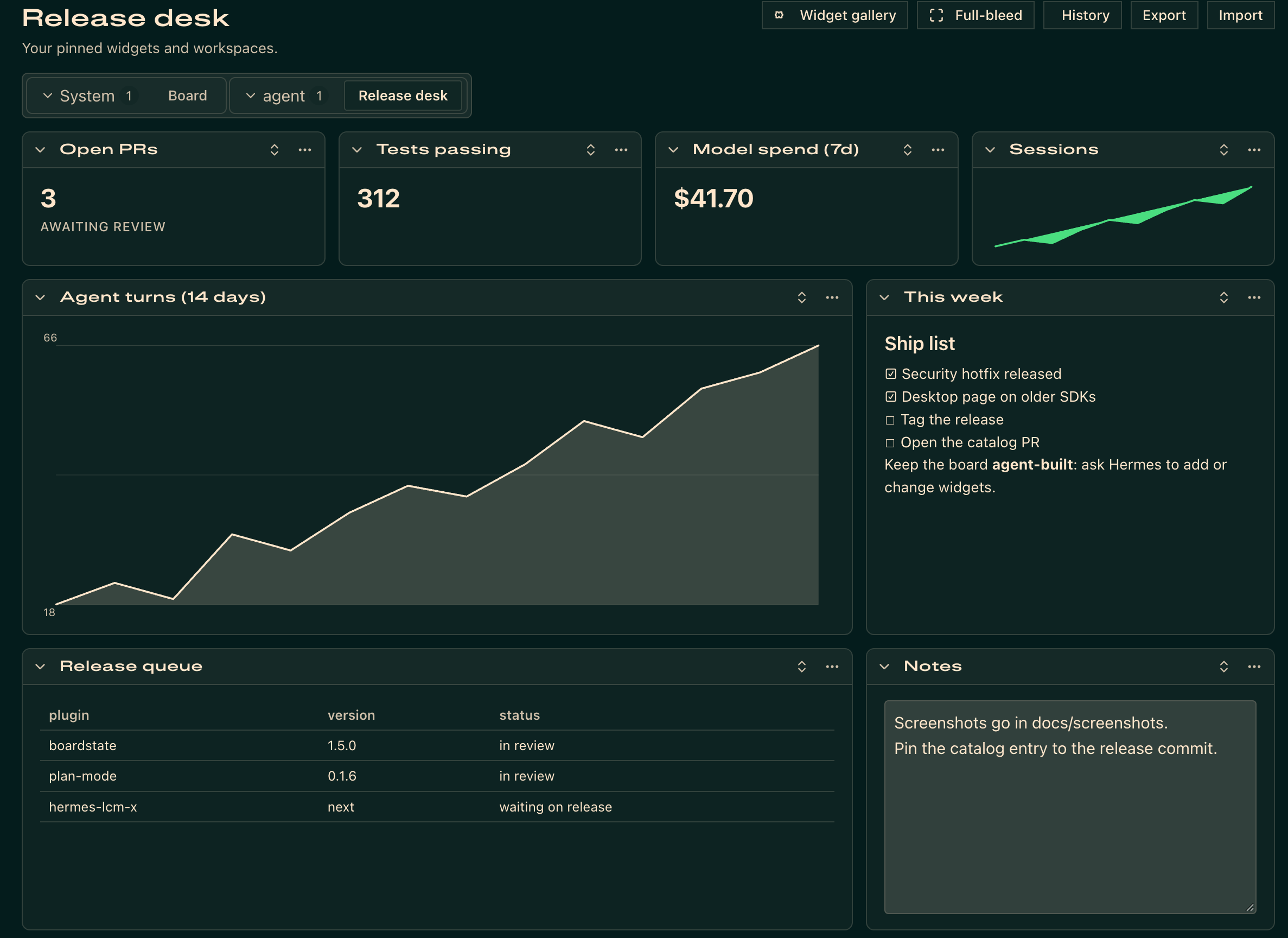
A board built by the agent through the native tools, in the Web Board tab:
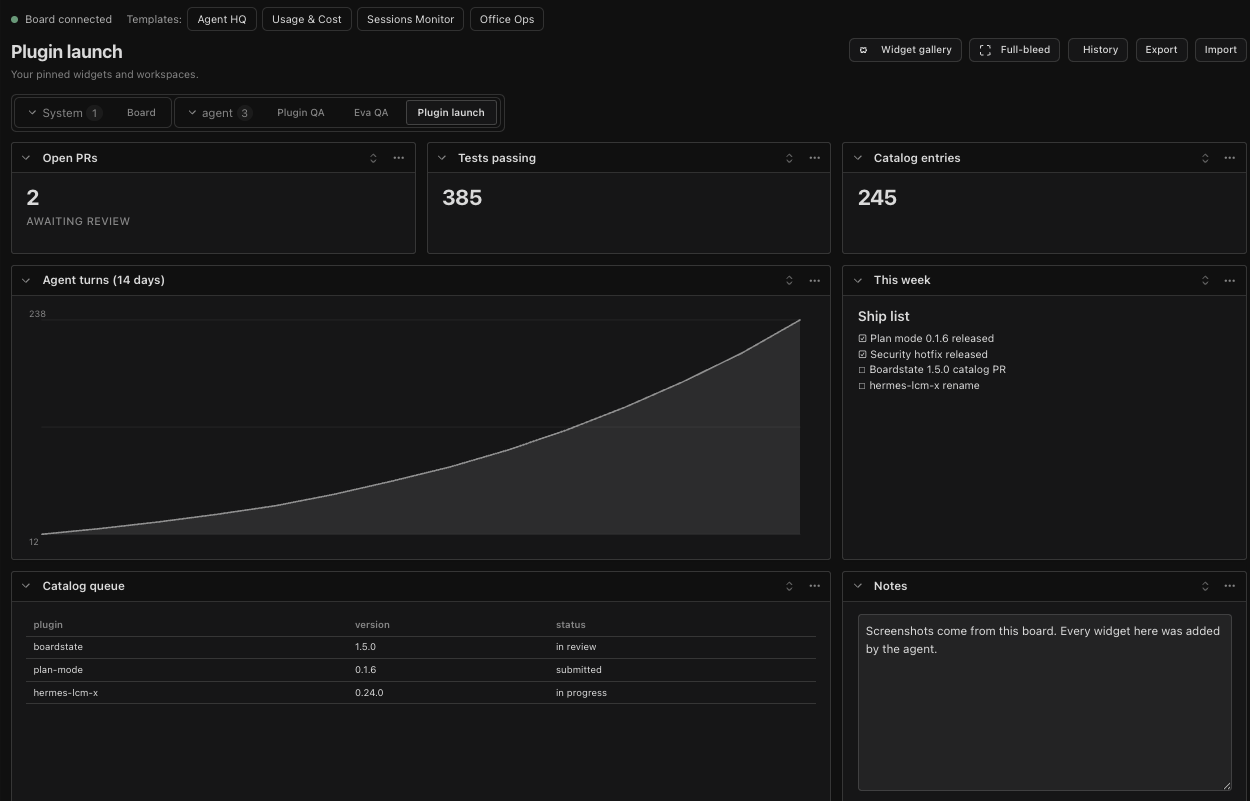
The same kind of board on the Board page in Hermes Desktop:
Troubleshooting and reporting a bug
Boardstate has no agent-callable diagnostics tool yet. Collect recent logs withhermes logs gui -n 300 | grep -i boardstate (dashboard), hermes logs desktop -n 300 | grep -i boardstate (Desktop), orhermes logs -n 300 | grep -i boardstate (agent tools); remove tokens, credentials, private data, and local paths.
In a browser tab where you are already signed in to your local Hermes dashboard, open /api/plugins/boardstate/health and check the browser console.
The probe reports ok, sidecar_running, sidecar_port, state_dir, and bundle_present; leave state_dir out of the report. Don't copy session tokens or call the endpoint or the gateway by hand with credentials.
From the next release, ask your Hermes agent to "report a problem with Boardstate"; review its draft before filing.
Use the bug report form.
Report security problems through a private advisory.
License
MIT — see LICENSE.
Reviews (0)
Sign in to leave a review.
Leave a reviewNo results found