hermes-teammates
Health Gecti
- License — License: MIT
- Description — Repository has a description
- Active repo — Last push 0 days ago
- Community trust — 59 GitHub stars
Code Gecti
- Code scan — Scanned 12 files during light audit, no dangerous patterns found
Permissions Gecti
- Permissions — No dangerous permissions requested
Bu listing icin henuz AI raporu yok.
Give your Hermes agent a fixed team: named teammates with roles, follow-ups that keep context, and a Kanban review lane.
Hermes Teammates
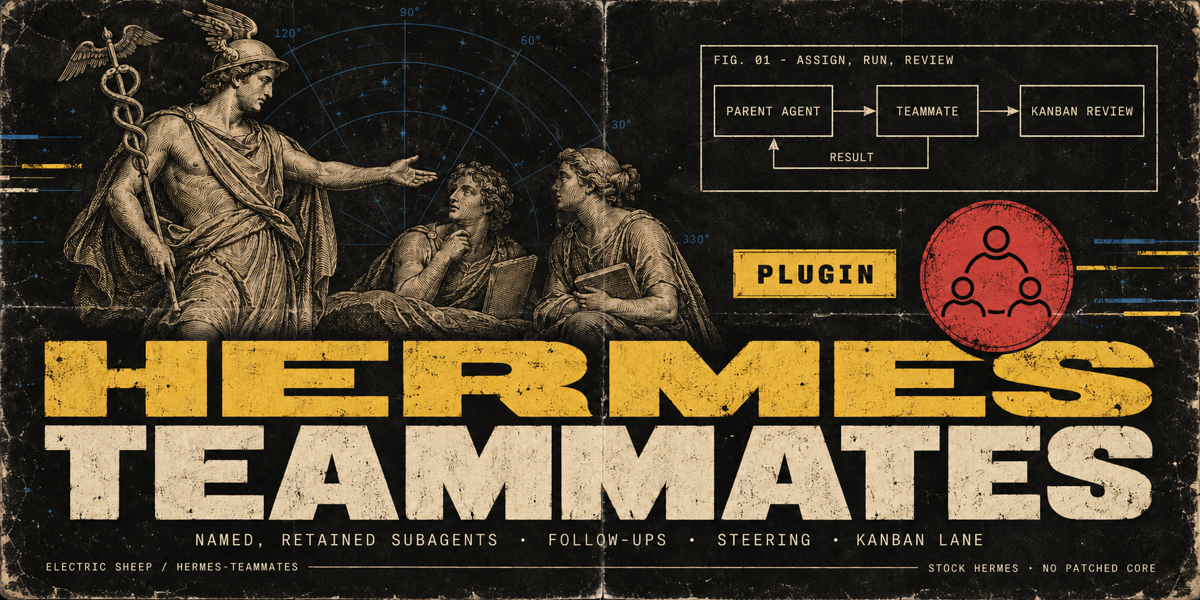
Give your Hermes agent a fixed team: named teammates with roles, follow-ups that keep context, and a Kanban review lane.



Install
hermes plugins install 100yenadmin/hermes-teammates --enable
It needs Hermes Agent 0.21.4 or newer (tested on 0.23.0), with
plugins running in process, which is the default. There are no extra packages and no API keys to add: teammates use
your agent's own provider and credentials. Add a roster, then restart the gateway (or the CLI session) so the tools
register, and start a new chat.
Try it
- Add the three-teammate roster from the Quick start (a scout, a
writer and a reviewer) to your profile'sconfig.yaml, under theplugins:key the install created (keep itsenabledlist). Restart, then start a new chat. The chat needs Hermes'kanbantoolset, andwebfor the
scout's research (Hermes' web search works without a key on a fresh install). - Send one message: "We're launching a weekend coffee pop-up. Put three linked cards on the Kanban board for the
team…" (the full message is in the Quick start). - Watch the
teammateslane on Hermes Desktop's Kanban page, or withhermes kanban watch. Three linked cards
appear. Each one lands in Review, and the agent approves it and hands its result to the next teammate. The
agent's last reply says what each teammate did. On a fast model this takes about two minutes.
Contents: What it does · Compared with delegate_task ·
Screenshots · How it works · Quick start ·
Configure · Use · Compatibility · Benchmarks ·
Limits · How to test · Security ·
Troubleshooting and bugs · Releases and license
What it does
You define a small roster of named teammates, such as a scout, a writer and a reviewer. Each has its own
instructions, tools and, optionally, its own model. Your agent hands them work, checks on them, steers them mid-task
and follows up with what they did before. On Hermes' own Kanban board, they work linked cards one after another, and
each card a teammate finishes waits in Review for approval before the next one starts.
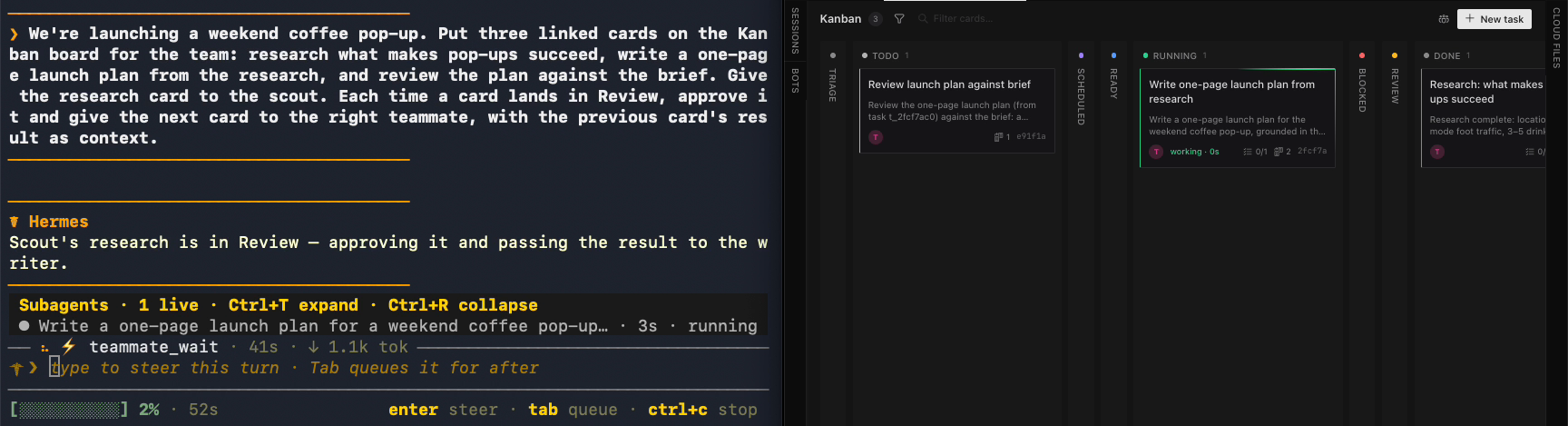
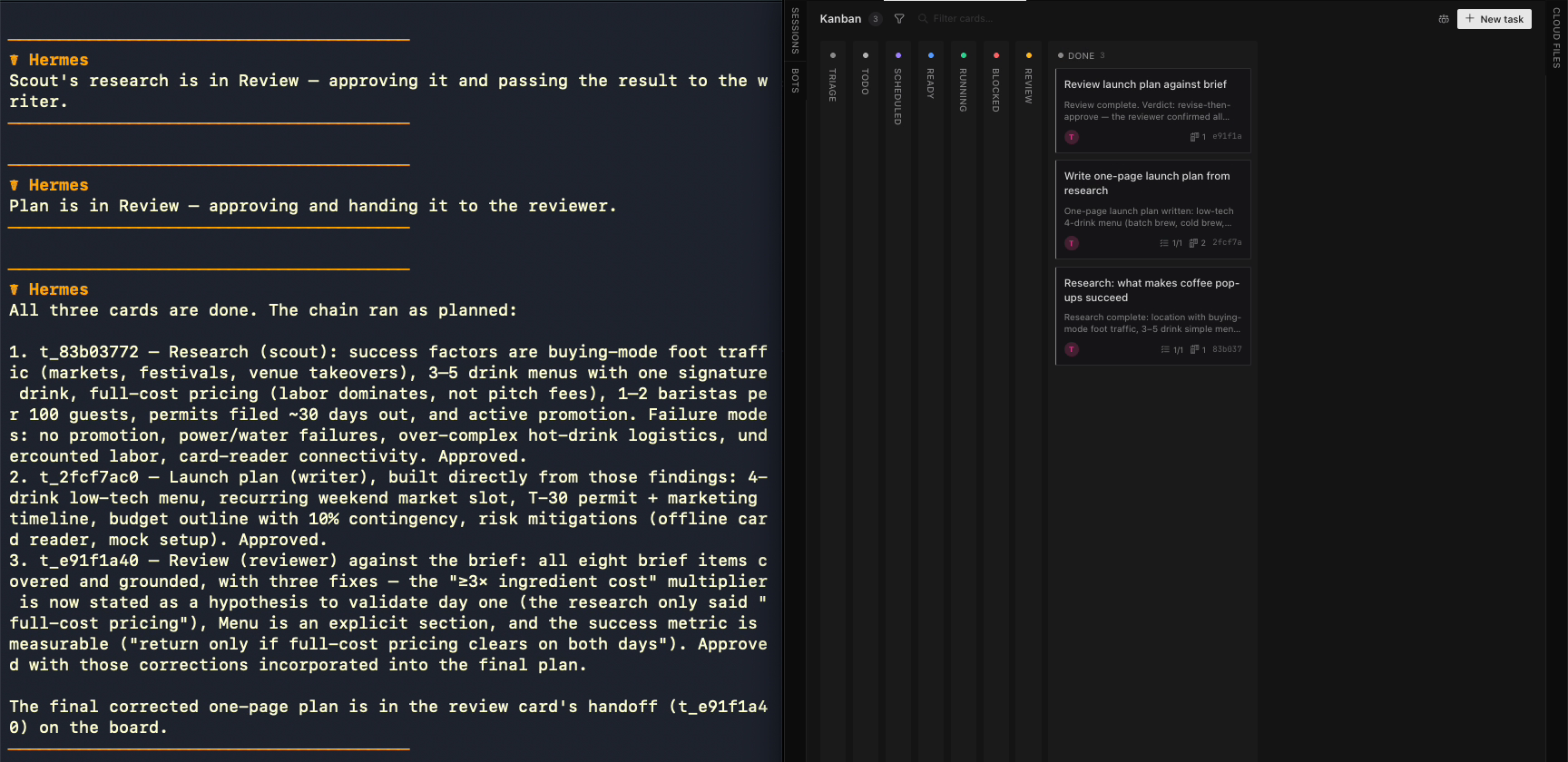
One message ran the chain above: research, a one-page plan from the research, then a review of the plan against the
brief. The agent gave each card to a teammate and waited for it. When the card landed in Review, the agent
approved it and handed the result to the next teammate. The reviewer, with its own brief and no web or file tools,
marked the plan "Revise" for a pricing claim the research didn't support. It took about 90 seconds, with no further
input.
What it adds to Hermes
- A roster the model can't change. The model picks only a teammate's name; your settings decide what that
name can do. A teammate's toolsets can only narrow the parent's tools, toolset by toolset, so a reviewer given
onlytodogets no web, file or terminal tools, whatever the prompt says. (Hermes can add inherited MCP toolsets
back unlessdelegation.inherit_mcp_toolsetsis false.) - A teammates lane on Hermes' Kanban board. Hermes hands board cards to whole Hermes profiles. This lane is
worked by your roster, inside one conversation. The plugin claims the card and keeps the claim alive while the
teammate works. It writes the result onto the card and moves the card to review; the plugin never completes
a card. An approval (kanban_complete) finishes it and unlocks the cards that depend on it;teammate_chaincreates a sequence in one call, and parent cards' results travel automatically. - Background runs with a memory. Teammates are real Hermes subagents started through the public plugin
subagent lifecycle API (ctx.subagent_lifecycle). The agent can wait for them, steer them or stop them. A
per-profile ledger records every run's goal, status and result across turns. A follow-up in the same conversation
carries a digest of that teammate's earlier results, so you don't paste them back in. - A review loop the agent drives. When a card in Review needs changes,
teammate_request_changesreopens it and
starts the teammate again with the feedback and its previous result. It also adds the feedback as a card comment
on a best-effort basis: if the comment can't be saved, the run still starts with the feedback and the reply sayscomment_saved: false. It works from any chat, and it never completes a card.teammate_assign(source_run_ids=[…])hands chosen earlier results to the next teammate: each run's stored summary
(up to 8,000 characters), quoted as is and marked if it had to be clipped to fit. The writer gets the scout's
research without the agent retyping it. - History the agent can search.
teammates_rosterfilters this conversation's runs by status, text or date,
pages through them, and shows each teammate's record: runs, failures and median time. The ledger keeps each
run's complete result, up to 256 KB of text, andteammate_checkreads it 8,000 characters at a time.
Stock Hermes; no patched core.
Teammates and Hermes' built-in delegate_task
Hermes already runs subagents in the background and lets the agent list, steer and stop them. Teammates keeps
that and changes who decides what a subagent is.
delegate_task (built in) |
Teammates | |
|---|---|---|
| The brief | The model writes the whole brief, goal and context, on every call | Each teammate's standing instructions live in settings; the model picks a name and gives the task's goal |
| Tools | Every child inherits the parent's toolsets, minus a block list | Each teammate has its own toolsets, narrowed from the parent's: a reviewer on todo gets no web, file or terminal tools (Hermes adds inherited MCP toolsets back unless delegation.inherit_mcp_toolsets is false) |
| Model | The same delegation model for every child | Optionally one per teammate |
| Record | action='list' shows live children; a result arrives once |
A SQLite ledger per profile keeps every run's goal, status and complete result (up to 262,144 characters, a 256 KB text cap) across turns and restarts; follow-ups carry a digest |
| Kanban | Board cards go to whole Hermes profiles | A teammates lane worked by your roster inside the chat; a finished card goes to review and a failed run blocks its card; the plugin never marks a card done |
Checked against Hermes 0.23.0 and main (tools/delegate_tool.py: children are spawned with toolsets=None,
"always inherit the parent's toolsets").
- For: people who want the same specialists every time, without rewriting the brief, with each teammate's work
handed to review and a durable record of what each teammate did. - Not for: DAG workflows with gates and fan-out. Use
hermes-workflows for those. Teammates is about who does the
work; workflows is about the shape of a long job.
Screenshots
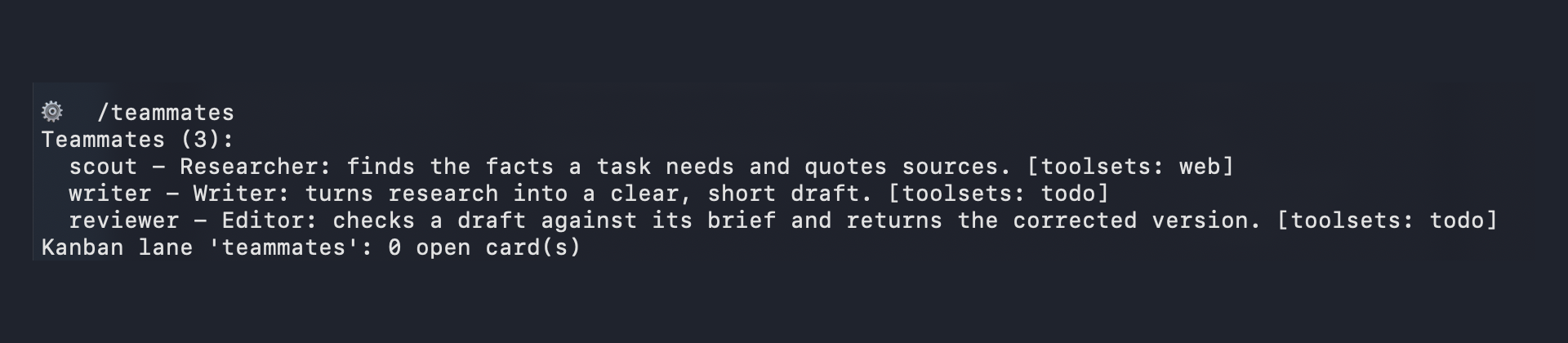
/teammates: the roster and the lane |
Two teammates in parallel, one working a Kanban card |
|---|---|
 |
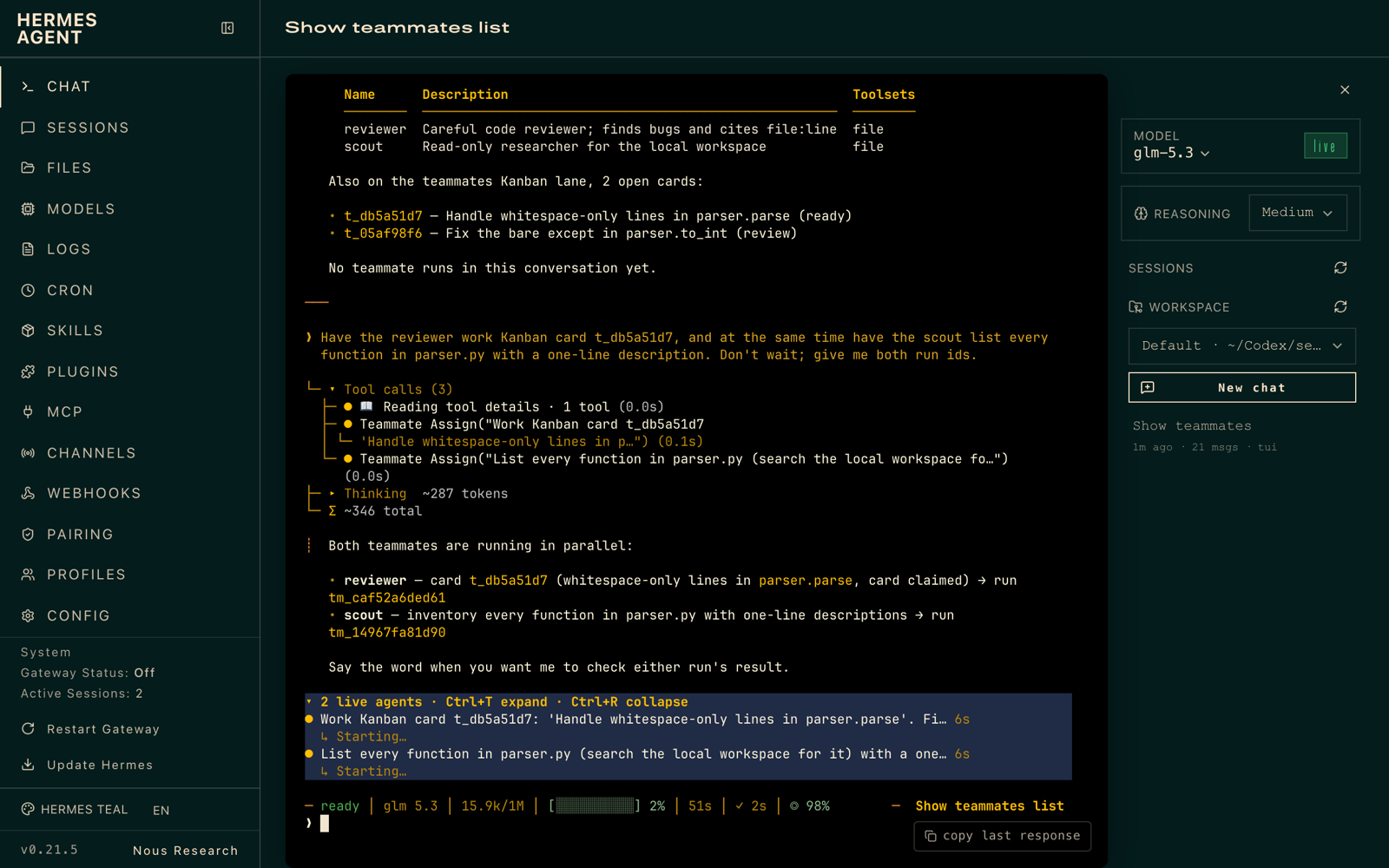 |
| Results; the card moved to review | /teammates in Hermes' dashboard |
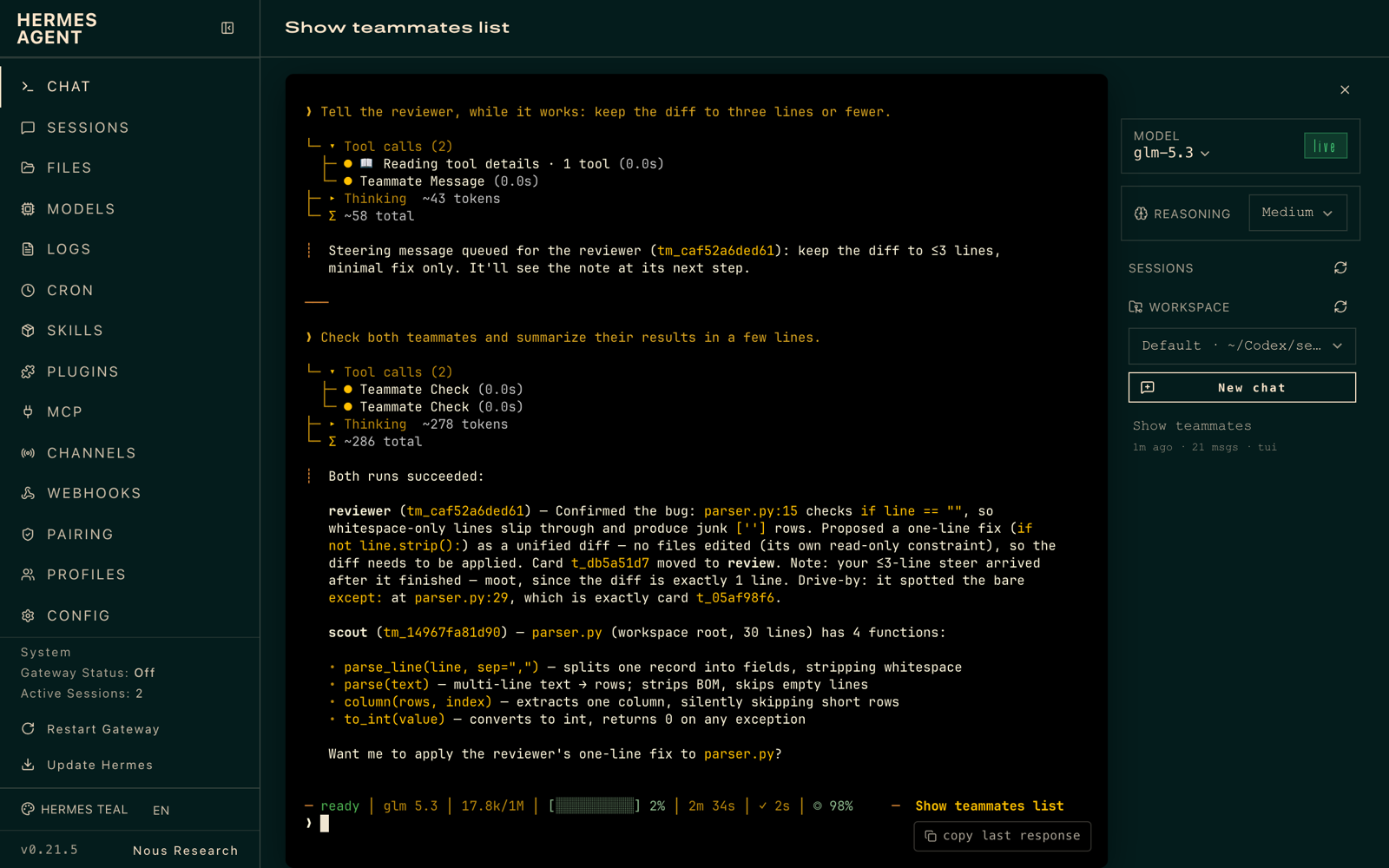 |
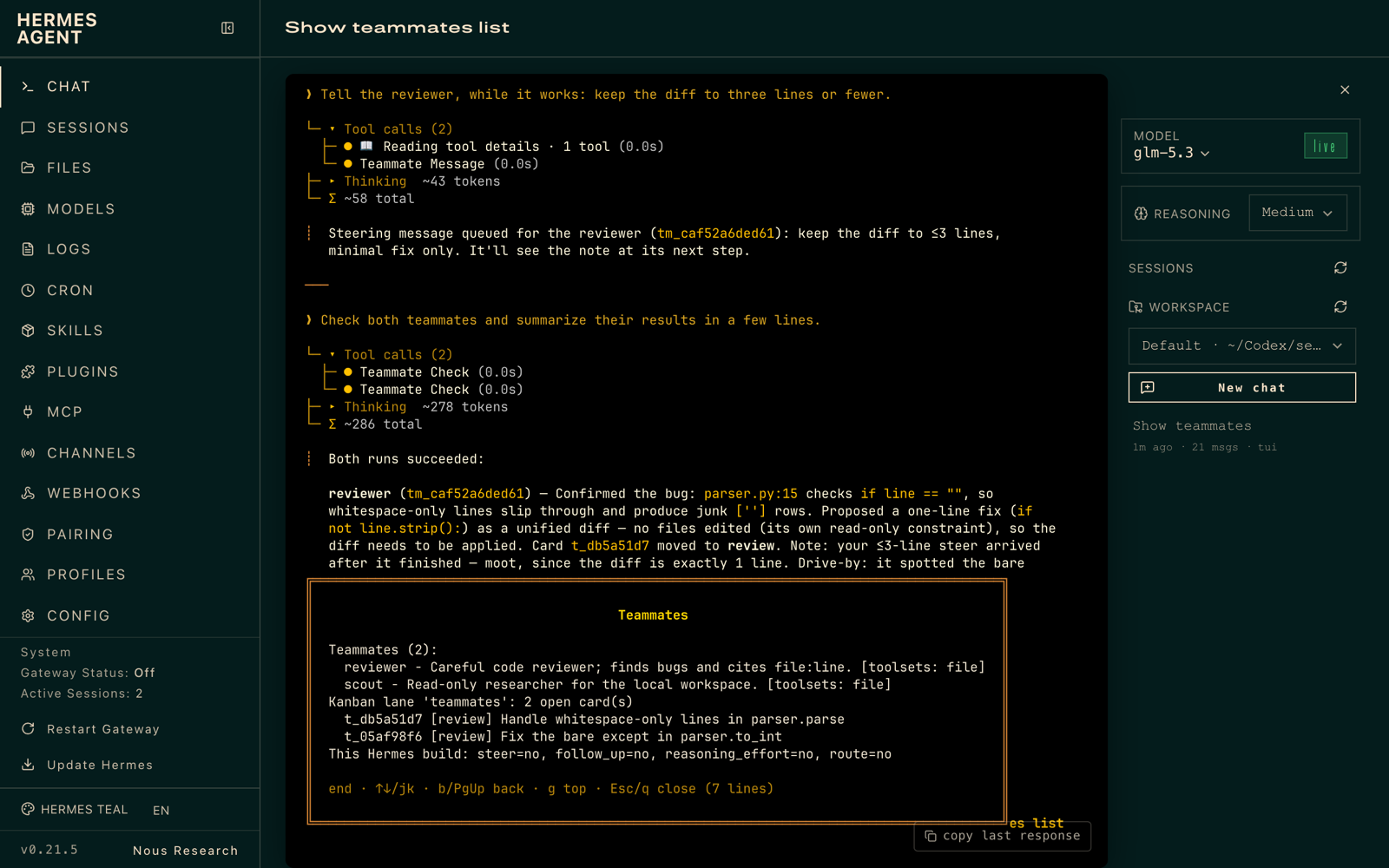 |
How it works
 you ──► parent agent ──teammate_assign──► teammate (Hermes subagent, your toolsets/model)
              ▲                                  │
              └──────────teammate_check◄─────────┘  result, provider/model, duration
              │
              └─teammate_assign(kanban_task)──► claim lane task ─► run ─► task moves to REVIEW
- You define teammates in config. The model only ever picks a teammate name; you decide what that name
means. teammate_assignlaunches a subagent throughctx.subagent_lifecycleand returns arun_idat once. The
teammate's instructions travel in its context. Its toolsets can only narrow the parent's, never widen them.teammate_checkreports status, or waits up to 60 s and returns the result. Every run is recorded in a
per-profile SQLite ledger (<HERMES_HOME>/plugin-data/hermes-teammates/data.db). Results of plain runs are
saved when the child finishes, even if you never callteammate_check. A result longer than 8,000 characters is
kept in full (up to 256 KB of text);teammate_check(run_id, offset=N)pages through it.follow_up: truegives the teammate a bounded digest of its earlier assignments in this conversation, so it
picks up where it left off.source_run_idshands over the stored summaries of finished runs from any teammate in this conversation, quoted as is and marked when clipped to fit the launch budget.
Withfollow_up=True, a source that is the same teammate's own earlier run also appears in the follow-up digest and uses budget twice; leave it out ofsource_run_idsin that case.teammate_messagesteers a running teammate. The text lands at its next step, without stopping it.teammate_stoprecords accepted stops; completions after the stop stay cancelled and block their Kanban card.
Refused cancellations leave completed work intact.- Kanban teammates lane. Create 1–8 linked cards with
teammate_chain, or assign cards to theteammateslane, which is not a Hermes profile, so the
dispatcher leaves them alone.teammate_assign(kanban_task=…)claims the card and keeps the claim alive while
the teammate works. Each finished parent card's result (what its teammate handed to Review, not the approval note) travels automatically with the card's title and body;
the agent no longer needs to pass those results as context. On success the card moves to review with the teammate's summary; on failure it is
blocked with the reason. To accept a card, approve it (kanban_complete). To ask for changes, the agent usesteammate_request_changes(kanban_task=…, feedback=…): it reopens the card, records the feedback as a comment and
starts a teammate again with the feedback and previous result as context; it never completes a card. It works from any chat: for a card another conversation worked, it takes the teammate and the last result from the card itself. The manual route remainshermes kanban reopen-review <card> --reason "what to change", followed byteammate_assignwith that context.
(Hermes'kanban_request_changestool only returns an active review run to its implementer, and a lane card in
review has none.)
Lane cards keep the lane as their assignee; theteammateargument picks who works each one. So that agents
set cards up this way from the start, each new session's prompt carries one short paragraph saying so (on
Hermes builds with plugin prompt sections; it is left out while the roster has no usable teammate). One request
can run a chain of linked cards hands-off, in any chat: the agent gives a card to a teammate, waits for it withteammate_wait, approves the card, and gives the next card to the next teammate, all in one turn. Hermes can
also wake the chat that created a card when that card reaches review. Messaging chats get this from Hermes
0.21.6, and Hermes Desktop and CLI chats from 0.22.6. TUI chats don't get it. Cards made withhermes kanban create, or whilekanban.auto_subscribe_on_createisfalse, get no automatic subscription, so they wake a
chat only if you subscribe it yourself (seehermes kanban notify-subscribe --help). A wake for a card the agent
already approved is only a late notice. Settingkanban.auto_subscribe_on_create: falsestops these notices for new cards,
and also their automatic completion and block notices; subscribe explicitly if you still want those. It only
stops new automatic subscriptions: cards made from a subscribed card still inherit its subscription, and existing
ones stay untilhermes kanban notify-unsubscriberemoves them.
Quick start: the team from the screenshots
This is the roster behind the screenshots above. Merge it into the profile's config.yaml: the install already
added a plugins: key with an enabled list, so put entries: under that key rather than adding a secondplugins:. In Hermes Desktop, the same three entries go in the Teammates setting as JSON (see
Configure).
plugins:
  entries:
    hermes-teammates:
      settings:
        teammates:
          scout:
            description: "Researcher: finds the facts a task needs and quotes sources."
            instructions: "Find the facts asked for with at most three web searches, then stop searching and answer from what you found. Quote your sources. Keep it under 150 words."
            toolsets: [web]
          writer:
            description: "Writer: turns research into a clear, short draft."
            instructions: "Write the requested piece from the material you are given. Plain words, short sections, under 200 words. Reply with the piece itself; don't create files."
            toolsets: [todo]
          reviewer:
            description: "Editor: checks a draft against its brief and returns the corrected version."
            instructions: "Check the draft you are given against its brief and research. Answer in one final reply, text only. Line 1: a one-line verdict that names the problems you found. Then those problems (at most 3, one line each), then the corrected version in under 200 words. Don't call tools or create files."
            toolsets: [todo]
The writer and the reviewer get only todo, so they have no web, file or terminal tools. If the profile has MCP
servers, also set delegation.inherit_mcp_toolsets: false, or Hermes adds their tools back. The chat needs
Hermes' kanban toolset so the agent can create and approve cards, and web so the scout can search. Restart and
start a new chat after adding the roster: the lane paragraph goes into new session prompts only while the roster has
a usable teammate.
Then send one message:
We're launching a weekend coffee pop-up. Put three linked cards on the Kanban board for the team: research what
makes pop-ups succeed, write a one-page launch plan from the research, and review the plan against the brief.
Give the research card to the scout. Each time a card lands in Review, approve it and give the next card to the
right teammate, with the previous card's result as context.
The agent may now use teammate_chain to create those linked cards in one call; parent results travel automatically.
You should see three linked cards in the teammates lane. Each lands in Review; the agent approves it and gives
the next card to the next teammate. The agent's last reply sums up what each teammate did. On a fast model the
chain takes about two minutes: our daily check finished all three cards in 131 seconds with no errors. Watch it on
Hermes Desktop's Kanban page or with hermes kanban watch. The approvals come from your message: without "approve
it", each finished card waits in Review for you.
Configure
In Hermes Desktop (0.21.5 or newer), open the plugin's settings. On current builds they are under
Settings ▸ Plugins; on 0.21.5 they open inline from the plugin's row under Capabilities ▸ Plugins.
| Setting | What it does | Valid values (invalid teammates are refused; other settings fall back to defaults) |
|---|---|---|
| Teammates | Your roster, as a JSON object (example below) | Names: up to 32 characters, starting with a lowercase letter, then lowercase letters, digits, - or _ |
| Kanban lane | Kanban assignee for teammate cards | Any name that is not a Hermes profile, none, null or -; case and surrounding spaces are ignored; default teammates |
| Kanban claim TTL (seconds) | How long a claim on a lane card lasts between heartbeats | 60–86400; default 900 |
| Max live runs per conversation | Teammate runs one conversation may have in flight | 1–16; default 4 |
| Follow-up context budget (characters) | How much of earlier results a follow-up carries | 0–24000; default 8000 |
The Teammates field takes JSON like this:
{
  "reviewer": {
    "description": "Careful code reviewer; finds regressions and cites file:line.",
    "instructions": "Review the change you are given. Report findings with file:line and a fix.",
    "toolsets": ["file", "terminal"]
  },
  "scout": {
    "description": "Fast web researcher.",
    "instructions": "Find the facts asked for. Quote sources.",
    "toolsets": ["web"]
  }
}
Each teammate takes description, instructions and toolsets, plus optional model, route andreasoning_effort (see Compatibility). The form checks types, not ranges. A value it accepts but
the plugin can't use is listed under Config problems in /teammates. Invalid teammates refuse launch:
unknown keys, wrong field types, and empty or invalid toolsets fail closed. Absent or null toolsets inherit.
Long descriptions (over 300 characters) and instructions (over 4,000) are clipped with warnings and remain launchable;
toolset names are trimmed. model, route and reasoning_effort over 100 characters, more than 24 toolsets, or a
toolset name that is not 1–48 printable ASCII characters without spaces make the teammate invalid.
Launch context reserves operator instructions, then card text (up to 6,000 characters), the follow-up digest,
handed-over results, and caller context, within 30,000 characters. Clipped parts show [… N characters omitted]; instructions stay intact.
With the CLI, headless, or on Hermes 0.21.4, put the same settings in config.yaml:
plugins:
  entries:
    hermes-teammates:
      settings:
        teammates:
          reviewer:
            description: "Careful code reviewer; finds regressions and cites file:line."
            instructions: "Review the change you are given. Report findings with file:line and a fix."
            toolsets: [file, terminal]
          scout:
            description: "Fast web researcher."
            instructions: "Find the facts asked for. Quote sources."
            toolsets: [web]
            model: null            # same provider as the parent; see Compatibility
        lane: teammates            # Kanban assignee for the teammates lane (must not be a profile name)
        max_live_runs: 4           # per conversation
        followup_context_chars: 8000
        claim_ttl_seconds: 900
Settings are read on every call, so edits apply without a restart. The one exception is the list of teammate
names in the teammate_assign tool description, which is fixed at startup. A teammate you add later works by
name right away, and teammates_roster always shows the current list; restart to refresh the description.
Roster file
To keep the roster out of config.yaml, put it in its own YAML file and point roster_file at it:
plugins:
  entries:
    hermes-teammates:
      settings:
        roster_file: teammates.yaml   # relative to this profile's Hermes home, or an absolute path
The file holds one top-level teammates mapping, written exactly like the setting (see teammates.example.yaml),
and replaces the teammates setting while roster_file is set. Every other setting stays in config.yaml. Each
teammate is validated as usual. A missing, unreadable or invalid file gives an empty roster and a config problem,
never a failed call. /teammates and teammates_roster show which file the roster came from. The file is read on
every call, like the other settings. Several profiles can share one roster by pointing at the same absolute path.roster_file is an operator setting: no tool argument can change it. Leave it unset to keep the roster inconfig.yaml.
Use
Ask in plain language:
Have the reviewer check the diff in
src/parser.py, and the scout find how other projects handle BOM-prefixed
CSV. Report back when both are done.
| Tool | What it does |
|---|---|
teammates_roster |
Lists teammates and their current role_hash, recent runs, open lane cards and host features; optional teammate explains one definition |
teammate_assign |
Starts a run: teammate, goal, optional context, follow_up, source_run_ids (1–8 finished runs in this conversation), kanban_task, wait_seconds (0–300, default 0). With kanban_task, goal may be left out: the card's title is used |
teammate_request_changes |
Sends a lane card in Review back for changes: kanban_task, feedback (up to 4,000 characters), optional teammate (default: whoever worked it last) and wait_seconds (0–300, default 0). Reopens the card, adds the feedback as a comment and starts a new run on it. It never completes a card |
teammate_chain |
Creates 1–8 linked lane cards from steps (title, teammate, optional body); optional start (default false) starts the first, with wait_seconds (integer 0–300, default 0). Each teammate receives its parent cards' results. Approve each card with kanban_complete |
teammate_check |
Shows status (including queued), result, api_calls and duration_seconds, or waits (wait_seconds ≤ 60); optional offset (integer ≥ 0) pages the result in 8,000-character chunks |
teammate_wait |
Waits for any or all of 1–16 unique run IDs in this conversation; returns done, pending, and timed_out |
teammate_message |
Steers a running teammate |
teammate_stop |
Cancels a run |
Use teammate_assign(wait_seconds=...) when you need one result now; use teammate_wait for several runs or when you have work to do meanwhile.
These tools include relay guidance with finished summaries: preserve specialist findings, citations and verdict
verbatim when reporting them, and keep the parent's commentary separate.
/teammates prints the roster in any chat surface.
queued means Hermes has accepted the child and is waiting to start it. Queued runs still count toward the
live-run cap.
Hermes tool search
On the inspected Hermes compatibility pin
and main revision,tools.tool_search.enabled: auto defers plugin tools whenever any are available. The default 5% threshold_pct
limits the catalog listing, not activation. Neither defer: [] nor a smaller schema keeps teammate tools direct.
There is no supported selective opt-out at these revisions; upstream request.
teammate_assign, teammate_request_changes, teammate_chain, teammate_wait, teammate_check and teammates_roster include short catalog hints and
schema examples for the bridge. If the tool is deferred, use tool_search to find its name, thentool_describe for its parameters, then tool_call to invoke it. Skip search when the catalog already shows
the exact name. Describing a tool does not make it directly callable. For example, after describing the roster:
{"calls":[{"name":"teammates_roster","arguments":{}}]}
Send that object to tool_call. Use one entry per teammate invocation, with an arguments object and the
actual tool name (never tool_call itself). When the tool is directly listed, invoke it normally.
If your model struggles with the bridge, merge this into the active profile's config.yaml at the top level,
alongside plugins, preserving other tools settings, then start a new CLI session or restart the gateway:
tools:
  tool_search:
    enabled: "off"
This makes all enabled local plugin/MCP and otherwise-deferred core tools direct, including process_manage;
it cannot select only teammates. More full schemas occupy the parent's context on every request, especially
with many MCP tools. Restore enabled: auto and restart to return to deferred discovery.
Setting tools.tool_search.enabled: "off" also removes discovery of hosted connector tools (connectors__*, such as Gmail, Calendar or Linear) on both inspected Hermes revisions, so keep auto if you use Hermes connectors.
In the exploratory Slice 3 comparison, C-eager (global deferral off) used 0.70× parent tokens and 1.30 fewer
parent calls per request than C (deferral on), across 60 requests per arm. This compared configuration packages,
including process_manage visibility; it did not isolate teammate deferral or these new hints.
Quality/success non-inferiority remains UNRESOLVED. See #56
and the slice 3 report (the C-eager vs C contrast in its notes).
No new model run or cost claim is made by this change.
Results and receipts
Finished runs report these fields through teammate_assign(wait_seconds=...), teammate_check, teammate_wait and the roster's recent runs:
| Field | Meaning |
|---|---|
summary |
Teammate result text within the existing budget; JSON decoding preserves newlines, quotes and non-ASCII text |
relay_instruction |
Guidance to relay findings, citations and verdict verbatim; present on finished assign/wait/check rows with nonempty summaries, with an explicit warning when clipped; the roster includes it once at the top level |
summary_clipped |
True when original summary content was cut, even if a stop note adds text afterward |
summary_chars |
Original summary length before ledger/public clipping; null for old rows or no summary |
role_hash |
First 12 SHA-256 hex characters of the canonical JSON of the parsed teammate definition used at launch; null for old rows |
api_calls, duration_seconds |
Lifecycle request count and duration in seconds; null when unavailable |
tokens_input, tokens_output |
Accumulated input and output token buckets from the child's API hooks |
tokens_cache_read, tokens_cache_write, tokens_reasoning |
Accumulated cache and reasoning token buckets, when supplied |
Summaries retain at most 8,000 characters in the ledger; the roster returns at most 300 per run.
When a summary is clipped, the ledger also keeps the complete original result up to 262,144 characters
(256 KB of text; Unicode can take more bytes). teammate_check adds full_result_chars when this text exists.
Pass offset=0, then each returned next_offset, to read result_page in 8,000-character chunks.
Pages include result_offset, full_result_chars (retained length), and full_result_truncated (true if the cap cut text);next_offset is null at the end, including offsets past the end. Without a full result, paging reads the stored summary.
For old rows,summary_clipped only detects clipping of the stored text because the original length is unknown.
The roster's current role_hash can differ from a run's hash after you edit the definition.
Run rows omit error when it is null; actual tool errors retain error and ok: false.
Replies remain valid JSON with additive guidance; they do not append a second, unescaped copy of the summary.
If summary_clipped is true, describe the summary as incomplete and page the rest with teammate_check offset;
do not infer missing findings or a verdict. Results beyond the cap and text clipped before this upgrade cannot be recovered.
The roster's short previews follow the same rule; one top-level instruction points to teammate_check for the full retained text.
Follow-up digests preserve result text within their configured budget, tell the teammate to continue from prior results and label results
already clipped in the ledger as incomplete. Further digest clipping keeps its characters-omitted marker.
Kanban review handoffs retain their 4,000-character summary budget and add summary_chars, summary_clipped
and relay_instruction to the existing hermes_teammates metadata. These instructions guide the parent;
they do not guarantee that a model relays a result faithfully.
Token receipts require both subagent_start and post_api_request hooks and in-process plugins; the roster
reports token_receipts support. Only mapped child sessions contribute, never the parent's own requests or
unmapped children. Counts are in-process only: unfinished accumulators do not survive reloads or restarts.
Missing, invalid or overflowing buckets are null; completed receipts stay in the ledger. The map holds at
most 1,024 sessions, so evicted sessions cannot supply complete receipts. Hermes does not expose cost to plugins.
teammates_roster(teammate="reviewer") returns only that teammate and its parsed definition, currentrole_hash, launch_toolsets (or inherits parent), route support in features, ignored fields inunsupported, and read-only global delegation values: inherit_mcp_toolsets, worktree_isolation andchild_timeout_seconds. Unset values use Hermes's defaults; delegation_sources marks each value asconfig, managed, default or unknown. Unavailable values are unknown; an unknown name returns unknown_teammate.
The reply stays within 16,000 characters, measured as JSON with non-ASCII text left unescaped. If an explained
definition would not fit, its instructions are shortened and instructions_clipped is true.
When a list is cut short, the reply says how many entries it left out: runs_omitted for recent runs andlane.cards_omitted for open lane cards. lane.cards_waiting counts every lane card in todo, whether it waits on
parent cards or was set to todo another way; the rendered roster calls these cards "not ready yet".
Filter or page this conversation's runs with status, search, since, limit and offset.status accepts running, succeeded, failed, interrupted, cancelled or unknown; search is a
case-insensitive literal substring (1–200 characters) in goal, summary or error, including literal % and _.since is inclusive unix seconds. limit is 1–50 (default 20), and offset is 0–10000 (default 0).
Combine them with teammate, for example teammates_roster(teammate="reviewer", status="failed", limit=5, offset=5).runs_total counts matching rows when status, search, since or offset is given, or runs are omitted;runs_omitted counts matches remaining after the offset and returned page. Invalid values return invalid_roster.
Run previews stay at 300 characters; use teammate_check for full retained text.
Teammates with runs in this conversation also have stats: runs, succeeded, failed (including interrupted
and unknown), cancelled, median_duration_seconds (ignoring missing durations, or null if none), andlast_run_at (unix seconds). Stats cover this conversation's history regardless of run filters or paging./teammates shows a compact stats suffix. Teammates without runs have no stats key; stats are dropped before
teammate entries if needed to keep the reply within 16,000 characters, and stats_omitted then counts the
teammates whose stats were dropped. Explicit null for a filter argument means "not given".
teammate_wait(run_ids, mode="any", wait_seconds=30) returns as soon as any requested run ends;
use mode="all" for fan-in. The wait is bounded to 0–300 seconds (default 30). Unknown or cross-conversation IDs
return unknown_run before waiting. Finished rows omit goal and share a summary budget: per-run budget ismax(1000, 24000 // number_of_done_runs). summary_clipped reports any cut; teammate_check keeps its full
goal and 8,000-character summary budget. Before it replies, wait makes one attempt to hand each finished Kanban
lane card to review, so its reply usually already shows kanban_outcome. It waits for that only until its own
deadline (at most 5 s) or a Hermes interrupt, and a slow board finishes it in the background. A null outcome means
the handoff hasn't landed yet: check the run before approving its card. Retries stay with the monitor andteammate_check.
Hermes interrupts (/stop or a new user message) end a wait promptly, returning interrupted: true andtimed_out: false with the current finished and pending runs; the teammates keep running. Replies omitinterrupted otherwise. Hermes's default tool-call timeout (tools.sequential_call) is 420 seconds;
if you lowered it, keep wait_seconds below your timeout. teammate_check remains bounded to 0–60 seconds.
Completion notices (not available yet)
Notices that tell the parent when a run ends are built, but no current Hermes build can deliver them safely. Hermes can't
yet confirm which conversation would receive an injected message. In the CLI it goes to whatever session is open, and in the
gateway a chat keeps the same routing key after /new. A notice could land in the wrong conversation, so the plugin never
injects one; the roster reports push_completion as unsupported with the reason. Use teammate_wait instead.
Session-bound injection is requested upstream in
NousResearch/hermes-agent#133212.
Once Hermes has it, a plugin update can enable notices behind notify_on_completion (off by default; outside the CLI
also the operator's allow_gateway_injection). A notice contains only the teammate name, run ID and status, never child
output, goals or child error text. Runs already read with check/wait or stopped by the parent get no notice.
Compatibility
- Requires Hermes 0.21.4 or newer. CI runs against a pinned upstream commit and against
main. - Runs with
plugins.isolation: in_process(the default). Underplugins.isolation: host, every tool except the
roster answersunsupported_isolation. Hermes builds with NousResearch/hermes-agent#137167 can carry launches across
the plugin-host boundary. But calls made after a tool returns (run monitors) cannot yet resolve their parent
session, and the plugin cannot see the delegation depth or spawn pause from the host process. - Some features depend on the Hermes build. The plugin detects each one at call time and never quietly
substitutes something else:
| Teammate setting / feature | Needs in Hermes | When missing |
|---|---|---|
model |
any supported version | Must be served by the child's selected provider (normally inherited from the parent) |
delegation: config (provider, model, reasoning effort) |
provider and model: builds with #137167; reasoning effort: any supported version | Teammates use the parent's provider and model; delegation.reasoning_effort still applies to every teammate |
route (a configured Hermes provider name, such as openrouter) |
SubagentLaunchRequest.provider, in Hermes builds with NousResearch/hermes-agent#137167 (on Hermes main since 2026-10-12, first in the v0.21.7 canary of 2026-10-13, and in the 0.23.0 release) |
Listed in the run's unsupported field; the run uses the parent's provider. With support, a routed teammate does not use the delegation: provider settings (provider, model, base URL, API mode, request overrides); the global delegation.reasoning_effort still applies on any build (a per-teammate reasoning_effort is the separate row below). Always set model together with route. |
reasoning_effort |
SubagentLaunchRequest.reasoning_effort (upstream PR #89936) |
Listed in the run's unsupported field |
| steering | a lifecycle steer (Hermes builds with #137167); older builds fall back to delegate_task steer with the live parent |
teammate_message returns unsupported |
teammate_wait |
supported lifecycle and in-process plugin | Same isolation restrictions as check |
teammate_request_changes |
Kanban reopen_review_task |
Returns unsupported |
teammate_chain |
Hermes kanban_create through ctx.dispatch_tool |
Returns unsupported when dispatch is unavailable |
| push completion | public session-bound injection (unavailable on tested pinned/main); gateway also needs operator consent | Roster reports unsupported; results remain available via check/wait |
| follow-up on the same child | a lifecycle follow_up (proposed upstream) |
Follow-ups carry earlier results as context |
The upstream proposal is tracked in NousResearch/hermes-agent#133212.
Benchmarks
The first live slice ran one code-review task three ways on the same model (GLM glm-5.3, one Hermes build, 3 runs each):
A one agent alone, B core delegate_task fan-out to 4 helpers, C 4 teammates.
| Setup | Bugs found (of 8) | Parent tokens | Total tokens | Parent API calls | Wall time |
|---|---|---|---|---|---|
| A, one agent | 8 | 135k | 135k | 9 | 87 s |
B, delegate_task |
8 | 32k | 171k | 3.3 | 81 s |
| C, teammates (0.1.3) | 8 | 52k | 195k | 6.3 | 86 s |
All three setups found every planted bug, so this task cannot rank them on quality. It does show the cost shape: delegating cut the parent's cumulative token use 2.6–4.2× (its peak prompt about 1.6×), cost 26–44% more tokens in total, and was not faster here. Teammates made about twice
as many parent calls as delegate_task.
An audit of every recorded tool call found no run read the answer key. These are means of 3 runs, without significance tests.
Slice 2 re-measured this on 10 harder review cases × 2 runs, with teammates 0.2.2 and teammate_wait, against the
same delegate_task fan-out. Its declared verdict is INCONCLUSIVE: 4 of 40 runs broke the frozen recipe (3 delegate_task,
1 teammates). On the 36 valid runs both found 98% of the planted bugs. The teammates parent still used 1.76× the tokens
of the delegate_task parent (95% bounds 1.48–2.07) and made 3.2 more API calls per run: about 1.7 calls finding the
plugin's tools behind Hermes's tool search, and 2.3 waits, since a wait is capped at 60 s while helpers ran 150–200 s.
Fixes: a longer wait (#40) and directly listed plugin tools upstream (NousResearch/hermes-agent#135762). For a one-shot
fan-out, delegate_task is the cheaper choice today.
Slice 3 tested what teammates are for: one six-request session that needs three named specialists, a scout, a
reviewer and a tester. It ran on 10 cases, with teammates 0.2.5 against delegate_task with the same role rules in
AGENTS.md. The declared verdict is INCONCLUSIVE (quality unresolved):
- Rule-following: teammates were at least as good (+0.117; the lower bound sat exactly on the bar).
- Success: too close to call (−0.017, with bounds −0.083 to +0.050).
- Cost: unresolved: 1.04× the parent tokens (bounds 0.79–1.41) and 0.75 more calls per request (bounds −0.23 to +1.95).
Every reviewer specialist given a planted bug found it (teammates 9 of 9, delegate_task 10 of 10; one teammates review was never delegated). Teammates lost points in two places:
- Passing the answer on: the parent paraphrased the reviewer's finding instead of copying its finding line, in 20 of 20 reviews (
delegate_task: 19 of 20 copied). Twice that lost thefile:line. - Tool search: discovering the plugin's tools behind Hermes's tool search cost extra calls.
0.2.7 addresses both: results now carry a verbatim relay instruction, and the tools carry tool-search bridge hints.
Slice 3b was the planned re-measure of 0.2.7. It stopped before the scored run, at its calibration gate, because
each setup scored 12 of 12 on the two calibration cases (24 of 24 pooled), above the gate's 0.95 ceiling. By its pre-declared rule,
that makes it INCONCLUSIVE (design), with no tuning and no rerun. On those 24 calibration turns, both setups' parents kept the reviewer's file:line
in all 4 reviews. Only teammates' parents also kept the reviewer's exact finding line, 4 of 4 against 0 of 4; in slice 3 it was the other way round. That is
exploratory, two cases only, and not a measured claim.
What this means in practice:
Choose
delegate_taskfor a one-shot fan-out. It is built in, never sits behind tool search, and was cheaper
in slices 1 and 2. Since Hermes 0.22 it also runs in the background in chat sessions, brings results back
between turns, and can list, steer or stop running children.Add advanced-delegation
when all you need is fordelegate_taskto pick a named model, or to run a task as one of your Hermes profiles. That
official plugin adds model routes and profile routes todelegate_task; Hermes core still runs the subagent. It
needs Hermes 0.22.5 or newer.Choose teammates when the same specialists come back across a session or a project:
- you write each role's rules, toolsets and model once, in config, instead of in every brief;
- results are kept per run, with token receipts and a clipped flag;
- you can check or wait on a run by its id within a turn, send a follow-up that carries the earlier result, and
hand finished work to a Kanban review lane.
On that workload, slice 3 found teammates following the role rules at least as well as
delegate_task; success
and cost were unresolved. A quality or cost advantage is not established.
Full reports, method and per-run data: bench/results/slice1/REPORT.md,bench/results/slice2/REPORT.md,bench/results/slice3/REPORT.md andbench/results/slice3b/REPORT.md. The $0 mechanics benchmarks
(tests/bench_mechanics) run in CI on every change.
Limits (honest list)
- Follow-ups carry context, not the transcript. A follow-up starts a fresh subagent with a digest of earlier
results until Hermes exposes transcript-level follow-up to plugins. - Runs do not survive a restart. Hermes keeps subagents in-process. After a restart the ledger marks
unfinished runs from dead processesinterruptedon first plugin use across conversations; results are not
recovered or re-run. Plugin reloads within the same process preserve live runs. A lane card's claim expires through Kanban's normal TTL. - Runs belong to the conversation that started them. Another chat on the same profile cannot see, steer or
stop them. - Compression keeps runs;
/newand rotation do not. Hermes' default in-place compression (compression.in_place: true)
keeps the session id, so runs survive it. In rotation mode (in_place: false) and after/new, the conversation gets a new
session id and earlier runs answerunknown_run. A lane card is blocked when its monitor detects the lost handle; the child
may continue without a recoverable result. - Toolsets narrow, but they are Hermes toolsets.
fileincludes write tools, so a teammate withfilecan
edit files even if its instructions say not to. Pick toolsets for what the teammate may do, not what it should
do. By default Hermes adds the parent's MCP toolsets back to a teammate with narrowedtoolsets(delegation.inherit_mcp_toolsets: true); set it tofalsefor a strict intersection. - The plugin refuses nested teammates, checks Hermes's spawn-pause flag, and caps live runs per conversation.
- Hermes builds before #137167 cannot grant plugin toolsets (for example Spotify) to teammates; launch returns
launch_failed. Newer builds accept them.
How to test
hermes plugins validate --install-deps ./hermes-teammates
cd hermes-teammates && python -m pytest -q   # inside a Hermes venv
Manual walkthrough (5 minutes):
- Add the
reviewerteammate above, in the plugin settings orconfig.yaml. - Ask: "Show me my teammates." You should see the roster with
reviewerand a features table. - Ask: "Have the reviewer summarize README.md in three bullets." You get a
run_id, then the result viateammate_check. - Ask: "Follow up with the reviewer: which bullet is weakest?" The run starts with
follow_up: true. - Create a Kanban card assigned to
teammates, then ask: "Have the reviewer work Kanban task ." The card
goes running → review with the summary. - Hands-off chain, in any chat, with the
scoutfromteammates.example.yamladded too and thekanbantoolset enabled for that platform (next toteammates): ask
"Put three linked cards on the Kanban board, each assigned to the teammates lane: research X, write Y from the
research, review Y. Give the first card to the scout. Each time a card lands in review, approve it and give
the next card to the right teammate with the previous result as context." Each card goes
ready → running → review → done in turn, with no further prompts. On builds that wake the chat at review, late
notices for cards the agent already approved may follow; they need no action.
Security
See SECURITY.md. In short:
- Credentials come from Hermes: the parent's, or the operator-configured provider's when route is supported.
The model cannot choose credentials; teammates can only narrow toolsets. - The model picks names, never providers or models.
- The ledger stays local and per profile, retaining complete results up to 262,144 characters (256 KB of text) per run.
- The plugin makes no network calls of its own.
- It only claims Kanban cards assigned to its lane.
- It adds one short paragraph about the Kanban lane to new session prompts, rendered from its settings; no
conversation content goes into it.
Troubleshooting and reporting a bug
Use /teammates for the roster, or teammates_roster for config problems, host features and recent runs.
If the tools are missing on one platform (for example Telegram) while hermes plugins shows the plugin enabled, check that profile's platform_toolsets: when it holds an explicit list for that platform, teammates must be in it. Run hermes tools to add it.
Inspect an existing run with teammate_check (wait_seconds: 0) for status, summary, api_calls and duration_seconds.
For recent agent-log excerpts, use hermes logs -n 300 | grep -i teammate; remove secrets and private text before sharing.
Inspect existing runs first; ask before starting a new run or follow-up, because model calls cost money.
Or ask your Hermes agent to report a problem with Hermes Teammates (the bundled teammates-report-problem skill); it drafts the report and files nothing until you approve the draft. On Hermes versions that do not list plugin skills in the system prompt, name it: "load the skill hermes-teammates:teammates-report-problem".
Use the bug report form for reproducible problems.
Report toolset escapes, cross-profile access or leaked credentials through a private advisory.
Releases and license
- Releases and the CHANGELOG
- Contributing and the security policy
- MIT license. Maintained by @100yenadmin (Electric Sheep).
Yorumlar (0)
Yorum birakmak icin giris yap.
Yorum birakSonuc bulunamadi