boss-cli
Health Uyari
- No license — Repository has no license file
- Description — Repository has a description
- Active repo — Last push 0 days ago
- Low visibility — Only 8 GitHub stars
Code Uyari
- network request — Outbound network request in bosscli/client.py
Permissions Gecti
- Permissions — No dangerous permissions requested
Bu listing icin henuz AI raporu yok.
脱机搜 BOSS直聘 职位的 CLI / MCP 工具:Python 纯算复现 App 的 native 请求加签。
boss-cli
English | 中文
Search BOSS直聘 (com.hpbr.bosszhipin) jobs from your terminal or from an AI agent — off-device,
pure Python, no phone/emulator needed to run. It reproduces the app's native request signing
(libyzwg.so) in Python, so a plain HTTP request gets accepted by the server.
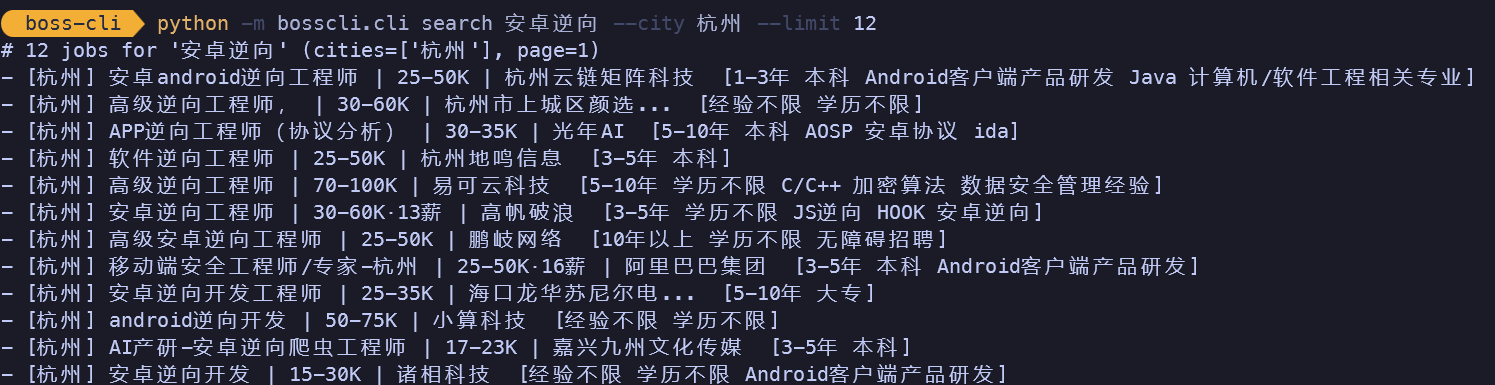
$ boss search "安卓逆向" --city 北京,上海,杭州
# 12 jobs for '安卓逆向' (cities=['北京', '上海', '杭州'], page=1)
- [北京] 资深Android逆向与风控对抗专家 | 70-100K·13薪 | PureblueAI
- [上海] 移动安全/逆向工程师 | 30-60K | ...
- [杭州] android逆向开发 | 50-75K | 小算科技
...
Research / educational project. It searches with your own logged-in account's token; you are
responsible for complying with BOSS直聘's Terms of Service. Don't hammer the API.
Features
- Off-device search — no phone, emulator, or unidbg at runtime; just Python + your session token.
- Multi-city in one call —
--city 北京,上海,杭州, by name or code. - Keyword filter —
--filter 远程/--filter 兼职keeps only matching jobs (title / labels / company). - Clean or JSON output — human-readable list, or
--jsonfor scripting. - MCP server — expose search as a tool (
boss_search) to Claude / any MCP client.
Install
pip install -r requirements.txt # lz4, requests (mcp only needed for the MCP server)
Get your session (one-time)
The client needs three things from a logged-in BOSS直聘 app on a device you control:
| field | where it comes from |
|---|---|
t2 |
the t2 request header — your login token |
client_info |
the client_info query param (a JSON blob: model / uniqid / did …) |
uniqid |
inside client_info |
Capture one GET https://api5.zhipin.com/api/batch/requests from the app with any HTTPS
interceptor (Reqable / Charles / mitmproxy; use a frida SSL-unpin script if the app pins), then copy
those values into session.local.json:
cp session.example.json session.local.json # then paste your t2 / client_info / uniqid / cardlist_defaults
session.local.json is gitignored (it holds your token). t2 expires — when searches start returninginvalid auth, grab a fresh t2 the same way.
Usage
# by city name or code, one or several
boss search "Python"                              # default city from your session
boss search "数据分析" --city 上海
boss search "安卓逆向" --city 北京,上海,杭州        # multi-city, results tagged [city]

# filter / paginate / cap
boss search "逆向" --city 北京,上海 --filter 远程   # only jobs mentioning 远程 (remote)
boss search "Golang" --page 2 --limit 20
boss search "算法" --json                          # parsed jobs as JSON

# run without installing (module form)
python -m bosscli.cli search "AIGC" --city 深圳
Options: --city (name/code, comma-separated) · --filter <text> · --page N · --sort -1 ·--limit N · --json · --token <t2> (override) · --session <path>.
City names built in: 全国 / 北京 / 上海 / 广州 / 深圳 / 杭州 / 成都 / 南京 / 武汉 / 西安 / 苏州 / 天津 / 长沙 / 重庆 / 郑州 / 厦门 (others: pass the raw code).
MCP server
BOSS_SESSION=./session.local.json python -m bosscli.mcp_server
Register it in your MCP client (e.g. ~/.claude.json); the tool isboss_search(query, city?, page?, sort?).
How it works (short version)
BOSS直聘's search goes through a batch endpoint whose params carry two anti-tamper values — sp
(an encrypted parameter blob) and sig (a signature) — both produced by the native librarylibyzwg.so. This project reproduces that library's signing/encryption in pure Python
(bosscli/yzwg.py), assembles the batch request (bosscli/signer.py), sends it and decrypts the
reply (bosscli/client.py). Correctness is pinned by byte-exact tests against real captures
(tests/). That's the whole trick: once the signing is reproduced, the search is just an HTTP call.
python tests/test_yzwg.py       # native crypto — byte-exact vs real-device captures
python tests/test_signer.py     # request assembly round-trip
Layout
bosscli/yzwg.py     signing / encryption primitives (pure Python)
bosscli/signer.py   batch-request assembly
bosscli/client.py   search: build → send → decrypt → parse
bosscli/cli.py      the `boss search ...` CLI
bosscli/mcp_server.py  MCP wrapper (tool: boss_search)
tests/              byte-exact regression tests + fixtures
session.example.json   template for your session
中文
English | 中文
在终端或 AI agent 里搜 BOSS直聘(com.hpbr.bosszhipin) 职位 —— 纯 Python、离设备,跑的时候不需要手机/模拟器。
它把 App 的 native 请求加签库(libyzwg.so)用 Python 复现了出来,所以一条普通 HTTP 请求就能被服务器接受。
$ boss search "安卓逆向" --city 北京,上海,杭州
# 12 jobs for '安卓逆向' (cities=['北京', '上海', '杭州'], page=1)
- [北京] 资深Android逆向与风控对抗专家 | 70-100K·13薪 | PureblueAI
- [杭州] android逆向开发 | 50-75K | 小算科技
...
研究 / 学习用途。它用的是你自己登录账号的 token 去搜;请自行遵守 BOSS直聘的服务条款,别高频打接口。
功能
- 离设备搜索 —— 运行时不需要手机 / 模拟器 / unidbg,只要 Python + 你的 session token。
- 一条命令多城市 ——
--city 北京,上海,杭州,支持城市名或城市码。 - 关键词筛选 ——
--filter 远程/--filter 兼职,只保留标题/标签/公司命中的岗位。 - 文本或 JSON 输出 —— 可读列表,或
--json供脚本消费。 - MCP 服务 —— 把搜索暴露成工具(
boss_search)给 Claude / 任意 MCP 客户端。
安装
pip install -r requirements.txt # lz4、requests(MCP 服务另需 mcp 包)
获取 session
客户端需要从一台已登录 BOSS直聘的设备上拿三个凭证:
| 字段 | 来源 |
|---|---|
t2 |
请求头里的 t2 —— 你的登录 token |
client_info |
query 参数 client_info(一段 JSON:机型 / uniqid / did …) |
uniqid |
在 client_info 里面 |
用任意 HTTPS 抓包工具
抓一条 App 发出的 GET https://api5.zhipin.com/api/batch/requests,把上面几个值填进 session.local.json:
cp session.example.json session.local.json # 再把你的 t2 / client_info / uniqid / cardlist_defaults 粘进去
t2 会过期 —— 搜索开始返回 invalid auth 时,照上面再抓一个新的即可。
用法
# 按城市名或城市码,单个或多个
boss search "Python"                              # 用 session 里的默认城市
boss search "数据分析" --city 上海
boss search "安卓逆向" --city 北京,上海,杭州        # 多城市,结果带 [城市] 标签

# 筛选 / 翻页 / 限量
boss search "逆向" --city 北京,上海 --filter 远程   # 只看提到“远程”的岗
boss search "Golang" --page 2 --limit 20
boss search "算法" --json                          # 解析后的职位 JSON

# 不安装、直接模块方式跑
python -m bosscli.cli search "AIGC" --city 深圳
参数:--city(城市名/码,逗号分隔)· --filter <文本> · --page N · --sort -1 ·--limit N · --json · --token <t2>(临时覆盖)· --session <路径>。
内置城市名:全国 / 北京 / 上海 / 广州 / 深圳 / 杭州 / 成都 / 南京 / 武汉 / 西安 / 苏州 / 天津 / 长沙 / 重庆 / 郑州 / 厦门(其它城市直接传城市码)。
MCP 服务
BOSS_SESSION=./session.local.json python -m bosscli.mcp_server
在 MCP 客户端里注册(如 ~/.claude.json);工具名 boss_search(query, city?, page?, sort?)。
原理
BOSS直聘的搜索走一个批量端点,参数里带两个防篡改值 —— sp(加密参数串)和 sig(签名),都由 native 库libyzwg.so 生成。本项目把这个库的加签/加密用纯 Python 复现(bosscli/yzwg.py),装配批量请求
(bosscli/signer.py)、发出去再解密响应(bosscli/client.py)。正确性靠对真实抓包的字节级测试兜底
(tests/)。核心就这一点:加签一旦复现出来,搜索就只是一次普通 HTTP 请求。
免责声明
仅供安全研究与学习交流。请勿用于任何违反 BOSS直聘服务条款或相关法律法规的用途;因使用本项目产生的一切后果由使用者自负。
Yorumlar (0)
Yorum birakmak icin giris yap.
Yorum birakSonuc bulunamadi