fauxnix
Health Gecti
- License — License: MIT
- Description — Repository has a description
- Active repo — Last push 0 days ago
- Community trust — 16 GitHub stars
Code Basarisiz
- process.env — Environment variable access in scripts/npm-child-env.mjs
- spawnSync — Synchronous process spawning in scripts/package-smoke.mjs
- process.env — Environment variable access in scripts/package-smoke.mjs
- spawnSync — Synchronous process spawning in scripts/release-check.mjs
Permissions Gecti
- Permissions — No dangerous permissions requested
Bu listing icin henuz AI raporu yok.
Run Linux-style commands on Windows via deterministic bash→PowerShell translation. No VM, no WSL. MCP server + CLI built for AI agents (Claude Code, Codex, OpenCode...). GNU-style output, bash-style errors, UTF-8/GBK handled.
fauxnix





Run Linux-style commands on Windows — natively, deterministically, with no VM and no WSL.
fauxnix is a bash→PowerShell translation layer built for AI agents. Your agent keeps writing the
bash it already knows (ls -la | grep foo, find . -name '*.ts' | wc -l, kill -9 1234), and
fauxnix deterministically translates each command into PowerShell, executes it natively, and hands
back output that looks like GNU/Linux: ls -l columns, bash-style error messages, coreutils exit
codes, UTF-8/GBK handled automatically.
npm install -g fauxnix-cli # then point any MCP harness at `fauxnix mcp`
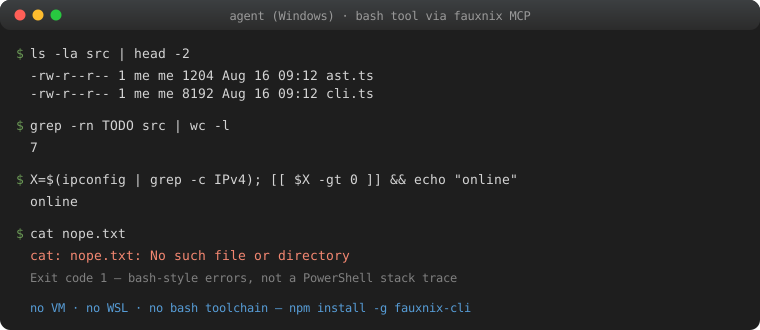
$ fauxnix "ls -la src | head -2"
-rw-r--r-- 1 me me 1204 Aug 16 09:12 ast.ts
-rw-r--r-- 1 me me 8192 Aug 16 09:12 cli.ts

$ fauxnix "cat nope.txt"
cat: nope.txt: No such file or directory        # not a PowerShell stack trace
Measured: your model is probably worse at PowerShell than you think
Same model (DeepSeek-V4-Pro), same 5 tasks, three execution modes on one Windows machine —
full data in docs/benchmark-deepseek-v4-pro.md and
[`docs/benchmark-ark-models.md](docs/benchmark-ark-models.md):
| PowerShell | fauxnix | Git Bash | |
|---|---|---|---|
| tool calls / unexpected errors | 14 / 9 | 7 / 0 | 4 / 0 |
| time (T1–T4) | 163s | 66s | 57s |
Across 7 models on the Volcano Ark Coding Plan, the PowerShell-vs-fauxnix gap held for every
model tested — worst case (kimi-k2-thinking): 3.1× slower with 24 error events writing
PowerShell vs zero errors through fauxnix. fauxnix lands within ~15% of the real-bash ceiling
with no bash toolchain installed.
Why
LLM agents are dramatically better at bash than at PowerShell — bash dominates training data, so
models on Windows often produce "looks right, doesn't run" commands (wrong quoting, curl that
isn't curl, mojibake from codepage mismatches, inscrutable CategoryInfo error dumps). Existing
solutions are either a full VM (WSL — heavy, wrong filesystem, separate environment) or plain
shell wrappers (still PowerShell underneath).
fauxnix takes the third road: translate, don't emulate. A large, high-value subset of the
Linux command line — file ops, text processing, process management, archives, networking basics —
maps cleanly onto PowerShell + .NET. fauxnix implements that subset faithfully and fails loudly
and helpfully on what it can't translate, so the agent never gets silently-wrong results.
Labs now train computer-use agents on fleets of real desktops. Reporting in 2026 (The
Information, widely repeated) has OpenAI buying tens of thousands of Mac mini / Mac Studio
boxes — no screen, no keyboard — to reinforcement-learn agents that click, edit, test, and
run bash workflows, and Anthropic renting Mac minis through AWS for the same class of work.
That scoring environment is macOS. Windows users should not have to install a guest Unix to
keep up: the agent keeps writing bash; fauxnix makes the Windows box answer like the box the
agent was trained on. See docs/rfc-computer-use-windows.md.
Install
npm install -g fauxnix-cli
Or from source:
git clone https://github.com/20000419/fauxnix && cd fauxnix
npm ci
npm install -g .
npm package name is
fauxnix-cli(thefauxnixname on npm belongs to an
unrelated 2015 websocket library); the installed command is stillfauxnix.
Requires: Windows with PowerShell 5.1+ (built-in) and Node.js ≥ 18.
Quick start
# one-off commands
fauxnix "ls -la"
fauxnix "grep -rn TODO src | wc -l"
fauxnix "cat log.txt | grep -i error | sort | uniq -c"

# see what a command becomes (great for debugging / learning PS)
fauxnix translate "find . -name '*.log' -mtime +7 -delete"

# check your environment
fauxnix check
fauxnix doctor                   # check + encoding, harness config, MCP

# write user-level MCP config (idempotent; also --codex/--opencode/--kimi/--qwen)
fauxnix install --claude

# run the MCP stdio server (what agent harnesses connect to)
fauxnix mcp
Unknown commands (git, node, npm, python, cargo, gh, docker, ...) are passed through natively
with argv-style quoting. Windows .cmd/.bat shims necessarily pass through cmd.exe; fauxnix
preserves its supported punctuation and fails loudly for %, embedded double quotes, NUL, and
line breaks rather than passing a different argument.
Use with your agent harness
fauxnix ships an MCP stdio server exposing a bash tool (plus fauxnix_translate andfauxnix_session). Point any MCP-capable harness at it withfauxnix install --claude (or --codex / --opencode / --kimi / --qwen).
Idempotent; prints what changed. Manual configs below.
- Quickstarts — copy-paste config + a 10-command smoke:
docs/examples/
Claude Code
claude mcp add fauxnix -- fauxnix mcp
Codex (~/.codex/config.toml or codex mcp add fauxnix -- fauxnix mcp)
[mcp_servers.fauxnix]
command = "fauxnix"
args = ["mcp"]
Note: in non-interactive codex exec mode, MCP tool calls are auto-denied by
the approval layer; pass --dangerously-bypass-approvals-and-sandbox (or run
interactively and approve once).
OpenCode (opencode.json)
{
  "mcp": {
    "fauxnix": { "type": "local", "command": ["fauxnix", "mcp"] }
  }
}
Kimi Code — unlike the others, MCP servers live in a JSON file, not the
TOML config: ~/.kimi-code/mcp.json
{
  "mcpServers": {
    "fauxnix": { "command": "fauxnix", "args": ["mcp"] }
  }
}
Qwen Code (~/.qwen/settings.json)
fauxnix install --qwen
The installer preserves the rest of settings.json and writes an absolute
Node + package-entry launcher so Qwen startup does not depend on its working
directory or PATH order. See the Qwen example for
the generated JSON shape.
Any MCP client — stdio server: fauxnix mcp. The tool name is bash (override withFAUXNIX_TOOL_NAME). Tool description already teaches the model the supported subset, so no
system-prompt changes are required.
The MCP session persists cwd, environment variables, export/unset, cd -/OLDPWD, and
positional parameters (set -- / $1 / "$@") across tool calls — it behaves like a logged-in
shell, not a stateless exec. $0 is the MCP tool name (bash / FAUXNIX_TOOL_NAME), not a
Windows path.
What's translated
~105 commands, all output-matched against real GNU coreutils on Windows (Git Bash) during
development:
- files:
ls cp mv rm mkdir rmdir touch mktemp ln readlink realpath basename dirname stat file du df find chmod chown diff - text filters:
grep egrep sed awk sort uniq cut tr— sed/awk scripts are parsed at
translate time (unsupported constructs throw named errors, never silently misbehave) - text I/O:
echo printf cat head tail wc tee nl tac md5sum sha1sum sha256sum base64 seq yes xargs
The curated agent-daily 60 carry a CommandSpec: unknown options fail with a GNU-style
usage error instead of being ignored. The generated docs/command-specs.md
is the exact list, coverage count, option table, and exclusion rationale; fauxnix list --json
exposes the same per-command metadata. find stays unspec'd so predicates like -name still
compile; sed/awk/egrep keep their command-specific parsers; tar remains native totar.exe so supported bsdtar options reach the executable. Implemented GNU holes includecp -n / mv -n / touch -c / tee --append / grep -m / head --lines /du --max-depth / env -u / ps -f / command -V / date --date=@SECONDS.
- shell/system:
cd pwd export unset env printenv ps kill pkill pgrep sleep which type whoami id groups date uname hostname uptime free nproc clear true false test [ [[ : pushd popd dirs sudo timeout man history less more source . eval exit alias set shift - network:
curl wget ping netstat ss ip ifconfig nslookup dig host - archives:
tar gzip gunzip zcat zip unzip
Plus shell syntax: pipes, && / || / ;, redirections (> >> 2> 2>&1 < &>, /dev/null),
quoting, $VAR $1 $# "$@" set -- shift, ${name:-word} ${name//pat/str}${name:off:len} ${name[n]} ${#name[@]}, A=(x y z) array assignment, $(...) command
substitution, VAR=x cmd prefixes, ~ expansion, and POSIX-style path normalization
(/tmp, /d/foo → D:\foo).
Exit codes follow bash conventions: 0 ok, 1 fail, 2 usage/serious, 127 command not found,
124 timeout.
How it works
bash command ──parser──▶ AST ──translator──▶ PowerShell script ──executor──▶ powershell.exe
                                                                              │
agent ◀── GNU-style output, bash-style errors ◀── UTF-8 framed host protocol ◀┘
- Deterministic translation, zero LLM calls at runtime.
- Each command maps to a generator that emits a self-contained PowerShell block honoring the
"Fauxnix contract": string-per-line stdout,[Console]::Error.WriteLinefor bash-style
stderr,$script:fx_exitfor exit codes,$inputfor stdin. - The executor wraps every script with UTF-8 enforcement (
[Console]::OutputEncoding,$OutputEncoding,chcp 65001), decodes native output at the process boundary (UTF-8 by
default or GBK(936) inansimode), keeps host frames UTF-8, strips CLIXML serialization and
PowerShell noise from stderr, and rewrites common PowerShell errors (including zh-CN locale
messages) into bash phrasing. - Scripts run via
-EncodedCommand(UTF-16LE) and transparently fall back to a temp.ps1file
when the 32 KB command-line limit would be exceeded.
Known deviations (honest list)
fauxnix optimizes for the commands agents actually run. Documented deviations:
X=1standalone assignments followexportsemantics (one session-wide environment; bash's
shell-var vs exported-var distinction does not exist), and a same-segment prefix is visible to$VARinside the command's own words (Z=in [[ $Z == in ]]is true here, false in bash where
word expansion precedes the temporary environment).yesis capped at 65,536 lines — PS 5.1 pipelines cannot signal upstream producers to stop, so
an unboundedyes | headwould hang.tail -f,eval,alias, heredocs,env -i/--ignore-environment,
background&, and output/fd redirects (>>>2>2>>&>&>>2>&11>&2) on a non-last pipeline stage (echo hi >f | cat) are
rejected with operation-specific, actionable error messages instead of
misbehaving. Per-stage<remains supported; fully routed per-stage output
fds are still tracked by #157.
(if/then/elif/else/fi,for x in ...,while/until,case ... esac(;;only;;&/;;&fail loud),
backtick substitution,command -v, pipelineread,
dotenv-stylesource, word-level$((...))arithmetic expansion,A=(x y z)arrays, and${name//pat/str}/${name:off:len}are supported.)command -v <builtin>prints/usr/bin/<name>where bash prints the bare builtin name;
exit codes and empty-result semantics match.chmodmaps only the read-only bit; exec bits are no-ops on Windows.chownis a silent no-op
(as in Git Bash).ps auxcolumns are approximations (no per-process CPU% accounting, USER shows?).gzip -c/pipeline stdin is text-faithful, not byte-faithful; file-modegzip fis byte-exact.- A pipeline producing exactly one line, piped into
wc -l, counts that line (bash would count 0
if the producer omitted the trailing newline).printf 'x' | md5sumstays byte-exact. sed/awksupport the common subset; hold-space, labels, arrays, loops throw named
"not supported" errors at translate time.curl/wgetrefuse loopback/private/reserved addresses (localhost, 127.x, ::1, 10.x,
172.16–31.x, 192.168.x, 169.254.x) as a safety default for agent-driven HTTP.- Native-tool pipelines vs encoding: PS 5.1 has a single console-encoding knob, so
piping localized admin tools (ipconfig, tasklist — GBK on zh-CN) and UTF-8-native dev
tools (node, curl) cannot both decode cleanly mid-pipeline. Default favors UTF-8 dev
tools; setFAUXNIX_NATIVE_ENCODING=ansiwhen your agents grep Chinese output of
native Windows admin tools. File reads are always sniffed per file (UTF-8 strict →
GBK fallback), so grep/sed/awk over GBK files works in either mode — unlike Git Bash,
which only matches the encoding its locale assumes.
Development
npm install
npm test          # unit + real-PowerShell integration suite (Windows only, auto-skipped elsewhere)
npm run build
npx tsx scratch/run.mjs "any bash command"   # quick live check
Differential vs Git Bash is opt-in (FAUXNIX_DIFF_ORACLE=1; skips if unset or bash.exe is missing — Git Bash is not required). See test/differential/README.md. This is grown from the 40-case RFC C-7 scaffold, not the 200-case 1.0 gate. The weekly oracle is opt-in via the scheduled workflow (.github/workflows/differential.yml) when Git Bash is on the runner.
Architecture map: src/parser.ts (bash subset → AST) · src/translator.ts (AST → PowerShell +
executor wrapper) · src/executor.ts (spawn, redirects, session persistence) ·src/commands/*.ts (per-command generators) · src/mcp.ts (MCP server) · src/cli.ts.
Roadmap: docs/rfc-roadmap-to-1.0.md — tracks, milestones,
and the RFC process for proposing waves.
Security
Trust model, host protocol, kill semantics, network guard, and reporting:
SECURITY.md.
License
MIT © 20000419
Yorumlar (0)
Yorum birakmak icin giris yap.
Yorum birakSonuc bulunamadi