tmux-agent-wizard
Health Uyari
- License — License: MIT
- Description — Repository has a description
- Active repo — Last push 0 days ago
- Low visibility — Only 9 GitHub stars
Code Basarisiz
- rm -rf — Recursive force deletion command in scripts/cli-sweep.sh
Permissions Gecti
- Permissions — No dangerous permissions requested
Bu listing icin henuz AI raporu yok.
herdr for tmux: see which AI coding agent needs you and jump there in one key. herdr's detection engine for 22 agents, inside the tmux you already run.
tmux-agent-wizard
Every agent. One key. Your tmux.
herdr's detection engine for 22 coding agents, as a plugin for the tmux you already run. From the maker of tmux-session-wizard.


Try it in your browser, no install
Install | Docs | How it compares | Coming from herdr
You run coding agents in tmux: Claude Code in one session, Codex in another, OpenCode in a
worktree. One of them has been waiting on a permission prompt for twenty minutes; another
finished an hour ago. You find out by flicking through windows.
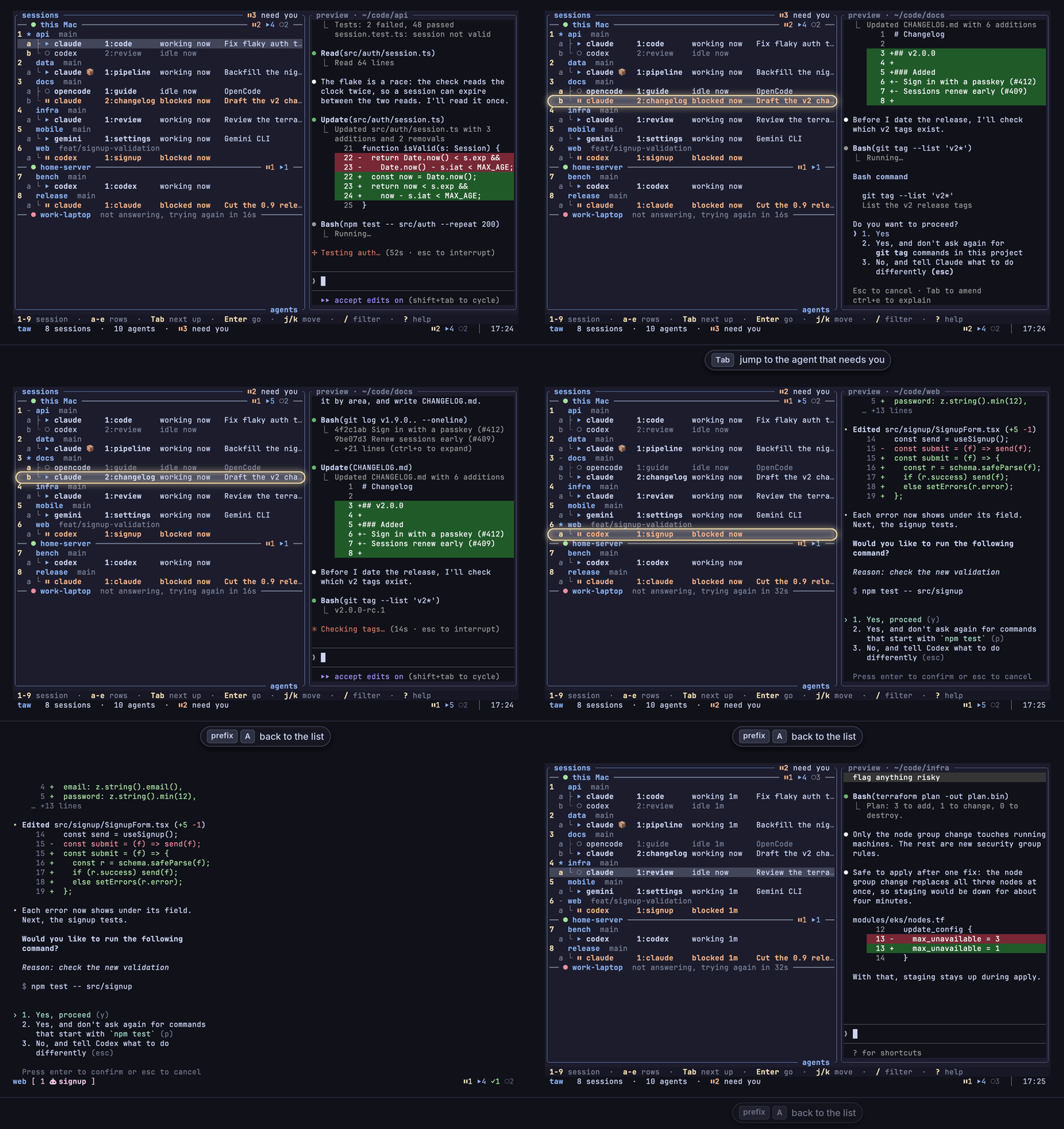
taw reads every pane and shows you. prefix + A opens one tree of every session and agent,
with each one's state: blocked, working, done or idle. Tab goes to the one that needs you,Enter takes you there. Not in the popup? A toast says who needs you, and prefix + O jumps
there. After a reboot, the agents come back in the conversation they were in, once each agent's
hook is installed.
One plugin line in the tmux you already run. Nothing to restart, nothing to migrate.
One plugin for agents, sessions and restore
- Every agent's state, in the tmux you already run. taw reads 22 agents with
herdr's own detection engine and rules. - Pick a project, land in its session.
nin the popup picks a project folder and switches
to its session, or makes it: tmux-session-wizard's session picking, folded in. - Back after a reboot, tmux-resurrect's job included. Save and restore for sessions, layouts
and folders, and agents come back in their conversations.
Your tmux.conf, keys, plugins and status line stay as they are. No central daemon (one small
watcher per pane, about 9 MB each), no account.
Install
Needs tmux 3.2 or newer, on macOS or Linux, and TPM.
Add the plugin to
~/.tmux.conf:set -g @plugin '27medkamal/tmux-agent-wizard'Press
prefix + I. TPM installs the plugin, and its first load downloads thetawbinary for
your machine from the project's
GitHub releases, checked against
the release's SHA-256 checksum. tmux saystmux-agent-wizard: taw is ready, press prefix + A
when it is done.Press
prefix + A. The agents you already have running are in the list.Optional, for restore: once for each agent you use, let it tell taw its session, so a restore
brings it back into the same conversation:taw integration install claude # and codex, opencode, cursor, ...Optional, for a shell outside tmux (inside tmux,
tawis on yourPATHalready):mkdir -p ~/.local/bin && ln -s ~/.local/state/tmux-agent-wizard/bin/taw ~/.local/bin/taw
Without TPM, from source, or with the download off: see
Install.
Three keys
| Key | What happens |
|---|---|
prefix + A |
One tree: every session, its panes, and the worktrees whose session you closed. Each agent shows its state, its task and for how long. The border counts what needs you. |
Tab |
Moves the cursor to the next agent that needs you (blocked, or finished and not looked at yet), else to the next agent. |
Enter |
Goes there. |
1-9 jump to a session, / filters the whole tree with fzf syntax, and ? lists every key on
one screen. If you know tmux, you already know taw.
Keys
Told when an agent needs you, wherever you are
When an agent in a pane you are not looking at blocks or finishes:
| Where | What you see |
|---|---|
| In tmux | a toast on the status line (the default) |
| On your desktop | a macOS or Linux notification ([ui.toast] delivery = "system") |
| In your terminal, over ssh too | your terminal's own notification ([ui.toast] delivery = "terminal") |
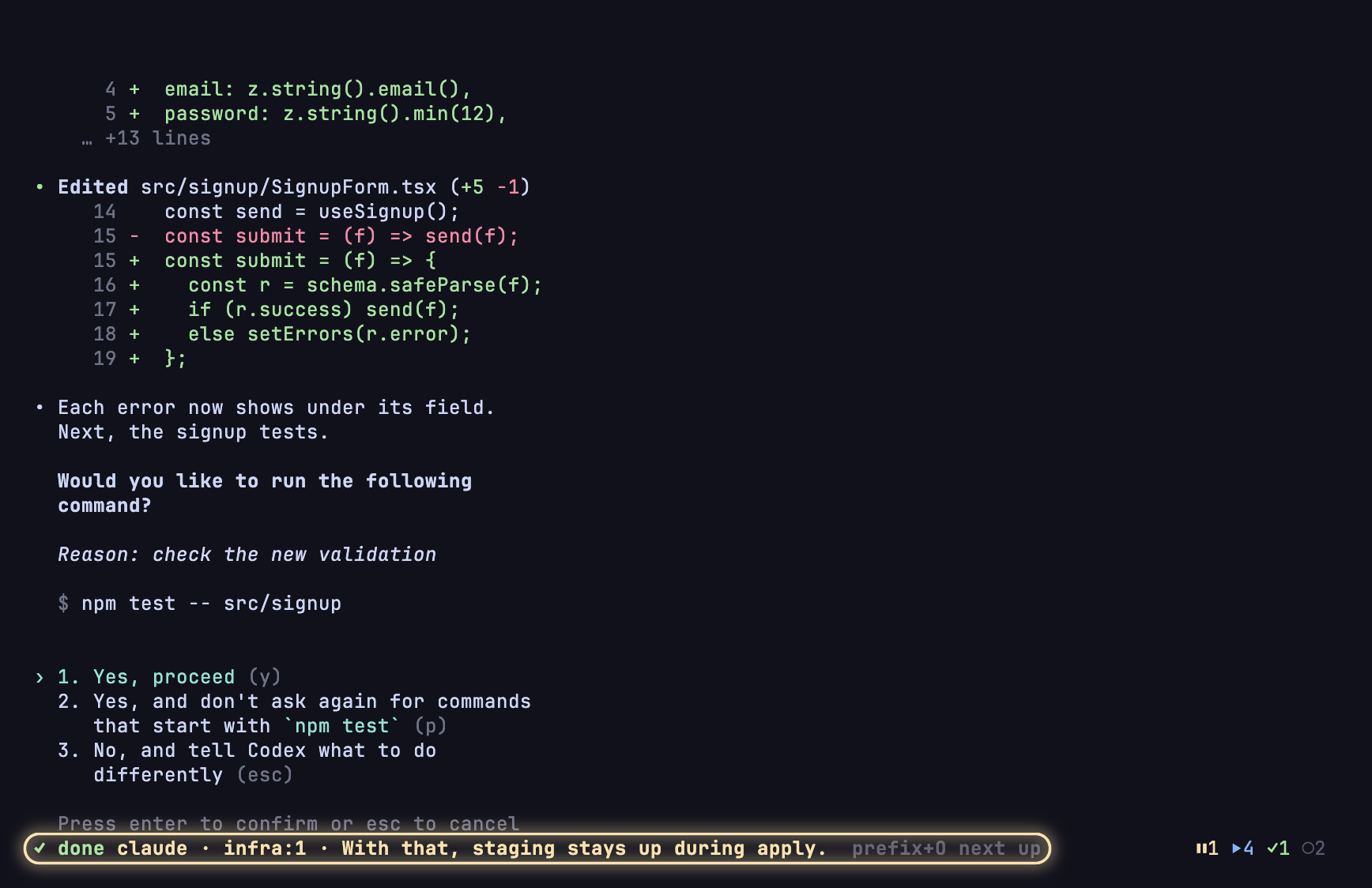
| On your status line, all the time | ⏸1 ⏵3 ✓2: blocked, working, done, once you add #{@agent_wizard_status} to it |
| On your phone | a message through ntfy, Pushover or any command, from a one-line hook |
prefix + Otakes you to the agent that needs you, from anywhere in tmux. Press it again
for the next one.
On your phone, with nothing new to install
It is all tmux, so your agents are wherever your tmux is: ssh in from any terminal app on your
phone, tmux attach, and prefix + A lists every agent; Tab and Enter take you to the one
that needs you. With the one-line hook above, your phone also tells you when one does.
Back after a reboot, in the same conversation
taw saves on its own, a few seconds after each change, and keeps a copy of the layout at most
every 15 minutes. After a reboot or a tmux crash, taw session restore brings back your
sessions, windows, layouts and folders, and 18 agents (Claude Code, Codex and OpenCode among
them) reopen in their own conversations once each agent's hook is installed (one command per
agent, such as taw integration install claude).
Next to tmux-resurrect and tmux-continuum: taw restores when you run the command, not by itself
when tmux starts, and it does not start other programs such as vim again, which resurrect can.
So you do not need resurrect unless you want that, and if you keep it, one line runs taw's
restore after resurrect's own.
Save and restore
Also in the box
- 22 agents. Claude Code, Codex, Gemini CLI, OpenCode, Copilot CLI, Cursor, Amp and 15 more,
also when started through npm, a wrapper script or a container.
Agents - Worktrees as sessions.
wmakes a git worktree with its own tmux session; a closed one
stays in the tree andEnterreopens it.
Sessions and worktrees - Your other machines.
taw applists every machine's agents in one list, over your ssh.
Remote machines - A sandbox on request.
taw sandboxruns an agent in a container, through a profile you
can read (in beta).
Sandbox - Hooks. A command of yours on any event: an agent going blocked, a session opening, a
worktree closing. Hooks - Agents can drive agents. Every verb is a JSON CLI (
taw agent prompt --wait), andtaw skillprints a skill any agent can read. CLI - herdr-compatible. Your herdr
config.tomlmeans what it meant, and herdr's CLI-driven
plugins install here (plugin support is in beta).
Coming from herdr
How it compares
✅ has it, ⚠️ in part, ❌ does not. Where taw is ahead first, then what both do.
| taw | herdr | tmux and its plugins | |
|---|---|---|---|
| Runs in the tmux you already run | ✅ a TPM plugin, no restart; running agents show up at once | ❌ its own terminal workspace and config | ✅ |
| Project picker (your project folders, open or not) | ✅ n in the popup, or taw open |
❌ a new workspace starts in the folder new_cwd names |
✅ with tmux-session-wizard (zoxide) |
| An agent in a container | ✅ taw sandbox, through a profile you can read |
❌ no sandbox of its own | ❌ by hand |
| An agent you start in Docker or Podman | ✅ recognised, with nothing set | ⚠️ only with HERDR_AGENT set |
❌ |
| A command of yours on any event | ✅ one line under [hooks] |
⚠️ through a plugin or its socket | ⚠️ tmux's own hooks, for tmux's events |
| Notifications on your phone | ✅ a one-line hook | ⚠️ through a plugin | ❌ |
| Knows each agent's state | ✅ 22 agents, herdr's rules plus seven of taw's own | ✅ 22 agents | ❌ |
| Takes you to what needs you | ✅ Tab in the popup, prefix + O anywhere |
✅ its sidebar and notification key | ❌ |
| Agents back in their conversations after a reboot | ✅ 18 agents, once each one's hook is installed | ✅ the same 18 | ❌ tmux-resurrect: layouts, folders, some programs |
| Agents always accessible | ✅ in a popup on a key, plus a count on the status line | ✅ in a sidebar | ❌ |
| Updates live as agents change | ✅ the popup, the status line and the toasts, as it happens | ✅ the sidebar, and events on its socket | ❌ |
| Supports herdr's plugins | ✅ in beta: herdr's CLI-driven plugins, beside your TPM ones | ✅ plugins and a marketplace | ❌ |
herdr as of v0.9.4, October 2026.
taw is independent of herdr and uses herdr's Apache-2.0 detection engine and rules, with
credit. herdr is its own terminal workspace, and a good one outside tmux; taw is for the people who
stay in tmux. The parity ledger goes through herdr feature by feature, and
Beyond herdr lists what taw does differently.
Footprint
One small watcher per pane, about 9 MB each; eleven panes with ten agents among them used 2.7%
of one core of an M1 Pro, and scripts/demo/measure.sh measures your
own. State lives in tmux's own options, kept current by those watchers. taw writes nothing into
your tmux.conf or your status line: it adds its two keys and its tmux hooks when it loads,
beside yours. The only thing it asks the network for on its own is newer detection rules from
herdr.dev, at most once every 6 hours, and one setting turns that off. An end-to-end suite drives
real tmux servers.
Docs
- Install and Keys
- Configuration: tmux options,
config.toml, 12 themes that can follow your terminal's light or dark mode, two key presets - Notifications, Sessions and worktrees, Save and restore
- Agents: integrations, reporting an agent of your own, containers, Sandbox
- Remote machines, Hooks, Plugins, CLI
- Questions: why not herdr, Claude Code's own agent view, what it costs, how to remove it
- Coming from herdr, Coming from tmux-session-wizard, Troubleshooting
- In the repo: COMPAT.md, ARCHITECTURE.md, RELEASING.md, CONTRIBUTING
Licence
MIT. The parts taken from herdr keep herdr's Apache 2.0
licence; THIRD_PARTY_LICENSES.md lists them.
Yorumlar (0)
Yorum birakmak icin giris yap.
Yorum birakSonuc bulunamadi