OrbMet
Health Gecti
- License — License: MIT
- Description — Repository has a description
- Active repo — Last push 0 days ago
- Community trust — 10 GitHub stars
Code Gecti
- Code scan — Scanned 3 files during light audit, no dangerous patterns found
Permissions Gecti
- Permissions — No dangerous permissions requested
Bu listing icin henuz AI raporu yok.
See how much of your Claude Code and Codex limits you've used, right on your Windows screen edge.
OrbMet




See how much of your Claude Code and Codex limits you've used, right on
your Windows screen edge, without leaving the terminal. It shows
Antigravity's limits too, if you have it.
Download the installer (no administrator rights,
no .NET needed). Free and open source, no account, nothing sent anywhere.
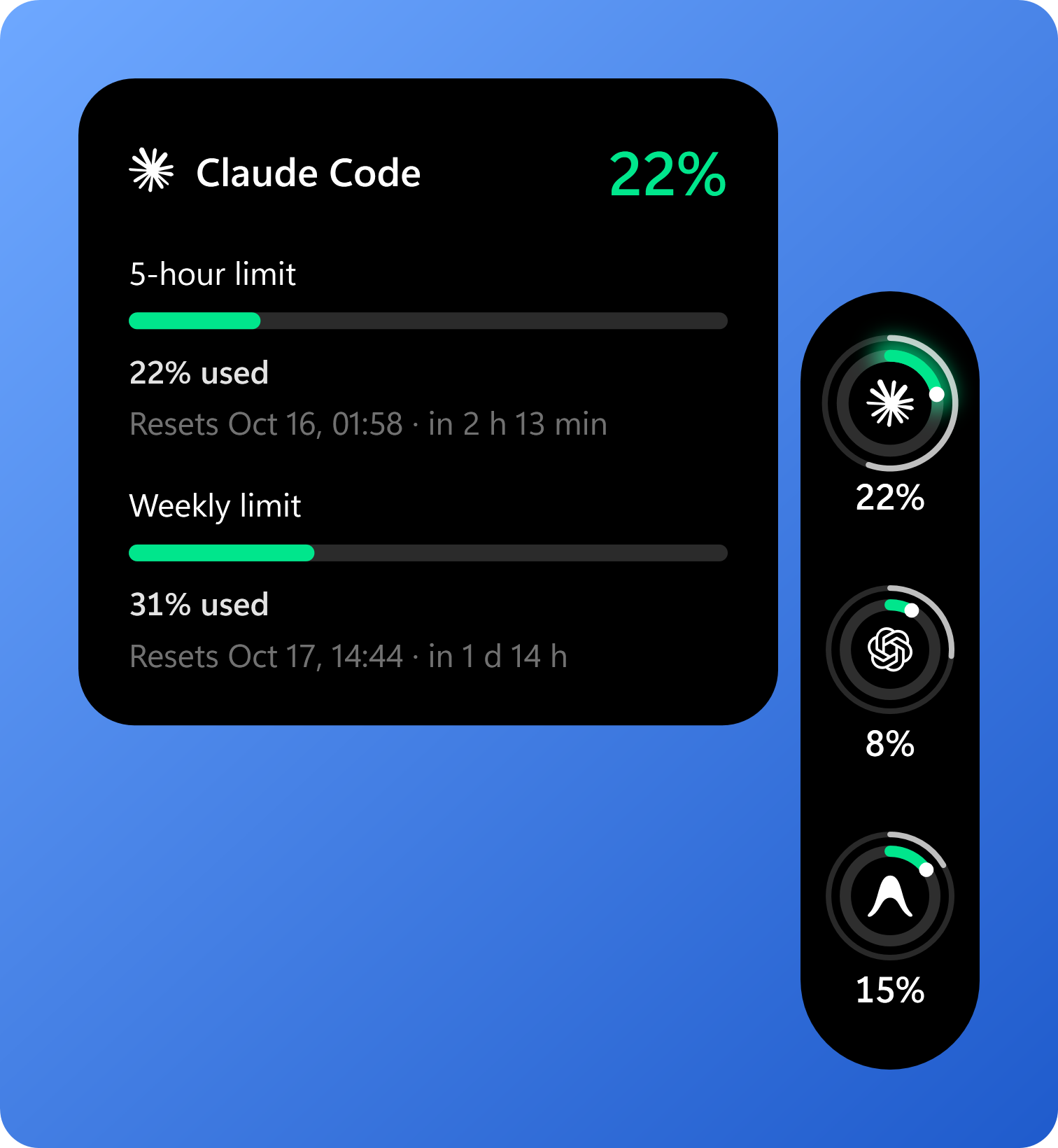
OrbMet sits on the edge of your screen as a black strip with one ring per
provider. The ring fills as you use your limit and changes colour only when it
starts to matter: green below 50%, yellow below 75%, red above.
Features
- One ring per provider showing its 5-hour limit, as the provider reports it.
The menu can switch the rings to the weekly limit, or to whichever limit is
closest to running out. - Shows only the providers you have: with Claude Code alone you see one
ring. A provider you install later appears by itself; one you have but do
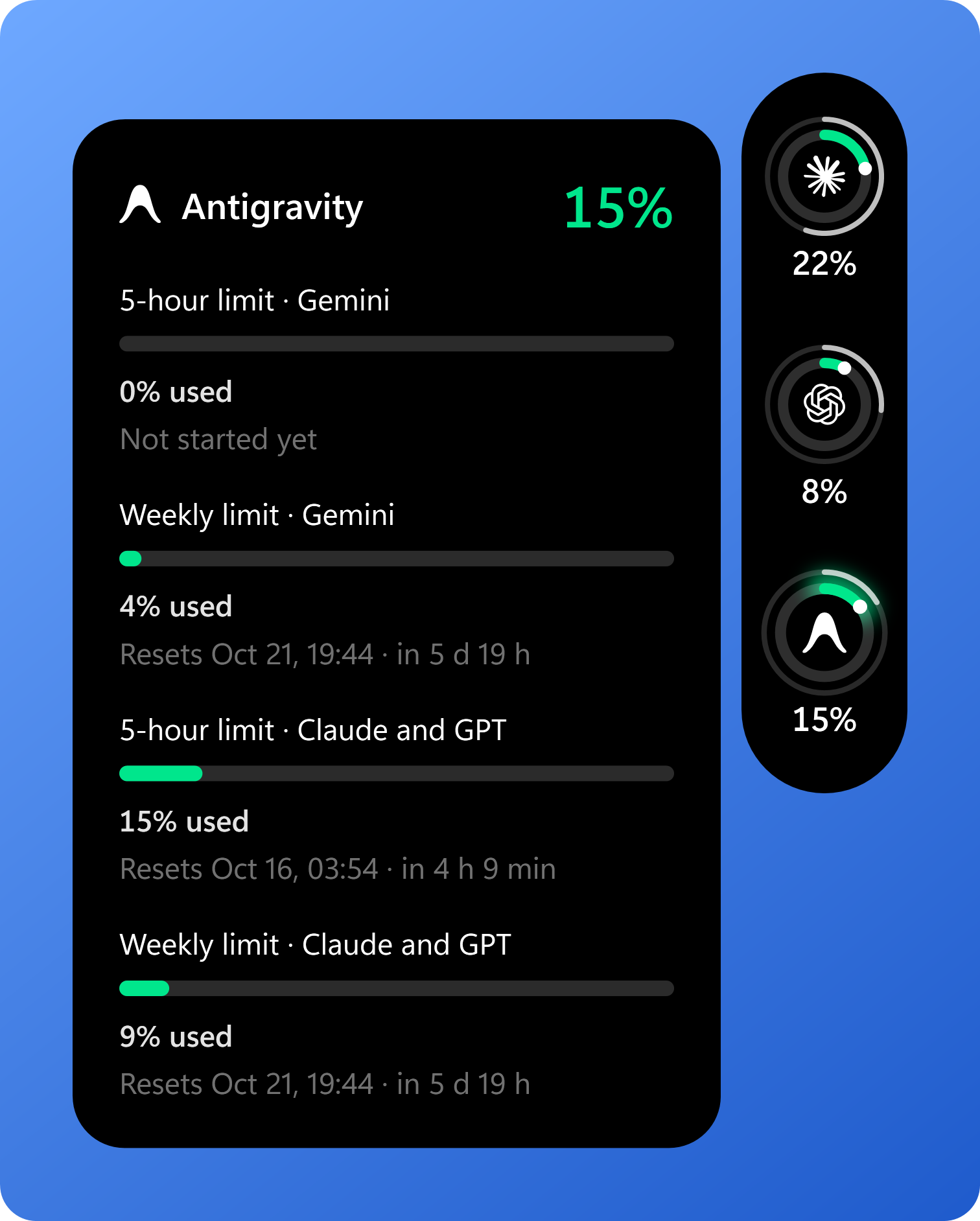
not want can be hidden under Appearance, and is then not read at all. - Antigravity (or Antigravity IDE) gets a ring of its own when it is
installed: its Gemini and its Claude and GPT allowances, each with a 5-hour
and a weekly limit, with the fuller group on the ring. These figures exist
only inside Antigravity, so they are read while it is open. - A thin outer arc shows how much of the limit's window has passed, so you
can see at a glance whether you are ahead of the clock. - Under Appearance: show what is left instead of what is used, pick each
ring's colour (warnings stay yellow and red), and an optional forecast on
the card of whether a limit lasts until its reset. The forecast is always
labelled as one and never changes the figures. - Also under Appearance, all off until you turn them on: fold a docked
strip to a thin line at the screen edge while you are not using it (it
turns red when a limit is close), move the strip to whichever display the
pointer is on, and show a dot circling a ring while Claude Code or Codex is
working (see Privacy). - Hover a ring to see every limit it reports (5-hour, weekly, per model),
how much of each is used, when it resets and how long that is from now. - Click a ring to refresh it.
- The tray icon is a small copy of the fullest ring; hover it for every
provider's figure, click it for Details, double-click to show or hide the
strip. - Optional notifications (off until you pick a threshold in the menu): when a
limit passes 75, 80, 90 or 95%, when it runs out, when a limit you were
warned about resets, and when Claude Code gets disconnected or Codex can't
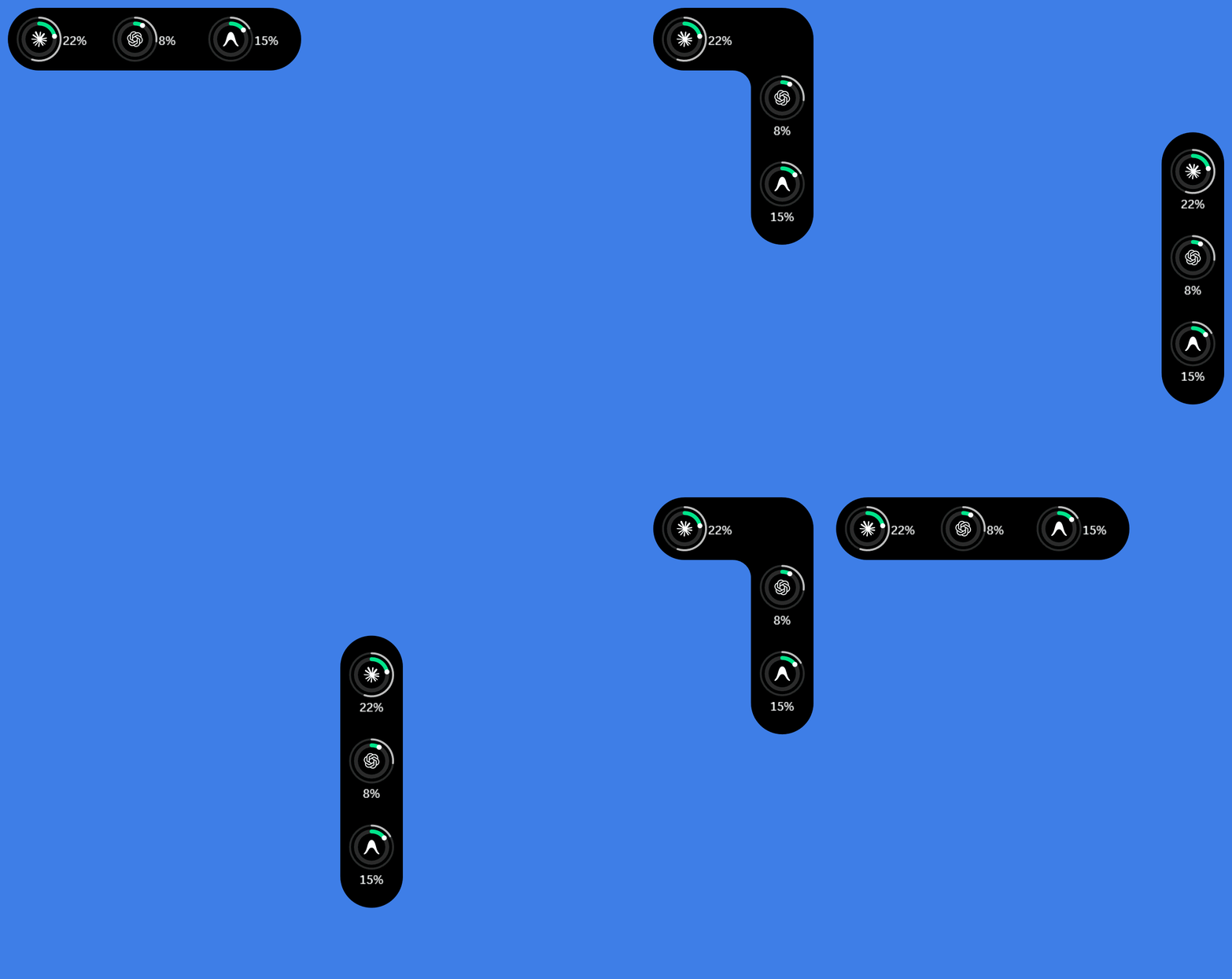
be read. Each is said once. - Drag the strip to any edge and it docks there, or leave it anywhere on
screen. Push it into a corner and the rings turn onto the other edge one at
a time, the last one first. It remembers where, and in what shape. - Never takes focus from your terminal.
- Can start with Windows (off unless you turn it on in the menu).
- Tells you when a new version is out. If you used the installer, Update
in the menu downloads it, installs it and restarts OrbMet; from the zip it
opens the download page. - English and Turkish, switchable from the menu.
Requirements
- Windows 10 or 11, x64
- Claude Code in the terminal, Codex CLI, or both
- Optionally Antigravity or Antigravity IDE
Install
Download from Releases. Neither needs .NET installed.
| Download | What it is |
|---|---|
OrbMet-<version>-setup.exe |
Installer. Installs for your user only (no administrator rights), adds a Start menu shortcut and an entry in Installed apps, and can start OrbMet with Windows. |
OrbMet-<version>-win-x64.zip |
The same app without an installer: unpack it into a folder you will keep and run OrbMet.exe. |
"Windows protected your PC"
OrbMet is not code-signed yet: a signing certificate costs money every year,
and this is a free project. So the first time you run the installer, Windows
SmartScreen may say Windows protected your PC. Click More info, then
Run anyway.
If you would rather check first:
- The whole source is here, and every release is built from a tagged commit
withtools\publish.ps1. - Each download has a
.sha256file next to it. Compare it withGet-FileHash .\OrbMet-<version>-setup.exein PowerShell. - OrbMet installs for your user only and never asks for administrator rights.
OrbMet lives in the system tray. Right-click the strip or the tray icon for
the menu; Exit is in the tray menu.
Connecting
Codex
Nothing to set up. OrbMet finds codex on your PATH and asks it for your
rate limits through codex app-server, using the sign-in you already have.
It checks every two minutes and when you click the ring.
Claude Code
Claude Code reports usage to its status line, so OrbMet needs to be connected
once: right-click the strip, open Connections and press Connect.
This changes one setting, statusLine in ~/.claude/settings.json, so that
Claude Code runs OrbMet's small helper (OrbMet.Capture.exe) after each
response. Good to know:
- If you already had a status line, it keeps showing: the helper runs your
command and prints its output. - Your original settings file is backed up once to
%LOCALAPPDATA%\OrbMet\backupsbefore the first change. - Disconnect puts your previous status line back exactly as it was.
- Usage updates when Claude Code finishes a response. OrbMet never sends
prompts to make data appear. - Only the terminal CLI runs the status line. If you use Claude Code from the
VS Code extension or the desktop app, OrbMet gets no data from it. - If you move the OrbMet folder, the Connections window says so and offers
Reconnect.
Antigravity
Nothing to set up. Antigravity keeps its limits in a small server of its own
that runs while Antigravity is open, listening only on your own computer
(127.0.0.1). OrbMet finds that server, asks it for the quota summary every
two minutes and when you click the ring, and shows Read while Antigravity is
open when it is closed. Until you use a limit, its card line says Not
started yet: Antigravity has no reset time for it then.
The address RetrieveUserQuotaSummary that OrbMet asks is Antigravity's own,
not a documented API, so a new Antigravity version could change it.
Privacy
OrbMet sends nothing about you or your usage anywhere. Its one network
request of its own is the update check:
At start and once a day it asks GitHub for OrbMet's latest release
(api.github.com/repos/29ardayildiz/OrbMet/releases/latest). GitHub sees
your IP address, as with any download; no account, usage or settings are
sent. Turn it off with Check for updates in the menu.Updating downloads the installer from this repository's releases and
checks its SHA-256 before running it.After each response, Claude Code hands the helper a summary of the session.
The helper keeps only the rate-limit figures (percentages and reset times)
and a one-way hash of the session id, in%LOCALAPPDATA%\OrbMet, and
discards the rest.Codex usage comes from
codex app-serverand is kept in memory.Antigravity usage comes from Antigravity's own server on
127.0.0.1and is
kept in memory. To be let in, OrbMet reads the one-time code Antigravity
gives that server when it starts (on the server's command line) and sends
it back to that server only. The code is not your Google sign-in, changes
every time Antigravity starts, and is never stored or logged.Account credentials are never read. Prompts and transcripts are never stored.
Transcripts are read only if you turn on Show when an agent is working
(off by default). Then, every few seconds, OrbMet opens the last 128 KB of
the session files Claude Code and Codex wrote in the past five minutes
(~/.claude/projects,~/.codex/sessions) and looks only at each record's
type, stop reason and time, plus Claude Code's own "Request interrupted"
marker. Nothing from them is kept, logged or sent.
How the numbers are shown
- Percentages are exactly what the provider reports; OrbMet does not estimate
usage from tokens or cost. - Missing data shows as
—, never as 0%. - When a limit's reset time passes, its old value is hidden until new data
arrives, rather than shown as the new period's. - Data that is not fresh carries its age, such as "As of 12 min ago".
Uninstall
Installed: uninstall OrbMet from Settings > Apps > Installed apps. It
puts Claude Code's previous status line back, removes the Start with Windows
entry, and asks whether to delete your settings in %LOCALAPPDATA%\OrbMet.
From the zip: press Disconnect in Connections if Claude Code is
connected, turn off Start with Windows if it is on, exit OrbMet from the
tray, then delete its folder and %LOCALAPPDATA%\OrbMet.
Building
Requires the .NET 10 SDK.
dotnet build -c Debug
dotnet test -c Debug --no-build
Release packages:
powershell -ExecutionPolicy Bypass -File tools\publish.ps1 -Version 0.7.0
This writes the installer and the zip to artifacts\, each with a .sha256
file, and the winget manifests for that version to artifacts\winget\. The
installer needs Inno Setup 6
(winget install JRSoftware.InnoSetup).
Credits
OrbMet was inspired by Pulse, a
screen-edge usage monitor for macOS, and adapts parts of its code for
Windows (Apache 2.0, see the notices).
Provider marks come from Lobe Icons
(MIT). Third-party licences are listed in
THIRD_PARTY_NOTICES.md.
Claude, OpenAI and Antigravity names and marks belong to their owners. OrbMet
is not affiliated with or endorsed by Anthropic, OpenAI or Google.
License
Yorumlar (0)
Yorum birakmak icin giris yap.
Yorum birakSonuc bulunamadi