tg-pane
Health Pass
- License — License: MIT
- Description — Repository has a description
- Active repo — Last push 0 days ago
- Community trust — 13 GitHub stars
Code Pass
- Code scan — Scanned 12 files during light audit, no dangerous patterns found
Permissions Pass
- Permissions — No dangerous permissions requested
No AI report is available for this listing yet.
Telegram inside Claude Code: read chats and channels in a pane, get AI summaries of unread posts. No API key, no bot.
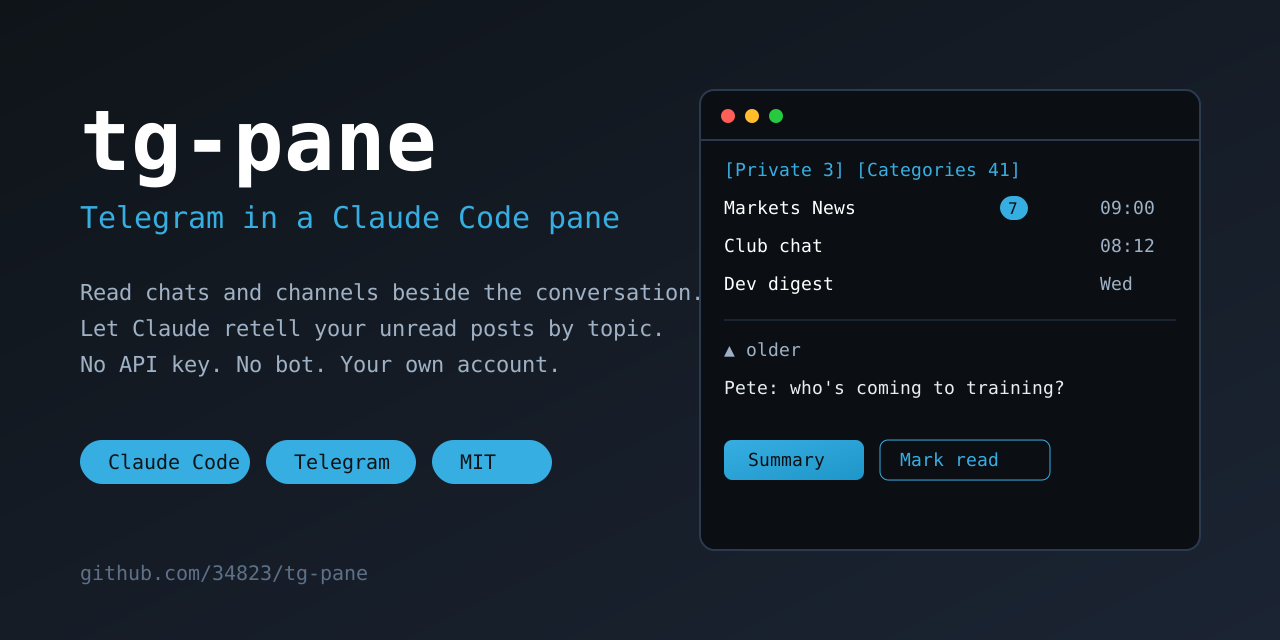





tg-pane — Telegram in a Claude Code pane
Read your Telegram chats and channels beside the conversation, and ask Claude to retell the unread posts by topic.
No API key, no bot — it works through your own logged-in Telegram Web.
Quick start (details in Install):
/plugin install tg-pane --marketplace 34823/tg-pane
Then /tg-pane, scan the QR code with your phone — done.
Features
- Private — chats with people, unread first; read a chat without sending «read», reply from the input field.
The other person sees «read» only when you reply or press Mark read. Summary retells the unread private
chats (or one chat) in the conversation — without marking them read. - Categories — All chats, then your Telegram folders, with unread counts and a preview. Open one to see its
chats, open a chat to read it (in a group, with who wrote what), scroll back with the mouse wheel (or ▲ / ▼); a picture has an ▣ open row — it is downloaded only then and drawn over the chat inside the pane (✕ closes). Theme in the header flips the colour. Summary on a folder
or a chat asks Claude to read the unread posts and retell them by topic, right in the conversation. Mark all read
clears a folder. - Times on the right, in your time zone: the system's, or — on a server set to UTC — asked once in the pane.
- The pane opens where you left it, after
/clearand after a restart. - Login by QR code drawn in the pane; works in a narrow pane too (list, then chat).
 [Private 3] [Categories 41] [Refresh]  cache 15:48
 [← Folders] Interesting 34 [Summary] [Mark all read]

  Markets News (7)   09:00   Club chat  [Mark read (2)] [Summary]
  Club chat (2)  08:12   ▲ older
  Markets          Wed   — 8.10 —
  …                      Pete: who's coming to training?    08:12
How it works
There is no Telegram API key and no bot: the mod drives Telegram Web (web.telegram.org/k) logged in to your
account, in a headless Chromium on your machine, and reads it through Telegram Web's own internal API — the same
calls its interface makes. Nothing leaves your machine except what Telegram Web itself sends. The browser is
touched only while the pane is open and in use (counters once a minute, the open chat once a minute, a pause after
10 idle minutes and whenever Telegram answers FLOOD_WAIT). Nothing is sent but what you type.
The backend is a few Python scripts in backend/ (Playwright). They also work on their own:
| Script | What it does |
|---|---|
tgbrowser.py start|stop|status|login |
the headless Chromium; login prints the QR code in the terminal and asks for the cloud password |
tgcache.py [folder…] |
unread counters and previews of your folders into the cache |
tgchat.py <peer> [N] [--read] [--before <mid>] |
a chat's history as JSON |
tgmsg.py --peer <peer> "<text>" |
send one message, check it went out |
tgmedia.py <peer> <mid> |
downloads one message's picture (photo, image, video preview) to the data folder as PNG, only when you press «open» |
tgcells.py <png> <cols> <rows> |
turns that picture into terminal cells for the pane (needs Pillow) |
tgunread.py "<folder>" | --peer <id> | --private [--mark-only] |
unread posts as text for a model; channels and groups are marked read, private chats (and --private) never |
What it runs, reads and sends
The plugin is a pane (hooks/register.tsx) plus the Python scripts in backend/ (Playwright).
- Runs: the Python from the Python option (default
python3) with one of the scripts inbackend/
(tgbrowser.py,tgcache.py,tgchat.py,tgmsg.py,tgunread.py) and its arguments; the command is<python> <plugin folder>/backend/<script> <args>, no shell.tgbrowser.pystarts a headless Chromium
(Playwright's, with a debugging port on127.0.0.1:9444only) with its own profile in the data folder.
Nothing else is started. - Reads: Telegram Web (
web.telegram.org/k) in that browser, logged in to your account: folders, unread counters,
chat history, and the browser profile — which is your Telegram session. The pane also readsHOME(only to find the
default data folder) and keeps its cache, lock andconfig.jsonin the data folder. It does not read your project files. - Sends to the network: only what Telegram Web itself sends to Telegram (reading, and «mark read» when you press it or open a channel with that
option on), plus a message when you type one in the pane's input field. There is no other server and no analytics. - Sends to the conversation (and so to the model): when you press Summary, the pane submits a prompt (
$.prompt.submit)
that tells Claude to runtgunread.pyand retell the result (for a channel or a group that script also marks it read; private chats are never marked read by a summary). The unread posts of that folder or chat then become part of the
Claude Code conversation and go to the model like any other text there. Press nothing, and nothing is passed on. - Hooks:
session.startregisters the/tg-panecommand and starts timers that run only while the pane is open;command.runfortg-paneopens the pane;session.end/classic.SessionStart/ui.closereopen or close it after/clear;ui.renderdraws it. No hook changes a prompt, a tool call, a setting or another plugin's behaviour.
Install
In Claude Code (a terminal session):
/plugin install tg-pane --marketplace 34823/tg-paneAnswer
yto add the marketplace, pick a scope, set the options (all have defaults).Python with Playwright and its Chromium (once):
python3 -m pip install playwright
python3 -m playwright install chromium
Another Python (a venv) — put its path into the Python option (
/config)./tg-pane. The first time it starts the browser and shows a QR code: Telegram on your phone → Settings →
Devices → Link Desktop Device, and scan it. If the account has a cloud password, the pane shows the command to
run in a terminal (the password is typed there, never into the pane).
Options (/config)
| Option | Default | |
|---|---|---|
| Python | python3 |
the Python that has Playwright |
| Data folder | ~/.local/share/tg-pane |
browser profile (your Telegram session — keep it private), cache, lock; config.json there may set port (9444) and tz for the scripts run by hand |
| Private chats folder | empty | a Telegram folder for the Private tab; empty — every chat with a person or a bot |
| Language | en |
en or ru, the pane and summaries |
| Mark channels read on open | on | as Telegram does; private chats and groups are never marked read by just looking |
| Time zone | system | IANA name for message times; empty and the system is on UTC — the pane asks once |
Caveats
- Unofficial: Telegram Web's internal API can change with its updates; then a script fails and the pane shows the error.
- The browser profile in the data folder is a logged-in session of your account. Do not copy or share it.
To log out: Telegram → Settings → Devices → end the «Telegram Web» session, or delete the folder. - Linux and macOS. On a server run as root, Chromium starts with
--no-sandbox.
Develop
claude plugin validate .
claude plugin test .
claude --plugin-dir .
Feedback
If it is useful, a ⭐ on the repo helps others find it (contributing, security). Ideas and questions — Discussions; bugs — Issues (a 👍 on an issue shows what matters most).
MIT license.
Star history
Reviews (0)
Sign in to leave a review.
Leave a reviewNo results found