like-code
Health Warn
- No license — Repository has no license file
- Description — Repository has a description
- Active repo — Last push 0 days ago
- Low visibility — Only 5 GitHub stars
Code Warn
- fs module — File system access in .codex-loop/scripts/init_codex_loop.cjs
Permissions Pass
- Permissions — No dangerous permissions requested
This tool is a customized fork of Claude Code that adds multi-model orchestration, custom model routing via aliases, and an enhanced terminal dashboard for managing AI agents.
Security Assessment
The repository requires a moderate to high level of caution. It executes shell commands via a dev mode and specifically includes a `--dangerously-skip-permissions` flag, which disables critical safety guardrails. The codebase exhibits local file system access (flagged in an init script) and inherently makes network requests to external AI model APIs. No hardcoded secrets were found during the scan, and no dangerous system-level permissions are requested by the core application itself. However, users are strongly advised to audit the external `cc-route-proxy` dependency, as it intercepts and routes your model traffic. Overall risk: Medium.
Quality Assessment
The project is very new and actively maintained, with repository pushes from today. However, it suffers from extremely low community visibility and validation, having only 5 stars. Furthermore, the repository lacks a standard open-source license. This means that strict copyright laws apply by default, and there are no legal grants for users to modify, distribute, or safely use the code in commercial environments.
Verdict
Use with caution — it offers interesting features but relies on a skipped-permissions mode, unvetted external routing dependencies, and lacks a proper license.
A customized Claude Code fork for routed models, multi-agent orchestration, and dense terminal control.
likecode
An opinionated Claude Code fork focused on routed models, multi-model coordination, and a denser terminal dashboard.
Origin: likecode is derived from the learn-likecc project.
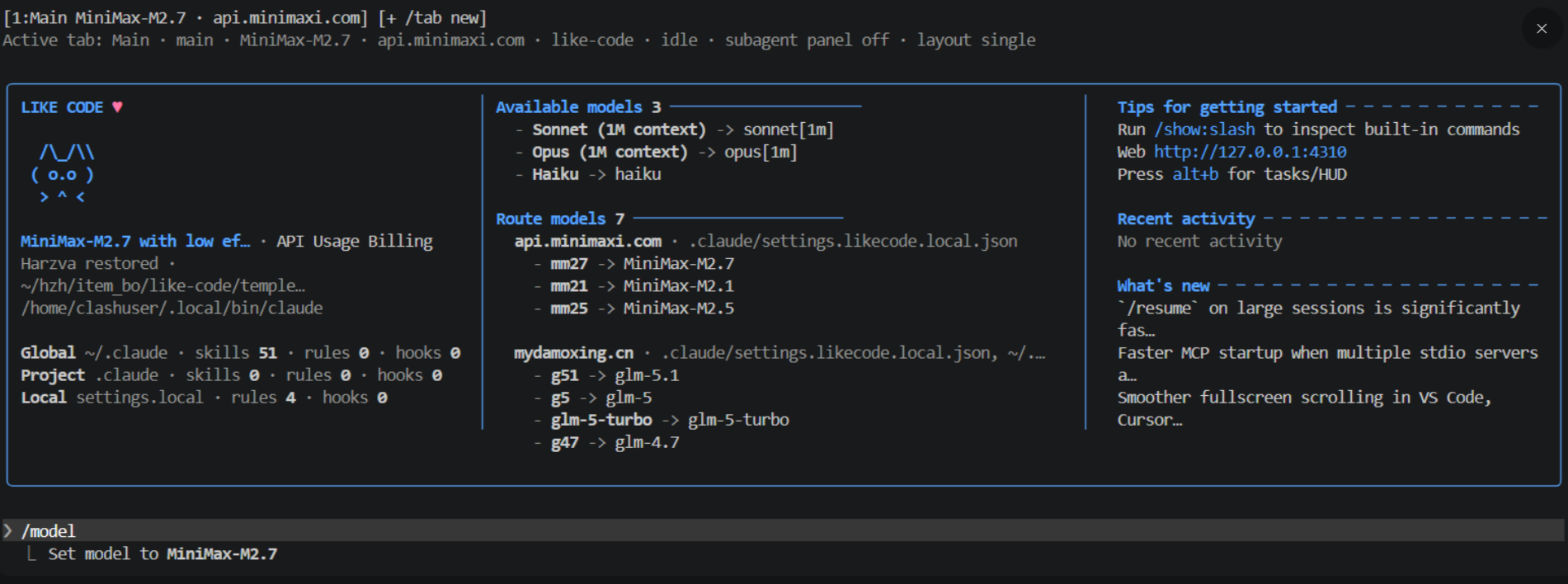
Current state: custom route models, alias switching, /mmodel orchestration, HUD/rewind overlay, and improved background task visibility are all working in this fork.
What likecode adds
modelRouteswith short aliases such asmm27,mm25,g5,g51/modelcan switch by alias and shows route source + host/mmodelturns natural-language requests into lightweight multi-model orchestration prompts- route models can carry optional
pricingmetadata - startup dashboard shows:
- built-in models
- route model alias mapping
- route source file and host
- double-
Escopens aRewind | HUDoverlay - footer and background task UI are tuned for multi-agent work
alt+bopens the tasks panel quickly
Quick Start
Clone the repo:
git clone [email protected]:3873225350/like-code.git
cd like-code
Install dependencies and run in dev mode:
bun install
bun run build
bun run dev
Install cc-route (required for model routing)
like-code delegates model routing to the standalone cc-route project:
# Option A: npm
npm install -g cc-route-proxy

# Option B: pre-built binary (no Node.js)
# See https://github.com/3873225350/cc-route#quick-start
Then configure your routes in ~/.claude/settings.cc-route.json and launch with clauder instead of claude.
See docs/cc-route-integration.md for full details.
For a permissive local dev session:
bun run dev:danger
To build a local standalone binary:
bun run package:local
Run the packaged binary directly:
./dist/likecode
To expose likecode as a global command on your machine:
mkdir -p ~/.local/bin
ln -sf "$(pwd)/dist/likecode" ~/.local/bin/likecode
Make sure ~/.local/bin is on your PATH, then you can start it anywhere with:
likecode
For local debugging with permissive filesystem access:
likecode --dangerously-skip-permissions
Settings Layout And Precedence
likecode currently uses two related configuration layers:
- the original Claude Code settings layer
- the likecode-specific extension layer
They are read separately, then applied together.
Standard Claude Code settings
These are the original Claude-style settings files:
~/.claude/settings.json- user-level global defaults
.claude/settings.json- shared project settings, suitable for committing
.claude/settings.local.json- personal project override, usually gitignored
Effective precedence inside the standard Claude settings layer is:
~/.claude/settings.json
  < .claude/settings.json
  < .claude/settings.local.json
  < CLI --settings
  < managed/policy settings
So for normal Claude settings, local project settings beat shared project settings, and shared project settings beat user-global settings.
likecode settings
These are the likecode-specific files used for routed models and related extensions:
~/.claude/settings.likecode.json- user-level likecode defaults
.claude/settings.likecode.local.json- project-level likecode override
Effective precedence inside the likecode layer is:
~/.claude/settings.likecode.json
  < .claude/settings.likecode.local.json
So the project's settings.likecode.local.json wins over the user-global settings.likecode.json.
Relationship Between The Two Layers
The important rule is:
- standard Claude settings control the normal Claude Code behavior
- likecode settings add likecode-specific behavior, especially routed-model data
For routed models specifically, the effective order is:
environment variable model routes
  > standard Claude settings modelRoutes
  > likecode settings modelRoutes
And inside the likecode settings portion:
.claude/settings.likecode.local.json
  > ~/.claude/settings.likecode.json
In practice, that means:
- if you want team-shared Claude behavior, use
.claude/settings.json - if you want your own project-only Claude override, use
.claude/settings.local.json - if you want likecode route aliases, custom route hosts, and likecode-specific route metadata for this project, use
.claude/settings.likecode.local.json - if you want your own cross-project likecode defaults, use
~/.claude/settings.likecode.json
Recommended split:
.claude/settings.json: shared hooks, shared plugins, shared Claude behavior.claude/settings.local.json: your personal local Claude overrides~/.claude/settings.likecode.json: your reusable likecode defaults across projects.claude/settings.likecode.local.json: the project's routed-model definitions and aliases
Example
Typical project setup:
~/.claude/settings.json
~/.claude/settings.likecode.json
<repo>/.claude/settings.json
<repo>/.claude/settings.local.json
<repo>/.claude/settings.likecode.local.json
Recommended usage:
- keep generic Claude preferences in
~/.claude/settings.json - keep team-shared project behavior in
.claude/settings.json - keep your machine-specific project tweaks in
.claude/settings.local.json - keep likecode route aliases and route providers in
.claude/settings.likecode.local.json
Route Model Config
Put your route models in .claude/settings.likecode.local.json:
{
  "modelRoutes": {
    "MiniMax-M2.7": {
      "alias": "mm27",
      "baseURL": "https://api.minimaxi.com/anthropic",
      "authToken": "YOUR_TOKEN",
      "pricing": {}
    },
    "MiniMax-M2.5": {
      "alias": "mm25",
      "baseURL": "https://api.minimaxi.com/anthropic",
      "authToken": "YOUR_TOKEN",
      "pricing": {}
    },
    "glm-5": {
      "alias": "g5",
      "baseURL": "https://mydamoxing.cn/anthropic",
      "authToken": "YOUR_TOKEN",
      "pricing": {}
    }
  }
}
Then you can use:
/model mm27
/model g5
/mmodel
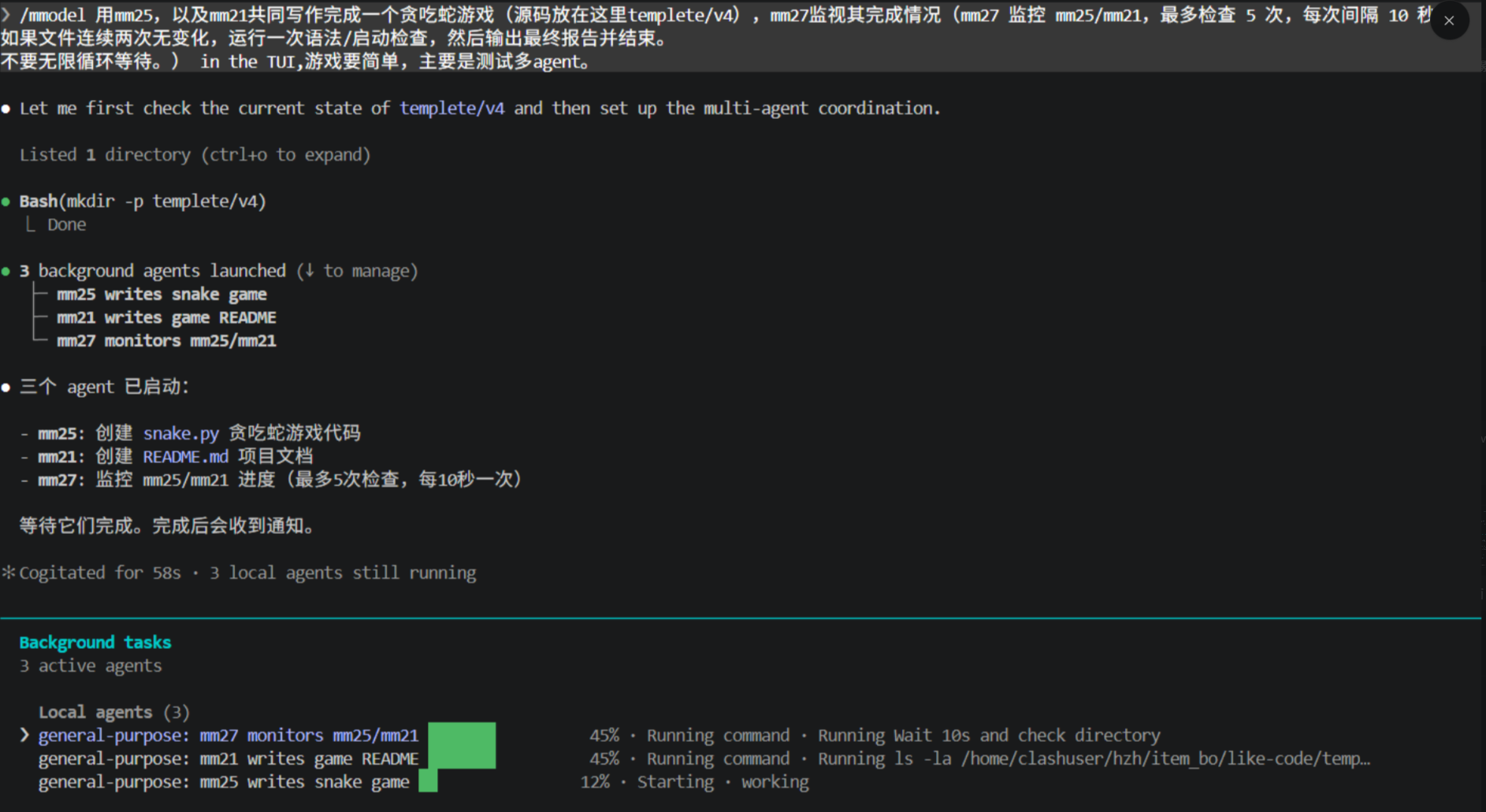
/mmodel is a prompt-level orchestration helper for multi-model work. It does not hardcode a scheduler; it generates a structured instruction that tells Claude to delegate with explicit model aliases.
Example:
/mmodel 用mm25,以及mm21共同写作完成一个贪吃蛇游戏(源码放在这里templete/v4),mm27监视其完成情况。
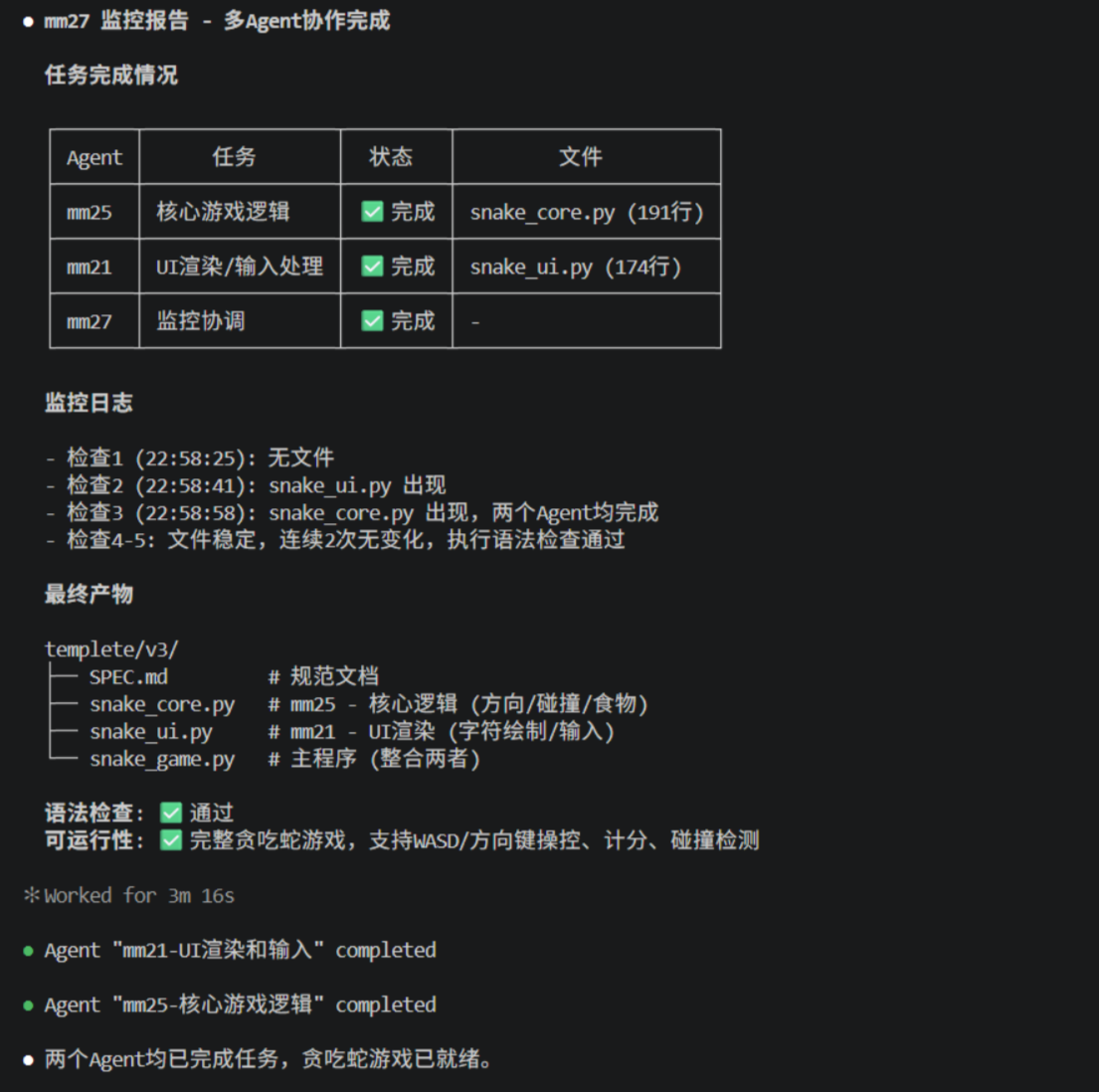
Typical behavior:
mm25handles implementationmm21handles UI, README, or a second bounded taskmm27monitors progress and reports completion
The monitor flow in this fork is tuned to avoid endless waiting by using bounded checks and a report-oriented finish.
Interface Highlights
Welcome screen
- current model + host
- built-in model list
- route model alias mapping
- route source file display
- quick hint for
alt+b
Rewind / HUD
Double-press Esc on an empty input to open:
Rewind: restore or summarize from an earlier pointHUD: inspect session/project token usage and switch HUD mode
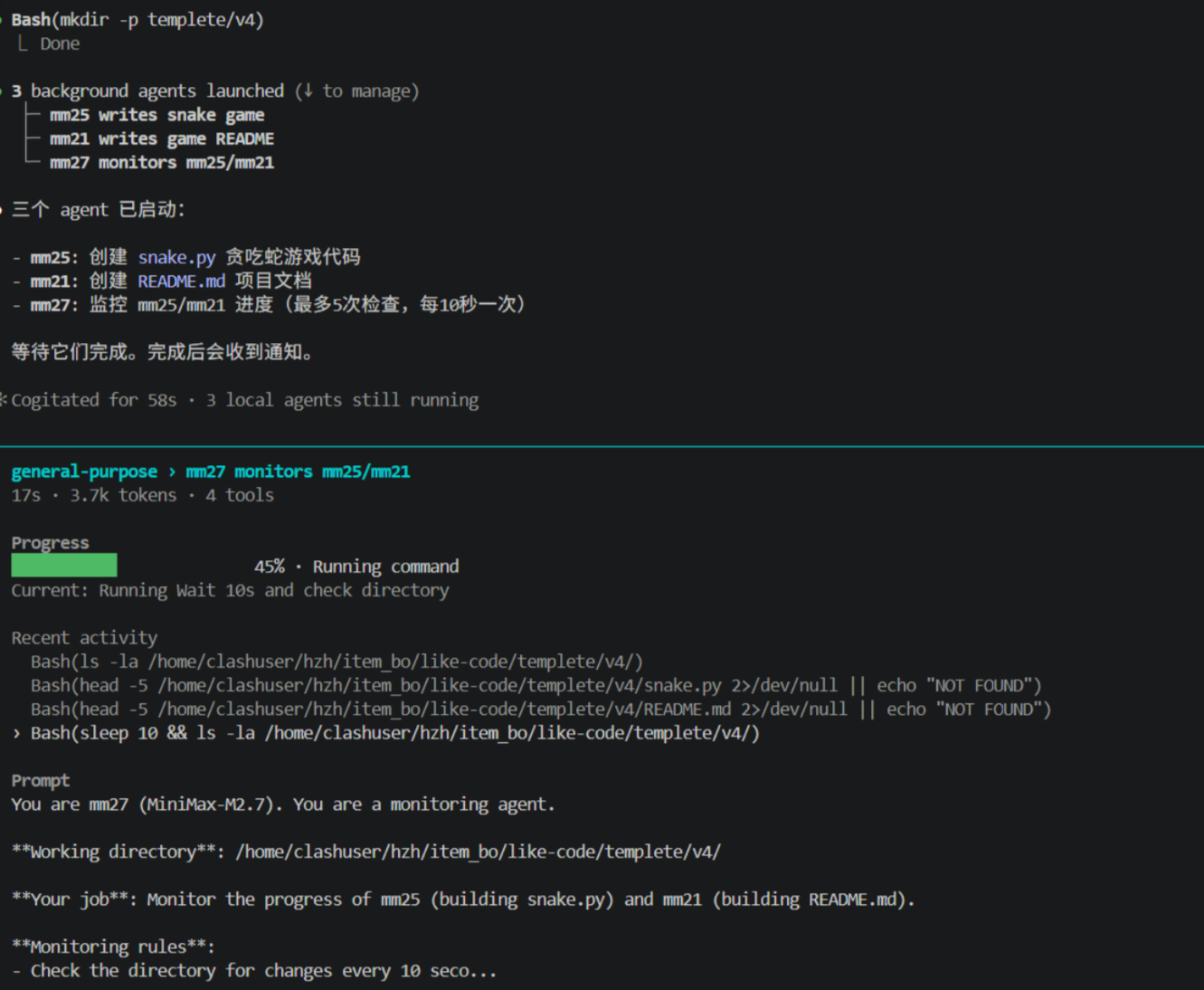
Background tasks
- compact multi-agent footer summaries
- progress bar previews for local agents
- task panel optimized for selecting and drilling into running agents
Scripts
bun run dev
bun run dev:danger
bun run build
bun run package:local
bun run typecheck
Project Notes
This repository started from a Claude Code source study base and is being reshaped into a more experimental operator-focused fork.
Some notable areas in this fork:
src/utils/model/modelRoutes.tssrc/utils/model/modelOptions.tssrc/components/LogoV2/CondensedLogo.tsxsrc/components/MessageSelector.tsxsrc/components/HudPanel.tsxsrc/components/tasks/BackgroundTaskStatus.tsx
Image Assets
README images live in:
docs/images/
Current README screenshots are pulled from docs/images/, and more TUI captures can be added there later.
Disclaimer
This repository includes source material originally studied from a public leak event discussed on 2026-03-31. Original Claude Code source remains the property of Anthropic. This fork is a learning and modification project and is not affiliated with Anthropic.
Reviews (0)
Sign in to leave a review.
Leave a reviewNo results found