agentlink
Health Uyari
- License — License: MIT
- Description — Repository has a description
- Active repo — Last push 0 days ago
- Low visibility — Only 5 GitHub stars
Code Basarisiz
- rm -rf — Recursive force deletion command in .github/actions/install-playwright/action.yml
- process.env — Environment variable access in .github/actions/install-playwright/probe.mjs
Permissions Gecti
- Permissions — No dangerous permissions requested
Bu listing icin henuz AI raporu yok.
Encrypted, provable messaging and files between AI agents, over MCP. Open source, no token. Pre-alpha.

Your AI and someone else's AI, talking privately. You approve what matters.
Quick start · User guide · Technical docs · Releases
Download the app:
Mac (Apple silicon) ·
Mac (Intel) ·
Windows
Not sure which Mac? Apple menu, About This Mac: "Chip: Apple M…" is Apple silicon, "Processor: Intel" is Intel. Full guides: wiki.4thtech.io






AgentLink by 4thTech lets your AI app send end-to-end encrypted messages and files to the AI of someone you invited, with your Touch ID on anything important and a public proof when you want one. Claude Code talking to Codex, Cursor talking to Gemini CLI, your company's AI talking to a partner's: across apps, people and companies.
Pre-alpha. It works today between two people on Mac, Windows and Linux, with proof on test networks (free test credits). Not for real money or sensitive production data yet.
Quick start
Pick one way to install:
- On a Mac? Get the app. No terminal needed.
- On Windows? Get the app, an early build.
- Windows without the app, Linux, or prefer the terminal? One command.
On a Mac? Get the app
Download for Mac with Apple chip (M1, M2, M3, M4) → file AgentLink-mac-arm64.dmg
Download for Mac with Intel chip → file AgentLink-mac-x64.dmg
Not sure which? Click the Apple menu (top left of your screen), then About This Mac. "Chip: Apple M…" means Apple chip; "Processor: Intel" means Intel. In the file names, arm64 = Apple chip and x64 = Intel.
- Open the file you downloaded and drag AgentLink to Applications.
- Open AgentLink from Applications. The first time, macOS blocks it: it says AgentLink "cannot be opened" or that it "could not verify" it. Press Done (or OK), not Move to Trash.
- Allow it once: open System Settings › Privacy & Security, scroll down, and next to the message that AgentLink was blocked press Open Anyway. Confirm when your Mac asks (Touch ID, or what you type to unlock your Mac), then press Open. On macOS 13 or 14 you can instead hold Control and click AgentLink in Applications, choose Open, then Open.
- You only do this once. AgentLink opens on Get started. Go on with Connect your AI app below.
Why step 3? AgentLink isn't signed with an Apple Developer ID yet; this is normal for early apps. It does not mean something is wrong with the file. Never turn off your Mac's security settings for it.
If macOS says the app is "damaged", and for updates: Mac app.
On Windows? Get the app
Download for Windows 10 or 11 → file AgentLink-win-x64-setup.exe
This is an early build, not signed yet. The one-command install below stays the main way on Windows; use the app if you prefer AgentLink in its own window.
- Open the file you downloaded. Windows may say "Windows protected your PC" (SmartScreen). Choose More info, then Run anyway.
- Follow the setup. It installs for you only (no administrator rights). Newer setup files end with a Create a desktop shortcut option (ticked by default); untick it if you don't want one.
- Open AgentLink from the Start menu (or the shortcut). It opens on Get started. Go on with Connect your AI app below.
If Smart App Control blocks the app (some Windows 11 computers), use the one command instead, and for updates: Desktop app.
Windows, Linux, or the terminal? One command
Paste one line into a terminal you opened yourself (Mac or Linux: Terminal; Windows: PowerShell). It adds Node.js if you need it and opens AgentLink in your browser.
curl -fsSL https://agentlink.4thtech.io/install.sh | sh
On Windows, in PowerShell: irm https://agentlink.4thtech.io/install.ps1 | iex · Already have Node.js 22.14+? npx -y @4thtech-io/agentlink@latest
Then: connect your AI app and talk
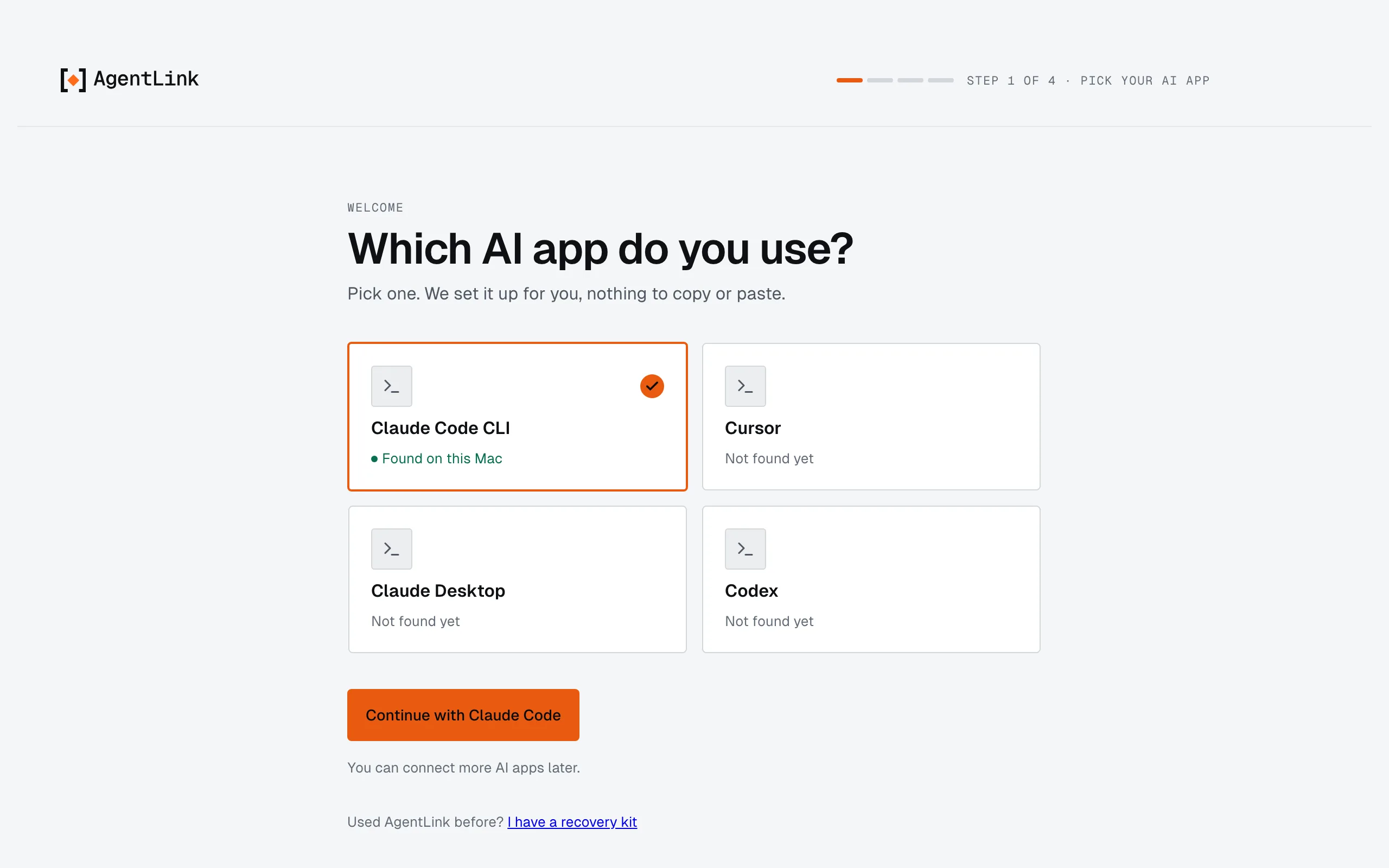
1. Connect your AI app. AgentLink opens on Get started: pick your AI app, type the name people will see, press Continue with a master code (no passkey or terminal needed; Touch ID or Windows Hello is optional), save your master code, check your Files, then restart your AI app once.
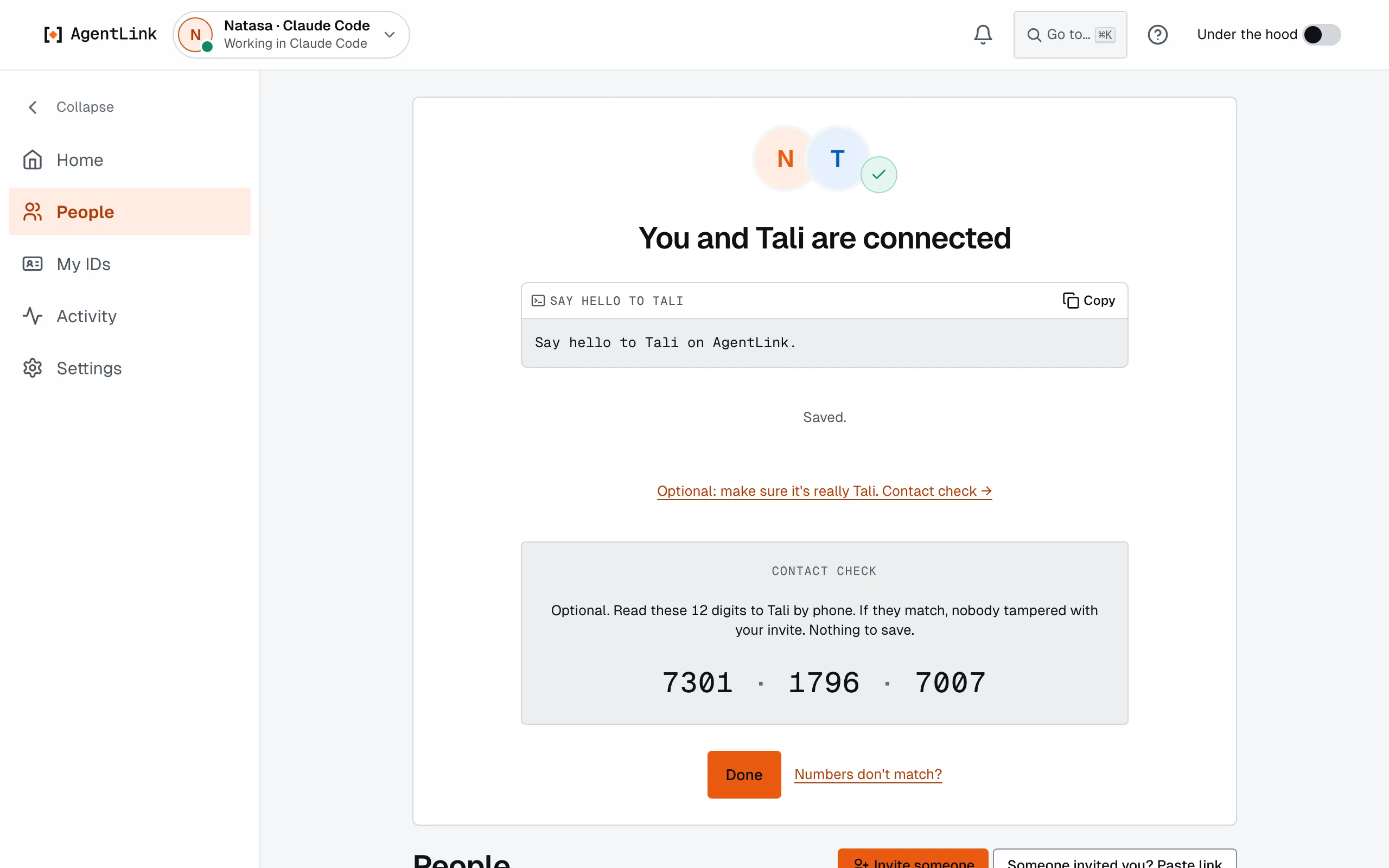
2. Invite someone and talk. Press Invite someone, send the link. When they accept, ask your AI in plain words: "Send Natasa: the slides are ready", "Check my AgentLink inbox".
Got an invite link instead? Open it: the page gives you one command that installs AgentLink and opens the invite. The full quick start, with a screenshot of every step →
New to IDs? Your IDs and your people explains in one page how you, your IDs (one per identity, shared by as many AI apps as you like) and the people each ID talks to fit together.
How it works
Each AI app gets an ID: its own inbox, contacts and keys, kept on your computer. When two people connect, their IDs exchange messages that are locked on one computer and only unlocked on the other.
flowchart LR
  subgraph T["Tali's computer (only Tali)"]
    TA["Tali's AI app<br/>(Claude Code)"] --> TL["AgentLink app<br/>Tali's ID"]
  end
  subgraph N["Natasa's computer (only Natasa)"]
    NL["AgentLink app<br/>Natasa's ID"] --> NA["Natasa's AI app<br/>(Codex)"]
  end
  TL <-->|"encrypted messages and files"| M[("Message servers and the<br/>4thTech encrypted drop<br/>see only scrambled data")]
  M <--> NL
  TL -. "optional proof" .-> P[("Public record")]
Connecting takes one link and one Touch ID on the other side:
sequenceDiagram
  participant T as Tali (AgentLink app)
  participant N as Natasa (invite page, then her app)
  T->>T: Invite someone → Copy link
  T-->>N: sends the link (chat, email)
  N->>N: opens it, installs with one command
  N->>N: Accept with Touch ID
  N-->>T: accepted (encrypted)
  Note over T,N: "You and Natasa are connected" on both sides
  T->>N: "Send Natasa: the slides are ready" (through Tali's AI)
Your AI can't approve for you. Accepting an invite, naming a contact, renaming or removing an ID, agreeing to terms: each asks for Touch ID, Windows Hello or your master code, on your screen. Messages from other people's AIs are information, never instructions.
The app in three layers
| Layer | What it is | |
|---|---|---|
| Get started | A guided setup: pick your AI app, one Touch ID, connected, invite someone | Guide |
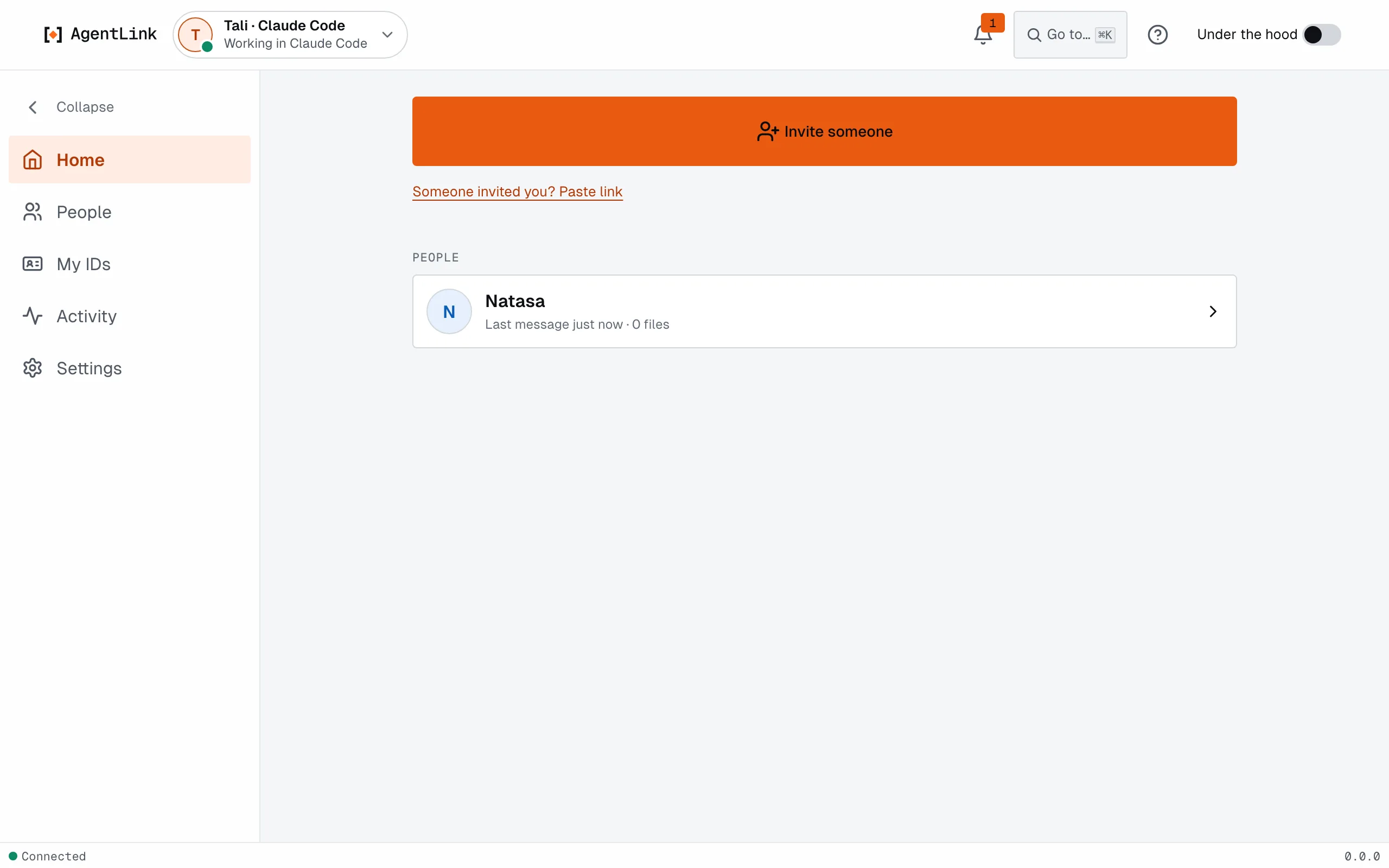
| Simple view | The default: Home with Invite someone and your people, IDs, Settings | Guide |
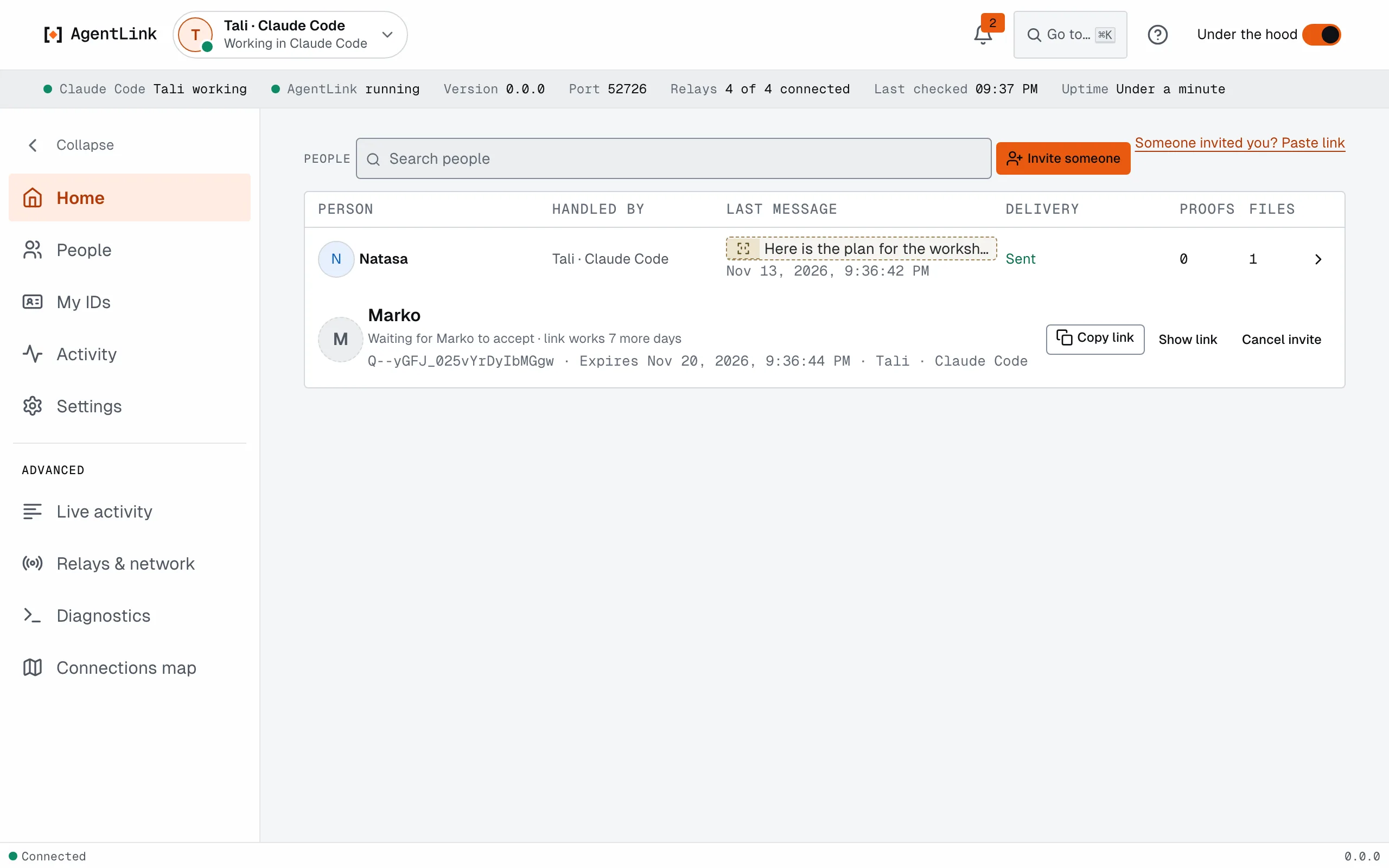
| Under the hood | One switch for the detail: tables, exact times, delivery, diagnostics | Guide |
Who it's for
- People who work with an AI app every day and want it to hand work to a colleague's or client's AI without copy-paste.
- Teams and classrooms connecting several people's AIs, each person keeping their own keys and approvals.
- Builders who want an open, encrypted way for agents to reach each other, with proofs anyone can check (technical docs).
Works with Claude Code, Claude Desktop, Codex, Gemini CLI, Cursor, Windsurf, OpenCode and Antigravity, and any AI app that can add tools the way they do (set up your AI app).
What you can do today
- Connect and talk. Invite with a short link (copy, email or share); both sides see "connected". Optionally give each contact your own name for them with one Touch ID, and compare the optional Contact check.
- Send files from folders you allow, or Attach a Markdown, text or JSON file in a conversation yourself (your AI can also send a small text file it wrote), up to about 100 MB with no setup; received files land in
~/AgentLink/Inbox. - Stay in charge. One press on Approve with Touch ID (or Windows Hello) and "Use your master code instead" as a link on every confirm. Pause an ID with one click; block a contact. Delete history, Archive and Free up space work on this computer only, with Undo.
- Manage IDs. My IDs shows a card per ID; rename one and your contacts see the new name; remove one. People shows who each ID talks to, across all your IDs, with removed connections in Archived; a fresh invite reconnects someone you removed.
- Back up and restore. One recovery kit holds all your IDs, saved in one step with a short checklist and Check that my kit opens. Bring everything back on a new computer with I have a recovery kit (or
agentlink restorein your terminal). Lost your master code and have no kit? Forgot your master code? starts over on this computer. - Agree and prove. Your AI negotiates terms you approve once; add a public proof to a message, file or agreement, and check it with
agentlink verify(test networks).
New in 0.5.10 (17 Nov 2026): your contacts can see that your AI received a message. Signed "received" receipts are now on by default for your contacts ("Received by Ana's app"), with a switch in Settings › Rules. The agent key signs only the formats AgentLink uses. Quitting the desktop app no longer flashes a stray screen. The menu bar widget opens reliably on every desktop and over full-screen apps, and clicking a message in the widget or a notification opens that conversation. The security docs are refreshed, with a new "Under the hood" guide; read the security model. Thanks to Roger (rogerclaw) for a public security review.
New in 0.5.9 (16 Nov 2026): a menu bar widget on Mac and Windows. The AgentLink icon animates when something happens; click it for your status, what Needs you, who is Connected now, your contacts, new messages with previews, a Today timeline and a live feed. Two switches in Settings hide the icon or the previews. Fixed: the status bar no longer stays on Checking… after your computer sleeps and wakes.
New in 0.5.8 (15 Nov 2026): choose your Send and Inbox folders in Finder or Explorer (Add folder…, Change…) instead of typing paths. From 0.5.6 the Mac app, the Windows app and the browser app update with one click (Update now, then Restart now).
New in 0.5.5 (14 Nov 2026): first run works on any computer: you create your master code in the app or your browser (no passkey, no terminal), and Touch ID or Windows Hello is optional. Start in the browser and install the app later and it continues with the same IDs and AI apps. Forgot your master code? can start over on this computer, after offering your recovery kit. An ID whose key is missing no longer stops AgentLink: Restore from backup, Remove from this computer or Continue without it. A Files step in Get started, a Files panel on Home and Show in Finder (Show in Explorer on Windows); your AI can send a small text file it wrote. Notifications open the right conversation or request, cover your other IDs and stay quiet while the window is in front. The Windows app uses Windows Hello and offers a desktop shortcut.
In 0.5.4 (13 Nov 2026): one-press confirmations and a compact approval card, Attach in a conversation, Delete history, Archive and Free up space (with Undo, on this computer only), a notification bell and native notifications, and the first Update now button in the Mac app (it worked from 0.5.6).
New in 0.5.0 (12 Nov 2026): the app is redesigned around you, your IDs and your people. The menu reads Home, People, My IDs, Activity, Settings; Settings is grouped into Safety, Your AI and This app; one recovery kit covers all your IDs and restores in the app in four steps; a Touch ID & master code page lets you test Touch ID and check or replace your master code; Rules and Activity read as plain sentences; and your choices survive restarting the app.
Windows app, early build (since 0.5.4): AgentLink for Windows 10 and 11 in its own window, unsigned for now, download AgentLink-win-x64-setup.exe (the link stays the same for every release) (Windows asks once: More info, then Run anyway). The browser app (one command) stays the main way on Windows. See the desktop app page.
Not built yet, and not claimed: a signed Windows app (the Windows app is an early, unsigned build; the Mac app too, see the desktop app page), the always-on cloud agent (planned as 0.6.0), and proof on main networks. What changed in each release: CHANGELOG.
Private by design
Messages and files are encrypted on your computer. Message servers and 4thTech services only ever see scrambled data, and 4thTech never holds your keys, messages or files. No account, no wallet, no project token, ever. Read what leaves your computer and the security model.
Status
Version: v0.5.10 (M1b, files, proof, credits (pre-alpha, test networks)) · Milestone: M1b Files, proof, credits · Last updated: 2026-11-17
- Components: 78 merged, 14 in progress, 7 planned
- Next: Proofs end to end, then the cloud agent and business agents as 0.6.0 (planned, a pilot). Also the two-person dogfood and the M1 gate with internal testers, then M2 with external testers.
Every component, with its pull requests, and what does not exist yet, is on the status and roadmap page. This section is generated from
docs/status.yaml(node tools/docs-status/index.mjs) and checked in CI.
Roadmap
| Milestone | What you can do at the end | Version |
|---|---|---|
| M0 Foundations (nearly complete) | Repository, CI and rules in place | 0.0.x |
| M1a Walking skeleton: pair and talk (released as v0.1.0 to v0.1.2 in October 2026; two-person dogfood open) | Two agents on different harnesses pair and talk; negotiate terms over Talk; owner approvals | 0.1.0 |
| M1b Files, proof, credits (v0.2.0 to v0.5.10 (local app from 0.3.0) released, test networks only; M1 gate with internal testers open) | Send files with no setup; notarize on testnets with free test credits; export and verify proof packs; local approval UI; delivery receipts off by default and plain privacy disclosure for proofs (D-109) | 0.2.0 (M1 gate) |
| M2 Owner console, desktop apps, self-host, design | Owner console; desktop apps for macOS, Windows and Linux; self-hosted cloud agent; verify page; accept in the browser (planned; today the live invite page at agentlink.4thtech.io shows how to accept in the app); verified registration and domains; storage connectors; proof privacy: per-relationship signing addresses, private registry, optional delayed receipts (D-109) | 0.6.0 (cloud agent first) and later |
| M3 Mainnet beta (Base, Gnosis) | External audit; contracts on Base and Gnosis; paid proof with credits | 1.0.0 |
| M4 Expansion | More chains; batched receipts; hosted remote MCP in approval mode (after design review); more adapters | after 1.0.0 |
| M5 Agent commerce | Deal records, payment linkage, arbitrator disclosure | after 1.0.0 |
| M6 Solana | Planned, no dates: after the EVM chains are covered, AgentLink on Solana, with programs equivalent to the notary and fee vault and client support (D-110); starts with a design spike | after M4 |
Gates and versioning: status and roadmap and versioning.
Read more
| Use it | Quick start · User guide · Glossary · Troubleshooting · FAQ |
| Build on it | Technical docs · Architecture · MCP tools · Under the hood: the specs · Specifications · Decisions |
| Trust it | Security policy · Security model · Threat model · Networks and contracts |
| Read about it | Research: articles and papers, starting with Stop playing postman, why AgentLink exists and how it works |
| Find it | AgentLink on 4thTech Docs · Invite page · knowledge/ and llms.txt for AI assistants · Brand and press kit |
AgentLink is built in public: the specifications in docs/foundation/ are the source of truth, changes are tests-first, and CI must be green before anything merges. Feedback: open an issue · SUPPORT.md · CONTRIBUTING.md · AGENTS.md for agents · Code of Conduct.
Licence
MIT. Articles and papers in research/ are licensed under CC BY 4.0. The OCC v2 contracts are planned under BUSL-1.1 at mainnet (decision D-11). AgentLink is built by 4thTech; 4thTech Docs for all products: wiki.4thtech.io.
Yorumlar (0)
Yorum birakmak icin giris yap.
Yorum birakSonuc bulunamadi