pebbleagent
Health Gecti
- License — License: AGPL-3.0
- Description — Repository has a description
- Active repo — Last push 0 days ago
- Community trust — 35 GitHub stars
Code Basarisiz
- rm -rf — Recursive force deletion command in agent_core/bash_validator.py
Permissions Gecti
- Permissions — No dangerous permissions requested
Bu listing icin henuz AI raporu yok.
Your personal light coding agent

A light,open-source, and extensible desktop AI agent with tools, skills, MCP servers, a self-maintained code knowledge base, and cross-session memory.






Platform support: Windows 10/11 (64-bit) is the tested platform, and the only one that can build the desktop shell. The backend and the web UI also run on macOS, where the shell is unavailable because its Tauri sidecar management is written against Win32 APIs. Linux is untested.
macOS has not been run by the author, who has no Apple machine. It is verified by code inspection rather than by use, so it should work on MacOS — and if it does not, please open an issue.
Features
- Code Knowledge Base (CKB). The agent indexes your repository into a chaptered knowledge base, verifies it against the source, and keeps it in sync as the project evolves.
- Cross-session experience ledger. Corrections, constraints, and preferences you express during work become evidence-backed entries in a local SQLite ledger. Later turns recall the relevant ones by full-text relevance plus tool and path context, and superseded entries are retired automatically. Capture and recall run on rules, not extra model calls.
- Snapshot & rollback. Every write is snapshotted before it happens; diffs are tracked per file, and you can roll back a single file or an entire change set — with an undo for the rollback itself.
- Permission & audit system. Three permission modes (manual, auto, read-only), rule sets with
tool:patternmatching, a path whitelist, fail-closed checks, and a tamper-evident audit log (chained checksums) for every sensitive operation. - Skills and MCP servers. 50 bundled skills load on demand; MCP servers over stdio, SSE, HTTP, or WebSocket are installed with sha256 verification and approved per project. Both are extensible from the installed app with no source build required, and you do not have to touch a file yourself: ask the agent to add a skill or an MCP server and it writes the
SKILL.mdunder~/.pebble/skills/<name>/or themcpServersentry in~/.pebble/.mcp.jsonfor you. A user skill with the same name overrides the bundled one, and a new MCP entry waits in the MCP panel until you approve it before anything is launched. - Real-time cost tracking. Per-model pricing with peak/off-peak tiers (including Chinese statutory holidays) and cache-hit accounting, updated live per conversation.
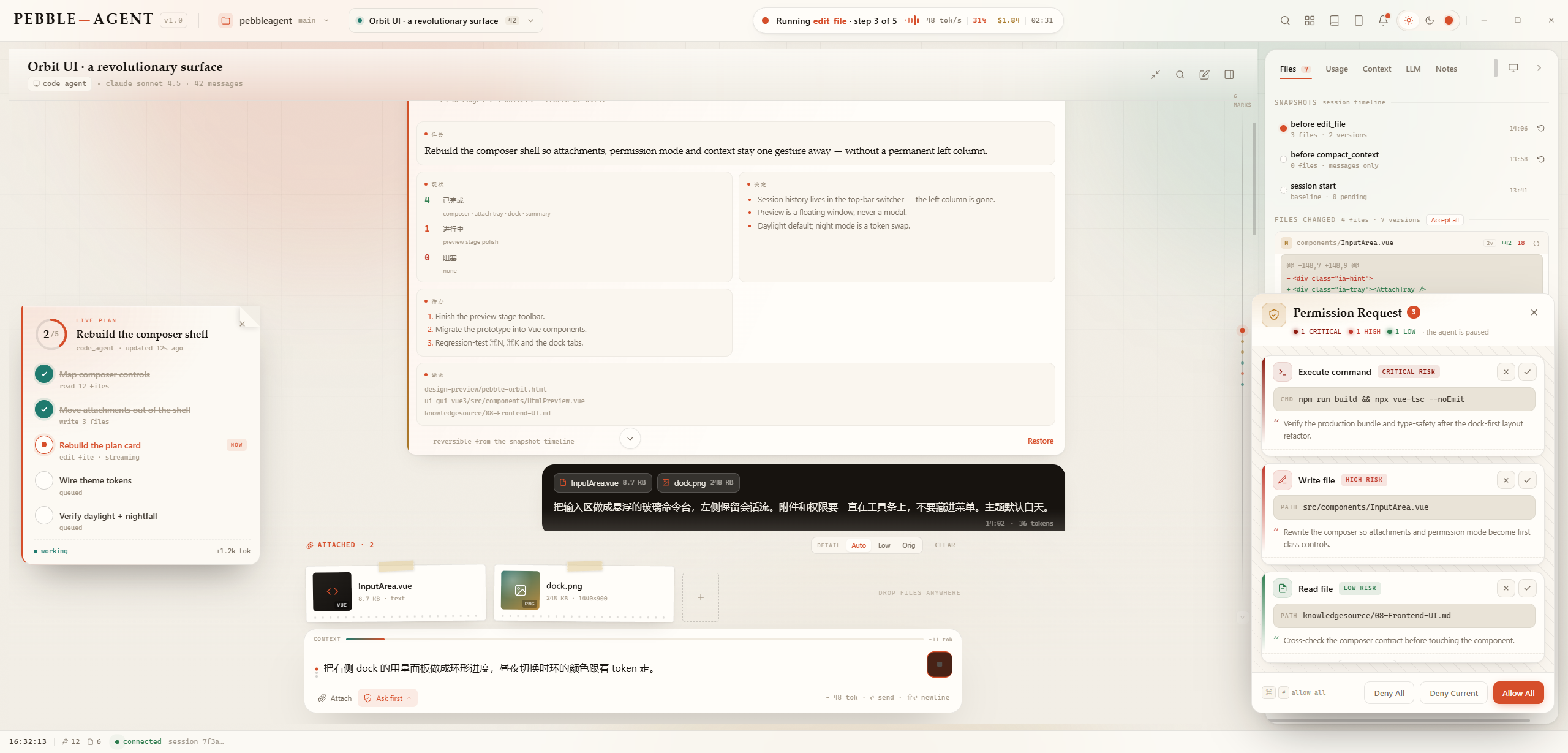
- HTML preview with feedback bridge. Generated HTML pages render in a sandboxed preview; click any element to leave a comment, and the agent iterates on the page from your annotations.
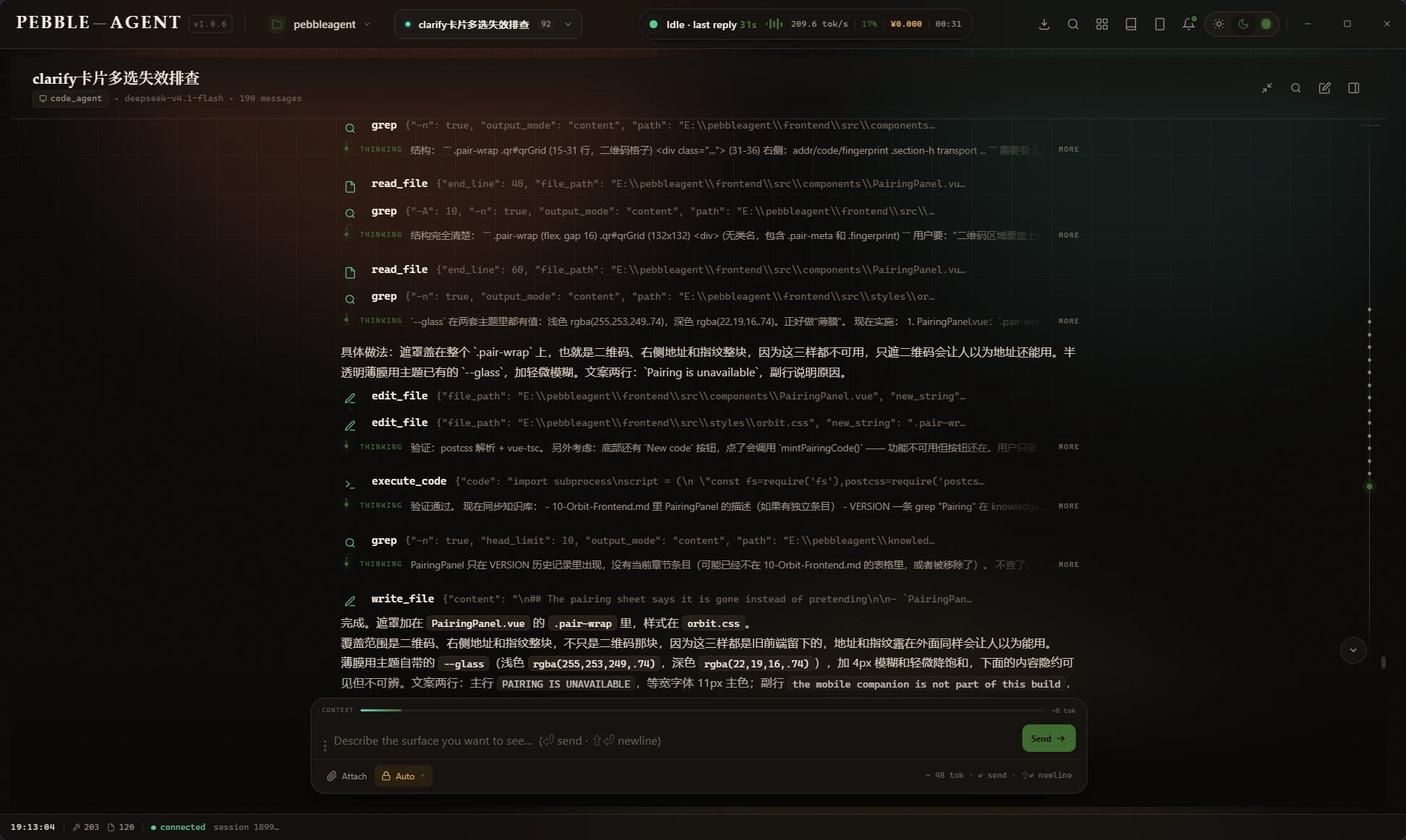
- Streaming agent chat with full execution visibility. Reasoning, tool calls, file changes, and results unfold as a step-by-step timeline instead of a black box.
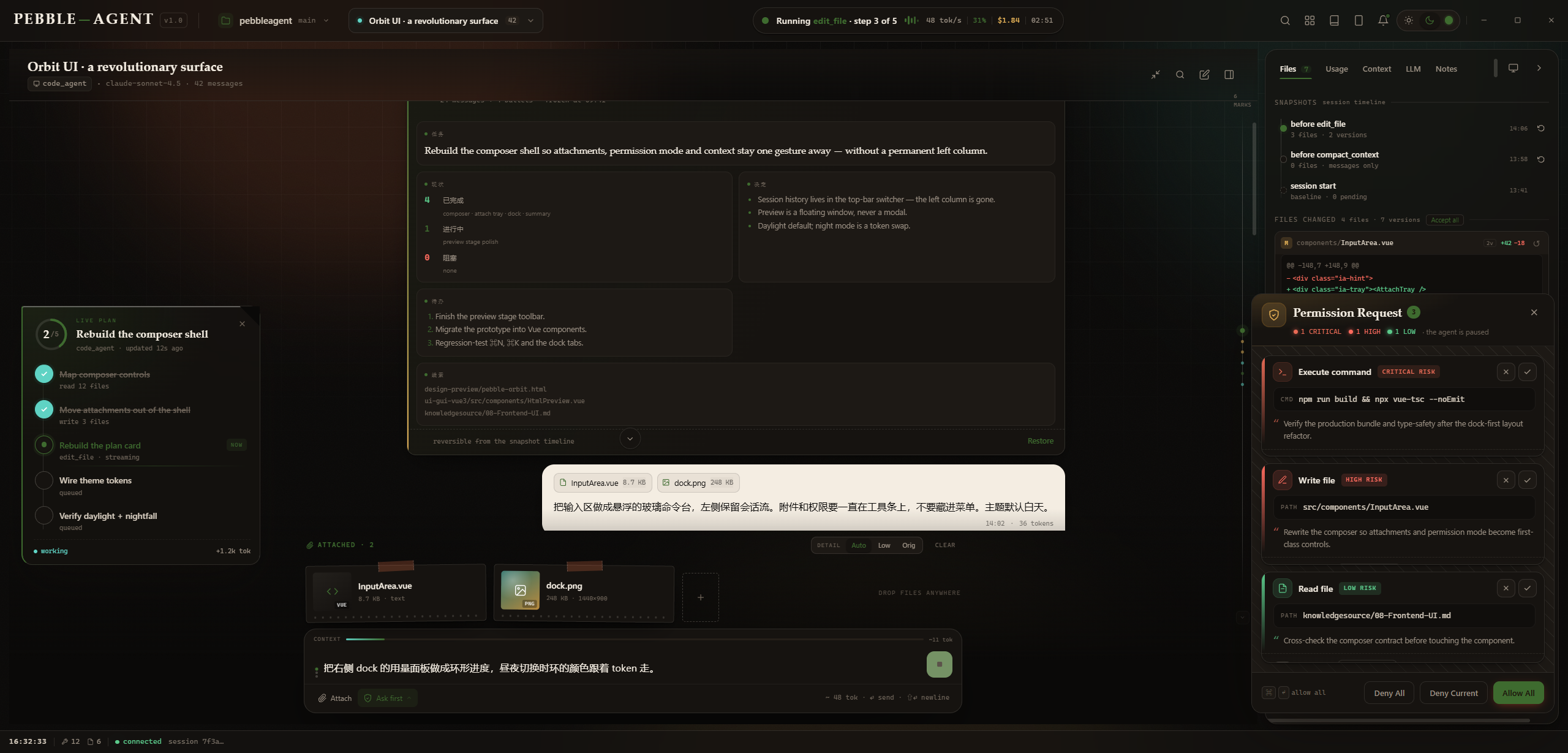
- Full UI theming. Pick any color and the whole palette adapts instantly across the entire interface.
- Desktop-grade shell. A frameless Tauri 2 window, a WebSocket JSON-RPC 2.0 protocol, and a self-contained Python backend shipped as a sidecar.
Screenshots
Architecture
flowchart LR
    UI["Vue 3 + Pinia<br/>(Tauri 2 webview)"] -->|"WebSocket · JSON-RPC 2.0"| GW["Python Gateway"]
    GW --> AG["Agent Core"]
    AG --> TL["Tool System"]
    AG --> MCP["MCP Servers"]
    AG --> LLM["LLM Providers"]
    GW --> DB[("SQLite")]
Getting Started
Prerequisites
- Windows 10/11 (64-bit) for the desktop shell, or macOS for web mode
- Python 3.11+
- Node.js 18+ (for the frontend and npx-based MCP servers)
- Rust toolchain (only needed to build the desktop shell)
Run from source
git clone <your-repo-url>
cd <repo-folder>

pip install -r requirements.txt

cd frontend
npm install
cd ..
requirements.txt is the core set, enough to start the backend and chat. The
optional set adds pypdf for reading PDF attachments, psutil for CPU/memory
details and playwright for the verification script one skill ships; install
it with pip install -r requirements-optional.txt.
Then launch both services with the provided script:
start_gui.bat
This starts the Python backend (ws://127.0.0.1:19876) and the Vite dev server (http://localhost:5180).
On macOS the two services are started separately:
chmod +x start_backend.sh
./start_backend.sh
cd frontend
npm run dev
Then open http://localhost:5180. The dev server injects the gateway token into the
page, so nothing else has to be configured. The powershell tool is not offered on
macOS; execute_shell covers the same ground. The desktop shell cannot be built
there yet, so web mode is how it runs.
To run the desktop shell in development instead, start the backend first and then:
cd frontend
npx tauri dev
Build the desktop app
Just want to run it? Windows users who want the app rather than the build
should grab the latest installer from
Releases. It
already bundles the Python backend, so none of the steps below are needed.
This section is Windows-only. The sidecar management in
frontend/src-tauri/src/lib.rsis built on Win32 APIs, so the shell does not
compile on macOS. Web mode above needs none of it.
- Package the backend with PyInstaller:
pyinstaller pebble-backend.spec
- Copy the artifact next to the Tauri shell (sidecar naming requires the target triple):
copy dist\pebble-backend.exe frontend\src-tauri\binaries\pebble-backend-x86_64-pc-windows-msvc.exe
- Build the desktop bundle:
cd frontend
npx tauri build
Configuration
All runtime data lives in %USERPROFILE%\.pebble\ (override with the PEBBLE_HOME environment variable).
- LLM providers — providers, API keys, models, and reasoning effort are configured in
llm_providers.jsonor from the in-app settings. - Skills — bundled skills ship inside the app. Ask the agent to add one and it writes
~/.pebble/skills/<name>/SKILL.md; a user skill with the same name overrides the bundled copy. - MCP servers — the MCP panel installs and manages servers; tokens and executable paths are stored in
~/.pebble/.mcp.json. Ask the agent to add a server and it writes the entry, which then appears in the panel and waits for your approval before it is launched. - Permissions — modes and
tool:patternrules live inpermission_rules.json; the path whitelist inpath_whitelist.json. - Pricing — the per-model price table (with peak/off-peak tiers) is in
model_pricing.json; holiday data incn_holidays.json.
Project Structure
gateway/          Python WebSocket gateway (JSON-RPC, sessions, permissions)
agent_core/       Agent core (chat service, tool orchestration, experience ledger, snapshots)
tools/            Built-in tools
skills/           Bundled skills
knowledgesource/  Code knowledge base (chaptered)
frontend/         Orbit frontend (Vue 3) + Tauri 2 desktop shell
tests/            Standalone verification tests (python tests/run_all.py)
Tests
Standalone verification tests live in tests/ and need no framework — each file runs on its own and exits non-zero on failure:
python tests/run_all.py    # Python tests (tool policy, compaction, billing, ...)
node tests/run_all.mjs     # JS tests (fold algorithm, WS recovery, UI formulas, ...)
Three billing/holiday regression scripts (peb_check_*.py) sit at the repo root and follow the same exit-code convention. All of the above, plus a full compileall syntax check and a vue-tsc type check, run in CI on every push (.github/workflows/checks.yml).
Credits
PebbleAgent bundles 50 skills. Third-party skills and materials
(10 Apache-2.0 skills, 1 MIT skill, 1 reference set) are listed in
THIRD_PARTY_NOTICES.md.
Video rendering (the brag skill) is powered by
HyperFrames, Copyright 2026
HeyGen, Inc., licensed under Apache-2.0.
License
Licensed under the GNU Affero General Public License v3.0.
Yorumlar (0)
Yorum birakmak icin giris yap.
Yorum birakSonuc bulunamadi