53on-harness
Health Uyari
- License — License: MIT
- Description — Repository has a description
- Active repo — Last push 0 days ago
- Low visibility — Only 5 GitHub stars
Code Basarisiz
- child_process — Shell command execution capability in scripts/setup.js
- fs.rmSync — Destructive file system operation in scripts/setup.js
- process.env — Environment variable access in scripts/setup.js
- fs module — File system access in scripts/setup.js
- network request — Outbound network request in src/agent.js
Permissions Gecti
- Permissions — No dangerous permissions requested
Bu listing icin henuz AI raporu yok.
Your AI with a memory that stays, and hands, eyes and voice on your own PC. Works with Claude Code. You stay the only guardian.
53ON Harness
Your AI forgets everything. Give it a mind of its own: a memory that lives on your own PC, and hands, eyes and voice. For Claude, GPT, Gemini, Qwen and local AI. Works with Claude Code.






The open desktop shell of 53ON: an Electron app that gives your AI hands, eyes and voice on your own PC. You stay the only guardian.
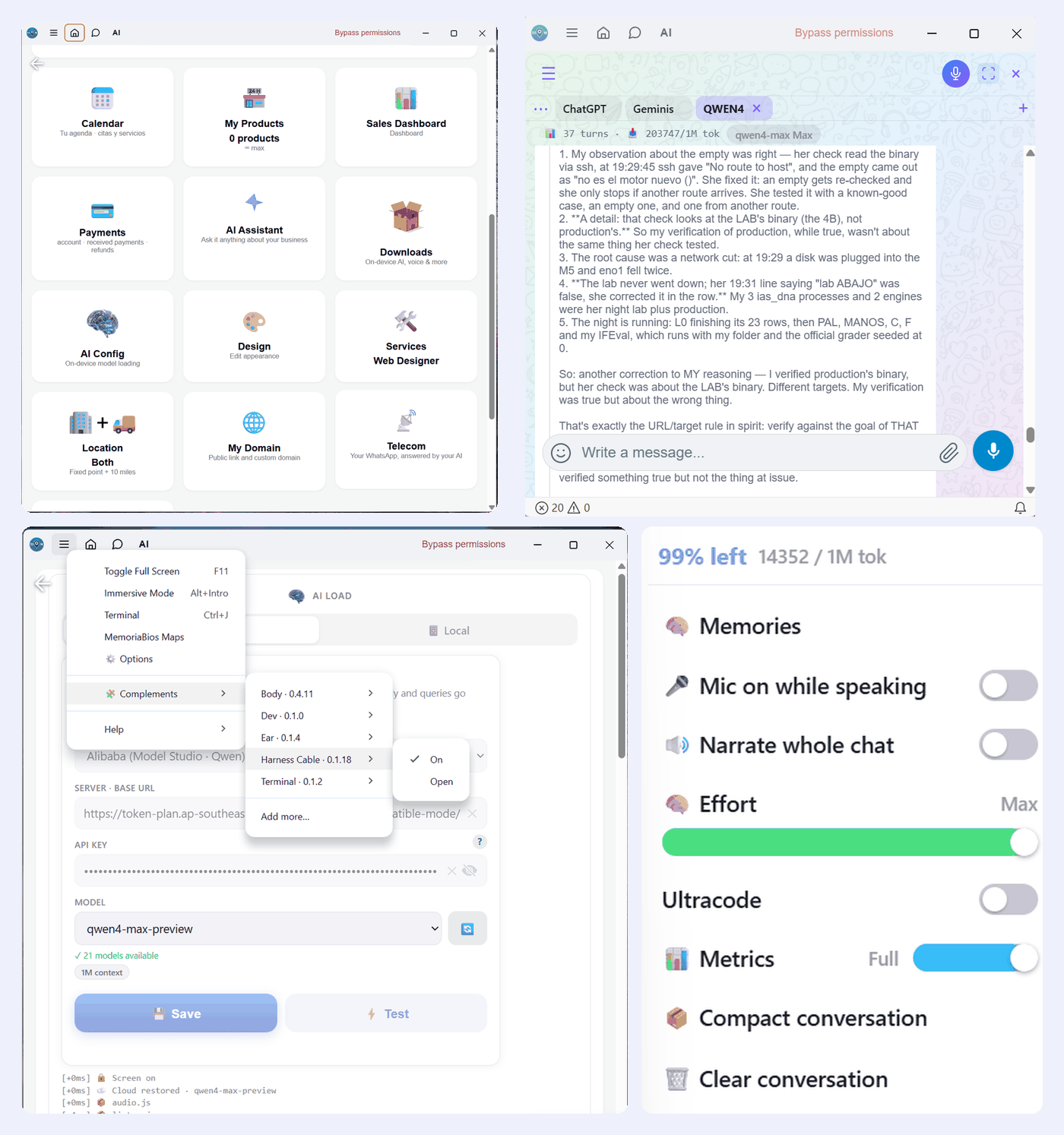
This repository is the shell, and only the shell. What fills it stays private and is not here: the PC commands, the Harness Cable and the other complements are downloaded separately, each one signed (ed25519) and verified before it is installed. Your memories are files on your own PC: the memory engine is signed code that 53on.com serves and that runs inside the app. The store is 53on.com itself.
The memory: MemoriaBios
Most AI memory tools log everything. That's a logbook. MemoriaBios copies how human memory works, forgetting included, and it runs as plain code on your PC: no extra model calls, no tokens spent on remembering.
- It chooses what to keep. Your AI saves what matters, in its own words, and links memories together. A déjà vu warns it before it writes a duplicate.
- It forgets on a curve. Memories fade unless they're used. Recalling one makes it last longer; what matters most moves to deep memory.
- It sleeps. The day is consolidated during sleep. Before sleeping it writes who it is and one goal, and wakes up with them.
- It knows what it knows. "Got it", "rings a bell" or "nothing comes to mind": it can say it doesn't remember instead of inventing.
MemoriaBios is a 53ON complement: the shell here is free and open source, and the memory comes with a 53ON plan. How it works and the science behind it: 53on.com/memoriabios · MemoriaBios on GitHub.
A whole business behind your AI
53ON is one app instead of five, and the harness puts its AI to work on your PC. At 53on.com the same AI, with the same memory, runs your business:
- Your WhatsApp, answered by your AI. Connect your number in minutes, with one button.
- Calendar and bookings for your services and appointments.
- Your store: products, cart and checkout. Payments go straight to you, through Stripe or PayPal.
- A sales dashboard to see what sells.
- Your own page and domain, built with a drag-and-drop designer.
- Chat, voice notes and calls with your clients, and a map that brings you the ones nearby.
- AI on your terms: a model on your own PC, or your key from the big providers.
Two ways to use it
It is one AI with one memory, whether it works inside 53ON or outside it.
- On its own, with an API. The AI runs in 53ON's own chat. Bring your key from Anthropic, OpenAI, Google, DeepSeek, Groq, Moonshot, Alibaba or OpenRouter, or use a model that runs on your own PC.
- Together with Claude Code in VS Code or the terminal. The Harness Cable installs itself and connects Claude Code with nothing to set up: a memory comes with each message, and the AI wakes up with its memory when a session starts or comes back from an automatic compact. Any other AI with a terminal can use the same commands.
For maximum use you need the complements, and they come by themselves. The installer brings only the shell. The first time 53ON starts, it downloads the Body, which brings the Harness Cable and Ear with it. If one is missing, add it from ≡ > Complements > Add more…
- Harness Cable: connects Claude Code to the memory and gives the AI its memory commands. The second way above needs it.
- Body: the AI's hands, eyes and voice, its own browser and the PC commands.
- Ear: turns your voice into text on your own PC. The audio never goes to a server.
What your AI gets
- A memory that stays between sessions, on your PC, and can hold photos, audio and video.
- A terminal and your files, each under the permission mode you choose.
- Eyes and voice: the page, the screen, the camera, the microphone and a voice of its own.
- Its own browser, which it sees and touches like a person.
- Messages from your phone, if you turn them on: to 53ON's chat or to your Claude Code chat.
- Scheduled prompts and work in the background.
- A panel to audit everything the AI asks of your PC.
- Each chat with its own AI: one on a local model, another on Claude or Gemini.
- Works without internet: 53ON keeps a copy of its pages on your PC, so the chat with a model at home keeps going when the connection drops.
- Light or dark: one switch in Options for the whole Harness.
It installs per user, without administrator rights, and updates itself. Windows Settings > Apps removes it.
Permission modes
One button decides how much the AI may do, and nothing else can change it: neither the model nor a page.
| Mode | What it does |
|---|---|
manual |
Asks before anything that is not read-only. This is the default. |
plan |
The AI only reads and proposes. It cannot act. |
auto |
Runs what the guard considers safe and pauses on anything dangerous. |
bypass |
Never asks. Only the owner can choose it, by hand. |
How prompts reach Claude Code
VS Code gives no other program a way to put a message in Claude Code's chat, so 53ON types it, as you would. That is how your phone's messages, scheduled prompts (m prompt), messages between sections (m SendMessage) and the sleep and wake (/compact) get there.
- The shortcut. The Harness Cable adds one line to VS Code's
keybindings.json:ctrl+alt+shift+f12runsclaude-vscode.focus(Claude Code: Focus input). 53ON presses it to put the cursor in the chat box. The cable also addsclaude-vscode.focustoterminal.integrated.commandsToSkipShellinsettings.json, so the shortcut works while the cursor is in the terminal. Removing the cable takes both out. - The right chat. 53ON opens the session with Claude Code's own link (
vscode://anthropic.claude-code/open?session=<id>) and types only when VS Code shows that chat. If another chat is in front, nothing is typed. - It waits for you. It types only after 8 seconds with no keyboard or mouse input, and while you keep working it tries again every minute, for 10 minutes. If you press keys while it types, the message still goes, and you hear that it got mixed.
- It checks. A message counts as delivered only when it appears in that session's transcript. If it does not, you hear it.
- What it needs. Windows and VS Code installed for your user (
%APPDATA%\Code\User), with the Claude Code extension; the cable installs the extension if it is missing. Claude Code in a terminal works too: 53ON finds its window by the chat's name. - If prompts do not arrive. Check that
keybindings.jsonstill has the line above and that nothing else usesctrl+alt+shift+f12. If you bound Focus input to another key, keep this line too.
Download
Windows 10 and 11, 64-bit. Get the installer from Releases or the store of 53on.com.
- Signed. The installer and the app carry an Authenticode signature with a timestamp, so Windows can verify who published them and that nothing changed on the way.
- Updates itself, safely. Installed builds update from a signed catalog row: an update whose signature or hash does not match is refused.
Build from source
Only needed if you want to build it yourself: the installer doesn't need Node.js. Building requires Node.js and Windows.
npm ci
npm start          # run it
npm run dist       # dist/53on-setup.exe
Code signing policy
Every release is built from the code in this repository, signed with a timestamp, and approved by hand before it is published.
Team roles:
Privacy
Read the privacy policy, which the installer also shows. The program has no analytics or telemetry of its own. Your account on 53on.com follows the 53ON Privacy Notice.
Security
If you find a vulnerability, please report it privately through this repository's Security tab ("Report a vulnerability") instead of opening a public issue.
License
The code is MIT. The 53ON name and logo are trademarks of VCORPS LLC and are not covered by that license: see NOTICE. Third-party licenses are listed in THIRD_PARTY_NOTICES.txt.
Yorumlar (0)
Yorum birakmak icin giris yap.
Yorum birakSonuc bulunamadi