roadmapped
Health Warn
- License — License: MIT
- Description — Repository has a description
- Active repo — Last push 0 days ago
- Low visibility — Only 7 GitHub stars
Code Fail
- spawnSync — Synchronous process spawning in bin/roadmapped.mjs
- process.env — Environment variable access in bin/roadmapped.mjs
- network request — Outbound network request in bin/roadmapped.mjs
Permissions Pass
- Permissions — No dangerous permissions requested
No AI report is available for this listing yet.
Project management as flat files in your repo. YAML tasks, a computed roadmap, driven by your AI agent. No database, no SaaS. MIT.

Roadmapped
Your repo is already your project management tool. We just added the interface.


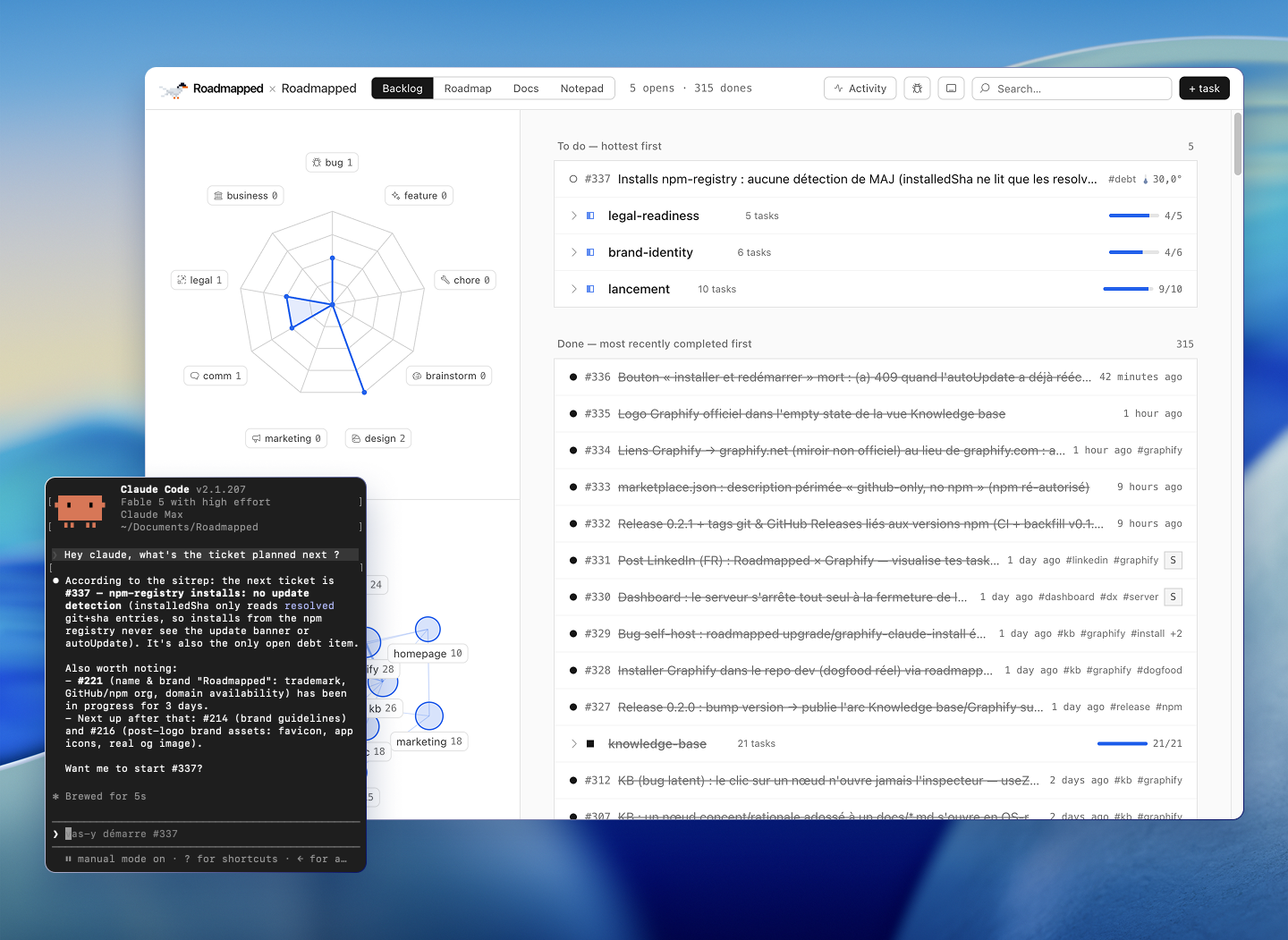
Backlog, roadmap, docs and a knowledge graph of your code — all flat YAML and markdown
inside your repository, the only source of truth. No database, no SaaS, no account. Your
AI agent reads and writes it through a CLI and a Claude skill; you review the diff.
Install: one prompt
Paste this to your AI coding agent (Claude Code and friends):
Install Roadmapped in my repo: https://github.com/5e1y/roadmapped
The agent does the rest. An installer that is a prompt is exactly the level of effort
this project aims for.
Prefer typing it yourself? Three ways in — same wired state, and every install keeps
itself current from GitHub HEAD afterwards, no reinstalling:
Claude Code plugin
/plugin marketplace add 5e1y/roadmapped
/plugin install roadmapped@roadmapped
npm
npx roadmapped init && npm install
Straight from GitHub — no registry involved:
npx --yes github:5e1y/roadmapped init && npm install
init is idempotent and lays down everything once: the docs/tasks/ skeleton, the Claude
skill, a git pre-commit guard, an .mcp.json entry, a CLAUDE.md block, and roadmapped
as a devDependency. Then restart your Claude Code session (it picks up the skill and the
MCP server) and tell the agent "let's set up Roadmapped" — the setup phase converts your
existing plans, TODOs and specs into the backlog, with your sign-off on the mapping.npx roadmapped dashboard opens the UI; npx roadmapped --help is the CLI your agent
(or you) drives.
Requirements: Node ≥ 22.18 and a
package.jsonin the host repo — the hooks and the
MCP entry resolve throughnode_modules/roadmapped/. Non-Node repo (Python, Go, Rust…)?npm init -yat the root is enough; Roadmapped only uses it to install itself.
First-class non-Node support is on the roadmap, not in v1.
Why
- It's just files. Task YAML you can diff, review and blame — because it is one.
No hidden state, no second copy to drift out of sync. - Agent-first. Your agent creates specs, tasks and dependencies in the correct schema,
and records what it ships: outcome, verification, commit. Every write — dashboard or
CLI — goes through the same validator; on error the change rolls back. - Local and yours. Your data stays in your repo. Not out of principle — we simply
don't have a server to send it to. Deleting your account isrm -rf. - Light. The dashboard ships pre-built: ~30 MB in your repo, no front-end toolchain.
- Free, actually. MIT. No pricing page, no seats, no "contact sales."
Yes, it's a folder of YAML files. No, it's not a database. That's kind of the point.
What's in the folder
| Area | What it does |
|---|---|
| Backlog | Sections and tasks under docs/tasks/, full CRUD from the dashboard or the CLI. |
| Roadmap | Your sections as columns plus a dependency graph, with done / available / locked states computed from the graph, never stored. |
| Docs | Your docs/ folder rendered as markdown. |
| Knowledge base | A live graph of your repo — code, docs, and the tickets wired in via their refs, nothing to fill in. Installed by default at init (--no-kb to opt out). |
| Agent CLI + Claude skill | npx roadmapped <cmd> and skills/roadmapped/, so an agent drives the whole cycle — and is held to it by the git guard. |
Knowledge base, powered by Graphify
Your repo gets a knowledge graph: code and docs as nodes and relations, tickets wired in
through their refs, committed at graphify-out/graph.json — a file, like everything
else here. The pretty graph in the Docs tab is not the point. The point is that your agent
navigates the repo through it instead of grepping cold: task briefs embed the neighborhood
of the files they touch, and the MCP tools (kb_neighborhood, kb_search, kb_node)
answer "where does X live, what touches it" in a few hundred tokens instead of a
read-everything expedition. Up to ~70% fewer exploration tokens — exploration, not the
whole session; no miracle claimed beyond that.
The graph is generated by your agent — one /graphify ., the only step that costs tokens,
and it asks first. Refreshes are code-only and free. The layer is Python-powered and
installed by init: a one-time ~30 MB on your machine, up to ~85 MB if it has neither
Python nor uv — the npm package stays Node-only either way.
How it works
Everything is flat, hand-editable files. The dashboard and the CLI read and write the same
data through the same validator — never a second, parallel schema hiding somewhere. Roadmap
states are derived from the dependency graph on every read; your git history is the audit log.
Roadmapped's own backlog is managed by Roadmapped, mostly by a Claude agent that records
every task it ships. The done tasks are the changelog. If you want to know whether the
workflow holds up, read the backlog — it's public, and more honest than we'd like.
Naming — the brand is Roadmapped (two p's, renamed 2026-07). The GitHub repository
and the npm package areroadmapped(lowercase). Host repos still using the legacyroadmaped.config.json(one p) keep working — the old filename is read as a fallback.Working on Roadmapped itself? Clone,
npm install,npm run dev; the CLI isnode scripts/task.mjs. Everything under the hood is the same code the package runs.
Documentation
- User guide — installation, dashboard tour, full CLI reference, YAML formats, agent workflow.
- Claude skill — the skill an agent loads to drive Roadmapped in your repo.
License
MIT © Rémi Courtillon
The knowledge base graph is generated by Graphify — a separate
open-source project (MIT, Graphify-Labs/graphify),
not ours. Roadmapped reads graphify-out/graph.json and renders it; they do the clever part.
Reviews (0)
Sign in to leave a review.
Leave a reviewNo results found