Fan-Browser-Agent
Health Gecti
- License — License: MIT
- Description — Repository has a description
- Active repo — Last push 0 days ago
- Community trust — 29 GitHub stars
Code Gecti
- Code scan — Scanned 12 files during light audit, no dangerous patterns found
Permissions Gecti
- Permissions — No dangerous permissions requested
Bu listing icin henuz AI raporu yok.
Open-source desktop AI agent with an embedded browser runtime and human-in-the-loop control.

Fan
An open-source desktop AI agent that works with you in a real, visible browser.
简体中文 · Download · Website · Use cases · Security · MIT License
[!IMPORTANT]
Fan is currently an early preview. It can operate real websites and local tools, so its behavior is affected by changing pages, model capabilities, and your local environment. Start with low-risk, verifiable tasks, and keep a human in the loop for submissions, payments, messages, deletions, and other consequential actions.
Introduction
Fan brings an Electron desktop app, an embedded Chromium browser, and a local Python agent runtime into one workspace. You describe a goal; Fan observes the live page, plans the next steps, operates the browser, and organizes the result. When a task reaches a login, verification code, sensitive field, or important decision, Fan pauses and returns control to you.
It is more than a chat window that tells you what to do, and it does not require a hand-written automation script for every website. The work happens in a visible browser where you can inspect the page, open tabs, execution progress, and pending confirmations at any time.
Product preview
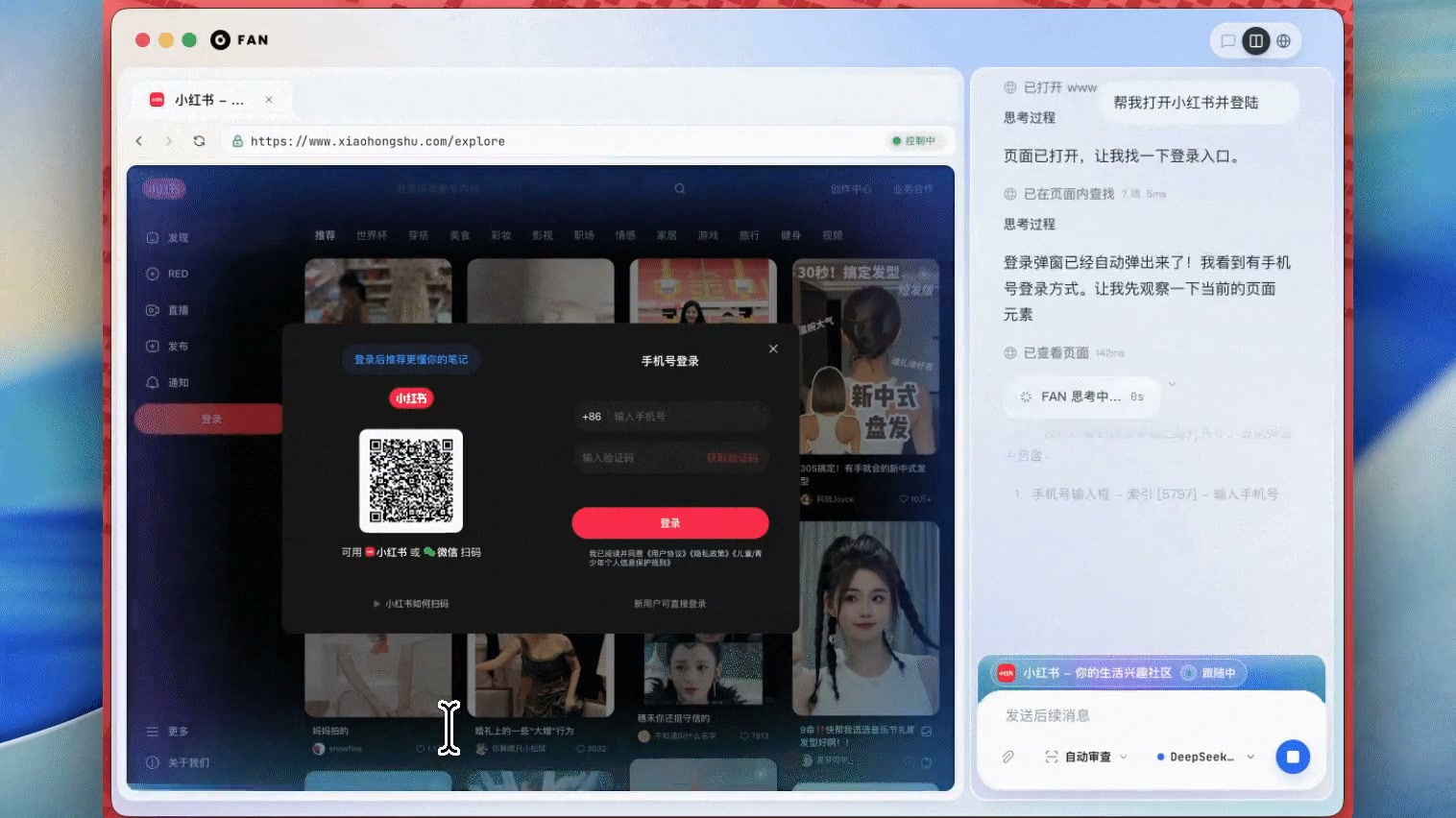
Click the image to watch the product demo
| Real-world task | What Fan does | Demo |
|---|---|---|
| South Korean visa application | Selects a visa type, fills the form, uploads documents, and pauses at consequential steps | View use case |
| PubMed literature research | Searches across multiple tabs, verifies paper metadata, and produces a reviewable summary | View use case |
| UPS package tracking | Recovers from an outdated entry point and verifies status, location, and delivery dates | View use case |
Why Fan
Fan began with a personal need: build a deliberately simple desktop AI assistant focused on browser use and computer use, then use it to solve the web tasks that come up every day.
Many browser agents felt like fully autonomous scripts or chat demos, while real work often needs a person in the loop. Users should handle logins and verification codes. Forms should be reviewable before submission. Payments, messages, deletions, and important choices should not be crossed silently. Fan therefore treats human participation as a primary interaction model, not as a recovery path after automation fails.
Token usage was another practical concern. Sending a complete DOM and a large collection of low-level tools to the model can turn a task into a costly loop of “look once, take one step.” Fan presents the model with a small set of goal-oriented browser interfaces, orchestrates sequences internally, and prunes stale page context so model calls stay focused on the moments that require understanding and judgment.
Those constraints shaped the project:
- Visible by default. The agent works inside an embedded browser, not in an opaque remote session.
- Humans can step in. Logins, verification codes, sensitive fields, and high-impact actions can be handed back naturally.
- The work is reviewable. Page state, tabs, task progress, and results remain together in one workspace.
- Local first. Configuration, sessions, Skills, and task history stay on your machine by default, with no Fan product account required.
- Bring your own model. Choose a built-in provider or connect an OpenAI-compatible endpoint you control.
- Capabilities accumulate. Skills, MCP, plugins, and scheduled tasks turn useful workflows into reusable building blocks.
Fan was first built to help its author get real work done. It is now open source so people who also need a visible browser, human confirmation, and local tool access can use it, change it, and help explore what browser agents should become.
Quick start
Download the desktop app
Download the latest build from GitHub Releases:
| Platform | Package |
|---|---|
| macOS Apple Silicon | Fan-0.4.3-mac-arm64.dmg |
| macOS Intel | Fan-0.4.3-mac-x64.dmg |
| Windows x64 | Fan-0.4.3-win-x64.exe (recommended) or MSI |
| Linux x64 | AppImage, DEB, or RPM |
Version 0.4.3 is an unsigned early preview. macOS Gatekeeper or Windows SmartScreen may show an unknown-developer warning. Download only from this repository's Release page and compare the file against SHA256SUMS.txt. Packaged builds check this same GitHub Releases feed for updates.
Run from source
Requirements:
| Component | Version |
|---|---|
| Python | 3.11–3.13 |
| Node.js | 22.12 or later |
| Python package manager | uv |
| Node.js package manager | npm |
| Operating system | macOS, Windows, or Linux |
Run from source:
git clone https://github.com/7757/Fan-Browser-Agent.git
cd Fan-Browser-Agent
npm run dev
The first run installs the locked Python and Node.js dependencies, then starts the desktop app. Always run these commands from the repository root.
To install dependencies without launching Fan:
npm run setup
Development data is stored under ~/.dev_fan by default. Set FAN_HOME before launch to use another location.
Configure a model provider
On first launch, Fan opens the model provider setup dialog. Choose a provider, enter its API key, and pass the connection check to start a conversation. You can change the provider later under Settings → Preferences.
| Provider | Built-in models | Required configuration |
|---|---|---|
| DeepSeek (recommended) | deepseek-v4-flash, deepseek-v4-pro |
DeepSeek API key |
| Alibaba Bailian / DashScope | qwen3-vl-plus, qwen3.7-max |
DashScope API key |
| Alibaba Cloud Coding Plan | qwen3-vl-plus, qwen3.7-max |
Coding Plan or DashScope API key |
| Ollama Cloud | nemotron-3-nano:30b |
Ollama API key |
| Custom endpoint | You specify the model | OpenAI-compatible base URL, model ID, and any key required by the endpoint |
To use DeepSeek:
- Open the model provider card under Settings → Preferences.
- Select DeepSeek.
- Enter your DeepSeek API key.
- Choose a model and save. Fan verifies the connection before writing the configuration locally.
The provider and model selection are stored in $FAN_HOME/config.yaml. API keys are stored in $FAN_HOME/.env. The UI and local API do not return complete keys.
Core features
- Browse, search, click, type, fill forms, upload files, take screenshots, and save PDFs.
- Re-check the live page after an action instead of assuming a click succeeded.
- Run multiple tasks and inspect their progress, results, and pending decisions in one workspace.
- Request human handoff or confirmation for logins, verification codes, CAPTCHA, sensitive input, and consequential actions.
- Work with local files, terminals, code, images, memory, and an artifacts workspace.
- Create local scheduled tasks, pause or resume them, run them immediately, and keep local execution history.
- Manage local Skills, connect MCP servers, and extend the runtime with plugins.
- Delegate independent parts of complex work to sub-agents.
Local data and network boundaries
The open-source build does not require a Fan product account. Electron, the Python backend, and the browser runtime communicate through capability tokens restricted to loopback interfaces. These tokens isolate local processes; they are not a user account or cloud login system.
| Data or request | Default behavior |
|---|---|
| Model API keys | Stored locally in $FAN_HOME/.env |
| Model and application settings | Stored locally in $FAN_HOME/config.yaml |
| Sessions, Skills, scheduled tasks, and logs | Stored locally under $FAN_HOME |
| Model requests | Sent directly to the provider or custom endpoint you configure |
| Browser traffic | Occurs when you or the agent opens pages, downloads resources, or performs a web task |
| MCP, plugins, and external tools | Connect only after you configure or enable the corresponding capability |
| Application updates | Checked against this repository's public GitHub Releases feed |
| Product analytics, support conversations, and diagnostic bundles | The open-source build does not upload them automatically to a Fan-operated service |
Fan can run terminal commands, read and write local files, and interact with websites where you are signed in. Treat it as a local application with your operating-system permissions, not as a security sandbox.
How it works
React UI + Electron
        ↕ authenticated local HTTP / WebSocket
Python gateway → agent loop → tools, Skills, MCP, memory
        ↕ browser RPC
Embedded Chromium browser
Electron owns the window, tabs, browser views, native input, and browser runtime. Python owns model calls, conversation state, tool execution, approvals, and persistence.
The model-facing browser API stays intentionally small:
browser_snapshotreads a compact, numbered page snapshot.browser_runexecutes bounded sequences through thefan.*browser API.browser_handoffreturns browser control to the user.
This keeps every low-level browser action from becoming a separate model tool and reduces repeated transmission of complete page content during long-running tasks.
Project layout
| Path | Purpose |
|---|---|
apps/desktop/ |
Electron main process, React UI, browser runtime, and packaging |
agent/ |
Agent loop, context management, model transports, and prompting |
fan_cli/ |
Configuration, local backend, sessions, and CLI entry points |
tools/ |
Browser, terminal, file, memory, MCP, approval, and workflow tools |
tui_gateway/ |
Authenticated JSON-RPC/WebSocket bridge used by the desktop app |
skills/, plugins/, providers/ |
Built-in workflows and extension points |
cron/ |
Local scheduled-task execution and coordination |
tests/ |
Python unit and integration tests |
testbed/ |
Local pages used by browser workflow checks |
scripts/ |
Development, validation, build, and open-source packaging scripts |
Development and contributing
Install dependencies and check the common development entry points:
npm run setup
npm --prefix apps/desktop run type-check
npm --prefix apps/desktop run lint
.venv/bin/python -m pytest
.venv/bin/python -m fan_cli.main --help
Desktop packages are built with dist:mac, dist:win, or dist:linux from apps/desktop. Release builds require a Git commit so packaged artifacts can be traced back to their source.
Use Issues to report problems or propose features. Pull requests are welcome. Describe the purpose and impact of your change, list the checks you completed, and include a screenshot or recording for visible UI changes.
Troubleshooting
First launch is stuck while installing dependencies
Confirm that your Python and Node.js versions meet the requirements, then run the setup again from the repository root:
npm run setup
npm run dev
Fan says no model is configured or the provider is unsupported
Open Settings → Preferences, select a supported provider, and save it again. Provider entries left by older builds are not treated as valid credentials.
Skills or UI changes do not load after editing the source
Refreshing the renderer does not necessarily restart the Electron main process or Python backend. Quit Fan completely, then run this command from the repository root:
npm run dev
The backend returns “Frontend not built”
Start the development environment with npm run dev from the repository root. If you start the Python backend directly, build the desktop frontend first.
Where are the logs?
Desktop and agent logs are stored under $FAN_HOME/logs/. In development, look under ~/.dev_fan/logs/ by default.
Security
Fan runs local tools with the permissions of the user who launched it. The terminal, Skills, plugins, and MCP servers are not a security sandbox. Review extensions before enabling them and use OS-level isolation or a container when you need stronger boundaries.
Do not include API keys, login cookies, private page content, or logs containing personal data in public issues. See SECURITY.md for the security model, scope, and private vulnerability reporting process.
Acknowledgements and upstream
Fan's agent runtime is based on the open-source Hermes Agent project by Nous Research, with adaptations for a visible desktop browser, human-in-the-loop interaction, and locally configured model providers. We thank Nous Research and the Hermes Agent contributors for the foundations they built across the general agent loop, tool system, Skills, memory, and task scheduling.
Hermes Agent is released under the MIT License and is Copyright © 2025 Nous Research. See the full upstream license at NousResearch/hermes-agent/LICENSE. This project's root LICENSE retains the applicable upstream copyright and permission notice.
License
Fan source code is licensed under the MIT License. Third-party software and external model/API services remain subject to their own terms.
Copyright © 2025–2026 Xingfan Technology.
Yorumlar (0)
Yorum birakmak icin giris yap.
Yorum birakSonuc bulunamadi