Store-Screenshot-Studio
Health Gecti
- License — License: MIT
- Description — Repository has a description
- Active repo — Last push 0 days ago
- Community trust — 31 GitHub stars
Code Basarisiz
- process.env — Environment variable access in skills/store-screenshot-studio/scripts/models.mjs
- execSync — Synchronous shell command execution in skills/store-screenshot-studio/scripts/studio.mjs
- fs.rmSync — Destructive file system operation in skills/store-screenshot-studio/scripts/studio.mjs
- process.env — Environment variable access in skills/store-screenshot-studio/scripts/studio.mjs
Permissions Gecti
- Permissions — No dangerous permissions requested
Bu listing icin henuz AI raporu yok.
Agent skill + Claude Code plugin: bold, art-directed App Store and Google Play screenshots from your own app screens, in every store size.
Store Screenshot Studio
Bold App Store and Google Play screenshots, made from your own app screens.
An agent skill for Claude Code and other AI coding agents.
You give it your screenshots. It gives you a finished, store-ready set.




Install · Use it · How it works · What you get · FAQ
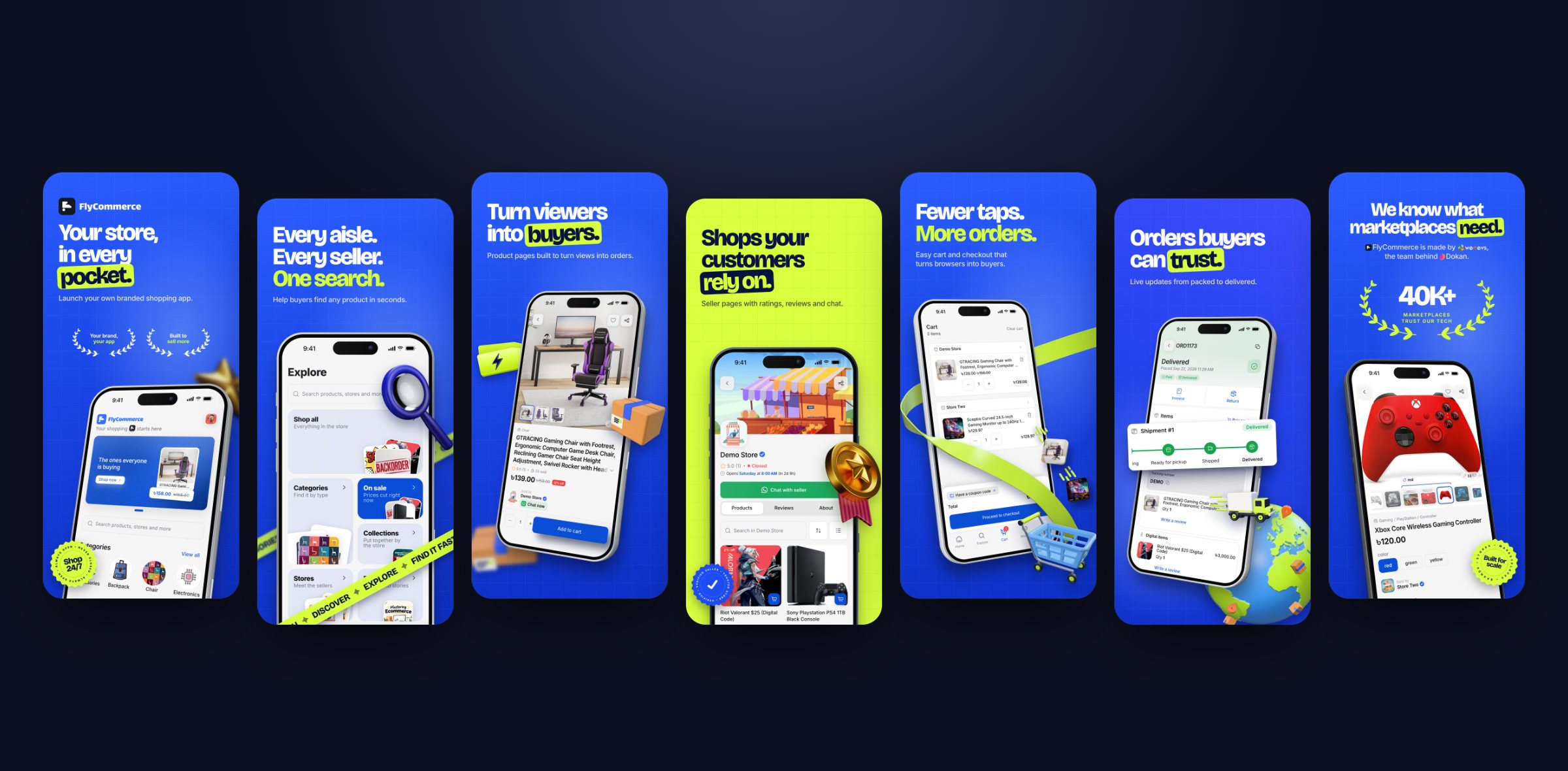
A real set made with this skill for the FlyCommerce shopping app.
Why use it
Most screenshot tools give you a template. The result looks like every other app in the store.
This skill works like a designer. It reads about your app, picks your best screens and writes short headlines.
It builds colours from your brand. Then it invents four concepts from your app's own world, and you choose.
The same skill gives every app a different result, built from your context, your brand and your references.
- Real 3D phone mockups. Every screen sits in a sharp iPhone Pro frame with depth, buttons and a shadow.
- Your brand, not a theme. Every palette is built from your logo colours, never a stock accent.
- 3D with taste. A few meaningful objects, in the style your concept needs: glossy, clay, cartoon, low-poly or metal.
- Real proof that pops. Your true rating, user count or awards go into a laurel that matches the design.
- No wasted rounds. You approve the screens, the words and the colours before any design starts.
- Every store size at once. One design becomes iPhone, iPad, Android phone and Android tablet sets.
- Store-safe text. It flags fake claims like "#1" or "best" and checks every line before export.
Install
You need Node.js 20 or newer and Google Chrome.
The first run downloads a small renderer (about 45 MB), so it needs internet then.
Claude Code (recommended)
Run these two commands inside Claude Code:
/plugin marketplace add 7ANV1R/Store-Screenshot-Studio
/plugin install store-screenshot-studio@store-screenshot-studio
Other agents (Codex, Cursor and more)
npx skills add 7ANV1R/Store-Screenshot-Studio
Manual install
Copy the skills/store-screenshot-studio folder into one of these places:
your-project/.claude/skills/to use it in one project~/.claude/skills/to use it in all projects
Use it
Open your app project in Claude Code. Then ask in your own words. For example:
Make App Store and Play Store screenshots for my app.
The website is https://example.com and the screenshots are in ~/Desktop/my-screens.
You can also start it directly with /store-screenshot-studio.
Everything goes into a store-screenshots folder in your project. It holds only images:
store-screenshots/
├── 1-storyboard.png         the story and words you approve
├── 2-palettes.png           colour choices made from your brand
├── round-1/overview.png     the four concepts side by side (every round is kept)
├── round-1/<concept>/       each concept's slides at full size
└── final/                   your store-ready images, one folder per store size
The editable working files sit in a hidden .studio folder inside it, so you can stop at any time and come back
weeks later: say "continue my store screenshots" and it picks up where you left off.
The renderer lives in your system's temp folder, shared by every project, and reinstalls itself if the system cleans it up.
Tips for the best result
- Use raw screenshots from one device size, with no phone frame. Simulator captures are fine.
- Use real-looking data in your app. Test names and "100%" everywhere look fake in a store listing.
- Share your logo as an SVG file. It gives the most exact brand colours.
- Have screenshot designs you love? Share the links. The skill follows your taste first.
How it works
- You share your app. Tell it what the app does, or give it a link to your website.
Point it to your screenshots. Add your logo if you have one.
If something is missing, it asks you. - It plans the story. It picks the 5 to 7 strongest screens and writes a headline for each.
You see one storyboard image. You approve it, or you change it. - You pick the colours. It reads your brand colours and shows 9 palettes.
You choose up to four. - Round 1: four concepts. You get four complete sets.
Each one is a different idea, made from your app's world, your brand and your references. - You refine. Tell it what to change, slide by slide.
It changes only what you ask. It keeps every earlier round, so you can go back. - You say "generate". It makes every store size, the Play feature graphic and the App Store header and search result art.
What you get
| Output | Size (pixels) |
|---|---|
| iPhone 6.9" screenshots | 1320 × 2868 |
| iPad 13" screenshots | 2048 × 2732 |
| Android phone screenshots | 1080 × 1920 |
| Android 7" tablet screenshots | 1200 × 1920 |
| Google Play feature graphic | 1024 × 500 |
| App Store product page header | 3840 × 1646 |
| App Store search result | 3840 × 2560 |
The three wide images are one design. Its headline and logo always sit inside each store's safe area, so no crop or overlay cuts them off.
See the full example set in every size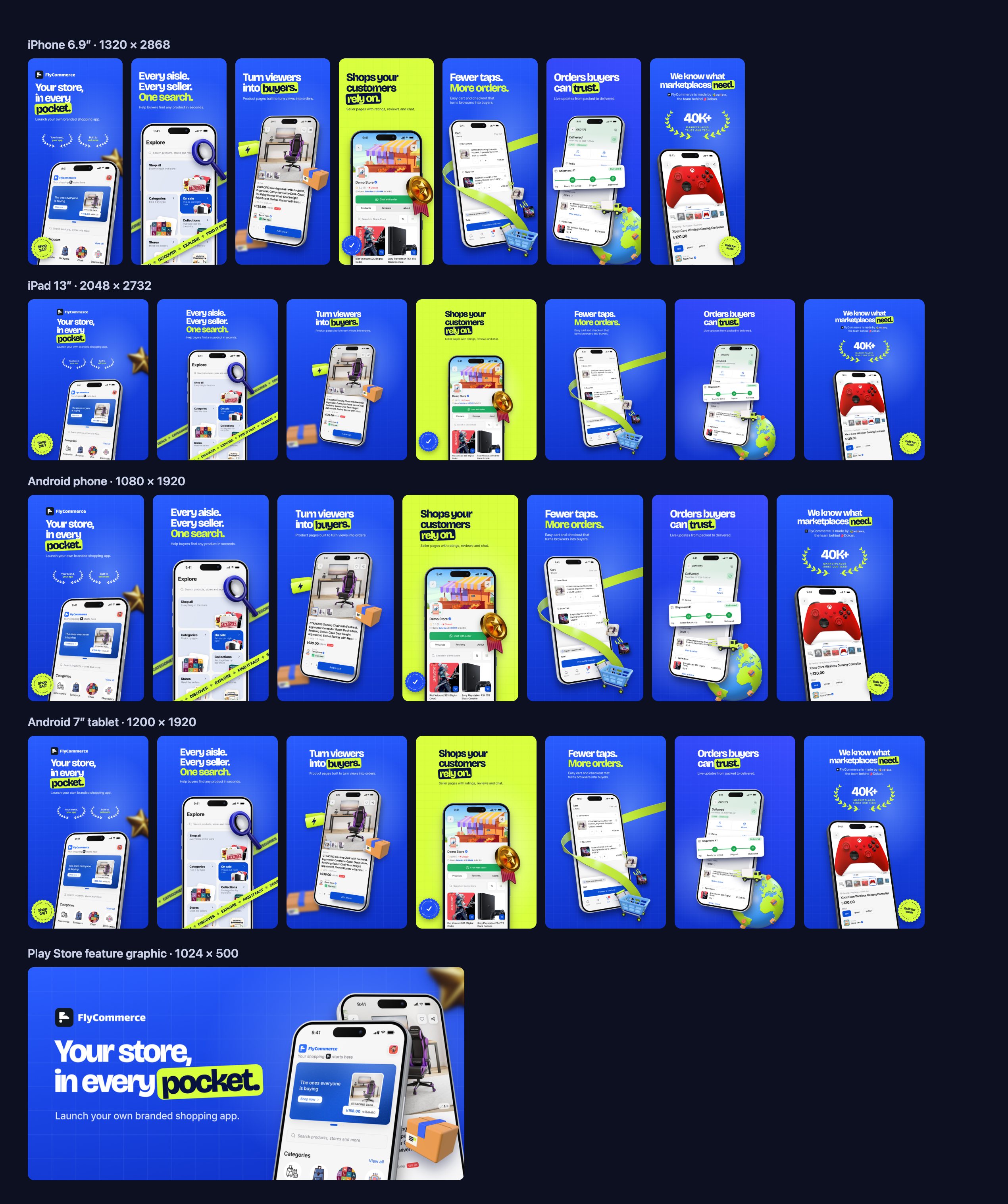
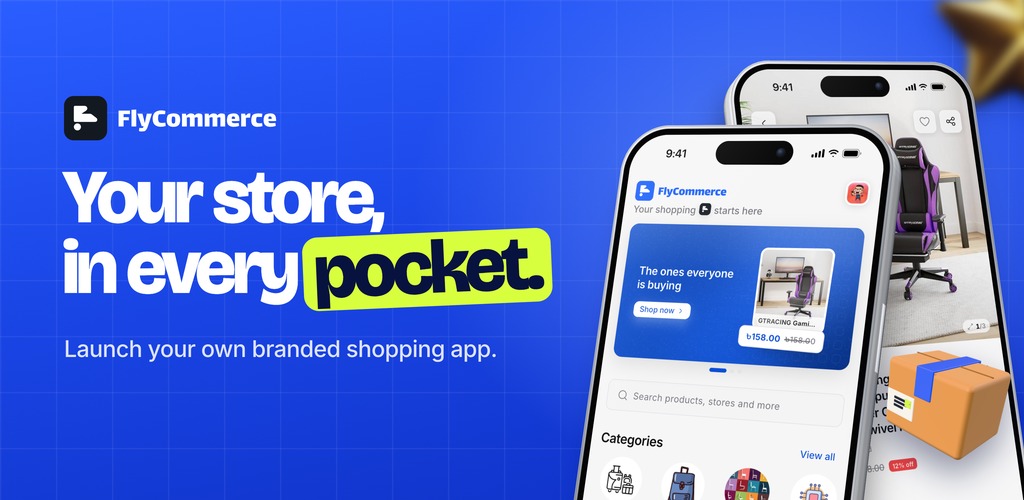
The Google Play feature graphic from the same set.
What is inside
skills/store-screenshot-studio/
├── SKILL.md         the step-by-step workflow the agent follows
├── references/      design taste, copy rules, layouts, store rules
├── scripts/         the renderer: phone mockups, palettes, 3D props, all store sizes
└── assets/          a parts demo and the banner template (feature graphic, header, search result)
The design taste comes from a real project. It went through 11 review rounds with a demanding client.
Every rule records what the client approved or rejected, and why.
Read it in references/design-taste.md.
FAQ
Does it work for any kind of app or game?Yes. A shopping app, a travel app, a calculator, a fitness tracker or a game all work. The ideas come from your app's own world. A travel app might get boarding passes and stamps. A calculator might get receipt tape and giant numbers. A game gets its own characters and world. Landscape game screenshots work too. Will my screenshots look like everyone else's?
There is no fixed template. The skill builds each concept from your app, your brand colours and your references. The four concepts in a round must also look different from each other. The FlyCommerce set above is one example of the quality level, not a style you will get. Can I bring my own style?
Yes. Share links or images you love, and a few mood words. Your references lead the design. Do I need design skills?
No. You answer a few simple questions and pick from images. The skill does the design work. Are the 3D objects free to use?
Yes. The skill makes them on your computer, in your brand colours. You can also use your own. Why is the phone an iPhone on the Android images too?
One look on every store keeps your brand the same everywhere. Ask the agent if you need an Android frame.
License
MIT. Use it for personal and commercial projects.
Yorumlar (0)
Yorum birakmak icin giris yap.
Yorum birakSonuc bulunamadi