html-progress-report-skill
Health Uyari
- License — License: MIT
- Description — Repository has a description
- Active repo — Last push 0 days ago
- Low visibility — Only 7 GitHub stars
Code Gecti
- Code scan — Scanned 1 files during light audit, no dangerous patterns found
Permissions Gecti
- Permissions — No dangerous permissions requested
Bu listing icin henuz AI raporu yok.
Agent skill: coding agents keep ONE living single-file HTML progress page — plain-language, visual-first, timeline with NEW-since-last-visit. Zero dependencies.
📊 html-progress-report
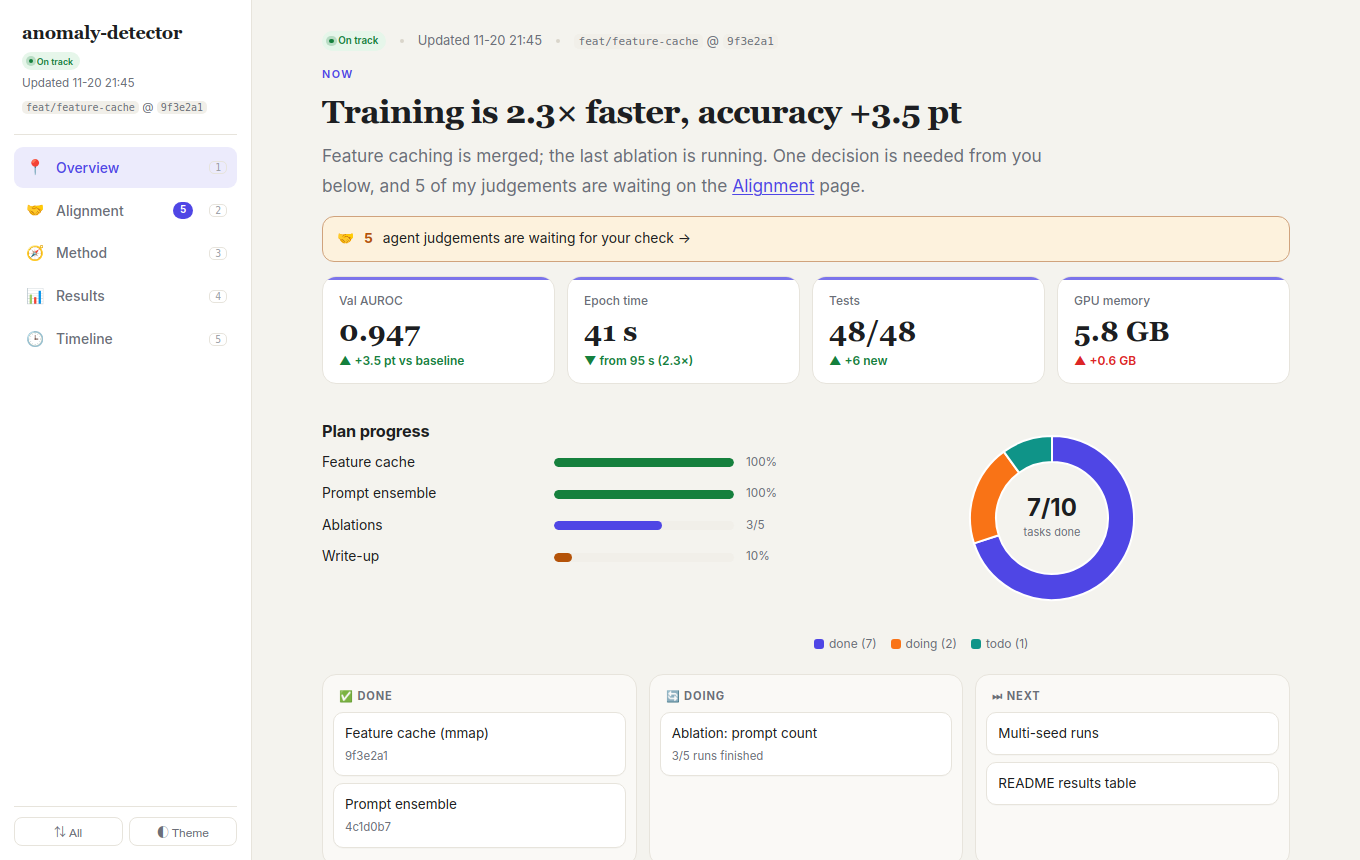
Let your coding agent keep one living, multi-page HTML report, so you can catch up on its work in about a minute and check that it still understands what you want.
English · 简体中文




Why
Coding agents now run for hours across many sessions. When you come back, the usual
record is a long chat log, a pile of commits, and maybe a Markdown summary that is
already out of date. None of these quickly answers three questions:
Where are we? What changed since I last looked? Do I need to decide anything?
It also can't tell you the most expensive thing to discover late: whether the agent still
understands the goal the way you do.
This skill makes the agent keep one HTML file per project (several pages inside) that
answers those questions on the first screen, and lays out the agent's own understanding so
you can correct it. The page explains the work in plain language and shows
it visually, so you can follow along without reading diffs.
Features
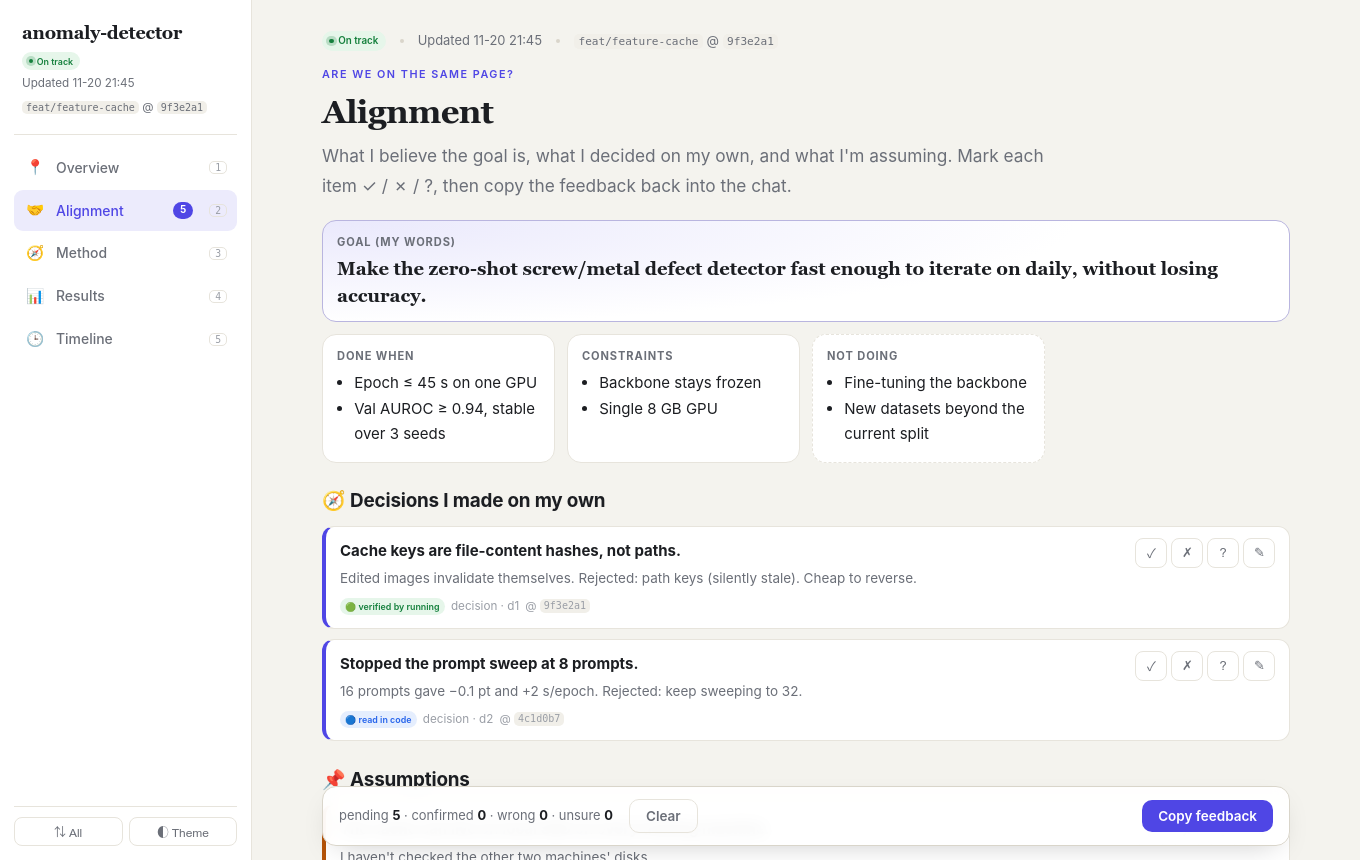
| 🤝 Alignment page | The agent restates the goal in its own words (with explicit non-goals), then lists the decisions it made on its own, the assumptions it relies on, and where the work deviates from what you asked. Each item carries an evidence tag (🟢 ran it · 🔵 read the code · ⚪ from docs · 🟠 guess). You mark ✓ / ✗ / ? with notes, click Copy feedback, paste it into the chat, and the agent fixes what you rejected. |
| 🗂 Pages, not a long scroll | Overview · Alignment · Method · Results · Timeline, switched from a sidebar (keys 1–9). Charts and diagrams render when their page opens. An All button puts everything on one scroll for Ctrl+F and printing. |
| 📄 One living file | The page is updated in place, not regenerated as a new report each time. The agent rewrites the Now snapshot and prepends one timeline entry per milestone. Old entries are never deleted. |
| 🆕 Catch-up mode | Entries added since your last visit get a NEW tag. You can filter the timeline by tag (feature, fix, experiment, …) and search it. |
| 🗣 Plain language | Conclusion first; what → why → result → next; jargon is defined on first use; one-line analogies for mechanisms; numbers always shown with a comparison (0.912 → 0.947). |
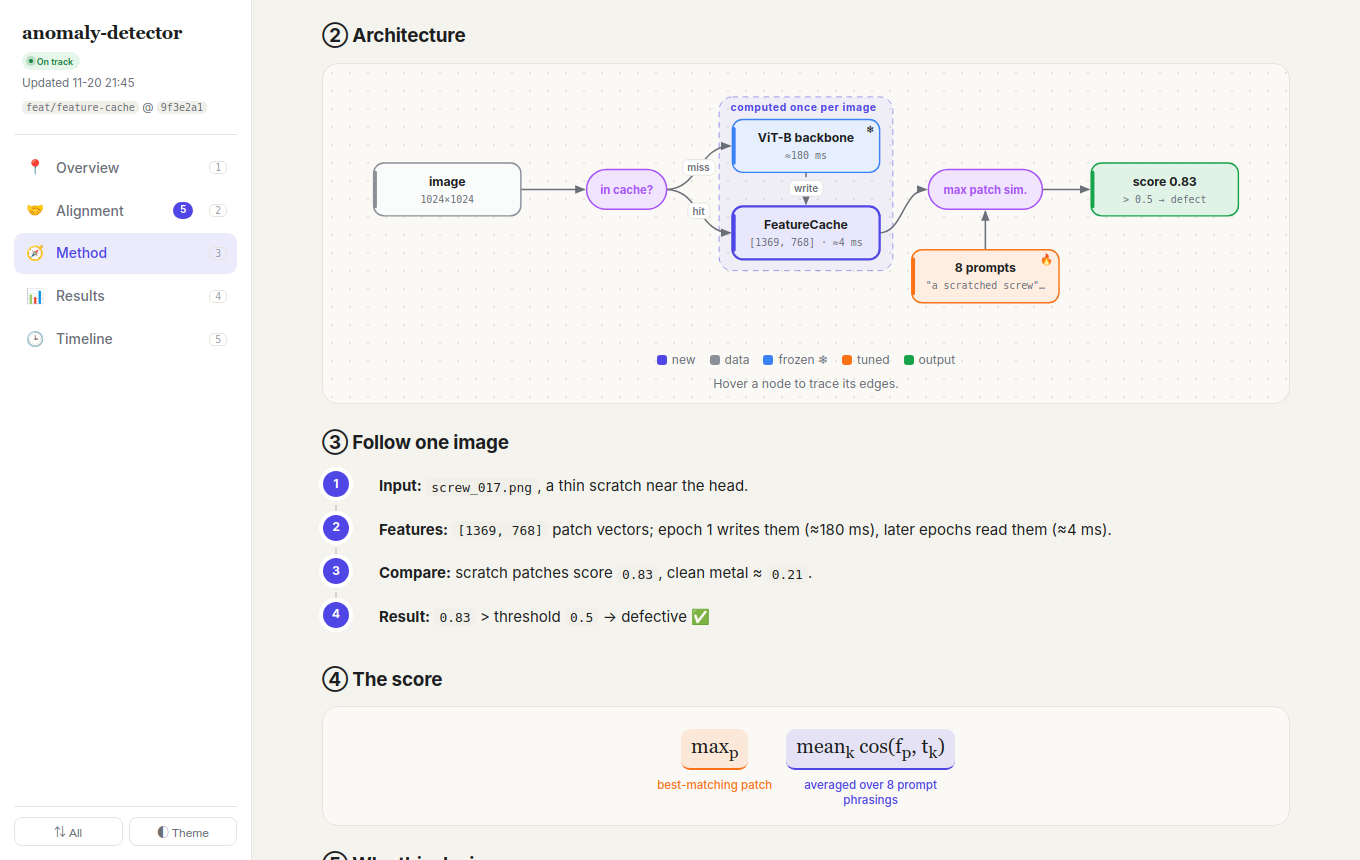
| 🎨 Picture-first method page | One-line idea card → old-vs-new flow (removed steps crossed out) → architecture diagram drawn from JSON (offline SVG, frozen/trainable/output colours, image nodes, hover to trace edges) → one real example as a strip of real images/heatmaps ending in a verdict → annotated formula → why cards with rejected alternatives → limits. The validator warns when the method page has too much prose. |
| 📈 Visual-first | KPI cards, progress bars, task board, flow diagrams, before/after, line / bar / hbar / donut charts, sortable tables, file trees, colored diffs, collapsible details. Every timeline entry includes at least one visual. |
| 🧭 "Needs your decision" | Questions that block progress are pinned at the top. Each one lists the options, the trade-offs, the agent's recommendation, and what it will do by default if you don't answer. |
| 🧪 Honest by design | Every number must come from a command output or a file. Unverified claims carry an unverified badge. Dead ends get their own entries. |
| 🌐 Your language | The page is written in the language you are using with the agent. Code, paths, and metric names stay as they are. |
| 📦 Zero dependencies | The whole page is one HTML file with inline CSS and a ~150-line SVG chart renderer. It works offline over file://, opens in a warm light theme (dark on demand), and prints cleanly. Mermaid is supported as an optional extra. |
| 🛡 Agent-safe edits | HTML comment markers fence each region. A validator that uses only the Python standard library checks markers, chart JSON, entry metadata, and tag balance. |
How it works
flowchart LR
    A[Milestone reached<br/>or user asks for a report] --> B{Page exists?}
    B -- no --> C[Copy template<br/>fill placeholders]
    B -- yes --> D[Read header, Now block,<br/>top 2 entries]
    C --> E[Gather facts<br/>git log / diff, tests, metrics]
    D --> E
    E --> F[Rewrite Now<br/>update Method if the design changed<br/>prepend timeline entry]
    F --> G[check_page.py]
    G -- errors --> F
    G -- ok --> H[Reply with link<br/>plus up to 3 lines]
The file has a header and five pages. Each region is fenced by markers, so the agent edits only what it should:
┌ header       status badge · last updated · branch@commit             → rewritten each update
├ 📍 Overview  TL;DR · KPIs · task board · ⚠ needs your decision        → rewritten each update
├ 🤝 Alignment goal card · decisions · assumptions · deviations · questions → updated each time; your ✓/✗ fed back
├ 🧭 Method    idea · old-vs-new · diagram · real example · formula · why → edited only when the approach changes
├ 📊 Results   charts · tables · ablations                              → when new evidence lands
└ 🕒 Timeline  newest first, one entry per milestone                    → prepend only; archived after ~30 entries
Install
This is a standard Agent Skill: a folder with a SKILL.md.
Clone it once, then link it into each agent's skills directory:
git clone https://github.com/7HHHHH/html-progress-report-skill.git ~/.agents/skills/html-progress-report
| Agent | Command |
|---|---|
| Claude Code | ln -s ~/.agents/skills/html-progress-report ~/.claude/skills/html-progress-report |
| Gemini CLI / Antigravity | ln -s ~/.agents/skills/html-progress-report ~/.gemini/config/skills/html-progress-report |
| Codex CLI | ln -s ~/.agents/skills/html-progress-report ~/.codex/skills/html-progress-report |
| Project-only | copy the folder to <repo>/.agents/skills/ (or <repo>/.claude/skills/) |
[!TIP]
Some agents don't support skills natively. For those, add one line toAGENTS.md:
"When reporting progress, follow~/.agents/skills/html-progress-report/SKILL.md."
Usage
Just ask, in any language:
Update the progress page.
Summarize what you did today and why.
汇报一下进展
Once a project has a page, the agent also updates it after each meaningful milestone.
- Where:
<repo>/.agent-progress/index.html. Open it in a browser and keep the tab open; reload to see updates. - Git: by default the page is added to
.git/info/exclude, which keeps it out of git without changing your repo's.gitignore. To commit it instead, tell the agent or say so in yourAGENTS.md. - Custom path: say "keep the progress page at
docs/progress.html" in yourAGENTS.md.
What's inside
SKILL.md                      instructions the agent follows (workflow, entry contract, rules)
assets/template.html          page skeleton: CSS, theme, NEW tags, filters, SVG charts
references/components.md      component catalog and a "which visual for what" table
references/writing-guide.md   how to write plain, scannable updates
scripts/check_page.py         validator (Python stdlib only)
examples/demo.html            filled example (see the live demo)
Components at a glance
| You want to show… | Component |
|---|---|
| Headline numbers and how they changed | KPI cards |
| Plan / sub-task completion | Progress bars, donut |
| Done / doing / next | Task board |
| How a pipeline or method works | Flow (offline) or Mermaid |
| Old vs. new | Compare |
| Metric over time | Line chart (with optional target line) |
| Variants and ablations | Bar / hbar chart, sortable table |
| What files changed / the key code change | File tree, diff |
| Decision / risk / win / note | Callouts |
Charts are declared with plain data attributes. No library is needed:
<div class="chart" data-type="line" data-title="Val AUROC" data-target="0.95"
  data-labels='["1","2","3","4","5"]'
  data-series='[{"name":"baseline","values":[0.88,0.90,0.91,0.91,0.912],"dashed":true},
                {"name":"ours","values":[0.89,0.92,0.94,0.945,0.947]}]'></div>
See references/components.md for every component and a copy-paste snippet for each.
Validate a page
python3 scripts/check_page.py .agent-progress/index.html
# OK: 3 entries, 4 charts, 0 errors, 0 warnings
The validator checks for:
- missing or duplicated markers, and unfilled
{{PLACEHOLDERS}} - unbalanced tags, and invalid chart JSON
- entry metadata (
data-timewith timezone, tags, status, commit) - newest-first order, entries with no visual, and timelines that should be archived
FAQ
Why HTML instead of Markdown?Markdown can't hold interactive charts, NEW-since-last-visit tags, filters, collapsible details, or a consistent dashboard layout. A single HTML file can, and it still opens anywhere with no build step.
Won't the agent burn tokens re-reading a huge file?No. The agent reads only the header, the Now block, and the top 2 entries. It edits by marker instead of rewriting the file. Timelines longer than ~30 entries are moved to monthly archive pages.
Does it work offline?Yes. Everything is inline. Only Mermaid diagrams need a network connection; when offline they fall back to showing the diagram source. The built-in .flow component covers most diagram needs offline.
Yes. All colors are CSS variables at the top of assets/template.html. Edit them once and every new page uses them.
Contributing
Issues and PRs are welcome, especially new components, better chart types, and adapters for more agents.
Please keep the main rule: single file, zero dependencies. Run check_page.py on examples/demo.html before submitting.
License
Yorumlar (0)
Yorum birakmak icin giris yap.
Yorum birakSonuc bulunamadi